4 wheel drive SUZUKI IGNIS 2019 User Guide
[x] Cancel search | Manufacturer: SUZUKI, Model Year: 2019, Model line: IGNIS, Model: SUZUKI IGNIS 2019Pages: 505, PDF Size: 8.36 MB
Page 174 of 505
3-21OPERATING YOUR VEHICLE
75RM4-01E
M (manual mode) (models with manual
mode)
Use this position for driving in the manual
mode.
Refer to “Manual mode” later in this section
for details on how to use the manual mode.
L (Low) (models with switch of S-mode)
Use this position to provide maximum
power when climbing steep hills or driving
through deep snow or mud, or to provide
maximum engine braking when going
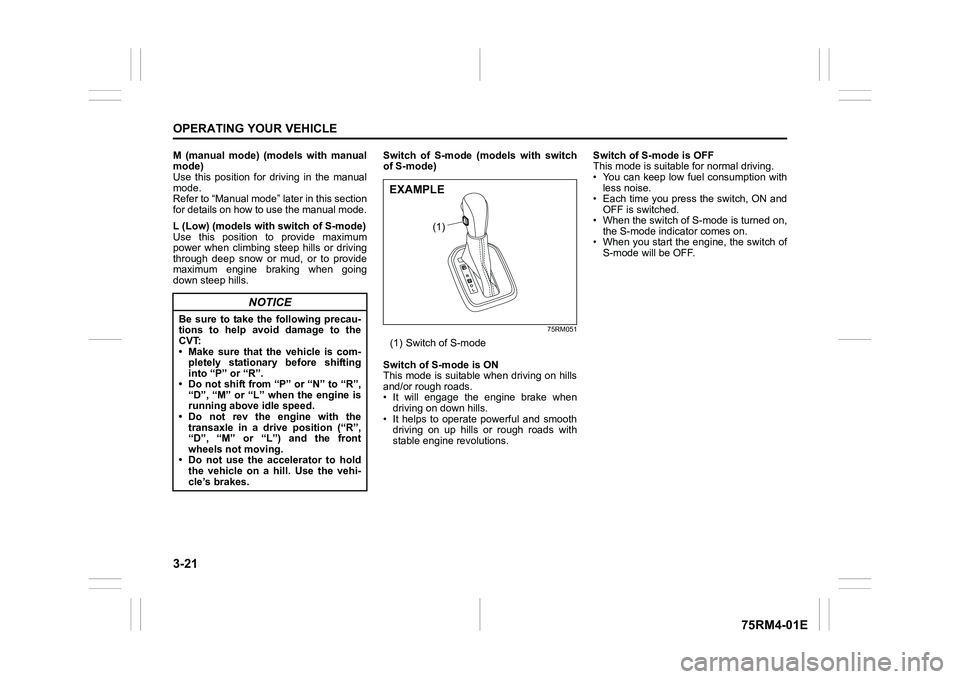
down steep hills. Switch of S-mode (models with switch
of S-mode)
75RM051
(1) Switch of S-mode
Switch of S-mode is ON
This mode is suitable when driving on hills
and/or rough roads.
• It will engage the engine brake when driving on down hills.
• It helps to operate powerful and smooth driving on up hills or rough roads with
stable engine revolutions. Switch of S-mode is OFF
This mode is suitable for normal driving.
• You can keep low fuel consumption with
less noise.
• Each time you press the switch, ON and OFF is switched.
• When the switch of S-mode is turned on, the S-mode indicator comes on.
• When you start the engine, the switch of
S-mode will be OFF.
NOTICE
Be sure to take the following precau-
tions to help avoid damage to the
CVT:
• Make sure that the vehicle is com-pletely stationary before shifting
into “P” or “R”.
• Do not shift from “P” or “N” to “R”, “D”, “M” or “L” wh en the engine is
running above idle speed.
• Do not rev the engine with the transaxle in a drive position (“R”,
“D”, “M” or “L”) and the front
wheels not moving.
• Do not use the accelerator to hold the vehicle on a hill. Use the vehi-
cle’s brakes.
(1)
EXAMPLE
Page 176 of 505
3-23OPERATING YOUR VEHICLE
75RM4-01E
62R0145
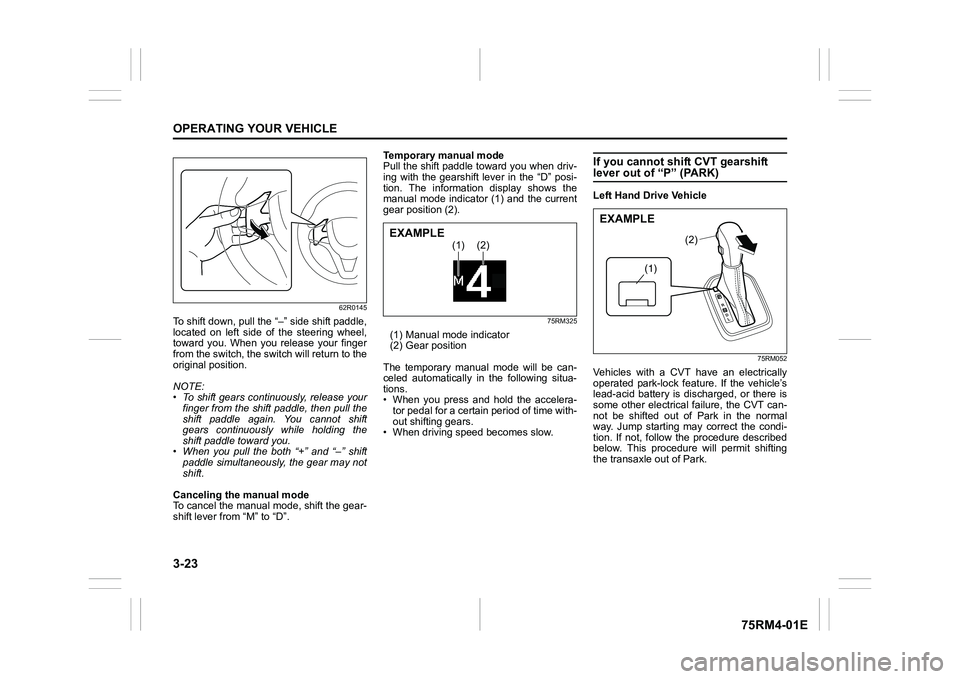
To shift down, pull the “–” side shift paddle,
located on left side of the steering wheel,
toward you. When you release your finger
from the switch, the switch will return to the
original position.
NOTE:
• To shift gears continuously, release yourfinger from the shift paddle, then pull the
shift paddle again. You cannot shift
gears continuously while holding the
shift paddle toward you.
• When you pull the both “+” and “ –” shift
paddle simultaneously, the gear may not
shift.
Canceling the manual mode
To cancel the manual mode, shift the gear-
shift lever from “M” to “D”. Temporary manual mode
Pull the shift paddle toward you when driv-
ing with the gearshift lever in the “D” posi-
tion. The information display shows the
manual mode indicator (1) and the current
gear position (2).
75RM325
(1) Manual mode indicator
(2) Gear position
The temporary manual mode will be can-
celed automatically in the following situa-
tions.
• When you press and hold the accelera- tor pedal for a certain period of time with-
out shifting gears.
• When driving spee d becomes slow.
If you cannot shift CVT gearshift lever out of “P” (PARK)Left Hand Drive Vehicle
75RM052
Vehicles with a CVT have an electrically
operated park-lock feat ure. If the vehicle’s
lead-acid battery is discharged, or there is
some other electrical failure, the CVT can-
not be shifted out of Park in the normal
way. Jump starting may correct the condi-
tion. If not, follow the procedure described
below. This procedure will permit shifting
the transaxle out of Park.
(1)
(2)
EXAMPLE
(1)
(2)
EXAMPLE
Page 195 of 505
3-42
OPERATING YOUR VEHICLE
75RM4-01E
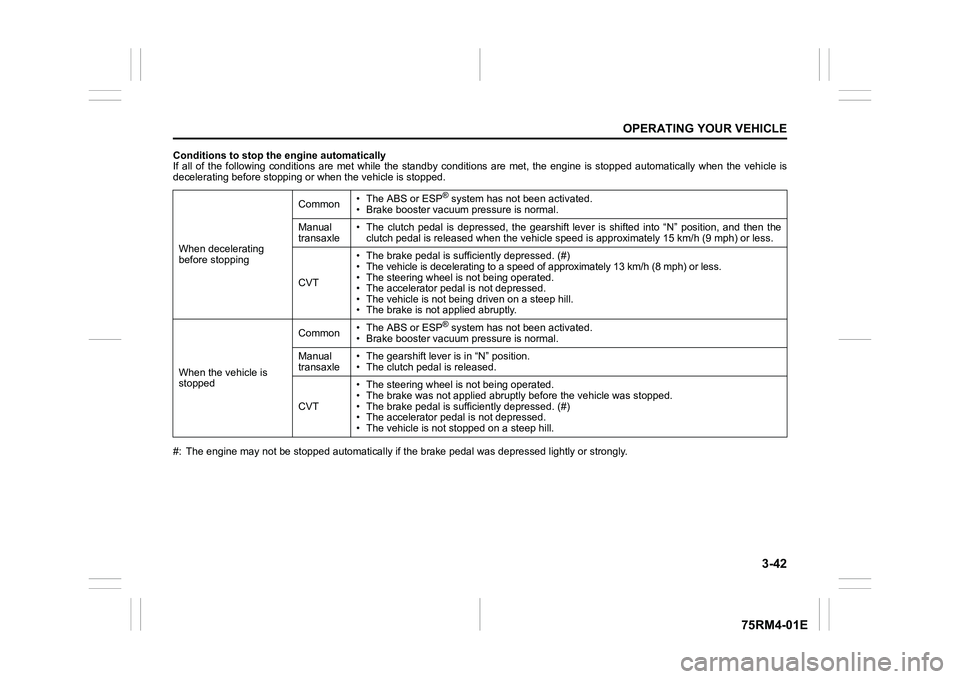
Conditions to stop the engine automatically
If all of the following conditions are met while the standby conditions are met, the engine is stopped automatically when the vehicle is
decelerating before stopping or when the vehicle is stopped.
#: The engine may not be stopped automatically if the brake peda l was depressed lightly or strongly.
When decelerating
before stopping
Common
• The ABS or ESP
® system has not been activated.
• Brake booster vacuum pressure is normal.
Manual
transaxle • The clutch pedal is depressed, the gearshift lever is shifted
into “N” position, and then the
clutch pedal is released when the vehicle speed is approximately 15 km/h (9 mph) or less.
CVT • The brake pedal is sufficiently depressed. (#)
• The vehicle is decelerating to a speed of approximately 13 km/
h (8 mph) or less.
• The steering wheel is not being operated.
• The accelerator pedal is not depressed.
• The vehicle is not being driven on a steep hill.
• The brake is not applied abruptly.
When the vehicle is
stopped Common
• The ABS or ESP® system has not been activated.
• Brake booster vacuum pressure is normal.
Manual
transaxle • The gearshift lever is in “N” position.
• The clutch pedal is released.
CVT • The steering wheel is not being operated.
• The brake was not app
lied abruptly before the vehicle was stop ped.
• The brake pedal is sufficiently depressed. (#)
• The accelerator pedal is not depressed.
• The vehicle is not s topped on a steep hill.
Page 196 of 505
3-43OPERATING YOUR VEHICLE
75RM4-01E
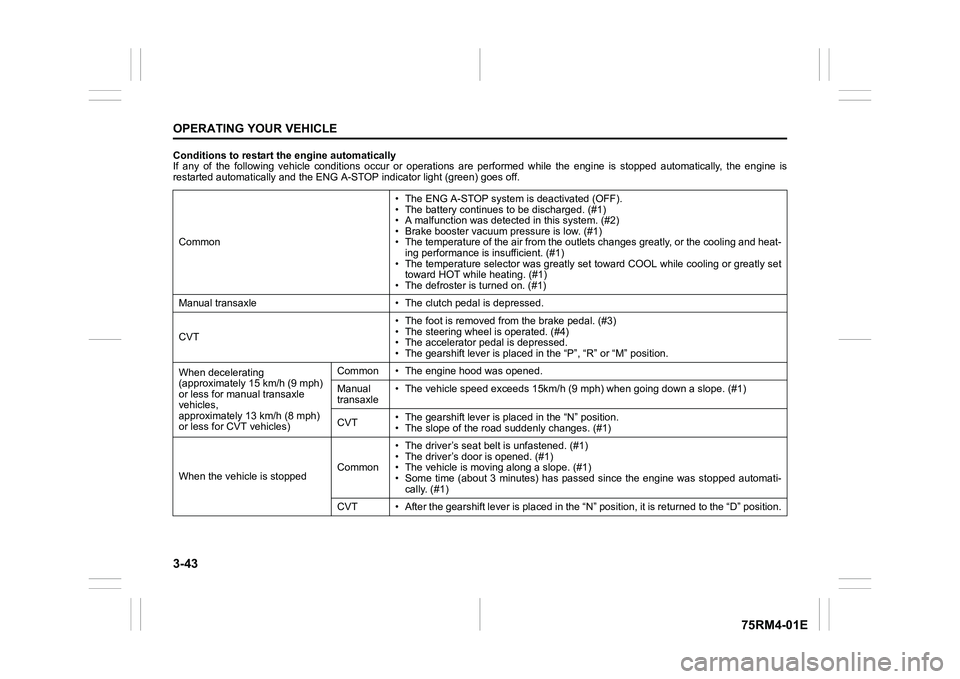
Conditions to restart the engine automatically
If any of the following vehicle conditions occur or operations are performed while the engine is stopped automatically, the en gine is
restarted automatically and the ENG A-STOP i ndicator light (green) goes off.
Common • The ENG A-STOP system is deactivated (OFF).
• The battery continues to be discharged. (#1)
• A malfunction was detect
ed in this system. (#2)
• Brake booster vacuum pressure is low. (#1)
• The temperature of the air from the outlets changes greatly, o r the cooling and heat-
ing performance is insufficient. (#1)
• The temperature selector was greatly set toward COOL while coo ling or greatly set
toward HOT while heating. (#1)
• The defroster is turned on. (#1)
Manual transaxle • The cl utch pedal is depressed.
CVT • The foot is removed from the brake pedal. (#3)
• The steering wheel is operated. (#4)
• The accelerator pedal is depressed.
• The gearshift lever is placed
in the “P”, “R” or “M” position.
When decelerating
(approximately 15 km/h (9 mph)
or less for manual transaxle
vehicles,
approximately 13 km/h (8 mph)
or less for CVT vehicles) Common • The engine hood was opened.
Manual
transaxle
• The vehicle speed exceeds 15km/
h (9 mph) when going down a slope. (#1)
CVT • The gearshift lever is placed in the “N” position.
• The slope of the road
suddenly changes. (#1)
When the vehicle is stopped Common• The driver’s seat
belt is unfastened. (#1)
• The driver’s door is opened. (#1)
• The vehicle is movi ng along a slope. (#1)
• Some time (about 3 minutes) has passed since the engine was st opped automati-
cally. (#1)
CVT • After the gearshift lever is placed in the “N” position, it is returned to the “D” position.
Page 209 of 505
3-56
OPERATING YOUR VEHICLE
75RM4-01E
Situations where the system does not activateUnder the following situations, the system
does not activate.
• When the engine is off (except when theengine is automatically stopped by the
ENG A-STOP system)
• After several seconds from starting the
engine
• When the gearshift lever is in reverse gear
• When the ESP
® system is activated
(except the frontal collision warning)
• When the following switches are pushed
and the system is turned off:
– Dual camera brake support OFFswitch
– ESP
® OFF switch
• When the stereo camera is temporarily stopped or malfunctioning
Situations where the system may not activate properlyUnder the following situations, the system
may not activate.
• When the stereo camera cannot detectobstacles in front of your vehicle
• When you take evasive action with the
steering wheel or a ccelerator pedal
Situations where the vehicle may not decelerate properlyUnder the following situations, the vehicle
may not decelerate properly even when
the system is activated.
• When the outside temperature is low, or
when the temperature of the brake is low
such as right after starting
• When the brake is overheating and the brake effect is deteriorated due to con-
tinuing to travel on a downhill road
• When the brake effect is deteriorated due to passing over puddles or washing
the vehicle
• When driving on the following roads – On sharp curves or extremely roughsurfaces
– On a steep slope
• When driving on the following slippery surfaces
– Frozen or snow-covered surfaces
– Over manholes or metal constructionplates
–Gravel
• When driving in a rainy day
Situations where the system may activate by chanceUnder the following situations, the stereo
camera may judge that there is an obstacle
in front of you, and the system may acti-
vate. Drive carefully and calmly.
• When passing through a toll booth with more than recommended speeds
• Before the parking lot gates or railroad crossing gates are opened fully
• When operating on hills that have vary-
ing slopes
• When you suddenly accelerate and approach the vehicle in front of you or on
neighboring lane
• Front visibility is poor due to that there is water vapor, sand or smoke or when the
vehicle in front of you or on oncoming
lane is surrounded by exhaust, water or
snow
• When passing through masses of water vapor or smoke
• When stopping close to an obstacle in
front of you
• When passing through near a vehicle or obstacle
Page 210 of 505
3-57OPERATING YOUR VEHICLE
75RM4-01E
54P000330
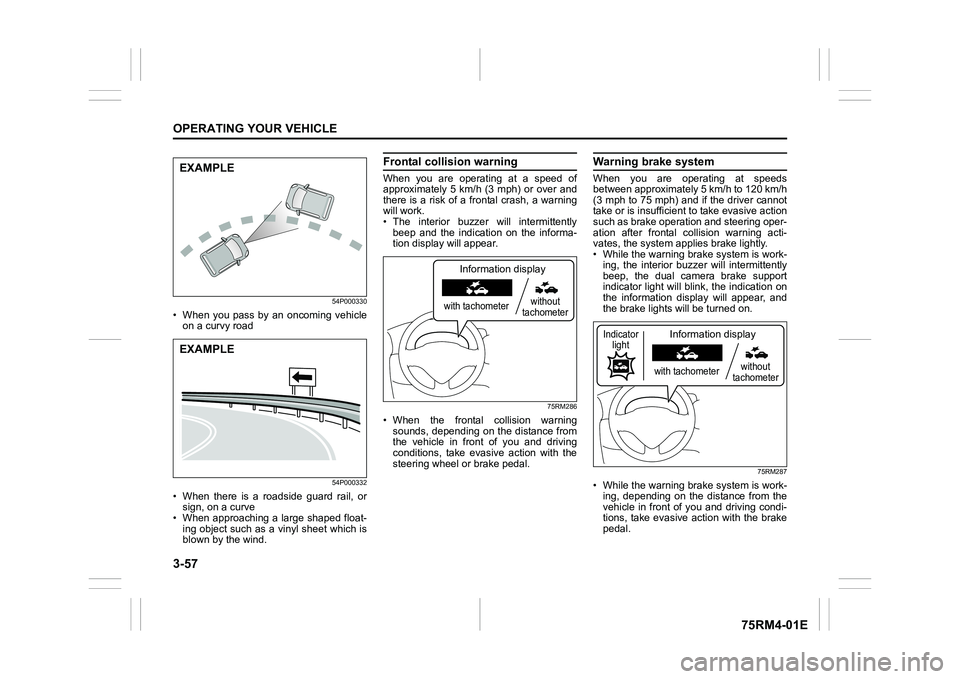
• When you pass by an oncoming vehicleon a curvy road
54P000332
• When there is a roadside guard rail, orsign, on a curve
• When approaching a large shaped float-
ing object such as a vinyl sheet which is
blown by the wind.
Frontal colli sion warningWhen you are operating at a speed of
approximately 5 km/h (3 mph) or over and
there is a risk of a frontal crash, a warning
will work.
• The interior buzzer will intermittently
beep and the indication on the informa-
tion display will appear.
75RM286
• When the frontal collision warningsounds, depending on the distance from
the vehicle in front of you and driving
conditions, take evasive action with the
steering wheel or brake pedal.
Warning brake systemWhen you are operating at speeds
between approximately 5 km/h to 120 km/h
(3 mph to 75 mph) and if the driver cannot
take or is insufficient t o take evasive action
such as brake operation and steering oper-
ation after frontal collision warning acti-
vates, the system appl ies brake lightly.
• While the warning brake system is work-
ing, the interior buzz er will intermittently
beep, the dual camera brake support
indicator light will blink, the indication on
the information display will appear, and
the brake lights will be turned on.
75RM287
• While the warning brake system is work-
ing, depending on the distance from the
vehicle in front of you and driving condi-
tions, take evasive action with the brake
pedal.
EXAMPLEEXAMPLE
with tachometer without
tachometer
Information display
with tachometer without
tachometer
Information display
Indicator light
Page 212 of 505
3-59OPERATING YOUR VEHICLE
75RM4-01E
Lane departure warningWhen you are operating at a speed of
approximately 60 km/h (37 mph) or over
and the stereo camera judges that your
vehicle is to deviate from the running lane,
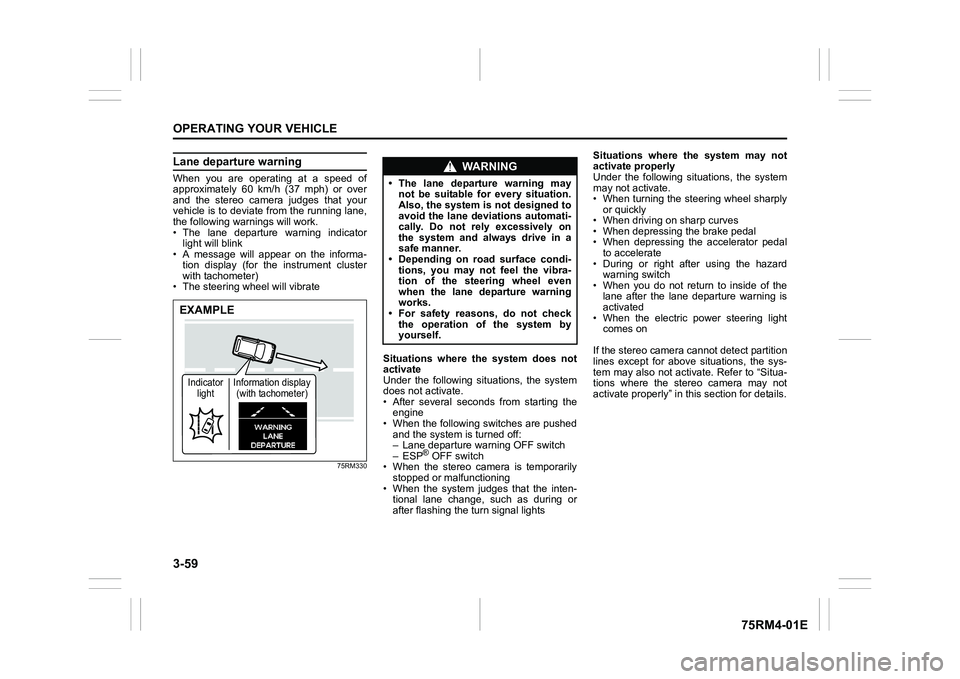
the following warnings will work.
• The lane departure warning indicatorlight will blink
• A message will appear on the informa-
tion display (for the instrument cluster
with tachometer)
• The steering wheel will vibrate
75RM330
Situations where the system does not
activate
Under the following situations, the system
does not activate.
• After several seconds from starting the engine
• When the following switches are pushed and the system is turned off:
– Lane departure warning OFF switch
– ESP
® OFF switch
• When the stereo camera is temporarily stopped or malfunctioning
• When the system judges that the inten- tional lane change, such as during or
after flashing the turn signal lights Situations where the system may not
activate properly
Under the following situations, the system
may not activate.
• When turning the steering wheel sharply
or quickly
• When driving on sharp curves
• When depressing the brake pedal
• When depressing the accelerator pedal to accelerate
• During or right after using the hazard warning switch
• When you do not return to inside of the lane after the lane departure warning is
activated
• When the electric power steering light comes on
If the stereo camera cannot detect partition
lines except for above situations, the sys-
tem may also not activ ate. Refer to “Situa-
tions where the stereo camera may not
activate properly” in this section for details.
EXAMPLEIndicator light Information display
(with tachometer)
WA R N I N G
• The lane departure warning may not be suitable for every situation.
Also, the system is not designed to
avoid the lane deviations automati-
cally. Do not rely excessively on
the system and always drive in a
safe manner.
• Depending on road surface condi-
tions, you may not feel the vibra-
tion of the steering wheel even
when the lane departure warning
works.
• For safety reasons, do not check
the operation of the system by
yourself.
Page 229 of 505
3-76
OPERATING YOUR VEHICLE
75RM4-01E
Brake assist systemWhen you slam the brakes on, the brake
assist system determines it to be an emer-
gency stop and provides more powerful
braking for a driver who cannot hold down
the brake pedal firmly.
NOTE:
If you quickly and forcefully depress the
brakes, you may hear clicking sound by
the brake assist system operation. This is
normal and indicates that the brake assist
system is activated properly.
Anti-lock brake system (ABS)ABS will help you avoid skidding by elec-
tronically controlling braking pressure. It
will also help you maintain steering control
when braking on slippery surfaces or when
braking hard.
The ABS works automatically, so you do
not need any special braking technique.
Just push the brake pedal down without
pumping. The ABS will operate whenever
it senses that the wheels are locking up.
You may feel the brake pedal move a little
while the ABS is operating.
NOTE:
• The ABS will not work if vehicle speed is under about 9 km/h (6 mph).
• If the ABS system is activated, you may
hear a clunking noise and/or feel pulsat-
ing in the brake pedal. This is normal
and indicates that the brake fluid pres-
sure is being controlled properly.
• You may hear an operation sound when you start the engine or after the vehicle
begins to move. This means that the
above systems are in the self-check
mode. This sound does not indicate a
malfunction.
WA R N I N G
Even without reserve power in the
brake system, you can still stop the
vehicle by pressing the brake pedal
harder than normally required. How-
ever, the stopping distance may be
longer.
WA R N I N G
• On some types of loose surfaces (such as gravel, snow-covered
roads, etc.), the stopping distance
required for a vehicle with ABS
may be slightly greater than the
one required for a comparable vehi-
cle with a conventional brake sys-
tem. With a conventional brake
system, skidding tires are able to
plow the gravel or snow layer,
shortening the stopping distance.
ABS minimizes this resistance
effect. Allow for extra stopping dis-
tance when driving on loose sur-
faces.
• On regular paved roads, some driv-
ers may be able to obtain slightly
shorter stopping distances with
conventional brake systems than
with ABS.
• In both of the above conditions, ABS will still offer the advantage of
helping you maintain directional
control. However, remember that
ABS will not compensate for bad
road or weather conditions or poor
driver judgment. Use good judg-
ment and do not drive too fast.
Page 230 of 505
3-77OPERATING YOUR VEHICLE
75RM4-01E
54MN069
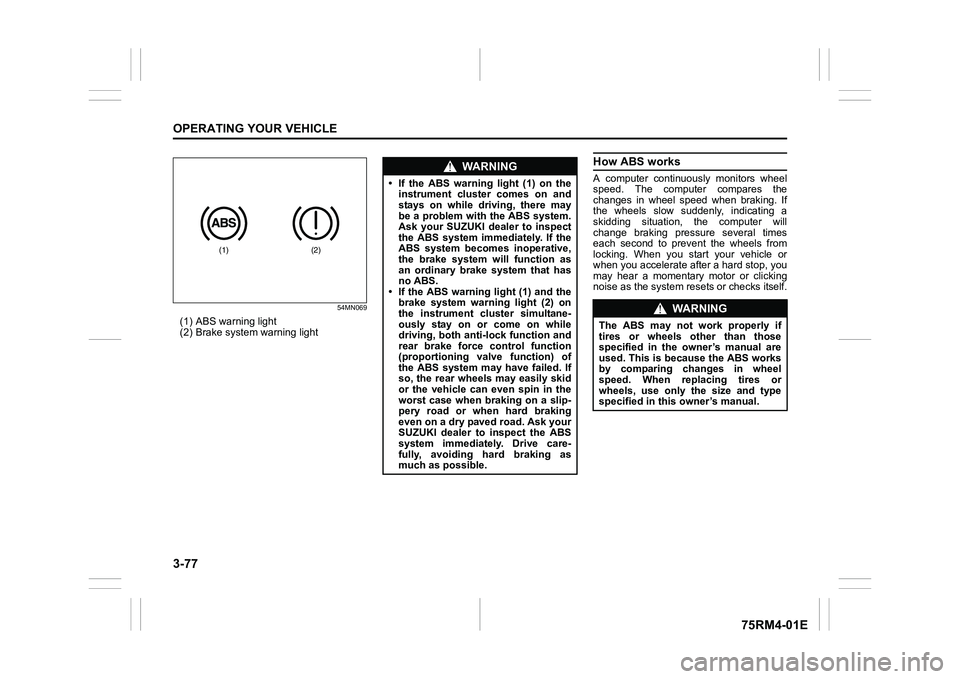
(1) ABS warning light
(2) Brake system warning light
How ABS worksA computer continuously monitors wheel
speed. The computer compares the
changes in wheel speed when braking. If
the wheels slow suddenly, indicating a
skidding situation, the computer will
change braking pressure several times
each second to prevent the wheels from
locking. When you start your vehicle or
when you accelerate after a hard stop, you
may hear a momentary motor or clicking
noise as the system resets or checks itself.
(1)
(2)
WA R N I N G
• If the ABS warning light (1) on theinstrument cluster comes on and
stays on while driving, there may
be a problem with the ABS system.
Ask your SUZUKI dealer to inspect
the ABS system immediately. If the
ABS system becomes inoperative,
the brake system will function as
an ordinary brake system that has
no ABS.
• If the ABS warning light (1) and the
brake system warning light (2) on
the instrument cluster simultane-
ously stay on or come on while
driving, both anti-lock function and
rear brake force control function
(proportioning valve function) of
the ABS system may have failed. If
so, the rear wheels may easily skid
or the vehicle can even spin in the
worst case when braking on a slip-
pery road or when hard braking
even on a dry paved road. Ask your
SUZUKI dealer to inspect the ABS
system immediately. Drive care-
fully, avoiding hard braking as
much as possible.
WA R N I N G
The ABS may not work properly if
tires or wheels other than those
specified in the owner’s manual are
used. This is because the ABS works
by comparing changes in wheel
speed. When replacing tires or
wheels, use only the size and type
specified in this owner’s manual.
Page 231 of 505
3-78
OPERATING YOUR VEHICLE
75RM4-01E
Electronic stability program (ESP
®) (if equipped)
ESP
® is a registered trademark of Daimler
AG.
The Electronic Stability Program (ESP
®)
helps to control the vehicle during corner-
ing if front wheels or rear wheels skid. It
also assists you in maintaining traction
while accelerating on loose or slippery
road surfaces. It does this by regulating
the engine’s output, and by selectively
applying the brakes. In addition, ESP®
helps to avoid skidding by controlling brak-
ing pressure. The ESP
® has the following three sys-
tems:
Stability control systemThe vehicle stability control system helps
provide integrated control of systems such
as anti-lock brakes, traction control, engine
control, etc. This system automatically
controls the brakes and engine to help pre-
vent the vehicle from skidding when cor-
nering on a slippery road surface or when
turning the steering wheel abruptly.Traction control systemThe traction control system automatically
helps prevent the spinning of wheels when
the vehicle is started or accelerated on
slippery road surfaces. The system oper-
ates only if it senses that some of the
wheels are spinning or beginning to lose
traction. When this happens, the system
operates the front or rear brakes and
reduces engine power to limit wheel spin.
Anti-lock brake system (ABS)ABS will help you avoid skidding by elec-
tronically controlling braking pressure. It
will also help you maintain steering control
when braking on slippery surfaces or when
braking hard. The ABS works automati-
cally, so you do not have to use any spe-
cial braking technique. Just push the brake
pedal down wit hout pumping. The ABS will
operate whenever it senses that wheels
are locking up. You may feel the brake
pedal pulsate while the ABS is operating.
(For more information on ABS, see “Brak-
ing” in this section.)
NOTE:
The ABS will not work if vehicle speed is
under about 9 km/h (6 mph).
WA R N I N G
The ESP
® cannot enhance the vehi-
cle’s driving stability in all situations
and does not control your vehicle’s
entire braking system. The ESP
® can-
not prevent accidents, including
those resulting from excessive speed
in turns, or hydroplaning. Only safe
and attentive drive can prevent acci-
dents. The capabilities of an ESP
®-
equipped vehicle must never be used
as a substitute for careful driving.
WA R N I N G
• The ESP
® may not work properly if
tires or wheels other than those
specified in the owner’s manual are
used. When replacing tires or
wheels, use only the size and type
specified in this owner’s manual.
• The ESP® may not work properly if
tires are not inflated to the recom-
mended tire inflation pressure.
• The ESP® may not work properly if
tires are fitted wi th tire chains.
(Continued)