Stop light SUZUKI IGNIS 2019 Owners Manual
[x] Cancel search | Manufacturer: SUZUKI, Model Year: 2019, Model line: IGNIS, Model: SUZUKI IGNIS 2019Pages: 505, PDF Size: 8.36 MB
Page 16 of 505
ILLUSTRATED TABLE OF CONTENTS
75RM4-01E
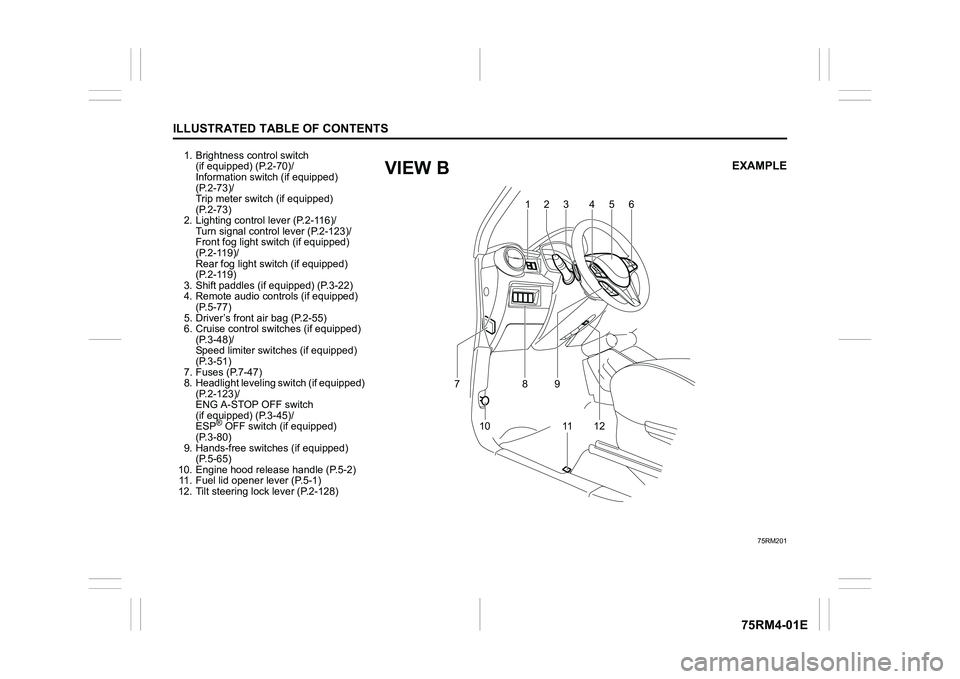
1. Brightness control switch (if equipped) (P.2-70)/
Information switch (if equipped)
(P.2-73)/
Trip meter switch (if equipped)
(P.2-73)
2. Lighting control lever (P.2-116)/
Turn signal control lever (P.2-123)/
Front fog light swit ch (if equipped)
(P.2-119)/
Rear fog light swit ch (if equipped)
(P.2-119)
3. Shift paddles (if equipped) (P.3-22)
4. Remote audio controls (if equipped) (P.5-77)
5. Driver’s front air bag (P.2-55)
6. Cruise control switches (if equipped) (P.3-48)/
Speed limiter switch es (if equipped)
(P.3-51)
7. Fuses (P.7-47)
8. Headlight leveling switch (if equipped) (P.2-123)/
ENG A-STOP OFF switch
(if equipped) (P.3-45)/
ESP
® OFF switch (if equipped)
(P.3-80)
9. Hands-free switc hes (if equipped)
(P.5-65)
10. Engine hood release handle (P.5-2) 11. Fuel lid opener lever (P.5-1)
12. Tilt steering lock lever (P.2-128)
75RM201
123 4 5
6
10 8
11 1 2
7
9
EXAMPLE
VIEW B
Page 40 of 505

2-17BEFORE DRIVING
75RM4-01E
How to arm the theft deterrent alarm
system (when enabled)
Lock all doors (including the tailgate) using
the keyless push start system remote con-
troller, the request switch or the keyless
entry system transmitter. The theft deter-
rent light (1) will start blinking, and the theft
deterrent alarm system will be armed in
about 20 seconds.
While the system is be ing armed, the indi-
cator continues to blink at intervals of
approximately 2 seconds.
75RM313
NOTE:
• To prevent the alarm from being acci- dentally triggered, avoid arming it while
anyone remains inside the vehicle. The
alarm will be triggered if any person
inside unlocks a door or engine hood (for
EU specification vehicle) by operating
the lock knob or power door locking
switch.
• The theft deterrent alarm system is not armed when all doors are locked using
the key from outside, or using the door
lock knobs or the power door locking
switch from inside.
• If any door is not operated within approx-
imately 30 seconds after the doors have
been unlocked using the keyless push
start system remote controller, the
request switch or the keyless entry sys-
tem transmitter, the doors are automati-
cally locked again. After the doors are
locked, the theft de terrent alarm system
will be armed in about 20 seconds if the
system is in the enabled state.
How to disarm the theft deterrent alarm
system
Simply unlock the doors using the keyless
push start system rem ote controller, the
request switch or the keyless entry system
transmitter. The theft deterrent light will go
out, indicating that t he theft deterrent alarm
system is disarmed. How to stop
the alarm
Should the alarm be triggered accidentally,
unlock the doors using the keyless push
start system remote c ontroller, the request
switch or the keyless entry system trans-
mitter, or press the engine switch to
change the ignition mode to ON or turn the
ignition switch to “ON” position. The alarm
will then stop.
NOTE:
• Even after the alarm has stopped, if you
lock the doors using the keyless push
start system remote controller, the
request switch or the keyless entry sys-
tem transmitter, the theft deterrent alarm
system will be rearmed with a delay of
about 20 seconds.
• If you disconnect the lead-acid battery while the theft deterrent alarm system is
in the armed condition or the alarm is
actually in operation, the alarm will be
triggered or re-triggered when the bat-
tery is then reconnected, although, in the
latter case, the alarm remains stopped
for the period between disconnection
and reconnection of the lead-acid bat-
tery.
• Even after the alarm has stopped at the
end of the predetermined operation time,
it will be triggered again if any door or
engine hood (for EU specification vehi-
cle) is opened without disarming the
theft deterrent alarm system.
(1)
EXAMPLE
Page 50 of 505
2-27BEFORE DRIVING
75RM4-01E
Front seatsSeat adjustment
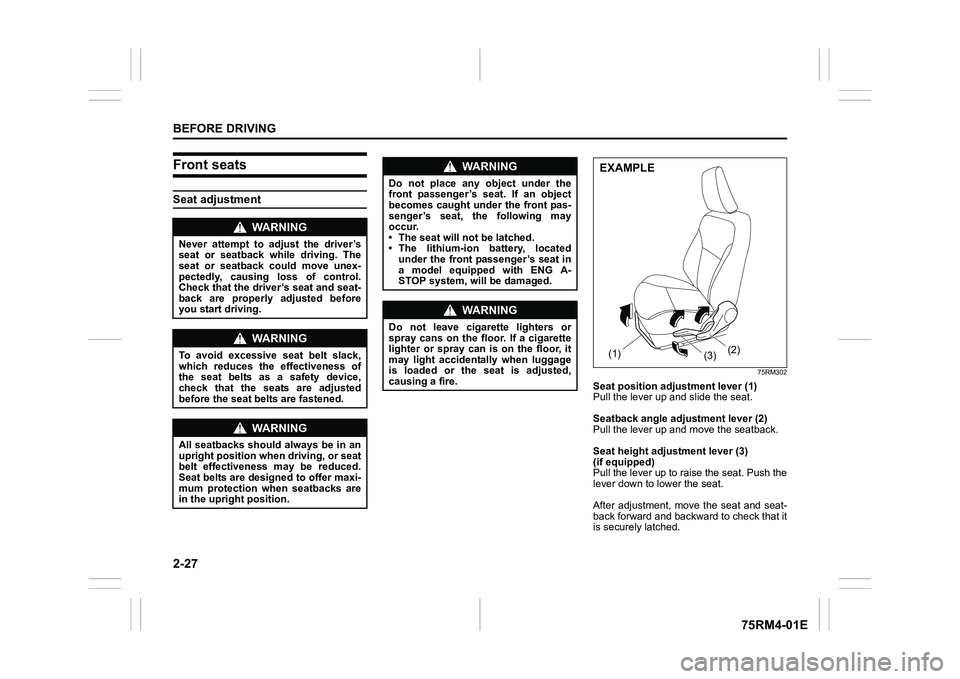
75RM302
Seat position adjustment lever (1)
Pull the lever up and slide the seat.
Seatback angle adju stment lever (2)
Pull the lever up and move the seatback.
Seat height adjustment lever (3)
(if equipped)
Pull the lever up to raise the seat. Push the
lever down to lower the seat.
After adjustment, move the seat and seat-
back forward and backward to check that it
is securely latched.
WA R N I N G
Never attempt to adjust the driver’s
seat or seatback while driving. The
seat or seatback could move unex-
pectedly, causing loss of control.
Check that the driver’s seat and seat-
back are properly adjusted before
you start driving.
WA R N I N G
To avoid excessive seat belt slack,
which reduces the effectiveness of
the seat belts as a safety device,
check that the seats are adjusted
before the seat belts are fastened.
WA R N I N G
All seatbacks should always be in an
upright position when driving, or seat
belt effectiveness may be reduced.
Seat belts are designed to offer maxi-
mum protection when seatbacks are
in the upright position.
WA R N I N G
Do not place any object under the
front passenger’s seat. If an object
becomes caught under the front pas-
senger’s seat, the following may
occur.
• The seat will not be latched.
• The lithium-ion battery, located under the front passenger’s seat in
a model equipped with ENG A-
STOP system, will be damaged.
WA R N I N G
Do not leave cigarette lighters or
spray cans on the floor. If a cigarette
lighter or spray can is on the floor, it
may light accidentally when luggage
is loaded or the seat is adjusted,
causing a fire.
(1) (2)
(3)EXAMPLE
Page 98 of 505
2-75BEFORE DRIVING
75RM4-01E
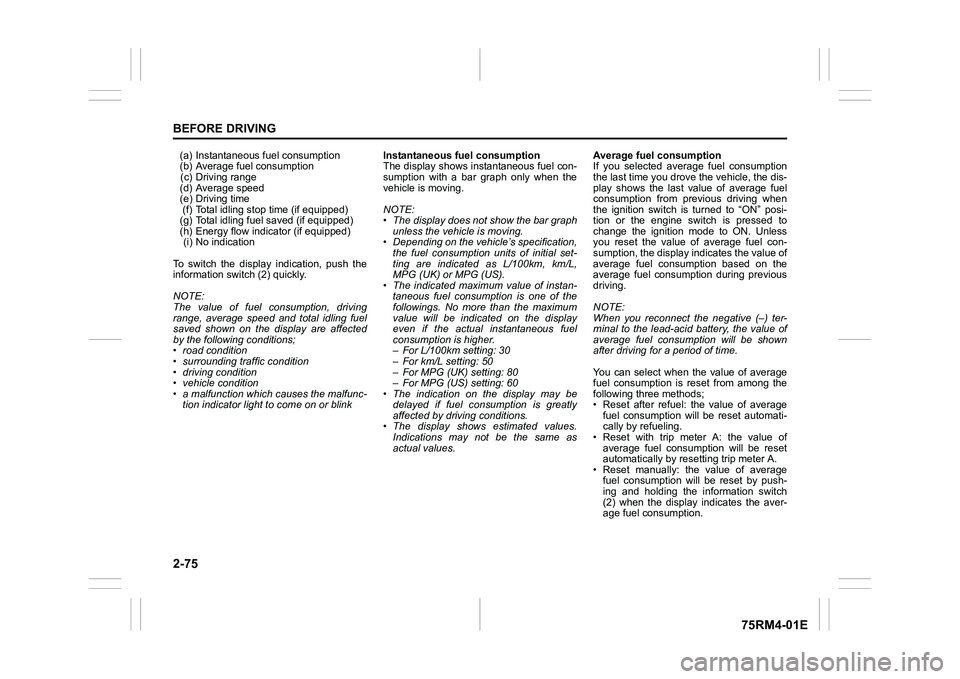
(a) Instantaneous fuel consumption
(b) Average fuel consumption(c) Driving range
(d) Average speed
(e) Driving time (f) Total idling stop time (if equipped)
(g) Total idling fuel saved (if equipped)
(h) Energy flow indicator (if equipped) (i) No indication
To switch the display indication, push the
information switch (2) quickly.
NOTE:
The value of fuel consumption, driving
range, average speed and total idling fuel
saved shown on the display are affected
by the following conditions;
• road condition
• surrounding traffic condition
• driving condition
• vehicle condition
• a malfunction which causes the malfunc- tion indicator light to come on or blink Instantaneous fuel consumption
The display shows instantaneous fuel con-
sumption with a bar graph only when the
vehicle is moving.
NOTE:
• The display does not show the bar graph
unless the vehicle is moving.
• Depending on the vehicle’s specification,
the fuel consumption units of initial set-
ting are indicated as L/100km, km/L,
MPG (UK) or MPG (US).
• The indicated maximum value of instan- taneous fuel consumption is one of the
followings. No more than the maximum
value will be indicated on the display
even if the actual instantaneous fuel
consumption is higher.
– For L/100km setting: 30
– For km/L setting: 50
– For MPG (UK) setting: 80
– For MPG (US) setting: 60
• The indication on the display may be
delayed if fuel consumption is greatly
affected by driving conditions.
• The display shows estimated values.
Indications may not be the same as
actual values. Average fuel consumption
If you selected average fuel consumption
the last time you drove
the vehicle, the dis-
play shows the last value of average fuel
consumption from previous driving when
the ignition switch is turned to “ON” posi-
tion or the engine switch is pressed to
change the ignition mode to ON. Unless
you reset the value of average fuel con-
sumption, the display indicates the value of
average fuel consumption based on the
average fuel consumption during previous
driving.
NOTE:
When you reconnect the negative (–) ter-
minal to the lead-acid battery, the value of
average fuel consumption will be shown
after driving for a period of time.
You can select when the value of average
fuel consumption is reset from among the
following three methods;
• Reset after refuel: the value of average fuel consumption will be reset automati-
cally by refueling.
• Reset with trip meter A: the value of average fuel consumption will be reset
automatically by resetting trip meter A.
• Reset manually: the value of average fuel consumption will be reset by push-
ing and holding the information switch
(2) when the display indicates the aver-
age fuel consumption.
Page 99 of 505
2-76
BEFORE DRIVING
75RM4-01E
To change when the value of average fuel
consumption is reset, refer to “Setting
mode” in this section.
NOTE:
If you add only a small amount of fuel
when you select “Reset after refuel”, the
average fuel consumption value may not
be reset.
Driving range
If you selected driving range the last time
you drove the vehicle, the display indicates
“---” for a few seconds and then indicates
the current driving range when the ignition
switch is turned to “ON” position or the
engine switch is pressed to change the
ignition mode to ON.
The driving range shown in the display is
the approximate distance you can drive
until the fuel gauge indicates “E”, based on
current driving conditions.
When the low fuel warning light comes on,
the display “---” will appear.
If the low fuel warning light comes on, fill
the fuel tank immediately regardless of the
value of driving range shown in the display.
As the driving range after refueling is cal-
culated based on the most recent driving
condition, the value is different each time
you refuel. NOTE:
• If you refuel when the ignition switch is in
“ON” position or the i gnition mode is ON,
the driving range may not indicate the
correct value.
• When you reconnect the negative (–)
terminal to the lead-acid battery, the
value of driving range will be shown after
driving for a period of time.
Average Speed
If you selected average speed the last time
you drove the vehicle, the display indicates
the last value of average speed from previ-
ous driving when the ignition switch is
turned to “ON” position or the engine
switch is pressed to change the ignition
mode to ON. Unless you reset the value of
average speed, the display indicates the
value of average speed which includes
average speed during previous driving.
To reset the value of average speed, push
and hold the information switch (2) for a
while when the display indicates an aver-
age speed. The display shows “---” and
then indicates a new average speed after
driving for a short time.
NOTE:
When you reconnect the negative (–) ter-
minal to the lead-acid battery, the value of
average speed will be shown after driving
for a period of time. Driving time
The display shows the total amount of driv-
ing time since the indication was reset.
• To reset the driving time to zero, push
and hold the information switch (2) for a
while when the display shows the driving
time.
NOTE:
When you reset the indication or reconnect
the negative (–) terminal to the lead-acid
battery, the driving time will be shown after
driving for a while.
Total idling stop time (if equipped)
The display shows the total length (in
hours, minutes and seconds) of engine
stopping time by ENG A-STOP system
since the indication was reset.
• To reset the total idling stop time to zero, push and hold the information switch (2)
for a while when the display shows the
total idling stop time.
NOTE:
• The indicated maximum value of the total idling stop time is 99:59:59.
• When you reconnect the negative (–) terminal to the lead-acid battery, the
value of the total idling stop time will be
reset.
Page 103 of 505
2-80
BEFORE DRIVING
75RM4-01E
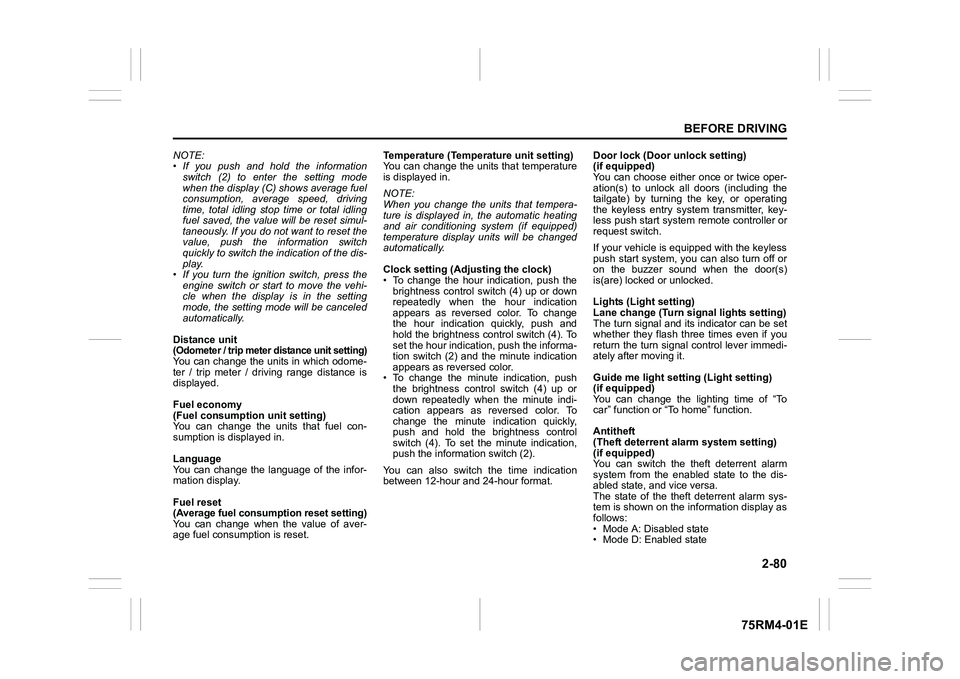
NOTE:
• If you push and hold the informationswitch (2) to enter the setting mode
when the display (C) shows average fuel
consumption, average speed, driving
time, total idling stop time or total idling
fuel saved, the value will be reset simul-
taneously. If you do not want to reset the
value, push the information switch
quickly to switch the indication of the dis-
play.
• If you turn the ignition switch, press the
engine switch or start to move the vehi-
cle when the display is in the setting
mode, the setting mode will be canceled
automatically.
Distance unit (Odometer / trip meter distance unit setting)You can change the units in which odome-
ter / trip meter / driving range distance is
displayed.
Fuel economy
(Fuel consumption unit setting)
You can change the units that fuel con-
sumption is displayed in.
Language
You can change the language of the infor-
mation display.
Fuel reset
(Average fuel consumption reset setting)
You can change when the value of aver-
age fuel consumption is reset. Temperature (Tempera
ture unit setting)
You can change the units that temperature
is displayed in.
NOTE:
When you change the units that tempera-
ture is displayed in, the automatic heating
and air conditioning system (if equipped)
temperature display units will be changed
automatically.
Clock setting (Adjusting the clock)
• To change the hour indication, push the brightness control switch (4) up or down
repeatedly when the hour indication
appears as reversed color. To change
the hour indication quickly, push and
hold the brightness control switch (4). To
set the hour indication, push the informa-
tion switch (2) and the minute indication
appears as reversed color.
• To change the minute indication, push the brightness control switch (4) up or
down repeatedly when the minute indi-
cation appears as reversed color. To
change the minute indication quickly,
push and hold the brightness control
switch (4). To set the minute indication,
push the information switch (2).
You can also switch the time indication
between 12-hour and 24-hour format. Door lock (Door
unlock setting)
(if equipped)
You can choose either once or twice oper-
ation(s) to unlock all doors (including the
tailgate) by turning the key, or operating
the keyless entry syst em transmitter, key-
less push start system remote controller or
request switch.
If your vehicle is equip ped with the keyless
push start system, you can also turn off or
on the buzzer sound when the door(s)
is(are) locked or unlocked.
Lights (Light setting)
Lane change (Turn signal lights setting)
The turn signal and its indicator can be set
whether they flash three times even if you
return the turn signal control lever immedi-
ately after moving it.
Guide me light setting (Light setting)
(if equipped)
You can change the lighting time of “To
car” function or “To home” function.
Antitheft
(Theft deterrent alarm system setting)
(if equipped)
You can switch the theft deterrent alarm
system from the enabled state to the dis-
abled state, and vice versa.
The state of the theft deterrent alarm sys-
tem is shown on the information display as
follows:
• Mode A: Disabled state
• Mode D: Enabled state
Page 104 of 505
2-81BEFORE DRIVING
75RM4-01E
NOTE:
For the theft deterrent alarm system of
other than Australia, Israel, Germany and
Taiwan models, refer to “Theft deterrent
alarm system” in this section.
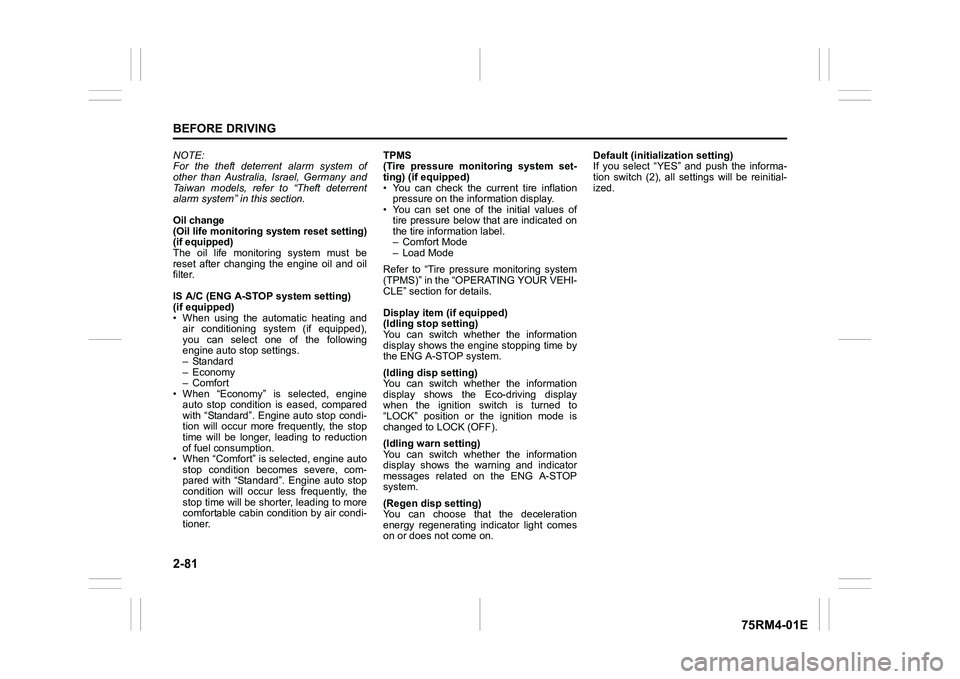
Oil change
(Oil life monitoring system reset setting)
(if equipped)
The oil life monitoring system must be
reset after changing the engine oil and oil
filter.
IS A/C (ENG A-STOP system setting)
(if equipped)
• When using the automatic heating and air conditioning system (if equipped),
you can select one of the following
engine auto stop settings.
– Standard
– Economy
–Comfort
• When “Economy” is selected, engine
auto stop condition is eased, compared
with “Standard”. Engine auto stop condi-
tion will occur more f requently, the stop
time will be longer, leading to reduction
of fuel consumption.
• When “Comfort” is sel ected, engine auto
stop condition becomes severe, com-
pared with “Standard”. Engine auto stop
condition will occur less frequently, the
stop time will be shorter, leading to more
comfortable cabin condition by air condi-
tioner. TPMS
(Tire pressure monitoring system set-
ting) (if equipped)
• You can check the current tire inflation
pressure on the information display.
• You can set one of the initial values of
tire pressure below that are indicated on
the tire information label.
– Comfort Mode
– Load Mode
Refer to “Tire pressure monitoring system
(TPMS)” in the “OPERATING YOUR VEHI-
CLE” section for details.
Display item (if equipped)
(Idling stop setting)
You can switch whether the information
display shows the engine stopping time by
the ENG A-STOP system.
(Idling disp setting)
You can switch whether the information
display shows the Eco-driving display
when the ignition switch is turned to
“LOCK” position or the ignition mode is
changed to LOCK (OFF).
(Idling warn setting)
You can switch whether the information
display shows the warning and indicator
messages related on the ENG A-STOP
system.
(Regen disp setting)
You can choose that the deceleration
energy regenerating indicator light comes
on or does not come on. Default (initialization setting)
If you select “YES” and push the informa-
tion switch (2), all settings will be reinitial-
ized.
Page 106 of 505
2-83BEFORE DRIVING
75RM4-01E
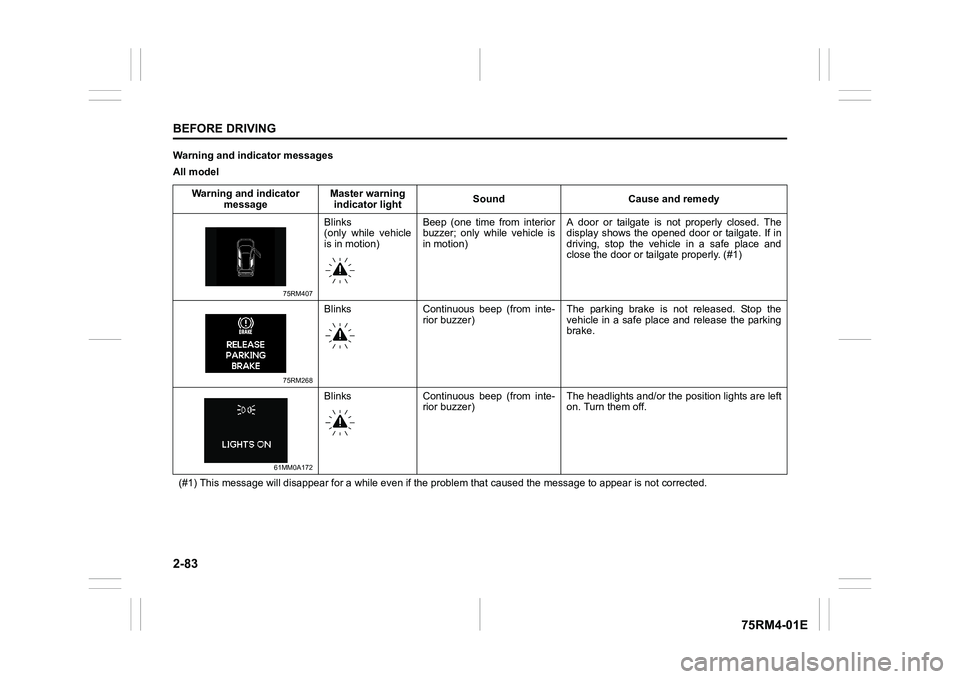
Warning and indicator messages
All modelWarning and indicator message Master warning
indicator light Sound Cause and remedy
75RM407
Blinks
(only while vehicle
is in motion)Beep (one time from interior
buzzer; only while vehicle is
in motion) A door or tailgate is not properly closed. The
display shows the opened door or tailgate. If in
driving, stop the vehicle in a safe place and
close the door or tailgate properly. (#1)
75RM268
Blinks Continuous beep (from inte-
rior buzzer) The parking brake is not released. Stop the
vehicle in a safe place and release the parking
brake.
61MM0A172
Blinks Continuous beep (from inte-
rior buzzer) The headlights and/or the
position lights are left
on. Turn them off.
(#1) This message will disappear for a while even if the proble m that caused the message to appear is not corrected.
Page 112 of 505
2-89BEFORE DRIVING
75RM4-01E
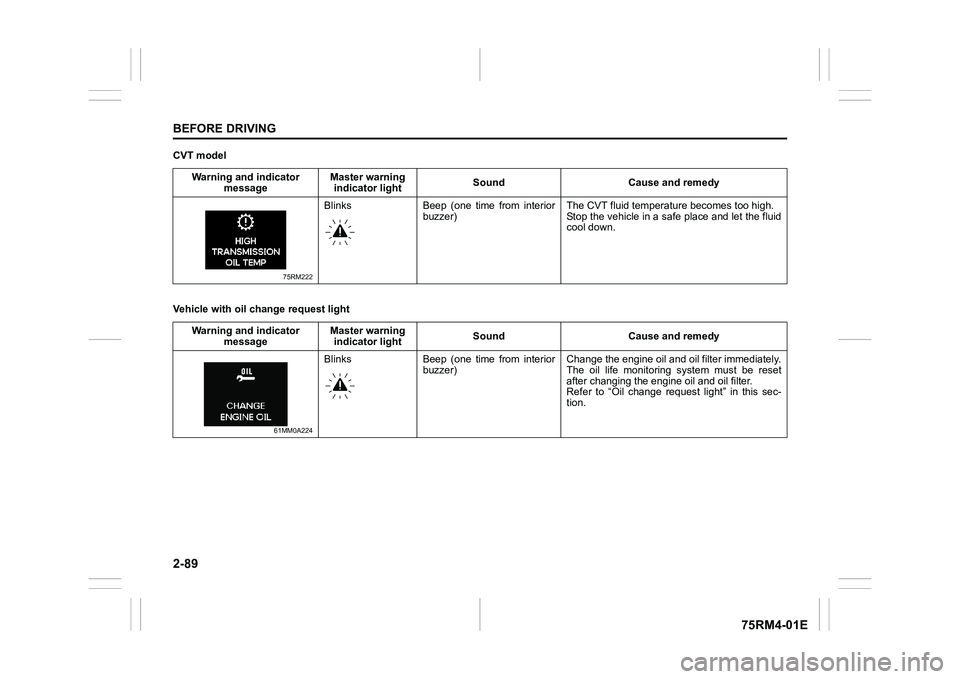
CVT model
Vehicle with oil change request lightWarning and indicator
message Master warning
indicator light Sound Cause and remedy
75RM222
Blinks Beep (one time from interior
buzzer) The CVT fluid temper
ature becomes too high.
Stop the vehicle in a safe place and let the fluid
cool down.
Warning and indicator message Master warning
indicator light Sound Cause and remedy
61MM0A224
Blinks Beep (one time from interior
buzzer) Change the engine oil and oil filter immediately.
The oil life monitoring system must be reset
after changing the engine oil and oil filter.
Refer to “Oil change request light” in this sec-
tion.
Page 114 of 505
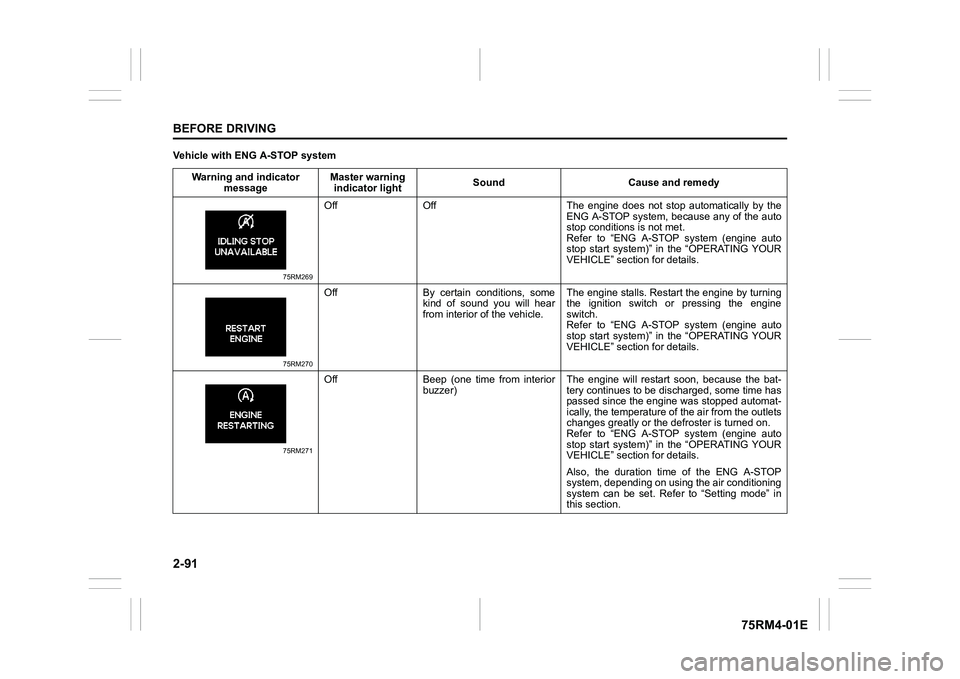
2-91BEFORE DRIVING
75RM4-01E
Vehicle with ENG A-STOP systemWarning and indicator message Master warning
indicator light Sound Cause and remedy
75RM269
Off Off The engine does not s
top automatically by the
ENG A-STOP system, because any of the auto
stop conditions is not met.
Refer to “ENG A-STOP system (engine auto
stop start system)” in the “OPERATING YOUR
VEHICLE” section for details.
75RM270
Off By certain conditions, some kind of sound you will hear
from interior of the vehicle. The engine stalls. Restar
t the engine by turning
the ignition switch or pressing the engine
switch.
Refer to “ENG A-STOP system (engine auto
stop start system)” in the “OPERATING YOUR
VEHICLE” section for details.
75RM271
Off Beep (one time from interior buzzer) The engine will restart soon, because the bat-
tery continues to be disc
harged, some time has
passed since the engin e was stopped automat-
ically, the temperature of the air from the outlets
changes greatly or the defroster is turned on.
Refer to “ENG A-STOP system (engine auto
stop start system)” in the “OPERATING YOUR
VEHICLE” section for details.
Also, the duration time of the ENG A-STOP
system, depending on using the air conditioning
system can be set. Refer to “Setting mode” in
this section.