ad blue SUZUKI IGNIS 2020 Owner's Manual
[x] Cancel search | Manufacturer: SUZUKI, Model Year: 2020, Model line: IGNIS, Model: SUZUKI IGNIS 2020Pages: 505, PDF Size: 8.36 MB
Page 330 of 505
5-75OTHER CONTROLS AND EQUIPMENT
75RM4-01E
Registration of audio devices
NOTE:
• To set up a new audio player, disconnectthe phone from the unit. Connect the
phone after audio player setup is com-
pleted if necessary.
• When attempts to establish the pairing fail within 60 seconds, the connecting
operation will be canceled. Try to estab-
lish the pairing again or refer to the audio
player manual for assistance with the
pairing process.
1) Press the Bluetooth
® setup button (7)
or (8).
The Bluetooth
® setup menu will be dis-
played.
2) Turn “TUNE/FLD PUSH SOUND” knob
(2) to select “Setup Bluetooth”, and
press the knob (2) to determine the
selection.
3) Turn “TUNE/FLD PUSH SOUND” knob (2) to select “Pairi ng”, and press the
knob (2) to determine the selection.
4) Select “My Car” from the Bluetooth
®
menu of the audio player and establish
the pairing.
Refer to the manual of the audio player
in use for further information.
5) Enter the passkey displayed on the unit
to the audio player. NOTE:
• When selecting “Go Back” or pressing
BACK button (6), the previous menu will
be displayed.
• When registering additional audio devices, repeat Step from 1).
Selecting Bluetooth
® audio mode
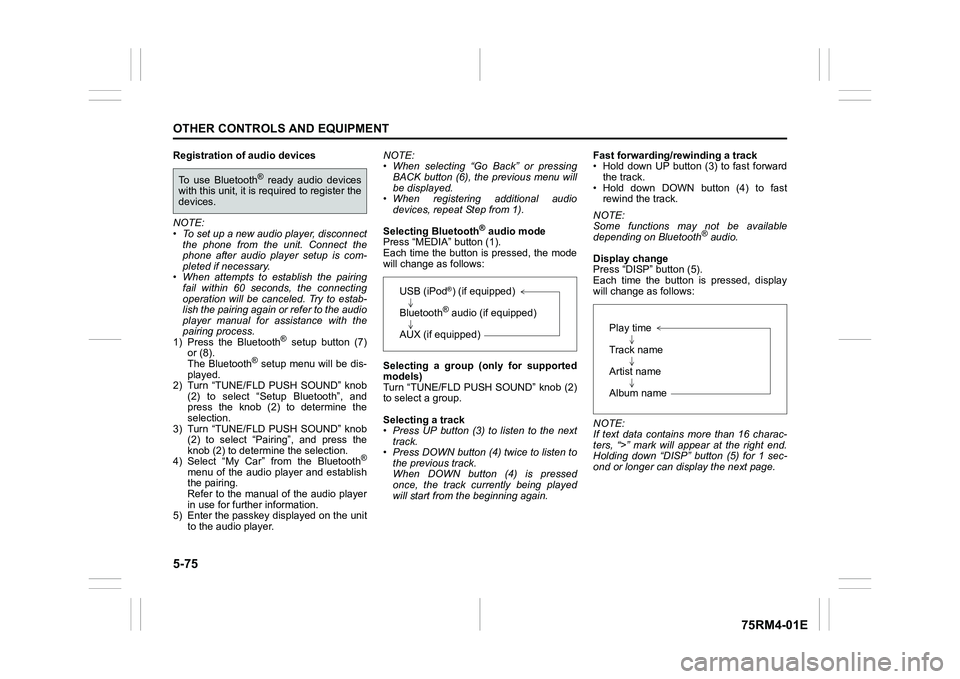
Press “MEDIA” button (1).
Each time the button is pressed, the mode
will change as follows:
Selecting a group (only for supported
models)
Turn “TUNE/FLD PUSH SOUND” knob (2)
to select a group.
Selecting a track
• Press UP button (3) to listen to the next track.
• Press DOWN button (4) twice to listen to the previous track.
When DOWN button (4) is pressed
once, the track currently being played
will start from the beginning again. Fast forwarding/rewinding a track
• Hold down UP button (3) to fast forward
the track.
• Hold down DOWN button (4) to fast rewind the track.
NOTE:
Some functions may not be available
depending on Bluetooth
® audio.
Display change
Press “DISP” button (5).
Each time the button is pressed, display
will change as follows:
NOTE:
If text data contains more than 16 charac-
ters, “>” mark will appear at the right end.
Holding down “DISP” button (5) for 1 sec-
ond or longer can display the next page.
To use Bluetooth
® ready audio devices
with this unit, it is r equired to register the
devices.
USB (iPod
®) (if equipped)
Bluetooth® audio (if equipped)
AUX (if equipped)
Play time
Track name
Artist name
Album name
Page 331 of 505
5-76
OTHER CONTROLS AND EQUIPMENT
75RM4-01E
Selection of audio device (Select Audio)
Follow the instructions below to select an
audio device to be paired with from the
registered audio devices.
1) Press the Bluetooth
® setup button (7)
or (8).
The Bluetooth
® setup menu will be dis-
played.
2) Turn “TUNE/FLD PUSH SOUND” knob
(2) to select “Setup Bluetooth”, and
press the knob (2) to determine the
selection.
3) Turn “TUNE/FLD PUSH SOUND” knob (2) to select “List Audio”, and press the
knob (2) to determine the selection.
4) Turn “TUNE/FLD PUSH SOUND” knob (2) to select an audio device to be
used, and press the knob (2) to deter-
mine the selection.
5) Turn “TUNE/FLD PUSH SOUND” knob
(2) to select “Select”, and press the
knob (2) to determine the selection.
NOTE:
• When selecting “Go Back” or pressing BACK button (6), the previous menu will
be displayed.
• The phone will be disconnected when the Bluetooth® ready audio device is
selected. List of audio devices (List Audio)
Follow the instructions below to display the
names of the registered audio devices in
sequence.
1) Press the Bluetooth
® setup button (7)
or (8).
The Bluetooth
® setup menu will be dis-
played.
2) Turn “TUNE/FLD PUSH SOUND” knob
(2) to select “Setup Bluetooth”, and
press the knob (2) to determine the
selection.
3) Turn “TUNE/FLD PUSH SOUND” knob (2) to select “List Audio”, and press the
knob (2) to determine the selection.
The names of registered audio devices
will be displayed in sequence.
NOTE:
When selecting “Go Back” or pressing
BACK button (6), the previous menu will
be displayed.
Passkey setting (Set Passkey)
Follow the instructions below to set the
security number (Passkey).
1) Press the Bluetooth
® setup button (7)
or (8).
The Bluetooth
® setup menu will be dis-
played.
2) Turn “TUNE/FLD PUSH SOUND” knob (2) to select “Setup Bluetooth”, and
press the knob (2) to determine the
selection. 3) Turn “TUNE/FLD PUSH SOUND” knob
(2) to select “Passkey”, and press the
knob (2) to determine the selection.
4) Turn “TUNE/FLD PUSH SOUND” knob (2) to select “Enter New Passkey”, and
press the knob (2) to determine the
selection.
5) Press or turn “TUNE/FLD PUSH SOUND” knob (2) to select “Confirm”.
6) Turn “TUNE/FLD PUSH SOUND” knob (2) to select a number for the first digit,
and press the knob (2) to determine the
selection. Select and determine num-
bers for the second, third and fourth
digits in order in the same manner.
When not entering up to the eighth
digit, enter blanks for the successive
digits.
7) Press “TUNE/FLD PUSH SOUND” knob (2) to determine the passkey set-
ting.
NOTE:
When selecting “Go Back” or pressing
BACK button (6), the previous menu will
be displayed.
Page 332 of 505

5-77OTHER CONTROLS AND EQUIPMENT
75RM4-01E
Deletion of audio device information
(Delete Audio)
Follow the instructions below to delete the
registered audio device information.
1) Press the Bluetooth
® setup button (7)
or (8).
The Bluetooth
® setup menu will be dis-
played.
2) Turn “TUNE/FLD PUSH SOUND” knob
(2) to select “Setup Bluetooth”, and
press the knob (2) to determine the
selection.
3) Turn “TUNE/FLD PUSH SOUND” knob (2) to select “List Audio”, and press the
knob (2) to determine the selection.
4) Turn “TUNE/FLD PUSH SOUND” knob (2) to select an audio device to be
deleted, and press the knob (2) to
determine the selection.
5) Turn “TUNE/FLD PUSH SOUND” knob
(2) to select “Delete”, and press the
knob (2) to determine the selection.
6) Turn “TUNE/FLD PUSH SOUND” knob
(2) to select “Delete?”, and press the
knob (2) to determine the selection.
7) Turn “TUNE/FLD PUSH SOUND” knob
(2) to select “Confirm”, and press the
knob (2) to complete the deletion.
NOTE:
When selecting “Go Back” or pressing
BACK button (6), the previous menu will
be displayed.
Disclaimer for Bluetooth
® function
• Depending on compatibility of mobile phone models, no Bluetooth
® function
can be used, or some Bluetooth® func-
tions may be restricted.
• Connectivity or voice quality may get
affected depending on circumstances.
• After the ignition switch is turned to “ON” position or the engine switch is pressed
to change the ignition mode to ON, the
audio system takes few seconds to
detect and connect to the Bluetooth
®
device (if already paired).
Remote audio controls (if equipped)Controlling basic functions of the audio
system is available us ing the switches on
the steering wheel.
75RM063
(4) (4)
(2)
(1) (3)
Page 333 of 505
5-78
OTHER CONTROLS AND EQUIPMENT
75RM4-01E
Adjusting the volume
• To increase the volume, press the “VOL”switch (1) up. The volume will continue
to increase until the switch is released.
• To decrease the volume, press the “VOL” switch (1) down. The volume will
continue to decrease until the switch is
released.
• To mute the sound, pr ess the switch (2).
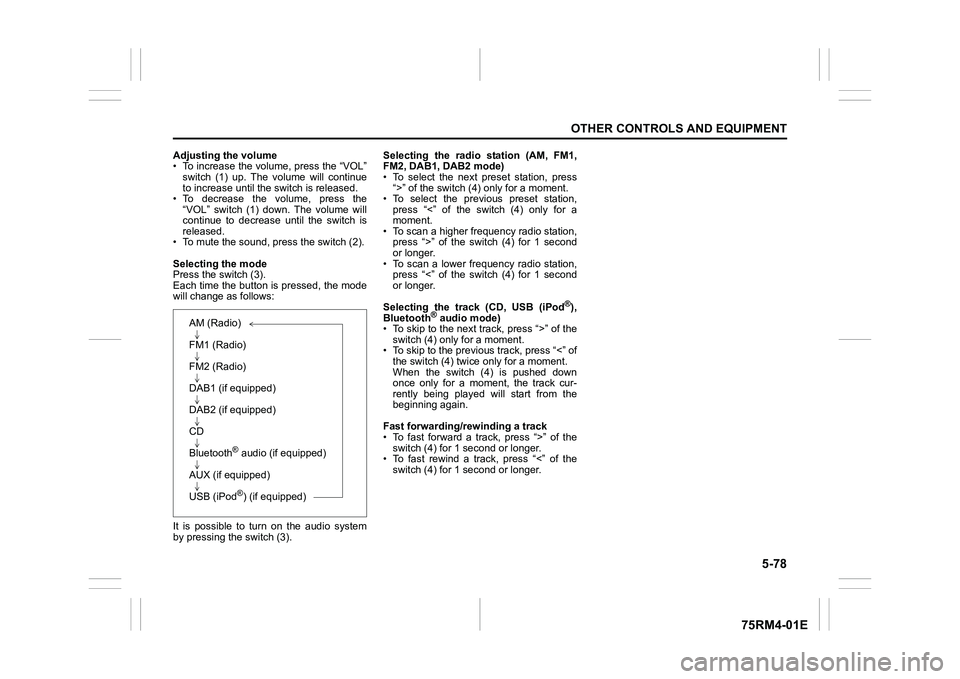
Selecting the mode
Press the switch (3).
Each time the button is pressed, the mode
will change as follows:
It is possible to turn on the audio system
by pressing the switch (3). Selecting the radio station (AM, FM1,
FM2, DAB1, DAB2 mode)
• To select the next preset station, press
“>” of the switch (4 ) only for a moment.
• To select the previous preset station, press “<” of the switch (4) only for a
moment.
• To scan a higher frequency radio station, press “>” of the switch (4) for 1 second
or longer.
• To scan a lower frequency radio station, press “<” of the switch (4) for 1 second
or longer.
Selecting the track (CD, USB (iPod
®),
Bluetooth
® audio mode)
• To skip to the next track, press “>” of the
switch (4) only for a moment.
• To skip to the previous track, press “<” of the switch (4) twice only for a moment.
When the switch (4) is pushed down
once only for a moment, the track cur-
rently being played will start from the
beginning again.
Fast forwarding/rewinding a track
• To fast forward a track, press “>” of the switch (4) for 1 second or longer.
• To fast rewind a track, press “<” of the
switch (4) for 1 second or longer.
AM (Radio)
FM1 (Radio)
FM2 (Radio)
DAB1 (if equipped)
DAB2 (if equipped)
CD
Bluetooth
® audio (if equipped)
AUX (if equipped)
USB (iPod®) (if equipped)
Page 337 of 505
5-82
OTHER CONTROLS AND EQUIPMENT
75RM4-01E
MP3/WMA/AACNo playback The disc contains unsupported formatted
data.
Check the file format.
Sound skips or noise produced Sound skipping may occur when playing
VBR (Variable Bit Rate) files.It is not recommended
to play VBR files.
USB
Playback does not start when the USB
device is connected There is no supported format file to play
on this unit.
Check the file format.
The current consumption of the USB
device exce eds 1.0 A. Use a USB device with a current con-
sumption lower than 1.0 A.
Bluetooth
®
Pairing failed The distance between this unit and the
Bluetooth
® ready device is too far, or a
metallic object may be located between
the Bluetooth® ready device and this unit. Change the location of the Bluetooth
®
ready device.
The Bluetooth
® function of the Bluetooth
®
ready device is off. Refer to the manual of the Bluetooth
®
ready device. (Some devices have the
power saving function that automatically
activates after a certain time.)
Unable to receive a call Your current location may be out of ser-
vice area. Drive your vehicle to the service area of
the phone.
The voice quality of hands-free is low
(Distortion, noise etc.) Another wireless device may be located
near the unit.Switch off the wireless device or keep it
away from the unit.
Problem
Possible cause
Possible solution
Page 339 of 505
5-84
OTHER CONTROLS AND EQUIPMENT
75RM4-01E
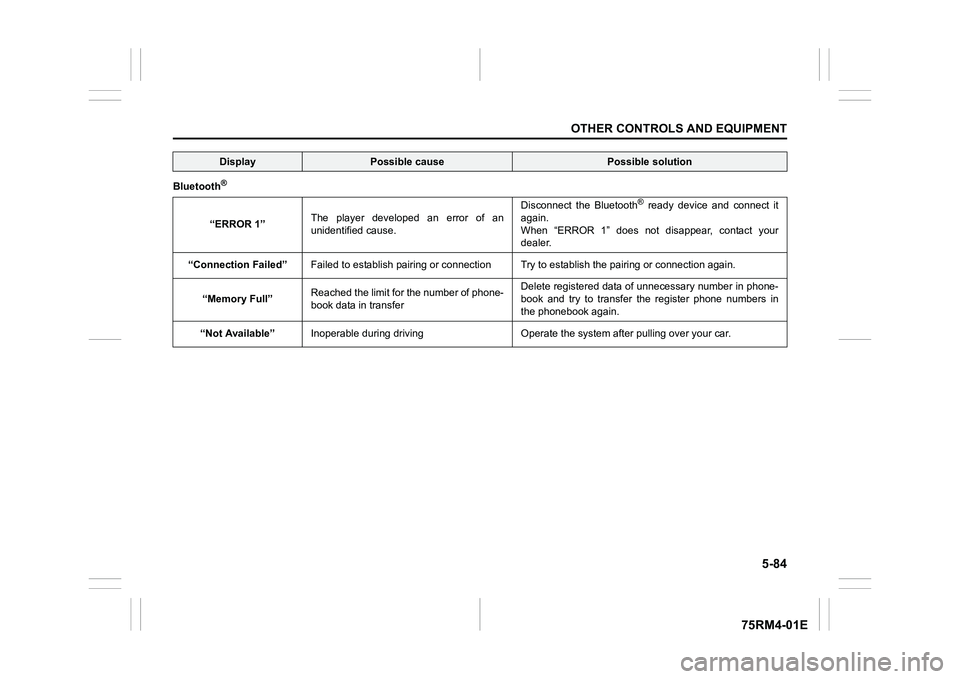
Bluetooth
®“ERROR 1”The player developed an error of an
unidentified cause. Disconnect the Bluetooth
® ready device and connect it
again.
When “ERROR 1” does not disappear, contact your
dealer.
“Connection Failed” Failed to establish pairing or c onnection Try to establish the p airing or connection again.
“Memory Full” Reached the limit for the number of phone-
book data in transfer Delete registered data of unnecessary number in phone-
book and try to transfer the register phone numbers in
the phonebook again.
“Not Available” Inoperable during driving Operate the syst em after pulling over your car.
Display
Possible cause
Possible solution
Page 353 of 505
7-4
INSPECTION AND MAINTENANCE
75RM4-01E
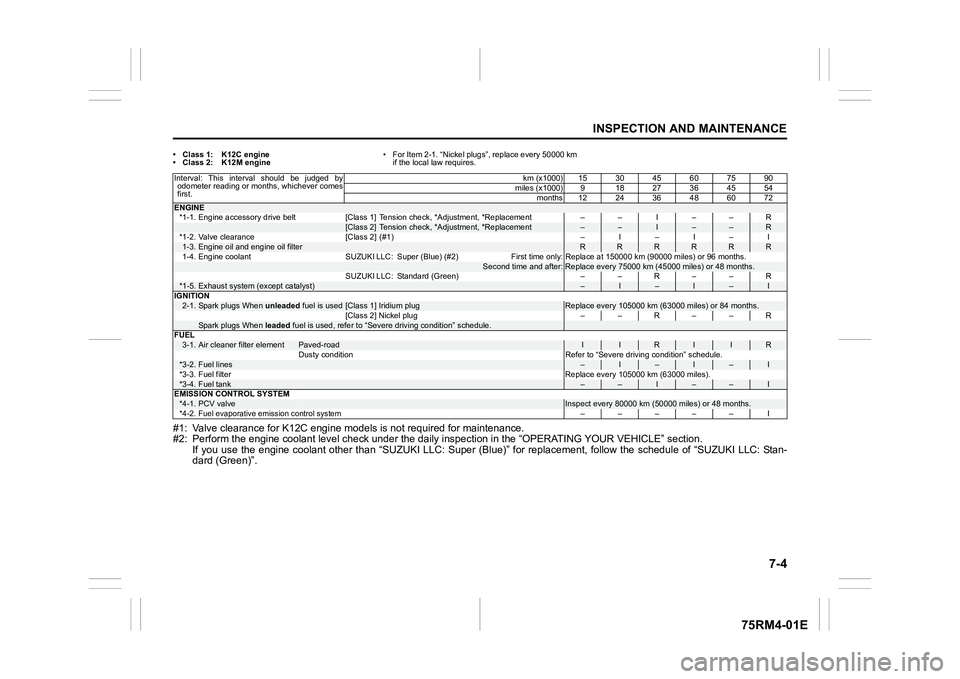
• Class 1: K12C engine
• Class 2: K12M engine• For Item 2-1. “Nickel plugs”, replace every 50000 km
if the local law requires.#1: Valve clearance for K12C engin e models is not required for maintenance.
#2: Perform the engine coolant l evel check under the daily inspection in the “OPERATING YOUR VEHICLE” section.
If you use the engine coolant other than “SUZUKI LLC: Super (Bl ue)” for replacement, follow the schedule of “SUZUKI LLC: Stan-
dard (Green)”.Interval: This interval should be judged by odometer reading or months, whichever comes
first. km (x1000) 15 30 45 60 75 90
miles (x1000) 9 18 27 36 45 54
months 12 24 36 48 60 72ENGINE*1-1. Engine accessory drive belt [Class 1] Tension check, *Adjust ment, *Replacement – – I – – R
[Class 2] Tension check, *Adjustment, *Replacement
–
–
I
–
–
R
*1-2. Valve clearance [Class 2] (#1) – I – I – I
1-3.
Engine oil and engine oil filter
R
R
R
R
R
R
1-4. Engine coolant SUZUKI LLC: Super (Blue) (#2)
First time only: Replace at 150000 km (90000 miles) or 96 months .
Second time and after:
Replace every 75000 km (45000 miles) or 48 months.
SUZUKI LLC: Standard (Green) – – R – – R
*1-5.
Exhaust system (except catalyst)
–
I
–
I
–
I
IGNITION
2-1.
Spark plugs When unleaded fuel is used
[Class 1] Iridium plug
Replace every 105000 km (63000 miles) or 84 months.
[Class 2] Nickel plug – – R – – R
Spark plugs When leaded fuel is used, refer to “Severe driving condition” schedule.
FUEL 3-1.
Air cleaner filter element
Paved-road
I
I
R
I
I
R
Dusty condition Refer to “Severe driving condition” schedule.
*3-2.
Fuel lines
–
I
–
I
–
I
*3-3. Fuel filter Replace every 105000 km (63000 miles).
*3-4.
Fuel tank
–
–
I
–
–
I
EMISSION CONTROL SYSTEM
*4-1.
PCV valve
Inspect every 80000 km (5 0000 miles) or 48 months.
*4-2.
Fuel evaporative emi ssion control system
––––– I
Page 354 of 505
7-5INSPECTION AND MAINTENANCE
75RM4-01E
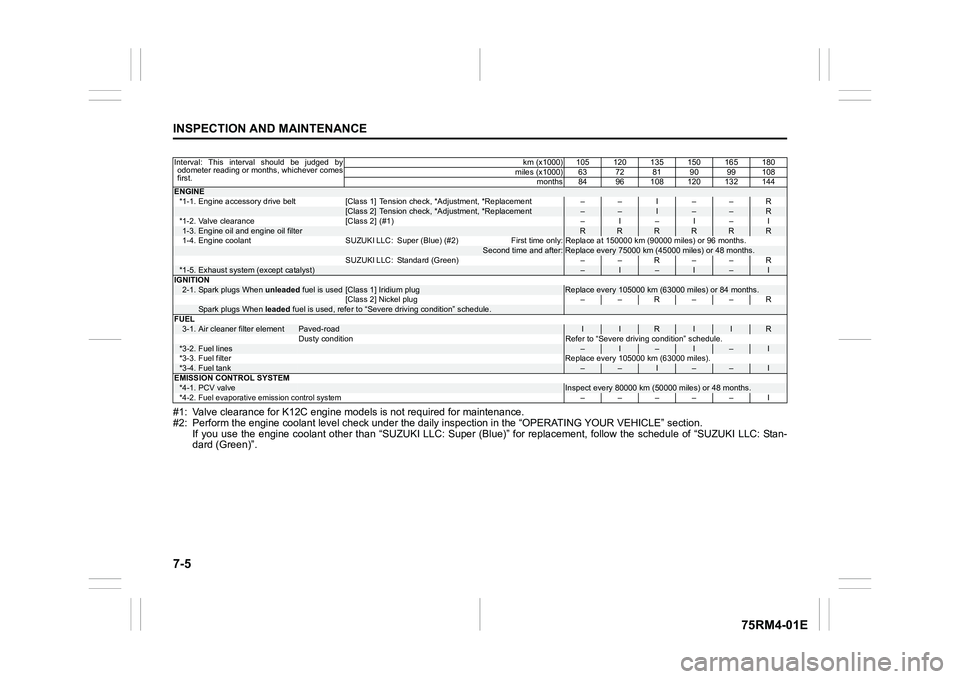
#1: Valve clearance for K12C engine models is not required for maintenance.
#2: Perform the engine coolant l evel check under the daily inspection in the “OPERATING YOUR VEHICLE” section.
If you use the engine coolant other than “SUZUKI LLC: Super (Bl ue)” for replacement, follow the schedule of “SUZUKI LLC: Stan-
dard (Green)”.Interval: This interval should be judged by odometer reading or months, whichever comes
first. km (x1000) 105 120 135 150 165 180
miles (x1000) 63 72 81 90 99 108 months 84 96 108 120 132 144ENGINE*1-1. Engine accessory drive belt [Class 1] Tension check, *Adjust ment, *Replacement – – I – – R
[Class 2] Tension check, *Adjustment, *Replacement
–
–
I
–
–
R
*1-2. Valve clearance [Class 2] (#1) – I – I – I
1-3.
Engine oil and engine oil filter
R
R
R
R
R
R
1-4. Engine coolant SUZUKI LLC: Super (Blue) (#2)
First time only: Replace at 150000 km (90000 miles) or 96 months .
Second time and after:
Replace every 75000 km (45000 miles) or 48 months.
SUZUKI LLC: Standard (Green) – – R – – R
*1-5.
Exhaust system (except catalyst)
–
I
–
I
–
I
IGNITION
2-1.
Spark plugs When unleaded fuel is used
[Class 1] Iridium plug
Replace every 105000 km (63000 miles) or 84 months.
[Class 2] Nickel plug – – R – – R
Spark plugs When leaded fuel is used, refer to “Severe driving condition” schedule.
FUEL 3-1.
Air cleaner filter element
Paved-road
I
I
R
I
I
R
Dusty condition Refer to “Severe driving condition” schedule.
*3-2.
Fuel lines
–
I
–
I
–
I
*3-3. Fuel filter Replace every 105000 km (63000 miles).
*3-4.
Fuel tank
–
–
I
–
–
I
EMISSION CONTROL SYSTEM
*4-1.
PCV valve
Inspect every 80000 km (5 0000 miles) or 48 months.
*4-2.
Fuel evaporative emi ssion control system
––––– I
Page 358 of 505
7-9INSPECTION AND MAINTENANCE
75RM4-01E
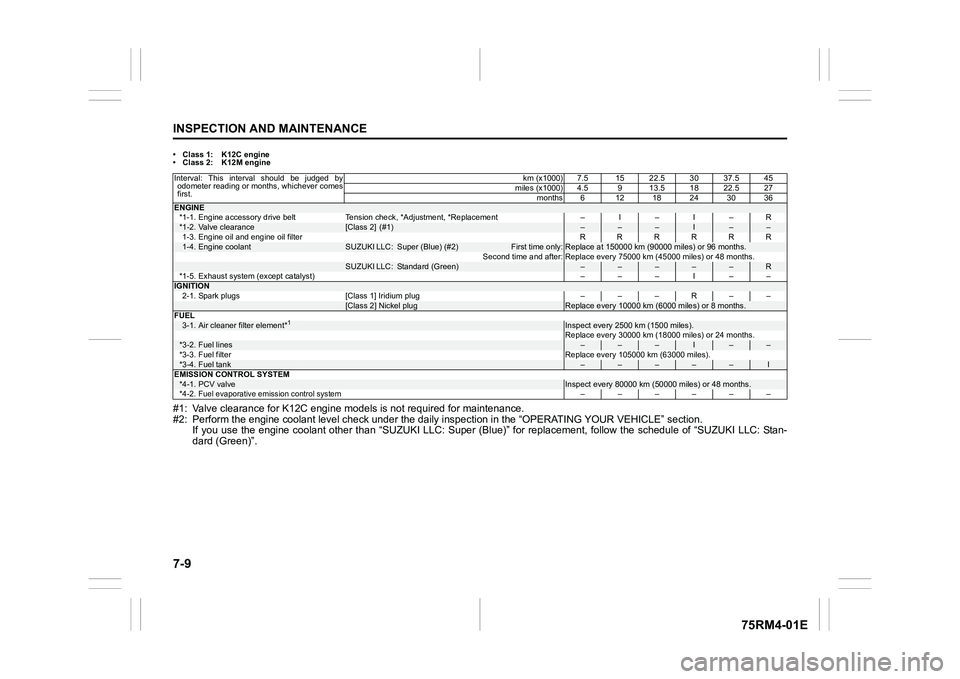
• Class 1: K12C engine
• Class 2: K12M engine#1: Valve clearance for K12C engine models is not required for maintenance.
#2: Perform the engine coolant l evel check under the daily inspection in the “OPERATING YOUR VEHICLE” section.
If you use the engine coolant other than “SUZUKI LLC: Super (Bl ue)” for replacement, follow the schedule of “SUZUKI LLC: Stan-
dard (Green)”.Interval: This interval should be judged by odometer reading or months, whichever comes
first. km (x1000) 7.5 15 22.5 30 37.5 45
miles (x1000) 4.5 9 13.5 18 22.5 27
months6 1218243036ENGINE*1-1. Engine accessory drive belt Tension check, *Adjustment, *Re placement – I – I – R*1-2.
Valve clearance
[Class 2] (#1)
–
–
–
I
–
–
1-3. Engine oil and engine oil filter RRRRRR
1-4.
Engine coolant
SUZUKI LLC:
Super (Blue) (#2)
First time only:
Replace at 150000 km (90000 miles) or 96 months.
Second time and after: Replace every 75000 km (45000 miles) or 48 months.
SUZUKI LLC:
Standard (Green)
–
–
–
–
–
R
*1-5. Exhaust system (except catalyst) ––– I ––
IGNITION
2-1. Spark plugs [Class 1] Iridium plug – – – R – –
[Class 2] Nickel plug
Replace every 10000 km (6000 miles) or 8 months.
FUEL
3-1.
Air cleaner filter element*
1
Inspect every 2500 km (1500 miles).
Replace every 30000 km (18000 miles) or 24 months.
*3-2.
Fuel lines
–
–
–
I
–
–
*3-3. Fuel filter Replace every 105000 km (63000 miles).
*3-4.
Fuel tank
–
–
–
–
–
I
EMISSION CONTROL SYSTEM
*4-1.
PCV valve
Inspect every 80000 km (5 0000 miles) or 48 months.
*4-2.
Fuel evaporative emi ssion control system
––––––
Page 359 of 505
7-10
INSPECTION AND MAINTENANCE
75RM4-01E
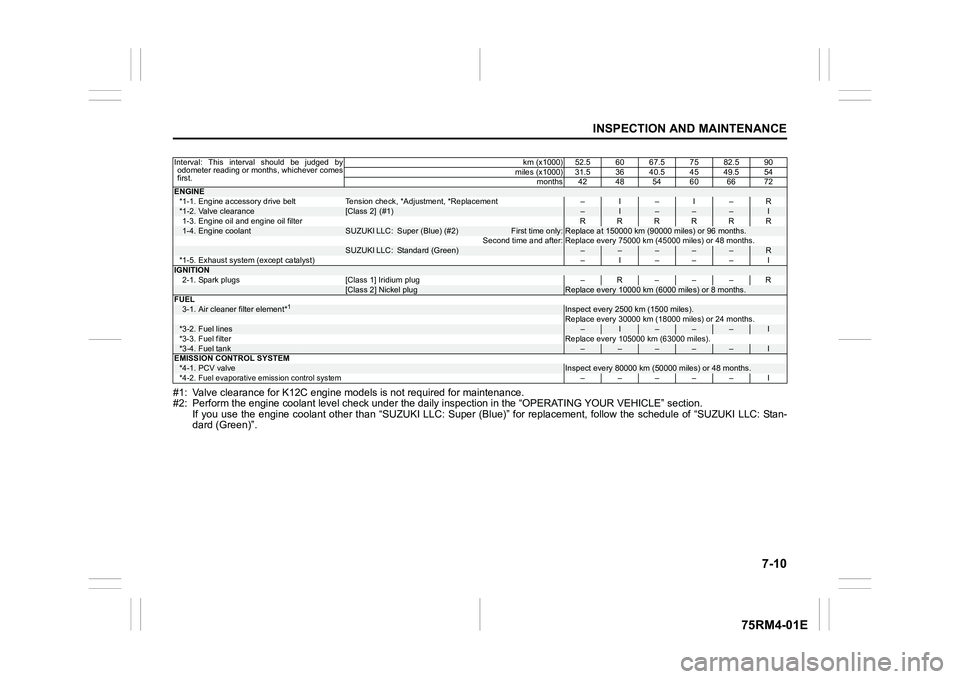
#1: Valve clearance for K12C engine models is not required for maintenance.
#2: Perform the engine coolant l evel check under the daily inspection in the “OPERATING YOUR VEHICLE” section.
If you use the engine coolant other than “SUZUKI LLC: Super (Bl ue)” for replacement, follow the schedule of “SUZUKI LLC: Stan-
dard (Green)”.Interval: This interval should be judged by odometer reading or months, whichever comes
first. km (x1000) 52.5 60 67.5 75 82.5 90
miles (x1000) 31.5 36 40.5 45 49.5 54 months 42 48 54 60 66 72ENGINE*1-1. Engine accessory drive belt Tension check, *Adjustment, *Re placement – I – I – R*1-2.
Valve clearance
[Class 2] (#1)
–
I
–
–
–
I
1-3. Engine oil and engine oil filter RRRRRR
1-4.
Engine coolant
SUZUKI LLC:
Super (Blue) (#2)
First time only:
Replace at 150000 km (90000 miles) or 96 months.
Second time and after: Replace every 75000 km (45000 miles) or 48 months.
SUZUKI LLC:
Standard (Green)
–
–
–
–
–
R
*1-5. Exhaust system (except catalyst) – I ––– I
IGNITION
2-1. Spark plugs [Class 1] Iridium plug – R – – – R
[Class 2] Nickel plug
Replace every 10000 km (6000 miles) or 8 months.
FUEL
3-1.
Air cleaner filter element*
1
Inspect every 2500 km (1500 miles).
Replace every 30000 km (18000 miles) or 24 months.
*3-2.
Fuel lines
–
I
–
–
–
I
*3-3. Fuel filter Replace every 105000 km (63000 miles).
*3-4.
Fuel tank
–
–
–
–
–
I
EMISSION CONTROL SYSTEM
*4-1.
PCV valve
Inspect every 80000 km (5 0000 miles) or 48 months.
*4-2.
Fuel evaporative emi ssion control system
––––– I