driver SUZUKI IGNIS 2020 Owners Manual
[x] Cancel search | Manufacturer: SUZUKI, Model Year: 2020, Model line: IGNIS, Model: SUZUKI IGNIS 2020Pages: 505, PDF Size: 8.36 MB
Page 1 of 505
Classification: API SG, SH, SJ, SL, SM or SN
Viscosity: SAE 0W-20, 5W-30, 10W-30, 10W-40,
15W-40, 20W-40
(K12M engine models)
(K12C engine models)
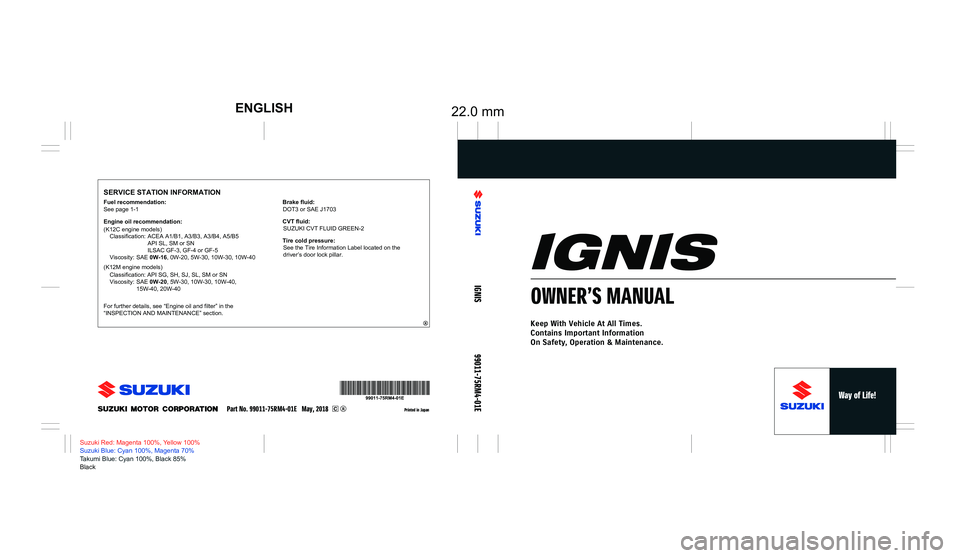
22.0 mmENGLISH
SERVICE STATION INFORMATION
Printed in Japan
Suzuki Red: Magenta 100%, Yellow 100%
Suzuki Blue: Cyan 100%, Magenta 70%
Takumi Blue: Cyan 100%, Black 85%
Black
IGNIS
99011-75RM4-01E
OWNER’S MANUAL
Keep With Vehicle At All Times.
Contains Important Information
On Safety, Operation & Maintenance.
See page 1-1
Fuel recommendation:
Engine oil recommendation:
Classification: ACEA A1/B1, A3/B3, A3/B4, A5/B5
API SL, SM or SN
ILSAC GF-3, GF-4 or GF-5
Viscosity: SAE 0W-16, 0W-20, 5W-30, 10W-30, 10W-40
For further details, see “Engine oil and filter” in the
“INSPECTION AND MAINTENANCE” section.
Part No. 99011-75RM4-01E May, 2018
Brake fluid: DOT3 or SAE J1703
Tire cold pressure: See the Tire Information Label located on the
driver’s door lock pillar.
CVT fluid:
SUZUKI CVT FLUID GREEN-2
Page 9 of 505
75RM4-01E
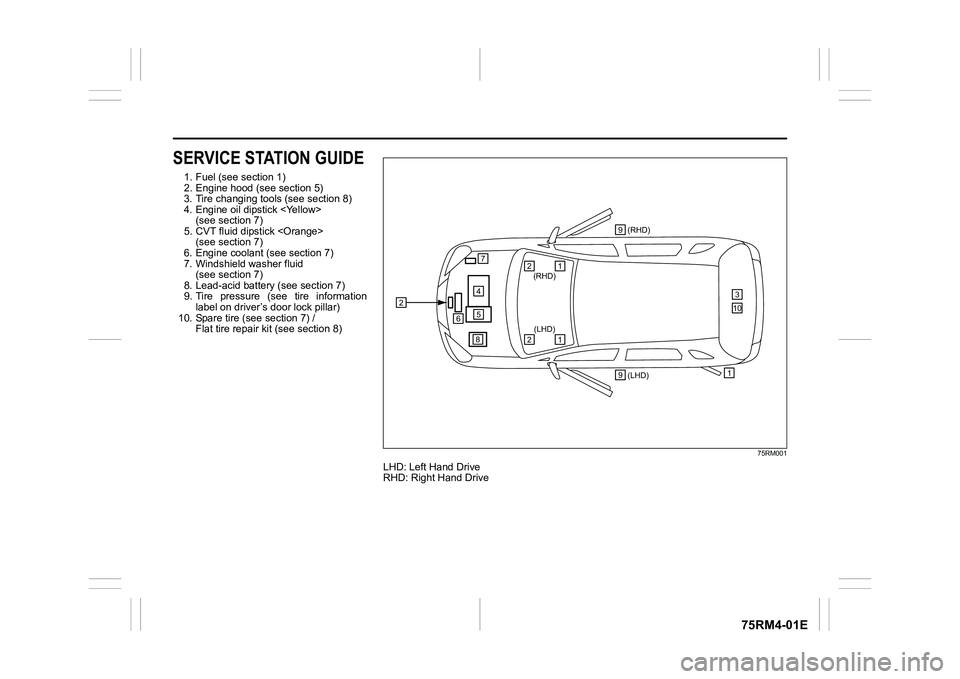
SERVICE STATION GUIDE1. Fuel (see section 1)
2. Engine hood (see section 5)
3. Tire changing tools (see section 8)
4. Engine oil dipstick
5. CVT fluid dipstick
6. Engine coolant (see section 7)
7. Windshield washer fluid (see section 7)
8. Lead-acid battery (see section 7)
9. Tire pressure (see tire information label on driver’s door lock pillar)
10. Spare tire (see section 7) / Flat tire repair kit (see section 8)
75RM001
LHD: Left Hand Drive
RHD: Right Hand Drive
2
457
6
(LHD) 1(RHD)
3
1
(RHD)
2
1
(LHD)
2
8 9
9
10
Page 16 of 505
ILLUSTRATED TABLE OF CONTENTS
75RM4-01E
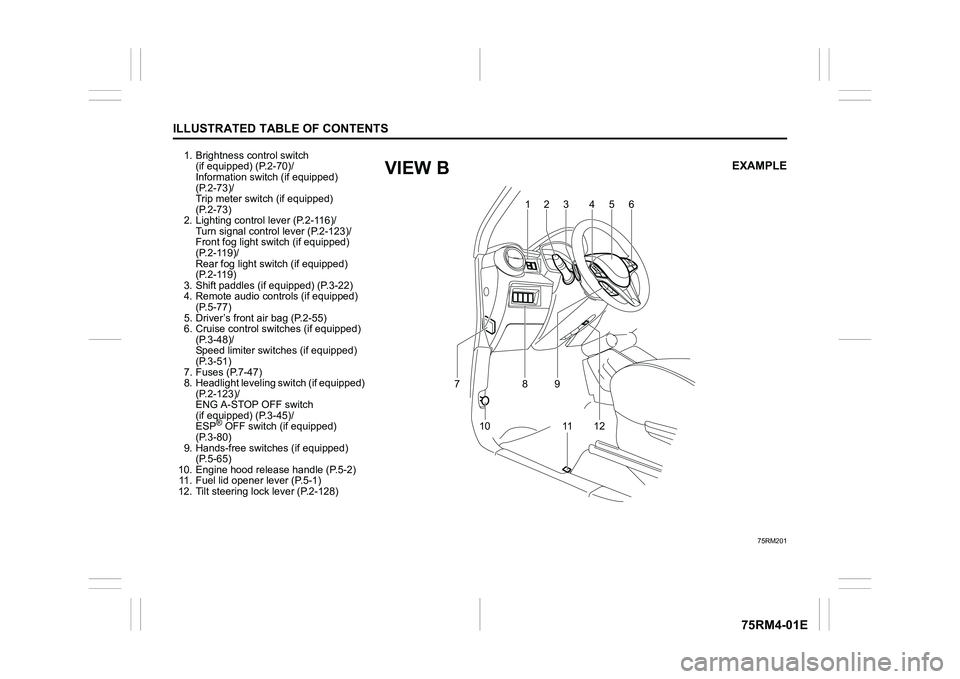
1. Brightness control switch (if equipped) (P.2-70)/
Information switch (if equipped)
(P.2-73)/
Trip meter switch (if equipped)
(P.2-73)
2. Lighting control lever (P.2-116)/
Turn signal control lever (P.2-123)/
Front fog light swit ch (if equipped)
(P.2-119)/
Rear fog light swit ch (if equipped)
(P.2-119)
3. Shift paddles (if equipped) (P.3-22)
4. Remote audio controls (if equipped) (P.5-77)
5. Driver’s front air bag (P.2-55)
6. Cruise control switches (if equipped) (P.3-48)/
Speed limiter switch es (if equipped)
(P.3-51)
7. Fuses (P.7-47)
8. Headlight leveling switch (if equipped) (P.2-123)/
ENG A-STOP OFF switch
(if equipped) (P.3-45)/
ESP
® OFF switch (if equipped)
(P.3-80)
9. Hands-free switc hes (if equipped)
(P.5-65)
10. Engine hood release handle (P.5-2) 11. Fuel lid opener lever (P.5-1)
12. Tilt steering lock lever (P.2-128)
75RM201
123 4 5
6
10 8
11 1 2
7
9
EXAMPLE
VIEW B
Page 25 of 505
2-2
BEFORE DRIVING
75RM4-01E
For vehicles with a keyless push start
system
If this light blinks, change the ignition mode
to LOCK (OFF), and then change it back to
ON. Also refer to “If the master warning
indicator light blinks and the engine cannot
be started” in “Starting engine (vehicle with
keyless push start system)” in the “OPER-
ATING YOUR VEHICLE” section.
If the light still blinks after the ignition mode
is changed back to ON, there may be
something wrong with your key or with the
immobilizer system. Ask your SUZUKI
dealer to have the system inspected.
The immobilizer/keyless push start system
warning light may also blinks if the remote
controller is not in the vehicle when you
close the door or attempt to start the
engine.
NOTE:
• If you lose your immobilizer ignition key or remote controller, ask your SUZUKI
dealer as soon as possible to deactivate
the lost one, and to make a new key or
remote controller.
• If you own other v ehicles with immobi-
lizer keys, keep those keys away from
the ignition switch or the engine switch
when using your SUZUKI vehicle. Other-
wise, or the engine may not be started
because they may interfere with your
SUZUKI vehicle’s immobilizer system. • If you attach any metal objects to the
immobilizer key or remote controller, it
may not start the engine.
Ignition key reminderA buzzer sounds intermittently to remind
you to remove the ignition key if it is in the
ignition switch when the driver’s door is
opened.
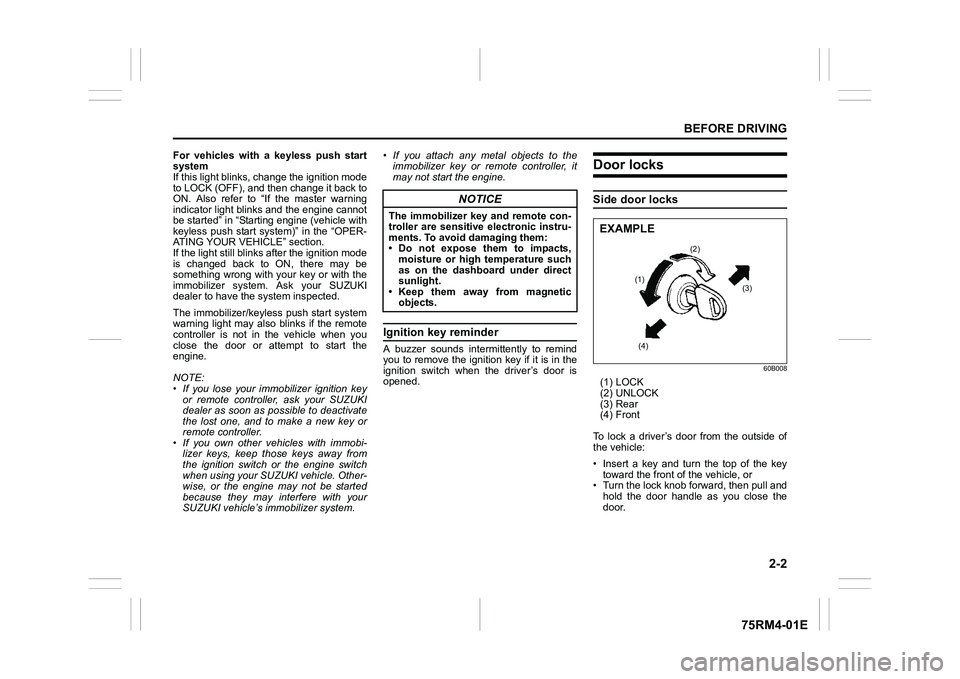
Door locksSide door locks
60B008
(1) LOCK
(2) UNLOCK
(3) Rear
(4) Front
To lock a driver’s door from the outside of
the vehicle:
• Insert a key and turn the top of the key toward the front o f the vehicle, or
• Turn the lock knob forward, then pull and
hold the door handle as you close the
door.
NOTICE
The immobilizer key and remote con-
troller are sensitive electronic instru-
ments. To avoid damaging them:
• Do not expose them to impacts,moisture or high temperature such
as on the dashboard under direct
sunlight.
• Keep them away from magnetic
objects.
(2)
(1) (3)
(4)
EXAMPLE
Page 26 of 505
2-3BEFORE DRIVING
75RM4-01E
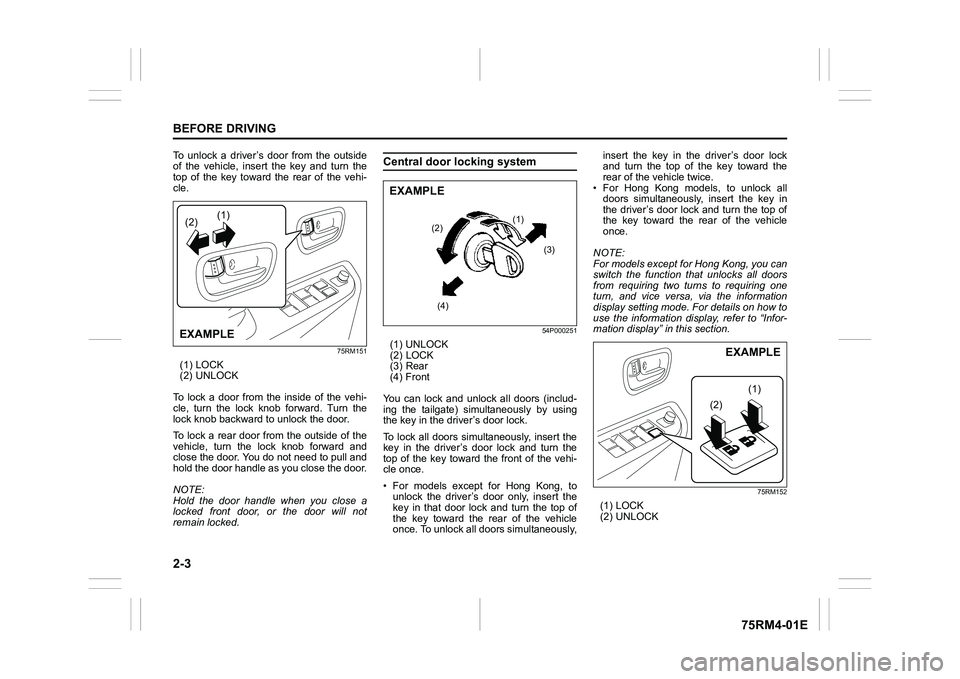
To unlock a driver’s door from the outside
of the vehicle, insert the key and turn the
top of the key toward the rear of the vehi-
cle.
75RM151
(1) LOCK
(2) UNLOCK
To lock a door from the inside of the vehi-
cle, turn the lock knob forward. Turn the
lock knob backward to unlock the door.
To lock a rear door from the outside of the
vehicle, turn the lock knob forward and
close the door. You do not need to pull and
hold the door handle as you close the door.
NOTE:
Hold the door handle when you close a
locked front door, or the door will not
remain locked.
Central door locking system
54P000251
(1) UNLOCK
(2) LOCK
(3) Rear
(4) Front
You can lock and unlock all doors (includ-
ing the tailgate) simultaneously by using
the key in the driver’s door lock.
To lock all doors simultaneously, insert the
key in the driver’s door lock and turn the
top of the key toward the front of the vehi-
cle once.
• For models except for Hong Kong, to unlock the driver’s door only, insert the
key in that door lock and turn the top of
the key toward the rear of the vehicle
once. To unlock all doors simultaneously, insert the key in the driver’s door lock
and turn the top of the key toward the
rear of the vehicle twice.
• For Hong Kong models, to unlock all doors simultaneously, insert the key in
the driver’s door lock and turn the top of
the key toward the rear of the vehicle
once.
NOTE:
For models except for Hong Kong, you can
switch the function that unlocks all doors
from requiring two turns to requiring one
turn, and vice versa, via the information
display setting mode. For details on how to
use the information display, refer to “Infor-
mation display” in this section.
75RM152
(1) LOCK
(2) UNLOCK
(2)(1)EXAMPLE
(1)
(2)
(3)
(4)
EXAMPLE
(2F (1F
EXAMPLE
Page 28 of 505
2-5BEFORE DRIVING
75RM4-01E
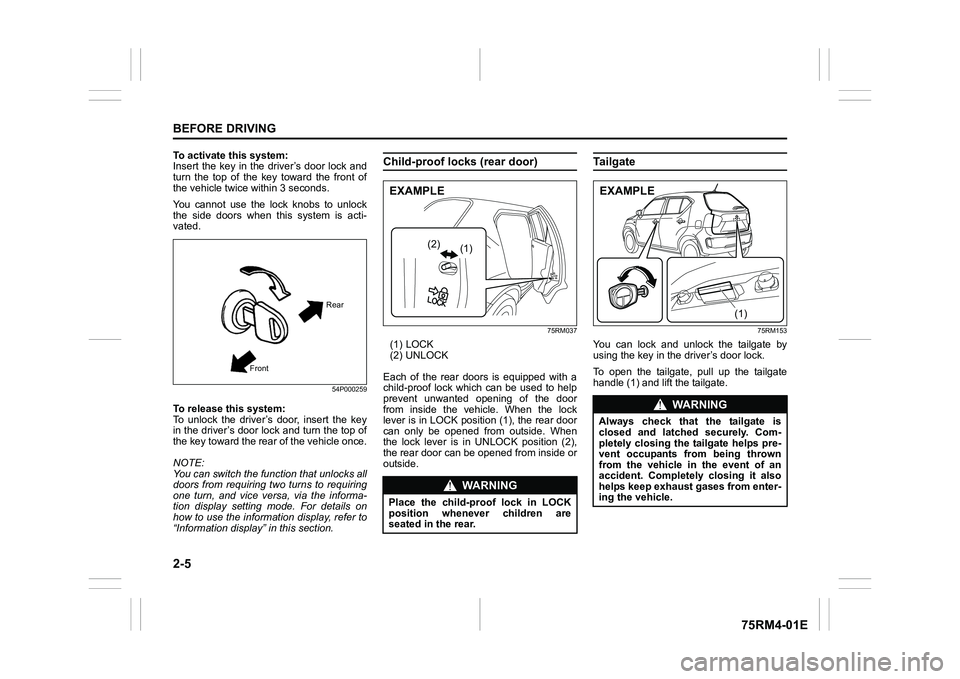
To activate this system:
Insert the key in the driver’s door lock and
turn the top of the key toward the front of
the vehicle twice within 3 seconds.
You cannot use the lock knobs to unlock
the side doors when this system is acti-
vated.
54P000259
To release this system:
To unlock the driver’s door, insert the key
in the driver’s door lock and turn the top of
the key toward the rear of the vehicle once.
NOTE:
You can switch the function that unlocks all
doors from requiring two turns to requiring
one turn, and vice versa, via the informa-
tion display setting mode. For details on
how to use the informati on display, refer to
“Information display” in this section.
Child-proof locks (rear door)
75RM037
(1) LOCK
(2) UNLOCK
Each of the rear doors is equipped with a
child-proof lock which can be used to help
prevent unwanted opening of the door
from inside the vehicle. When the lock
lever is in LOCK position (1), the rear door
can only be opened from outside. When
the lock lever is in UNLOCK position (2),
the rear door can be opened from inside or
outside.
Ta i l g a t e
75RM153
You can lock and unlock the tailgate by
using the key in the driver’s door lock.
To open the tailgate, pull up the tailgate
handle (1) and lift the tailgate.
Front Rear
WA R N I N G
Place the child-proof lock in LOCK
position whenever children are
seated in the rear.
(1)
(2)
(ΟΝ03/(
:Ν 5 1 , 1 *
ΝOZDśΚа FKHFNа WKDWа WKHа WDLOΙDWHа LΚ
FORΚHGа DΦGа ODWFKHGа ΚHFΧUHOśъа ΑRPв
SOHWHOśа FORΚLΦΙа WKHа WDLOΙDWHа KHOSΚа SUHв
YHΦWа RFFΧSDΦWΚа IURPа EHLΦΙа WKURZΦ
IURPа WKHа YHKLFOHа LΦа WKHа HYHΦWа RIа DΦ
DFFLGHΦWъа ΑRPSOHWHOśа FORΚLΦΙа LWа DOΚR
KHOSΚаNHHSаHΞKDΧΚWаΙDΚHΚаIURPаHΦWHUв
LΦΙаWKHаYHKLFOHъ
(1)
(ΟΝ03/(
Page 29 of 505
2-6
BEFORE DRIVING
75RM4-01E
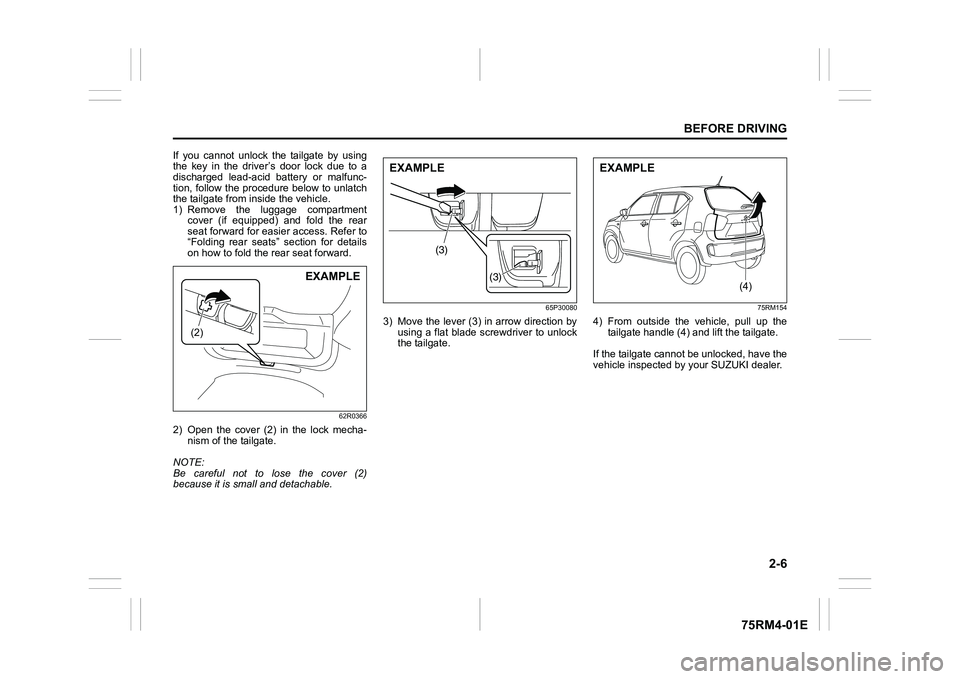
If you cannot unlock the tailgate by using
the key in the driver’s door lock due to a
discharged lead-acid battery or malfunc-
tion, follow the procedure below to unlatch
the tailgate from inside the vehicle.
1) Remove the luggage compartmentcover (if equipped) and fold the rear
seat forward for easier access. Refer to
“Folding rear seats” section for details
on how to fold the rear seat forward.
62R0366
2) Open the cover (2) in the lock mecha-nism of the tailgate.
NOTE:
Be careful not to lose the cover (2)
because it is small and detachable.
65P30080
3) Move the lever (3) in arrow direction by using a flat blade screwdriver to unlock
the tailgate.
75RM154
4) From outside the vehicle, pull up thetailgate handle (4) and lift the tailgate.
If the tailgate cannot be unlocked, have the
vehicle inspected by your SUZUKI dealer.
(2)
EXAMPLE
(3)
(3)
EXAMPLE
(4)
EXAMPLE
Page 31 of 505
2-8
BEFORE DRIVING
75RM4-01E
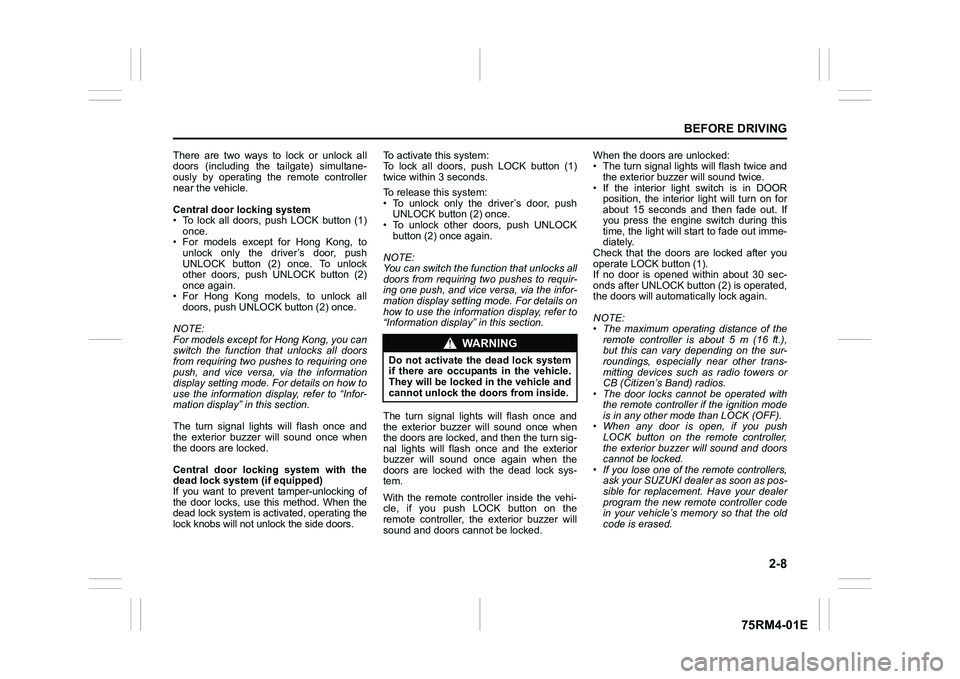
There are two ways to lock or unlock all
doors (including the tailgate) simultane-
ously by operating the remote controller
near the vehicle.
Central door locking system
• To lock all doors, push LOCK button (1)once.
• For models except for Hong Kong, to
unlock only the driver’s door, push
UNLOCK button (2) once. To unlock
other doors, push UNLOCK button (2)
once again.
• For Hong Kong models, to unlock all doors, push UNLOCK button (2) once.
NOTE:
For models except for Hong Kong, you can
switch the function that unlocks all doors
from requiring two pushes to requiring one
push, and vice versa, via the information
display setting mode. For details on how to
use the information display, refer to “Infor-
mation display” in this section.
The turn signal lights will flash once and
the exterior buzzer will sound once when
the doors are locked.
Central door locking system with the
dead lock system (if equipped)
If you want to prevent tamper-unlocking of
the door locks, use this method. When the
dead lock system is activated, operating the
lock knobs will not unlock the side doors. To activate this system:
To lock all doors, push LOCK button (1)
twice within 3 seconds.
To release this system:
• To unlock only the driver’s door, push
UNLOCK button (2) once.
• To unlock other doors, push UNLOCK
button (2) once again.
NOTE:
You can switch the fu nction that unlocks all
doors from requiring two pushes to requir-
ing one push, and vice versa, via the infor-
mation display setting mode. For details on
how to use the informati on display, refer to
“Information display” in this section.
The turn signal lights will flash once and
the exterior buzzer will sound once when
the doors are locked, and then the turn sig-
nal lights will flash once and the exterior
buzzer will sound once again when the
doors are locked with the dead lock sys-
tem.
With the remote controller inside the vehi-
cle, if you push LOCK button on the
remote controller, the exterior buzzer will
sound and doors cannot be locked. When the doors are unlocked:
• The turn signal lights will flash twice and
the exterior buzzer will sound twice.
• If the interior light switch is in DOOR position, the interior light will turn on for
about 15 seconds and then fade out. If
you press the engine switch during this
time, the light will start to fade out imme-
diately.
Check that the doors are locked after you
operate LOCK button (1).
If no door is opened within about 30 sec-
onds after UNLOCK button (2) is operated,
the doors will automatically lock again.
NOTE:
• The maximum operating distance of the
remote controller is about 5 m (16 ft.),
but this can vary depending on the sur-
roundings, especially near other trans-
mitting devices such as radio towers or
CB (Citizen’s Band) radios.
• The door locks cannot be operated with
the remote controller if the ignition mode
is in any other mode than LOCK (OFF).
• When any door is open, if you push
LOCK button on the remote controller,
the exterior buzzer will sound and doors
cannot be locked.
• If you lose one of the remote controllers, ask your SUZUKI dealer as soon as pos-
sible for replacement. Have your dealer
program the new remo te controller code
in your vehicle’s memory so that the old
code is erased.
WA R N I N G
Do not activate the dead lock system
if there are occupants in the vehicle.
They will be locked in the vehicle and
cannot unlock the doors from inside.
Page 32 of 505
2-9BEFORE DRIVING
75RM4-01E
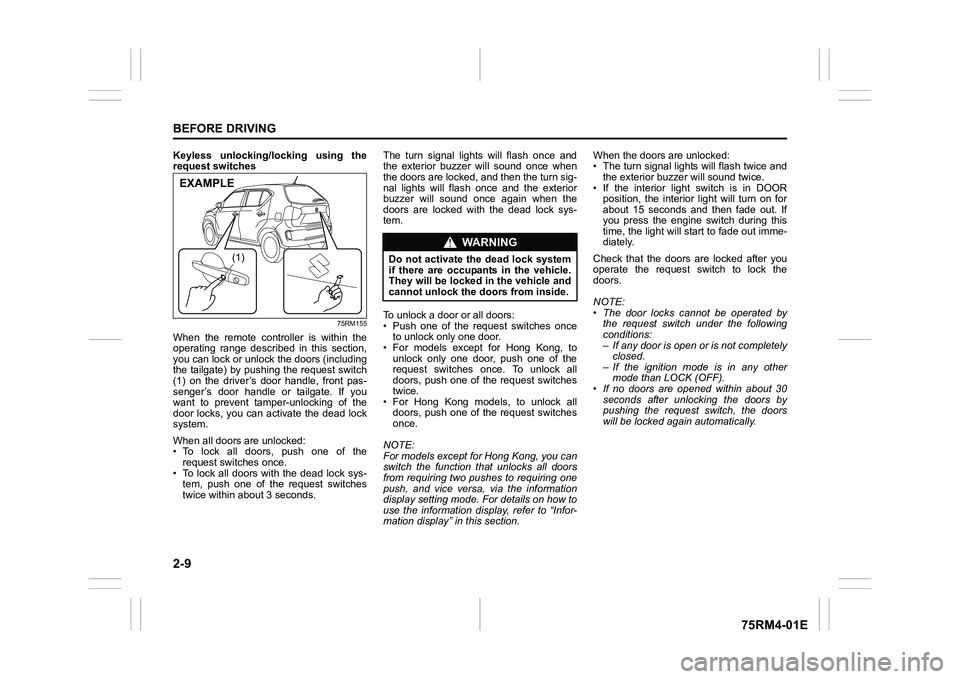
Keyless unlocking/locking using the
request switches
75RM155
When the remote controller is within the
operating range described in this section,
you can lock or unlock the doors (including
the tailgate) by pushing the request switch
(1) on the driver’s door handle, front pas-
senger’s door handle or tailgate. If you
want to prevent tamper-unlocking of the
door locks, you can activate the dead lock
system.
When all doors are unlocked:
• To lock all doors, push one of the request switches once.
• To lock all doors with the dead lock sys- tem, push one of the request switches
twice within abou t 3 seconds. The turn signal lights will flash once and
the exterior buzzer will sound once when
the doors are locked, and then the turn sig-
nal lights will flash once and the exterior
buzzer will sound once again when the
doors are locked with the dead lock sys-
tem.
To unlock a door or all doors:
• Push one of the request switches once
to unlock only one door.
• For models except for Hong Kong, to
unlock only one door, push one of the
request switches once. To unlock all
doors, push one of the request switches
twice.
• For Hong Kong models, to unlock all doors, push one of the request switches
once.
NOTE:
For models except for Hong Kong, you can
switch the function that unlocks all doors
from requiring two pushes to requiring one
push, and vice versa, via the information
display setting mode. For details on how to
use the information display, refer to “Infor-
mation display” in this section. When the doors are unlocked:
• The turn signal lights will flash twice and
the exterior buzzer will sound twice.
• If the interior light switch is in DOOR position, the interior light will turn on for
about 15 seconds and then fade out. If
you press the engine switch during this
time, the light will start to fade out imme-
diately.
Check that the doors are locked after you
operate the request switch to lock the
doors.
NOTE:
• The door locks cannot be operated by the request switch under the following
conditions:
– If any door is open or is not completelyclosed.
– If the ignition mode is in any other mode than LOCK (OFF).
• If no doors are opened within about 30
seconds after unlocking the doors by
pushing the request switch, the doors
will be locked again automatically.
(1)
EXAMPLE
WA R N I N G
Do not activate the dead lock system
if there are occupants in the vehicle.
They will be locked in the vehicle and
cannot unlock the doors from inside.
Page 33 of 505
2-10
BEFORE DRIVING
75RM4-01E
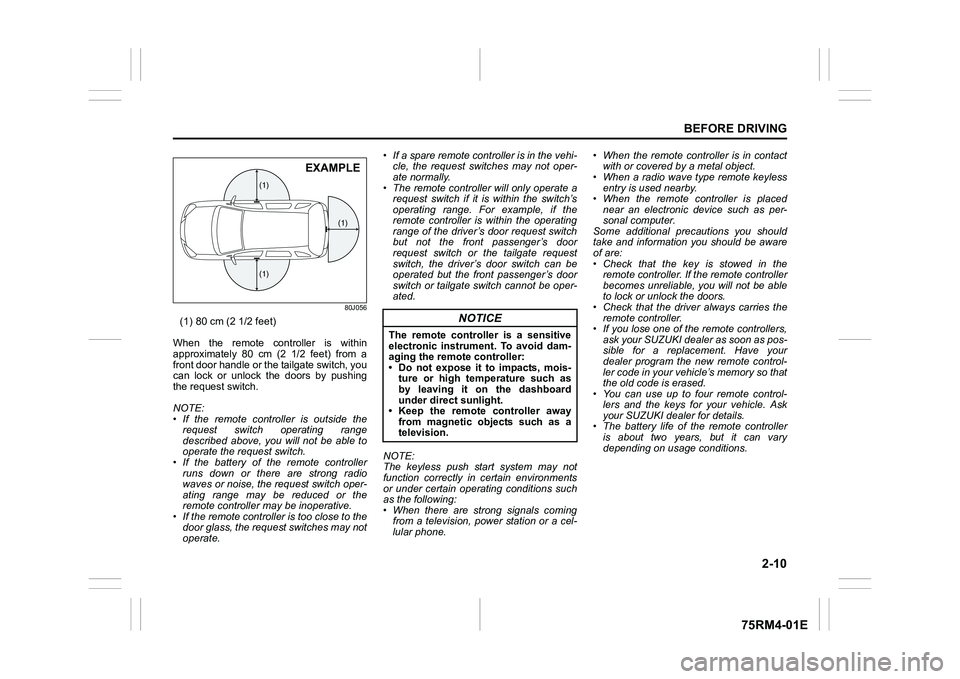
80J056
(1) 80 cm (2 1/2 feet)
When the remote controller is within
approximately 80 cm (2 1/2 feet) from a
front door handle or the tailgate switch, you
can lock or unlock the doors by pushing
the request switch.
NOTE:
• If the remote controller is outside the request switch operating range
described above, you will not be able to
operate the request switch.
• If the battery of th e remote controller
runs down or there are strong radio
waves or noise, the request switch oper-
ating range may be reduced or the
remote controller may be inoperative.
• If the remote controller is too close to the door glass, the request switches may not
operate. • If a spare remote controller is in the vehi-
cle, the request switches may not oper-
ate normally.
• The remote controller will only operate a request switch if it is within the switch’s
operating range. For example, if the
remote controller is within the operating
range of the driver’s door request switch
but not the front passenger’s door
request switch or the tailgate request
switch, the driver’s door switch can be
operated but the front passenger’s door
switch or tailgate switch cannot be oper-
ated.
NOTE:
The keyless push start system may not
function correctly in certain environments
or under certain operating conditions such
as the following:
• When there are strong signals coming from a television, power station or a cel-
lular phone. • When the remote controller is in contact
with or covered by a metal object.
• When a radio wave type remote keyless
entry is used nearby.
• When the remote controller is placed near an electronic device such as per-
sonal computer.
Some additional precautions you should
take and information you should be aware
of are:
• Check that the key is stowed in the remote controller. If the remote controller
becomes unreliable, you will not be able
to lock or unlock the doors.
• Check that the driver always carries the
remote controller.
• If you lose one of the remote controllers,
ask your SUZUKI dealer as soon as pos-
sible for a replacement. Have your
dealer program the new remote control-
ler code in your vehicle’s memory so that
the old code is erased.
• You can use up to four remote control-
lers and the keys for your vehicle. Ask
your SUZUKI dealer for details.
• The battery life of the remote controller
is about two years, but it can vary
depending on usage conditions.
(1)
(1)
(1)
EXAMPLE
NOTICE
The remote controller is a sensitive
electronic instrument. To avoid dam-
aging the remo te controller:
• Do not expose it to impacts, mois- ture or high temperature such as
by leaving it on the dashboard
under direct sunlight.
• Keep the remote controller away
from magnetic objects such as a
television.