Sim SUZUKI JIMNY 2019 Owner's Manual
[x] Cancel search | Manufacturer: SUZUKI, Model Year: 2019, Model line: JIMNY, Model: SUZUKI JIMNY 2019Pages: 421, PDF Size: 6.35 MB
Page 219 of 421

TPMS limitations
The tyre pressure monitoring system may not function properly under certain circumstances. In the following situations, the low tyre pressure warning light may come on and remain on or may blink. When you replace a flat tyre with the spare tyre. When you include a spare tyre during a tyre rotation. When the TPMS sensor is damaged during a tyre replacement or liquid sealants are used to repair a flat tyre. When the electronic signal of TPMS sensor is disturbed in one of the following ways: -Electric devices or facilities using similar radio wave frequencies are nearby. -A metallic film that may cause radio wave interference is attached on the window. -A lot of snow or ice covers the vehicle, in particular, around the wheels or wheel housings. -Snow tyres that are not installed with genuine TPMS sensors or snow chains are used.
When you use non-genuine SUZUKI wheels or tyres. When the pressure of any tyre is too high. When there is a problem with the receiver of the TPMS controller.
TPMS setting (For instrument cluster -Type A)
You can set one of the initial value of tyre pressure below that is indicated on the tyre information label. -Comfort Mode -Load Mode
For details on how to set the mode, refer to "Setting mode" in "BEFORE DRIVING" section.
A WARNING
If the loading weight has changed, adjust the tyre pressure according to the tyre information label and set the initial value via the information display. If the loading weight, tyre pressure and initial value do not match, the tyre pressure monitoring system will not function properly.
OPERATING YOUR VEHICLE
TPMS setting (For instrument clus
ter• Type B)
• You can check the current tyre pressure on the information display. • You can set one of the initial value of tyre pressure below that is indicated on the tyre information label. -Comfort Mode
-Load Mode
A WARNING
If the loading weight has changed, adjust the tyre pressure according to the tyre information label and set the initial value via the information display. If the loading weight, tyre pressure and initial value do not nJatch, the tyre pressure monitoring system will not function properly.
3-68
Page 234 of 421
DRIVING TIPS
Driving on hills
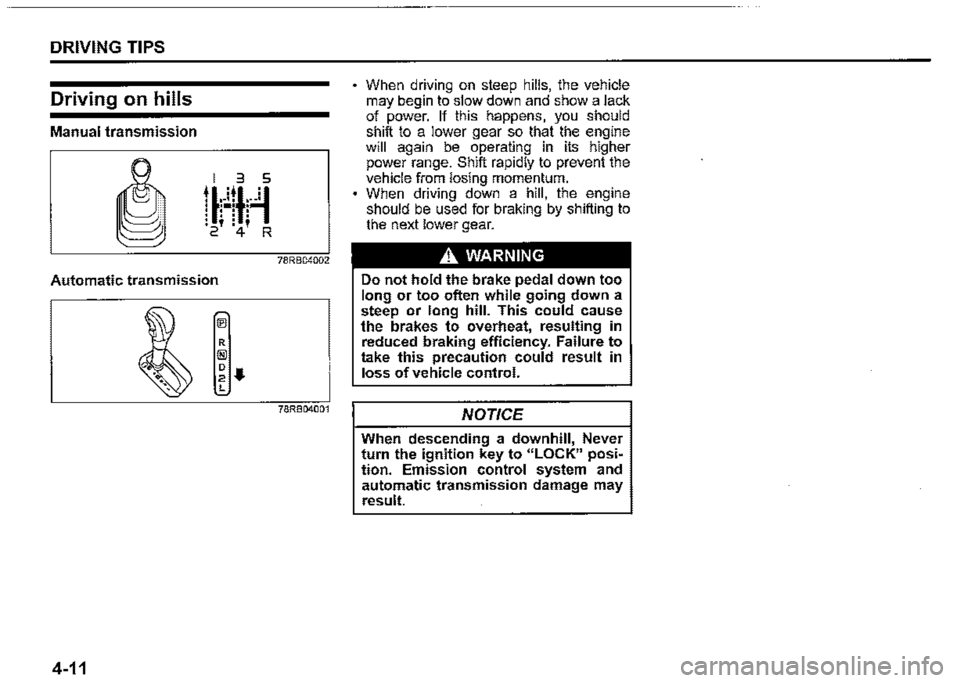
Manual transmission
78RB04002
Automatic transmission
78RB04001
4-11
When driving on steep hills, the vehicle may begin to slow down and show a lack of power. If this happens, you should shift to a lower gear so that the engine will again be operating in its higher power range. Shift rapidly to prevent the vehicle from losing momentum. When driving down a hill, the engine should be used for braking by shifting to the next lower gear.
A WARNING
Do not hold the brake pedal down too long or too often while going down a steep or long hill. This could cause the brakes to overheat, resulting in reduced braking efficiency. Failure to take this precaution could result in loss of vehicle control.
NOTICE
When descending a downhill, Never turn the ignition key to "LOCK" posiM lion. Emission control system and automatic transmission damage may result.
Page 236 of 421
OTHER CONTROLS AND EQUIPMENT
Fuel filler cap
78RB05001
5-1
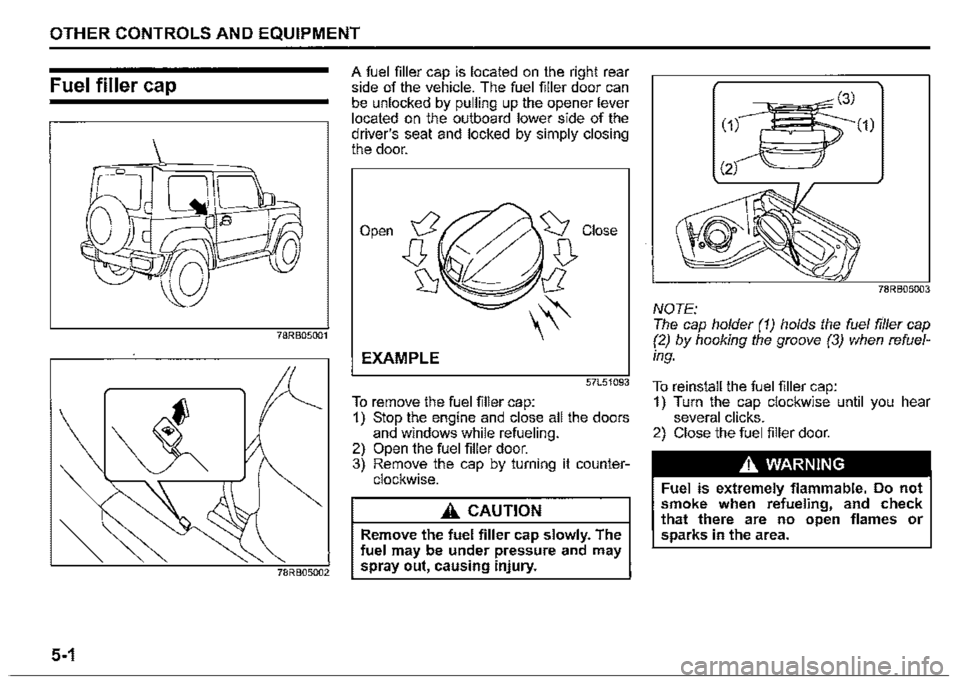
A fuel filler cap is located on the right rear side of the vehicle. The fuel filler door can be unlocked by pulling up the opener lever located on the outboard lower side of the driver's seat and locked by simply closing the door.
Open
EXAMPLE
57L51093
To remove the fuel filler cap: 1) Stop the engine and close all the doors and windows while refueling. 2) Open the fuel filler door. 3) Remove the cap by turning it counterclockwise.
A CAUTION
Remove the fuel filler cap slowly. The fuel may be under pressure and may spray out, causing injury.
78RB05003
NOTE: The cap holder (1) holds the fuel filler cap (2) by hooking the groove (3) when refuel
ing.
To reinstall the fuel filler cap: 1) Turn the cap clockwise until you hear several clicks. 2) Close the fuel filler door.
A WARNING
Fuel is extremely flammable. Do not smoke when refueling, and check that there are no open flames or sparks in the area.
Page 240 of 421

OTHER CONTROLS AND EQUIPMENT
Interior light
Front
52RM50070
This light switch has three positions which function as described below:
ON (1) The light comes on and stays on regardless of whether the door is open or closed.
NOTE: The light will automatically be turned off to prevent the lead-acid battery from discharging when the following conditions are simultaneously met: The ignition switch is in "LOCK" position. The hazard warning lights, the position lights and the headlights are off.
5-5
• After 15 minutes from the light on.
DOOR (2) The light comes on when the door is opened. After closing all doors, the light will remain on for about 15 seconds and then fade out. If you insert the key to change the ignition mode to "ACC" or "ON" during this time, the light will start to fade out immediately. After removing the key from the ignition switch, the light will turn on for about 15 seconds and then fade out.
NOTE: The light will automatically be turned off to prevent the lead-acid battery from discharging when the following conditions are simultaneously met: • The ignition switch is in "LOCK" position. • After about 15 minutes of the light on.
OFF (3) The light remains off even when the door is opened.
Luggage compartment
(if equipped)
ON @l) o @i OFF
(1) (2)
78RB05010
This light switch has three positions which function as described below:
ON (1) The light comes on and stays on regardless of whether the tailgate is open or closed.
NOTE: The light will automatically be turned off to prevent the lead-acid battery from discharging when the following conditions are simultaneously met: The ignition switch is in "LOCK" position. The hazard warning lights, the position lights and the headlights are off. After 15 minutes from the light on.
Page 241 of 421

DOOR (2) The light comes on when the tailgate is opened. After closing the tailgate, the light will remain on for about 15 seconds and then fade out. If you insert the key to change the ignition mode to "ACC" or "ON" during this time, the light will start to fade out immediately. After removing the key from the ignition switch, the light will turn on for about 15 seconds and then fade out.
NOTE: The light will automatically be turned off to prevent the lead-acid battery from discharging when the following conditions are
simultaneously met: • The ignition switch is in "LOCK" position. • After about 15 minutes of the light on.
OFF (3) The light remains off even when the tailgate is opened.
NOTICE
Do not leave the tailgate open with the luggage · compartment light switch in ON position for a long time, or the lead-acid battery will discharge.
OTHER CONTROLS AND EQUIPMENT
NOTE: The light will automatically be turned off to prevent the lead-acid battery from discharging when after 15 minutes of the tail
gate open.
78RB05011
NOTE: The number of doors involved in the lighting operation of the interior light depends on the vehicle specification. If there is a switch (rubber protrusion) at the door opening as shown, the door is involved in the lighting operation. The tailgate is also involved in this operation even without the rubber protrusion.
Accessory socket
Luggage compartment (if equipped)
5-6
Page 312 of 421
![SUZUKI JIMNY 2019 Owners Manual OTHER CONTROLS AND EQUIPMENT
Setting the anti-theft function
1) Press "VOL PUSH PWR" knob (1) to
power off.
2) Hold down the buttons numbered [1]
and [6] of PRESET buttons (2) and
press "VOL PUS](/img/20/43483/w960_43483-311.png "SUZUKI JIMNY 2019 Owners Manual OTHER CONTROLS AND EQUIPMENT
Setting the anti-theft function
1) Press \"VOL PUSH PWR\" knob (1) to
power off.
2) Hold down the buttons numbered [1]
and [6] of PRESET buttons (2) and
press \"VOL PUS")
OTHER CONTROLS AND EQUIPMENT
Setting the anti-theft function
1) Press "VOL PUSH PWR" knob (1) to
power off.
2) Hold down the buttons numbered [1]
and [6] of PRESET buttons (2) and
press "VOL PUSH PWR" knob (1).
"SECURITY" will be displayed.
3) Press UP button (3) and the button
numbered [1] of PRESET buttons (2)
simultaneously.
4) Enter a 4-digit number to be registered
as PIN using the buttons numbered [1]
-[4] of PRESET buttons (2).
5) Hold down "TUNE/FLO PUSH
SOUND" knob (4) for 1 second or lon
ger to set the anti-theft function.
NOTE:
Take a note of the registered PIN and keep
it for the future use.
5-77
Canceling the anti-theft feature
To cancel the anti-theft function, delete the
registered PIN.
1) Press "VOL PUSH PWR" knob (1) to
power off.
2) Hold down the buttons numbered [1]
and [6] of PRESET buttons (2) and
press "VOL PUSH PWR" knob (1).
"PIN ENTRY" will be displayed.
3) Press UP button (3) and the button
numbered [1] of PRESET buttons (2)
simultaneously.
4) Enter a 4-digit number to be registered
as PIN using the buttons numbered [1]
-[4] of PRESET buttons (2).
5) Hold down "TUNE/FLO PUSH
SOUND" knob (4) for 1 second or lon
ger to delete the registered PIN. The
indication "---" will be displayed and
the anti-theft function will be canceled.
NOTE:
To change your PIN, first delete your cur
rent PIN, and then set a new one.
Confirming the Personal Identification
Number (PIN)
When the main power source is discon
nected such as when the lead-acid battery
is replaced, etc. it is required to enter the
PIN to operate the unit again.
1) Set the ignition switch to "ACC" posi
tion.
"SECURITY" will be displayed.
2) Press UP button (3) and the button
numbered [1] of PRESET buttons (2)
simultaneously.
3) Enter a 4-digit number to be registered
as PIN using the buttons numbered [1]
-[4] of PRESET buttons (2).
4) Hold down "TUNE/FLO PUSH
SOUND" knob (4) for 1 second or lon
ger.
When the same PIN as registered is
entered, the power of the audio system
will be turned off automatically and it
will become operable again.
NOTE:
If an incorrect PIN is entered, "ERROR"
and the total number of incorrect entry
attempts will be displayed.
If an incorrect PIN is entered 10 times or
more, "HELP" will be displayed and the
audio system will become inoperable.
Page 366 of 421
INSPECTION AND MAINTENANCE
0
68PH00732
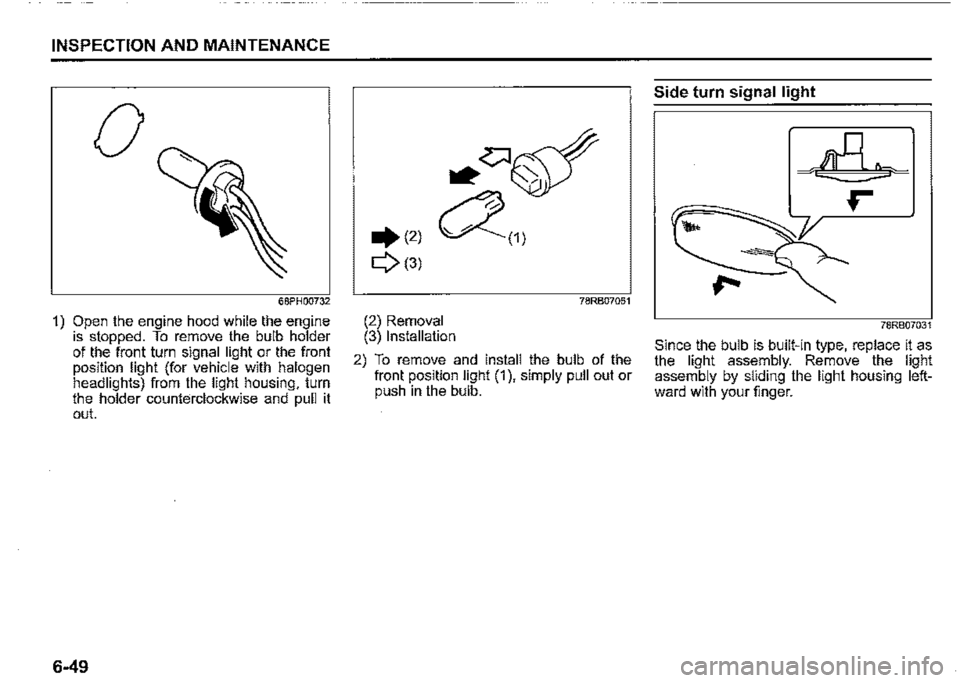
1) Open the engine hood while the engine is stopped. To remove the bulb holder of the front turn signal light or the front position light (for vehicle with halogen headlights) from the light_ housing, turn the holder counterclockw1se and pull 1t out.
6-49
.(2)
Q(3)
78RB07051
(2) Removal (3) Installation
2) To remove and install the bulb of the front position light (1 ), simply pull out or push in the bulb.
Side turn signal light
78RB07031
Since the bulb is built-in type, replace ii as the light assembly. Remove the light assembly by sliding the light housing leftward with your finger.
Page 369 of 421
(2) (4)(5)
78R807037
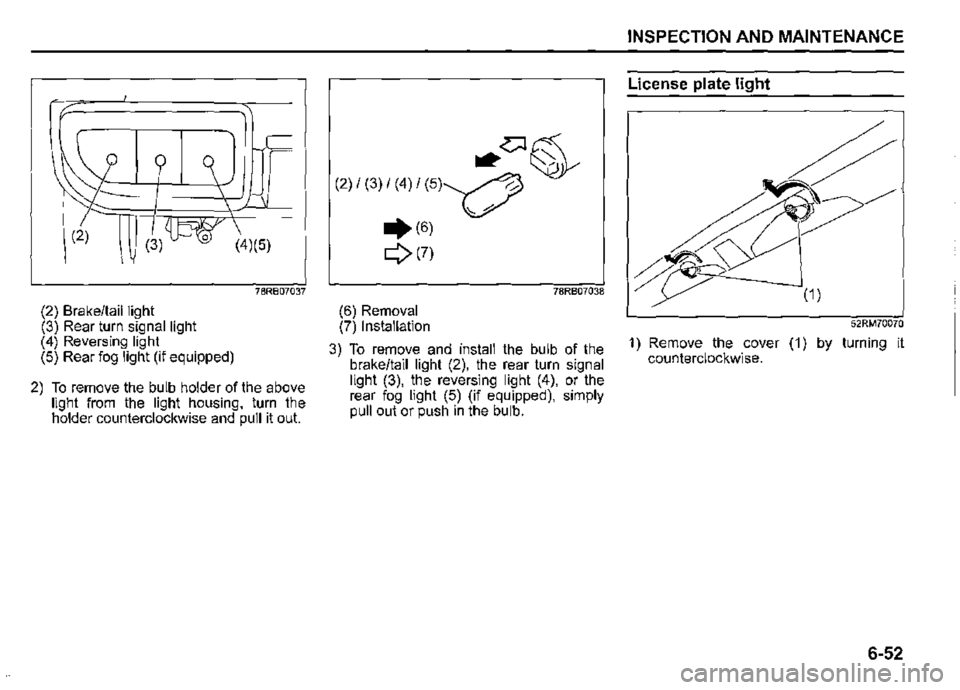
(2) Brake/tail light (3) Rear turn signal light (4) Reversing light (5) Rear fog light (if equipped)
2) To remove the bulb holder of the above light from the light housing, turn the holder counterclockwise and pull it out.
~~~
(2) / (3) / (4) / (5)~ ,
.. (6) V'
Q(7)
78RB07038
(6) Removal (7) Installation
3) To remove and install the bulb of the brake/tail light (2), the rear turn signal light (3), the reversing light (4), or the rear fog light (5) (if equipped), simply pull out or push in the bulb.
INSPECTION AND MAINTENANCE
License plate light
52RM70070
1) Remove the cover (1) by turning it counterclockwise.
6-52
Page 370 of 421
INSPECTION AND MAINTENANCE
76MH0A126
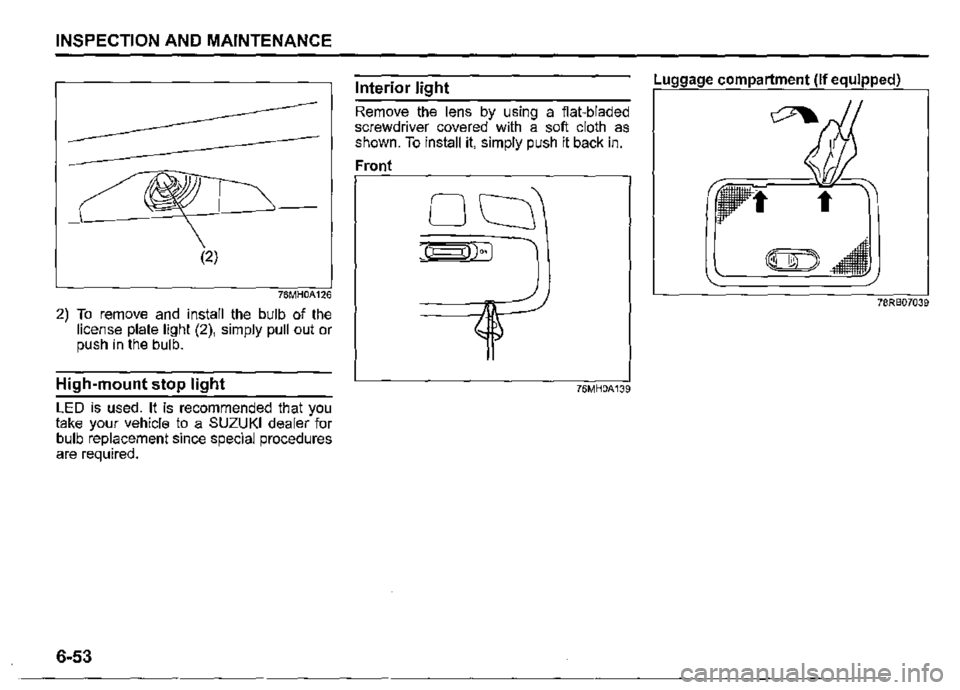
2) To remove and install the bulb of the license plate light (2), simply pull out or push in the bulb.
High-mount stop light
LED is used. It is recommended that you take your vehicle to a SUZUKI dealer for bulb replacement since special procedures are required.
6-53
Interior light
Remove the lens by using a flat-bladed screwdriver covered with a soft cloth as shown. To install it, simply push it back in.
Front
76MH0A139
Luggage compartment (if equipped)
78RB07039