change time SUZUKI JIMNY 2022 User Guide
[x] Cancel search | Manufacturer: SUZUKI, Model Year: 2022, Model line: JIMNY, Model: SUZUKI JIMNY 2022Pages: 421, PDF Size: 6.35 MB
Page 129 of 421
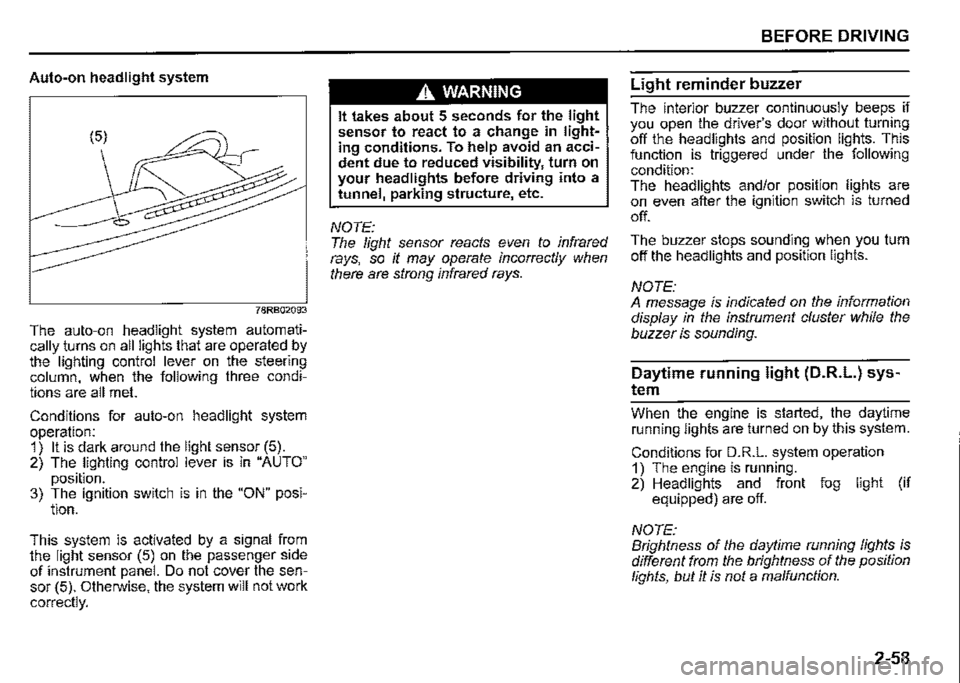
Auto-on headlight system
78RB02093
The auto-on headlight system automatically _turns on all lights that are operated by the lighting control lever on the steering column, when the following three conditions are all met.
Conditions for auto-on headlight system operation: 1) It is dark around the light sensor (5). 2) The lighting control lever is in "AUTO"
position. 3) The ignition switch is in the "ON" posi-tion.
This. system is activated by a signal from the light sensor (5) on the passenger side of instrument panel. Do not cover the sensor (5). Otherwise, the system will not work
correctly.
A WARNING
It takes about 5 seconds for the light sensor to react to a change in lighting conditions. To help avoid an accident due to reduced visibility, turn on your headlights before driving into a tunnel, parking structure, etc.
NOTE: The light sensor reacts even to infrared rays, so it may operate incorrectly when there are strong infrared rays.
BEFORE DRIVING
Light reminder buzzer
The interior buzzer continuously beeps if you open the driver's door without turning off the headlights and position lights. This function is triggered under the following condition: The headlights and/or position lights are on even after the ignition switch is turned
off.
The buzzer stops sounding when you turn off the headlights and position lights.
NOTE: A message is indicated on the information display in the instrument cluster while the buzzer is sounding.
Daytime running light (D.R.L.) sys
tem
Whe_n th_e engine is started, the daytime running lights are turned on by this system.
Conditions for D.R.L. system operation 1) The engine is running. 2) Headlights and front fog light (if equipped) are off.
NOTE: Brightness of the daytime running lights is different from the brightness of the position lights, but it is not a malfunction.
2-58
Page 130 of 421
BEFORE DRIVING
Guide me light (if equipped)
Guide me light has two functions of "To home" and "To car" for improving your visibility in the dark.
"To home" function Even after you leave the car, the ground will be illuminated for a short while with this function. You can turn on the front position lights and the headlights in the low beam setting for about 1 O seconds after the ignition switch is turned "LOCK".
To set the function: 1) Turn the lighting switch to "AUTO" position. 2) Turn the ignition switch to "LOCK" position. 3) Pull the lighting control lever toward you once and open the driver's side door within 60 seconds. Or pull the lighting control lever toward you once while the driver's side door is open.
2-59
To cancel the function: Perform any of the following operations. · If your vehicle is equipped with the keyless entry system (if equipped), it is necessary to insert the ignition key in the ignition switch. Pull the lighting control lever toward you once. Turn the ignition switch to "ACC" or "ON" position. Turn the lighting switch to any other position than "AUTO" position.
NOTE: When the "To home" is functioning, the front fog lights (if equipped), rear fog light and the headlights (high beam) are not turned on. Lighting time of the "To home" function can be changed on the information display. Refer to "Information display" in this section.
"To car" function Before you get in the vehicle, the ground will be illuminated for a short while to easily lead the driver to the vehicle. If "UNLOCK" button of the keyless entry system transmitter (if equipped) is pressed while the lighting switch is positioned in "AUTO", the front position lights and the headlights in the low beam are turned on for 1 O seconds. This function will operate only when it is dark outside the vehicle.
To cancel the function: Perform any of the following operations. If your vehicle is equipped with the keyless entry system (if equipped), it is necessary to insert the ignition key in the ignition switch. Lock the doors by using the keyless entry system transmitter, or the key in the driver's door lock. Turn the ignition switch to "ACC" or "ON" position. Turn the lighting switch to any other position than "AUTO" position.
NOTE: When the ''To car'' is functioning, the front fog lights (if equipped), rear fog fight and the headlights (high beam) are not turned on. Lighting time of the "To car'' function can be changed on the information display. Refer to "Information display" in this section.
Page 137 of 421
Turn signal control lever
57L21128
A WARNING
To avoid possible injury, do not operate controls by reaching through the steering wheel.
Turn signal operation
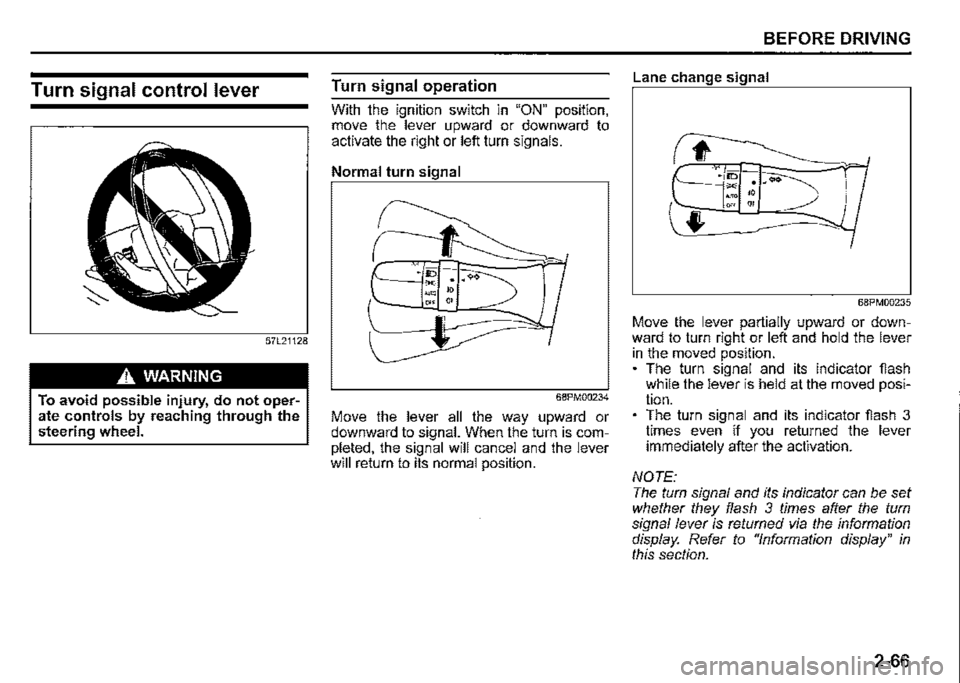
With the ignition switch in "ON" position. move the lever upward or downward to activate the right or left turn signals.
Normal turn signal
68PM00234
Move the lever all the way upward or downward to signal. When the turn is completed, the signal will cancel and the lever will return to its normal position.
BEFORE DRIVING
Lane change signal
68PM00235
Move the lever partially upward or downward to turn right or left and hold the lever in the moved position. The turn signal and its indicator fiash while the lever is held at the moved position. The turn signal and its indicator fiash 3 times even if you returned the lever immediately after the activation.
NOTE: The turn signal and its indicator can be set whether they flash 3 times after the turn signal lever is returned via the information display. Refer to "Information display" in this section.
2-66
Page 175 of 421

Changing cruising speed
Using the accelerator pedal To reset at a faster cruising speed, accelerate to the desired speed using the accelerator pedal and push down the "RES +/SET-" switch (3). The new speed will be main
tained.
Using the brake pedal To reset at a slower cruising speed, decelerate to the desired speed using the brake pedal and push down the "RES +/SET -" switch (3). The new speed will be main
tained.
NOTE: When the brake pedal is depressed, "SET" indicator light (5) or set indicator (7) goes off until the cruising speed is reset.
Using "RES +/SET-" switch To reset at a faster cruising speed, press repeatedly or hold push up the "RES +/ SET -" switch (3). Vehicle speed will steadily increase. When you release the switch, the new speed will be maintained.
To reset at a slower cruising speed, press repeatedly or hold push down the "RES +/ SET -" switch (3) until the vehicle has slowed to the desired speed, and then release the switch. The new speed will be maintained.
NOTE: You can adjust the set speed by approximately 1 km/h (1 mph) by pushing "RES +/ SET-" switch quickly
Cancelling cruise control
"SET' indicator light (5) or set indicator (7) will go off and the cruise control will be canceled temporarily with the following conditions:
Push "CANCEL" switch (2). Depress the brake pedal. For manual transmission vehicle, depress the clutch pedal. For automatic transmission vehicle, the gear position is changed to "L" When the transfer lever is operated, The vehicle speed falls more than about 20 percent from the set speed. Any time the vehicle speed falls below 40 km/h (25 mph). When the vehicle skids and ESP® is activated.
To resume the previously set speed, push up the "RES +/SET-" switch (3) and turn on "SET' indicator light (5) or set indicator (7). The vehicle speed must be above 40 km/h (25 mph) when the vehicle is not under the above conditions.
OPERATING YOUR VEHICLE
To turn off the cruise control system, push cruise switch (1) and check that the cruise indicator light (4) or cruise indicator (6)
goes off.
Also, if the malfunction indicator light in the instrument cluster comes on or blinks, the cruise control system will be turned off.
NOTE: If you turn off the cruise control system, the previously set speed in the memory is cleared. Reset your cruising speed again.
3-24
Page 190 of 421
OPERATING YOUR VEHICLE
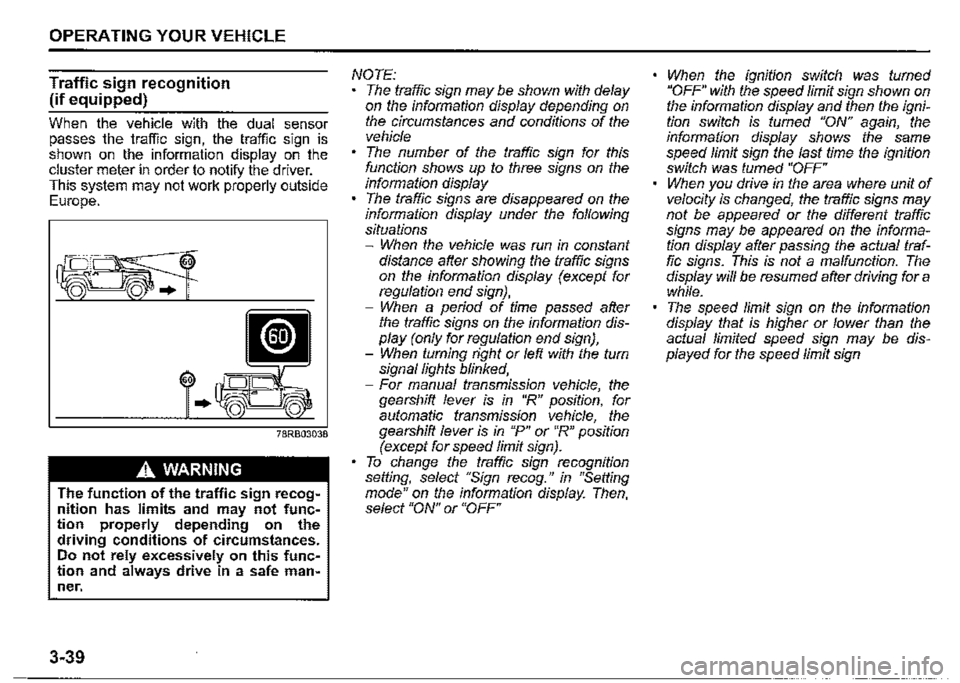
Traffic sign recognition
(if equipped)
When the vehicle with the dual sensor passes the traffic sign, the traffic sign is shown on the information display on the cluster meter in order to notify the driver. This system may not work properly outside Europe.
60
..
A WARNING
The function of the traffic sign recognition has limits and may not function properly depending on the driving conditions of circumstances. Do not rely excessively on this function and always drive in a safe man~ ner.
3-39
NOTE: The traffic sign may be shown with delay on the information display depending on the circumstances and conditions of the vehicle The number of the traffic sign for this function shows up to three signs on the information display The traffic signs are disappeared on the information display under the following situations -When the vehicle was run in constant distance after showing the traffic signs on the information display (except for regulation end sign}, -When a period of time passed after the traffic signs on the information display (only for regulation end sign), -When turning right or left with the turn signal lights blinked, -For manual transmission vehicle, the gearshift lever is in "R" position, for automatic transmission vehicle, the gearshift lever is in "P" or "R" position (except for speed limit sign). To change the traffic sign recognition setting, select "Sign recog." in "Setting mode" on the information display. Then, select "ON" or "OFF"
When the ignition switch was turned "OFF" with the speed limit sign shown on the information display and then the ignition switch is fumed "ON" again, the information display shows the same speed limit sign the last time the ignition switch was fumed "OFF" When you drive in the area where unit of velocity is changed, the traffic signs may not be appeared or the different traffic signs may be appeared on the information display after passing the actual traffic signs. This is not a malfunction. The display will be resumed after driving for a while. The speed limit sign on the information display that is higher or lower than the actual limited speed sign may be displayed for the speed limit sign
Page 201 of 421

72M20405
When your vehicle is weighed down by heavy items in the luggage compartment or rear seat When wheel alignment is deviated When the tyres are not infiated to the recommended tyre pressure or the tyres are worn With snow chains or non-specified sized tyres equipped When you have a temporarily repaired fiat tyre With a modified suspension equipped When passing through the entrance or exit of the tunnel and the brightness is changed extremely When driving without lighting the headlights at night or in tunnels When driving on the following roads -On sharp curves or extremely rough surfaces -On a steep slope -On seam of the road When vehicle is swaying When the optical axis of the headlight is deviated
With modified headlights and/or front fog lights equipped When the headlights are covered in dirt, snow, ice or mud
When the following types of a vehicle are in front of you, or when the following situations occur, the dual sensor may not detect a vehicle in front of you or may need more time to detect a vehicle. ·
72M20407
Vehicles in front of you have small, low, or uneven backs as shown below: -A track without side or back gates, and when mounting no luggage on the cargo bed -A vehicle with luggage protruding out from the back -A specially shaped vehicle such as a car carrier trailer or a motorcycle with side car -A low-slung vehicle When ground clearance of vehicle in front of you is extremely high. When a vehicle is oncoming or retreating vehicle
OPERATING YOUR VEHICLE
When a vehicle facing sideways When a vehicle in front of you without turning on the tail lights at night or in tunnels When a vehicle in front of you refiects sunlight strongly When there is a wall in front of the parked vehicle When there is another obstacle beside a vehicle
D
72M20406
When only a part of the vehicle in front of you is within the dual sensor detection field When the difference of speed between the vehicle in front of you and your vehicle is increased When the distance to the vehicle in front of you is short When the vehicle in front of you is difficult to refiect the laser beam When driving on a curve For a while after escaping from a curve When the vehicle in front of you turns, accelerates or decelerates suddenly When a vehicle in front of you jumps out
3-50
Page 202 of 421

OPERATING YOUR VEHICLE
• When you change the lane and approach the leading vehicle
When the following types of partition lines are in front of you, or when the following situations occur, the dual sensor may not detect the lines or may need more time to detect the lines. • The narrow lane width • When the lane is difficult to detect -No partition lines, or faded lines -The color of partition lines is similar to the road -The width of partition lines is narrow -The partition lines has blurred -There are road studs or stones -The partition lines can not be seen, or difficult to see due to sand, etc. -Driving on a road that is wet due to rain, after the rain, puddles, etc. -The partition lines drew on a curb -Driving on a road that is bright due to reflected light, etc. When the distance to the vehicle in front of you is short Immediately after the lane change, or immediately after passing through the intersection.
3-51
Page 206 of 421
OPERATING YOUR VEHICLE
A WARNING
If the ABS warning light (1) on the instrument cluster comes on and stays on while driving, there may be a problem with the ABS system. Ask a SUZUKI dealer to inspect the ABS system immediately. If the ABS system becomes inoperative, the brake system will function as an ordinary brake system that has no ABS. If the ABS warning light (1) and the brake system warning light (2) on the instrument cluster simultaneously stay on or come on while driving, both anti-lock function and rear brake force control function (proportioning valve function) of the ABS system may have failed. If so, the rear wheels may easily skid or the vehicle can even spin in the worst case when braking on a slippery road or when hard braking even on a dry paved road. Ask a SUZUKI dealer to inspect the ABS system immediately. Drive carefully, avoiding hard braking as much as possible.
3-55
How ABS works
A computer continuously monitors wheel speed. The computer compares the changes in wheel speed when braking. If the wheels slow suddenly. indicating a skidding situation, the computer will change braking pressure several times each second to prevent the wheels from locking. When you start your vehicle or when you accelerate after a hard stop. you may hear a momentary motor or clicking noise as the system resets or checks itself.
A WARNING
The ABS may not work properly if tyres or wheels other than those specified in the owner's manual are used. This is because the ABS works by comparing changes in wheel speed. When replacing tyres or wheels, use only the size and type specified in this owner's manual.
Electronic stability program
(ESP®)
ESP® is a registered trademark of Daimler
AG.
The Electronic Stability Program (ESP®) helps to control the vehicle during cornering if front wheels or rear wheels skid. It also assists you in maintaining traction while accelerating on loose or slippery road surfaces. It does this by regulating the engine's output, and by_ . selective!¥ applying the brakes. In add1t1on, ESP helps to avoid skidding by controlling braking pressure.
A WARNING
The ESP® cannot enhance the vehicle's driving stability in all situations and does not control your vehicle's entire braking system. The ESP® cannot prevent accidents, including those resulting from excessive speed in turns, or hydroplaning. Only safe and attentive drive can prevent accidents. The capabilities of an ESP®
equipped vehicle must never be used as a substitute for careful driving.
Page 226 of 421

DRIVING TIPS
Know Your Vehicle
Take time to familiarize yourself with the unique handling characteristics of your vehicle by first driving around in an area away from traffic. Practice turning the vehicle at a variety of speeds and in different directions. Get a feel for the greater steering response that your vehicle has over a conventional car.
Wear Your Seat Belts at All Times
The driver and all passengers should be properly restrained at all times, using the seat belts provided. Refer to the "SEAT BELTS" section for instructions on proper use of the seat belts.
Don't Make Sharp Turns
As mentioned before, small multipurpose vehicles have specific design characteristics that allow them to perform in a wide variety of applications. These characteristics also change the cornering behavior relative to conventional passenger cars. Remember, small multipurpose vehicles have more responsive steering and a higher center of gravity than conventional passenger cars. If at all possible, avoid making sharp turns in your vehicle.
4-3
Slow Down on Curves
Learn to approach curves cautiously and at a conservative speed. Do not attempt to take curves at the same speeds that you would in a vehicle with a lower center of gravity. Just as you would not drive a sports car on a trail, you should not attempt to drive your vehicle around curves like a sports car.
Slow Down and Use Caution on
Slippery Roads
60G089A
Under wet road conditions you should drive at a lower speed than on dry roads due to possible slippage of tyres during braking. When driving on icy, snow-covered, or muddy roads, reduce your speed and avoid sudden acceleration, abrupt braking, or sharp steering movements. Use 4-wheel drive high range (4H) for better traction.
Page 227 of 421
NOTICE
Never operate your vehicle in 114H" or 114L11 on dry pavement and, as much as possible, avoid using 114H" or 114L" on wet pavement, as this puts severe stress on the drive train, especially during tight cornering, and can d~mage it. Also, you may have some d1ff1~ culty in steering.
Off-Road Driving
Your vehicle has specific design characteristics for off-road driving. When you leave the paved road, you will encounter driving surfaces of all kinds which may change continually as you drive. In most cases, offroad driving requires the use of 4-wheel drive.
Use Caution on Steep Inclines
Always inspect hills before you attempt to drive up them. Know what is on the other side and how you will get back down. If you have any doubt that it. is safe, do not attempt to drive over a hill. Nev".r d_nve your vehicle up an extremely steep incline. Coming down a steep hill can be trickier than getting up one. Keep the vehicle heading straight down the hill and use low gear. Do not lock the brake~. If the vehicle begins to slide, accelerate slightly to regain steering control.
DRIVING TIPS
Do not Drive Across the Side of
Hills
Driving across the side of a hill can be extremely hazardous. Most of the vehicle'.s weight will be transferred to the downhill tyres, which could result in the vehicle rolling sideways. Whenever possible, avoid this potential hazard. Also, 1f you have to exit your vehicle on a side-hill, always get out on the uphill side.
Wear Your Seat Belts at All Times
You and your passengers should use the seat belts at all times when driving offroad. For proper seat belt use, refer to the "Seat Belts" section in this manual.
Avoid Sudden Reactions in Mud,
Ice, or Snow
Be careful when off-road conditions are slippery. Reduce your speed and avoid sudden movements of the vehicle. Be aware that driving in deep snow or mud can cause a loss of traction and an increase in the resistance to the vehicle's forward motion. Use 4WD low gear (4L) and maintain a steady but moderate speed with a light touch on the steering wheel and brakes.
4-4