main SUZUKI JIMNY 2022 Owner's Guide
[x] Cancel search | Manufacturer: SUZUKI, Model Year: 2022, Model line: JIMNY, Model: SUZUKI JIMNY 2022Pages: 421, PDF Size: 6.35 MB
Page 174 of 421

OPERATING YOUR VEHICLE
Setting cruising speed
Cruise control switch
(1)
(1) Cruise switch (2) "CANCEL" switch (3) "RES +/SET-" switch
(4) Cruise indicator light (5) "SET" indicator light
3-23
52RM30190
75RM329
78R803029
(6) Cruise indicator (7) Set indicator
1) Turn on the cruise control system by pushing cruise switch (1). When the cruise indicator light (4) (type A) or cruise indicator (6) (type B) comes on, you can set cruising speed. 2) Accelerate or decelerate to the desired speed. 3) Push down the "RES +/SET -" switch (3) and turn on the "SET" indicator light (5) (type A) or set indicator (7) (type B). Take your foot off the accelerator pedal and the set speed will be maintained.
A WARNING
If the cruising speed is set by accident, you cannot decelerate or could loose control of the vehicle. This could lead to an accident, resulting in severe injury or death. Turn off the cruise control system and check that cruise indicator (6) is off when the system is not in use.
Changing speed temporarily
When the cruising speed is maintained, you can temporarily accelerate or decelerate.
To accelerate, depress the accelerator pedal. When you take your foot off the pedal, your vehicle will return to the set speed.
To decelerate, depress the brake pedal. The set speed will be canceled and "SET" indicator light (5) or set indicator (7) will go off. To resume the previously set speed, push up the "RES +/SET -" switch (3) and turn on "SET" indicator light (5) or set indicator (7) again when vehicle speed is above 40 km/h (25 mph). The vehicle will accelerate to the previously set speed and maintain its speed.
Page 175 of 421

Changing cruising speed
Using the accelerator pedal To reset at a faster cruising speed, accelerate to the desired speed using the accelerator pedal and push down the "RES +/SET-" switch (3). The new speed will be main
tained.
Using the brake pedal To reset at a slower cruising speed, decelerate to the desired speed using the brake pedal and push down the "RES +/SET -" switch (3). The new speed will be main
tained.
NOTE: When the brake pedal is depressed, "SET" indicator light (5) or set indicator (7) goes off until the cruising speed is reset.
Using "RES +/SET-" switch To reset at a faster cruising speed, press repeatedly or hold push up the "RES +/ SET -" switch (3). Vehicle speed will steadily increase. When you release the switch, the new speed will be maintained.
To reset at a slower cruising speed, press repeatedly or hold push down the "RES +/ SET -" switch (3) until the vehicle has slowed to the desired speed, and then release the switch. The new speed will be maintained.
NOTE: You can adjust the set speed by approximately 1 km/h (1 mph) by pushing "RES +/ SET-" switch quickly
Cancelling cruise control
"SET' indicator light (5) or set indicator (7) will go off and the cruise control will be canceled temporarily with the following conditions:
Push "CANCEL" switch (2). Depress the brake pedal. For manual transmission vehicle, depress the clutch pedal. For automatic transmission vehicle, the gear position is changed to "L" When the transfer lever is operated, The vehicle speed falls more than about 20 percent from the set speed. Any time the vehicle speed falls below 40 km/h (25 mph). When the vehicle skids and ESP® is activated.
To resume the previously set speed, push up the "RES +/SET-" switch (3) and turn on "SET' indicator light (5) or set indicator (7). The vehicle speed must be above 40 km/h (25 mph) when the vehicle is not under the above conditions.
OPERATING YOUR VEHICLE
To turn off the cruise control system, push cruise switch (1) and check that the cruise indicator light (4) or cruise indicator (6)
goes off.
Also, if the malfunction indicator light in the instrument cluster comes on or blinks, the cruise control system will be turned off.
NOTE: If you turn off the cruise control system, the previously set speed in the memory is cleared. Reset your cruising speed again.
3-24
Page 186 of 421
OPERATING YOUR VEHICLE
Situations where the system may not activate properly Under the following situations, the system may not activate. • Right after lane changing
If the dual sensor cannot detect partition lines except for above situations, the system may also not activate. Refer to "Situations where the dual sensor may not activate properly" in this section for details.
High beam assist
After the auto high beam switch operation, head light is turned ON with the lighting control lever on "Auto" position when the ambient becomes dark, the system is activated. When the high beam assist is activated, high beam assist indicator light (green) comes on.
Under the any of following situations, the low beam turns on. • When vehicle speed is approximately 35 km/h (21.7 mph) or under When the front of the vehicle is bright When the vehicle in front of you turned on the lights There are many street lamps in front of you
Under the all of the following conditions are met, the high beams (main beams) turns on.
3-35
When vehicle speed is approximately 40 km/h (24.9 mph) or over When the front of the vehicle is dark When the vehicle in front of you is driving without lights • There is few street lamps in front of you
A. WARNING
• High beam assist has limits and may not function properly depending on the surrou.nding environment. Always drive in a safe manner, switch manually to the low beams and high beams (main beams), if necessary. Switching of the low beams and high beams (main beams) it might not match the feeling of the driver.
NOTE: Light vehicle such as a bicycle might not detect. When the sudden acceleration, high beam assist might not operate for a few seconds, even if vehicle speed exceeds 40kmlh (24.9 mph).
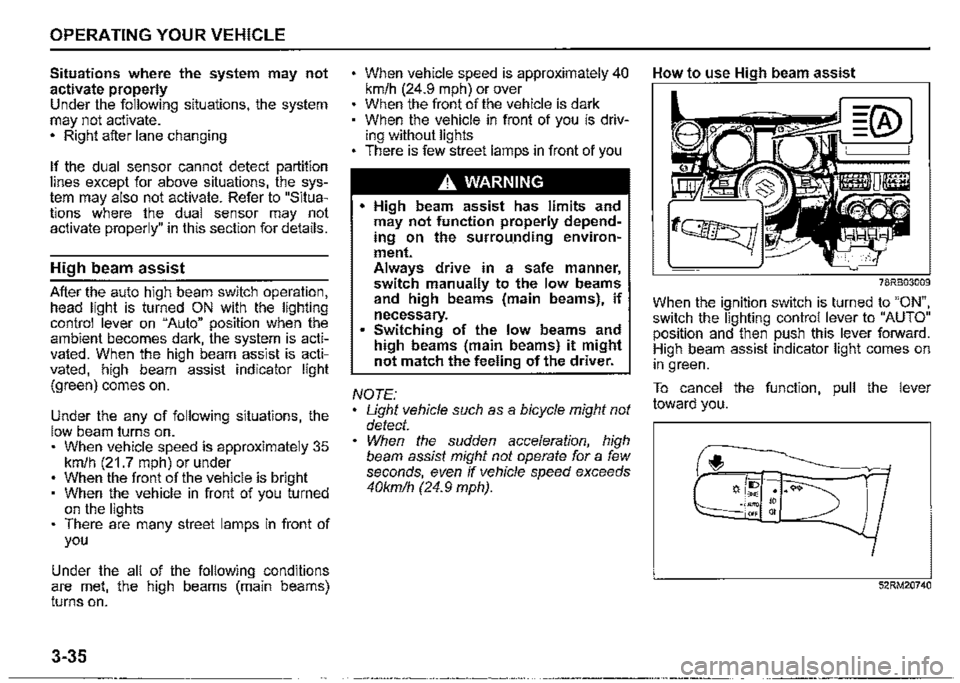
How to use High beam assist
78RB03009
When the ignition switch is turned to "ON", switch the lighting control lever to "AUTO" position and then push this lever forward. High beam assist indicator light comes on in green.
To cancel the function, pull the lever toward you.
f,
52RM20740
Page 187 of 421
Situations where the system does not activate When the high beam assist warning light (orange) comes on by the temporary stop or malfunction of system.
NOTE: When the function of the dual sensor brake support is temporarily stopped, high beam assist will be temporarily stopped. Refer to "Temporary stop or failure of the dual sensor'' in this section for details.
When high beam assist warning light (orange) is initially lighting immediately after the ignition switch is turned to "ON".
Under the following situations, high beam may not automatically switched to low beam. When you pass by an oncoming vehicle on a curvy road where the visibility is poor When another vehicle crosses in front of you When the vehicle in front of you glimpses due to continuous curves, medial strip or street trees When the vehicle in front of you approaches towards you from the far lane When the vehicle in front of you is driving without lights
For the following cause, there is case where the switching timing of the high beam and low beam is varied. When the lights of the vehicle in front of you is dark When only one side of the lights of the vehicle in front of you is turned on The directions and movements of the vehicle in front of you When the vehicle in front of you is a motorcycle When driving on the following roads -On sharp curves or extremely rough surfaces -On a steep slope
When your vehicle is weighed down by heavy items in the luggage compartment or rear seat
OPERATING YOUR VEHICLE
Under the following situations, the brightness of the surrounding area can not be detected accurately, and there is a case where the high beam is a nuisance to pedestrians or the vehicle ahead, or low beam will remain to continue. In these cases, change high beam or low beam manually. When lights are similar to headlights or taillights are around When the vehicle in front of you is driving without lights When the headlights of oncoming vehicle are covered in dirt or discolored When the optical axis of the headlight of oncoming vehicle is deviated When the brightness is changed extremely and continuously When driving on an undulated or bumpy road When driving on the road with a lot of curves When there are things that strongly reflect light, such as road signs or mirrors in front of the vehicle When the rear part of the preceding vehicle strongly reflects light, such as containers When the headlights of your car are damaged or covered in dirt When the vehicle is tilted due to the flat tyres or being towed
3-36
Page 188 of 421

OPERATING YOUR VEHICLE
Other than the described above, the dual sensor cannot be detected the vehicle in front of you or light source, and there is a case where high beam assist may not activate properly. Refer to "Situations where the dual sensor may not activate properly" in this section for details.
Under the following situations, switch high beam or low beam manually, When switching back and forth between the high beams (main beams) and low beams frequently When there is a problem using the high beams (main beams) When it is considered disturbing to other drivers or pedestrians
There is a case where high beams (main beams) is switched to low beams by the fog lights of the vehicle in front of you.
Street lights, traffic signals, and illumination of billboards or signs may cause the high beams (main beams) to switch to the low beams, or low beam to remain on.
3-37
Dual sensor brake support OFF switch
You can turn off the dual sensor brake support system. In the following situations, push and hold the dual sensor brake support OFF switch as unexpected dangers may be possible if ii is activated. -When the vehicle is placed upon atester such as when undergoing a vehicle inspection -When the vehicle is put up on a lift, and the tyres are idling -When the vehicle is being towed -When the vehicle is being carried on a car carrier -When the vehicle is being operated on a race track -When there is vinyl curtains or pendulous branches in front of the vehicle -When driving in the field covered with grown grass -When using an automatic car washer -When the vehicle is placed upon a car elevator or placed in a mechanical parking lot -With a spare tyre or snow chains equipped -When you have a temporarily repaired flat tyre -When you have an accident or breakdown -When the automatic brake system is activated frequently
-When tyres are not inflated to the recommended tyre pressure -With worn tyres equipped -With non-specified sized tyres or wheels equipped -With a modified suspension equipped -When attaching an item which inter-feres with the visibility of the dual sensor -When the vehicle is being weighed down by heavy items -When the vehicle is used to tow a trailer
78RB03010
Page 204 of 421

OPERATING YOUR VEHICLE
Braking
60G165S
The distance needed to bring any vehicle to a halt increases with the speed of the vehicle. The braking distance needed, for example, at 60 km/h (37 mph) will be approximately 4 times greater than the braking distance needed at 30 km/h (19 mph). Start to depress the brake pedal when there is plenty of distance between your vehicle and the stopping point, and slow down gradually.
3-53
A WARNING
If water gets into the brake devices, brake performance may become poor and unpredictable. After driving through water or washing the underside of the vehicle, test the brakes while driving at a slow speed to see if they have maintained their normal effectiveness. If the brakes are less effective than normal, dry them by repeatedly applying the brakes while driving slowly until the brakes have regained their normal effectiveness.
Power-assisted brakes
Your vehicle has power-assisted brakes. If power assistance is lost due to a stalled engine or other failures, the system is still fully operational on reserve power and you can bring the vehicle to a complete stop by pressing the brake pedal once and holding it down. The reserve power is partly used up when you depress the brake pedal and reduces each time the pedal is pressed. Apply smooth and even pressure to the pedal. Do not pump the pedal.
A WARNING
Even without reserve power in the brake system, you can still stop the vehicle by pressing the brake pedal harder than normally required. However, the stopping distance may be
longer.
Brake assist system
When you slam the brakes on, the brake assist system determines it to be an emergency stop and provides more powerful braking for a driver who cannot hold down the brake pedal firmly.
Page 205 of 421
Anti-lock brake system (ABS)
ABS will help you avoid skidding by electronically controlling braking pressure. It will also help you maintain steering control when braking on slippery surfaces or when braking hard. The ABS works automatically, so you do not need any special braking technique. Just push the brake pedal down without pumping. The ABS will operate whenever it senses that the wheels are locking up. You may feel the brake pedal move a little while the ABS is operating.
NOTE: The ABS will not work if vehicle speed is under about 9 km/h (6 mph). ff the ABS system is activated, you may hear a clunking noise and/or feel pulsating in the brake pedal. This is normal and indicates that the brake fluid pressure is being controlled properly. You may hear an operation sound when you start the engine or after the vehicle begins to move. This means that the above systems are in the self-check mode. This sound does not indicate a malfunction.
A WARNING
On some types of loose surfaces (such as gravel, snow-covered roads, etc.), the stopping distance required for a vehicle with ABS may be slightly greater than the one required for a comparable vehicle with a conventional brake system. With a conventional brake system, skidding tyres are able to plow the gravel or snow layer, shortening the stopping distance. ABS minimizes this resistance effect. Allow for extra stopping distance when driving on loose surfaces. On regular paved roads, some drivers may be able to obtain slightly shorter stopping distances with conventional brake systems than with ABS. In both of the above conditions, ABS will still offer the advantage of helping you maintain directional control. However, remember that ABS will not compensate for bad road or weather conditions or poor driver judgment. Use good judgment and do not drive too fast.
OPERATING YOUR VEHICLE
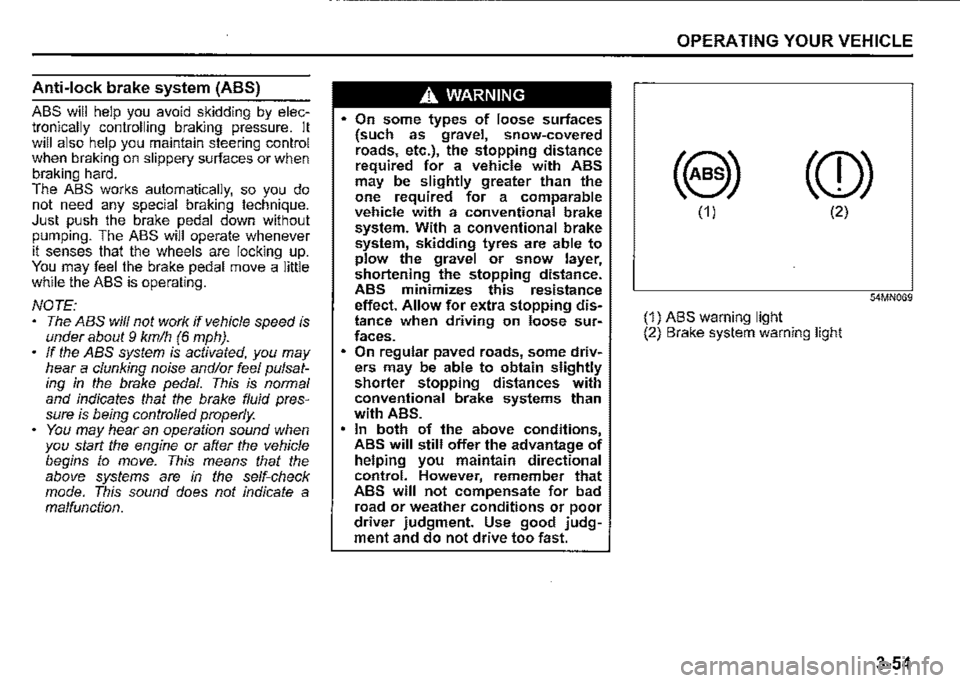
(8) (CD)
(1) (2)
54MN069
(1) ABS warning light (2) Brake system warning light
3-54
Page 206 of 421
OPERATING YOUR VEHICLE
A WARNING
If the ABS warning light (1) on the instrument cluster comes on and stays on while driving, there may be a problem with the ABS system. Ask a SUZUKI dealer to inspect the ABS system immediately. If the ABS system becomes inoperative, the brake system will function as an ordinary brake system that has no ABS. If the ABS warning light (1) and the brake system warning light (2) on the instrument cluster simultaneously stay on or come on while driving, both anti-lock function and rear brake force control function (proportioning valve function) of the ABS system may have failed. If so, the rear wheels may easily skid or the vehicle can even spin in the worst case when braking on a slippery road or when hard braking even on a dry paved road. Ask a SUZUKI dealer to inspect the ABS system immediately. Drive carefully, avoiding hard braking as much as possible.
3-55
How ABS works
A computer continuously monitors wheel speed. The computer compares the changes in wheel speed when braking. If the wheels slow suddenly. indicating a skidding situation, the computer will change braking pressure several times each second to prevent the wheels from locking. When you start your vehicle or when you accelerate after a hard stop. you may hear a momentary motor or clicking noise as the system resets or checks itself.
A WARNING
The ABS may not work properly if tyres or wheels other than those specified in the owner's manual are used. This is because the ABS works by comparing changes in wheel speed. When replacing tyres or wheels, use only the size and type specified in this owner's manual.
Electronic stability program
(ESP®)
ESP® is a registered trademark of Daimler
AG.
The Electronic Stability Program (ESP®) helps to control the vehicle during cornering if front wheels or rear wheels skid. It also assists you in maintaining traction while accelerating on loose or slippery road surfaces. It does this by regulating the engine's output, and by_ . selective!¥ applying the brakes. In add1t1on, ESP helps to avoid skidding by controlling braking pressure.
A WARNING
The ESP® cannot enhance the vehicle's driving stability in all situations and does not control your vehicle's entire braking system. The ESP® cannot prevent accidents, including those resulting from excessive speed in turns, or hydroplaning. Only safe and attentive drive can prevent accidents. The capabilities of an ESP®
equipped vehicle must never be used as a substitute for careful driving.
Page 207 of 421
The ESP® has the following three systems:
Stability control system
The vehicle stability control system helps provide integrated control of systems such as anti-lock brakes, traction control, engine control, etc. This system automatically controls the brakes and engine to help prevent the vehicle from skidding when cornering on a slippery road surface or when turning the steering wheel abruptly.
Traction control system
The traction control system automatically helps prevent the spinning of wheels when the vehicle is started or accelerated on slippery road surfaces. The system operates only if it senses that some of the wheels are spinning or beginning to lose traction. When this happens, the system operates the front or rear brakes and reduces engine power to l1m1t wheel spin.
NOTE: You may hear an operation sound when you start the engine or after the vehicle begins to move. This means that the above systems are in the self-check mode. This sound does not indicate a malfunction.
Anti-lock brake system (ABS)
ABS will help you avoid skidding by electronically controlling braking pressure. It will also help you maintain steering control when braking on slippery surfaces or when braking hard. The ABS works automatically, so you do not have to use any special braking technique. Just push the brak_e pedal down without pumping. The ABS will operate whenever it senses that wheels are locking up. You may feel the brake pedal pulsate while the ABS is operating. (For more information on ABS, see "Braking" in this section.)
NOTE: The ABS will not work if vehicle speed is under about 9 km/h (6 mph).
A WARNING
The ESP® may not work properly if tyres or wheels other than those specified in the owner's manual are used. When replacing tyres or wheels, use only the size and type specified in this owner's manual. • The ESP® may not work properly if ·tyres are not inflated to the recom
mended ~re pressure. The ESP" may not work properly if tyres are fitted with snow chains. (Continued)
OPERATING YOUR VEHICLE
A WARNING
(Continued) • The ESP® may not work properly if the tyres are excessively worn. Replace tyres when the tread wear indicators in the grooves appear on the tread surface. • The ESP® is not a substitute for winter tyres or snow chains on a snowMcovered road.
A WARNING
• The ESP® may not work properly if engine related parts such as the muffler are not equivalent to standard equipment or are extremely deteriorated. Do not modify the vehicle's suspension since the ESP® may not work properly.
NOTE: • If the Espi!) system is activated, you may hear a clunking noise and/or feel pulsating in the brake pedal. This is. normal and indicates that the brake flwd pressure is being controlled properly. You may hear an operation sound when you start the engine or after the vehicle begins to move. This means that the above systems are in the self-check mode. This sound does not indicate a malfunction.
3-56
Page 210 of 421
OPERATING YOUR VEHICLE
ABS warning light/ brake system
warning light
See "Braking" in this section.
Hill descent control system
The hill descent control system is designed to reduce the driver's workload when going down steep, rough and/or slippery hills where the vehicle cannot decelerate enough by engine braking alone. The hill descent control system helps to control vehicle speed by automatically engaging the vehicle's brakes, as needed, so you can concentrate on steering the vehicle.
.A. WARNING
Do not rely excessively on the hill descent control system. The hill descent control system may not control the vehicle speed on a hill under all load or road conditions. Always be prepa!ed to control vehicle speed by applying the brakes. Failure to pay attention and control vehicle speed using the brakes when necessary may result in loss of control or an accident.
3-59
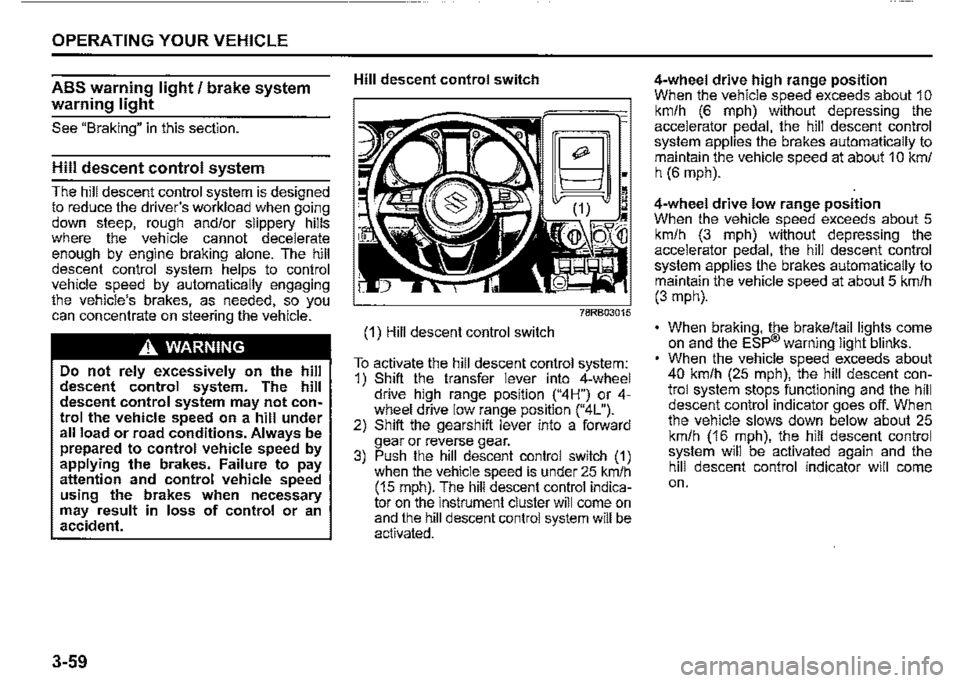
Hill descent control switch
(1) Hill descent control switch
~;
~~~:~M
To activate the hill descent control system: 1) Shift the transfer lever into 4-wheel drive hiQh range position ("4H") or 4-wh!"el drive low '.ange position ("4L"). 2) Shift the gearsh1ft lever into a forward gear or reverse gear. 3) Push the hill descent control switch (1) when the vehicle speed is under 25 km/h (15 mph). The hill descent control indicator on the instrument cluster will come on and the hill descent control system will be activated.
4-wheel drive high range position When the vehicle speed exceeds about 1 o km/h (6 mph) without depressing the accelerator pedal, the hill descent control system applies the brakes automatically to maintain the vehicle speed at about 1 O km/ h (6 mph).
4-wheel drive low range position When the vehicle speed exceeds about 5 km/h (3 mph) without depressing the accelerator pedal, the hill descent control system applies the brakes automatically to maintain the vehicle speed at about 5 km/h (3 mph).
• When braking, the brake/tail lights come on and the ESP® warning light blinks. When the vehicle speed exceeds about 40 km/h (25 mph), the hill descent control system stops functioning and the hill descent control indicator goes off. When the vehicle slows down below about 25 km/h (16 mph), the hill descent control system will be activated again and the hill descent control indicator will come on.