main SUZUKI JIMNY 2022 Repair Manual
[x] Cancel search | Manufacturer: SUZUKI, Model Year: 2022, Model line: JIMNY, Model: SUZUKI JIMNY 2022Pages: 421, PDF Size: 6.35 MB
Page 277 of 421
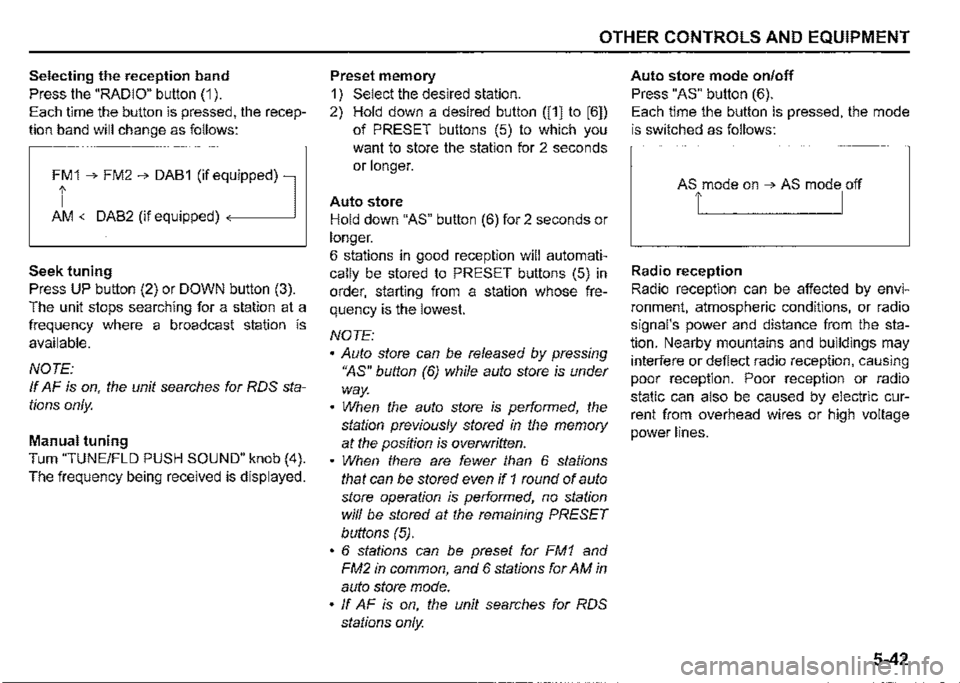
Selecting the reception band
Press the "RADIO" button (1 ).
Each time the button is pressed, the recep
tion band will change as follows:
Ff 1 ➔ FM2 ➔ DAB1 (if eq,uipped) l
AM <-DAB2 (if equipped)
Seek tuning
Press UP button (2) or DOWN button (3).
The unit stops searching for a station at a
frequency where a broadcast station is
available.
NOTE:
If AF is on, the unit searches for RDS sta
tions only.
Manual tuning
Turn "TUNE/FLO PUSH SOUND" knob (4).
The frequency being received is displayed.
OTHER CONTROLS AND EQUIPMENT
Preset memory
1) Select the desired station.
2) Hold down a desired button ([1] to [6])
of PRESET buttons (5) to which you
want to store the station for 2 seconds
or longer.
Auto store
Hold down "AS" button (6) for 2 seconds or
longer.
6 stations in good reception will automati
cally be stored to PRESET buttons (5) in
order, starting from a station whose fre
quency is the lowest.
NOTE:
• Auto store can be released by pressing
"AS" button (6) while auto store is under
way.
• When the auto store is performed, the
station previously stored in the memory
at the position is overwritten.
• When there are fewer than 6 stations
that can be stored even if 1 round of auto
store operation is performed, no station
will be stored at the remaining PRESET
buttons (5).
• 6 stations can be preset for FM1 and
FM2 in common, and 6 stations for AM in
auto store mode.
• ff AF is on, the unit searches for RDS
stations only.
Auto store mode on/off
Press "AS" button (6).
Each time the button is pressed, the mode
is switched as follows:
Radio reception
Radio reception can be affected by envi
ronment, atmospheric conditions, or radio
signal's power and distance from the sta
tion. Nearby mountains and buildings may
interfere or deflect radio reception, causing
poor reception. Poor reception or radio
static can also be caused by electric cur
rent from overhead wires or high voltage
power lines.
5-42
Page 279 of 421
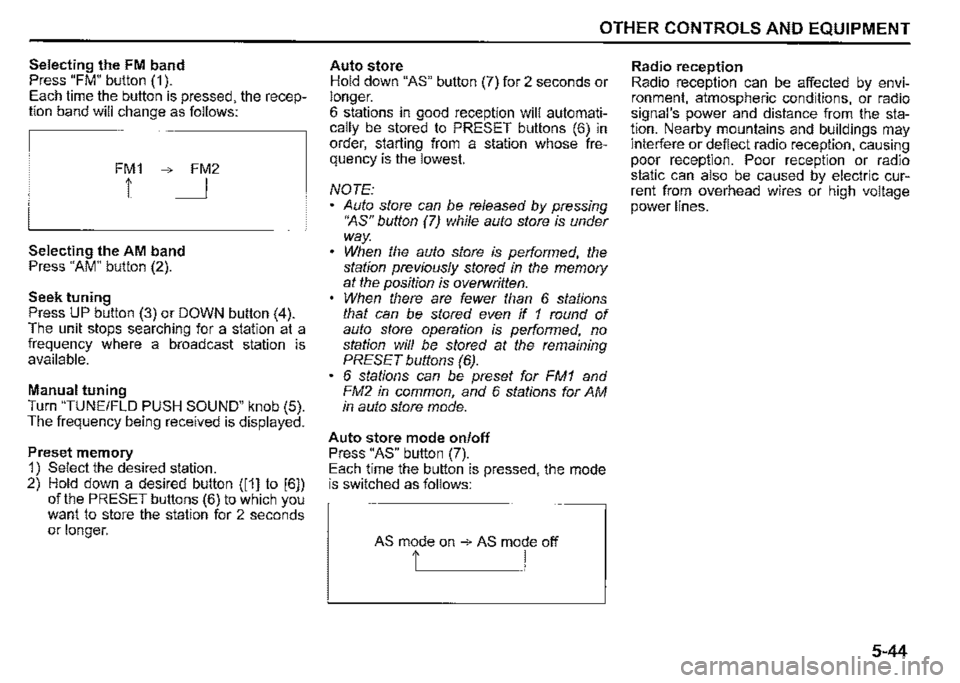
Selecting the FM band Press "FM" button (1 ). Each time the button is pressed, the reception band will change as follows:
FM1 ➔ FM2
1 I
Selecting the AM band Press "AM" button (2).
Seek tuning Press UP button (3) or DOWN button (4). The unit stops searching for a station at a frequency where a broadcast station is available.
Manual tuning Turn "TUNE/FLO PUSH SOUND" knob (5). The frequency being received is displayed.
Preset memory 1) Select the desired station. 2) Hold down a desired button ([1] to [6]) of the PRESET buttons (6) to which you want to store the station for 2 seconds or longer.
OTHER CONTROLS AND EQUIPMENT
Auto store Hold down "AS" button (7) for 2 seconds or longer. 6 stations in good reception will automatically be stored to PRESET buttons (6) in order, starting from a station whose frequency is the lowest.
NOTE: Auto store can be released by pressing •~s" button (7) while auto store is under way. When the auto store is performed, the station previously stored in the memory at the position is overwritten. When there are fewer than 6 stations that can be stored even if 1 round of auto store operation is performed, no station will be stored at the remaining PRESET buttons (6). 6 stations can be preset for FM1 and FM2 in common, and 6 stations for AM in auto store mode.
Auto store mode on/off Press "AS" button (7). Each time the button is pressed, the mode is switched as follows:
AS mode on ➔ AS mode off
t I
Radio reception Radio reception can be affected by environment, atmospheric conditions, or radio signal's power and distance from the station. Nearby mountains and buildings may interfere or deflect radio reception, causing poor reception. Poor reception or radio static can also be caused by electric current from overhead wires or high voltage power lines.
5-44
Page 284 of 421
![SUZUKI JIMNY 2022 Repair Manual OTHER CONTROLS AND EQUIPMENT
[Q]oI~!L DIGITAL AUDIO (A)
CDs or CD-ROMs without mark (A) cannot be used. Some discs recorded in CD-R/CD-RW format may sometimes be impossible to use.
A CD is to be](/img/20/43483/w960_43483-283.png "SUZUKI JIMNY 2022 Repair Manual OTHER CONTROLS AND EQUIPMENT
[Q]oI~!L DIGITAL AUDIO (A)
CDs or CD-ROMs without mark (A) cannot be used. Some discs recorded in CD-R/CD-RW format may sometimes be impossible to use.
A CD is to be")
OTHER CONTROLS AND EQUIPMENT
[Q]oI~!L DIGITAL AUDIO (A)
CDs or CD-ROMs without mark (A) cannot be used. Some discs recorded in CD-R/CD-RW format may sometimes be impossible to use.
A CD is to be inserted with its label side up. When there is a CD already in the unit, it is impossible to insert another CD without ejecting the CD in the unit. Do not use force to insert a CD into the CD insertion slot.
5-49
NOTICE
Never insert your finger or hand into the CD insertion slot. Never insert foreign objects. Never insert a CD with glue coming out from adhesive tape or a rental CD label or with a trace indicating that adhesive tape or a rental CD label has been removed. This may cause the CD not to eject or result in a malfunction.
Loading a CD Insert a CD in the insertion slot (1 ). When the CD is loaded, it starts to play.
Ejecting a CD Press EJECT button (2). When the ignition switch is in "LOCK" position, the CD remained ejected for around 15 seconds or longer will automatically be drawn inside the unit. (Auto reload function) The backup eject function: This function allows you to eject a CD by pressing EJECT button (2) even when the ignition switch is in "LOCK" position.
NOTICE
If you forcefully try to push an ejected CD inside the unit before auto reloading, the disc surface might be scratched. Before reloading a CD, remove it from the unit completely.
Listening to a CD When a CD is inserted, playback will automatically start. When a CD is already inside the unit, press "CD" button (3) to start playback.
Selecting a track Press UP button (4) to listen to the next track. Press DOWN button (5) twice to listen to the previous track. When DOWN button (5) is pressed once, the track currently being played will start from the beginning again.
Fast forwarding/rewinding a track Hold down UP button (4) to fast forward the track. Hold down DOWN button (5) to fast rewind the track.
Page 288 of 421
OTHER CONTROLS AND EQUIPMENT
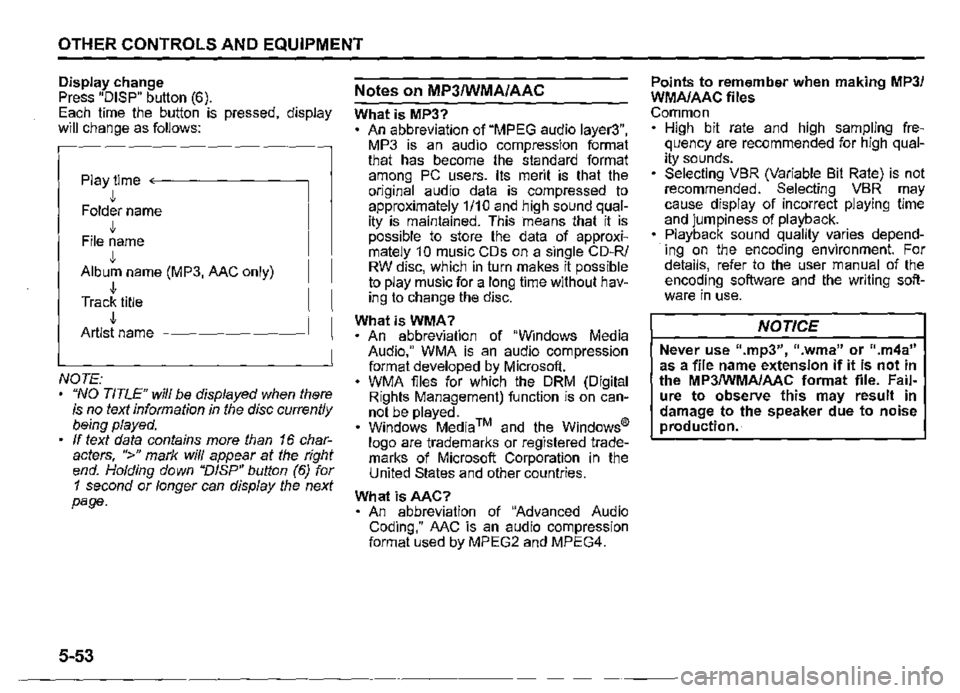
Display change Press "DISP" button (6). Each time the button is pressed, display will change as follows:
Play time <--------
• Folder name J, File name J, Album name (MP3, AAC only) J, Track title J, Artist name -------~
NOTE: "NO TITLE" will be displayed when there is no text information in the disc currently being played. If text data contains more than 16 characters, ">" mark will appear at the right end. Holding down "DISP" button (6) for 1 second or longer can display the next page.
5-53
Notes on MP3/WMA/AAC
What is MP3? An abbreviation of "MPEG audio layer3", MP3 is an audio compression format that has become the standard format among PC users. Its merit is that the original audio data is compressed to approximately 1/10 and high sound quality is maintained. This means that it is possible to store the data of approximately 1 0 music CDs on a single CD-R/ RW disc, which in turn makes it possible to play music for a long time without having to change the disc.
WhatisWMA? An abbreviation of "Windows Media Audio," WMA is an audio compression format developed by Microsoft. WMA files for which the ORM (Digital Rights Management) function is on cannot be played. Windows Media™ and the Windows® logo are trademarks or registered trademarks of Microsoft Corporation in the United States and other countries.
What isAAC? An abbreviation of "Advanced Audio Coding," AAC is an audio compression format used by MPEG2 and MPEG4.
Points to remember when making MP3/ WMA/AAC files Common High bit rate and high sampling frequency are recommended for high quality sounds. Selecting VBR (Variable Bit Rate) is not recommended. Selecting VBR may cause display of incorrect playing time and jumpiness of playback. Playback sound quality varies depending on the encoding environment. For details, refer to the user manual of the encoding software and the writing software in use.
NOTICE
Never use 11.mp3", 11 .wma" or ".m4a" as a file name extension if it is not in the MP3/WMA/AAC format file. Failure to observe this may result in damage to the speaker due to noise production.
Page 312 of 421
![SUZUKI JIMNY 2022 Repair Manual OTHER CONTROLS AND EQUIPMENT
Setting the anti-theft function
1) Press "VOL PUSH PWR" knob (1) to
power off.
2) Hold down the buttons numbered [1]
and [6] of PRESET buttons (2) and
press "VOL PUS](/img/20/43483/w960_43483-311.png "SUZUKI JIMNY 2022 Repair Manual OTHER CONTROLS AND EQUIPMENT
Setting the anti-theft function
1) Press \"VOL PUSH PWR\" knob (1) to
power off.
2) Hold down the buttons numbered [1]
and [6] of PRESET buttons (2) and
press \"VOL PUS")
OTHER CONTROLS AND EQUIPMENT
Setting the anti-theft function
1) Press "VOL PUSH PWR" knob (1) to
power off.
2) Hold down the buttons numbered [1]
and [6] of PRESET buttons (2) and
press "VOL PUSH PWR" knob (1).
"SECURITY" will be displayed.
3) Press UP button (3) and the button
numbered [1] of PRESET buttons (2)
simultaneously.
4) Enter a 4-digit number to be registered
as PIN using the buttons numbered [1]
-[4] of PRESET buttons (2).
5) Hold down "TUNE/FLO PUSH
SOUND" knob (4) for 1 second or lon
ger to set the anti-theft function.
NOTE:
Take a note of the registered PIN and keep
it for the future use.
5-77
Canceling the anti-theft feature
To cancel the anti-theft function, delete the
registered PIN.
1) Press "VOL PUSH PWR" knob (1) to
power off.
2) Hold down the buttons numbered [1]
and [6] of PRESET buttons (2) and
press "VOL PUSH PWR" knob (1).
"PIN ENTRY" will be displayed.
3) Press UP button (3) and the button
numbered [1] of PRESET buttons (2)
simultaneously.
4) Enter a 4-digit number to be registered
as PIN using the buttons numbered [1]
-[4] of PRESET buttons (2).
5) Hold down "TUNE/FLO PUSH
SOUND" knob (4) for 1 second or lon
ger to delete the registered PIN. The
indication "---" will be displayed and
the anti-theft function will be canceled.
NOTE:
To change your PIN, first delete your cur
rent PIN, and then set a new one.
Confirming the Personal Identification
Number (PIN)
When the main power source is discon
nected such as when the lead-acid battery
is replaced, etc. it is required to enter the
PIN to operate the unit again.
1) Set the ignition switch to "ACC" posi
tion.
"SECURITY" will be displayed.
2) Press UP button (3) and the button
numbered [1] of PRESET buttons (2)
simultaneously.
3) Enter a 4-digit number to be registered
as PIN using the buttons numbered [1]
-[4] of PRESET buttons (2).
4) Hold down "TUNE/FLO PUSH
SOUND" knob (4) for 1 second or lon
ger.
When the same PIN as registered is
entered, the power of the audio system
will be turned off automatically and it
will become operable again.
NOTE:
If an incorrect PIN is entered, "ERROR"
and the total number of incorrect entry
attempts will be displayed.
If an incorrect PIN is entered 10 times or
more, "HELP" will be displayed and the
audio system will become inoperable.
Page 317 of 421
INSPECTION AND MAINTENANCE
INSPECTION AND MAINTENANCE
Maintenance schedule ........................................................ 6-2
Periodic maintenance schedule
(except for EU countries and Israel) .................................. 6-3
Maintenance recommended under severe driving
conditions (except for EU countries and Israel) .............. 6-8
Periodic maintenance schedule
(for EU countries and Israel) .............................................. 6-13
Maintenance recommended under severe driving
conditions (for EU countries and Israel) ........................... 6-18
Drive belt .............................................................................. 6-23 -
Engine oil and filter ............................................................. 6-23
Engine coolant .................................................................... 6-28
Air cleaner ............................................................................ 6-30
Spark plugs .......................................................................... 6-30
Gear oil ................................................................................. 6-31
60G410 Clutch pedal ......................................................................... 6-33
Brakes .................................................................................. 6-33
Steering wheel ..................................................................... 6-36
Tyres ..................................................................................... 6-36
Battery .................................................................................. 6-41
Fuses .................................................................................... 6-42
Headlight aiming ................................................................. 6-46
Headlight Washer Fluid ...................................................... 6-46
Bulb replacement ................................................................ 6-47
Wiper blades ........................................................................ 6-54
Windshield washer fluid ..................................................... 6-57
Air conditioning system ..................................................... 6-58
Page 318 of 421
INSPECTION AND MAINTENANCE
60B128S
.A. WARNING
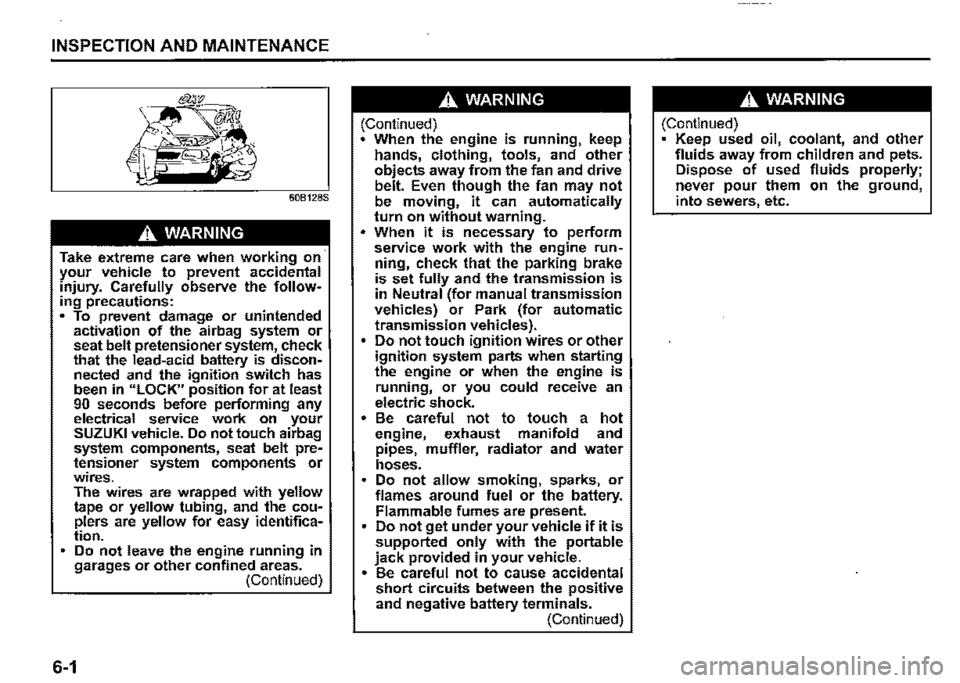
Take extreme care when working on· your vehicle to prevent accidental injury. Carefully observe the following precautions: • To prevent damage or unintended activation of the airbag system or seat belt pretensioner system, check that the lead-acid battery is disconnected and the ignition switch has been in "LOCK" position for at least 90 seconds before performing any electrical service work on your SUZUKI vehicle. Do not touch airbag system components, seat belt pretensioner system components or wires. The wires are wrapped with yellow tape or yellow tubing, and the couplers are yellow for easy identification. Do not leave the engine running in garages or other confined areas. (Continued)
6-1
.A. WARNING
(Continued) When the engine is running, keep hands, clothing, tools, and other objects away from the fan and drive belt. Even though the fan may not be moving, it can automatically turn on without warning . • When it is necessary to perform service work with the engine run~ ning, check that the parking brake is set fully and the transmission is in Neutral (for manual transmission vehicles) or Park (for automatic transmission vehicles). Do not touch ignition wires or other ignition system parts when starting the engine or when the engine is running, or you could receive an electric shock. • Be careful not to touch a hot engine, exhaust manifold and pipes, muffler, radiator and water hoses. Do not allow smoking, sparks, or flames around fuel or the battery. Flammable fumes are present. Do not get under your vehicle if it is supported only with the portable jack provided in your vehicle. • Be careful not to cause accidental short circuits between the positive and negative battery terminals. (Continued)
.A. WARNING
(Continued) Keep used oil, coolant, and other fluids away from children and pets. Dispose of used fluids properly; never pour them on the ground, into sewers, etc.
Page 319 of 421
Maintenance schedule
The following table shows the timing when you should perform regular maintenance on your vehicle. This table shows in miles, kilometers and months when you should perform inspections, adjustments, lubrication and other services. These intervals should be shortened if driving is usually done under severe conditions (refer to "Maintenance recommended under severe driving conditions") .
.A, WARNING
SUZUKI recommends that maintenance on items marked with an aster~ isk (*) be performed by a SUZUKI dealer or a qualified service technician. If you are qualified, you may perform maintenance on the unmarked items by referring to the instructions in this section. If you are not sure whether you can success~ fully ·complete any of the unmarked maintenance jobs, ask a SUZUKI dealer to do the maintenance for you.
NOTICE
Whenever it becomes necessary to replace parts on your vehicle, it is recommended that you use genuine SUZUKI replacement parts or their equivalent.
INSPECTION AND MAINTENANCE
6-2
Page 320 of 421
INSPECTION AND MAINTENANCE
Periodic maintenance schedule (except for EU countries and Israel)
"R" : Replace or Change 111" : Inspect, clean, adjust, lubricate or replace as necessary
NOTE:
This table shows the service schedule up to 180000 km (108000 miles). Beyond 180000 km (108000 miles), perform the same services at the same intervals shown in the chart.
NOTE:
For the Periodic Maintenance Schedule of Russian models, refer to "For Russia" in the "SUPPLEMENT" section.
6-3
Page 321 of 421
INSPECTION AND MAINTENANCE
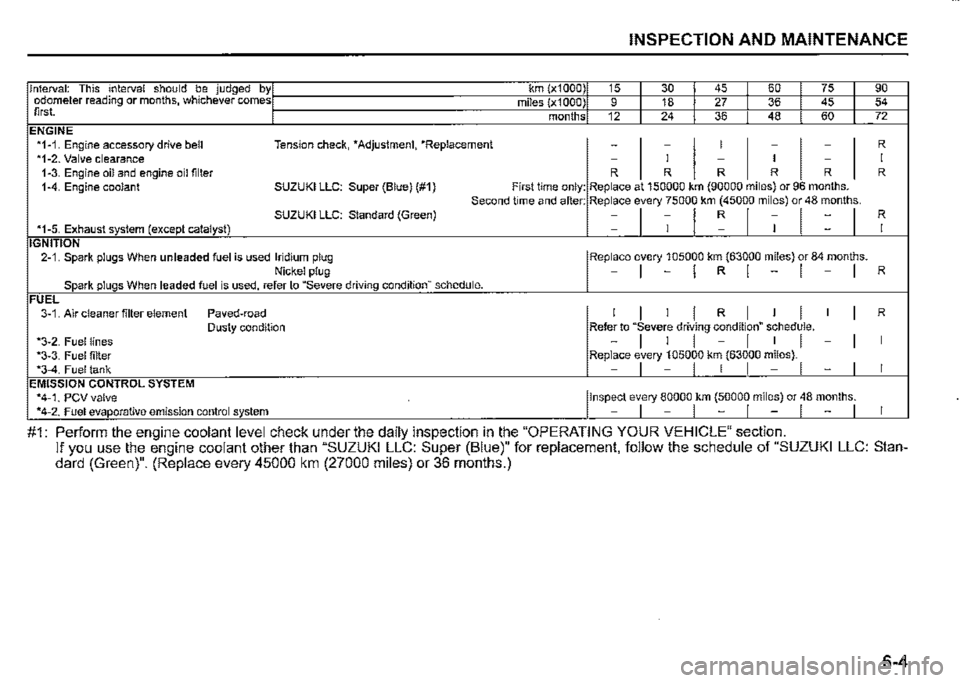
Interval: This interval should be judged by1 km (x1000) 15 I 30 I 45 I 60 I 75 I 90 odometer reading or months, whichever comesI miles (x1000) 9 I 18 I 27 I 36 I 45 I 54 first. 1 months 12 I 24 I 36 I 48 I 60 I 72 ENGINE *1-1. Engine accessory drive bell Tension check, *Adjustment, *Replacement -
I
-
I
I
I
-
I
-
I
R *1-2. Valve clearance -I -I -I 1-3. Engine oil and engine oil filter R R R R R R 1-4. Engine coolant SUZUKI LLC: Super (Blue) (#1) First time only: Replace at 150000 km (90000 miles) or 96 months. Second time and after: Replace every 75000 km (45000 miles) or 48 months. SUZUKI LLC: Standard (Green) =l1l~l1l=I R *1-5. Exhaust system (except catalyst) I IGNITION 2-1. Spark plugs When unleaded fuel is used Iridium plug I Replace every 105000 km (63000 miles) or 84 months. Nickel plug -I-IRl-1-1 R Spark plugs When leaded fuel is used, refer to "Severe driving conditionn schedule. FUEL 3-1. Air cleaner filter element Paved-road I I I I R I I I I I R Dusty condition Refer to "Severe driving condition" schedule. *3-2. Fuel lines -I I I -I I I -I I *3-3. Fuel filter Replace every 105000 km (63000 miles). *3-4. Fuel tank -I -I I I -I -I I EMISSION CONTROL SYSTEM *4-1. PCV valve I Inspect every 80000 km (50000 miles) or 48 months. *4-2. Fuel evaporative emission control system -1-1-1-1-1 I
#1: Perform the engine coolant level check under the daily inspection in the "OPERATING YOUR VEHICLE" section. If you use the engine coolant other than "SUZUKI LLC: Super (Blue)" for replacement, follow the schedule of "SUZUKI LLC: Standard (Green)". (Replace every 45000 km (27000 miles) or 36 months.)
6-4