full SUZUKI JIMNY 2022 Workshop Manual
[x] Cancel search | Manufacturer: SUZUKI, Model Year: 2022, Model line: JIMNY, Model: SUZUKI JIMNY 2022Pages: 421, PDF Size: 6.35 MB
Page 263 of 421
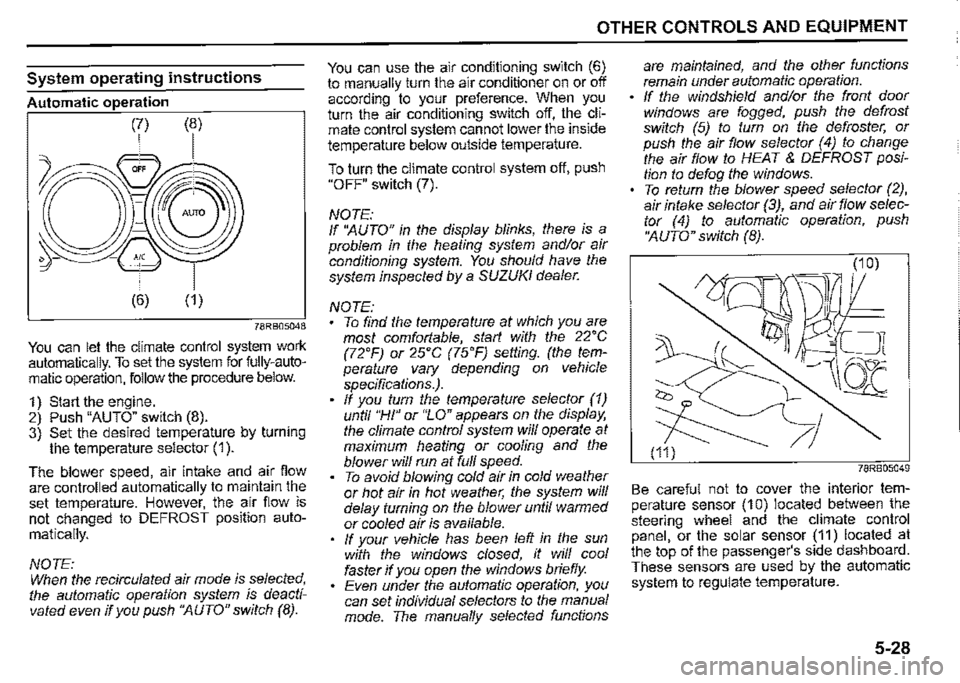
System operating instructions
Automatic operation
78RB05048
You can let the climate control system work automatically. To set the system for fully-automatic operation, follow the procedure below.
1) Start the engine. 2) Push "AUTO" switch (8). 3) Set the desired temperature by turning the temperature selector (1 ).
The blower speed, air intake and air flow are controlled automatically to maintain the set temperature. However, the air flow is not changed to DEFROST position auto
matically.
NOTE: When the recirculated air mode is selected, the automatic operation system is deactivated even if you push ''AUTO" switch (8).
OTHER CONTROLS AND EQUIPMENT
You can use the air conditioning switch (6) to manually turn the air conditioner on or off according to your preference. When you turn the air conditioning switch off, the climate control system cannot lower the inside temperature below outside temperature.
To turn the climate control system off, push "OFF" switch (7).
NOTE: If ''AUTO" in the display blinks, there is a problem in the heating system and/or air conditioning system. You should have the system inspected by a SUZUKI dealer.
NOTE: To find the temperature at which you are most comfortable, start with the 22'C (72'F) or 25'C (75'F) setting. (the temperature vary depending on vehicle specifications.). If you turn the temperature selector (1) until "HI" or "LO" appears on the display, the climate control system will operate at maximum heating or cooling and the blower will run at full speed. To avoid blowing cold air in cold weather or hot air in hot weather, the system will delay turning on the blower until warmed or cooled air is available. If your vehicle has been left in the sun with the windows closed, it will cool faster if you open the windows briefly. Even under the automatic operation, you can set individual selectors to the manual mode. The manually selected functions
are maintained, and the other functions remain under automatic operation. If the windshield and/or the front door windows are fogged, push the defrost switch (5) to turn on the defroster, or push the air flow selector (4) to change the air flow to HEAT & DEFROST position to defog the windows. To return the blower speed selector (2), air intake selector (3), and air flow selector (4) to automatic operation, push ''AUTO" switch (8).
78RB05049
Be careful not to cover the interior temperature sensor (10) located between the steering wheel and the climate control panel, or the solar sensor (11) located at the top of the passenger's side dashboard. These sensors are used by the automatic system to regulate temperature.
5-28
Page 268 of 421

OTHER CONTROLS AND EQUIPMENT
Removing the disc Proper way to hold ~
thecomz '------~-, ©j-O--~---__J
~ 52D347
~~~~ To remove fingermarks and dust, use a
soft cloth, and wipe in a straight line from
52D275
To remove the compact disc from its stor
age case, press down on the canter of the
case and lift the disc out, holding it care
fully by the edges.
Always handle the compact disc by the
edges.
Never touch the surface.
5-33
the center of the compact disc to the cir
cumference.
52D277
New discs may have some roughness
around the edges. The unit may not work
or the sound may skip if such discs are
used. Use a ball-point pen (B), etc. to
remove the roughness (C) from edges of
the disc before inserting it into the unit.
52D348
Never stick labels on the surface of the
compact disc or write on the surface with a
pencil or pen.
52D349
Do not use any solvents such as commer
cially available cleaners, anti-static spray,
or thinner to clean compact discs.
Page 284 of 421
![SUZUKI JIMNY 2022 Workshop Manual OTHER CONTROLS AND EQUIPMENT
[Q]oI~!L DIGITAL AUDIO (A)
CDs or CD-ROMs without mark (A) cannot be used. Some discs recorded in CD-R/CD-RW format may sometimes be impossible to use.
A CD is to be](/img/20/43483/w960_43483-283.png "SUZUKI JIMNY 2022 Workshop Manual OTHER CONTROLS AND EQUIPMENT
[Q]oI~!L DIGITAL AUDIO (A)
CDs or CD-ROMs without mark (A) cannot be used. Some discs recorded in CD-R/CD-RW format may sometimes be impossible to use.
A CD is to be")
OTHER CONTROLS AND EQUIPMENT
[Q]oI~!L DIGITAL AUDIO (A)
CDs or CD-ROMs without mark (A) cannot be used. Some discs recorded in CD-R/CD-RW format may sometimes be impossible to use.
A CD is to be inserted with its label side up. When there is a CD already in the unit, it is impossible to insert another CD without ejecting the CD in the unit. Do not use force to insert a CD into the CD insertion slot.
5-49
NOTICE
Never insert your finger or hand into the CD insertion slot. Never insert foreign objects. Never insert a CD with glue coming out from adhesive tape or a rental CD label or with a trace indicating that adhesive tape or a rental CD label has been removed. This may cause the CD not to eject or result in a malfunction.
Loading a CD Insert a CD in the insertion slot (1 ). When the CD is loaded, it starts to play.
Ejecting a CD Press EJECT button (2). When the ignition switch is in "LOCK" position, the CD remained ejected for around 15 seconds or longer will automatically be drawn inside the unit. (Auto reload function) The backup eject function: This function allows you to eject a CD by pressing EJECT button (2) even when the ignition switch is in "LOCK" position.
NOTICE
If you forcefully try to push an ejected CD inside the unit before auto reloading, the disc surface might be scratched. Before reloading a CD, remove it from the unit completely.
Listening to a CD When a CD is inserted, playback will automatically start. When a CD is already inside the unit, press "CD" button (3) to start playback.
Selecting a track Press UP button (4) to listen to the next track. Press DOWN button (5) twice to listen to the previous track. When DOWN button (5) is pressed once, the track currently being played will start from the beginning again.
Fast forwarding/rewinding a track Hold down UP button (4) to fast forward the track. Hold down DOWN button (5) to fast rewind the track.
Page 292 of 421
OTHER CONTROLS AND EQUIPMENT
Notes on USB device
Compatible USB devices USS mass storage class For details as to whether your USS memory/USS audio is compatible with USS mass storage class, please contact the USS memory/USS audio manufacturer. USS .standard compatibility 1.1/2.0 full speed File system FAT12/16/32, VFAT Maximum current less than 1.0 A If devices such as USS hub, extension cable are connected to the audio system, it may not be recognized. In such case, connect the USS device directly to the audio system. Devices such as MP3 player/mobile phone/digital camera may not be recognized by the audio system for playing music.
5-57
USB device connection When connecting a USS device, check that the connector is pushed all the way into the port. Do not leave the USS device for long periods of time inside the vehicle where the temperature can rise too high. Back up any important data beforehand. We cannot accept responsibility for any lost data. It is recommended not to connect a USS device that contains data files other than MP3/WMA/AAC format.
Recording MP3/WMA/AAC files on a USB device Playback or display may not be possible depending on the type of USS device in use or the condition of the recording. Depending on the connected USB memory, the files may be played in different order from the stored one.
Compression formats MP3 Bit rate: MPEG1 Audio Layer Ill: 32 k -320 kbps MPEG2 Audio Layer Ill: 8 k-160 kbps MPEG2.5 Audio Layer Ill: 8 k-160 kbps Sampling frequency: MPEG1 Audio Layer Ill: 32 k/44.1 k/48 kHz MPEG2 Audio Layer Ill: 16 k/22.05 k/24 kHz MPEG2.5 Audio Layer Ill: 8 k/11.025 k/12 kHz
WMA (Ver. 7, Ver. 8, Ver. g•) • Bit rate: CBR 32 k -320 kbps • Sampling frequency: 32 k/44.1 k/48 kHz • WMA 9 Professional/LossLessNoice are not supported.
Mc•
• Bit rate: ABR 16 k -320 kbps • Sampling frequency: 32 k/44.1 k/48 kHz • Apple Lossless is not supported.
Maximum number of files/folders Maximum number of files: 2500 Maximum number of files in a folder: 255 Maximum depth of tree structure: 8 Maximum number of folders: 255 (Root folder is included.)
Page 316 of 421

OTHER CONTROLS AND EQUIPMENT
Display Possible cause Possible solution
Bluetooth®
Disconnect the Bluetooth® ready device and connect it
"ERROR 1" The player developed an error of an again.
unidentified cause. When "ERROR 1" does not disappear, contact your
dealer.
"Connection Failedu Failed to establish pairing or connection Try to establish the pairing or connection again.
Reached the limit for the number of phone-Delete registered data of unnecessary number in phone-11Memory Full" book data in transfer book and try to transfer the register phone numbers in
the phonebook again.
"Not Available" Inoperable during driving Operate the system after pulling over your car.
5-81
Page 318 of 421
INSPECTION AND MAINTENANCE
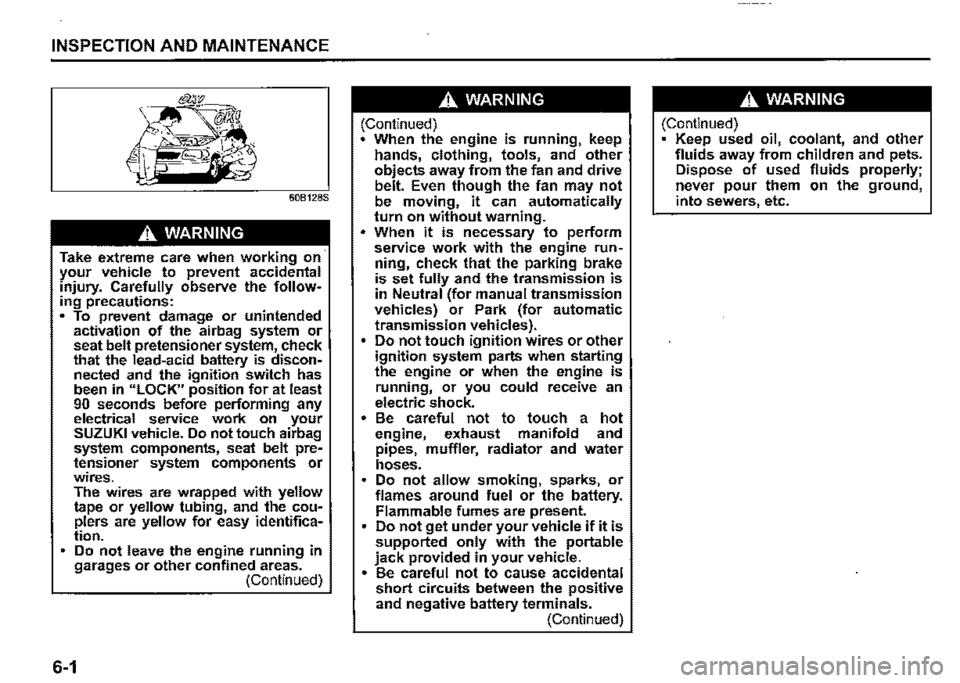
60B128S
.A. WARNING
Take extreme care when working on· your vehicle to prevent accidental injury. Carefully observe the following precautions: • To prevent damage or unintended activation of the airbag system or seat belt pretensioner system, check that the lead-acid battery is disconnected and the ignition switch has been in "LOCK" position for at least 90 seconds before performing any electrical service work on your SUZUKI vehicle. Do not touch airbag system components, seat belt pretensioner system components or wires. The wires are wrapped with yellow tape or yellow tubing, and the couplers are yellow for easy identification. Do not leave the engine running in garages or other confined areas. (Continued)
6-1
.A. WARNING
(Continued) When the engine is running, keep hands, clothing, tools, and other objects away from the fan and drive belt. Even though the fan may not be moving, it can automatically turn on without warning . • When it is necessary to perform service work with the engine run~ ning, check that the parking brake is set fully and the transmission is in Neutral (for manual transmission vehicles) or Park (for automatic transmission vehicles). Do not touch ignition wires or other ignition system parts when starting the engine or when the engine is running, or you could receive an electric shock. • Be careful not to touch a hot engine, exhaust manifold and pipes, muffler, radiator and water hoses. Do not allow smoking, sparks, or flames around fuel or the battery. Flammable fumes are present. Do not get under your vehicle if it is supported only with the portable jack provided in your vehicle. • Be careful not to cause accidental short circuits between the positive and negative battery terminals. (Continued)
.A. WARNING
(Continued) Keep used oil, coolant, and other fluids away from children and pets. Dispose of used fluids properly; never pour them on the ground, into sewers, etc.
Page 319 of 421
Maintenance schedule
The following table shows the timing when you should perform regular maintenance on your vehicle. This table shows in miles, kilometers and months when you should perform inspections, adjustments, lubrication and other services. These intervals should be shortened if driving is usually done under severe conditions (refer to "Maintenance recommended under severe driving conditions") .
.A, WARNING
SUZUKI recommends that maintenance on items marked with an aster~ isk (*) be performed by a SUZUKI dealer or a qualified service technician. If you are qualified, you may perform maintenance on the unmarked items by referring to the instructions in this section. If you are not sure whether you can success~ fully ·complete any of the unmarked maintenance jobs, ask a SUZUKI dealer to do the maintenance for you.
NOTICE
Whenever it becomes necessary to replace parts on your vehicle, it is recommended that you use genuine SUZUKI replacement parts or their equivalent.
INSPECTION AND MAINTENANCE
6-2
Page 345 of 421
Refill with oil and oil leakage check
1) Pour oil through the filler hole and install the filler cap. For the approximate capacity of the oil, refer to "Recommended fuel / lubricants and capacities (approx.)" in "SPECIFICATIONS" section. 2) Start the engine and carefully check the oil filter and the drain plug for leakage. Run the engine at various speeds for at least 5 minutes. 3) Stop the engine and wait about 5 minutes. Check the oil level again and add oil if necessary. Check for leakage again.
NOTICE
When replacing the oil filter, it is recommended that you use a genuine SUZUKI replacement filter. If you use an aftermarket filter, check that it is of equivalent quality and follow the manufacturer's instructions. • Oil leakage from the periphery of the oil filter or drain plug indicate incorrect installation or gasket damage. If you find any leakage or are not sure that the filter has been properly tightened, have the vehicle inspected by a SUZUKI dealer.
Engine coolant
Selection of coolant
NOTICE
SUZUKI LLC: Super (Blue) coolant; This coolant is already diluted to the proper percentage. Do not dilute with distilled water additionally. Doing so may result in the possibility of freezing and/or overheating coolant.
To maintain optimum performance and durability of your engine, use SUZUKI genuine coolant or equivalent.
NOTE: If you use the engine coolant other than the SUZUKI LLC: Super (Blue) for replacement, follow the schedule of SUZUKI LLC: Standard (Green). To see the detail of the maintenance schedule, refer to "Periodic maintenance schedule" in this section.
This type of coolant is the best for cooling system for the following reasons: • The coolant helps maintain proper engine temperature. It gives proper protection against freezing and boiling. It gives proper protection against corrosion and rust.
INSPECTION AND MAINTENANCE
Failure to use the proper coolant can damage your cooling system. Your SUZUKI dealer can help you select the proper coolant.
NOTICE
To avoid damaging your cooling system: Always use a high quality ethylene glycol base non-silicate type coolant diluted with distilled water at the correct mixture concentration. Check that the proper mix is 50/50 coolant to distilled water and in no case higher than 70/30. Concentrations greater than 70/30 coolant to distilled water will cause overheating conditions. Do not use straight coolant nor plain water (except "SUZUKI LLC: Super {Blue)"). . • Do not add extra inhibitors or additives. They may not be compatible with your cooling system. Do not mix different types of base coolants. Doing so may result in accelerated seal wear and/or the possibility of severe overheating and extensive engine/automatic transmission damage.
6-28
Page 346 of 421
INSPECTION AND MAINTENANCE
NOTE: SUZUKI highly recommends the use of ECSTAR brand coolant. ECSTAR has been specially formulated for your SUZUKI product and contributes to the desired vehicle performance and ideal driving experience.
Coolant level check
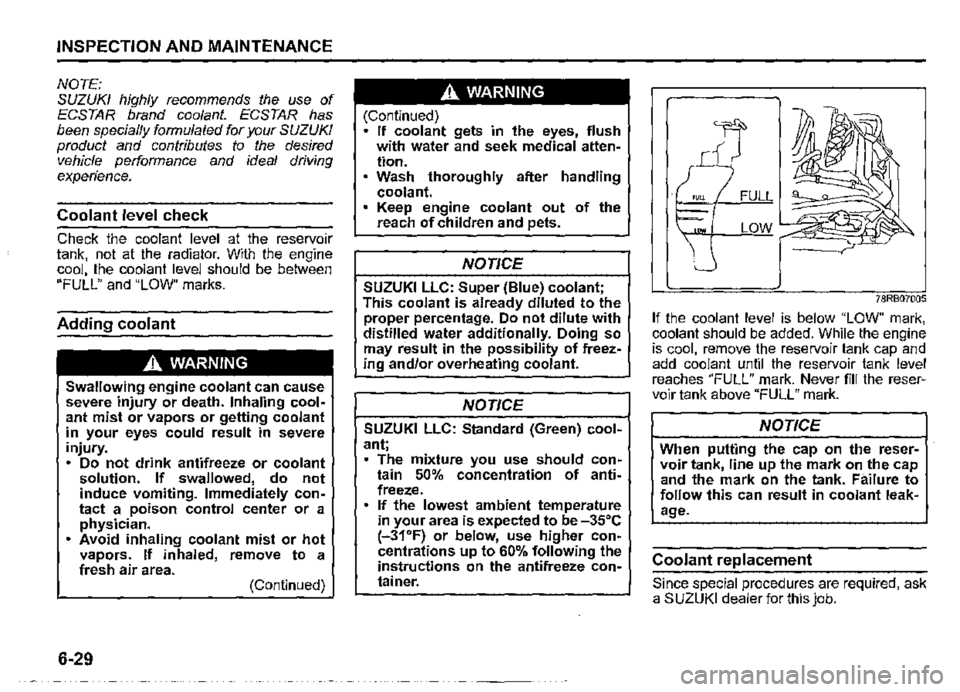
Check the coolant level at the reservoir tank, not at the radiator. With the engine cool, the coolant level should be between "FULL" and "LOW" marks.
Adding coolant
,A WARNING
Swallowing engine coolant can cause severe injury or death. Inhaling coolant mist or vapors or getting coolant in your eyes could result in severe injury. • Do not drink antifreeze or coolant solution. If swallowed, do not induce vomiting. Immediately contact a poison control center or a physician. • Avoid inhaling coolant mist or hot vapors. If inhaled, remove to a fresh air area. (Continued)
6-29
,A WARNING
(Continued) • If coolant gets in the eyes, flush with water and seek medical attention. Wash thoroughly after handling coolant. Keep engine coolant out of the reach of children and pets.
NOTICE
SUZUKI LLC: Super (Blue) coolant; This coolant is already diluted to the proper percentage. Do not dilute with distilled water additionally. Doing so may result in the possibility of freezing and/or overheating coolant.
NOTICE
SUZUKI LLC: Standard (Green) coolant; • The mixture you use should contain 50% concentration of antifreeze. If the lowest ambient temperature in your area is expected lo be -35°C (-31'F) or below, use higher concentrations up to 60% following the instructions on the antifreeze container.
78RB07005
If the coolant level is below "LOW" mark, coolant should be added. While the engine is cool, remove the reservoir tank cap and add coolant until the reservoir tank level reaches "FULL" mark. Never fill the reservoir tank above "FULL" mark.
NOTICE
When putting the cap on the reservoir tank, line up the mark on the cap and the mark on the tank. Failure to follow this can result in coolant leakage.
Coolant replacement
Since special procedures are required, ask a SUZUKI dealer for this job.
Page 350 of 421
· INSPECTION AND MAINTENANCE
A CAUTION
After driving the vehicle, the gear oil temperature may be high enough to burn you. Wait until the oil filler and level plug are cool enough to touch with your bare hands before inspecting gear oil level.
NOTICE
Be sure to use new plug with new gasket to avoid loose·ness of the plug and oil leakage.
Gear oil change
Since special procedures, materials and tools are required, ask a SUZUKI dealer for this job.
6-33
Clutch pedal
Fluid control clutch
78RB07011
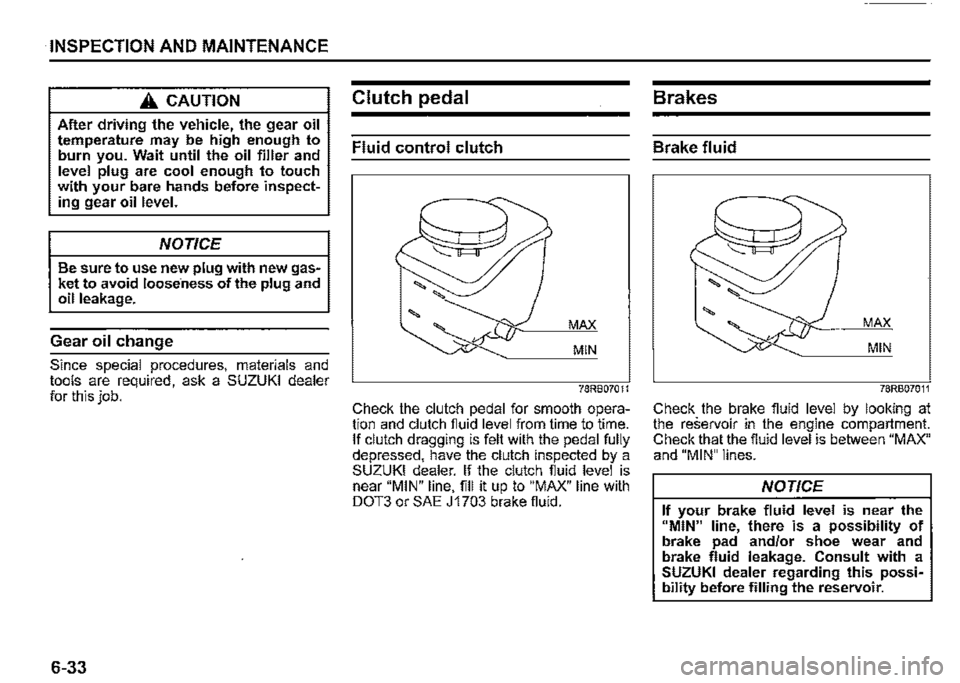
Check the clutch pedal for smooth operation and clutch fiuid level from time to time. If clutch dragging is felt with the pedal fully depressed, have the clutch inspected by a SUZUKI dealer. If the clutch fiuid level is near "MIN" line, fill it up to "MAX" line with DOT3 or SAE J1703 brake fiuid.
Brakes
Brake fluid
MAX
MIN
78RB07011
Check the brake fluid level by looking at the reservoir in the engine compartment. Check that the fiuid level is between "MAX" and "MIN" lines.
NOTICE
If your brake fluid level is near the 11MIN" line, there is a possibility of brake pad and/or shoe wear and brake fluid leakage. Consult with a SUZUKI dealer regarding this possibility before filling the reservoir.