bluetooth SUZUKI KIZASHI 2010 1.G User Guide
[x] Cancel search | Manufacturer: SUZUKI, Model Year: 2010, Model line: KIZASHI, Model: SUZUKI KIZASHI 2010 1.GPages: 388, PDF Size: 4.94 MB
Page 225 of 388

5-46
OTHER CONTROLS AND EQUIPMENT
57L20-03E
Reset to factory defaults
You can delete all registered data and
reset the all changement to the factory
default.
1) Press the Off Hook button (7).
The Bluetooth
® main menu appears.
2) Turn the TUNE FOLDER PUSH
SOUND knob (1) to select “Setup”,
and press the TUNE FOLDER PUSH
SOUND knob (1) to determine the
selection.
3) Turn the TUNE FOLDER PUSH
SOUND knob (1) to select “System
Setup”, and press the TUNE FOLDER
PUSH SOUND knob (1) to determine
the selection.
4) Turn the TUNE FOLDER PUSH
SOUND knob (1) to select “Initialize”,
and press the TUNE FOLDER PUSH
SOUND knob (1) to determine the
selection.
5) Turn the TUNE FOLDER PUSH
SOUND knob (1) to select “Confirm”,
and press the TUNE FOLDER PUSH
SOUND knob (1) to determine the
selection.
6) Turn the TUNE FOLDER PUSH
SOUND knob (1) to select “Confirm”,
and press the TUNE FOLDER PUSH
SOUND knob (1) to determine the
selection.
NOTE:
Selection of “Go Back” displays the previ-
ous menu.Selection of telephone (Select Phone)
The phone to be used can be selected.
1) Press the Off Hook button (7).
The Bluetooth
® main menu appears.
2) Turn the TUNE FOLDER PUSH SOUND
knob (1) to select “Setup”, and press the
TUNE FOLDER PUSH SOUND knob (1)
to determine the selection.
3) Turn the TUNE FOLDER PUSH SOUND
knob (1) to select “Phone Setup”, and
press the TUNE FOLDER PUSH
SOUND knob (1) to determine the selec-
tion.
4) Turn the TUNE FOLDER PUSH SOUND
knob (1) to select “Select Phone”, and
press the TUNE FOLDER PUSH
SOUND knob (1) to determine the selec-
tion.
5) Turn the TUNE FOLDER PUSH SOUND
knob (1) to select a phone to be paired,
and press the TUNE FOLDER PUSH
SOUND knob (1) to determine the selec-
tion.
6) Turn the TUNE FOLDER PUSH SOUND
knob (1) to select “Confirm”, and press
the TUNE FOLDER PUSH SOUND knob
(1) to determine the selection.
NOTE:
Selection of “Go Back” displays the previ-
ous menu.
The Bluetooth
®-ready audio device will be
disconnected when the phone is selected.
Name change (Change Name)
The registered name of phones are
changed.
1) Press the Off Hook button (7).
The Bluetooth
® main menu appears.
2) Turn the TUNE FOLDER PUSH
SOUND knob (1) to select “Setup”,
and press the TUNE FOLDER PUSH
SOUND knob (1) to determine the
selection.
3) Turn the TUNE FOLDER PUSH
SOUND knob (1) to select “Phone
Setup”, and press the TUNE FOLDER
PUSH SOUND knob (1) to determine
the selection.
4) Turn the TUNE FOLDER PUSH
SOUND knob (1) to select “Change
Name”, and press the TUNE FOLDER
PUSH SOUND knob (1) to determine
the selection.
5) Turn the TUNE FOLDER PUSH
SOUND knob (1) to select a phone to
be changed, and press the TUNE
FOLDER PUSH SOUND knob (1) to
determine the selection.
6) Turn the TUNE FOLDER PUSH
SOUND knob (1) to select “Record
Name”, and press the TUNE FOLDER
PUSH SOUND knob (1) to determine
the selection.
Page 226 of 388

5-47OTHER CONTROLS AND EQUIPMENT
57L20-03E
7) Pronounce the name to be used at
voice recognition.
8) Turn the TUNE FOLDER PUSH
SOUND knob (1) to select “Confirm”,
and press the TUNE FOLDER PUSH
SOUND knob (1) to determine the
selection.
NOTE:
Selection of “Go Back” displays the previ-
ous menu.List of telephones (List Phones)
The registered name of phones are dis-
played in sequence.
1) Press the Off Hook button (7).
The Bluetooth
® main menu appears.
2) Turn the TUNE FOLDER PUSH
SOUND knob (1) to select “Setup”,
and press the TUNE FOLDER PUSH
SOUND knob (1) to determine the
selection.
3) Turn the TUNE FOLDER PUSH
SOUND knob (1) to select “Phone
Setup”, and press the TUNE FOLDER
PUSH SOUND knob (1) to determine
the selection.
4) Turn the TUNE FOLDER PUSH
SOUND knob (1) to select “List
Phones”, and press the TUNE
FOLDER PUSH SOUND knob (1) to
determine the selection.
The names of registered phones are
displayed in sequence.
NOTE:
Selection of “Go Back” displays the previ-
ous menu.Passkey setting (Set Passkey)
The security number (Passkey) is speci-
fied.
1) Press the Off Hook button (7).
The Bluetooth
® main menu appears.
2) Turn the TUNE FOLDER PUSH
SOUND knob (1) to select “Setup”,
and press the TUNE FOLDER PUSH
SOUND knob (1) to determine the
selection.
3) Turn the TUNE FOLDER PUSH
SOUND knob (1) to select “Phone
Setup”, and press the TUNE FOLDER
PUSH SOUND knob (1) to determine
the selection.
4) Turn the TUNE FOLDER PUSH
SOUND knob (1) to select “Set Pass-
key”, and press the TUNE FOLDER
PUSH SOUND knob (1) to determine
the selection.
5) Turn the TUNE FOLDER PUSH
SOUND knob (1) to select a number
for ones digit, and press the TUNE
FOLDER PUSH SOUND knob (1) to
determine the selection. Determine the
tens, hundreds, and thousands digits
in the same manner.
NOTE:
Selection of “Go Back” displays the previ-
ous menu.
Page 227 of 388

5-48
OTHER CONTROLS AND EQUIPMENT
57L20-03E
Deletion of telephone data (Delete Phone)The registered information of phone is
deleted.
1) Press the Off Hook button (7).
The Bluetooth
® main menu appears.
2) Turn the TUNE FOLDER PUSH SOUND
knob (1) to select “Setup”, and press the
TUNE FOLDER PUSH SOUND knob (1)
to determine the selection.
3) Turn the TUNE FOLDER PUSH SOUND
knob (1) to select “Phone Setup”, and
press the TUNE FOLDER PUSH SOUND
knob (1) to determine the selection.
4) Turn the TUNE FOLDER PUSH SOUND
knob (1) to select “Delete Phone”, and
press the TUNE FOLDER PUSH SOUND
knob (1) to determine the selection.
5) Turn the TUNE FOLDER PUSH SOUND
knob (1) to select a phone to be deleted,
and press the TUNE FOLDER PUSH
SOUND knob (1) to determine the selec-
tion.
6) Turn the TUNE FOLDER PUSH SOUND
knob (1) to select “Confirm”, and press
the TUNE FOLDER PUSH SOUND knob
(1) to determine the selection.
NOTE:
Selection of “Go Back” displays the previous
menu.
HF function on/off (HF Power)
Toggles the Bluetooth
® function on and
off.
1) Press the Off Hook button (7).
The Bluetooth
® main menu appears.
2) Turn the TUNE FOLDER PUSH
SOUND knob (1) to select “Setup”,
and press the TUNE FOLDER PUSH
SOUND knob (1) to determine the
selection.
3) Turn the TUNE FOLDER PUSH
SOUND knob (1) to select “Phone
Setup”, and press the TUNE FOLDER
PUSH SOUND knob (1) to determine
the selection.
4) Turn the TUNE FOLDER PUSH
SOUND knob (1) to select “HF Power”,
and press the TUNE FOLDER PUSH
SOUND knob (1) to determine the
selection.
5) Turn the TUNE FOLDER PUSH
SOUND knob (1) to select “Turn on” or
“Turn off ” and press the TUNE
FOLDER PUSH SOUND knob (1) to
determine the selection.
NOTE:
Selection of “Go Back” displays the previ-
ous menu.
Page 228 of 388
5-49OTHER CONTROLS AND EQUIPMENT
57L20-03E
Bluetooth
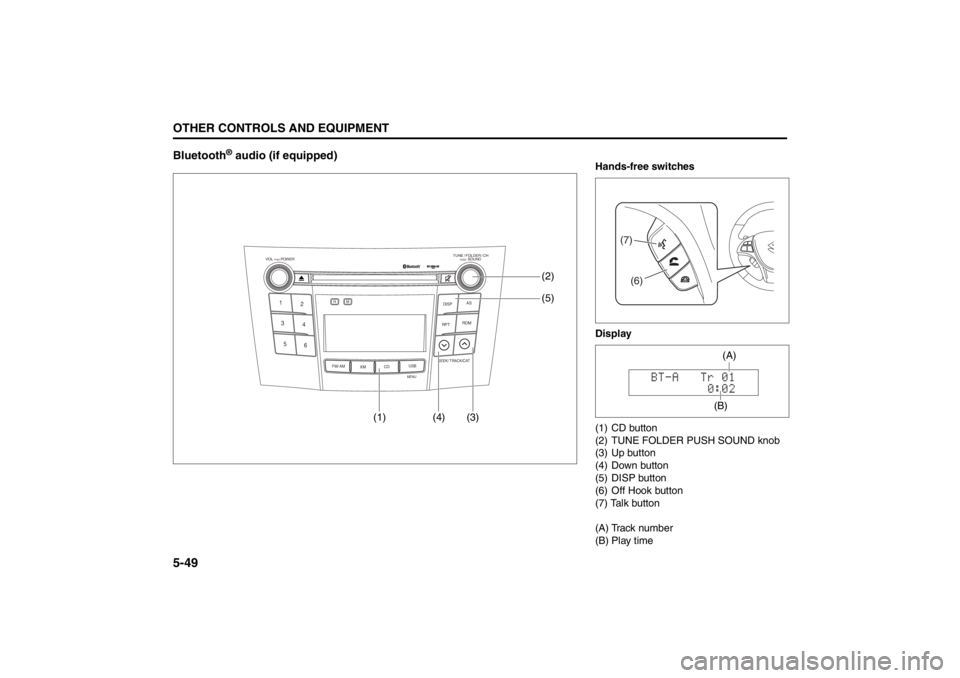
® audio (if equipped)
TUNE / FOLDER / CHDISPAS
RPT
XM
USBMENU
RDM
SEEK/ TRACK/CAT
SOUNDPUSH
1
2
3
4
5
6
VOL PUSH POWER
CD
FM/ AMH
M
(4) (3)(5) (2)
(1)
Hands-free switches
Display
(1) CD button
(2) TUNE FOLDER PUSH SOUND knob
(3) Up button
(4) Down button
(5) DISP button
(6) Off Hook button
(7) Talk button
(A) Track number
(B) Play time
(7)(6)
(B)(A)
Page 229 of 388
5-50
OTHER CONTROLS AND EQUIPMENT
57L20-03E
Registration of audio devices (Pair
Audio, when no cell phone is regis-
tered)
NOTE:
To set up a new audio player, disconnect
the system from the phone. The phone
shall be reconnected after audio player
setup is completed.
If connection cannot be confirmed within
120 seconds, the connecting operation
is canceled. Please try again or refer to
the audio player manual for assistance
with the pairing process.
1) Press the CD button (1) to select
Bluetooth
® audio mode.
“BT-A” is displayed.
2) Press the Talk button (7).
The Bluetooth
® main menu appears.
3) Turn the TUNE FOLDER PUSH
SOUND knob (2) to select “Pair
Audio”, and press the TUNE FOLDER
PUSH SOUND knob (2) to determine
the selection.
4) Turn the TUNE FOLDER PUSH
SOUND knob (2) to select “Record
Name”, and press the TUNE FOLDER
PUSH SOUND knob (2) to determinethe selection.
5) Pronounce the name to be used at
voice recognition.
6) Turn the TUNE FOLDER PUSH
SOUND knob (2) to select “Confirm”,
and press the TUNE FOLDER PUSH
SOUND knob (2) to determine the
selection.
7) Select “CAR_M.MEDIA” from the
Bluetooth
® menu of the audio player
and make a connection.
Refer to the manual of your audio
player for further information.
8) Enter the Passkey displayed on the
system into the audio player.
NOTE:
Selection of “Go Back” displays the previ-
ous menu.Registration of audio devices (Pair
Audio, when your cell phone is regis-
tered)
NOTE:
To set up a new audio player, disconnect
the system from the phone. The phone
shall be reconnected after audio player
setup is completed.
If connection cannot be confirmed within
120 seconds, the connecting operation
is canceled. Please try again or refer to
the audio player manual for assistance
with the pairing process.
1) Press the Off Hook button (6).
The Bluetooth
® main menu appears.
2) Turn the TUNE FOLDER PUSH
SOUND knob (2) to select “Setup”,
and press the TUNE FOLDER PUSH
SOUND knob (2) to determine the
selection.
3) Turn the TUNE FOLDER PUSH
SOUND knob (2) to select “BT.A
Setup”, and press the TUNE FOLDER
PUSH SOUND knob (2) to determine
the selection.
To use Bluetooth
®-ready audio devices
with this unit, the devices need to be
registered.
To use Bluetooth
®-ready audio devices
with this unit, the devices need to be
registered.
Page 230 of 388

5-51OTHER CONTROLS AND EQUIPMENT
57L20-03E
4) Turn the TUNE FOLDER PUSH
SOUND knob (2) to select “Record
Name”, and press the TUNE FOLDER
PUSH SOUND knob (2) to determine
the selection.
5) Pronounce the name to be used at
voice recognition.
6) Turn the TUNE FOLDER PUSH
SOUND knob (2) to select “Confirm”,
and press the TUNE FOLDER PUSH
SOUND knob (2) to determine the
selection.
7) Select “CAR_M.MEDIA” from the
Bluetooth
® menu of the audio player
and make a connection.
Refer to the manual of your audio
player for further information.
8) Enter the Passkey displayed on the
system into the audio player.
NOTE:
Selection of “Go Back” displays the previ-
ous menu.Selecting the bluetooth audio mode
Press the CD button (1).
Each time the button is pressed, the
source is switched as follows:
Selecting a group (only for supported-
models)
Turn the TUNE FOLDER PUSH SOUND
knob (2) to select a group.
Selecting a track
Press the Up button (3) to listen to the
next track.
Press the Down button (4) twice to listen
to the previous track.
When the Down button (4) is pressed
once, the track currently being played
will start again at the beginning.
Fast forwarding/Rewinding a track
Hold in the Up button (3) to advance a
track rapidly.
Hold in the Down button (4) to rewind a
track.Display change
Press the DISP button (5).
Each time it is pressed, display is changed
as follows:
NOTE:
If all the text data cannot be displayed, the
“>” mark appears at the right end. Holding
down the DISP button (5) for 1 sec. or
more calls the next page. CD Bluetooth
® audio
Play time display
Track name display
Artist name display
Album name display
Page 231 of 388

5-52
OTHER CONTROLS AND EQUIPMENT
57L20-03E
Selection of audio device (Select
Audio)
The audio device to be used can be
selected.
1) Press the Off Hook button (6).
The Bluetooth
® main menu appears.
2) Turn the TUNE FOLDER PUSH
SOUND knob (2) to select “Setup”,
and press the TUNE FOLDER PUSH
SOUND knob (2) to determine the
selection.
3) Turn the TUNE FOLDER PUSH
SOUND knob (2) to select “BT.A
Setup”, and press the TUNE FOLDER
PUSH SOUND knob (2) to determine
the selection.
4) Turn the TUNE FOLDER PUSH
SOUND knob (2) to select “Select
Audio”, and press the TUNE FOLDER
PUSH SOUND knob (2) to determine
the selection.
5) Turn the TUNE FOLDER PUSH
SOUND knob (2) to select an audio
device to be paired, and press the
TUNE FOLDER PUSH SOUND knob
(2) to determine the selection.
6) Turn the TUNE FOLDER PUSH
SOUND knob (2) to select “Confirm”,
and press the TUNE FOLDER PUSH
SOUND knob (2) to determine the
selection.7) Turn the TUNE FOLDER PUSH
SOUND knob (2) to select “From Car”
or “From Audio”, and press the TUNE
FOLDER PUSH SOUND knob (2) to
determine the selection.
"From Car": Makes a pairing from the
unit.
"From Audio": Makes a pairing from
the audio device.
8) Turn the TUNE FOLDER PUSH
SOUND knob (2) to select “Confirm”,
and press the TUNE FOLDER PUSH
SOUND knob (2) to determine the
selection.
NOTE:
Selection of “Go Back” displays the pre-
vious menu.
The phone will be disconnected when
the Bluetooth
®-ready audio device is
selected.Change of audio device name (Change
Name)
The registered name of audio devices are
changed.
1) Press the Off Hook button (6).
The Bluetooth
® main menu appears.
2) Turn the TUNE FOLDER PUSH
SOUND knob (2) to select “Setup”,
and press the TUNE FOLDER PUSH
SOUND knob (2) to determine the
selection.
3) Turn the TUNE FOLDER PUSH
SOUND knob (2) to select “BT.A
Setup”, and press the TUNE FOLDER
PUSH SOUND knob (2) to determine
the selection.
4) Turn the TUNE FOLDER PUSH
SOUND knob (2) to select “Change
Name”, and press the TUNE FOLDER
PUSH SOUND knob (2) to determine
the selection.
5) Turn the TUNE FOLDER PUSH
SOUND knob (2) to select an audio
device to be changed, and press the
TUNE FOLDER PUSH SOUND knob
(2) to determine the selection.
6) Turn the TUNE FOLDER PUSH
SOUND knob (2) to select “Record
Name”, and press the TUNE FOLDER
PUSH SOUND knob (2) to determine
the selection.
Page 232 of 388

5-53OTHER CONTROLS AND EQUIPMENT
57L20-03E
7) Pronounce the name to be used at
voice recognition.
8) Turn the TUNE FOLDER PUSH
SOUND knob (2) to select “Confirm”,
and press the TUNE FOLDER PUSH
SOUND knob (2) to determine the
selection.
NOTE:
Selection of “Go Back” displays the previ-
ous menu.List of audio devices (List Audio)
The registered name of audio devices are
displayed in sequence.
1) Press the Off Hook button (6).
The Bluetooth
® main menu appears.
2) Turn the TUNE FOLDER PUSH
SOUND knob (2) to select “Setup”,
and press the TUNE FOLDER PUSH
SOUND knob (2) to determine the
selection.
3) Turn the TUNE FOLDER PUSH
SOUND knob (2) to select “BT.A
Setup”, and press the TUNE FOLDER
PUSH SOUND knob (2) to determine
the selection.
4) Turn the TUNE FOLDER PUSH
SOUND knob (2) to select “List
Audios”, and press the TUNE
FOLDER PUSH SOUND knob (2) to
determine the selection.
The names of registered phones are
displayed in sequence.
NOTE:
Selection of “Go Back” displays the previ-
ous menu.Passkey setting (Set Passkey)
The security number (Passkey) is speci-
fied.
1) Press the Off Hook button (6).
The Bluetooth
® main menu appears.
2) Turn the TUNE FOLDER PUSH
SOUND knob (2) to select “Setup”,
and press the TUNE FOLDER PUSH
SOUND knob (2) to determine the
selection.
3) Turn the TUNE FOLDER PUSH
SOUND knob (2) to select “BT.A
Setup”, and press the TUNE FOLDER
PUSH SOUND knob (2) to determine
the selection.
4) Turn the TUNE FOLDER PUSH
SOUND knob (2) to select “Set Pass-
key”, and press the TUNE FOLDER
PUSH SOUND knob (2) to determine
the selection.
5) Turn the TUNE FOLDER PUSH
SOUND knob (2) to select a number
for ones digit, and press the TUNE
FOLDER PUSH SOUND knob (2) to
determine the selection. Determine the
tens, hundreds, and thousands digits
in the same manner.
NOTE:
Selection of “Go Back” displays the previ-
ous menu.
Page 233 of 388

5-54
OTHER CONTROLS AND EQUIPMENT
57L20-03E
Deletion of connection data (Delete
Audio)
The registered information of audio device
is deleted.
1) Press the Off Hook button (6).
The Bluetooth
® main menu appears.
2) Turn the TUNE FOLDER PUSH
SOUND knob (2) to select “Setup”,
and press the TUNE FOLDER PUSH
SOUND knob (2) to determine the
selection.
3) Turn the TUNE FOLDER PUSH
SOUND knob (2) to select “BT.A
Setup”, and press the TUNE FOLDER
PUSH SOUND knob (2) to determine
the selection.
4) Turn the TUNE FOLDER PUSH
SOUND knob (2) to select “Delete
Audio”, and press the TUNE FOLDER
PUSH SOUND knob (2) to determine
the selection.
5) Turn the TUNE FOLDER PUSH
SOUND knob (2) to select an audio
device to be deleted, and press the
TUNE FOLDER PUSH SOUND knob
(2) to determine the selection.
6) Turn the TUNE FOLDER PUSH
SOUND knob (2) to select “Confirm”,
and press the TUNE FOLDER PUSH
SOUND knob (2) to determine the
selection.NOTE:
Selection of “Go Back” displays the previ-
ous menu.
Page 234 of 388
5-55OTHER CONTROLS AND EQUIPMENT
57L20-03E
Voice command for Bluetooth
® Hands-Free/Bluetooth
® Audio
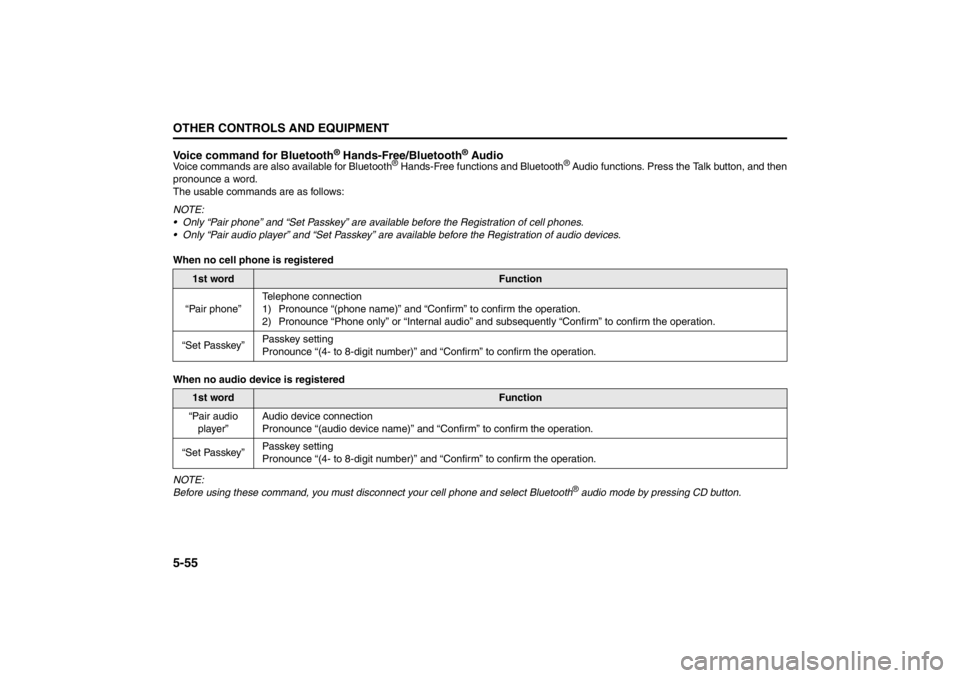
Voice commands are also available for Bluetooth
® Hands-Free functions and Bluetooth
® Audio functions. Press the Talk button, and then
pronounce a word.
The usable commands are as follows:
NOTE:
Only “Pair phone” and “Set Passkey” are available before the Registration of cell phones.
Only “Pair audio player” and “Set Passkey” are available before the Registration of audio devices.
When no cell phone is registered
When no audio device is registered
NOTE:
Before using these command, you must disconnect your cell phone and select Bluetooth® audio mode by pressing CD button.
1st word
Function
“Pair phone”Telephone connection
1) Pronounce “(phone name)” and “Confirm” to confirm the operation.
2) Pronounce “Phone only” or “Internal audio” and subsequently “Confirm” to confirm the operation.
“Set Passkey”Passkey setting
Pronounce “(4- to 8-digit number)” and “Confirm” to confirm the operation.
1st word
Function
“Pair audio
player”Audio device connection
Pronounce “(audio device name)” and “Confirm” to confirm the operation.
“Set Passkey”Passkey setting
Pronounce “(4- to 8-digit number)” and “Confirm” to confirm the operation.