ECU SUZUKI KIZASHI 2010 1.G Owner's Manual
[x] Cancel search | Manufacturer: SUZUKI, Model Year: 2010, Model line: KIZASHI, Model: SUZUKI KIZASHI 2010 1.GPages: 388, PDF Size: 4.94 MB
Page 129 of 388
2-110
BEFORE DRIVING
57L20-03E
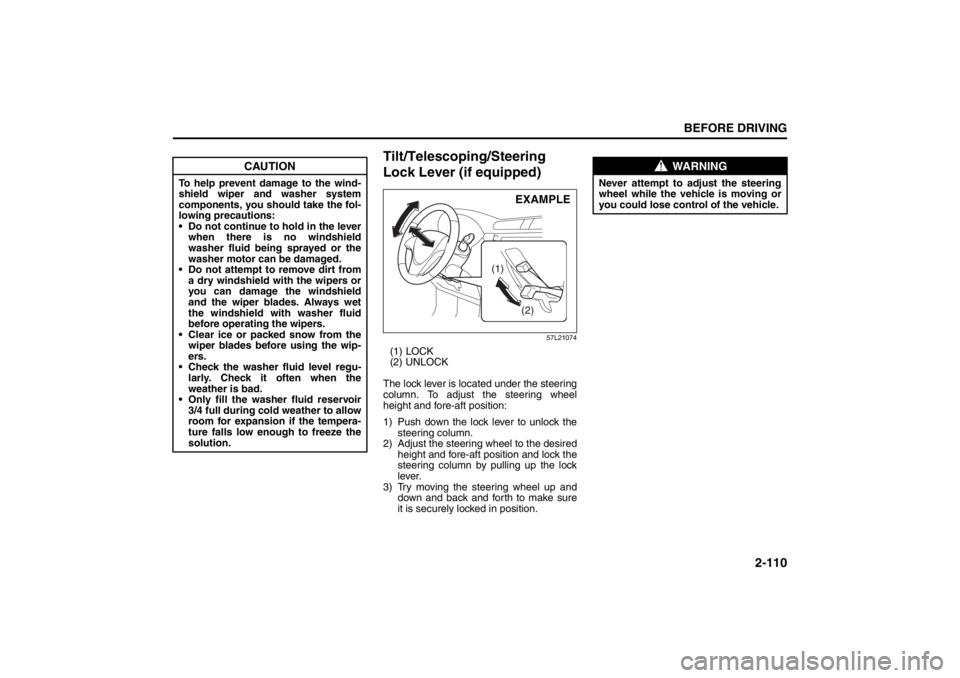
Tilt/Telescoping/Steering
Lock Lever (if equipped)
57L21074
(1) LOCK
(2) UNLOCK
The lock lever is located under the steering
column. To adjust the steering wheel
height and fore-aft position:
1) Push down the lock lever to unlock the
steering column.
2) Adjust the steering wheel to the desired
height and fore-aft position and lock the
steering column by pulling up the lock
lever.
3) Try moving the steering wheel up and
down and back and forth to make sure
it is securely locked in position.
CAUTION
To help prevent damage to the wind-
shield wiper and washer system
components, you should take the fol-
lowing precautions:
Do not continue to hold in the lever
when there is no windshield
washer fluid being sprayed or the
washer motor can be damaged.
Do not attempt to remove dirt from
a dry windshield with the wipers or
you can damage the windshield
and the wiper blades. Always wet
the windshield with washer fluid
before operating the wipers.
Clear ice or packed snow from the
wiper blades before using the wip-
ers.
Check the washer fluid level regu-
larly. Check it often when the
weather is bad.
Only fill the washer fluid reservoir
3/4 full during cold weather to allow
room for expansion if the tempera-
ture falls low enough to freeze the
solution.
(1)
(2)
EXAMPLE
WARNING
Never attempt to adjust the steering
wheel while the vehicle is moving or
you could lose control of the vehicle.
Page 133 of 388
3-2
OPERATING YOUR VEHICLE
57L20-03E
12)Check all gauges.
13)Make sure that the BRAKE light turnsoff when the parking brake is released.
Once a week, or each time you fill your fuel
tank, perform the following under-hood
checks:
1) Engine oil level
2) Coolant level
3) Brake fluid level
4) Windshield washer fluid level
5) Hood latch operation Pull the hood release handle inside the
vehicle. Make sure that you cannot
open the hood all the way without
releasing the secondary latch. Be sure
to close the hood securely after check-
ing for proper latch operation. See the
item “All latches, hinges and locks” of
“CHASSIS AND BODY” in the “Periodic
Maintenance Schedule” section in the
“INSPECTION AND MAINTENANCE”
section for lubrication schedule. Once a month, or each time you fill your
fuel tank, check the tire pressure using a
tire pressure gauge. Also check the tire
pressure of the spare tire.
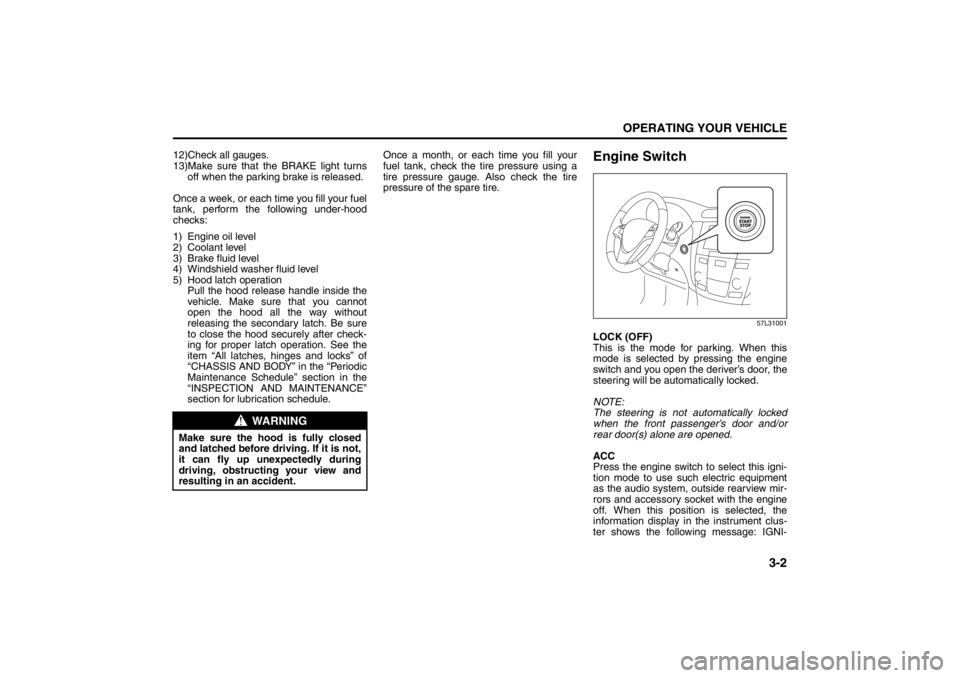
Engine Switch
57L31001
LOCK (OFF)
This is the mode for parking. When this
mode is selected by pressing the engine
switch and you open the deriver’s door, the
steering will be automatically locked.
NOTE:
The steering is not automatically locked
when the front passenger’s door and/or
rear door(s) alone are opened.
ACC
Press the engine switch to select this igni-
tion mode to use such electric equipment
as the audio system, outside rearview mir-
rors and accessory socket with the engine
off. When this position is selected, the
information display in the instrument clus-
ter shows the following message: IGNI-
WARNING
Make sure the hood is fully closed
and latched before driving. If it is not,
it can fly up unexpectedly during
driving, obstructing your view and
resulting in an accident.
Ignition Switch: 8
Page 141 of 388
3-10
OPERATING YOUR VEHICLE
57L20-03E
Steering lock warning buzzer
If the steering lock fails to engage due to a
fault in the system even when you press
the engine switch to change the ignition
mode to “LOCK” (OFF), the interior buzzer
will warn you of this condition with
repeated short beeps. If this happens,
have the vehicle inspected by an autho-
rized SUZUKI dealer.
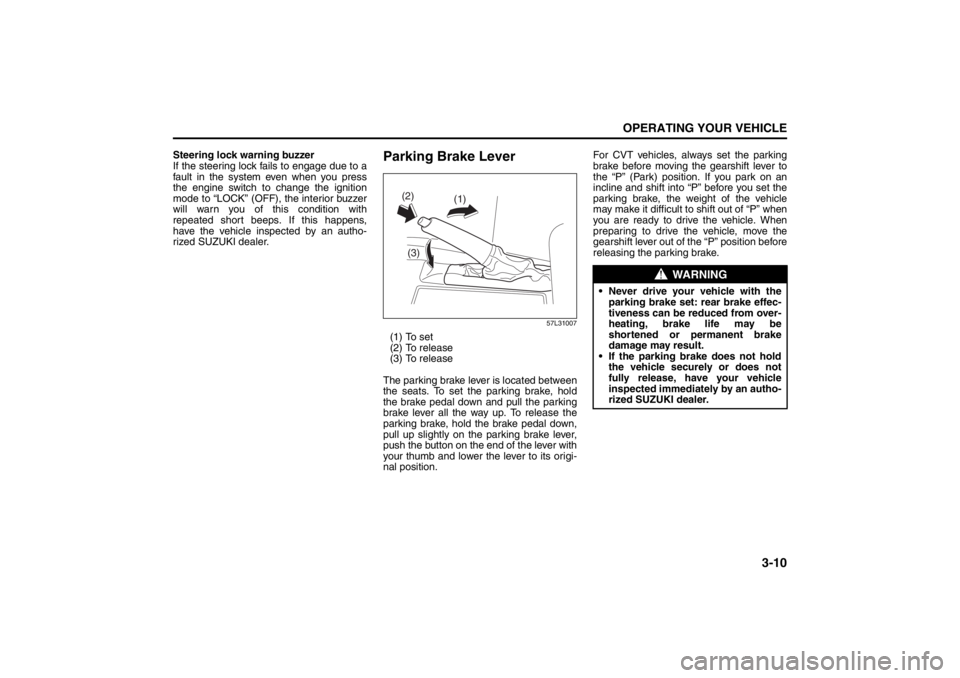
Parking Brake Lever
57L31007
(1) To set
(2) To release
(3) To release
The parking brake lever is located between
the seats. To set the parking brake, hold
the brake pedal down and pull the parking
brake lever all the way up. To release the
parking brake, hold the brake pedal down,
pull up slightly on the parking brake lever,
push the button on the end of the lever with
your thumb and lower the lever to its origi-
nal position. For CVT vehicles, always set the parking
brake before moving the gearshift lever to
the “P” (Park) position. If you park on an
incline and shift into “P” before you set the
parking brake, the weight of the vehicle
may make it difficult to
shift out of “P” when
you are ready to drive the vehicle. When
preparing to drive the vehicle, move the
gearshift lever out of the “P” position before
releasing the parking brake.
(1)
(2)
(3)
WARNING
Never drive your vehicle with the parking brake set: rear brake effec-
tiveness can be reduced from over-
heating, brake life may be
shortened or permanent brake
damage may result.
If the parking brake does not hold the vehicle securely or does not
fully release, have your vehicle
inspected immediately by an autho-
rized SUZUKI dealer.
Page 143 of 388
3-12
OPERATING YOUR VEHICLE
57L20-03E
Accelerator Pedal (3)This pedal controls the speed of the
engine. Depressing the accelerator pedal
increases power output and speed.
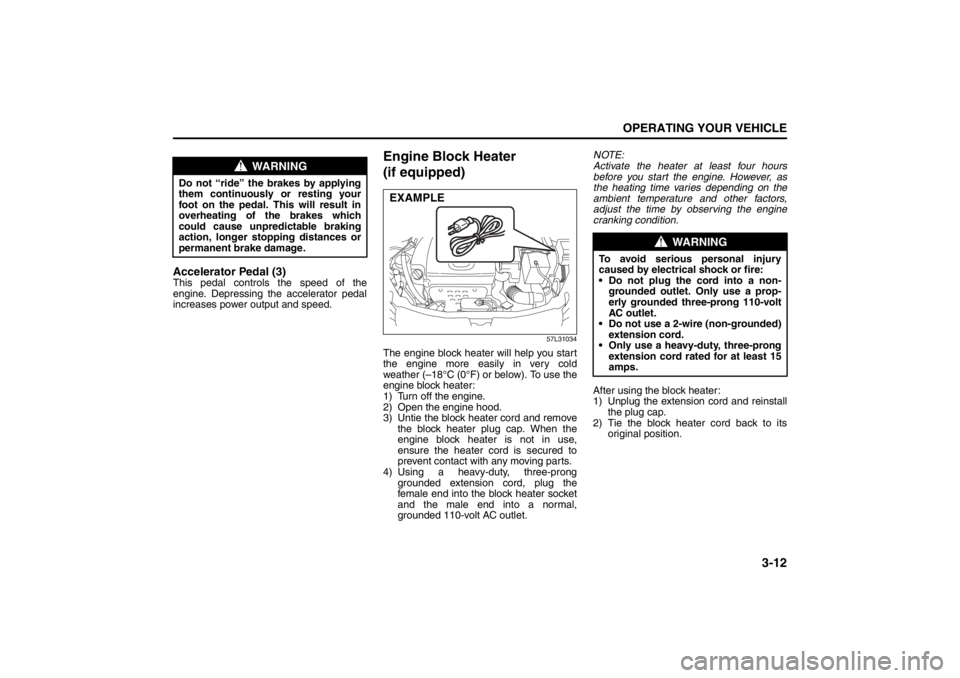
Engine Block Heater
(if equipped)
57L31034
The engine block heater will help you start
the engine more easily in very cold
weather (–18°C (0°F) or below). To use the
engine block heater:
1) Turn off the engine.
2) Open the engine hood.
3) Untie the block heater cord and remove
the block heater plug cap. When the
engine block heater is not in use,
ensure the heater cord is secured to
prevent contact with any moving parts.
4) Using a heavy-duty, three-prong
grounded extension cord, plug the
female end into the block heater socket
and the male end into a normal,
grounded 110-volt AC outlet.NOTE:
Activate the heater at least four hours
before you start the engine. However, as
the heating time varies depending on the
ambient temperature and other factors,
adjust the time by observing the engine
cranking condition.
After using the block heater:
1) Unplug the extension cord and reinstall
the plug cap.
2) Tie the block heater cord back to its
original position.
WARNING
Do not “ride” the brakes by applying
them continuously or resting your
foot on the pedal. This will result in
overheating of the brakes which
could cause unpredictable braking
action, longer stopping distances or
permanent brake damage.
EXAMPLE
WARNING
To avoid serious personal injury
caused by electrical shock or fire:
Do not plug the cord into a non-
grounded outlet. Only use a prop-
erly grounded three-prong 110-volt
AC outlet.
Do not use a 2-wire (non-grounded)
extension cord.
Only use a heavy-duty, three-prong
extension cord rated for at least 15
amps.
Page 144 of 388
3-13OPERATING YOUR VEHICLE
57L20-03E
3) Close the engine hood securely before
starting the engine.
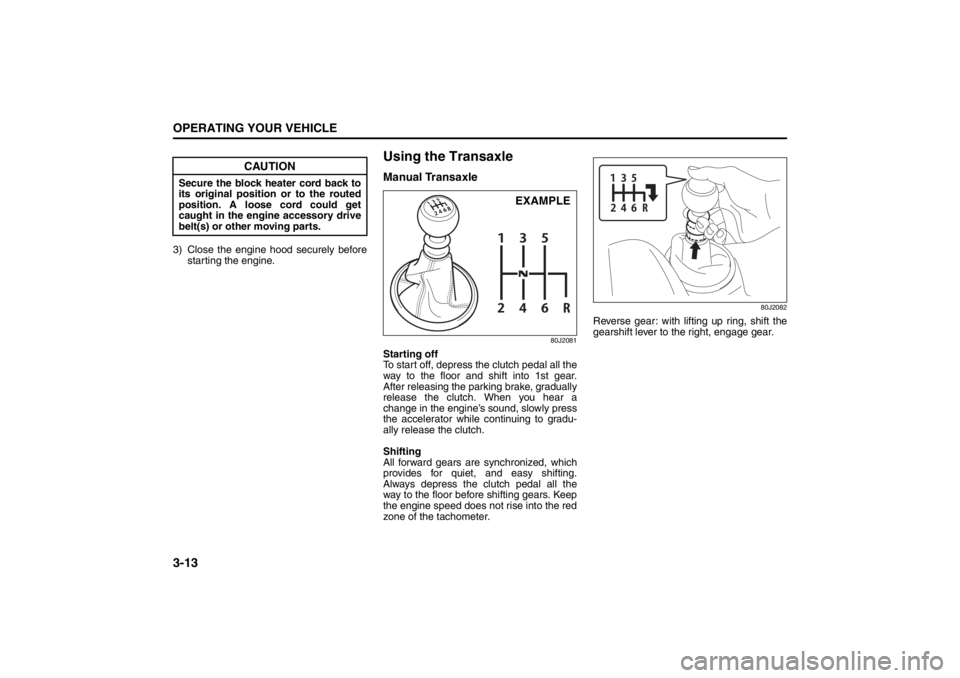
Using the TransaxleManual Transaxle
80J2081
Starting off
To start off, depress the clutch pedal all the
way to the floor and shift into 1st gear.
After releasing the parking brake, gradually
release the clutch. When you hear a
change in the engine’s sound, slowly press
the accelerator while continuing to gradu-
ally release the clutch.
Shifting
All forward gears are synchronized, which
provides for quiet, and easy shifting.
Always depress the clutch pedal all the
way to the floor before shifting gears. Keep
the engine speed does not rise into the red
zone of the tachometer.
80J2082
Reverse gear: with lifting up ring, shift the
gearshift lever to the right, engage gear.
CAUTION
Secure the block heater cord back to
its original position or to the routed
position. A loose cord could get
caught in the engine accessory drive
belt(s) or other moving parts.
EXAMPLE
Page 223 of 388

5-44
OTHER CONTROLS AND EQUIPMENT
57L20-03E
Security number (PIN)
The security number (PIN) is specified.
Once PIN is specified, PIN entry is
required when toggling Phonebook
between locking and unlocking.
1) Press the Off Hook button (7).
The Bluetooth
® main menu appears.
2) Turn the TUNE FOLDER PUSH
SOUND knob (1) to select “Setup”,
and press the TUNE FOLDER PUSH
SOUND knob (1) to determine the
selection.
3) Turn the TUNE FOLDER PUSH
SOUND knob (1) to select “Security”,
and press the TUNE FOLDER PUSH
SOUND knob (1) to determine the
selection.
4) Turn the TUNE FOLDER PUSH
SOUND knob (1) to select “Set PIN”,
and press the TUNE FOLDER PUSH
SOUND knob (1) to determine the
selection.
If the PIN is already specified, PIN
entry is required. If the PIN needs to
be changed, enter the current PIN.
5) Turn the TUNE FOLDER PUSH
SOUND knob (1) to select a number
for ones digit, and press the TUNE
FOLDER PUSH SOUND knob (1) to
determine the selection. Determine the
tens, hundreds, and thousands digits
in the same manner.6) Turn the TUNE FOLDER PUSH
SOUND knob (1) to select “Confirm”,
and press the TUNE FOLDER PUSH
SOUND knob (1) to determine the
selection.
NOTE:
Selection of “Go Back” displays the previ-
ous menu.Phonebook lock
Locking Phonebook disables users from
referring to, using, editing, and deleting
Phonebook, outgoing call record, and
incoming call record.
1) Press the Off Hook button (7).
The Bluetooth
® main menu appears.
2) Turn the TUNE FOLDER PUSH
SOUND knob (1) to select “Setup”,
and press the TUNE FOLDER PUSH
SOUND knob (1) to determine the
selection.
3) Turn the TUNE FOLDER PUSH
SOUND knob (1) to select “Security”,
and press the TUNE FOLDER PUSH
SOUND knob (1) to determine the
selection.
4) Turn the TUNE FOLDER PUSH
SOUND knob (1) to select “Phbk
Lock”, and press the TUNE FOLDER
PUSH SOUND knob (1) to determine
the selection.
If Phonebook is already set to Lock,
“Phbk Lock.” is displayed.
5) Enter a PIN number.
NOTE:
Selection of “Go Back” displays the previ-
ous menu.
Page 224 of 388

5-45OTHER CONTROLS AND EQUIPMENT
57L20-03E
Phonebook unlock
1) Press the Off Hook button (7).
The Bluetooth
® main menu appears.
2) Turn the TUNE FOLDER PUSH
SOUND knob (1) to select “Setup”,
and press the TUNE FOLDER PUSH
SOUND knob (1) to determine the
selection.
3) Turn the TUNE FOLDER PUSH
SOUND knob (1) to select “Security”,
and press the TUNE FOLDER PUSH
SOUND knob (1) to determine the
selection.
4) Turn the TUNE FOLDER PUSH
SOUND knob (1) to select “Phbk
Unlock”, and press the TUNE
FOLDER PUSH SOUND knob (1) to
determine the selection.
If Phonebook is already set to Unlock,
“Phbk Unlock.” is displayed.
5) Enter a PIN number.
NOTE:
Selection of “Go Back” displays the previ-
ous menu.Adjusting the guidance volume
You can adjust the guidance volume.
1) Press the Off Hook button (7).
The Bluetooth
® main menu appears.
2) Turn the TUNE FOLDER PUSH
SOUND knob (1) to select “Setup”,
and press the TUNE FOLDER PUSH
SOUND knob (1) to determine the
selection.
3) Turn the TUNE FOLDER PUSH
SOUND knob (1) to select “System
Setup”, and press the TUNE FOLDER
PUSH SOUND knob (1) to determine
the selection.
4) Turn the TUNE FOLDER PUSH
SOUND knob (1) to select “Guidance
Vol”, and press the TUNE FOLDER
PUSH SOUND knob (1) to determine
the selection.
The current guidance volume is dis-
played.
5) Turn the TUNE FOLDER PUSH
SOUND knob (1) to select guidance
volume, and press the TUNE FOLDER
PUSH SOUND knob (1) to determine
the selection.
NOTE:
Selection of “Go Back” displays the previ-
ous menu.Display of device data (Device Name)
BD address and device name is displayed.
1) Press the Off Hook button (7).
The Bluetooth
® main menu appears.
2) Turn the TUNE FOLDER PUSH
SOUND knob (1) to select “Setup”,
and press the TUNE FOLDER PUSH
SOUND knob (1) to determine the
selection.
3) Turn the TUNE FOLDER PUSH
SOUND knob (1) to select “System
Setup”, and press the TUNE FOLDER
PUSH SOUND knob (1) to determine
the selection.
4) Turn the TUNE FOLDER PUSH
SOUND knob (1) to select “Device
Name”, and press the TUNE FOLDER
PUSH SOUND knob (1) to determine
the selection.
5) Turn the TUNE FOLDER PUSH
SOUND knob (1) to display the BD
address and the device name.
NOTE:
Selection of “Go Back” displays the previ-
ous menu.
Page 226 of 388

5-47OTHER CONTROLS AND EQUIPMENT
57L20-03E
7) Pronounce the name to be used at
voice recognition.
8) Turn the TUNE FOLDER PUSH
SOUND knob (1) to select “Confirm”,
and press the TUNE FOLDER PUSH
SOUND knob (1) to determine the
selection.
NOTE:
Selection of “Go Back” displays the previ-
ous menu.List of telephones (List Phones)
The registered name of phones are dis-
played in sequence.
1) Press the Off Hook button (7).
The Bluetooth
® main menu appears.
2) Turn the TUNE FOLDER PUSH
SOUND knob (1) to select “Setup”,
and press the TUNE FOLDER PUSH
SOUND knob (1) to determine the
selection.
3) Turn the TUNE FOLDER PUSH
SOUND knob (1) to select “Phone
Setup”, and press the TUNE FOLDER
PUSH SOUND knob (1) to determine
the selection.
4) Turn the TUNE FOLDER PUSH
SOUND knob (1) to select “List
Phones”, and press the TUNE
FOLDER PUSH SOUND knob (1) to
determine the selection.
The names of registered phones are
displayed in sequence.
NOTE:
Selection of “Go Back” displays the previ-
ous menu.Passkey setting (Set Passkey)
The security number (Passkey) is speci-
fied.
1) Press the Off Hook button (7).
The Bluetooth
® main menu appears.
2) Turn the TUNE FOLDER PUSH
SOUND knob (1) to select “Setup”,
and press the TUNE FOLDER PUSH
SOUND knob (1) to determine the
selection.
3) Turn the TUNE FOLDER PUSH
SOUND knob (1) to select “Phone
Setup”, and press the TUNE FOLDER
PUSH SOUND knob (1) to determine
the selection.
4) Turn the TUNE FOLDER PUSH
SOUND knob (1) to select “Set Pass-
key”, and press the TUNE FOLDER
PUSH SOUND knob (1) to determine
the selection.
5) Turn the TUNE FOLDER PUSH
SOUND knob (1) to select a number
for ones digit, and press the TUNE
FOLDER PUSH SOUND knob (1) to
determine the selection. Determine the
tens, hundreds, and thousands digits
in the same manner.
NOTE:
Selection of “Go Back” displays the previ-
ous menu.
Page 232 of 388

5-53OTHER CONTROLS AND EQUIPMENT
57L20-03E
7) Pronounce the name to be used at
voice recognition.
8) Turn the TUNE FOLDER PUSH
SOUND knob (2) to select “Confirm”,
and press the TUNE FOLDER PUSH
SOUND knob (2) to determine the
selection.
NOTE:
Selection of “Go Back” displays the previ-
ous menu.List of audio devices (List Audio)
The registered name of audio devices are
displayed in sequence.
1) Press the Off Hook button (6).
The Bluetooth
® main menu appears.
2) Turn the TUNE FOLDER PUSH
SOUND knob (2) to select “Setup”,
and press the TUNE FOLDER PUSH
SOUND knob (2) to determine the
selection.
3) Turn the TUNE FOLDER PUSH
SOUND knob (2) to select “BT.A
Setup”, and press the TUNE FOLDER
PUSH SOUND knob (2) to determine
the selection.
4) Turn the TUNE FOLDER PUSH
SOUND knob (2) to select “List
Audios”, and press the TUNE
FOLDER PUSH SOUND knob (2) to
determine the selection.
The names of registered phones are
displayed in sequence.
NOTE:
Selection of “Go Back” displays the previ-
ous menu.Passkey setting (Set Passkey)
The security number (Passkey) is speci-
fied.
1) Press the Off Hook button (6).
The Bluetooth
® main menu appears.
2) Turn the TUNE FOLDER PUSH
SOUND knob (2) to select “Setup”,
and press the TUNE FOLDER PUSH
SOUND knob (2) to determine the
selection.
3) Turn the TUNE FOLDER PUSH
SOUND knob (2) to select “BT.A
Setup”, and press the TUNE FOLDER
PUSH SOUND knob (2) to determine
the selection.
4) Turn the TUNE FOLDER PUSH
SOUND knob (2) to select “Set Pass-
key”, and press the TUNE FOLDER
PUSH SOUND knob (2) to determine
the selection.
5) Turn the TUNE FOLDER PUSH
SOUND knob (2) to select a number
for ones digit, and press the TUNE
FOLDER PUSH SOUND knob (2) to
determine the selection. Determine the
tens, hundreds, and thousands digits
in the same manner.
NOTE:
Selection of “Go Back” displays the previ-
ous menu.
Page 242 of 388
5-63OTHER CONTROLS AND EQUIPMENT
57L20-03E
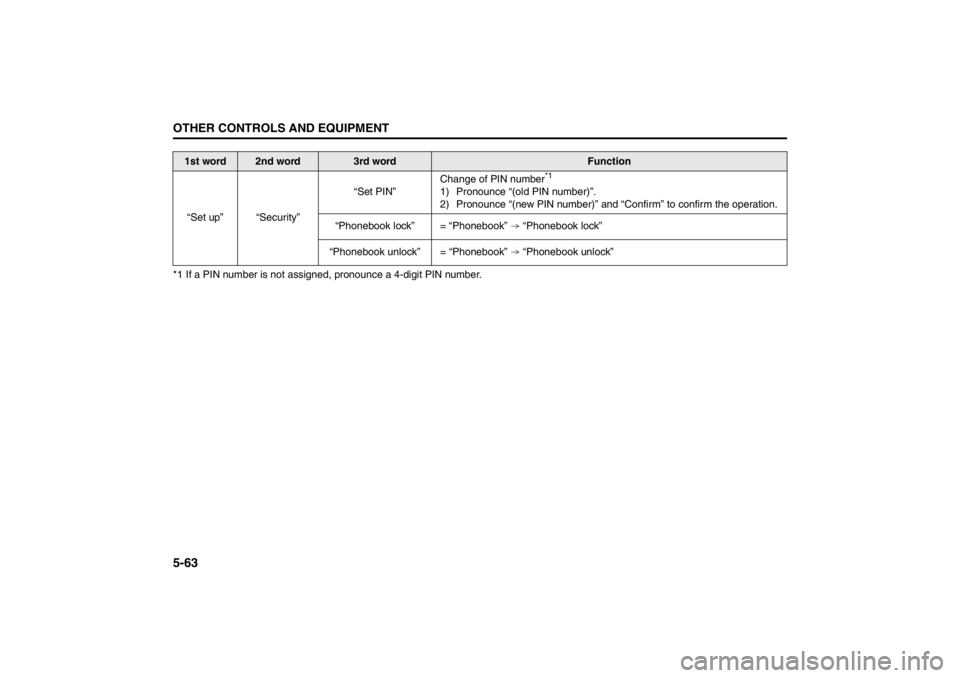
*1 If a PIN number is not assigned, pronounce a 4-digit PIN number.
1st word
2nd word
3rd word
Function
“Set up” “Security”“Set PIN”Change of PIN number
*1
1) Pronounce “(old PIN number)”.
2) Pronounce “(new PIN number)” and “Confirm” to confirm the operation.
“Phonebook lock” = “Phonebook” “Phonebook lock”
“Phonebook unlock” = “Phonebook” “Phonebook unlock”