audio SUZUKI KIZASHI 2010 1.G Owner's Manual
[x] Cancel search | Manufacturer: SUZUKI, Model Year: 2010, Model line: KIZASHI, Model: SUZUKI KIZASHI 2010 1.GPages: 388, PDF Size: 4.94 MB
Page 240 of 388
5-61OTHER CONTROLS AND EQUIPMENT
57L20-03E
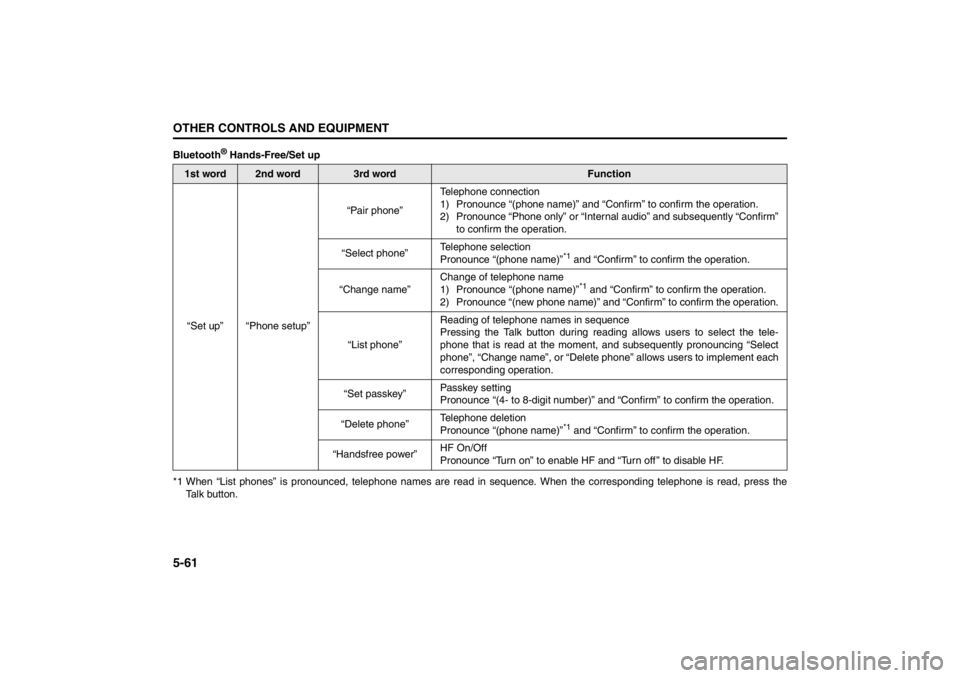
Bluetooth
® Hands-Free/Set up
*1 When “List phones” is pronounced, telephone names are read in sequence. When the corresponding telephone is read, press the
Talk button.
1st word
2nd word
3rd word
Function
“Set up” “Phone setup”“Pair phone”Telephone connection
1) Pronounce “(phone name)” and “Confirm” to confirm the operation.
2) Pronounce “Phone only” or “Internal audio” and subsequently “Confirm”
to confirm the operation.
“Select phone”Telephone selection
Pronounce “(phone name)”
*1 and “Confirm” to confirm the operation.
“Change name”Change of telephone name
1) Pronounce “(phone name)”*1 and “Confirm” to confirm the operation.
2) Pronounce “(new phone name)” and “Confirm” to confirm the operation.
“List phone”Reading of telephone names in sequence
Pressing the Talk button during reading allows users to select the tele-
phone that is read at the moment, and subsequently pronouncing “Select
phone”, “Change name”, or “Delete phone” allows users to implement each
corresponding operation.
“Set passkey”Passkey setting
Pronounce “(4- to 8-digit number)” and “Confirm” to confirm the operation.
“Delete phone”Telephone deletion
Pronounce “(phone name)”
*1 and “Confirm” to confirm the operation.
“Handsfree power”HF On/Off
Pronounce “Turn on” to enable HF and “Turn off ” to disable HF.
Page 241 of 388
5-62
OTHER CONTROLS AND EQUIPMENT
57L20-03E
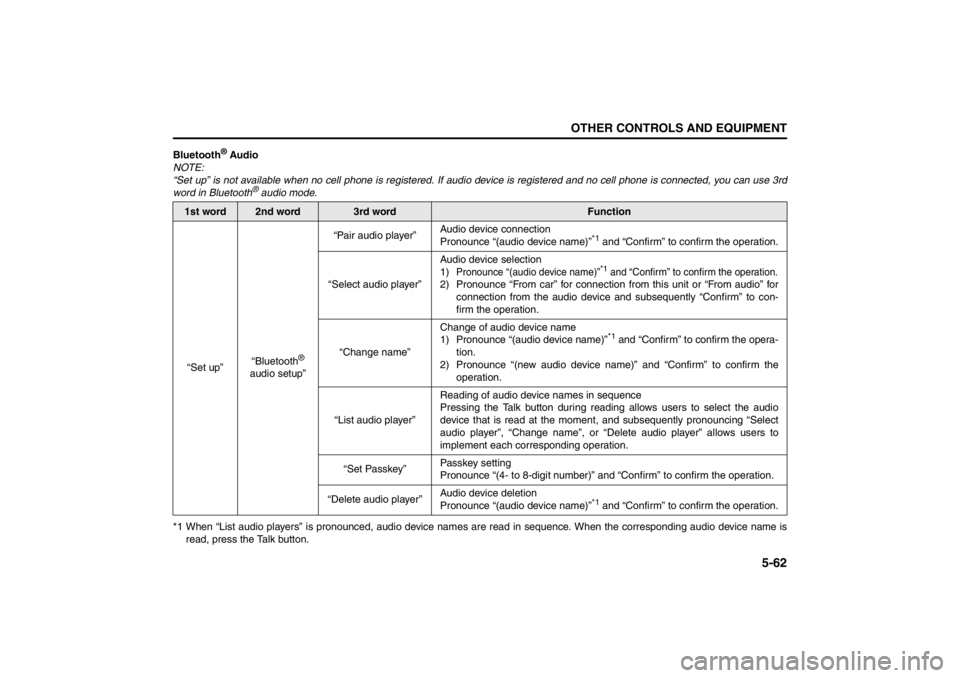
Bluetooth
® Audio
NOTE:
“Set up” is not available when no cell phone is registered. If audio device is registered and no cell phone is connected, you can use 3rd
word in Bluetooth
® audio mode.
*1 When “List audio players” is pronounced, audio device names are read in sequence. When the corresponding audio device name is
read, press the Talk button.
1st word
2nd word
3rd word
Function
“Set up”“Bluetooth
®
audio setup”“Pair audio player”Audio device connection
Pronounce “(audio device name)”
*1 and “Confirm” to confirm the operation.
“Select audio player”Audio device selection
1)
Pronounce “(audio device name)”
*1 and “Confirm” to confirm the operation.
2) Pronounce “From car” for connection from this unit or “From audio” for
connection from the audio device and subsequently “Confirm” to con-
firm the operation.
“Change name”Change of audio device name
1) Pronounce “(audio device name)”
*1 and “Confirm” to confirm the opera-
tion.
2) Pronounce “(new audio device name)” and “Confirm” to confirm the
operation.
“List audio player”Reading of audio device names in sequence
Pressing the Talk button during reading allows users to select the audio
device that is read at the moment, and subsequently pronouncing “Select
audio player”, “Change name”, or “Delete audio player” allows users to
implement each corresponding operation.
“Set Passkey”Passkey setting
Pronounce “(4- to 8-digit number)” and “Confirm” to confirm the operation.
“Delete audio player”Audio device deletion
Pronounce “(audio device name)”
*1 and “Confirm” to confirm the operation.
Page 243 of 388
5-64
OTHER CONTROLS AND EQUIPMENT
57L20-03E
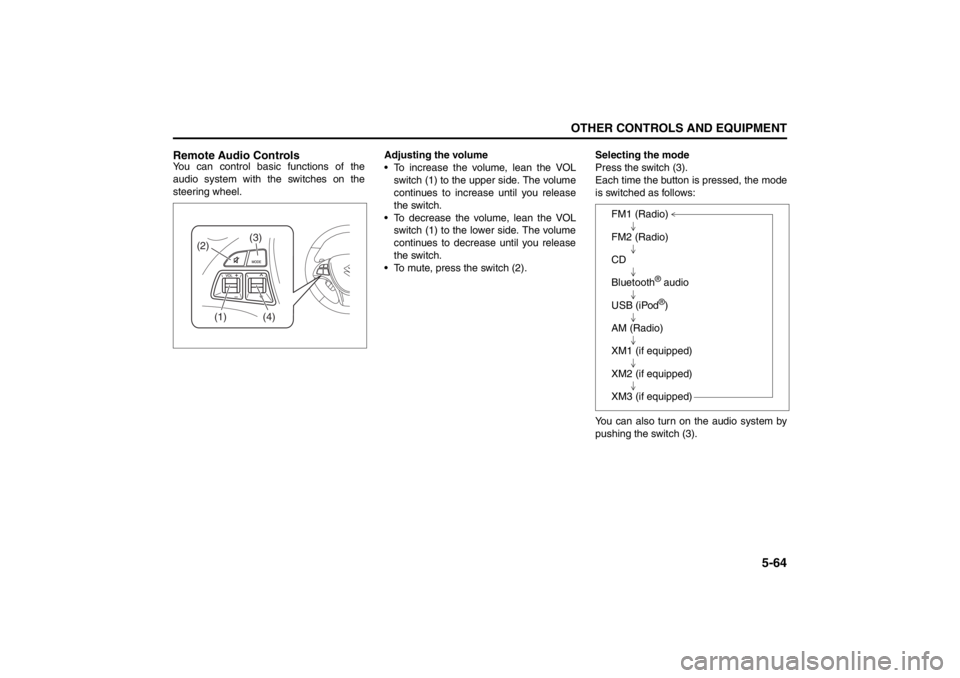
Remote Audio ControlsYou can control basic functions of the
audio system with the switches on the
steering wheel.Adjusting the volume
To increase the volume, lean the VOL
switch (1) to the upper side. The volume
continues to increase until you release
the switch.
To decrease the volume, lean the VOL
switch (1) to the lower side. The volume
continues to decrease until you release
the switch.
To mute, press the switch (2).Selecting the mode
Press the switch (3).
Each time the button is pressed, the mode
is switched as follows:
You can also turn on the audio system by
pushing the switch (3).
(2)
(1)
(4)
(3)
FM1 (Radio)
FM2 (Radio)
CD
Bluetooth
® audio
USB (iPod®)
AM (Radio)
XM1 (if equipped)
XM2 (if equipped)
XM3 (if equipped)
Page 244 of 388

5-65OTHER CONTROLS AND EQUIPMENT
57L20-03E
Selecting the radio station (FM1, FM2,
AM mode)
To select the next preset station, lean
the SEEK switch (4) to the upper side
briefly.
To select the previous preset station,
lean the SEEK switch (4) to the lower
side briefly.
To scan to a higher frequency radio sta-
tion, lean the SEEK switch (4) to the
upper side for 1 sec. or longer.
To scan to a lower frequency radio sta-
tion, lean the SEEK switch (4) to the
lower side for 1 sec. or longer.Selecting the channel (XM1, XM2, XM3
mode)
To select the next preset channel, lean
the SEEK switch (4) to the upper side
briefly.
To select the previous preset channel,
lean the SEEK switch (4) to the lower
side briefly.
To select the next channel in the same
category, lean the SEEK switch (4) to
the upper side for 1 sec. or longer.
To select the previous channel in the
same category, lean the SEEK switch
(4) to the lower side for 1 sec. or longer.Selecting the track (CD, USB (iPod
®),
Bluetooth
® audio mode)
To advance to the next track, lean the
SEEK switch (4) to the upper side
briefly.
To select the previous track, lean the
SEEK switch (4) to the lower side briefly.
Fast forwarding/Rewinding a track
To advance a track rapidly, lean the
SEEK switch (4) to the upper side for 1
sec. or longer
To rewind a track, lean the SEEK switch
(4) to the lower side for 1 sec. or longer.
Page 246 of 388

5-67OTHER CONTROLS AND EQUIPMENT
57L20-03E
The anti-theft feature is intended to dis-
courage theft or the audio system by pre-
venting the system from operating when it
is moved to a different vehicle.
This feature works by allowing you to enter
a Personal Identification Number (PIN).
When the audio system is disconnected
from its power source, such as when the
audio system is removed or the battery is
disconnected, the system will not operate
again unless the PIN is reentered.Setting the Anti-Theft Function
1) Press the VOL PUSH POWER knob
(1) to power off.
2) Press the Preset buttons (2) 1, 6 and
VOL PUSH POWER knob (1) simulta-
neously.
“SECURITY” is displayed.
3) Press the Up button (3) and Preset
button (2) 1 simultaneously.
4) Enter a 4-digit PIN number using the
Preset buttons (2) 1-4.
5) Hold down TUNE FOLDER PUSH
SOUND knob (4) for 1 sec. or more.
NOTE:
Write down your PIN for the future use.
Canceling the anti-theft feature
This operation is to be done when you
want to cancel the anti-theft function or
change your PIN.
1) Press the Preset buttons (2) 1, 6 and
the VOL PUSH POWER knob (1)
simultaneously.
2) Press the Up button (3) and Preset
button (2) 1 simultaneously.
3) Enter a 4-digit PIN number using the
Preset buttons (2) 1-4.
4) Hold down the TUNE FOLDER PUSH
SOUND knob (4) for 1 sec. or more.
NOTE:
To change your PIN, first delete your cur-
rent PIN, then set a new one.Confirming Your Personal Identification
Number (PIN)
When the main power source is discon-
nected such as when you exchange your
battery, etc, you will have to confirm your
PIN to be able to use the audio system.
1) Press the engine switch to change the
ignition mode to “ACC”.
2) Press the Up button (3) and Preset
button (2) 1 simultaneously.
3) Enter a 4-digit PIN number using the
Preset buttons (2) 1-4.
4) Hold down the TUNE FOLDER PUSH
SOUND knob (4) for 1 sec. or more.
If the PIN that you input matches the
registered PIN, the power of the audio-
system will turn off, and you will be
able to operate the audio system.
NOTE:
If you input your PIN incorrectly, “ERROR”
will be displayed. If you enter an incorrect
PIN more than 10 times, “HELP” will be
displayed and you can not perform any
further operation.
Page 260 of 388
5-81OTHER CONTROLS AND EQUIPMENT
57L20-03E
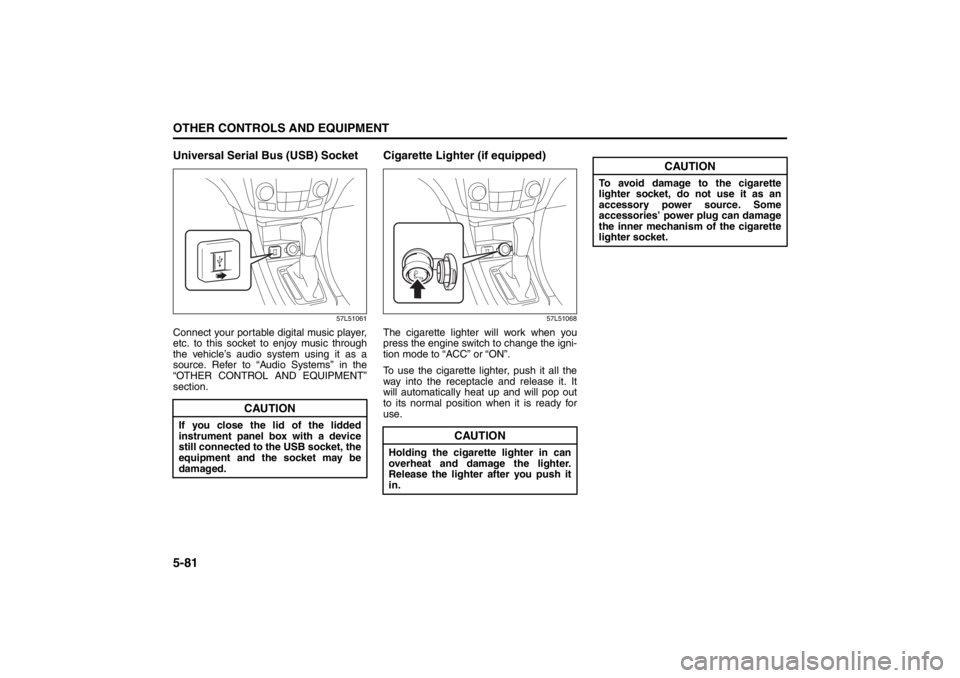
Universal Serial Bus (USB) Socket
57L51061
Connect your portable digital music player,
etc. to this socket to enjoy music through
the vehicle’s audio system using it as a
source. Refer to “Audio Systems” in the
“OTHER CONTROL AND EQUIPMENT”
section.
Cigarette Lighter (if equipped)
57L51068
The cigarette lighter will work when you
press the engine switch to change the igni-
tion mode to “ACC” or “ON”.
To use the cigarette lighter, push it all the
way into the receptacle and release it. It
will automatically heat up and will pop out
to its normal position when it is ready for
use.
CAUTION
If you close the lid of the lidded
instrument panel box with a device
still connected to the USB socket, the
equipment and the socket may be
damaged.
CAUTION
Holding the cigarette lighter in can
overheat and damage the lighter.
Release the lighter after you push it
in.
CAUTION
To avoid damage to the cigarette
lighter socket, do not use it as an
accessory power source. Some
accessories’ power plug can damage
the inner mechanism of the cigarette
lighter socket.
Page 267 of 388
5-88
OTHER CONTROLS AND EQUIPMENT
57L20-03E
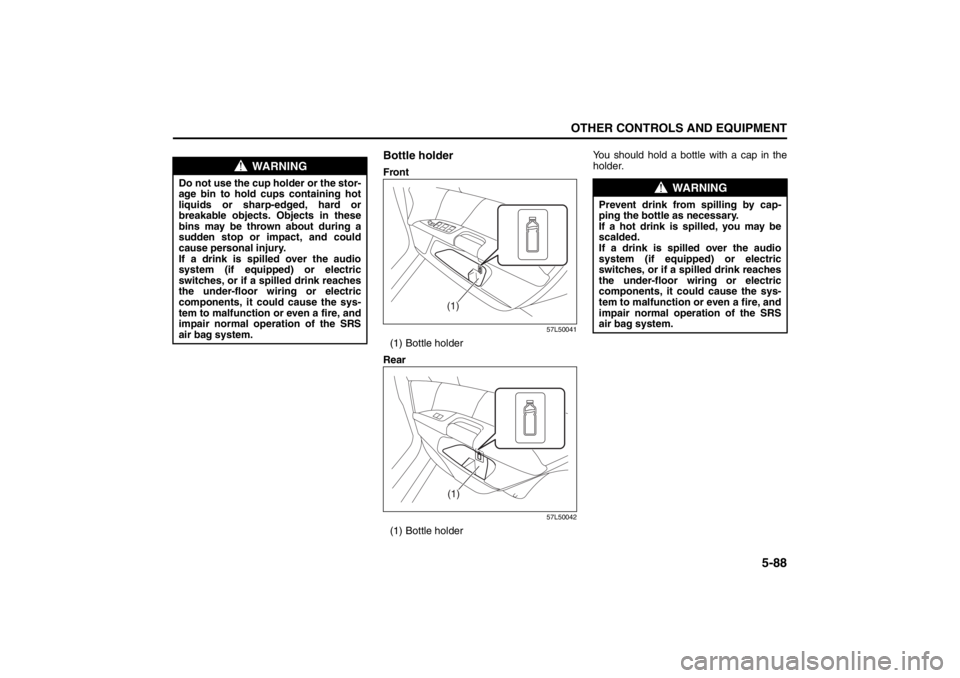
Bottle holderFront
57L50041
(1) Bottle holder
Rear
57L50042
(1) Bottle holderYou should hold a bottle with a cap in the
holder.
WARNING
Do not use the cup holder or the stor-
age bin to hold cups containing hot
liquids or sharp-edged, hard or
breakable objects. Objects in these
bins may be thrown about during a
sudden stop or impact, and could
cause personal injury.
If a drink is spilled over the audio
system (if equipped) or electric
switches, or if a spilled drink reaches
the under-floor wiring or electric
components, it could cause the sys-
tem to malfunction or even a fire, and
impair normal operation of the SRS
air bag system.
(1)(1)
WARNING
Prevent drink from spilling by cap-
ping the bottle as necessary.
If a hot drink is spilled, you may be
scalded.
If a drink is spilled over the audio
system (if equipped) or electric
switches, or if a spilled drink reaches
the under-floor wiring or electric
components, it could cause the sys-
tem to malfunction or even a fire, and
impair normal operation of the SRS
air bag system.
Page 328 of 388
7-43INSPECTION AND MAINTENANCE
57L20-03E
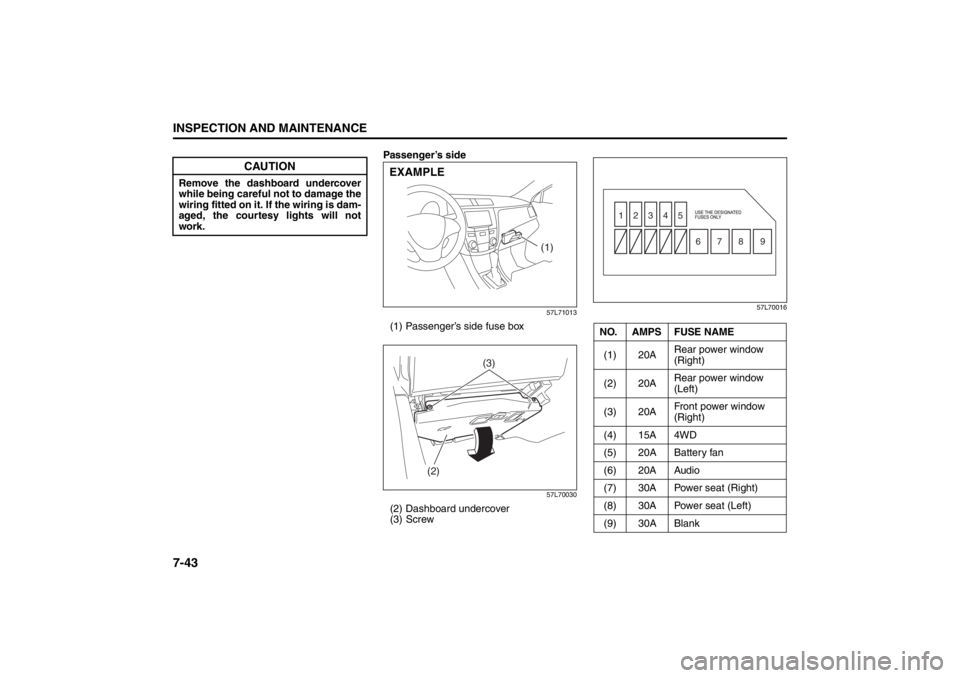
Passenger’s side
57L71013
(1) Passenger’s side fuse box
57L70030
(2) Dashboard undercover
(3) Screw
57L70016
CAUTION
Remove the dashboard undercover
while being careful not to damage the
wiring fitted on it. If the wiring is dam-
aged, the courtesy lights will not
work.
(1)
EXAMPLE
(2)(3)
NO. AMPS FUSE NAME
(1) 20ARear power window
(Right)
(2) 20ARear power window
(Left)
(3) 20AFront power window
(Right)
(4) 15A 4WD
(5) 20A Battery fan
(6) 20A Audio
(7) 30A Power seat (Right)
(8) 30A Power seat (Left)
(9) 30A Blank
1
6789 2345
Page 375 of 388
11-9
FUSES AND PROTECTED CIRCUITS
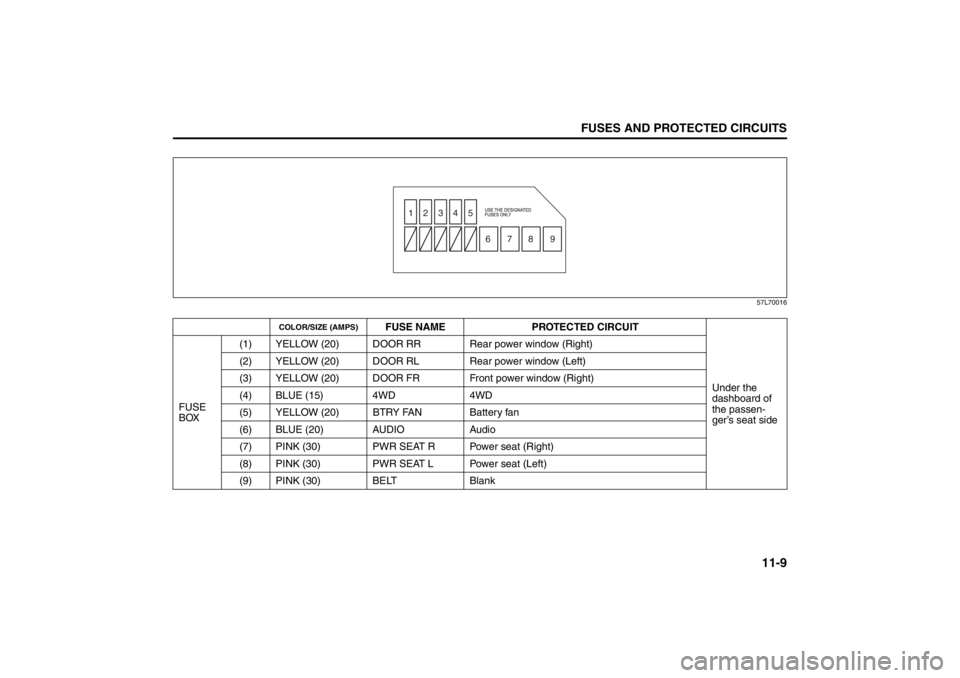
57L20-03E57L70016
COLOR/SIZE (AMPS)
FUSE NAME PROTECTED CIRCUIT
Under the
dashboard of
the passen-
ger’s seat side FUSE
BOX(1) YELLOW (20) DOOR RR Rear power window (Right)
(2) YELLOW (20) DOOR RL Rear power window (Left)
(3) YELLOW (20) DOOR FR Front power window (Right)
(4) BLUE (15) 4WD 4WD
(5) YELLOW (20) BTRY FAN Battery fan
(6) BLUE (20) AUDIO Audio
(7) PINK (30) PWR SEAT R Power seat (Right)
(8) PINK (30) PWR SEAT L Power seat (Left)
(9) PINK (30) BELT Blank
1
6789 2345
Page 381 of 388

13-1
INDEX
13
57L20-03E
INDEXSymbols“CRUISE” Indicator Light.................................................... 2-75
“ESP
® OFF” Indicator Light ................................................ 2-72
“ESP® OFF” switch ............................................................. 3-33
“i-AWD” Indicator Light ............................................. 2-76 , 3-19
“SET” Indicator Light .......................................................... 2-75
AAccelerator Pedal ....... ......................................................... 3-12
Accessory Socket .......... ................................................... ... 5-80
Adding Coolant .................................................................... 7-19
Adjusting Seat Position ............................................. 2-23 , 2-24
Adjusting Seatbacks .................................................. 2-24 , 2-25
Adjusting the Lumbar Support ........................................... 2-26
AIR BAG Light ...................................................................... 2-73
Air Cleaner............................................................................ 7-20
Air Conditioning System ..................................................... 7-57
All Seat Belts Except Rear Center...................................... 2-37
Anti-Lock Brake System (ABS) .......................................... 3-29
Anti-Lock Brake System (ABS) Warning Light ................. 2-71
Armrest ................ .............................................................. ... 5-90
Ashtray ................................................................................. 5-82
Assist Grips.......................................................................... 5-82
Audio Systems ..................................................................... 5-10
Auto Dimming Rearview Mirror .......................................... 2-21
Automatic Heating and Air Conditioning System
(Climate Control).................................................................... 5-1
Automatic Lights Operation ............................................. 2-101
Automatic Locking Retractor ............................................. 2-36
Average Fuel Consumption ................................................ 2-83 Average Speed ..................................................................... 2-81
BBattery ................................................................................... 7-39
Brake Assist System............................................................ 3-28
Brake Fluid............................................................................ 7-25
Brake Pedal.................................................................. 3-11
, 7-26
Brake System Warning Light .............................................. 2-70
Brakes ................................................................................... 7-25
Braking .................................................................................. 3-28
Break-In ................................................................................... 4-1
Brightness Control............................................................... 2-79
Bulb Replacement ................................................................ 7-45CCatalytic Converter ..................... ........................................... 4-1
Center Console Box ............................................................. 5-89
Changing Engine Oil and Filter........................................... 7-16
Changing Wheels ................................................................... 8-5
Charging Light...................................................................... 2-73
Child Lock System (rear doors) ............................................ 2-5
Child Restraint Systems ...................................................... 2-44
Cigarette Lighter .................................................................. 5-81
Cleaning Interior..................................................................... 9-3
Cleaning the Exterior ............................................................. 9-4
Clutch Pedal ................................................................ 3-11 , 7-23
Coat Hooks ........................................................................... 5-83
Compact Spare Tire ............................................................. 7-34
Continuously Variable Transaxle (CVT) ............................. 3-15
Continuously Variable Transaxle (CVT) Fluid ................... 7-24
Coolant Level Check ..... ....................................................... 7-19
Coolant Replacement .......................................................... 7-20
Corrosion Prevention ............................................................ 9-1