lock SUZUKI KIZASHI 2010 1.G Owner's Manual
[x] Cancel search | Manufacturer: SUZUKI, Model Year: 2010, Model line: KIZASHI, Model: SUZUKI KIZASHI 2010 1.GPages: 388, PDF Size: 4.94 MB
Page 35 of 388
2-16
BEFORE DRIVING
57L20-03E
How to stop the alarm
Should the alarm be triggered accidentally,
change the ignition mode to “ON” by press-
ing the engine switch. The alarm will then
stop.
NOTE:
Even after the alarm has stopped, if you
lock the doors using the keyless start
system remote controller or by pushing
the request switch, the theft deterrent
alarm system will be rearmed with a
delay of about 20 seconds.
If you disconnect the battery while the
theft deterrent alarm system is in the
armed condition or the alarm is actually
in operation, the alarm will be triggered
or re-triggered when the battery is then
reconnected, although, in the latter case,
the alarm remains stopped for the period
between disconnection and reconnec-
tion of the battery.
Even after the alarm has stopped at the
end of the predetermined operation time,
it will be triggered again if any door is
opened without disarming the theft
deterrent alarm system.Checking whether the alarm has been
triggered during parking
If the alarm was triggered due to an unau-
thorized entry into the vehicle and you then
change the ignition mode to “ON” by press-
ing the engine switch, the theft deterrent
light will flash rapidly for about 8 seconds
and a buzzer will beep 4 times during this
period. If this happens, check whether your
vehicle has been broken into while you
were away from it.
Enabling and disabling the theft deter-
rent alarm system
The theft deterrent alarm system can be
either “enabled” or “disabled”.
When enabled (factory setting)
When the system is enabled, it causes the
hazard warning lights to flash for about 40
seconds if any of the alarm trigger condi-
tions is met. The system also causes the
interior buzzer to beep intermittently for
about 10 seconds, which is followed by
intermittent sounding of the horn for about
30 seconds.
*The theft deterrent light continues to flash
during this time.
When disabled
When the system is disabled, it stays dis-
armed even if you perform any system
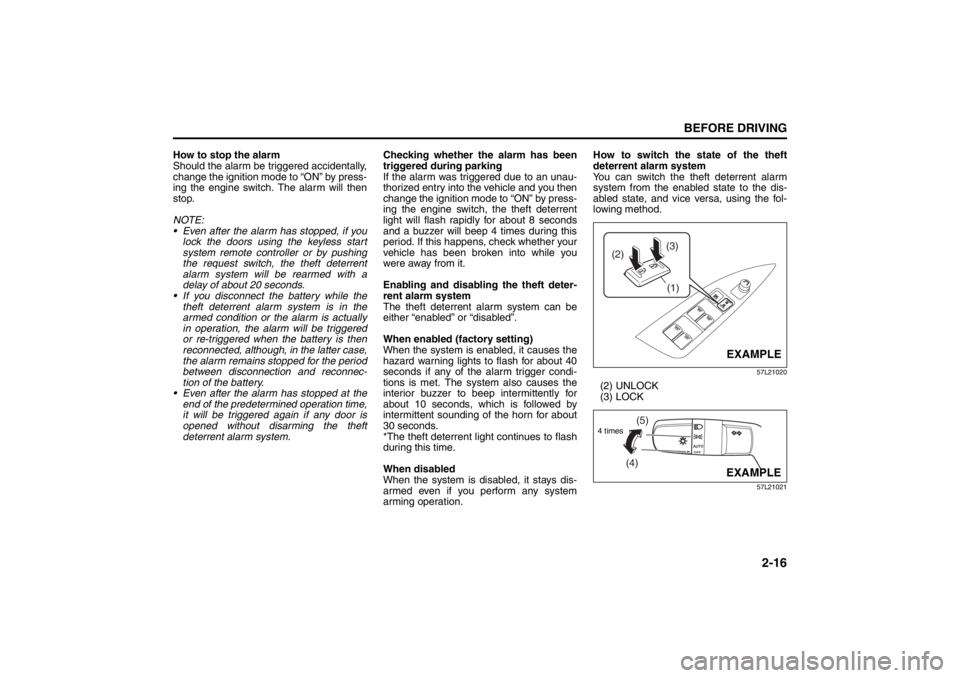
arming operation.How to switch the state of the theft
deterrent alarm system
You can switch the theft deterrent alarm
system from the enabled state to the dis-
abled state, and vice versa, using the fol-
lowing method.
57L21020
(2) UNLOCK
(3) LOCK
57L21021
(3)
(2)
(1)
EXAMPLE
(4)(5)
4 times
EXAMPLE
Seat Belts and Child Restraint Systems: 3
Page 36 of 388
2-17BEFORE DRIVING
57L20-03E
1) With the ignition mode changed to “ON”
by pressing the engine switch, close all
the doors as well as the engine hood
and the trunk lid and push the unlock
end (backward end) of the power door
locking switch (1) of the driver’s door.
Turn the knob control on the lighting
control lever to the OFF position (4).
NOTE:
All operations included in the following
steps 2) and 3) must be completed within
15 seconds.
2) Turn the knob control on the lighting
control lever to the position (5) and
then to the OFF position (4). Repeat
this operation 4 times with the control
finally set to the OFF position.
3) Push the lock end (forward end) of the
power door lock switch (1) to lock the
doors, and then the unlock end (back-
ward end) to unlock the doors. Repeat
these operations 3 times and finally
push the lock end of the switch.Every time you perform the series of the
above steps, the state of the theft deterrent
alarm system changes from the currently
selected one to the other. You can check
whether the system is enabled or disabled
by the number of interior buzzer beeps at
the end of the procedure as follows.
NOTE:
You cannot disable the theft deterrent
alarm system while it is in the armed
condition.
If you fail to complete the operations in
step 2) and 3) within 15 seconds, per-
form the procedure again from the
beginning.
Make sure all doors are closed when
performing the above procedure.
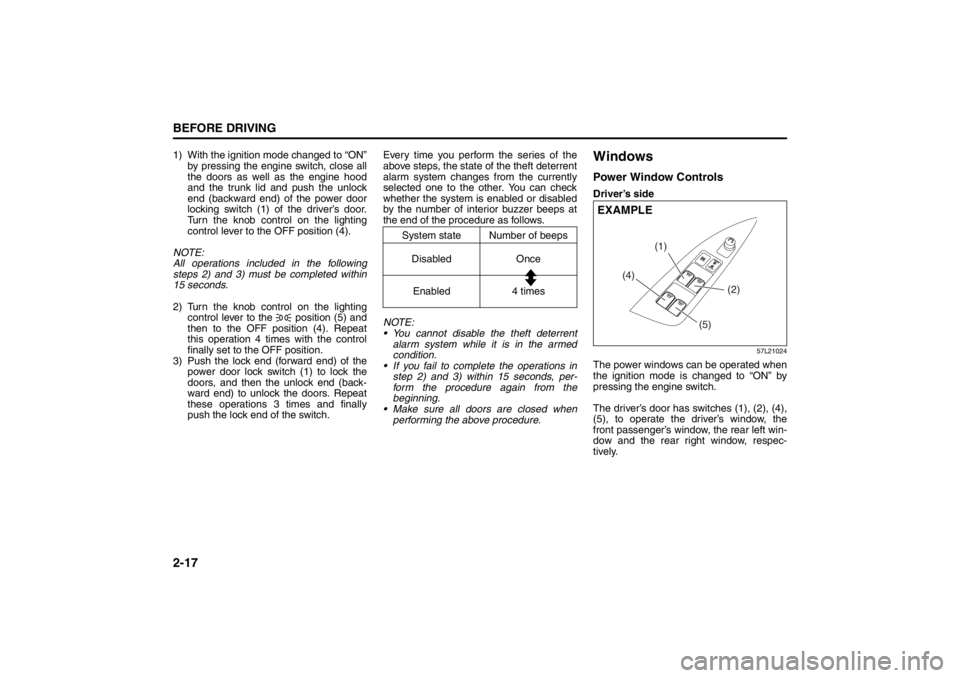
WindowsPower Window ControlsDriver’s side
57L21024
The power windows can be operated when
the ignition mode is changed to “ON” by
pressing the engine switch.
The driver’s door has switches (1), (2), (4),
(5), to operate the driver’s window, the
front passenger’s window, the rear left win-
dow and the rear right window, respec-
tively.
System state Number of beeps
Disabled Once
Enabled 4 times
(4)(1)
(2)
(5)
EXAMPLE
Seat Belts and Child Restraint Systems: 3
Page 37 of 388
2-18
BEFORE DRIVING
57L20-03E
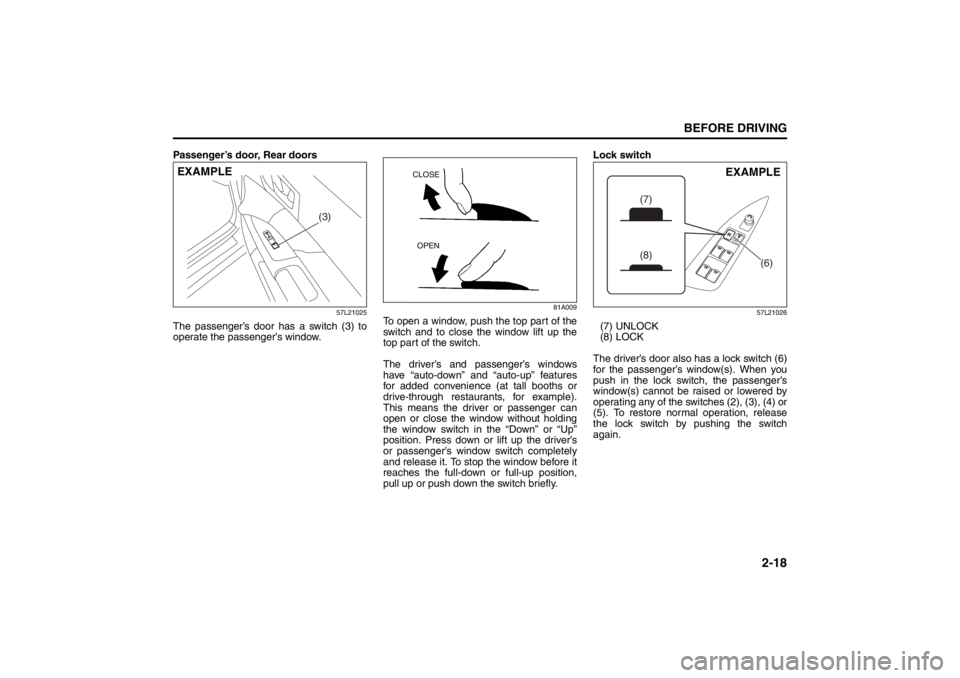
Passenger’s door, Rear doors
57L21025
The passenger’s door has a switch (3) to
operate the passenger’s window.
81A009
To open a window, push the top part of the
switch and to close the window lift up the
top part of the switch.
The driver’s and passenger’s windows
have “auto-down” and “auto-up” features
for added convenience (at tall booths or
drive-through restaurants, for example).
This means the driver or passenger can
open or close the window without holding
the window switch in the “Down” or “Up”
position. Press down or lift up the driver’s
or passenger’s window switch completely
and release it. To stop the window before it
reaches the full-down or full-up position,
pull up or push down the switch briefly.Lock switch
57L21026
(7) UNLOCK
(8) LOCK
The driver’s door also has a lock switch (6)
for the passenger’s window(s). When you
push in the lock switch, the passenger’s
window(s) cannot be raised or lowered by
operating any of the switches (2), (3), (4) or
(5). To restore normal operation, release
the lock switch by pushing the switch
again.
(3)
EXAMPLE
CLOSE
OPEN
(6)
(7)
(8)
EXAMPLE
Seat Belts and Child Restraint Systems: 3
Page 38 of 388
2-19BEFORE DRIVING
57L20-03E
NOTE:
The driver’s and passenger’s windows can
be operated for 30 seconds even after the
ignition mode is changed from “ON” to
“ACC” or “LOCK” (OFF) by pressing the
engine switch. However, if either of the
front doors is opened within this 30-second
period, the windows cannot be operated
thereafter.
If you drive with one of the rear windows
open, you may hear a loud sound caused
by air vibration. To reduce the sound, openthe driver’s or front passenger’s window, or
narrow the rear window opening.
Initialization of Auto-Down/Up Function
If the auto-down/up function does not work
for some reason, initialize the function as
instructed below. Note that the initialization
must be performed using the switch for
each window; the function of the passen-
ger’s door window cannot be initialized
using the switch of the driver’s door win-
dow.
1) Start the engine.
2) Open the front window fully by holding
the window switch in the “Down” posi-
tion.
3) Close the front window by holding the
switch in the “Up” position, and keep
holding the switch for 2 seconds after
the window fully closed.
4) Check the front window if the auto-
down/up feature work.
Pinching Prevention Function
(if equipped)The front window is equipped with the
pinching prevention function. The function
detects a foreign object caught in the win-
dow while being closed by the “auto-up”
feature, which you can close the window
without holding the window switch in the
“Up” position, and stops the window clos-
ing to prevent damage.
WARNING
You should always lock the passen-
ger’s window operation when there
are children in the vehicle. Children
can be seriously injured if they get
part of their body caught by the
window during operation.
To avoid injuring an occupant by
window entrapment, be sure no
part of the occupant’s body such
as hands or head is in the path of
the electric windows when closing
them.
Always take the keyless start sys-
tem remote controller with you
when leaving the vehicle even if
only for a short time. Also do not
leave children alone in a parked
vehicle. Unattended children could
use the electric window switches
and get trapped by the window.
WARNING
To avoid injuring an occupant by win-
dow entrapment, be sure no part of
the occupant’s body such as hands
or head is in the path of the electric
window when closing it.
The function may not detect the
object depending on size, hardness,
and position of the object caught by
the closing window.
CAUTION
The pinching prevention function
does not act while you are holding
the window switch in the “Up” posi-
tion.
The pinching prevention function
may not detect an object caught in
the window where just before the
window fully closed.
Seat Belts and Child Restraint Systems: 3
Page 40 of 388
2-21BEFORE DRIVING
57L20-03E
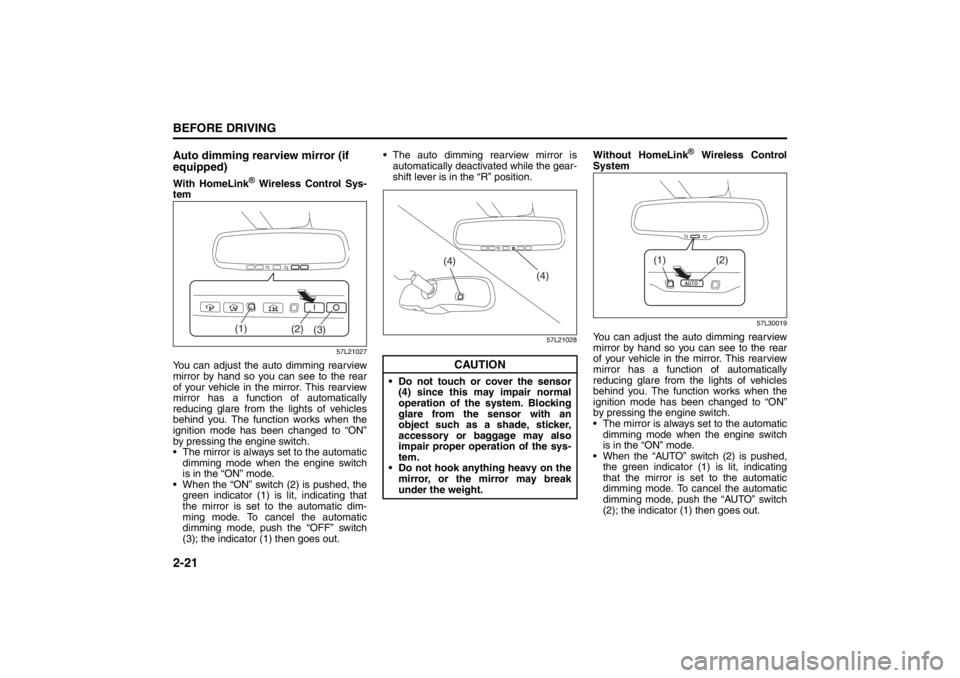
Auto dimming rearview mirror (if
equipped)With HomeLink
® Wireless Control Sys-
tem
57L21027
You can adjust the auto dimming rearview
mirror by hand so you can see to the rear
of your vehicle in the mirror. This rearview
mirror has a function of automatically
reducing glare from the lights of vehicles
behind you. The function works when the
ignition mode has been changed to “ON”
by pressing the engine switch.
The mirror is always set to the automatic
dimming mode when the engine switch
is in the “ON” mode.
When the “ON” switch (2) is pushed, the
green indicator (1) is lit, indicating that
the mirror is set to the automatic dim-
ming mode. To cancel the automatic
dimming mode, push the “OFF” switch
(3); the indicator (1) then goes out. The auto dimming rearview mirror is
automatically deactivated while the gear-
shift lever is in the “R” position.
57L21028
Without HomeLink
® Wireless Control
System
57L30019
You can adjust the auto dimming rearview
mirror by hand so you can see to the rear
of your vehicle in the mirror. This rearview
mirror has a function of automatically
reducing glare from the lights of vehicles
behind you. The function works when the
ignition mode has been changed to “ON”
by pressing the engine switch.
The mirror is always set to the automatic
dimming mode when the engine switch
is in the “ON” mode.
When the “AUTO” switch (2) is pushed,
the green indicator (1) is lit, indicating
that the mirror is set to the automatic
dimming mode. To cancel the automatic
dimming mode, push the “AUTO” switch
(2); the indicator (1) then goes out.
(2)
(3) (1)
CAUTION
Do not touch or cover the sensor
(4) since this may impair normal
operation of the system. Blocking
glare from the sensor with an
object such as a shade, sticker,
accessory or baggage may also
impair proper operation of the sys-
tem.
Do not hook anything heavy on the
mirror, or the mirror may break
under the weight.
(4)
(4)
(2)
(1)
Seat Belts and Child Restraint Systems: 3
Page 41 of 388
2-22
BEFORE DRIVING
57L20-03E
The auto dimming rearview mirror is
automatically deactivated while the gear-
shift lever is in the “R” position.
57L30020
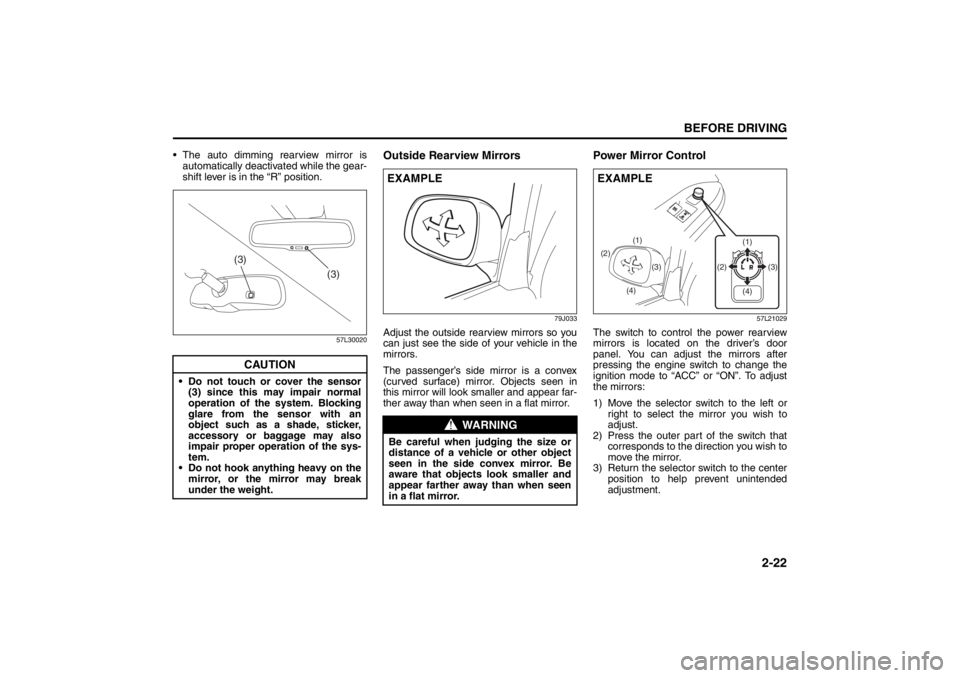
Outside Rearview Mirrors
79J033
Adjust the outside rearview mirrors so you
can just see the side of your vehicle in the
mirrors.
The passenger’s side mirror is a convex
(curved surface) mirror. Objects seen in
this mirror will look smaller and appear far-
ther away than when seen in a flat mirror.
Power Mirror Control
57L21029
The switch to control the power rearview
mirrors is located on the driver’s door
panel. You can adjust the mirrors after
pressing the engine switch to change the
ignition mode to “ACC” or “ON”. To adjust
the mirrors:
1) Move the selector switch to the left or
right to select the mirror you wish to
adjust.
2) Press the outer part of the switch that
corresponds to the direction you wish to
move the mirror.
3) Return the selector switch to the center
position to help prevent unintended
adjustment.
CAUTION
Do not touch or cover the sensor
(3) since this may impair normal
operation of the system. Blocking
glare from the sensor with an
object such as a shade, sticker,
accessory or baggage may also
impair proper operation of the sys-
tem.
Do not hook anything heavy on the
mirror, or the mirror may break
under the weight.
(3)
(3)
WARNING
Be careful when judging the size or
distance of a vehicle or other object
seen in the side convex mirror. Be
aware that objects look smaller and
appear farther away than when seen
in a flat mirror.EXAMPLE
(2)
(4)(3) (1)
(1)
(3) (2)
(4)
EXAMPLE
Seat Belts and Child Restraint Systems: 3
Page 43 of 388
2-24
BEFORE DRIVING
57L20-03E
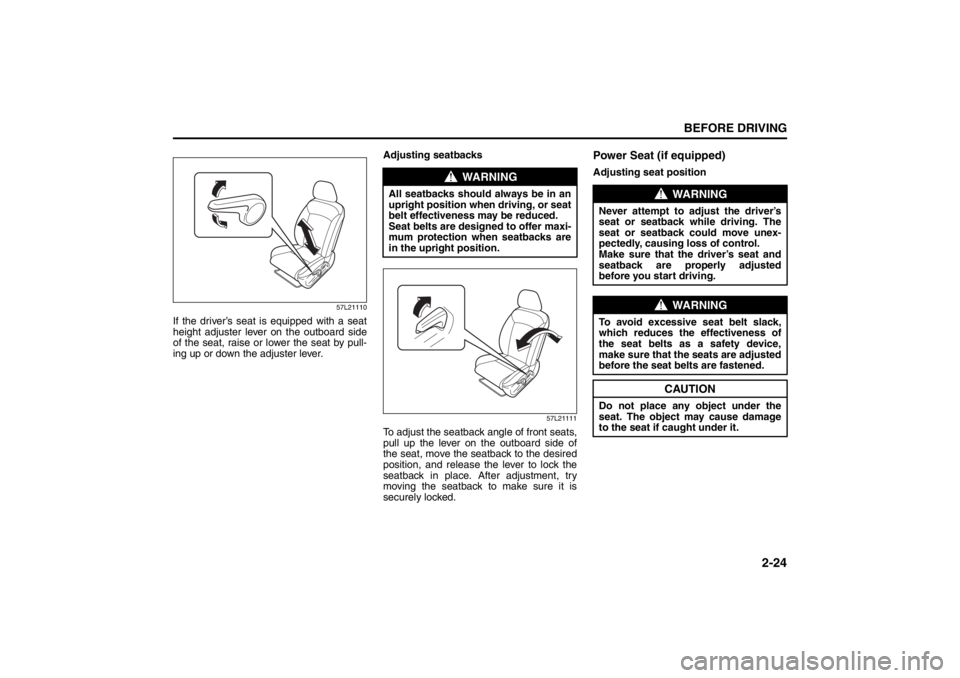
57L21110
If the driver’s seat is equipped with a seat
height adjuster lever on the outboard side
of the seat, raise or lower the seat by pull-
ing up or down the adjuster lever.Adjusting seatbacks
57L21111
To adjust the seatback angle of front seats,
pull up the lever on the outboard side of
the seat, move the seatback to the desired
position, and release the lever to lock the
seatback in place. After adjustment, try
moving the seatback to make sure it is
securely locked.
Power Seat (if equipped)Adjusting seat position
WARNING
All seatbacks should always be in an
upright position when driving, or seat
belt effectiveness may be reduced.
Seat belts are designed to offer maxi-
mum protection when seatbacks are
in the upright position.
WARNING
Never attempt to adjust the driver’s
seat or seatback while driving. The
seat or seatback could move unex-
pectedly, causing loss of control.
Make sure that the driver’s seat and
seatback are properly adjusted
before you start driving.
WARNING
To avoid excessive seat belt slack,
which reduces the effectiveness of
the seat belts as a safety device,
make sure that the seats are adjusted
before the seat belts are fastened.
CAUTION
Do not place any object under the
seat. The object may cause damage
to the seat if caught under it.
Seat Belts and Child Restraint Systems: 3
Page 45 of 388
2-26
BEFORE DRIVING
57L20-03E
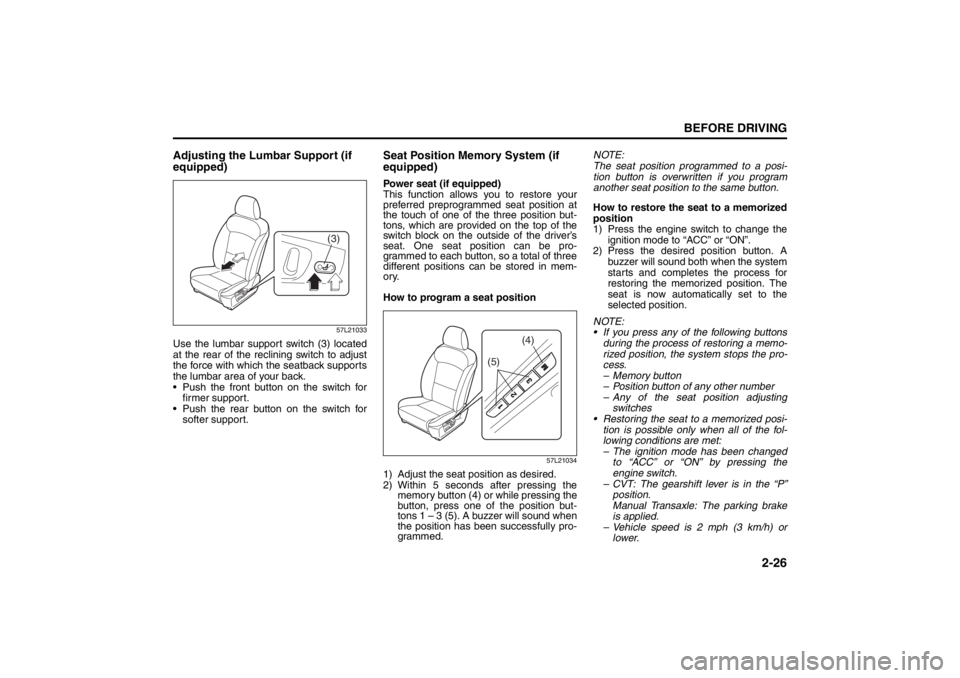
Adjusting the Lumbar Support (if
equipped)
57L21033
Use the lumbar support switch (3) located
at the rear of the reclining switch to adjust
the force with which the seatback supports
the lumbar area of your back.
Push the front button on the switch for
firmer support.
Push the rear button on the switch for
softer support.
Seat Position Memory System (if
equipped)Power seat (if equipped)
This function allows you to restore your
preferred preprogrammed seat position at
the touch of one of the three position but-
tons, which are provided on the top of the
switch block on the outside of the driver’s
seat. One seat position can be pro-
grammed to each button, so a total of three
different positions can be stored in mem-
ory.
How to program a seat position
57L21034
1) Adjust the seat position as desired.
2) Within 5 seconds after pressing the
memory button (4) or while pressing the
button, press one of the position but-
tons 1 – 3 (5). A buzzer will sound when
the position has been successfully pro-
grammed. NOTE:
The seat position programmed to a posi-
tion button is overwritten if you program
another seat position to the same button.
How to restore the seat to a memorized
position
1) Press the engine switch to change the
ignition mode to “ACC” or “ON”.
2) Press the desired position button. A
buzzer will sound both when the system
starts and completes the process for
restoring the memorized position. The
seat is now automatically set to the
selected position.
NOTE:
If you press any of the following buttons
during the process of restoring a memo-
rized position, the system stops the pro-
cess.
– Memory button
– Position button of any other number
– Any of the seat position adjusting
switches
Restoring the seat to a memorized posi-
tion is possible only when all of the fol-
lowing conditions are met:
– The ignition mode has been changed
to “ACC” or “ON” by pressing the
engine switch.
– CVT: The gearshift lever is in the “P”
position.
Manual Transaxle: The parking brake
is applied.
– Vehicle speed is 2 mph (3 km/h) or
lower.
(3)
(5)
(4)
Seat Belts and Child Restraint Systems: 3
Page 50 of 388
2-31BEFORE DRIVING
57L20-03E
To reinstall the head restraints, do the fol-
lowing:
For the left and right seating places, insert
the head restraint while still in its forward-
tipped position (do not face the backside
forward) into the seatback until it locks.
Then tilt it back to the normal position. The
height of the reinstalled head restraints
must be adjusted properly before use.
NOTE:
It is recommended to tilt the head
restraints forward to have a better rearward
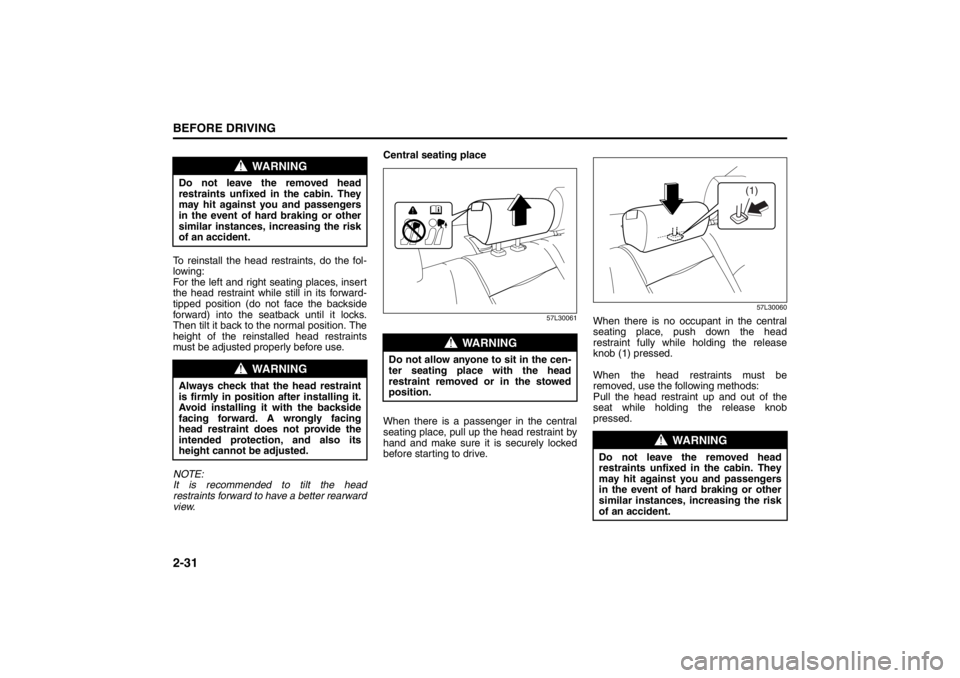
view.Central seating place
57L30061
When there is a passenger in the central
seating place, pull up the head restraint by
hand and make sure it is securely locked
before starting to drive.
57L30060
When there is no occupant in the central
seating place, push down the head
restraint fully while holding the release
knob (1) pressed.
When the head restraints must be
removed, use the following methods:
Pull the head restraint up and out of the
seat while holding the release knob
pressed.
WARNING
Do not leave the removed head
restraints unfixed in the cabin. They
may hit against you and passengers
in the event of hard braking or other
similar instances, increasing the risk
of an accident.
WARNING
Always check that the head restraint
is firmly in position after installing it.
Avoid installing it with the backside
facing forward. A wrongly facing
head restraint does not provide the
intended protection, and also its
height cannot be adjusted.
WARNING
Do not allow anyone to sit in the cen-
ter seating place with the head
restraint removed or in the stowed
position.
WARNING
Do not leave the removed head
restraints unfixed in the cabin. They
may hit against you and passengers
in the event of hard braking or other
similar instances, increasing the risk
of an accident.
(1)
Seat Belts and Child Restraint Systems: 3
Page 51 of 388
2-32
BEFORE DRIVING
57L20-03E
To reinstall the head restraints, do the fol-
lowing:
With the correct side facing forward, insert
the head restraint into the seat until it is
locked at a height. Then adjust the height
as desired.
Folding Rear SeatsThe rear seats of your vehicle can be folded
forward to provide additional cargo space.
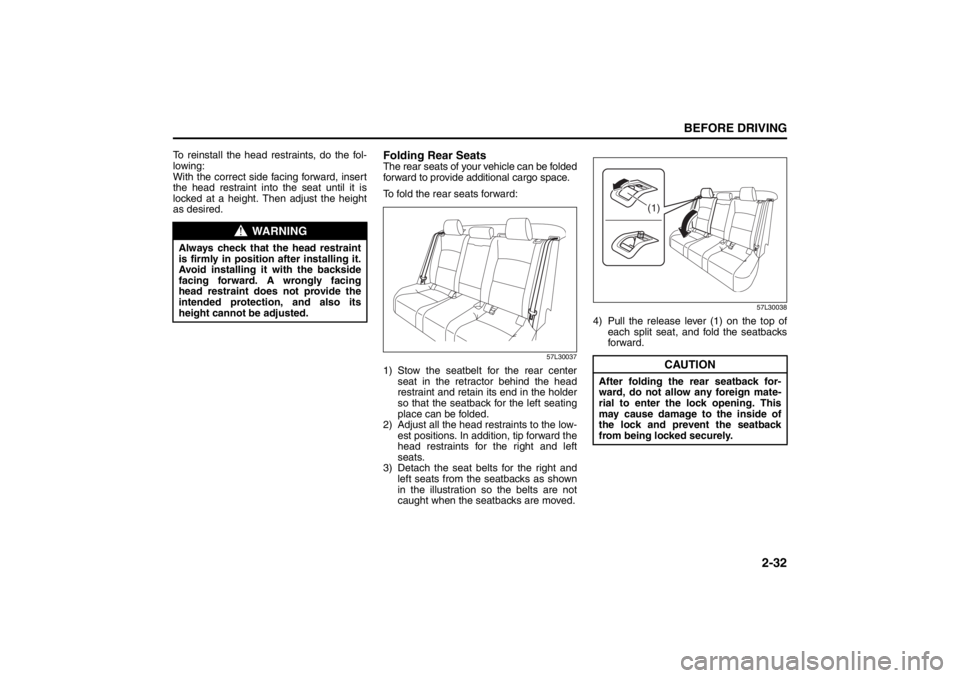
To fold the rear seats forward:
57L30037
1) Stow the seatbelt for the rear center
seat in the retractor behind the head
restraint and retain its end in the holder
so that the seatback for the left seating
place can be folded.
2) Adjust all the head restraints to the low-
est positions. In addition, tip forward the
head restraints for the right and left
seats.
3) Detach the seat belts for the right and
left seats from the seatbacks as shown
in the illustration so the belts are not
caught when the seatbacks are moved.
57L30038
4) Pull the release lever (1) on the top of
each split seat, and fold the seatbacks
forward.
WARNING
Always check that the head restraint
is firmly in position after installing it.
Avoid installing it with the backside
facing forward. A wrongly facing
head restraint does not provide the
intended protection, and also its
height cannot be adjusted.
CAUTION
After folding the rear seatback for-
ward, do not allow any foreign mate-
rial to enter the lock opening. This
may cause damage to the inside of
the lock and prevent the seatback
from being locked securely.
(1)
Seat Belts and Child Restraint Systems: 3