beep SUZUKI KIZASHI 2010 1.G Owners Manual
[x] Cancel search | Manufacturer: SUZUKI, Model Year: 2010, Model line: KIZASHI, Model: SUZUKI KIZASHI 2010 1.GPages: 388, PDF Size: 4.94 MB
Page 29 of 388
2-10
BEFORE DRIVING
57L20-03E
Request Switch Warning Buzzer
This outside buzzer beeps for about 2 sec-
onds in the following conditions to warn
you that the request switch is not working:
The request switch is pressed after all
doors are closed with the ignition mode
changed to “ACC” or “ON” by pressing
the engine switch.
The request switch is pressed in any of
the following conditions after changing
the ignition mode to “LOCK” (OFF) by
pressing the engine switch.
– The remote controller is left inside the
vehicle.
– Any of the doors is open.
Press the request switch again after doing
the following:
With the ignition mode changed to “LOCK”
(OFF) by pressing the engine switch, bring
out the remote controller if it is inside the
vehicle and check that all doors are com-
pletely closed.Remote Controller Reminder Function
When you lock a door without using the
key, this function prevents it from being
locked if the remote controller is left inside
the vehicle.
With the remote controller inside the vehi-
cle, locking of the driver’s and passenger’s
doors made with the power door locking
system or door lock knobs will be can-
celled if either of the doors is open.
NOTE:
Whenever you lock a door without using
the key, check that you have the remote
controller with you. This is a good habit
to prevent locking a door with the remote
controller left behind.
The remote controller reminder function
is activated when you press the engine
switch to change the ignition mode to
“ACC” or “ON” anywhere the remote
controller is placed.Vehicle Inside Area Where Request
Switch Warning Buzzer/Remote Con-
troller Reminder Function Works
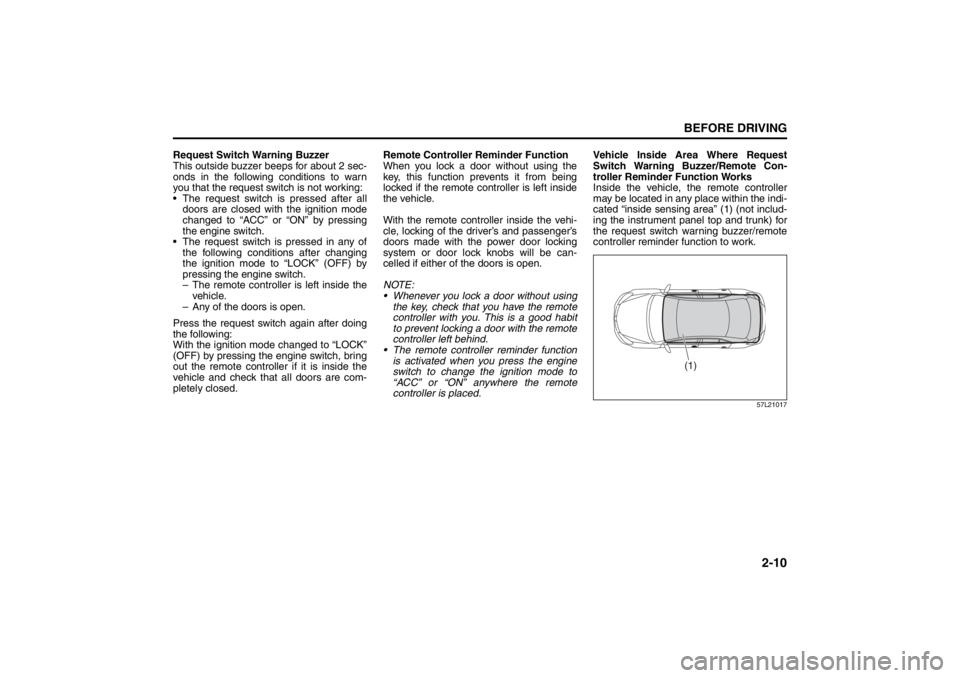
Inside the vehicle, the remote controller
may be located in any place within the indi-
cated “inside sensing area” (1) (not includ-
ing the instrument panel top and trunk) for
the request switch warning buzzer/remote
controller reminder function to work.
57L21017
(1)
Windows: 3, 8
Mirrors: 3, 8
Page 35 of 388
2-16
BEFORE DRIVING
57L20-03E
How to stop the alarm
Should the alarm be triggered accidentally,
change the ignition mode to “ON” by press-
ing the engine switch. The alarm will then
stop.
NOTE:
Even after the alarm has stopped, if you
lock the doors using the keyless start
system remote controller or by pushing
the request switch, the theft deterrent
alarm system will be rearmed with a
delay of about 20 seconds.
If you disconnect the battery while the
theft deterrent alarm system is in the
armed condition or the alarm is actually
in operation, the alarm will be triggered
or re-triggered when the battery is then
reconnected, although, in the latter case,
the alarm remains stopped for the period
between disconnection and reconnec-
tion of the battery.
Even after the alarm has stopped at the
end of the predetermined operation time,
it will be triggered again if any door is
opened without disarming the theft
deterrent alarm system.Checking whether the alarm has been
triggered during parking
If the alarm was triggered due to an unau-
thorized entry into the vehicle and you then
change the ignition mode to “ON” by press-
ing the engine switch, the theft deterrent
light will flash rapidly for about 8 seconds
and a buzzer will beep 4 times during this
period. If this happens, check whether your
vehicle has been broken into while you
were away from it.
Enabling and disabling the theft deter-
rent alarm system
The theft deterrent alarm system can be
either “enabled” or “disabled”.
When enabled (factory setting)
When the system is enabled, it causes the
hazard warning lights to flash for about 40
seconds if any of the alarm trigger condi-
tions is met. The system also causes the
interior buzzer to beep intermittently for
about 10 seconds, which is followed by
intermittent sounding of the horn for about
30 seconds.
*The theft deterrent light continues to flash
during this time.
When disabled
When the system is disabled, it stays dis-
armed even if you perform any system
arming operation.How to switch the state of the theft
deterrent alarm system
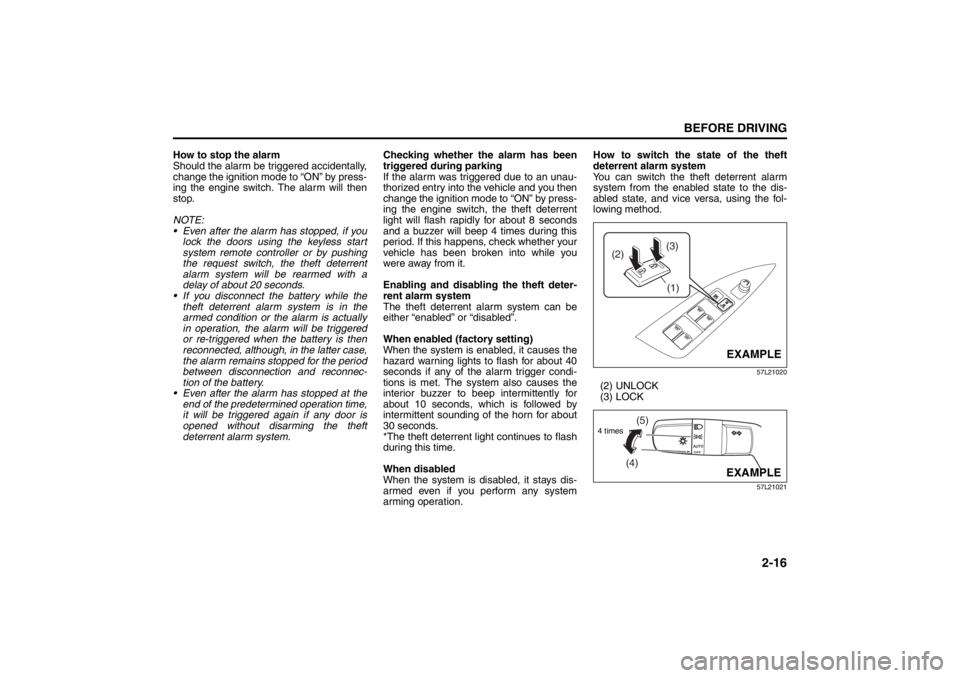
You can switch the theft deterrent alarm
system from the enabled state to the dis-
abled state, and vice versa, using the fol-
lowing method.
57L21020
(2) UNLOCK
(3) LOCK
57L21021
(3)
(2)
(1)
EXAMPLE
(4)(5)
4 times
EXAMPLE
Seat Belts and Child Restraint Systems: 3
Page 36 of 388
2-17BEFORE DRIVING
57L20-03E
1) With the ignition mode changed to “ON”
by pressing the engine switch, close all
the doors as well as the engine hood
and the trunk lid and push the unlock
end (backward end) of the power door
locking switch (1) of the driver’s door.
Turn the knob control on the lighting
control lever to the OFF position (4).
NOTE:
All operations included in the following
steps 2) and 3) must be completed within
15 seconds.
2) Turn the knob control on the lighting
control lever to the position (5) and
then to the OFF position (4). Repeat
this operation 4 times with the control
finally set to the OFF position.
3) Push the lock end (forward end) of the
power door lock switch (1) to lock the
doors, and then the unlock end (back-
ward end) to unlock the doors. Repeat
these operations 3 times and finally
push the lock end of the switch.Every time you perform the series of the
above steps, the state of the theft deterrent
alarm system changes from the currently
selected one to the other. You can check
whether the system is enabled or disabled
by the number of interior buzzer beeps at
the end of the procedure as follows.
NOTE:
You cannot disable the theft deterrent
alarm system while it is in the armed
condition.
If you fail to complete the operations in
step 2) and 3) within 15 seconds, per-
form the procedure again from the
beginning.
Make sure all doors are closed when
performing the above procedure.
WindowsPower Window ControlsDriver’s side
57L21024
The power windows can be operated when
the ignition mode is changed to “ON” by
pressing the engine switch.
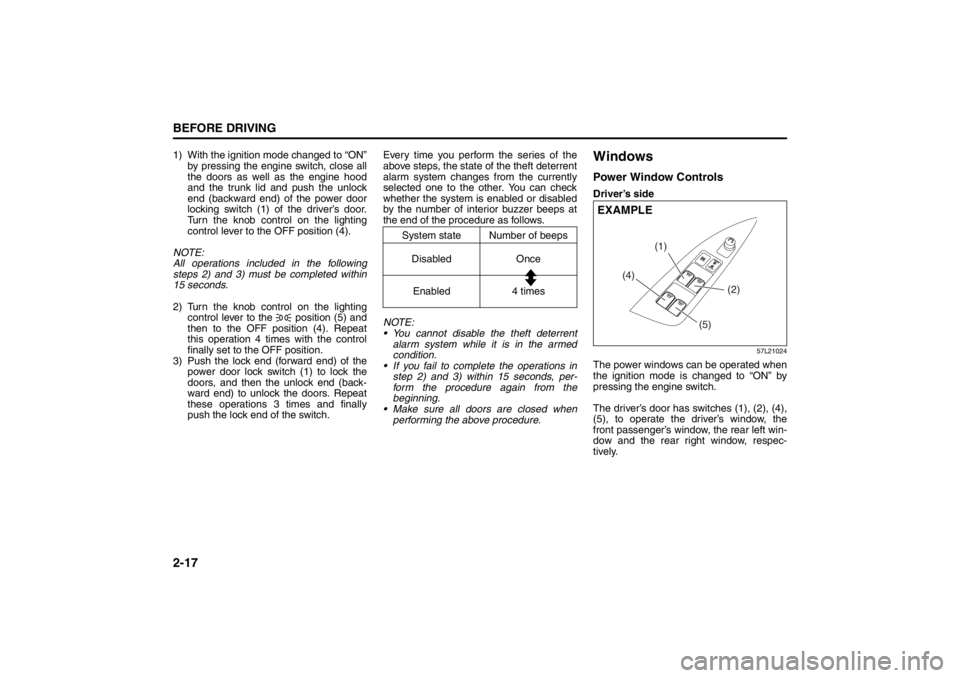
The driver’s door has switches (1), (2), (4),
(5), to operate the driver’s window, the
front passenger’s window, the rear left win-
dow and the rear right window, respec-
tively.
System state Number of beeps
Disabled Once
Enabled 4 times
(4)(1)
(2)
(5)
EXAMPLE
Seat Belts and Child Restraint Systems: 3
Page 110 of 388
2-91BEFORE DRIVING
57L20-03E
Warning and Indicator
MessageMaster Warning
IndicatorSound Cause and Remedy
57L21093
Blinks Repeated beeps under cer-
tain conditions (for about 2
seconds from exterior and/or
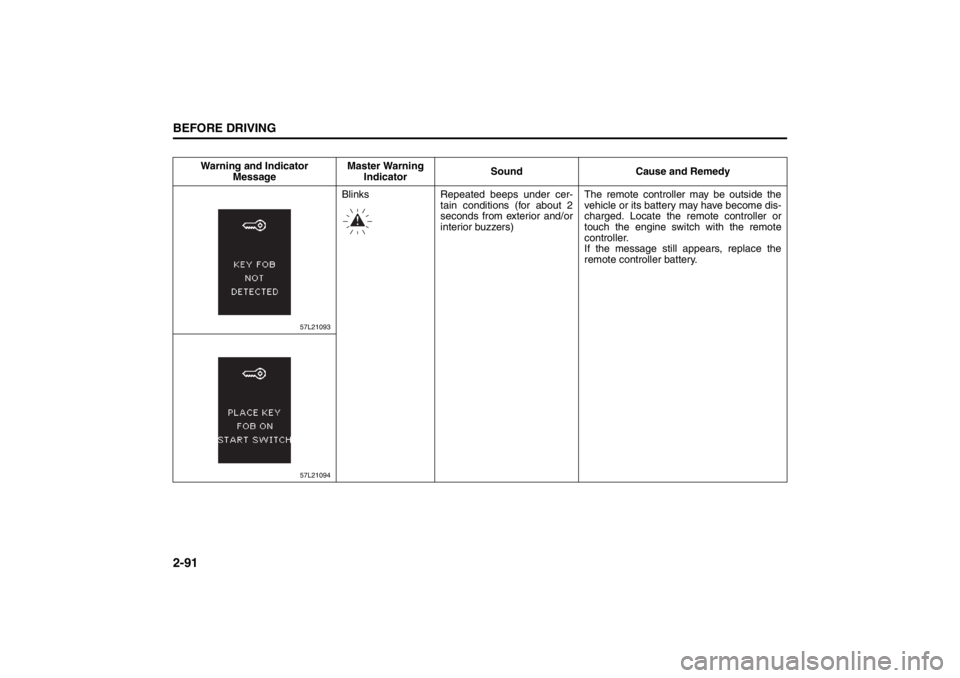
interior buzzers)The remote controller may be outside the
vehicle or its battery may have become dis-
charged. Locate the remote controller or
touch the engine switch with the remote
controller.
If the message still appears, replace the
remote controller battery.
57L21094
Page 111 of 388
2-92
BEFORE DRIVING
57L20-03E
(#1) This message will disappear for a while even if the problem that caused the message to appear is not corrected.Warning and Indicator
MessageMaster Warning
IndicatorSound Cause and Remedy
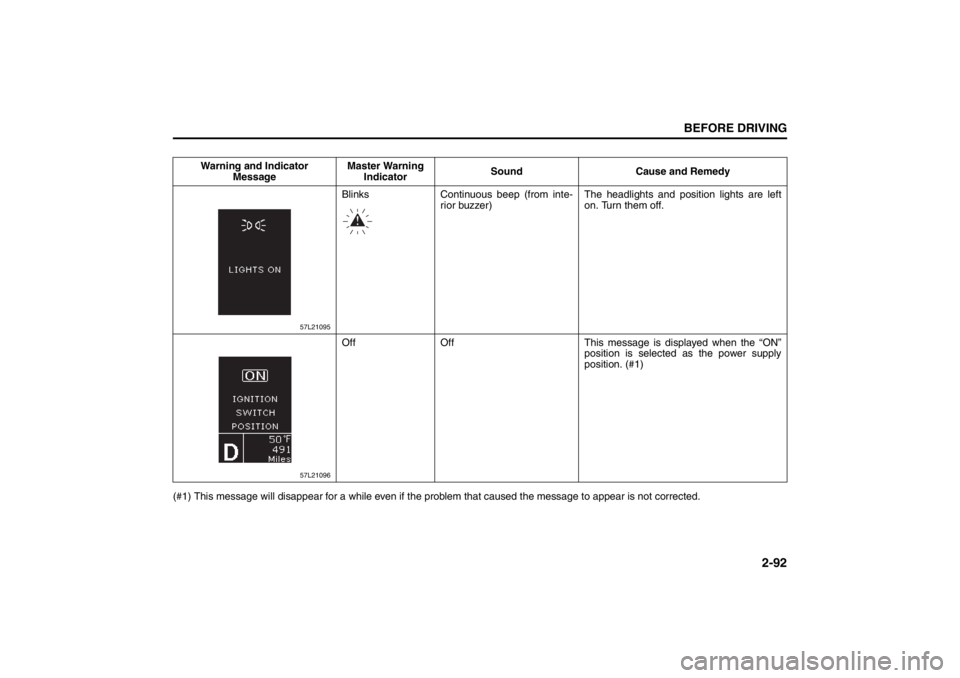
57L21095
Blinks Continuous beep (from inte-
rior buzzer)The headlights and position lights are left
on. Turn them off.
57L21096
Off Off This message is displayed when the “ON”
position is selected as the power supply
position. (#1)
Page 123 of 388
2-104
BEFORE DRIVING
57L20-03E
Sensitivity of the light sensor
The amount of outside light needed to turn
the lights on and off is pre-set at the fac-
tory. The sensitivity of the light sensor can
be adjusted so that the lights are turned on
and off when it is:
lighter outside than the pre-set condition,
or
darker outside than the pre-set condition
Rain-triggered automatic lighting oper-
ation
The setting of the auto-on headlight sys-
tem can be changed to make it turn on the
headlights:
when the rain sensor senses heavy rain-
fall (pre-set at the factory)
when the rain sensor senses light and
heavy rainfall (in coordination with rain-
sensing wiper operation), or
independently from rain-sensing wiper
operation.
Light Reminder BuzzerThe interior buzzer continuously beeps if
you open the driver’s door without turning
off the headlights and position lights. This
function is triggered under the following
condition:
The headlights and position lights are on
even after you change the ignition mode
to “LOCK” (OFF) by pressing the engine
switch.
The buzzer stops sounding when you turn
off the headlights and position lights.
NOTE:
A message is indicated on the information
display in the instrument cluster while the
buzzer is sounding.
Daytime Running Light (D.R.L.)
System
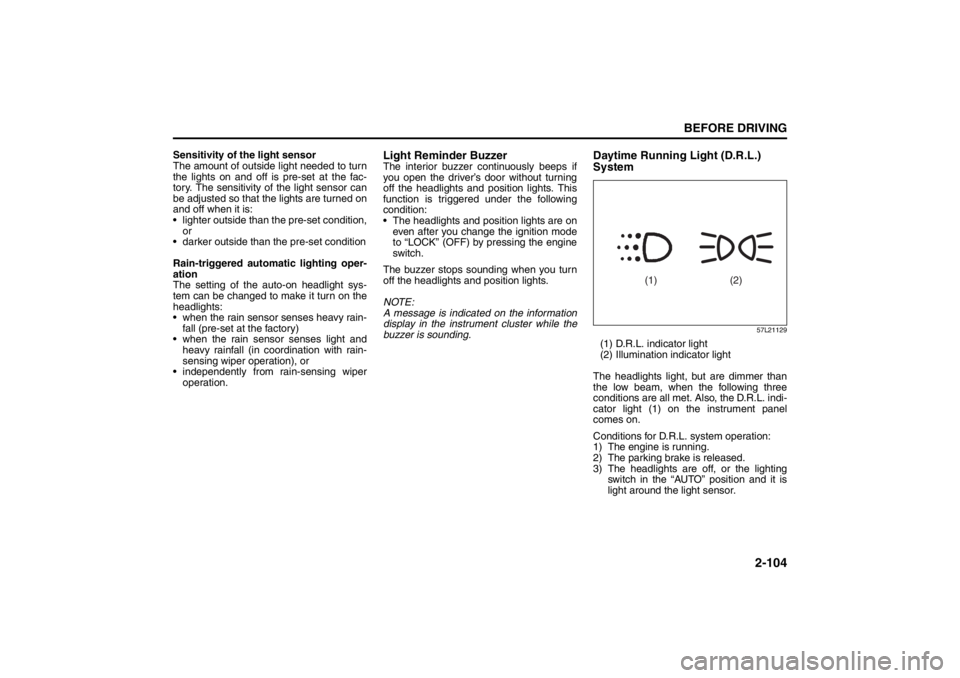
57L21129
(1) D.R.L. indicator light
(2) Illumination indicator light
The headlights light, but are dimmer than
the low beam, when the following three
conditions are all met. Also, the D.R.L. indi-
cator light (1) on the instrument panel
comes on.
Conditions for D.R.L. system operation:
1) The engine is running.
2) The parking brake is released.
3) The headlights are off, or the lighting
switch in the “AUTO” position and it is
light around the light sensor.
(1) (2)
Page 140 of 388

3-9OPERATING YOUR VEHICLE
57L20-03E
CVT – If the gearshift lever is not in the
“P” (Park) position, shift it to “P”. Hold
the brake pedal fully depressed.
3) The PUSH START SWITCH. message
will appear on the information display in
the instrument cluster. Press the engine
switch (1).
4) Within about 10 seconds of flashing of the master warning light in the instru-
ment cluster, touch the engine switch
with the lock switch end of the remote
controller (2) for about 2 seconds.
NOTE:
If you still cannot start the engine after several attempts using the above
method, there may be a problem else-
where, such as a low battery. Contact
your SUZUKI dealer for inspection.
The immobilizer/keyless start system warning light will light for about 5 sec-
onds while the master warning light is
flashing. In addition, the information dis-
play will show a certain message during
this time. Refer to “Information Display”
in the “Before Driving” section for details.
You may customize the system to cause the interior buzzer to sound once for the
“remote controller ou t of sensing range”
warning. Please contact an authorized
SUZUKI dealer for the customization.
If the battery of the remote controller is about to be completely discharged, a
message warning this will appear on the
information display when the ignition
mode is changed to “ON” by pressing the engine switch. For details on replac-
ing the battery, refer to the “Keyless Start
System Remote Controller” section in
the “Before Driving” chapter.
Returning the ignition mode to
“LOCK” (OFF)CVT
– To ensure safety, the ignition mode
can be returned to “LOCK” (OFF) by
pressing the engine switch only when the
gearshift lever is placed in the “P” position.
NOTE:
Messages may appear on the informa- tion display in the instrument cluster
when you attempt to return the ignition
mode to “LOCK” (OFF) by pressing the
engine switch. Refer to “Information dis-
play” in the “Before Driving” section for
details.
In the case of a CVT model, the engine cannot be returned to the “LOCK” (OFF)
position if the gearshift lever is in any
other position than “P”.
Certain problems like a fault in engine
system may prevent the engine switch
from going back to the “LOCK” (OFF)
mode. If this happens, have the vehicle
inspected by an autohorized SUZUKI
dealer after doing the following:
– Lock the doors using the key to pre-
vent theft. (The request switches and
the keyless start system remote con-
troller cannot be used to lock them.) – Disconnect the negative cable from
the battery to prevent discharge.
“LOCK” (OFF) mode reminder buzzer
If the driver’s door is opened without
returning the ignition mode to “LOCK”
(OFF) by pressing the engine switch, a
buzzer sounds to warn you of this state.
If you open the driver’s door after press- ing the engine switch to change the igni-
tion mode to “ACC”, the interior buzzer
beeps intermittently.
The buzzer will stop sounding if you then push the engine switch twice, thus bring-
ing it back the ignition mode to “LOCK”
(OFF).
NOTE:
Whenever you leave the vehicle, make
sure you have returned the ignition mode
to “LOCK” (OFF) using the engine switch
and then lock the doors. Without returning
the ignition mode to “LOCK” (OFF), you
cannot use a request switch or keyless
start system remote controller to lock the
doors.
Page 141 of 388
3-10
OPERATING YOUR VEHICLE
57L20-03E
Steering lock warning buzzer
If the steering lock fails to engage due to a
fault in the system even when you press
the engine switch to change the ignition
mode to “LOCK” (OFF), the interior buzzer
will warn you of this condition with
repeated short beeps. If this happens,
have the vehicle inspected by an autho-
rized SUZUKI dealer.
Parking Brake Lever
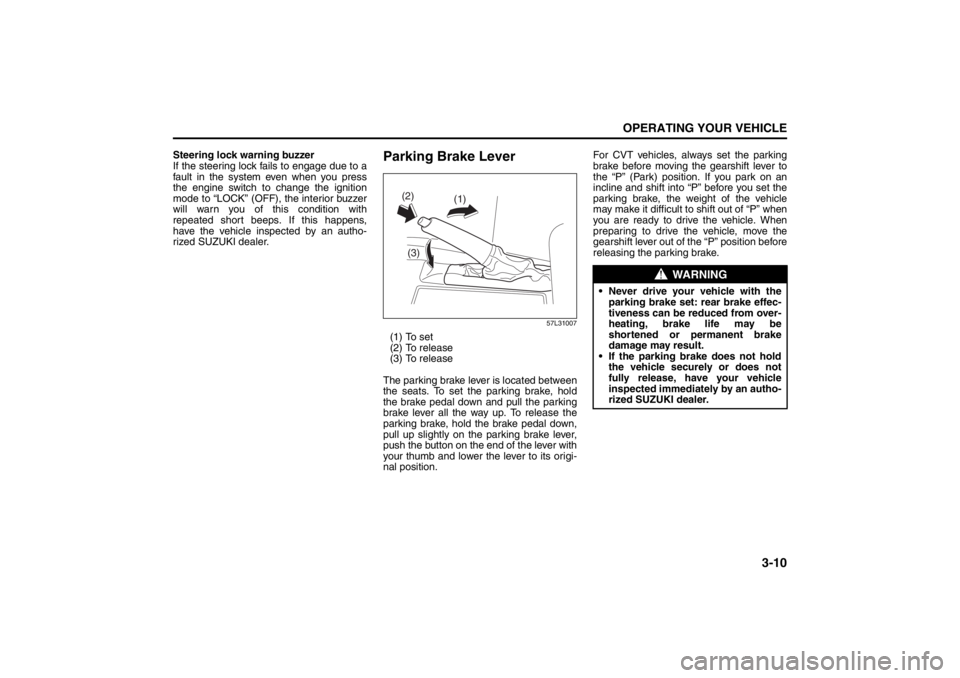
57L31007
(1) To set
(2) To release
(3) To release
The parking brake lever is located between
the seats. To set the parking brake, hold
the brake pedal down and pull the parking
brake lever all the way up. To release the
parking brake, hold the brake pedal down,
pull up slightly on the parking brake lever,
push the button on the end of the lever with
your thumb and lower the lever to its origi-
nal position. For CVT vehicles, always set the parking
brake before moving the gearshift lever to
the “P” (Park) position. If you park on an
incline and shift into “P” before you set the
parking brake, the weight of the vehicle
may make it difficult to
shift out of “P” when
you are ready to drive the vehicle. When
preparing to drive the vehicle, move the
gearshift lever out of the “P” position before
releasing the parking brake.
(1)
(2)
(3)
WARNING
Never drive your vehicle with the parking brake set: rear brake effec-
tiveness can be reduced from over-
heating, brake life may be
shortened or permanent brake
damage may result.
If the parking brake does not hold the vehicle securely or does not
fully release, have your vehicle
inspected immediately by an autho-
rized SUZUKI dealer.
Page 142 of 388
3-11OPERATING YOUR VEHICLE
57L20-03E
Parking Brake Reminder Buzzer
If you start the vehicle without releasing
the parking brake, the interior buzzer
warns you by repeated triple beeps.
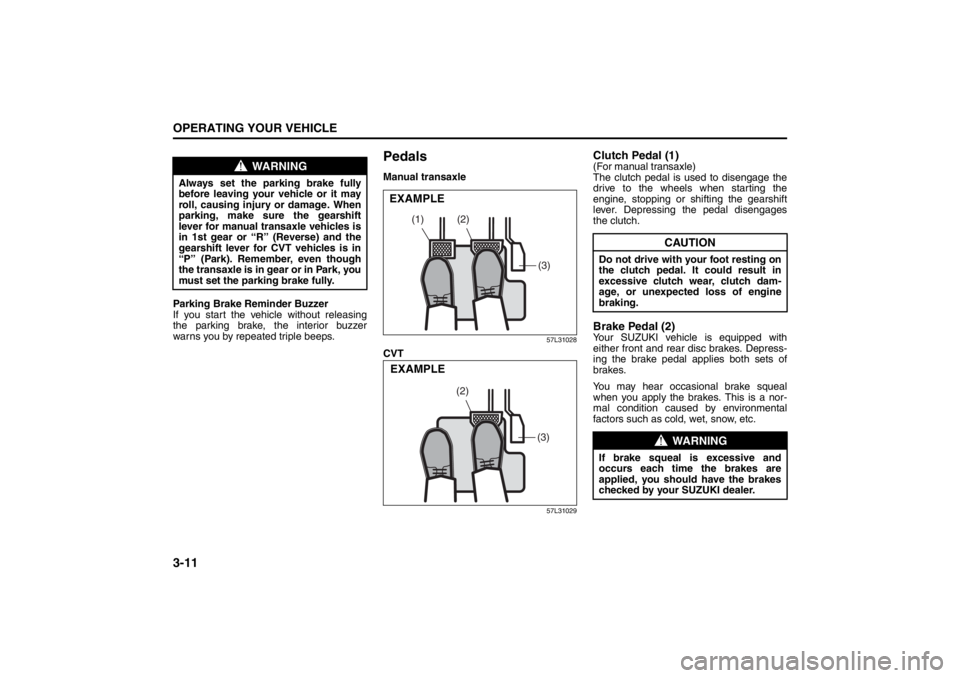
PedalsManual transaxle
57L31028
CVT
57L31029
Clutch Pedal (1)(For manual transaxle)
The clutch pedal is used to disengage the
drive to the wheels when starting the
engine, stopping or shifting the gearshift
lever. Depressing the pedal disengages
the clutch.Brake Pedal (2)Your SUZUKI vehicle is equipped with
either front and rear disc brakes. Depress-
ing the brake pedal applies both sets of
brakes.
You may hear occasional brake squeal
when you apply the brakes. This is a nor-
mal condition caused by environmental
factors such as cold, wet, snow, etc.
WARNING
Always set the parking brake fully
before leaving your vehicle or it may
roll, causing injury or damage. When
parking, make sure the gearshift
lever for manual transaxle vehicles is
in 1st gear or “R” (Reverse) and the
gearshift lever for CVT vehicles is in
“P” (Park). Remember, even though
the transaxle is in gear or in Park, you
must set the parking brake fully.
(2)
(1)
(3)
EXAMPLE
(3)
(2)
EXAMPLE
CAUTION
Do not drive with your foot resting on
the clutch pedal. It could result in
excessive clutch wear, clutch dam-
age, or unexpected loss of engine
braking.
WARNING
If brake squeal is excessive and
occurs each time the brakes are
applied, you should have the brakes
checked by your SUZUKI dealer.
Page 158 of 388
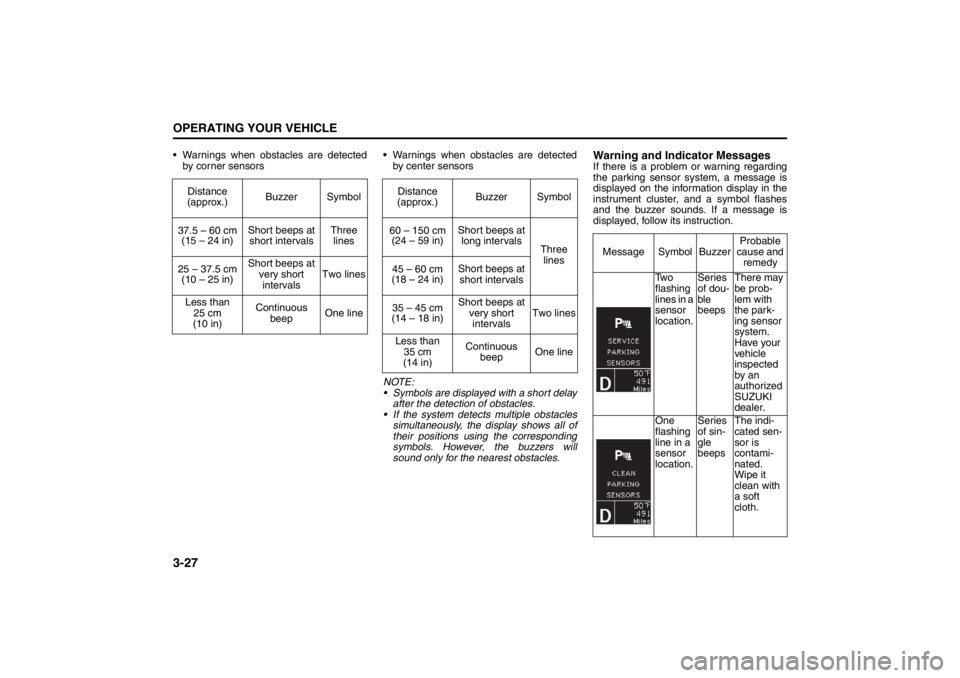
3-27OPERATING YOUR VEHICLE
57L20-03E
Warnings when obstacles are detected
by corner sensors Warnings when obstacles are detected
by center sensors
NOTE:
Symbols are displayed with a short delay
after the detection of obstacles.
If the system detects multiple obstacles
simultaneously, the display shows all of
their positions using the corresponding
symbols. However, the buzzers will
sound only for the nearest obstacles.
Warning and Indicator MessagesIf there is a problem or warning regarding
the parking sensor system, a message is
displayed on the information display in the
instrument cluster, and a symbol flashes
and the buzzer sounds. If a message is
displayed, follow its instruction. Distance
(approx.)Buzzer Symbol
37.5 – 60 cm
(15 – 24 in)Short beeps at
short intervalsThree
lines
25 – 37.5 cm
(10 – 25 in)Short beeps at
very short
intervalsTwo lines
Less than
25 cm
(10 in)Continuous
beepOne line
Distance
(approx.)Buzzer Symbol
60 – 150 cm
(24 – 59 in)Short beeps at
long intervals
Three
lines
45 – 60 cm
(18 – 24 in)Short beeps at
short intervals
35 – 45 cm
(14 – 18 in)Short beeps at
very short
intervalsTwo lines
Less than
35 cm
(14 in)Continuous
beepOne line
Message Symbol BuzzerProbable
cause and
remedy
Tw o
flashing
lines in a
sensor
location.Series
of dou-
ble
beepsThere may
be prob-
lem with
the park-
ing sensor
system.
Have your
vehicle
inspected
by an
authorized
SUZUKI
dealer.
One
flashing
line in a
sensor
location.Series
of sin-
gle
beepsThe indi-
cated sen-
sor is
contami-
nated.
Wipe it
clean with
a soft
cloth.