ECO mode SUZUKI RENO 2008 1.G Owners Manual
[x] Cancel search | Manufacturer: SUZUKI, Model Year: 2008, Model line: RENO, Model: SUZUKI RENO 2008 1.GPages: 226, PDF Size: 4.98 MB
Page 29 of 226
1-17SEATS AND RESTRAINT SYSTEMS
85Z14-03E
Question: What are the different types
of add-on child restraints?
Answer: Add-on child restraints, which are
purchased by the vehicle’s owner, are
available in four basic types. Selection of a
particular restraint should take into consid-
eration not only the child’s weight, height
and age but also whether or not the
restraint will be compatible with the motor
vehicle in which it will be used.
For most basic types of child restraints,
there are many different models available.
When purchasing a child restraint, be sure
it is designed to be used in a motor vehicle.
If it is, the restraint will have a label saying
that it meets federal motor vehicle safety
standards.
The restraint manufacturer’s instructions
that come with the restraint, state the
weight and height limitations for a particu-
lar child restraint. In addition, there are
many kinds of restraints available for chil-
dren with special needs.
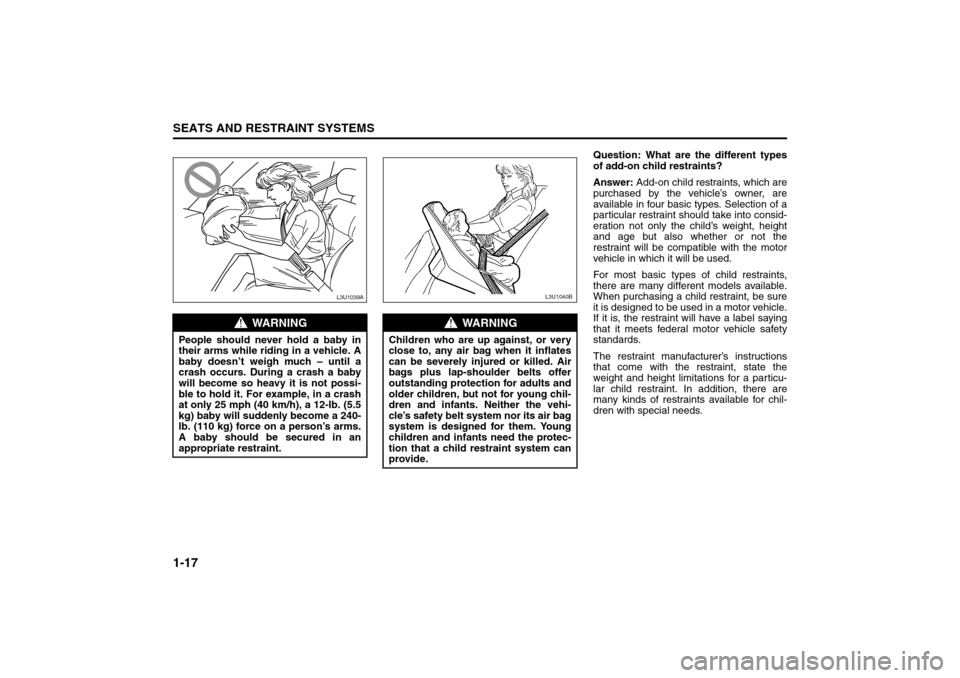
WARNING
People should never hold a baby in
their arms while riding in a vehicle. A
baby doesn’t weigh much – until a
crash occurs. During a crash a baby
will become so heavy it is not possi-
ble to hold it. For example, in a crash
at only 25 mph (40 km/h), a 12-lb. (5.5
kg) baby will suddenly become a 240-
lb. (110 kg) force on a person’s arms.
A baby should be secured in an
appropriate restraint.
L3U1039A
WARNING
Children who are up against, or very
close to, any air bag when it inflates
can be severely injured or killed. Air
bags plus lap-shoulder belts offer
outstanding protection for adults and
older children, but not for young chil-
dren and infants. Neither the vehi-
cle’s safety belt system nor its air bag
system is designed for them. Young
children and infants need the protec-
tion that a child restraint system can
provide.
L3U1040B
Child Restraints:
Page 43 of 226
1-31SEATS AND RESTRAINT SYSTEMS
85Z14-03E
position, then sit upright in the seat, cen-
tered on the seat cushion, with the per-
son’s legs comfortably extended. Restart
the vehicle and have the person remain
in this position for about three minutes.
This will allow the system to detect that
person and then enable the passenger’s
air bag.
With the vehicle parked, ask the right
front passenger to get out of the seat for
more than three seconds, place the
seatback in the fully upright position, and
then sit upright in the seat, centered on
the seat cushion, with the person’s legs
comfortably extended. Have the person
remain in this position for about three
minutes. This will allow the system to
detect that person and then enable the
passenger’s air bag.
Adding Equipment to Your Air Bag-
Equipped VehicleQuestion: Because I have a disability, I
have to get my vehicle modified. How
can I find out whether this will affect my
advanced air bag system?
Answer: Changing or moving any parts of
the front seats, safety belts, the air bag
sensing and diagnostic module can affect
the operation of the advanced air bag sys-
tem. If it is necessary to modify the
advanced air bag system to accommodate
a person with disabilities, owners in the
continental United States can call Ameri-
can Suzuki toll-free at 1-800-934-0934, or
write to:
American Suzuki Motor Corporation
Automotive Customer Relations
3251 East Imperial Highway
Brea, CA 92821-6795
When Should an Air Bag Inflate?The driver’s and right front passenger’s
frontal air bags are designed to inflate in
moderate to severe frontal or near-frontal
crashes. But they are designed to inflate
only if the impact speed is above the sys-
tem’s designed “threshold level.”
If the front of your vehicle goes straight into
a wall that doesn’t move or deform, the
threshold level is about 9 to 14 mph (14.5
to 23 km/h). The threshold level can vary,
however, with specific vehicle design, so
that it can be somewhat above or below
this range.
If your vehicle strikes something that will
move or deform, such as a parked car, the
threshold level will be higher. The driver’s
and right front passenger’s frontal air bags
are not designed to inflate in rollovers, rear
impacts, or in many side impacts because
inflation would not help the occupant.
A side impact air bag is designed to inflate
in moderate to severe side crashes involv-
ing the door. A side impact air bag will
inflate if the crash severity is above the
system’s designed “threshold level”. The
threshold level can vary with specific vehi-
cle design. A side impact air bag is not
designed to inflate in frontal or near-frontal
impacts, rollovers or rear impacts, because
inflation would not help the occupant.
In any particular crash, no one can say
whether an air bag should have inflated
simply because of the damage to a vehicle
WARNING
If the air bag readiness light in the
instrument panel cluster ever comes
on and stays on, it means that some-
thing may be wrong with the air bag
system. If this ever happens, have the
vehicle serviced promptly, because
an adult-size person sitting in the
right front passenger’s seat may not
have the protection of the air bags.
See “Air Bag Readiness Light” in
Section 3 for more on this, including
important safety information.
WARNING
A thick layer of additional material
such as a blanket, or aftermarket
equipment such as seat covers, seat
heaters and seat massagers can
affect how well the passenger sens-
ing system operates. Remove any
additional material from the seat
cushion before allowing a passenger
to use the front passenger’s seat, and
do not use aftermarket equipment
such as seat covers.
Supplemental Restraint System:
Page 57 of 226
2-9FEATURES AND CONTROLS
85Z14-03E
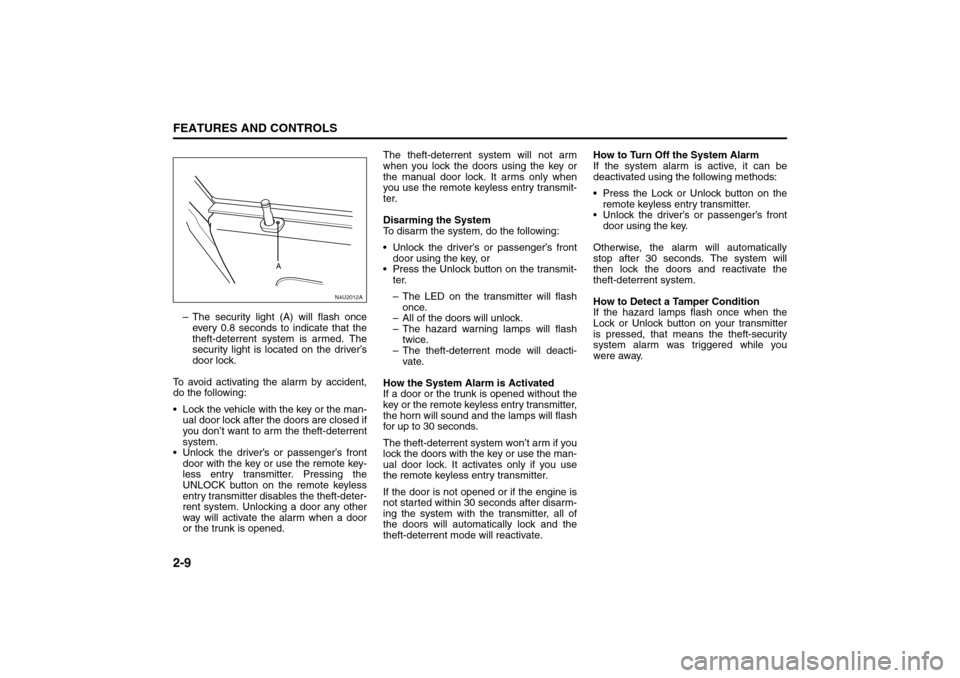
– The security light (A) will flash once
every 0.8 seconds to indicate that the
theft-deterrent system is armed. The
security light is located on the driver’s
door lock.
To avoid activating the alarm by accident,
do the following:
Lock the vehicle with the key or the man-
ual door lock after the doors are closed if
you don’t want to arm the theft-deterrent
system.
Unlock the driver’s or passenger’s front
door with the key or use the remote key-
less entry transmitter. Pressing the
UNLOCK button on the remote keyless
entry transmitter disables the theft-deter-
rent system. Unlocking a door any other
way will activate the alarm when a door
or the trunk is opened.The theft-deterrent system will not arm
when you lock the doors using the key or
the manual door lock. It arms only when
you use the remote keyless entry transmit-
ter.
Disarming the System
To disarm the system, do the following:
Unlock the driver’s or passenger’s front
door using the key, or
Press the Unlock button on the transmit-
ter.
– The LED on the transmitter will flash
once.
– All of the doors will unlock.
– The hazard warning lamps will flash
twice.
– The theft-deterrent mode will deacti-
vate.
How the System Alarm is Activated
If a door or the trunk is opened without the
key or the remote keyless entry transmitter,
the horn will sound and the lamps will flash
for up to 30 seconds.
The theft-deterrent system won’t arm if you
lock the doors with the key or use the man-
ual door lock. It activates only if you use
the remote keyless entry transmitter.
If the door is not opened or if the engine is
not started within 30 seconds after disarm-
ing the system with the transmitter, all of
the doors will automatically lock and the
theft-deterrent mode will reactivate.How to Turn Off the System Alarm
If the system alarm is active, it can be
deactivated using the following methods:
Press the Lock or Unlock button on the
remote keyless entry transmitter.
Unlock the driver’s or passenger’s front
door using the key.
Otherwise, the alarm will automatically
stop after 30 seconds. The system will
then lock the doors and reactivate the
theft-deterrent system.
How to Detect a Tamper Condition
If the hazard lamps flash once when the
Lock or Unlock button on your transmitter
is pressed, that means the theft-security
system alarm was triggered while you
were away.
N4U2012A
A
Theft-Deterrent Systems:
Page 62 of 226
2-14
FEATURES AND CONTROLS
85Z14-03E
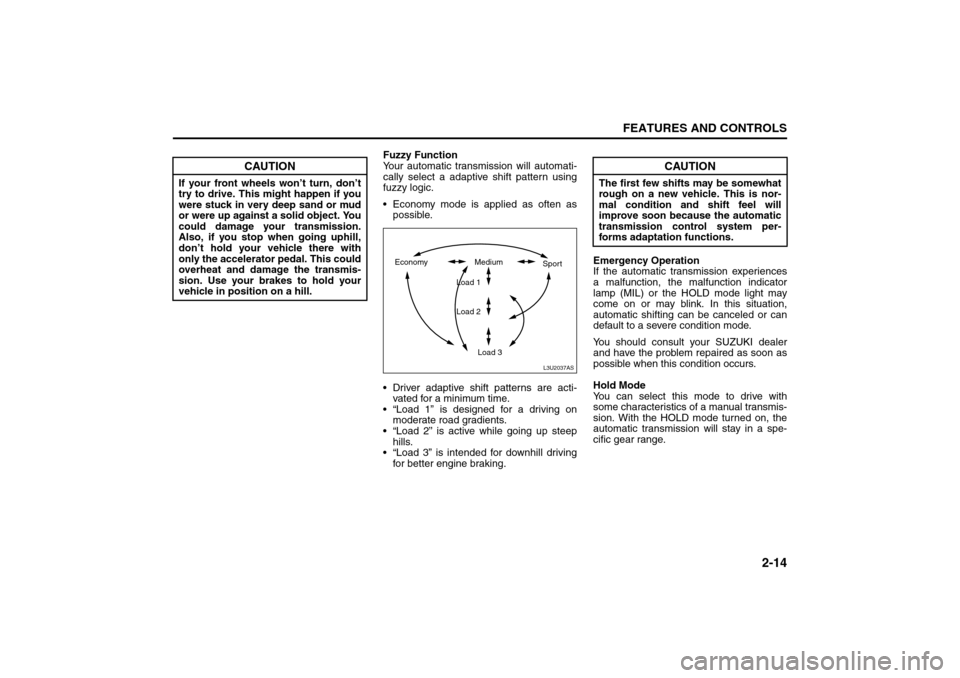
Fuzzy Function
Your automatic transmission will automati-
cally select a adaptive shift pattern using
fuzzy logic.
Economy mode is applied as often as
possible.
Driver adaptive shift patterns are acti-
vated for a minimum time.
“Load 1” is designed for a driving on
moderate road gradients.
“Load 2” is active while going up steep
hills.
“Load 3” is intended for downhill driving
for better engine braking.Emergency Operation
If the automatic transmission experiences
a malfunction, the malfunction indicator
lamp (MIL) or the HOLD mode light may
come on or may blink. In this situation,
automatic shifting can be canceled or can
default to a severe condition mode.
You should consult your SUZUKI dealer
and have the problem repaired as soon as
possible when this condition occurs.
Hold Mode
You can select this mode to drive with
some characteristics of a manual transmis-
sion. With the HOLD mode turned on, the
automatic transmission will stay in a spe-
cific gear range.
CAUTION
If your front wheels won’t turn, don’t
try to drive. This might happen if you
were stuck in very deep sand or mud
or were up against a solid object. You
could damage your transmission.
Also, if you stop when going uphill,
don’t hold your vehicle there with
only the accelerator pedal. This could
overheat and damage the transmis-
sion. Use your brakes to hold your
vehicle in position on a hill.
L3U2037AS
Economy Medium
Load 1
Load 2
Load 3Sport
CAUTION
The first few shifts may be somewhat
rough on a new vehicle. This is nor-
mal condition and shift feel will
improve soon because the automatic
transmission control system per-
forms adaptation functions.
Starting and Operating Your Vehicle:
Page 63 of 226
2-15FEATURES AND CONTROLS
85Z14-03E
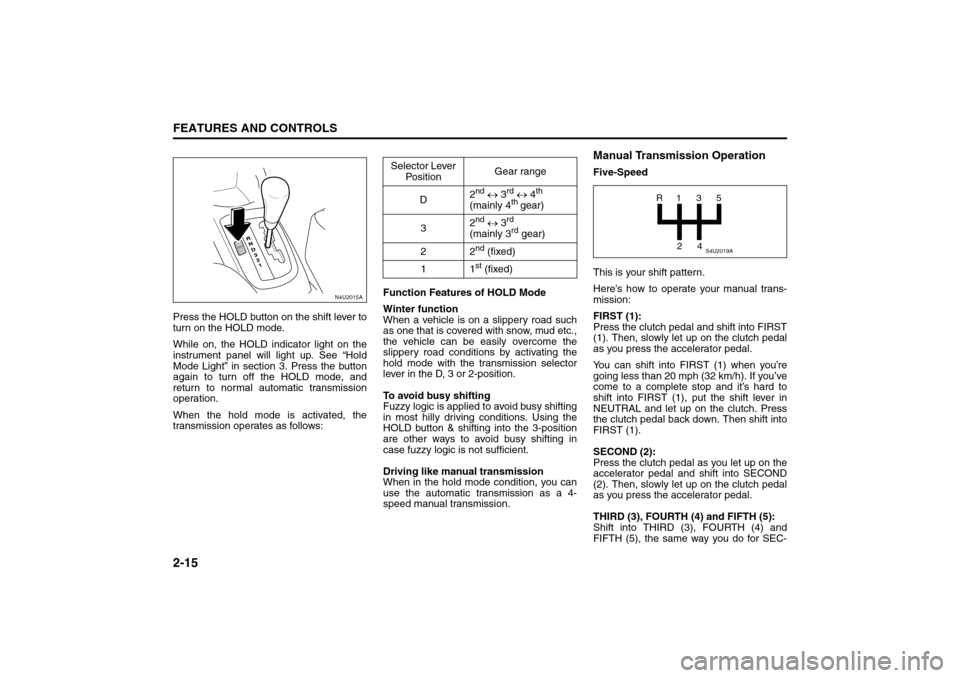
Press the HOLD button on the shift lever to
turn on the HOLD mode.
While on, the HOLD indicator light on the
instrument panel will light up. See “Hold
Mode Light” in section 3. Press the button
again to turn off the HOLD mode, and
return to normal automatic transmission
operation.
When the hold mode is activated, the
transmission operates as follows:Function Features of HOLD Mode
Winter function
When a vehicle is on a slippery road such
as one that is covered with snow, mud etc.,
the vehicle can be easily overcome the
slippery road conditions by activating the
hold mode with the transmission selector
lever in the D, 3 or 2-position.
To avoid busy shifting
Fuzzy logic is applied to avoid busy shifting
in most hilly driving conditions. Using the
HOLD button & shifting into the 3-position
are other ways to avoid busy shifting in
case fuzzy logic is not sufficient.
Driving like manual transmission
When in the hold mode condition, you can
use the automatic transmission as a 4-
speed manual transmission.
Manual Transmission OperationFive-Speed
This is your shift pattern.
Here’s how to operate your manual trans-
mission:
FIRST (1):
Press the clutch pedal and shift into FIRST
(1). Then, slowly let up on the clutch pedal
as you press the accelerator pedal.
You can shift into FIRST (1) when you’re
going less than 20 mph (32 km/h). If you’ve
come to a complete stop and it’s hard to
shift into FIRST (1), put the shift lever in
NEUTRAL and let up on the clutch. Press
the clutch pedal back down. Then shift into
FIRST (1).
SECOND (2):
Press the clutch pedal as you let up on the
accelerator pedal and shift into SECOND
(2). Then, slowly let up on the clutch pedal
as you press the accelerator pedal.
THIRD (3), FOURTH (4) and FIFTH (5):
Shift into THIRD (3), FOURTH (4) and
FIFTH (5), the same way you do for SEC-
N4U2015A
HOLD
Selector Lever
PositionGear range
D2
nd ↔ 3
rd ↔ 4
th
(mainly 4
th gear)
32
nd ↔ 3
rd
(mainly 3rd gear)
22
nd (fixed)
11st (fixed)
S4U2019A
R1
2435
Starting and Operating Your Vehicle:
Page 89 of 226
3-15INSTRUMENT PANEL
85Z14-03E
vehicle to cool down. It also helps the sys-
tem to operate more efficiently.
For quick cool down on hot days, do the
following:
1) Press the recirculation button.
2) Press the A/C button.
3) Select the coolest temperature on the
temperature control knob.
4) Select the highest fan speed on the fan
control knob.
Using these settings together for long peri-
ods of time may cause the air inside of
your vehicle to become too dry. To prevent
this from happening, after the air in your
vehicle has cooled, turn off the recircula-
tion mode by pressing the button again.
The air-conditioning system removes mois-
ture from the air, so you may sometimes
notice a small amount of water dripping
underneath your vehicle while idling or
after turning off the engine. This is normal.Defogging and Defrosting
Fog on the inside of windows is a result of
high humidity (moisture) condensing on
the cool window glass. This can be mini-
mized if the climate control system is used
properly. There are two modes to clear fog
or frost from your windshield and side win-
dows. Use the defog mode to clear the
windows of fog or moisture and warm the
passengers. Use the defrost mode to
remove fog or frost from the windshield
more quickly. For best results, clear all
snow and ice from the windshield before
defrosting. Turn the air distribution knob to
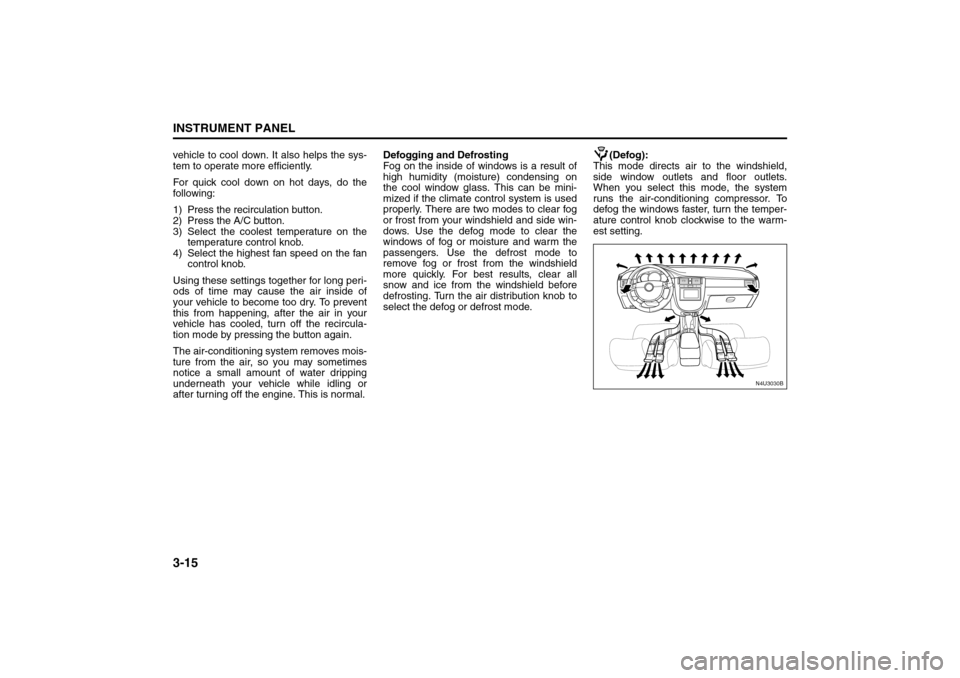
select the defog or defrost mode.(Defog):
This mode directs air to the windshield,
side window outlets and floor outlets.
When you select this mode, the system
runs the air-conditioning compressor. To
defog the windows faster, turn the temper-
ature control knob clockwise to the warm-
est setting.
N4U3030B
Climate Controls:
Page 96 of 226
3-22
INSTRUMENT PANEL
85Z14-03E
Speed Sensitive Power Steering
(SSPS) Warning LightIf your vehicle has Speed Sensitive Power
Steering (SSPS), this warning light will
come on briefly when you turn the ignition
to ON as a check to show you the bulb is
working.
Then it should go out after a few seconds.
If the warning light does not come on, have
it fixed so it will be able to warn you if there
is a problem.
If the warning light stays on, or comes on
while you are driving, the SSPS system
may not be working. If this happens, see
your SUZUKI dealer for service.
Hold Mode LightIf your vehicle has this feature, this light will
come on when the Hold mode is active.
If the HOLD mode light flashes, have your
vehicle checked.
See “Hold Mode” under “Automatic Trans-
mission Operation” in section 2 for addi-
tional information on this feature.
Engine Coolant Temperature GaugeYour vehicle is equipped with an engine
coolant temperature gauge. With the igni-
tion in the ON position, this gauge shows
the engine coolant temperature.
If the gauge pointer moves into the red
area, your engine is too hot! It means that
your engine coolant has overheated.
If you have been operating your vehicle
under normal driving conditions, you
should pull off the road, stop your vehicle
and turn off the engine as soon as possi-
ble.
See “Engine Overheating” in section 5.
N5U3003A
Warning Lights, Gauges and Indicators:
Page 108 of 226
3-34
INSTRUMENT PANEL
85Z14-03E
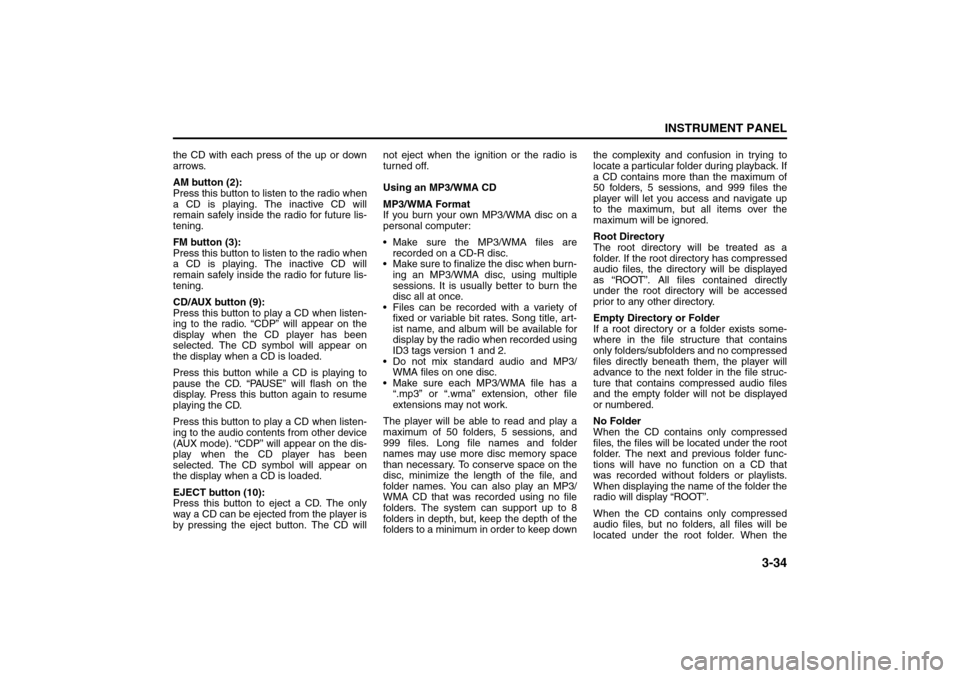
the CD with each press of the up or down
arrows.
AM button (2):
Press this button to listen to the radio when
a CD is playing. The inactive CD will
remain safely inside the radio for future lis-
tening.
FM button (3):
Press this button to listen to the radio when
a CD is playing. The inactive CD will
remain safely inside the radio for future lis-
tening.
CD/AUX button (9):
Press this button to play a CD when listen-
ing to the radio. “CDP” will appear on the
display when the CD player has been
selected. The CD symbol will appear on
the display when a CD is loaded.
Press this button while a CD is playing to
pause the CD. “PAUSE” will flash on the
display. Press this button again to resume
playing the CD.
Press this button to play a CD when listen-
ing to the audio contents from other device
(AUX mode). “CDP” will appear on the dis-
play when the CD player has been
selected. The CD symbol will appear on
the display when a CD is loaded.
EJECT button (10):
Press this button to eject a CD. The only
way a CD can be ejected from the player is
by pressing the eject button. The CD willnot eject when the ignition or the radio is
turned off.
Using an MP3/WMA CD
MP3/WMA Format
If you burn your own MP3/WMA disc on a
personal computer:
Make sure the MP3/WMA files are
recorded on a CD-R disc.
Make sure to finalize the disc when burn-
ing an MP3/WMA disc, using multiple
sessions. It is usually better to burn the
disc all at once.
Files can be recorded with a variety of
fixed or variable bit rates. Song title, art-
ist name, and album will be available for
display by the radio when recorded using
ID3 tags version 1 and 2.
Do not mix standard audio and MP3/
WMA files on one disc.
Make sure each MP3/WMA file has a
“.mp3” or “.wma” extension, other file
extensions may not work.
The player will be able to read and play a
maximum of 50 folders, 5 sessions, and
999 files. Long file names and folder
names may use more disc memory space
than necessary. To conserve space on the
disc, minimize the length of the file, and
folder names. You can also play an MP3/
WMA CD that was recorded using no file
folders. The system can support up to 8
folders in depth, but, keep the depth of the
folders to a minimum in order to keep downthe complexity and confusion in trying to
locate a particular folder during playback. If
a CD contains more than the maximum of
50 folders, 5 sessions, and 999 files the
player will let you access and navigate up
to the maximum, but all items over the
maximum will be ignored.
Root Directory
The root directory will be treated as a
folder. If the root directory has compressed
audio files, the directory will be displayed
as “ROOT”. All files contained directly
under the root directory will be accessed
prior to any other directory.
Empty Directory or Folder
If a root directory or a folder exists some-
where in the file structure that contains
only folders/subfolders and no compressed
files directly beneath them, the player will
advance to the next folder in the file struc-
ture that contains compressed audio files
and the empty folder will not be displayed
or numbered.
No Folder
When the CD contains only compressed
files, the files will be located under the root
folder. The next and previous folder func-
tions will have no function on a CD that
was recorded without folders or playlists.
When displaying the name of the folder the
radio will display “ROOT”.
When the CD contains only compressed
audio files, but no folders, all files will be
located under the root folder. When the
Audio System:
Page 109 of 226
3-35INSTRUMENT PANEL
85Z14-03E
radio displays the name of the folder the
radio will display “ROOT”.
Order of Play
Tracks will be played in the following order:
Play will begin from the first track under the
root directory. When all tracks from the root
directory have been played, play will con-
tinue from files according to their numerical
listing. After playing the last track from the
last folder, the player will begin playing
again at the first track of the first folder or
root directory.
File System and Naming
The song name in the ID3 tag will be dis-
played. If the song name is not present in
the ID3 tag, then the radio will display the
file name without the extension (such as
MP3/WMA) instead.
Track names longer than 32 characters or
4 pages will be shortened. The display will
not show parts of words on the last page of
text and the extension of the filename will
not be displayed.
Playing an MP3/WMA
With the ignition on, insert a CD partway
into the slot, label side up. The player will
pull it in, then “LOADING”, and then “MP3”
or “WMA” will appear on the display. The
CD should begin playing. You can’t insert a
CD with the acc off. As each new track
starts to play, the track number, and the
song name will appear on the display.If the ignition or radio is turned off with a
CD in the player, it will stay in the player.
When a CD is in the player and the ignition
is turned on, the radio must be turned on
before the CD will start playback. When
the ignition and radio are turned on, the
CD will start playing where it stopped, if it
was the last selected audio source.
The CD player can play the smaller 3 inch
(8 cm) single CDs with an adapter ring.
Full-size CDs and the smaller CDs are
loaded in the same manner.
If playing a CD-R, the sound quality may
be reduced due to CD-R quality, the
method of recording, the quality of the
music that has been recorded, and the way
the CD-R has been handled. There may be
an increase in skipping, difficulty in finding
tracks, and/or difficulty in loading and
ejecting. If these problems occur, check
the bottom surface of the CD. If the surface
of the CD is damaged, such as cracked,
broken, or scratched, the CD will not play
properly.
If there is no apparent damage, try a
known good CD.
Do not add any label to a CD, it could get
caught in the CD player. If a CD is
recorded on a personal computer and a
description label is needed, try labeling the
top of the recorded CD with a marking pen
instead.If an error appears on the display, see “CD
Messages” later in this section.
All of the CD functions work the same
while playing an MP3/WMA, except for
those listed here. See “Playing a CD” ear-
lier for more information.
DIR (Directory) button (11):
Press this button to repeat the tracks in the
current directory. “DIR” will appear on the
display.
Press this button again to repeat the tracks
in all of the directories. “ALL” will appear on
the display.
Press this button again to turn off repeat
play.
SEEK (Previous/Next Folder) button (5)
(in MP3/WMA mode):
Press the up or down arrows to change the
folder. If the CD-R doesn’t have any folder,
“ROOT” will flash on display for a short
time.
TUNE (Previous/Next Folder) button (4):
Press the up or down arrows to go to the
first track in the previous or to go to the
next folder. The player will continue moving
backward or forward through the CD with
each press of the up or down arrows.
INFO/DISP (Information/Display) button
(12):
Press this button to display additional text
information related to the current MP3/
WMA song. A choice of additional informa-
Page 110 of 226
3-36
INSTRUMENT PANEL
85Z14-03E
tion such as: Song Title, Album Title, Artist,
and Bit rate may appear.
When information is not available, “No Info”
will appear on the display.
Press and hold this button to change the
display mode.
Scroll:
Press and hold the sound button [in MP3/
WMA mode]
The song title or other information of a
song will scroll on/off. The default mode is
scroll on.
Scroll mode can be changed only when
you press and hold the sound button.
CD Messages
CHECK CD:
If this message appears on the display
and/or the CD comes out, it could be for
one of the following reasons:
It is very hot. When the temperature
returns to normal, the CD will play.
You are driving on a very rough road.
When the road becomes smoother, the
CD will play.
The CD is dirty, scratched, wet, or
upside down.
The air is very humid. If so, wait about an
hour and try again.
The format of the CD may not be com-
patible. See “MP3/WMA Format” earlier
in this section. There may have been a problem while
burning the CD.
The label may be caught in the CD
player.
If the CD is not playing correctly, for any
other reason, try a known good CD.
If any error occurs repeatedly or if an error
cannot be corrected, contact your SUZUKI
dealer. If the radio displays an error mes-
sage, write it down and provide it to your
SUZUKI dealer when reporting the prob-
lem.
AUX Mod e
Press this button to listen to the audio con-
tents from other devices; Walkman, Porta-
ble CD Player, Portable MP3 Player, i-pod,
XM receiver, etc.
1) Connect the output port of the device to
the aux jack of the head unit with an
aux connector.
2) Turn the device on.
3) Press this button.
If you want to control the volume level, use
the volume buttons of the head unit or the
device.
Using the Auxiliary Input Jack
Your radio system has an auxiliary input
jack located on the lower right side of the
faceplate. This is not an audio output; do
not plug a headphone set into the front
auxiliary input jack. You can however, con-
nect an external audio device such as aniPod, laptop computer, MP3 player, CD
changer, or cassette tape player, etc. to the
auxiliary input jack for use as another
source for audio listening.
The auxiliary input jack will also accept cell
phone connectors. Plug the cell phone
connector into the auxiliary input jack to
hear the other side of a cell phone’s con-
versation through the vehicle sound sys-
tem.
Drivers are encouraged to set up their por-
table audio player while the vehicle is
parked. See Defensive Driving for more
information on driver distraction.
To use a portable audio player, connect a
3.5 mm (1/8 inch) cable to the radio’s front
auxiliary input jack. When a device is con-
nected, press the radio CD/AUX button as
needed to begin playing audio from the
device over the car speakers.
CD/AUX (CD/Auxiliary) button (9):
Press this button once to play a CD while a
portable audio device is playing. Press this
button a second time and the system will
begin playing audio from the connected
portable audio player. Once in this mode,
“Auxinput” will appear on the display. If the
auxiliary jack does not detect the presence
of an output jack, the aux mode will be pre-
vented from coming up.
Power/Volume knob (1):
Turn this knob clockwise or counterclock-
wise to increase or decrease the volume of