FOLDER SUZUKI SWIFT 2017 5.G Owner's Manual
[x] Cancel search | Manufacturer: SUZUKI, Model Year: 2017, Model line: SWIFT, Model: SUZUKI SWIFT 2017 5.GPages: 336, PDF Size: 6.24 MB
Page 164 of 336
5-37OTHER CONTROLS AND EQUIPMENT
74LH0-74E
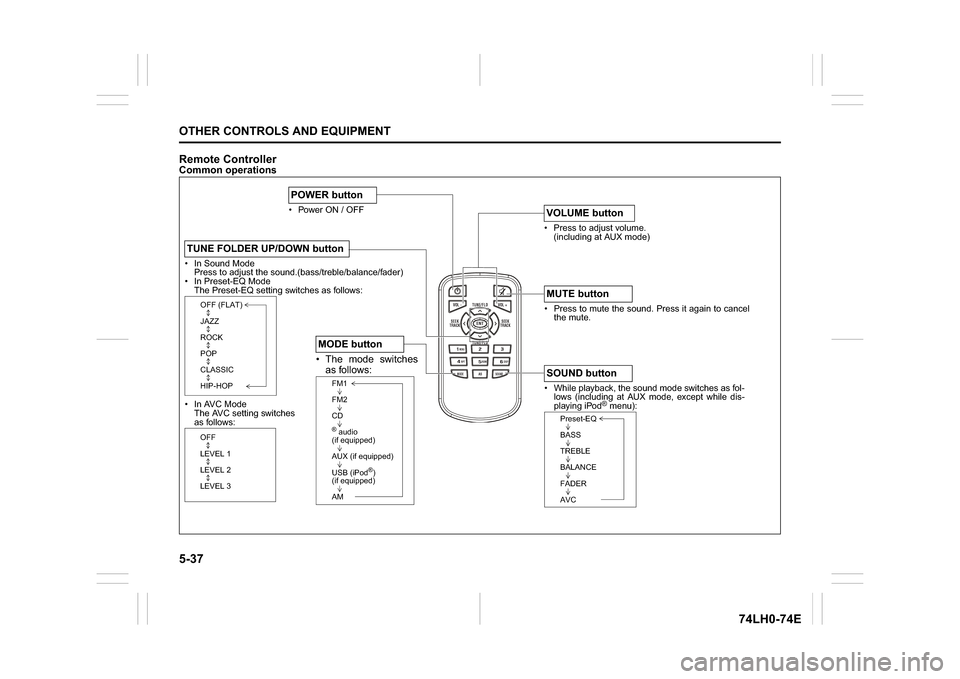
Remote ControllerCommon operations
/TUNE
VOL -VOL + FLD/TUNE
MODE
AS
SOUND
1
5
4
FLDENT
SEEK
TRACK
SEEK
TRACK
RPT RDM
6
MENU
3 2DISP
In Sound Mode
Press to adjust the sound.(bass/treble/balance/fader)
In Preset-EQ Mode
The Preset-EQ setting switches as follows:
In AVC Mode
The AVC setting switches
as follows:TUNE FOLDER UP/DOWN button
OFF (FLAT)
JAZZ
ROCK
POP
CLASSIC
HIP-HOPOFF
LEVEL 1
LEVEL 2
LEVEL 3
Power ON / OFFPOWER button
Press to adjust volume.
(including at AUX mode)VOLUME button Press to mute the sound. Press it again to cancel
the mute.MUTE button While playback, the sound mode switches as fol-
lows (including at AUX mode, except while dis-
playing iPod
® menu):
SOUND button
Preset-EQ
BASS
TREBLE
BALANCE
FADER
AVC
The mode switches
as follows: MODE button
FM1
FM2
CD® audio
(if equipped)
AUX (if equipped)
USB (iPod
®)
(if equipped)
AM
Page 167 of 336
5-40
OTHER CONTROLS AND EQUIPMENT
74LH0-74E
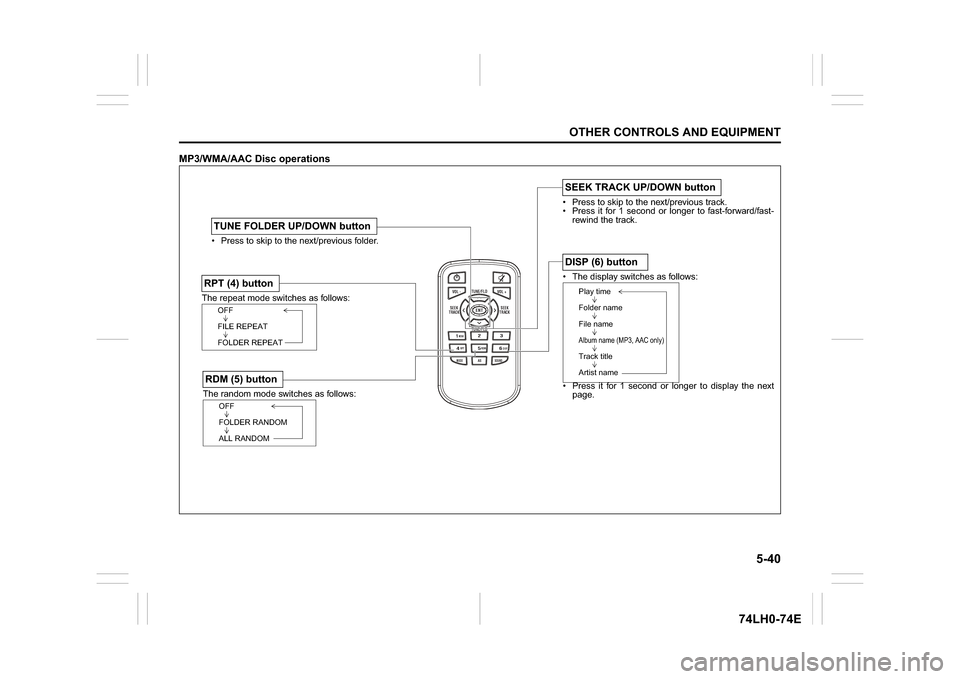
MP3/WMA/AAC Disc operations
/TUNE
VOL -VOL + FLD/TUNE
MODE
AS
SOUND
1
5
4
FLDENT
SEEK
TRACK
SEEK
TRACK
RPT RDM
6
MENU
3 2DISP
The random mode switches as follows:RDM (5) button
OFF
FOLDER RANDOM
ALL RANDOM
The repeat mode switches as follows:RPT (4) button
OFF
FILE REPEAT
FOLDER REPEAT Press to skip to the next/previous folder.TUNE FOLDER UP/DOWN button
The display switches as follows:
Press it for 1 second or longer to display the next
page.DISP (6) button
Play time
Folder name
File nameAlbum name (MP3, AAC only)Track title
Artist name
Press to skip to the next/previous track.
Press it for 1 second or longer to fast-forward/fast-
rewind the track.SEEK TRACK UP/DOWN button
Page 168 of 336
5-41OTHER CONTROLS AND EQUIPMENT
74LH0-74E
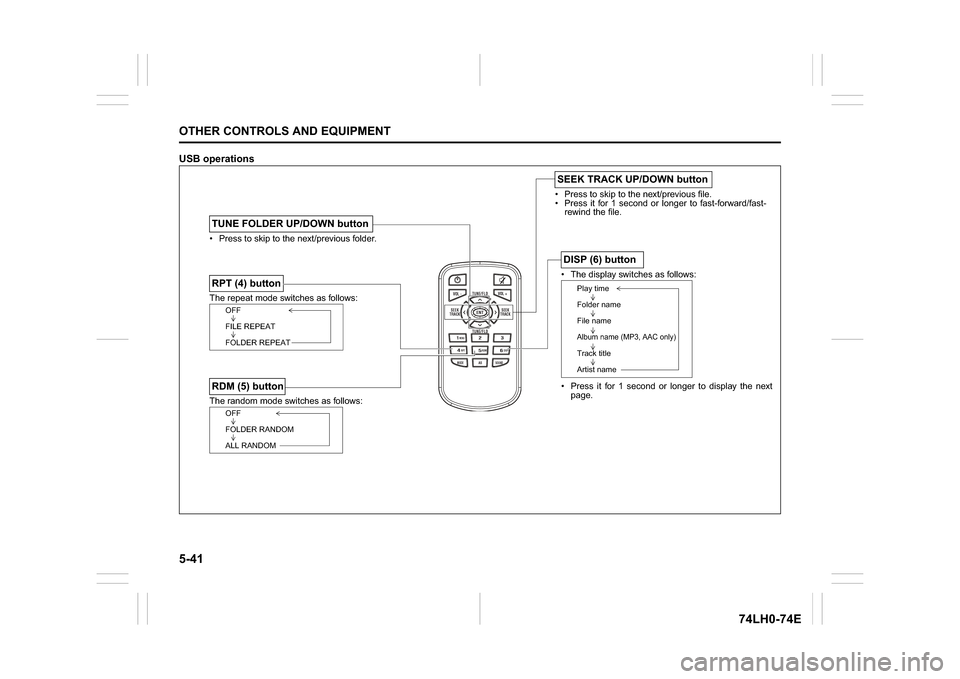
USB operations
/TUNE
VOL -VOL + FLD/TUNE
MODE
AS
SOUND
1
5
4
FLDENT
SEEK
TRACK
SEEK
TRACK
RPT RDM
6
MENU
3 2DISP
Press to skip to the next/previous file.
Press it for 1 second or longer to fast-forward/fast-
rewind the file.SEEK TRACK UP/DOWN button
The repeat mode switches as follows:RPT (4) button
OFF
FILE REPEAT
FOLDER REPEAT
The display switches as follows:
Press it for 1 second or longer to display the next
page.DISP (6) button
Play time
Folder name
File nameAlbum name (MP3, AAC only)Track title
Artist name
Press to skip to the next/previous folder.TUNE FOLDER UP/DOWN buttonThe random mode switches as follows:RDM (5) button
OFF
FOLDER RANDOM
ALL RANDOM
Page 169 of 336
5-42
OTHER CONTROLS AND EQUIPMENT
74LH0-74E
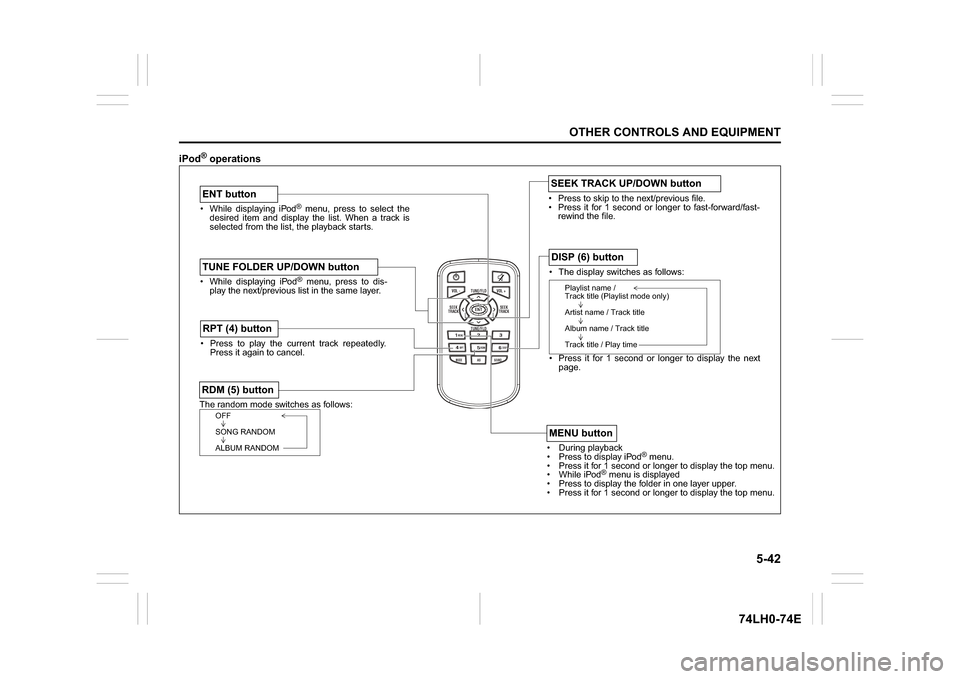
iPod
® operations
/TUNE
VOL -VOL + FLD/TUNE
MODE
AS
SOUND
1
5
4
FLDENT
SEEK
TRACK
SEEK
TRACK
RPT RDM
6
MENU
3 2DISP
While displaying iPod
® menu, press to select the
desired item and display the list. When a track is
selected from the list, the playback starts.
ENT buttonThe random mode switches as follows:RDM (5) button
OFF
SONG RANDOM
ALBUM RANDOM
Press to play the current track repeatedly.
Press it again to cancel.RPT (4) button
The display switches as follows:
Press it for 1 second or longer to display the next
page.DISP (6) button
Playlist name /
Track title (Playlist mode only)
Artist name / Track title
Album name / Track title
Track title / Play time
During playback
Pres
s to display iPod
® menu.
Press it for 1 second or longer to display the top menu.
While iPod
® menu is displayed
Press to displa
y the folder in one layer upper.
Press it for 1 second or longer to display the top menu.
MENU button
While displaying iPod
® menu, press to dis-
play the next/previous list in the same layer.
TUNE FOLDER UP/DOWN button
Press to skip to the next/previous file.
Press it for 1 second or longer to fast-forward/fast-
rewind the file.SEEK TRACK UP/DOWN button