door lock SUZUKI SWIFT 2017 5.G Owner's Manual
[x] Cancel search | Manufacturer: SUZUKI, Model Year: 2017, Model line: SWIFT, Model: SUZUKI SWIFT 2017 5.GPages: 336, PDF Size: 6.24 MB
Page 39 of 336
2-20
BEFORE DRIVING
74LH0-74E
Security System (Vehicle with Key-
less push start system)
The security system is armed after you
lock all doors (including engine hood and
trunk/tailgate) by using the keyless push
start system remote controller or request
switch.
Once the system is armed, any attempt to
open a door by using any other means (*)
than the keyless push start system remote
controller or open the engine hood, will
cause the alarm to be triggered.
* These means include the following:
–The key
– The lock knob on a door
– The central door locking switch
– The tailgate unlatch button (if
equipped)
– The trunk lid unlatch button (if
equipped)
Also, in case that you have set the shock
sensor to enabled state and set sensitivity
of the pre-warning function and full blast
warning function to a level other than 0, the
warning will be triggered in case of any
attempt to tamper with the vehicle. The
shock sensor can be selected enabled or
disabled state, and sensitivity of each
warning can be adjusted as desired. To set
the shock sensor, ask your MARUTI
SUZUKI dealer or use the setting mode of
the information display.NOTE:
• The default setting of the shock sensor
is in the disabled state. Set to the
enabled state and adjust sensitivity of
each warning according to your prefer-
ence. For details on how to use the infor-
mation display, refer to “Information
Display” in this section.
• Your dealer may have already set the
shock sensor of the vehicle to the
enabled state before you purchase it.
Consult your dealer for further informa-
tion.
NOTE:
• The security system generates alarms
when any of the predetermined condi-
tions is met. However, the system does
not have any function of blocking unau-
thorized entry into the vehicle.
• Always use the keyless push start system
remote controller to unlock the doors when
the security system has been armed.
Using a key instead will trigger the alarm.
• If a person who does not know the secu-
rity system is going to drive the vehicle,
we recommend you explain the system
and its operation to the person. Mistak-
enly triggering the alarm may cause a
nuisance to others.
• Even if the security system is armed,
you should still be careful to guard
against theft. Do not leave money or
things of value in the vehicle.How to arm the security system
Lock all doors (including engine hood and
trunk/tailgate) using the keyless push start
system remote controller or request switch.
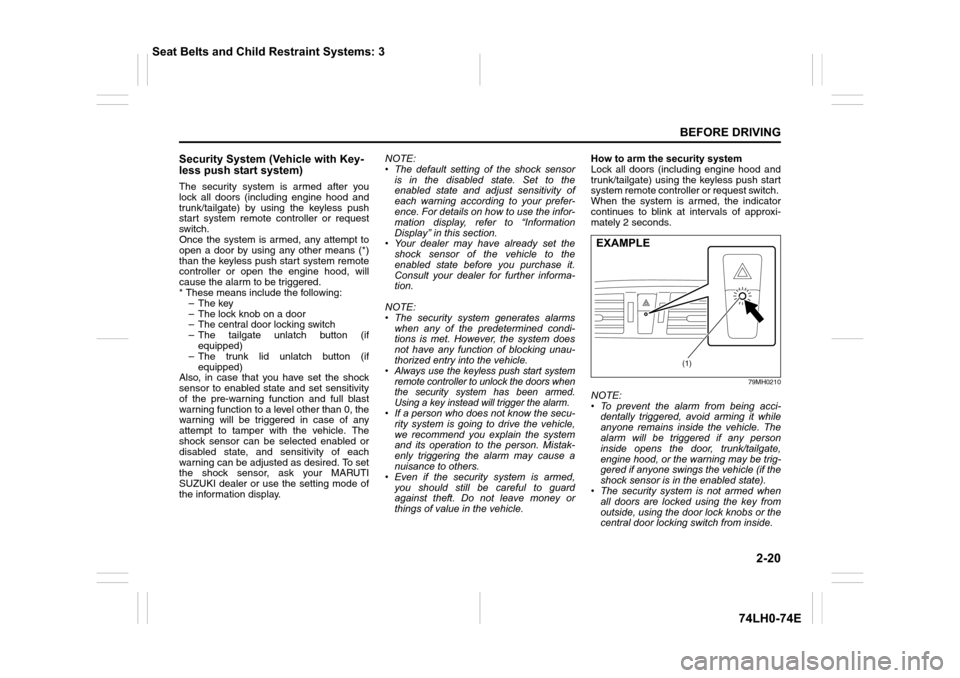
When the system is armed, the indicator
continues to blink at intervals of approxi-
mately 2 seconds.
79MH0210
NOTE:
• To prevent the alarm from being acci-
dentally triggered, avoid arming it while
anyone remains inside the vehicle. The
alarm will be triggered if any person
inside opens the door, trunk/tailgate,
engine hood, or the warning may be trig-
gered if anyone swings the vehicle (if the
shock sensor is in the enabled state).
• The security system is not armed when
all doors are locked using the key from
outside, using the door lock knobs or the
central door locking switch from inside.
(1)
EXAMPLE
Seat Belts and Child Restraint Systems: 3
Page 40 of 336
2-21
BEFORE DRIVING
74LH0-74E
• If any door is not operated within approx-
imately 30 seconds after the doors have
been unlocked using the keyless push
start system remote controller, the doors
are automatically locked again. When
the doors are locked, the security sys-
tem will be armed.
• If the security system indicator (1) blinks
when the ignition mode is “ON”, there
may be something wrong with the secu-
rity system. Ask your MARUTI SUZUKI
dealer to inspect the system.
How to disarm the security system
Simply unlock the doors using the keyless
push start system remote controller. The
security system indicator will go out, indi-
cating that the security system is dis-
armed.
How to stop the alarm
Should the alarm be triggered accidentally,
unlock the doors using the keyless push
start system remote controller or request
switch, or in case of emergency, press the
engine switch to change the ignition mode
to “ON”.
NOTE:
• Even after the alarm has stopped, if you
lock the doors using the keyless push
start system remote controller, the secu-
rity system will be rearmed.
• If you disconnect the battery while the
security system is in the armed condition
or the alarm is actually in operation, thealarm will be re-triggered when the bat-
tery is then reconnected.
• Even after the alarm has stopped at the
end of the predetermined operation time,
it will be triggered again if any of the
doors, trunk/tailgate or engine hood is
opened, or the warning may be triggered
if the vehicle feels a shock (if the shock
sensor is in the enabled state), without
disarming the security system.
Checking whether the alarm has been
triggered during parking
If the alarm was triggered and you then
turn the ignition mode is “ON”, the security
system indicator will blink rapidly for about
8 seconds and a buzzer will beep 4 times
during this period. If this happens, check
whether the vehicle has been broken into
while you were away from it.
Security system indication
• If any of the doors or trunk/tailgate are
opened without unlocking by the keyless
push start system remote controller, all
turn signal lights start to blink and the
interior buzzer beeps intermittently. After
5 seconds, the siren will sound for about
27.5 seconds. The security system indi-
cator continues to blink during this time.
• If the engine hood is opened, all turn sig-
nal lights blink, and the siren sounds for
about 27.5 seconds. The security sys-
tem indicator continues to blink during
this time.• If the shock sensor is in the enabled
state and the vehicle feels a shock
higher than the pre-warning sensitivity,
the siren sounds for about 2 seconds
(pre-warning). If the vehicle feel a shock
higher than the full blast warning sensi-
tivity, siren will sound for about 4.5 sec-
onds (full blast warning). The security
system indicator continues to blink
during this time.
NOTE:
If you set the full blast warning sensitivity
higher than the pre-warning sensitivity in
the setting mode of the information display,
or the vehicle feels such shock as to be
able to trigger the full blast warning, the full
blast warning will be triggered preferen-
tially. In this case, the pre-warning will not
be triggered.
Seat Belts and Child Restraint Systems: 3
Page 41 of 336
2-22
BEFORE DRIVING
74LH0-74E
Windows
Manual Window Control
(if equipped)
60G010
Raise or lower the door windows by turning
the handle located on the door panel.
Electric Window Controls
(if equipped)
The electric windows can only be operated
when the ignition switch is in the “ON” posi-
tion.
Driver’s door
74LHT0204
The driver’s door has a switch (1) to oper-
ate the driver’s window, and a switch (2) to
operate the front passenger’s window or
there are switches (3), (4), to operate the
rear left and right passenger windows,
respectively.
Passenger’s door (if equipped)
74LHT0205
The passenger’s door has a switch (5) to
operate the passenger’s window.
81A009
To open a window, push the top part of the
switch and to close the window lift up the
top part of the switch.
The driver’s window has an “auto-down”
feature for added convenience (at toll
booths or drive-through restaurants, for
example). This means you can open the
window without holding the window switch
in the “Down” position. Press the driver’s
window switch completely down and
release it. To stop the window before it
reaches the bottom, pull the switch up
briefly.
Lock switch
74LHT0206
The driver’s door also has a lock switch for
the passenger’s windows. When you push
in the lock switch, the passenger’s win-
dows cannot be raised or lowered by oper-
ating any of the switches (2), (3), (4) or (5).
To restore normal operation, release the
lock switch by pushing again.
EXAMPLE
(1)
(2)
(3)
(4)
EXAMPLE
(5)EXAMPLE
CLOSE
OPEN
EXAMPLE
Seat Belts and Child Restraint Systems: 3
Page 71 of 336
2-52
BEFORE DRIVING
74LH0-74E
When the low fuel warning light (1) comes
on, a ding sounds once to remind you to fill
the fuel.
If you do not fill the fuel, a ding sounds
every time when the ignition switch is
turned to “ON” position.
NOTE:
The activation point of the low fuel warning
light (1) varies depending on road condi-
tions (for example, slope or curve) and
driving conditions because of fuel moving
in the tank.
The mark (2) indicates that the fuel filler
door is located on the left side of the vehi-
cle.
Temperature Gauge
74LHT0221
When the ignition switch is in the “ON”
position or the ignition mode is "ON", this
gauge indicates the engine coolant tem-perature. Under normal driving conditions,
the indicator should stay within the normal,
acceptable temperature range between “H”
and “C”. If the indicator approaches “H”,
overheating is indicated. Follow the
instructions for engine overheating in the
“EMERGENCY SERVICE” section.
Brightness Control
68LM227
When the ignition switch is turned to the
“ON” position or the engine switch is
pressed to change the ignition mode is
"ON", the pointer lights come on.
Your vehicle has a system to automatically
dim the brightness of the instrument panellights when the position lights or headlights
are on.
When the position lights and/or headlights
are ON, you can control the meter illumina-
tion intensity.
To increase the brightness of the instru-
ment panel lights, turn the brightness con-
trol knob (1) clockwise.
To reduce the brightness of the instrument
panel lights, turn the brightness control
knob (1) counterclockwise.
NOTE:
• If you do not turn the brightness control
knob within about 5 seconds of activat-
ing the brightness control display, the
brightness control display will be can-
celed automatically.
• When you reconnect the battery, the
brightness of the instrument panel lights
will be reinitialized. Readjust the bright-
ness according to your preference.
NOTICE
Continuing to drive the vehicle when
engine overheating is indicated can
result in severe engine damage.
(1)
EXAMPLE
Page 76 of 336
2-57
BEFORE DRIVING
74LH0-74E
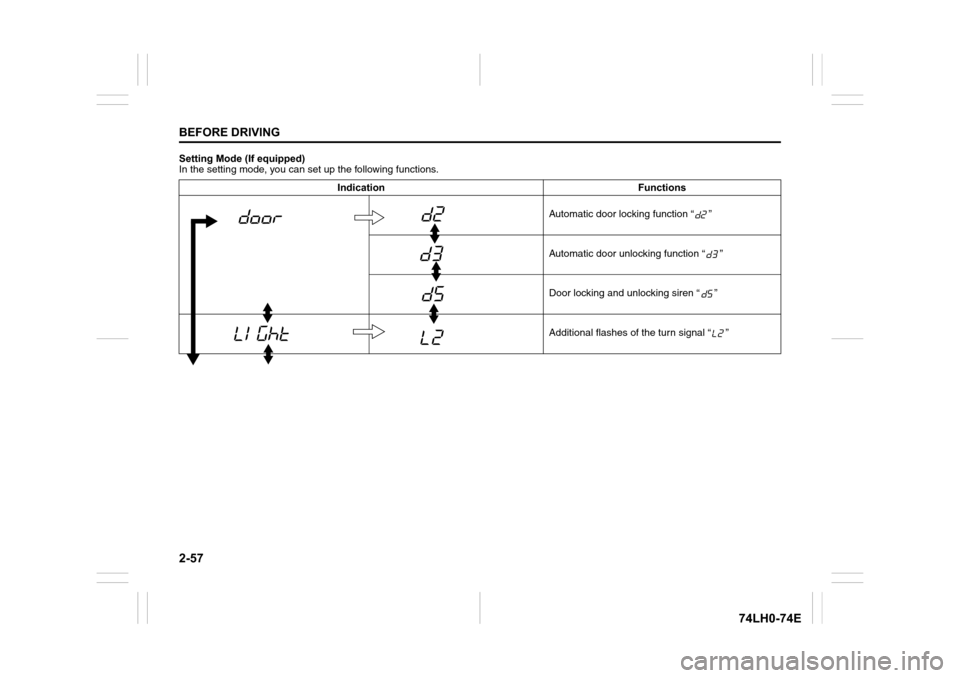
Setting Mode (If equipped)
In the setting mode, you can set up the following functions.
Indication Functions
Automatic door locking function “ ”
Automatic door unlocking function “ ”
Door locking and unlocking siren “ ”
Additional flashes of the turn signal “ ”
Page 78 of 336
2-59
BEFORE DRIVING
74LH0-74E
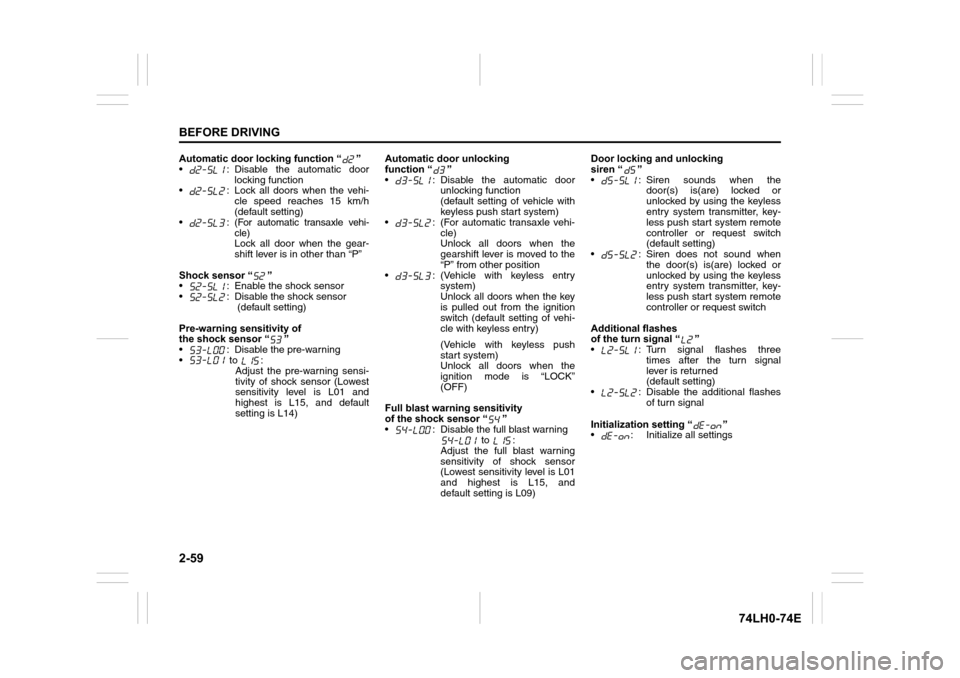
Automatic door locking function “ ”
• : Disable the automatic door
locking function
• : Lock all doors when the vehi-
cle speed reaches 15 km/h
(default setting)
•:
(For automatic transaxle vehi-
cle)
Lock all door when the gear-
shift lever is in other than “P”
Shock sensor “ ”
• : Enable the shock sensor
• : Disable the shock sensor
(default setting)
Pre-warning sensitivity of
the shock sensor “ ”
• : Disable the pre-warning
• to :
Adjust the pre-warning sensi-
tivity of shock sensor (Lowest
sensitivity level is L01 and
highest is L15, and default
setting is L14)Automatic door unlocking
function “ ”
• : Disable the automatic door
unlocking function
(default setting of vehicle with
keyless push start system)
• : (For automatic transaxle vehi-
cle)
Unlock all doors when the
gearshift lever is moved to the
“P” from other position
• : (Vehicle with keyless entry
system)
Unlock all doors when the key
is pulled out from the ignition
switch (default setting of vehi-
cle with keyless entry)
(Vehicle with keyless push
start system)
Unlock all doors when the
ignition mode is “LOCK”
(OFF)
Full blast warning sensitivity
of the shock sensor “ ”
• : Disable the full blast warning
to :
Adjust the full blast warning
sensitivity of shock sensor
(Lowest sensitivity level is L01
and highest is L15, and
default setting is L09)Door locking and unlocking
siren “ ”
• : Siren sounds when the
door(s) is(are) locked or
unlocked by using the keyless
entry system transmitter, key-
less push start system remote
controller or request switch
(default setting)
• : Siren does not sound when
the door(s) is(are) locked or
unlocked by using the keyless
entry system transmitter, key-
less push start system remote
controller or request switch
Additional flashes
of the turn signal “ ”
• : Turn signal flashes three
times after the turn signal
lever is returned
(default setting)
• : Disable the additional flashes
of turn signal
Initialization setting “ ”
• : Initialize all settings
Page 88 of 336
3-3OPERATING YOUR VEHICLE
74LH0-74E
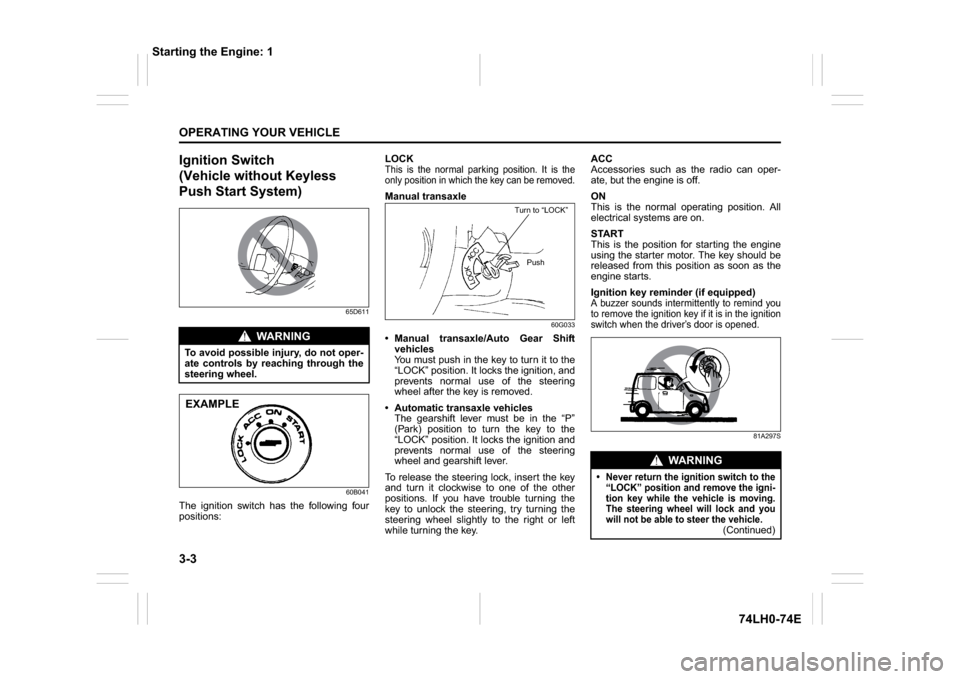
Ignition Switch
(Vehicle without Keyless
Push Start System)
65D611
60B041
The ignition switch has the following four
positions:LOCK
This is the normal parking position. It is the
only position in which the key can be removed.Manual transaxle
60G033
Manual transaxle/Auto Gear Shift
vehicles
You must push in the key to turn it to the
“LOCK” position. It locks the ignition, and
prevents normal use of the steering
wheel after the key is removed.
Automatic transaxle vehicles
The gearshift lever must be in the “P”
(Park) position to turn the key to the
“LOCK” position. It locks the ignition and
prevents normal use of the steering
wheel and gearshift lever.
To release the steering lock, insert the key
and turn it clockwise to one of the other
positions. If you have trouble turning the
key to unlock the steering, try turning the
steering wheel slightly to the right or left
while turning the key.ACC
Accessories such as the radio can oper-
ate, but the engine is off.
ON
This is the normal operating position. All
electrical systems are on.
START
This is the position for starting the engine
using the starter motor. The key should be
released from this position as soon as the
engine starts.
Ignition key reminder (if equipped)
A buzzer sounds intermittently to remind you
to remove the ignition key if it is in the ignition
switch when the driver’s door is opened.
81A297S
WA R N I N G
To avoid possible injury, do not oper-
ate controls by reaching through the
steering wheel.EXAMPLE
Turn to “LOCK”
Push
WA R N I N G
Never return the ignition switch to the
“LOCK” position and remove the igni-
tion key while the vehicle is moving.
The steering wheel will lock and you
will not be able to steer the vehicle.
(Continued)
Starting the Engine: 1
Page 89 of 336
3-4
OPERATING YOUR VEHICLE
74LH0-74E
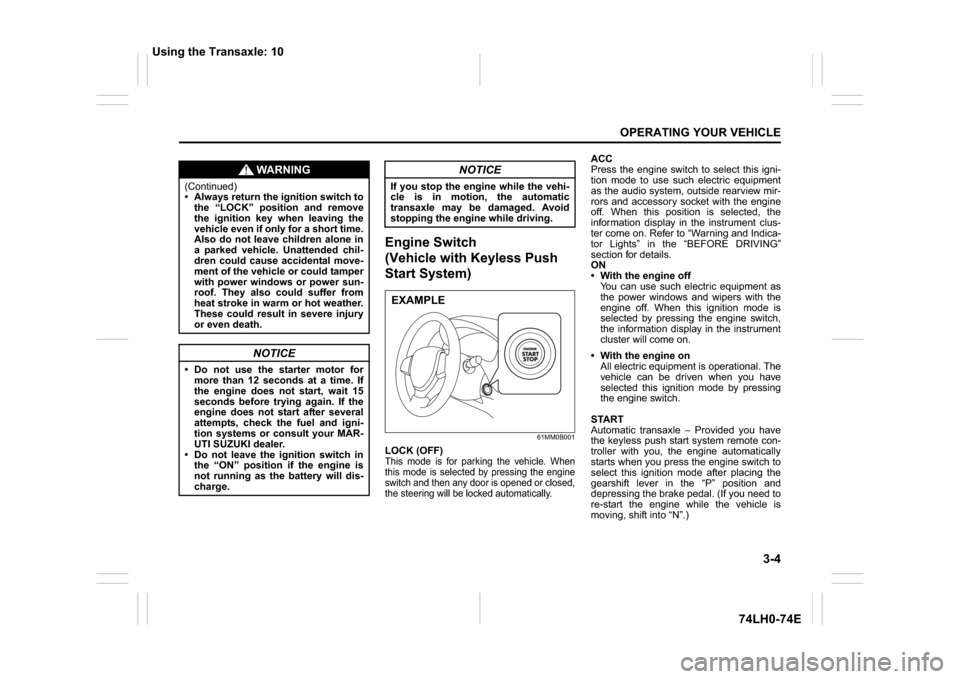
Engine Switch
(Vehicle with Keyless Push
Start System)
61MM0B001
LOCK (OFF)This mode is for parking the vehicle. When
this mode is selected by pressing the engine
switch and then any door is opened or closed,
the steering will be locked automatically.
ACC
Press the engine switch to select this igni-
tion mode to use such electric equipment
as the audio system, outside rearview mir-
rors and accessory socket with the engine
off. When this position is selected, the
information display in the instrument clus-
ter come on. Refer to “Warning and Indica-
tor Lights” in the “BEFORE DRIVING”
section for details.
ON
With the engine off
You can use such electric equipment as
the power windows and wipers with the
engine off. When this ignition mode is
selected by pressing the engine switch,
the information display in the instrument
cluster will come on.
With the engine on
All electric equipment is operational. The
vehicle can be driven when you have
selected this ignition mode by pressing
the engine switch.
START
Automatic transaxle – Provided you have
the keyless push start system remote con-
troller with you, the engine automatically
starts when you press the engine switch to
select this ignition mode after placing the
gearshift lever in the “P” position and
depressing the brake pedal. (If you need to
re-start the engine while the vehicle is
moving, shift into “N”.)
WA R N I N G
(Continued)
Always return the ignition switch to
the “LOCK” position and remove
the ignition key when leaving the
vehicle even if only for a short time.
Also do not leave children alone in
a parked vehicle. Unattended chil-
dren could cause accidental move-
ment of the vehicle or could tamper
with power windows or power sun-
roof. They also could suffer from
heat stroke in warm or hot weather.
These could result in severe injury
or even death.
NOTICE
Do not use the starter motor for
more than 12 seconds at a time. If
the engine does not start, wait 15
seconds before trying again. If the
engine does not start after several
attempts, check the fuel and igni-
tion systems or consult your MAR-
UTI SUZUKI dealer.
Do not leave the ignition switch in
the “ON” position if the engine is
not running as the battery will dis-
charge.
NOTICE
If you stop the engine while the vehi-
cle is in motion, the automatic
transaxle may be damaged. Avoid
stopping the engine while driving.EXAMPLE
Using the Transaxle: 10
Page 90 of 336
3-5OPERATING YOUR VEHICLE
74LH0-74E
Manual transaxle – Provided you have the
keyless push start system remote control-
ler with you, the engine automatically
starts when you press the engine switch to
select this ignition mode after shifting to
“N” (Neutral) and depressing the brake and
clutch pedals.
Auto Gear Shift – Provided you have the
keyless push start system remote control-
ler with you, the engine automatically
starts when you press the engine switch to
select this ignition mode after placing the
gearshift lever in the “N” position and
depressing the brake pedal.
NOTE:
You do not need to keep the engine switch
pressed to start the engine.
NOTE:
The steering lock may not be released if
some load is acting on the steering
wheel. If this happens, turn the steering
wheel to the right or left to relieve it from
the load before you press the engineswitch again to change to the desired
ignition mode.
In the presence of strong radio signals or
noise, you may not be able to change
the ignition mode to “ACC” or “ON” or to
start the engine using the engine switch.
Keyless Push Start System
(if equipped)Provided the keyless push start system
remote controller is within the “interior work-
able area” (refer to the related explanation
in this section), you can use the engine
switch for starting the engine and selecting
an ignition mode (“ACC” or “ON”). In addi-
tion, the following functions can be used: Keyless entry function. Refer to “Keyless
Push Start System Remote Controller” in the
“BEFORE DRIVING” section for details. Locking and unlocking doors using a
request switch. Refer to “Keyless Push
Start System Remote Controller” in the
“BEFORE DRIVING” section for details.
Immobilizer (anti-theft) function. Refer to
“Immobilizer System” in the “BEFORE
DRIVING” section for details.
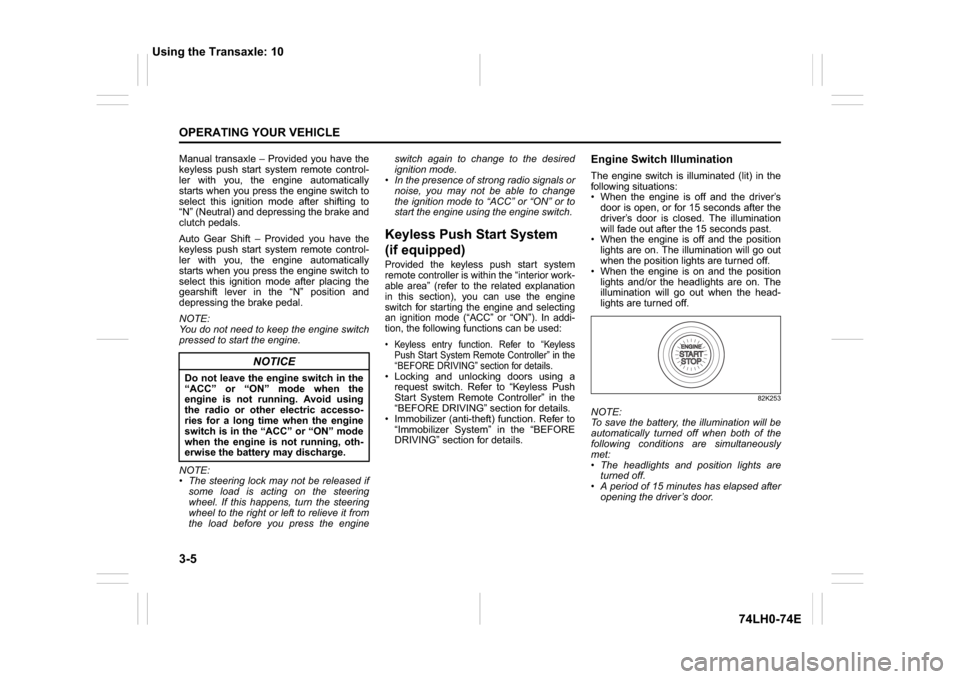
Engine Switch IlluminationThe engine switch is illuminated (lit) in the
following situations:
When the engine is off and the driver’s
door is open, or for 15 seconds after the
driver’s door is closed. The illumination
will fade out after the 15 seconds past.
When the engine is off and the position
lights are on. The illumination will go out
when the position lights are turned off.
When the engine is on and the position
lights and/or the headlights are on. The
illumination will go out when the head-
lights are turned off.
82K253
NOTE:
To save the battery, the illumination will be
automatically turned off when both of the
following conditions are simultaneously
met:
The headlights and position lights are
turned off.
A period of 15 minutes has elapsed after
opening the driver’s door.
NOTICE
Do not leave the engine switch in the
“ACC” or “ON” mode when the
engine is not running. Avoid using
the radio or other electric accesso-
ries for a long time when the engine
switch is in the “ACC” or “ON” mode
when the engine is not running, oth-
erwise the battery may discharge.
Using the Transaxle: 10
Page 92 of 336
3-7OPERATING YOUR VEHICLE
74LH0-74E
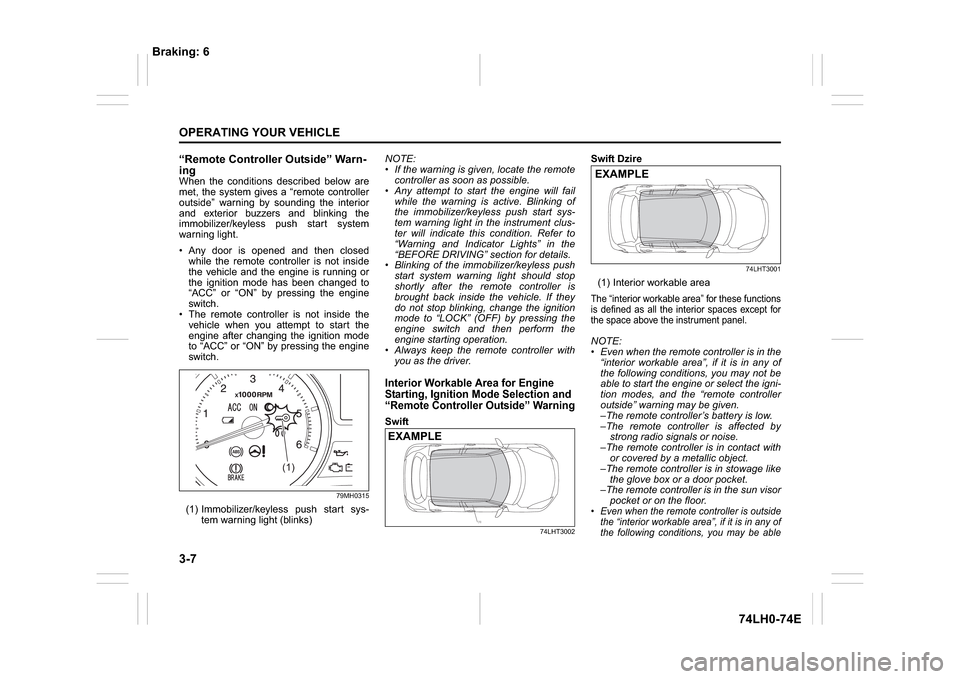
“Remote Controller Outside” Warn-
ingWhen the conditions described below are
met, the system gives a “remote controller
outside” warning by sounding the interior
and exterior buzzers and blinking the
immobilizer/keyless push start system
warning light.
Any door is opened and then closed
while the remote controller is not inside
the vehicle and the engine is running or
the ignition mode has been changed to
“ACC” or “ON” by pressing the engine
switch.
The remote controller is not inside the
vehicle when you attempt to start the
engine after changing the ignition mode
to “ACC” or “ON” by pressing the engine
switch.
79MH0315
(1) Immobilizer/keyless push start sys-
tem warning light (blinks)NOTE:
If the warning is given, locate the remote
controller as soon as possible.
Any attempt to start the engine will fail
while the warning is active. Blinking of
the immobilizer/keyless push start sys-
tem warning light in the instrument clus-
ter will indicate this condition. Refer to
“Warning and Indicator Lights” in the
“BEFORE DRIVING” section for details.
Blinking of the immobilizer/keyless push
start system warning light should stop
shortly after the remote controller is
brought back inside the vehicle. If they
do not stop blinking, change the ignition
mode to “LOCK” (OFF) by pressing the
engine switch and then perform the
engine starting operation.
Always keep the remote controller with
you as the driver.
Interior Workable Area for Engine
Starting, Ignition Mode Selection and
“Remote Controller Outside” WarningSwift
74LHT3002
Swift Dzire
74LHT3001
(1) Interior workable areaThe “interior workable area” for these functions
is defined as all the interior spaces except for
the space above the instrument panel.NOTE:
Even when the remote controller is in the
“interior workable area”, if it is in any of
the following conditions, you may not be
able to start the engine or select the igni-
tion modes, and the “remote controller
outside” warning may be given.
–The remote controller’s battery is low.
–The remote controller is affected by
strong radio signals or noise.
–The remote controller is in contact with
or covered by a metallic object.
–The remote controller is in stowage like
the glove box or a door pocket.
–The remote controller is in the sun visor
pocket or on the floor. Even when the remote controller is outside
the “interior workable area”, if it is in any of
the following conditions, you may be able
(1)
(1)
EXAMPLE
EXAMPLE
Braking: 6