Lock SUZUKI SWIFT 2017 5.G Workshop Manual
[x] Cancel search | Manufacturer: SUZUKI, Model Year: 2017, Model line: SWIFT, Model: SUZUKI SWIFT 2017 5.GPages: 336, PDF Size: 6.24 MB
Page 99 of 336
3-14
OPERATING YOUR VEHICLE
74LH0-74E
The immobilizer/keyless push start sys-
tem warning light come on for about 5
seconds while the “PUSH” indicator light
is blinking.
You may customize the system to cause
the interior buzzer to sound once for the
“remote controller out of sensing range”
warning. Please contact an authorized
MARUTI SUZUKI dealer for the customi-
zation.
If the battery of the remote controller is
about to be completely discharged, the
keyless push start system remote con-
troller battery consumption warning light
in the instrument cluster will come on for
a few seconds when the ignition mode is
changed to “ON” by pressing the engine
switch. For details on replacing the bat-
tery, refer to the “Keyless Push Start
System Remote Controller” in the
“BEFORE DRIVING” section.Returning the ignition mode to
“LOCK” (OFF)NOTE:
Certain problems like a fault in engine sys-
tem may prevent the engine switch from
going back to the “LOCK” (OFF) mode. If
this happens, have the vehicle inspected
by an authorized MARUTI SUZUKI dealer
after doing the following:
Lock the doors using the key to prevent
theft. (The request switches and the key-
less push start system remote controller
cannot be used to lock them.) Disconnect the negative cable from the
battery to prevent discharge.
“LOCK” (OFF) mode reminder buzzer
If the driver’s door is opened without
returning the ignition mode to “LOCK”
(OFF) by pressing the engine switch, a
buzzer sounds to warn you of this state.
If you open the driver’s door after press-
ing the engine switch to change the igni-
tion mode to “ACC”, the interior buzzer
beeps intermittently.
The buzzer will stop sounding if you then
push the engine switch twice, thus bring-
ing it back the ignition mode to “LOCK”
(OFF).
NOTE:
Whenever you leave the vehicle, make
sure you have returned the ignition mode
to “LOCK” (OFF) using the engine switch
and then lock the doors. Without returning
the ignition mode to “LOCK” (OFF), you
cannot use a request switch or keyless
push start system remote controller to lock
the doors.
Steering lock warning buzzer
If the steering lock fails to engage due to a
fault in the system when the ignition mode
is turned to “LOCK” (OFF) by pressing the
engine switch and then any door is opened
or closed, the interior buzzer will warn you
of this condition with repeated short beeps.
If this happens, have the vehicle inspected
by an authorized MARUTI SUZUKI dealer.
Using the Transmission
Manual Transmission
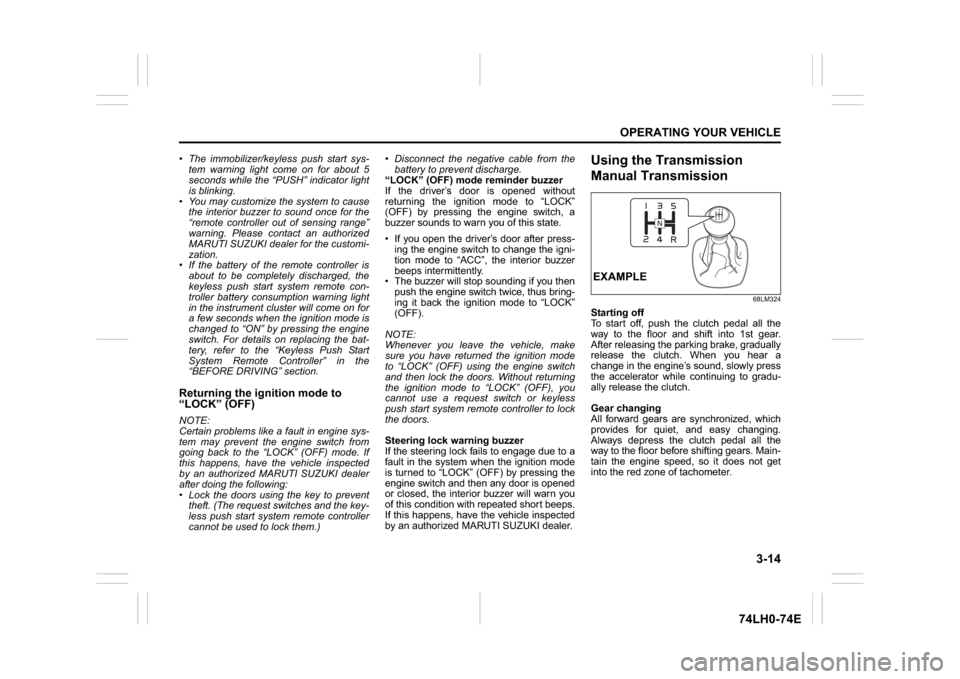
68LM324
Starting off
To start off, push the clutch pedal all the
way to the floor and shift into 1st gear.
After releasing the parking brake, gradually
release the clutch. When you hear a
change in the engine’s sound, slowly press
the accelerator while continuing to gradu-
ally release the clutch.
Gear changing
All forward gears are synchronized, which
provides for quiet, and easy changing.
Always depress the clutch pedal all the
way to the floor before shifting gears. Main-
tain the engine speed, so it does not get
into the red zone of tachometer.EXAMPLE
Page 100 of 336
3-15OPERATING YOUR VEHICLE
74LH0-74E
Downshifting maximum allowable
speedsFor Petrol engine
For Diesel engine
*NOTE:
You may not accelerate to the maximum
allowable speed because of the driving sit-
uation and/or the vehicle condition.
Gearshift lever
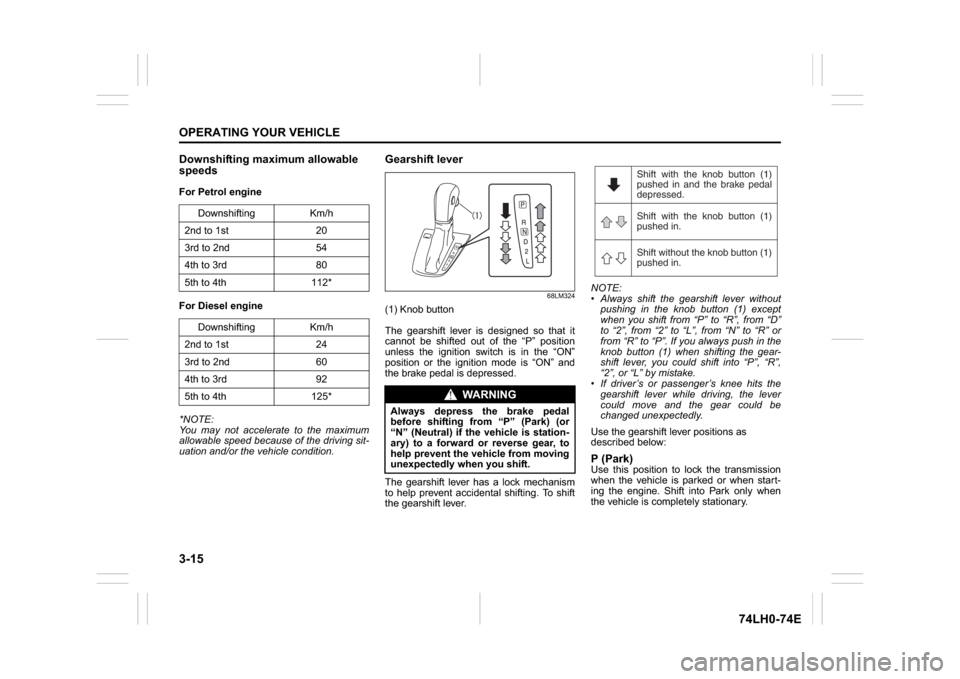
68LM324
(1) Knob button
The gearshift lever is designed so that it
cannot be shifted out of the “P” position
unless the ignition switch is in the “ON”
position or the ignition mode is “ON” and
the brake pedal is depressed.
The gearshift lever has a lock mechanism
to help prevent accidental shifting. To shift
the gearshift lever.NOTE:
Always shift the gearshift lever without
pushing in the knob button (1) except
when you shift from “P” to “R”, from “D”
to “2”, from “2” to “L”, from “N” to “R” or
from “R” to “P”. If you always push in the
knob button (1) when shifting the gear-
shift lever, you could shift into “P”, “R”,
“2”, or “L” by mistake.
If driver’s or passenger’s knee hits the
gearshift lever while driving, the lever
could move and the gear could be
changed unexpectedly.
Use the gearshift lever positions as
described below:
P (Park)Use this position to lock the transmission
when the vehicle is parked or when start-
ing the engine. Shift into Park only when
the vehicle is completely stationary. Downshifting Km/h
2nd to 1st 20
3rd to 2nd 54
4th to 3rd 80
5th to 4th 112*
Downshifting Km/h
2nd to 1st 24
3rd to 2nd 60
4th to 3rd 92
5th to 4th 125*
WA R N I N G
Always depress the brake pedal
before shifting from “P” (Park) (or
“N” (Neutral) if the vehicle is station-
ary) to a forward or reverse gear, to
help prevent the vehicle from moving
unexpectedly when you shift.
Shift with the knob button (1)
pushed in and the brake pedal
depressed.
Shift with the knob button (1)
pushed in.
Shift without the knob button (1)
pushed in.
Page 102 of 336
3-17OPERATING YOUR VEHICLE
74LH0-74E
Overdrive off switchThe transmission is a 4-speed (3-speed
plus overdrive) automatic transmission. By
operating the overdrive off switch, the
transmission can be converted to a 3-
speed automatic transmission that will not
move to the overdrive position. To convert
the transmission to the 3-speed mode,
push in the overdrive off switch and
release it.
To return the transmission to the 4-speed
mode, push in the overdrive off switch
again.
When the ignition switch is turned to the
“ACC” position or the engine switch is
pressed to change the ignition mode to
“ACC”, the transmission in the 3-speed
mode is converted to the 4-speed mode
automatically.]
The 3-speed mode is suitable for the fol-
lowing driving conditions:
Driving on hilly, winding roads
– You can drive more smoothly with less
frequent gear changing
Going down a steep hill
– Some engine braking is provided
NOTE:
If you move the gearshift lever to a lower
gear while driving faster than the maximum
allowable speed for the lower gear, the
transaxle will not actually downshift until
your speed drops below the maximum
speed for the lower gear.
If You Cannot Shift Automatic trans-
mission Gearshift Lever Out of “P”
(PARK)Automatic transmission
Vehicles with an automatic transmission
have an electrically operated parklock fea-
ture. If the vehicle’s battery is discharged,
or there is some other electrical failure, the
automatic transmission cannot be shifted
out of Park in the normal way. Jump start-
ing may correct the condition. If not, follow
the procedure described below. This pro-
cedure will permit shifting the transmission
out of Park.
1) Be sure the parking brake is firmly
applied.
2) If the engine is running, stop the
engine.
3) Make sure the key is in the “ON” or
“ACC” position, or the ignition mode is
“ON” or “ACC”.
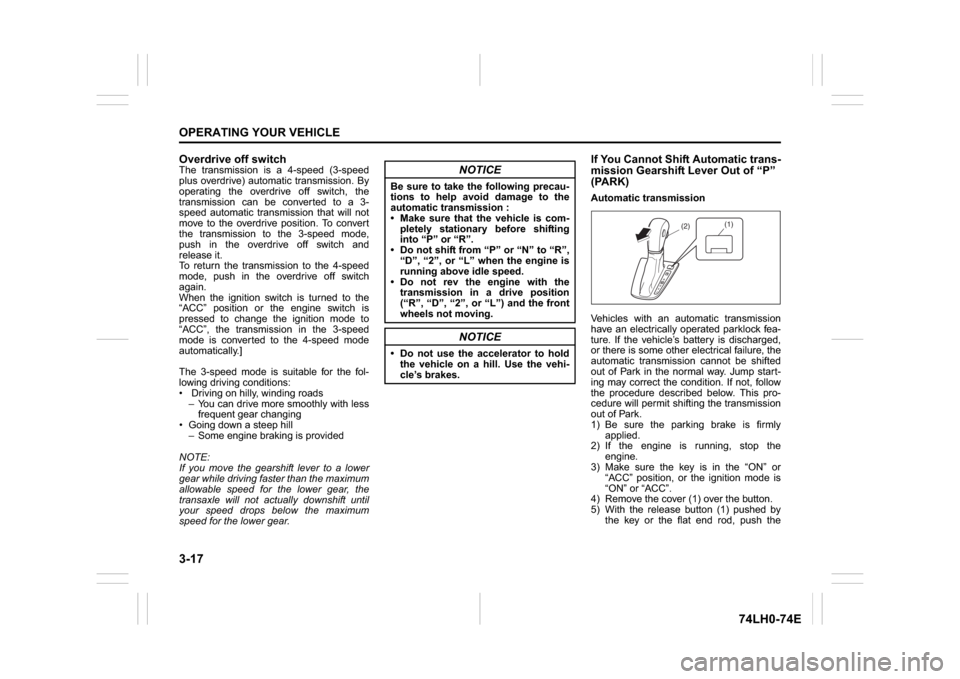
4) Remove the cover (1) over the button.
5) With the release button (1) pushed by
the key or the flat end rod, push the
NOTICE
Be sure to take the following precau-
tions to help avoid damage to the
automatic transmission :
Make sure that the vehicle is com-
pletely stationary before shifting
into “P” or “R”.
Do not shift from “P” or “N” to “R”,
“D”, “2”, or “L” when the engine is
running above idle speed.
Do not rev the engine with the
transmission in a drive position
(“R”, “D”, “2”, or “L”) and the front
wheels not moving.
NOTICE
Do not use the accelerator to hold
the vehicle on a hill. Use the vehi-
cle’s brakes.
(1)
(2)
Page 110 of 336
3-25OPERATING YOUR VEHICLE
74LH0-74E
Parking cancel
Depress the brake pedal, turn the ignition
switch to the “ON” position, and shift the
gearshift lever to the “N” position. The gear
will be disengaged.
Warning functions
A warning buzzer will sound or the indica-
tor will blink under the following conditions.Warning buzzer
The clutch is heated due to excessive
load.
The creeping function is being activated
for a long period of time.
The ignition switch is turned to the
“LOCK” position with the gear in 2nd,
3rd, 4th or 5th. In this case, turn the igni-
tion switch to the “ON” position and shift
the gearshift lever in the “N” position,
shift it to the “D” or “M” or “R” position,
then turn the ignition switch to “LOCK”.
During a stop, the driver’s door is
opened with the gearshift lever in the
“R”, “D” or “M” position while the engine
is running.
“N” indicator blinking
When the gear indicator lamp blinks “N”,
you should depress the brake pedal and
shift the gearshift lever to “N” position.
“1st” indicator blinking
When the gear indicator lamp blinks “1st”,
you should depress the brake pedal and
shift the gearshift lever to “N” position, then
shift to “D” or “M” position again a few sec-
onds later.“R” indicator blinking
When the gear indicator lamp blinks “R”,
you should depress the brake pedal and
shift the gearshift lever to “N” position, then
shift to “R” position again a few seconds
later.
Parking Sensors (if equipped) The parking sensor system uses ultra-
sonic sensors to detect obstacles near
the rear bumpers. If obstacles are
sensed while you are parking or moving
the vehicle slowly, the system warns you
by sounding a buzzer.
The system emits an ultrasonic wave
and the relevant sensor detects the
return of the wave reflected by an obsta-
cle. The system measures the time
taken by the ultrasonic wave to reach the
obstacle and return from it, from which it
determines the obstacle’s position.
The parking sensor function can be used
when the ignition switch is turned to the
“ON” or the engine switch is pressed to
change the ignition mode to “ON”, the
gearshift lever is in the “R” position and
the parking sensor switch is in the “ON”
position. This function is helpful in the
following cases: pulling over to the curb;
parallel-parking the vehicle; steering the
vehicle into a garage; driving along an
alley; and moving slowly in a place with
obstacles.
WARNING
If the gear is not engaged properly
and completely before the ignition
switch is turned off, the vehicle
may not be parked with the gear
engaged. Always confirm the gear
position by checking the gear posi-
tion indicator when parking.
Remember, even though the
transaxle is in gear, you must set
the parking brake firmly.
On a downhill slope, the gear
should be put in reverse, and in 1st
gear on an uphill slope. In the case
of uphill/downhill slope, after check
the vehicle stopped by the gear
engaged, put chocks under the
wheels. Otherwise, the vehicle may
move, and cause an unexpected
accident. If the gear is left in the
“N” position, the vehicle cannot be
parked with a gear engaged.
NOTICE
In the above cases, pull over to the
side of the road and stop the engine,
and then ask your MARUTI SUZUKI
dealer to inspect your vehicle. Other-
wise, the clutch disc may be dam-
aged.
Page 115 of 336
3-30
OPERATING YOUR VEHICLE
74LH0-74E
Anti-Lock Brake System (ABS)
(if equipped)ABS will help you avoid skidding by elec-
tronically controlling braking pressure. It
will also help you maintain steering control
when braking on slippery surfaces or when
braking hard.
The ABS works automatically, so you do
not need any special braking technique.
Just push the brake pedal down without
pumping. The ABS will operate whenever it
senses that the wheels are locking up. You
may feel the brake pedal moves a little
while the ABS is operating.
NOTE:
The ABS will not work if vehicle speed is
under about 10 km/h (6mph).
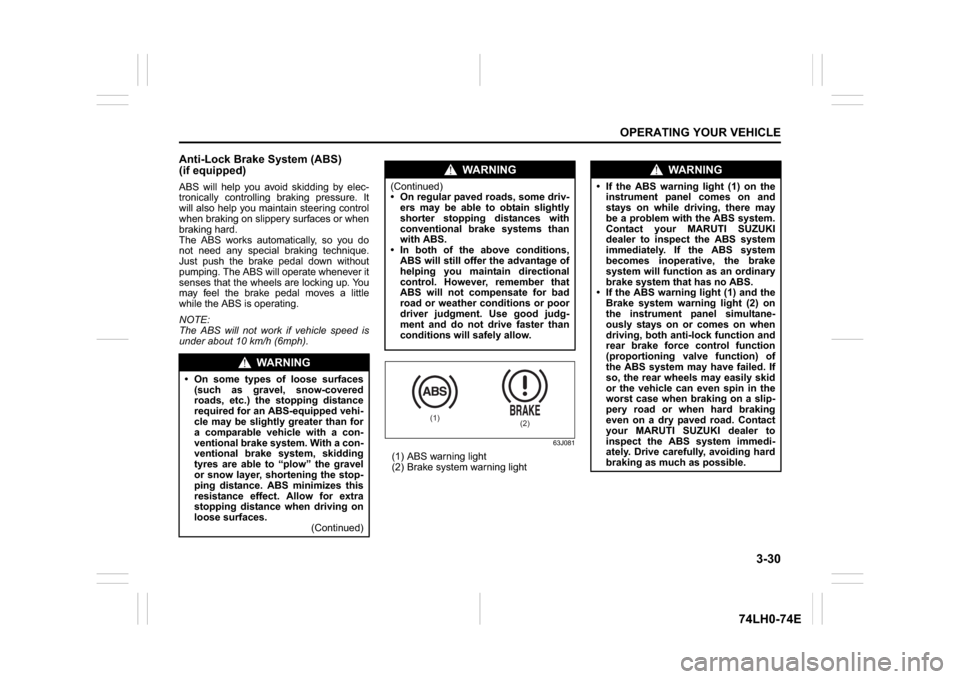
63J081
(1) ABS warning light
(2) Brake system warning light
WA R N I N G
On some types of loose surfaces
(such as gravel, snow-covered
roads, etc.) the stopping distance
required for an ABS-equipped vehi-
cle may be slightly greater than for
a comparable vehicle with a con-
ventional brake system. With a con-
ventional brake system, skidding
tyres are able to “plow” the gravel
or snow layer, shortening the stop-
ping distance. ABS minimizes this
resistance effect. Allow for extra
stopping distance when driving on
loose surfaces.
(Continued)
WA R N I N G
(Continued)
On regular paved roads, some driv-
ers may be able to obtain slightly
shorter stopping distances with
conventional brake systems than
with ABS.
In both of the above conditions,
ABS will still offer the advantage of
helping you maintain directional
control. However, remember that
ABS will not compensate for bad
road or weather conditions or poor
driver judgment. Use good judg-
ment and do not drive faster than
conditions will safely allow.
(1)
(2)
WA R N I N G
If the ABS warning light (1) on the
instrument panel comes on and
stays on while driving, there may
be a problem with the ABS system.
Contact your MARUTI SUZUKI
dealer to inspect the ABS system
immediately. If the ABS system
becomes inoperative, the brake
system will function as an ordinary
brake system that has no ABS.
If the ABS warning light (1) and the
Brake system warning light (2) on
the instrument panel simultane-
ously stays on or comes on when
driving, both anti-lock function and
rear brake force control function
(proportioning valve function) of
the ABS system may have failed. If
so, the rear wheels may easily skid
or the vehicle can even spin in the
worst case when braking on a slip-
pery road or when hard braking
even on a dry paved road. Contact
your MARUTI SUZUKI dealer to
inspect the ABS system immedi-
ately. Drive carefully, avoiding hard
braking as much as possible.
Page 116 of 336
3-31OPERATING YOUR VEHICLE
74LH0-74E
How the ABS WorksA computer continuously monitors wheel
speed. The computer compares the
changes in wheel speed when braking. If
the wheels slow suddenly, indicating a
skidding situation, the computer will
change braking pressure several times
each second to prevent the wheels from
locking. When you start your vehicle after a
stop, you may hear a momentary motor or
clicking noise as the system resets or
checks itself.
WA R N I N G
The ABS may not work properly if
tyres or wheels other than those
specified in the owner’s manual are
used. This is because the ABS works
by comparing changes in wheel
speed. When replacing tyres or
wheels, use only the size and type
specified in this owner’s manual.
Page 120 of 336

4-3DRIVING TIPS
67LH3-74E
Keep the air cleaner clean
74LHM0404
If the air cleaner is clogged with dust, there
will be greater intake resistance, resulting
in decreased power output and increased
fuel consumption.
Keep weight to a minimum
Heavier the load, more fuel the vehicle
consumes. Take out any luggage or cargo
when it is not necessary.
Keep tire pressures correct
Underinflation of the tires can waste fuel
due to increased running resistance of the
tires. Keep your tires inflated to the correct
pressure shown on the label on the driver’s
door lock pillar.
Highway DrivingWhen driving at high speeds, pay attention
to the following:
Stopping distance progressivelyincreases with vehicle speed. Apply the
brakes far enough ahead of the stopping
point to allow for the extra stopping dis-
tance.
On rainy days, hydroplaning can occur. Hydroplaning is the loss of direct contact
between the road surface and the vehi-
cle’s tires due to a water film forming
between them. Steering or braking the
vehicle while hydroplaning can be very
difficult, and loss of control can occur.
Keep speed down when the road sur-
face is wet.
At high speeds, the vehicle may be affected by side winds. Therefore,
reduce speed and be prepared for unex-
pected buffeting, which can occur at the
exits of tunnels, when passing by a cut
of a hill, or when being overtaken by
large vehicles, etc.
Driving on Hills
74LHM0405
When climbing steep hills, the vehicle
may begin to slow down and show a lack
of power. If this happens, you should
shift to a lower gear so that the engine
will again be operating in its normal
power range. Shift rapidly to prevent the
vehicle from losing momentum.
When driving down a hill, the engine should be used for braking by shifting to
next lower gear.
EXAMPLE
R
N
D
-
M+
EXAMPLE
Page 122 of 336
4-5DRIVING TIPS
67LH3-74E
If Your Vehicle Gets StuckIf your vehicle gets stuck in snow, mud, or
sand, follow the directions below:
1) Shift the transaxle back and forthbetween a forward range (or first gear
for manual transaxle) and reverse. This
will create a rocking motion which may
give you enough momentum to free the
vehicle. Press gently on the accelerator
to keep wheel spinning to a minimum
wheel rpm. Remove your foot from the
accelerator while shifting.
Do not race the engine. Excessive
wheel spin will cause the tires to dig
deeper, making it more difficult to free
the vehicle.
2) If your vehicle remains stuck after a few
minutes of rocking, we recommend you
to consult your authorised Maruti
Suzuki workshop or a roadside assis-
tance service. If a towing service is not
available in an emergency, your vehicle
may be temporarily towed by a towing
cable or chain secured to the towing
hook either on the front of the vehicle or
on the rear of the vehicle. Refer to
“Frame Hooks” in the “OTHER CON-
TROLS AND EQUIPMENT” section.
Driving on Wet Roads
WA R N I N G
Do not allow anyone to stand near
the vehicle when you are rocking it,
and do not spin the wheels faster
than an indicated 40 km/h on the
speedometer. Perso nal injury and/or
vehicle damage may result from spin-
ning the wheels too fast.
NOTICE
Do not continue rocking the vehicle
for more than a few minutes. Pro-
longed rocking can cause engine
overheating or transaxle damage.
NOTICE
When driving on wet roads, avoid driving through large amount of
standing water on the road. Large
amount of water entering the
engine compartment may cause
damage to the engine and or elec-
trical components.
If stuck in deep water, do not start the engine.
Water is incompressible substance, water inside engine is harmful to
the engine.
WA R N I N G
In addition to following the driving
tips in this section, it is important to
observe the following precautions.
Make sure your tires are in good
condition and always maintain the
specified tire pressure. Refer to
“Tires” in the “INSPECTION AND
MAINTENANCE” section for
details.
Do not use tires other than those
specified by MARUTI SUZUKI.
Never use different sizes or types
of tires on the front and rear
wheels. For information regarding
the specified tires, refer to the Tire
Information Label located on the
driver’s door lock pillar.
Never use oversized tires or spe- cial shock absorbers and springs
to raise (jack up) your vehicle. This
will change the handling character-
istics. Oversized tires may also rub
against the vehicle body over
bumps, causing vehicle damage or
tire failure.
After driving through water, test the brakes while driving at a slow
speed to see if they have main-
tained their normal effectiveness. If
they are less effective than normal,
dry them by repeatedly applying
the brakes while driving slowly
until the brakes have regained their
normal effectiveness.
Page 136 of 336
5-9OTHER CONTROLS AND EQUIPMENT
74LH0-74E
mum performance and durability of your air
conditioner, it needs to be run periodically.
Operate the air conditioner at least once a
month for one minute with the engine
idling. This circulates the refrigerant and oil
and helps protect the internal components.
NOTE:
Your vehicle uses the air conditioning
refrigerant HFC-134a, commonly called
“R-134a”. Only R-134a should be used in
your vehicle.Radio Antenna
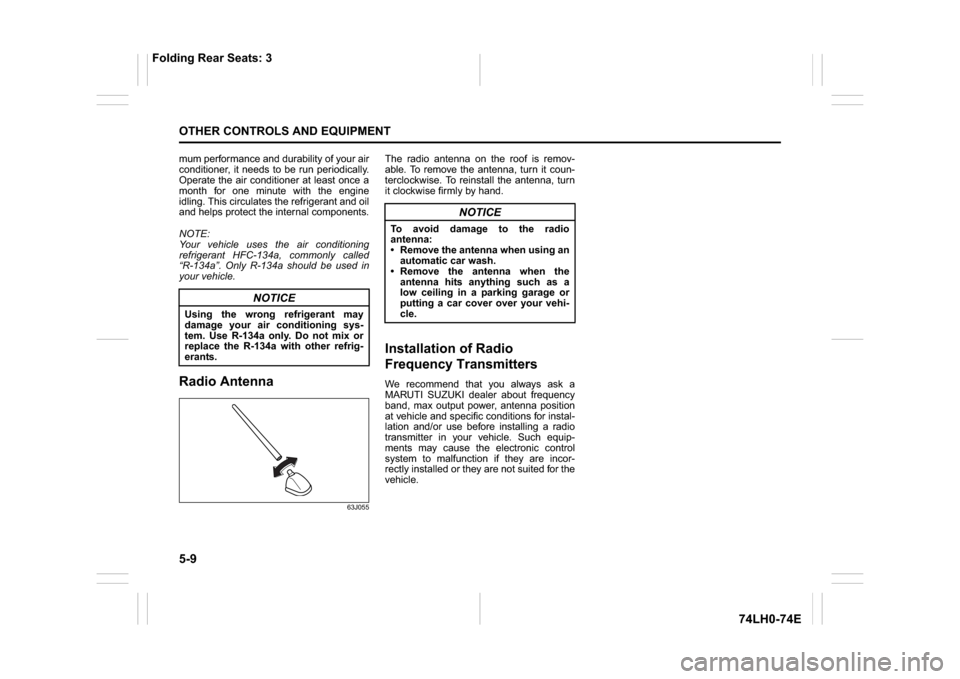
63J055
The radio antenna on the roof is remov-
able. To remove the antenna, turn it coun-
terclockwise. To reinstall the antenna, turn
it clockwise firmly by hand.Installation of Radio
Frequency TransmittersWe recommend that you always ask a
MARUTI SUZUKI dealer about frequency
band, max output power, antenna position
at vehicle and specific conditions for instal-
lation and/or use before installing a radio
transmitter in your vehicle. Such equip-
ments may cause the electronic control
system to malfunction if they are incor-
rectly installed or they are not suited for the
vehicle.
NOTICE
Using the wrong refrigerant may
damage your air conditioning sys-
tem. Use R-134a only. Do not mix or
replace the R-134a with other refrig-
erants.
NOTICE
To avoid damage to the radio
antenna:
Remove the antenna when using an
automatic car wash.
Remove the antenna when the
antenna hits anything such as a
low ceiling in a parking garage or
putting a car cover over your vehi-
cle.
Folding Rear Seats: 3
Page 140 of 336
5-13OTHER CONTROLS AND EQUIPMENT
74LH0-74E
(if equipped)
The
® word mark and logo are registered
trademarks and are owned by the SIG,
Ink.
Stop using this unit and a
® ready
device whenever requested.
This unit shares the communication fre-
quency with other private or public wireless
communication equipment such as a wire-
less LAN and other wireless communica-
tion radios.
You should stop using this unit whenever
you are notified that your unit disturbs
other wireless communication immediately.
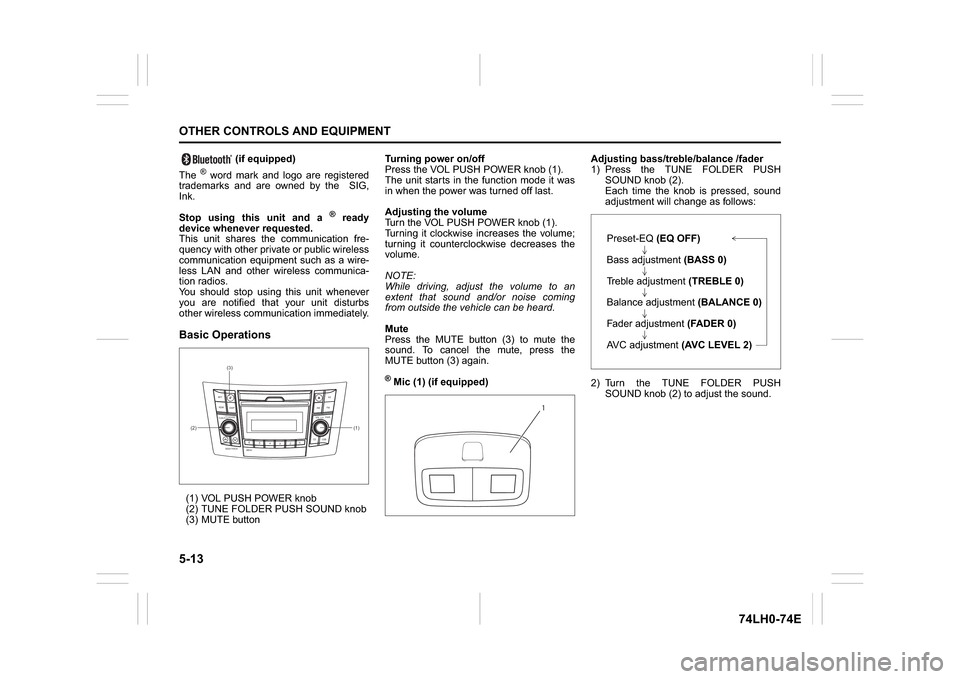
Basic Operations(1) VOL PUSH POWER knob
(2) TUNE FOLDER PUSH SOUND knob
(3) MUTE buttonTurning power on/off
Press the VOL PUSH POWER knob (1).
The unit starts in the function mode it was
in when the power was turned off last.
Adjusting the volume
Turn the VOL PUSH POWER knob (1).
Turning it clockwise increases the volume;
turning it counterclockwise decreases the
volume.
NOTE:
While driving, adjust the volume to an
extent that sound and/or noise coming
from outside the vehicle can be heard.
Mute
Press the MUTE button (3) to mute the
sound. To cancel the mute, press the
MUTE button (3) again.
® Mic (1) (if equipped)Adjusting bass/treble/balance /fader
1) Press the TUNE FOLDER PUSH
SOUND knob (2).
Each time the knob is pressed, sound
adjustment will change as follows:
2) Turn the TUNE FOLDER PUSH
SOUND knob (2) to adjust the sound.
(1) (2)(3)
B
S U
CD
2
3 4 5 6
SEEK/TRACK
AS
AMFM RPT
RDM
DISP
PUSHSOUND
TUNE/FLD
VOLPWRPUSH
11
MENU
1
Preset-EQ(EQ OFF)
Bass adjustment (BASS 0)
Treble adjustment (TREBLE 0)
Balance adjustment (BALANCE 0)
Fader adjustment (FADER 0)
AVC adjustment (AVC LEVEL 2)