battery SUZUKI SX4 2006 1.G Service Workshop Manual
[x] Cancel search | Manufacturer: SUZUKI, Model Year: 2006, Model line: SX4, Model: SUZUKI SX4 2006 1.GPages: 1556, PDF Size: 37.31 MB
Page 934 of 1556
Downloaded from www.Manualslib.com manuals search engine 7A-6 Heater and Ventilation:
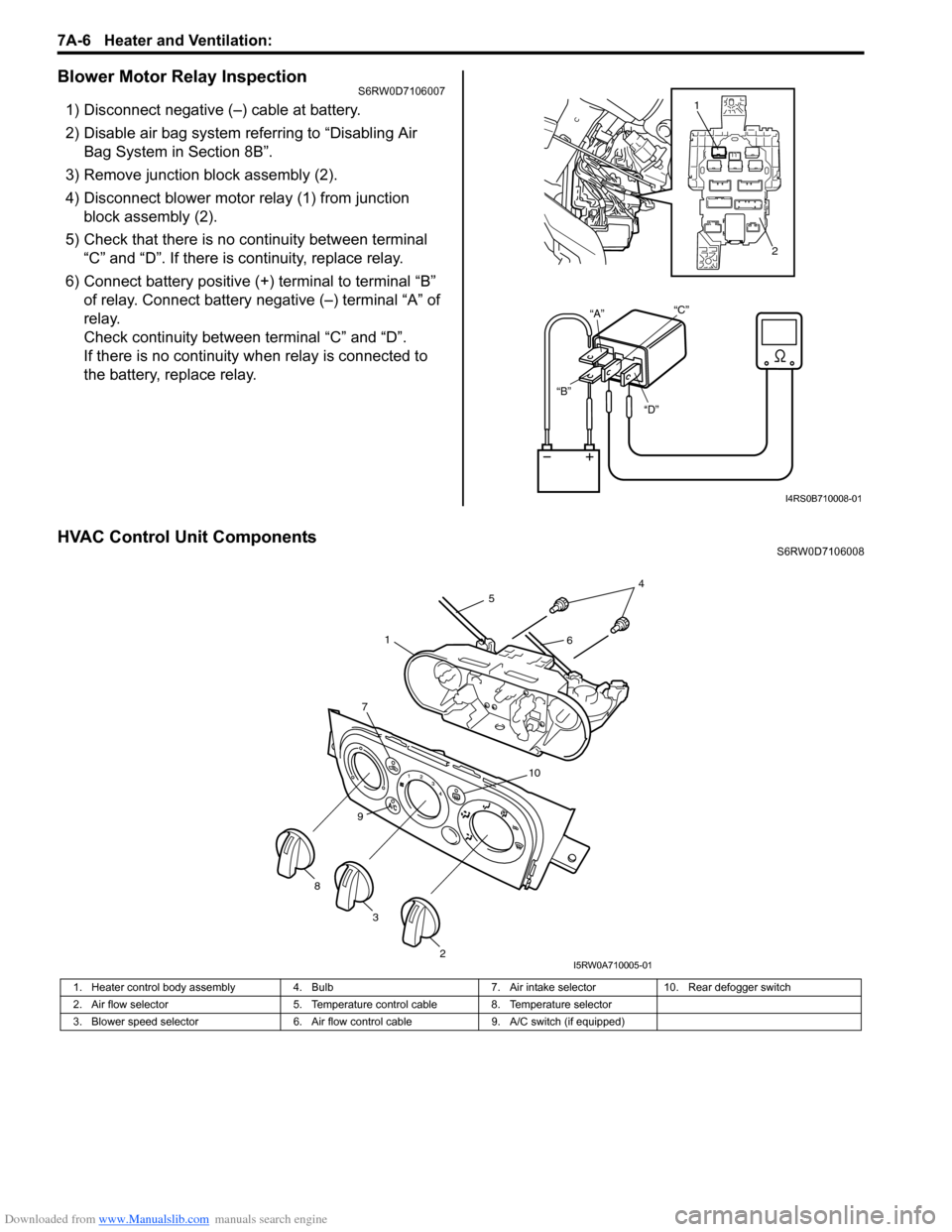
Blower Motor Relay InspectionS6RW0D7106007
1) Disconnect negative (–) cable at battery.
2) Disable air bag system referring to “Disabling Air
Bag System in Section 8B”.
3) Remove junction block assembly (2).
4) Disconnect blower motor relay (1) from junction
block assembly (2).
5) Check that there is no continuity between terminal
“C” and “D”. If there is continuity, replace relay.
6) Connect battery positive (+) terminal to terminal “B”
of relay. Connect battery negative (–) terminal “A” of
relay.
Check continuity between terminal “C” and “D”.
If there is no continuity when relay is connected to
the battery, replace relay.
HVAC Control Unit ComponentsS6RW0D7106008
“D” “B”“A”“C”
1
2
I4RS0B710008-01
1. Heater control body assembly 4. Bulb 7. Air intake selector 10. Rear defogger switch
2. Air flow selector 5. Temperature control cable 8. Temperature selector
3. Blower speed selector 6. Air flow control cable 9. A/C switch (if equipped)
7
10
9
2
3 8
45
61
I5RW0A710005-01
Page 935 of 1556
Downloaded from www.Manualslib.com manuals search engine Heater and Ventilation: 7A-7
HVAC Control Unit Removal and InstallationS6RW0D7106009
Removal
1) Disconnect negative (–) cable at battery.
2) Remove steering column hole cover from instrument
panel.
3) Remove audio unit from instrument panel referring to
“Audio Unit Removal and Installation (If Equipped) in
Section 9C”.
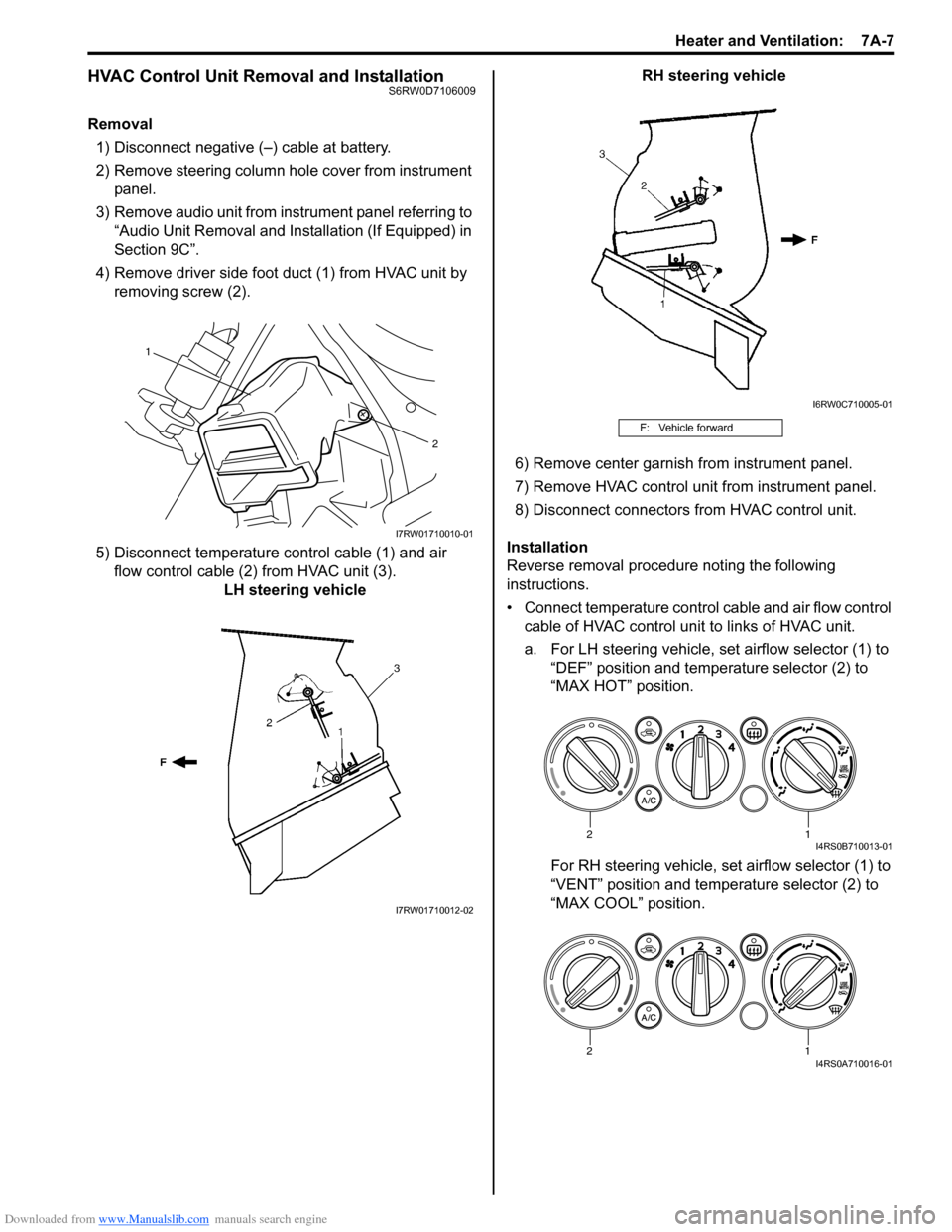
4) Remove driver side foot duct (1) from HVAC unit by
removing screw (2).
5) Disconnect temperature control cable (1) and air
flow control cable (2) from HVAC unit (3).
LH steering vehicleRH steering vehicle
6) Remove center garnish from instrument panel.
7) Remove HVAC control unit from instrument panel.
8) Disconnect connectors from HVAC control unit.
Installation
Reverse removal procedure noting the following
instructions.
• Connect temperature control cable and air flow control
cable of HVAC control unit to links of HVAC unit.
a. For LH steering vehicle, set airflow selector (1) to
“DEF” position and temperature selector (2) to
“MAX HOT” position.
For RH steering vehicle, set airflow selector (1) to
“VENT” position and temperature selector (2) to
“MAX COOL” position.
1
2
I7RW01710010-01
I7RW01710012-02
F: Vehicle forward
I6RW0C710005-01
12I4RS0B710013-01
12I4RS0A710016-01
Page 937 of 1556
Downloaded from www.Manualslib.com manuals search engine Heater and Ventilation: 7A-9
Blower Speed Selector InspectionS6RW0D7106010
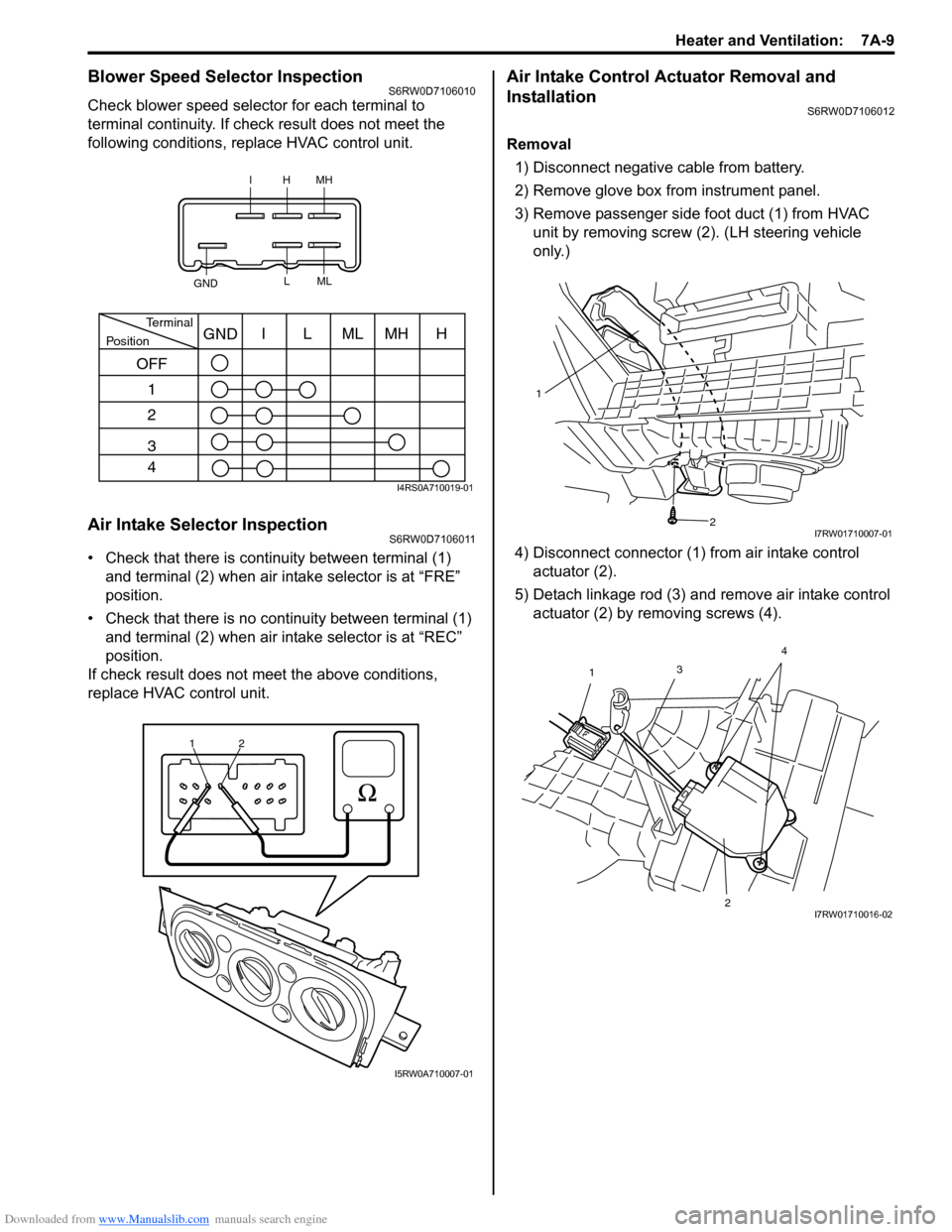
Check blower speed selector for each terminal to
terminal continuity. If check result does not meet the
following conditions, replace HVAC control unit.
Air Intake Selector InspectionS6RW0D7106011
• Check that there is continuity between terminal (1)
and terminal (2) when air intake selector is at “FRE”
position.
• Check that there is no continuity between terminal (1)
and terminal (2) when air intake selector is at “REC”
position.
If check result does not meet the above conditions,
replace HVAC control unit.
Air Intake Control Actuator Removal and
Installation
S6RW0D7106012
Removal
1) Disconnect negative cable from battery.
2) Remove glove box from instrument panel.
3) Remove passenger side foot duct (1) from HVAC
unit by removing screw (2). (LH steering vehicle
only.)
4) Disconnect connector (1) from air intake control
actuator (2).
5) Detach linkage rod (3) and remove air intake control
actuator (2) by removing screws (4).
IHMH
GNDLML
PositionTerminalI
OFF
1
2
3
4LMLMHHGND
I4RS0A710019-01
1
2
I5RW0A710007-01
1
2
I7RW01710007-01
3
1
24I7RW01710016-02
Page 938 of 1556

Downloaded from www.Manualslib.com manuals search engine 7A-10 Heater and Ventilation:
Installation
Reverse removal procedure noting the following
instruction.
• Be sure to insert the linkage rod (1) into the hole (2) of
air intake control actuator.Air Intake Control Actuator InspectionS6RW0D7106013
Check air intake control actuator as follows:
1) Using service wire, connect battery positive terminal
to “d” terminal and battery negative terminal to
terminal “a”. And, check if air intake selector link
operates smoothly and it stops at “FRE” position (1).
2) Using service wire, connect battery positive terminal
to “d” terminal and battery negative terminal to
terminal “c”. And, check if air intake selector link
operates smoothly and it stops at “REC” position (2).
3) For auto A/C model, using service wire, connect
battery positive terminal to “d” terminal and battery
negative terminal to “b” terminal. And, check air
intake selector link operates smoothly and it stops at
MIX position (3).
If malfunction is found, replace air intake control
actuator.
21
I7RW01710017-02
4. Motor rotation direction
“a” “b” “c” “d”
1 3
2
4“a”
“b”
“c” “d”
I7RW01710018-05
Page 939 of 1556
Downloaded from www.Manualslib.com manuals search engine Heater and Ventilation: 7A-11
Center Ventilation Louver Removal and
Installation
S6RW0D7106014
Removal
1) Disconnect negative (–) cable from battery.
2) Remove audio unit from instrument panel referring to
“Audio Unit Removal and Installation (If Equipped) in
Section 9C”.
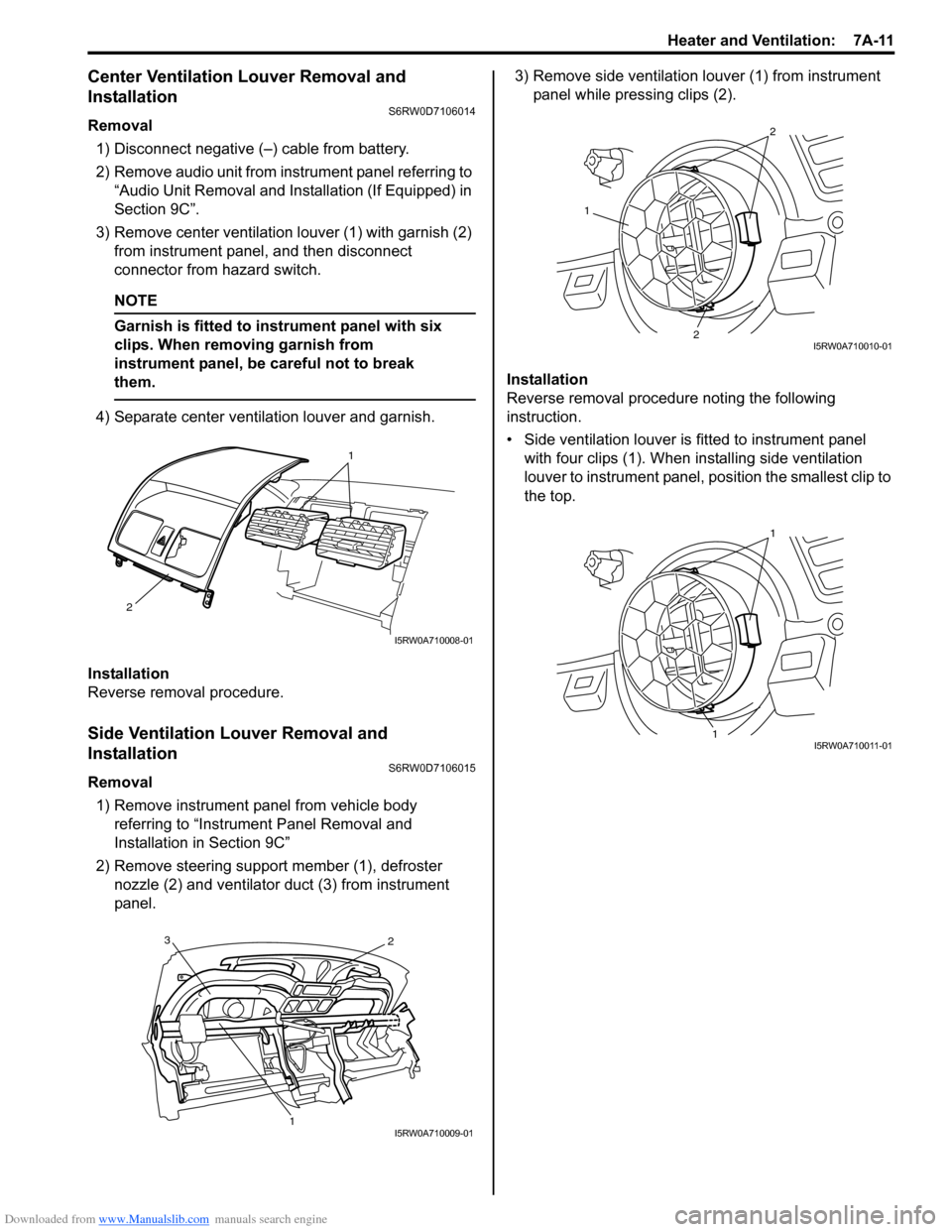
3) Remove center ventilation louver (1) with garnish (2)
from instrument panel, and then disconnect
connector from hazard switch.
NOTE
Garnish is fitted to instrument panel with six
clips. When removing garnish from
instrument panel, be careful not to break
them.
4) Separate center ventilation louver and garnish.
Installation
Reverse removal procedure.
Side Ventilation Louver Removal and
Installation
S6RW0D7106015
Removal
1) Remove instrument panel from vehicle body
referring to “Instrument Panel Removal and
Installation in Section 9C”
2) Remove steering support member (1), defroster
nozzle (2) and ventilator duct (3) from instrument
panel.3) Remove side ventilation louver (1) from instrument
panel while pressing clips (2).
Installation
Reverse removal procedure noting the following
instruction.
• Side ventilation louver is fitted to instrument panel
with four clips (1). When installing side ventilation
louver to instrument panel, position the smallest clip to
the top.
1
2
I5RW0A710008-01
3
12
I5RW0A710009-01
1
2
2
I5RW0A710010-01
1
1
I5RW0A710011-01
Page 940 of 1556
Downloaded from www.Manualslib.com manuals search engine 7A-12 Heater and Ventilation:
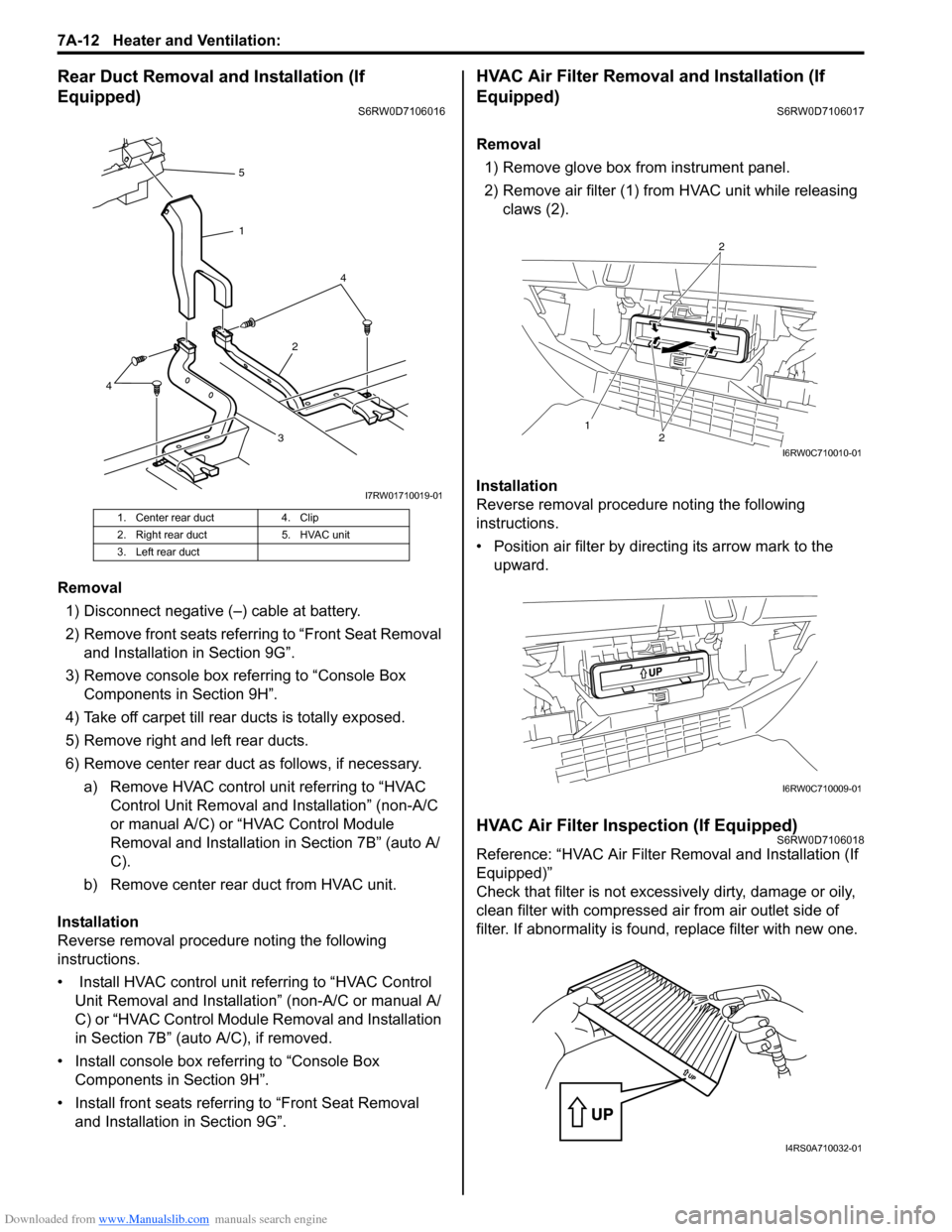
Rear Duct Removal and Installation (If
Equipped)
S6RW0D7106016
Removal
1) Disconnect negative (–) cable at battery.
2) Remove front seats referring to “Front Seat Removal
and Installation in Section 9G”.
3) Remove console box referring to “Console Box
Components in Section 9H”.
4) Take off carpet till rear ducts is totally exposed.
5) Remove right and left rear ducts.
6) Remove center rear duct as follows, if necessary.
a) Remove HVAC control unit referring to “HVAC
Control Unit Removal and Installation” (non-A/C
or manual A/C) or “HVAC Control Module
Removal and Installation in Section 7B” (auto A/
C).
b) Remove center rear duct from HVAC unit.
Installation
Reverse removal procedure noting the following
instructions.
• Install HVAC control unit referring to “HVAC Control
Unit Removal and Installation” (non-A/C or manual A/
C) or “HVAC Control Module Removal and Installation
in Section 7B” (auto A/C), if removed.
• Install console box referring to “Console Box
Components in Section 9H”.
• Install front seats referring to “Front Seat Removal
and Installation in Section 9G”.
HVAC Air Filter Removal and Installation (If
Equipped)
S6RW0D7106017
Removal
1) Remove glove box from instrument panel.
2) Remove air filter (1) from HVAC unit while releasing
claws (2).
Installation
Reverse removal procedure noting the following
instructions.
• Position air filter by directing its arrow mark to the
upward.
HVAC Air Filter Inspection (If Equipped)S6RW0D7106018
Reference: “HVAC Air Filter Removal and Installation (If
Equipped)”
Check that filter is not excessively dirty, damage or oily,
clean filter with compressed air from air outlet side of
filter. If abnormality is found, replace filter with new one.
1. Center rear duct 4. Clip
2. Right rear duct 5. HVAC unit
3. Left rear duct
324 5
1
4
I7RW01710019-01
12
2
I6RW0C710010-01
I6RW0C710009-01
I4RS0A710032-01
Page 948 of 1556
Downloaded from www.Manualslib.com manuals search engine 7B-8 Air Conditioning System: Manual Type
Diagnostic Information and Procedures
A/C System Performance InspectionS6RW0D7214001
1) Confirm that vehicle and environmental conditions
are as follows.
• Vehicle is put indoors.
• Ambient temperature is within 25 – 35 °C (77 – 95
°F).
• Relative humidity is within 30 – 70%.
• There is no wind indoors.
• HVAC unit is normal.
• Blower motor is normal.
• There is no air leakage from air ducts.
• Condenser fins are clean.
• HVAC air filter is not clogged with dirt and dust (if
equipped).
• Battery voltage is about 12 V.
• Radiator cooling fan operates normally.
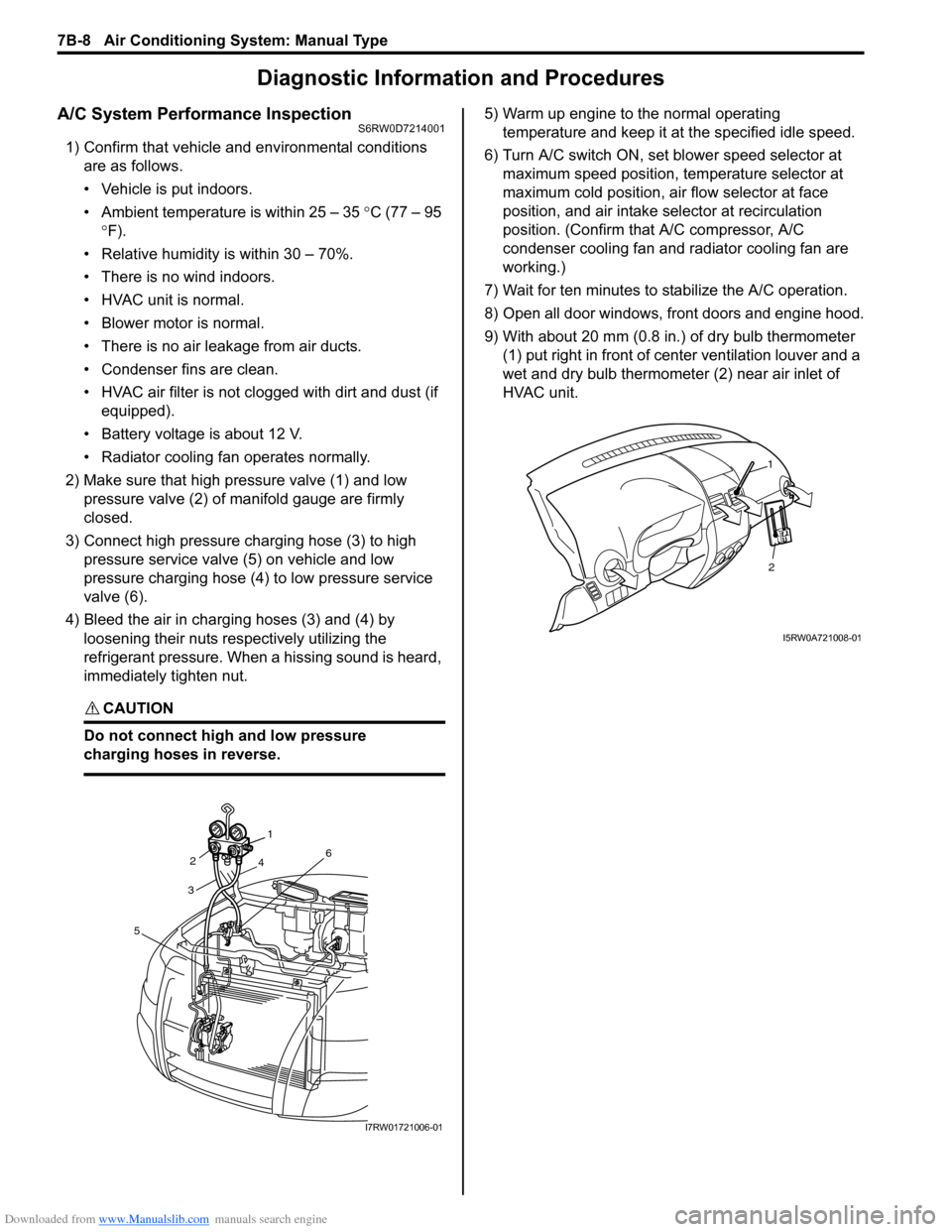
2) Make sure that high pressure valve (1) and low
pressure valve (2) of manifold gauge are firmly
closed.
3) Connect high pressure charging hose (3) to high
pressure service valve (5) on vehicle and low
pressure charging hose (4) to low pressure service
valve (6).
4) Bleed the air in charging hoses (3) and (4) by
loosening their nuts respectively utilizing the
refrigerant pressure. When a hissing sound is heard,
immediately tighten nut.
CAUTION!
Do not connect high and low pressure
charging hoses in reverse.
5) Warm up engine to the normal operating
temperature and keep it at the specified idle speed.
6) Turn A/C switch ON, set blower speed selector at
maximum speed position, temperature selector at
maximum cold position, air flow selector at face
position, and air intake selector at recirculation
position. (Confirm that A/C compressor, A/C
condenser cooling fan and radiator cooling fan are
working.)
7) Wait for ten minutes to stabilize the A/C operation.
8) Open all door windows, front doors and engine hood.
9) With about 20 mm (0.8 in.) of dry bulb thermometer
(1) put right in front of center ventilation louver and a
wet and dry bulb thermometer (2) near air inlet of
HVAC unit.
321
4
6
5
I7RW01721006-01
2
1
I5RW0A721008-01
Page 962 of 1556
Downloaded from www.Manualslib.com manuals search engine 7B-22 Air Conditioning System: Manual Type
Check A/C System for Refrigerant Leaks
Whenever a refrigerant leak is suspected in the system
or any service operation has been performed which may
result in malfunction of lines and connections, it is
advisable to check for leaks.
Common sense should be used during refrigerant leak
test, since the need and extent of any such test will, in
general, depend upon the nature of a complaint and the
type of a service performed on the system.
Liquid leak detector
WARNING!
• To prevent explosions and fires, make sure
that there are no flammables in the vicinity.
• When the refrigerant exposed to fire, it
turns into a poisonous gas (phosgene). Do
not inhale this gas.
There is a number of fittings and places throughout the
A/C system where a liquid leak detector solution may be
used to pinpoint refrigerant leaks.
By merely applying the solution to the area in question
with a swab, such as attached to the cap of a vial,
bubbles will form within seconds if there is a leak.
For confined areas, such as sections of the evaporator
and condenser, an electronic (refrigerant) leak detector
is more practical for determining leaks.
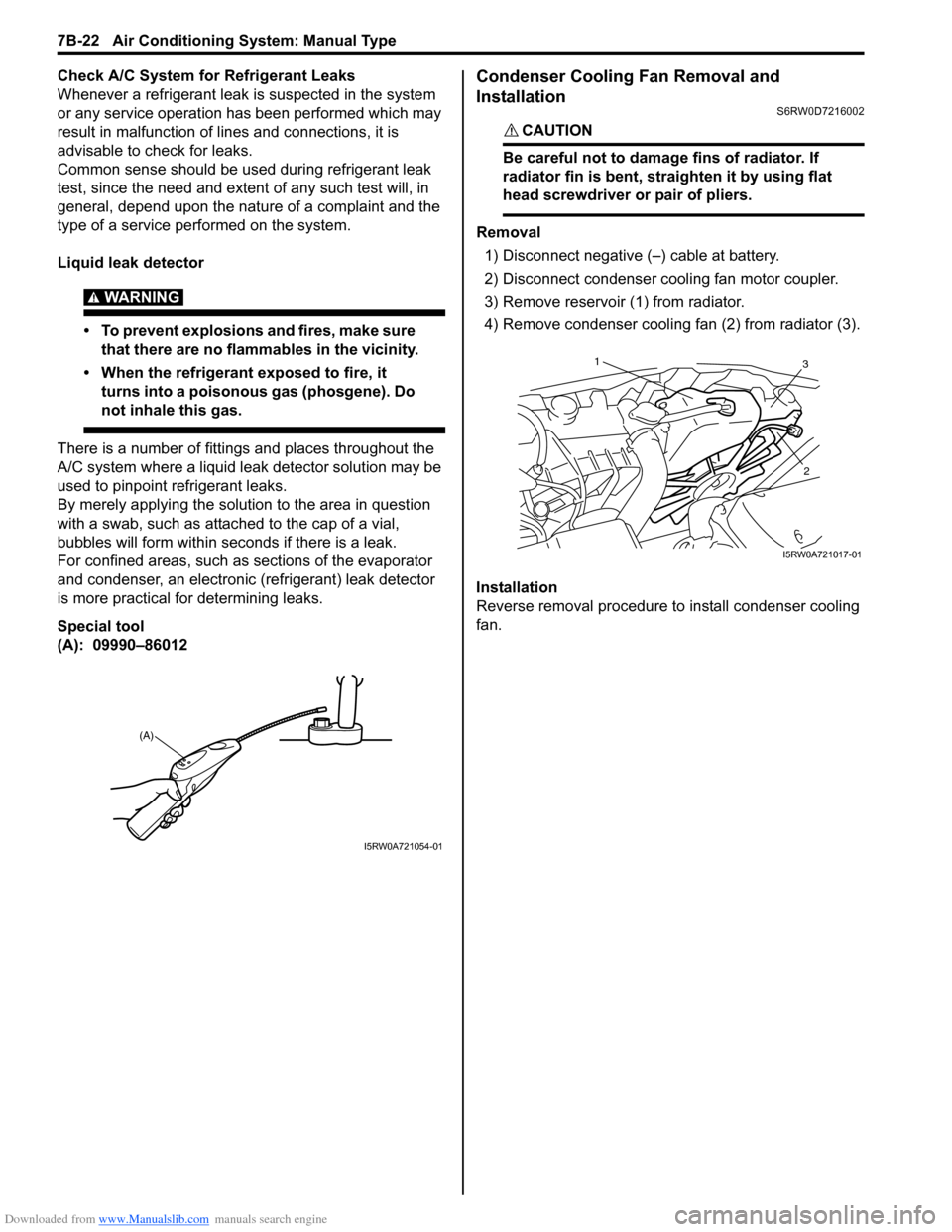
Special tool
(A): 09990–86012
Condenser Cooling Fan Removal and
Installation
S6RW0D7216002
CAUTION!
Be careful not to damage fins of radiator. If
radiator fin is bent, straighten it by using flat
head screwdriver or pair of pliers.
Removal
1) Disconnect negative (–) cable at battery.
2) Disconnect condenser cooling fan motor coupler.
3) Remove reservoir (1) from radiator.
4) Remove condenser cooling fan (2) from radiator (3).
Installation
Reverse removal procedure to install condenser cooling
fan.
(A)
I5RW0A721054-01
13
2
I5RW0A721017-01
Page 963 of 1556
Downloaded from www.Manualslib.com manuals search engine Air Conditioning System: Manual Type 7B-23
Condenser Cooling Fan InspectionS6RW0D7216003
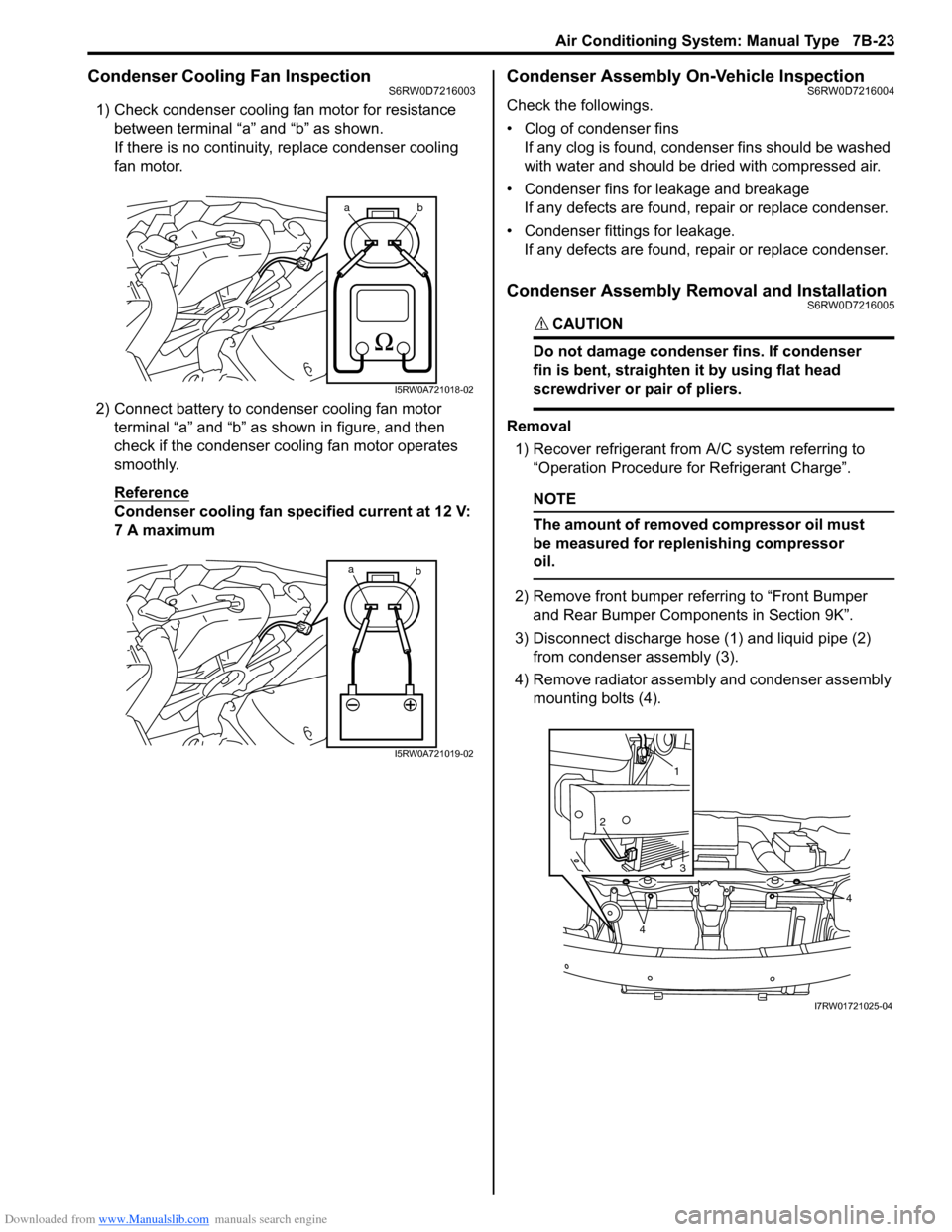
1) Check condenser cooling fan motor for resistance
between terminal “a” and “b” as shown.
If there is no continuity, replace condenser cooling
fan motor.
2) Connect battery to condenser cooling fan motor
terminal “a” and “b” as shown in figure, and then
check if the condenser cooling fan motor operates
smoothly.
Reference
Condenser cooling fan specified current at 12 V:
7 A maximum
Condenser Assembly On-Vehicle InspectionS6RW0D7216004
Check the followings.
• Clog of condenser fins
If any clog is found, condenser fins should be washed
with water and should be dried with compressed air.
• Condenser fins for leakage and breakage
If any defects are found, repair or replace condenser.
• Condenser fittings for leakage.
If any defects are found, repair or replace condenser.
Condenser Assembly Removal and InstallationS6RW0D7216005
CAUTION!
Do not damage condenser fins. If condenser
fin is bent, straighten it by using flat head
screwdriver or pair of pliers.
Removal
1) Recover refrigerant from A/C system referring to
“Operation Procedure for Refrigerant Charge”.
NOTE
The amount of removed compressor oil must
be measured for replenishing compressor
oil.
2) Remove front bumper referring to “Front Bumper
and Rear Bumper Components in Section 9K”.
3) Disconnect discharge hose (1) and liquid pipe (2)
from condenser assembly (3).
4) Remove radiator assembly and condenser assembly
mounting bolts (4).
ab
I5RW0A721018-02
a
b
I5RW0A721019-02
1
2
3
4
4
I7RW01721025-04
Page 969 of 1556

Downloaded from www.Manualslib.com manuals search engine Air Conditioning System: Manual Type 7B-29
A/C Refrigerant Pressure Sensor and Its Circuit
Inspection
S6RW0D7216014
1) Disconnect A/C refrigerant pressure sensor
connector.
2) Turn ignition switch to ON position.
3) Check if voltage between “RED” wire terminal and
“ORN” wire terminal of A/C refrigerant pressure
sensor connector is 4.75 V to 5.25 V.
If not, check A/C refrigerant pressure sensor circuit.
4) Connect A/C refrigerant pressure sensor connector
with ignition switch turned OFF.
5) Connect manifold gauge set to the charging valves.
6) Check A/C refrigerant pressure sensor voltage of
ECM connector referring to “A/C System Inspection
at ECM”.
If voltage is not as specified below, replace A/C
refrigerant pressure sensor.
A/C refrigerant pressure sensor voltage
specifications (A/C refrigerant pressure measured
by manifold gauge)
0.8 MPa (8.0 kgf/cm2, 116 psi): 1.40 – 1.78 V
1.4 MPa (14 kgf/cm2, 203 psi): 2.18 – 2.64 V
1.6 MPa (16 kgf/cm2, 232 psi): 2.44 – 2.92 V
1.8 MPa (18 kgf/cm2, 261 psi): 2.70 – 3.21 V
A/C Refrigerant Pressure Sensor Removal and
Installation
S6RW0D7216015
Removal
1) Recover refrigerant from the A/C system with the
recovery and recycling equipment referring to
“Recovery” in “Operation Procedure for Refrigerant
Charge”.
2) Disconnect negative (–) cable from battery.
3) Disconnect A/C refrigerant pressure sensor
connector.
4) Remove A/C refrigerant pressure sensor (1) from
liquid pipe (2).Installation
Reverse removal procedure noting the following
instructions.
• Apply compressor oil to O-ring of A/C refrigerant
pressure sensor.
• Tighten A/C refrigerant pressure sensor to specified
torque.
Tightening torque
A/C refrigerant pressure sensor (a): 11 N·m (1.1
kgf-m, 8.0 lb-ft)
• Evacuate and charge the A/C system referring to
“Evacuation” and “Charge” in “Operation Procedure
for Refrigerant Charge”.
A/C Switch InspectionS6RW0D7216016
• Check that there is continuity between terminal (1)
and terminal (2) when A/C switch is at ON position.
• Check that there is no continuity between terminal (1)
and terminal (2) when A/C switch is at OFF position.
If check result does not meet the above conditions,
replace HVAC control unit.
2
1
I5RW0A721029-01
(a)
I5RW0A721030-01
1
2
I5RW0A721031-01