4WD SUZUKI SX4 2006 1.G Service User Guide
[x] Cancel search | Manufacturer: SUZUKI, Model Year: 2006, Model line: SX4, Model: SUZUKI SX4 2006 1.GPages: 1556, PDF Size: 37.31 MB
Page 54 of 1556
Downloaded from www.Manualslib.com manuals search engine 1A-4 Engine General Information and Diagnosis:
Outline of troubleshooting
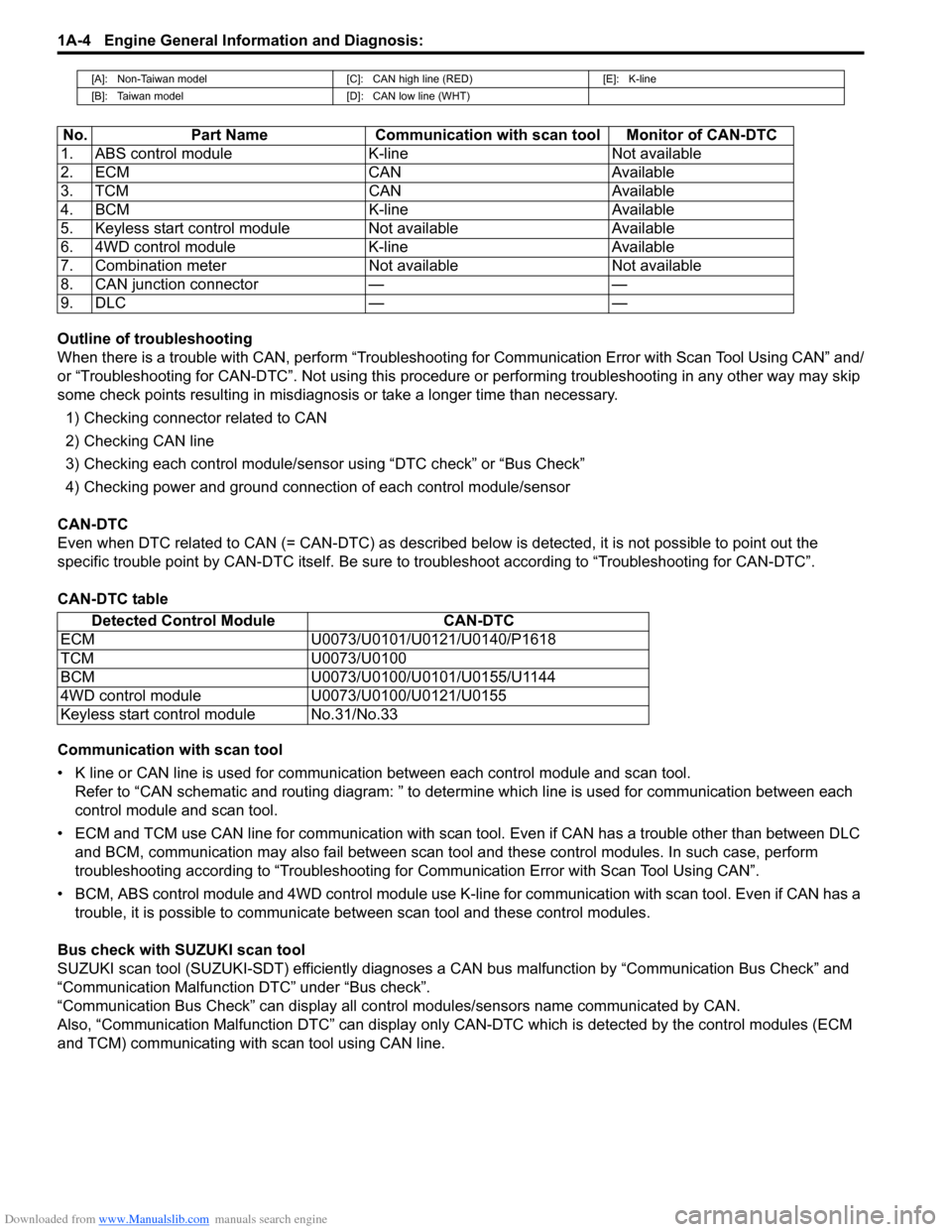
When there is a trouble with CAN, perform “Troubleshooting for Communication Error with Scan Tool Using CAN” and/
or “Troubleshooting for CAN-DTC”. Not using this procedure or performing troubleshooting in any other way may skip
some check points resulting in misdiagnosis or take a longer time than necessary.
1) Checking connector related to CAN
2) Checking CAN line
3) Checking each control module/sensor using “DTC check” or “Bus Check”
4) Checking power and ground connection of each control module/sensor
CAN-DTC
Even when DTC related to CAN (= CAN-DTC) as described below is detected, it is not possible to point out the
specific trouble point by CAN-DTC itself. Be sure to troubleshoot according to “Troubleshooting for CAN-DTC”.
CAN-DTC table
Communication with scan tool
• K line or CAN line is used for communication between each control module and scan tool.
Refer to “CAN schematic and routing diagram: ” to determine which line is used for communication between each
control module and scan tool.
• ECM and TCM use CAN line for communication with scan tool. Even if CAN has a trouble other than between DLC
and BCM, communication may also fail between scan tool and these control modules. In such case, perform
troubleshooting according to “Troubleshooting for Communication Error with Scan Tool Using CAN”.
• BCM, ABS control module and 4WD control module use K-line for communication with scan tool. Even if CAN has a
trouble, it is possible to communicate between scan tool and these control modules.
Bus check with SUZUKI scan tool
SUZUKI scan tool (SUZUKI-SDT) efficiently diagnoses a CAN bus malfunction by “Communication Bus Check” and
“Communication Malfunction DTC” under “Bus check”.
“Communication Bus Check” can display all control modules/sensors name communicated by CAN.
Also, “Communication Malfunction DTC” can display only CAN-DTC which is detected by the control modules (ECM
and TCM) communicating with scan tool using CAN line.
[A]: Non-Taiwan model [C]: CAN high line (RED) [E]: K-line
[B]: Taiwan model [D]: CAN low line (WHT)
No. Part Name Communication with scan tool Monitor of CAN-DTC
1. ABS control module K-line Not available
2. ECM CAN Available
3. TCM CAN Available
4. BCM K-line Available
5. Keyless start control module Not available Available
6. 4WD control module K-line Available
7. Combination meter Not available Not available
8. CAN junction connector — —
9. DLC — —
Detected Control Module CAN-DTC
ECM U0073/U0101/U0121/U0140/P1618
TCM U0073/U0100
BCM U0073/U0100/U0101/U0155/U1144
4WD control module U0073/U0100/U0121/U0155
Keyless start control module No.31/No.33
Page 59 of 1556
Downloaded from www.Manualslib.com manuals search engine Engine General Information and Diagnosis: 1A-9
CAN Communication System DescriptionS6RW0D1101005
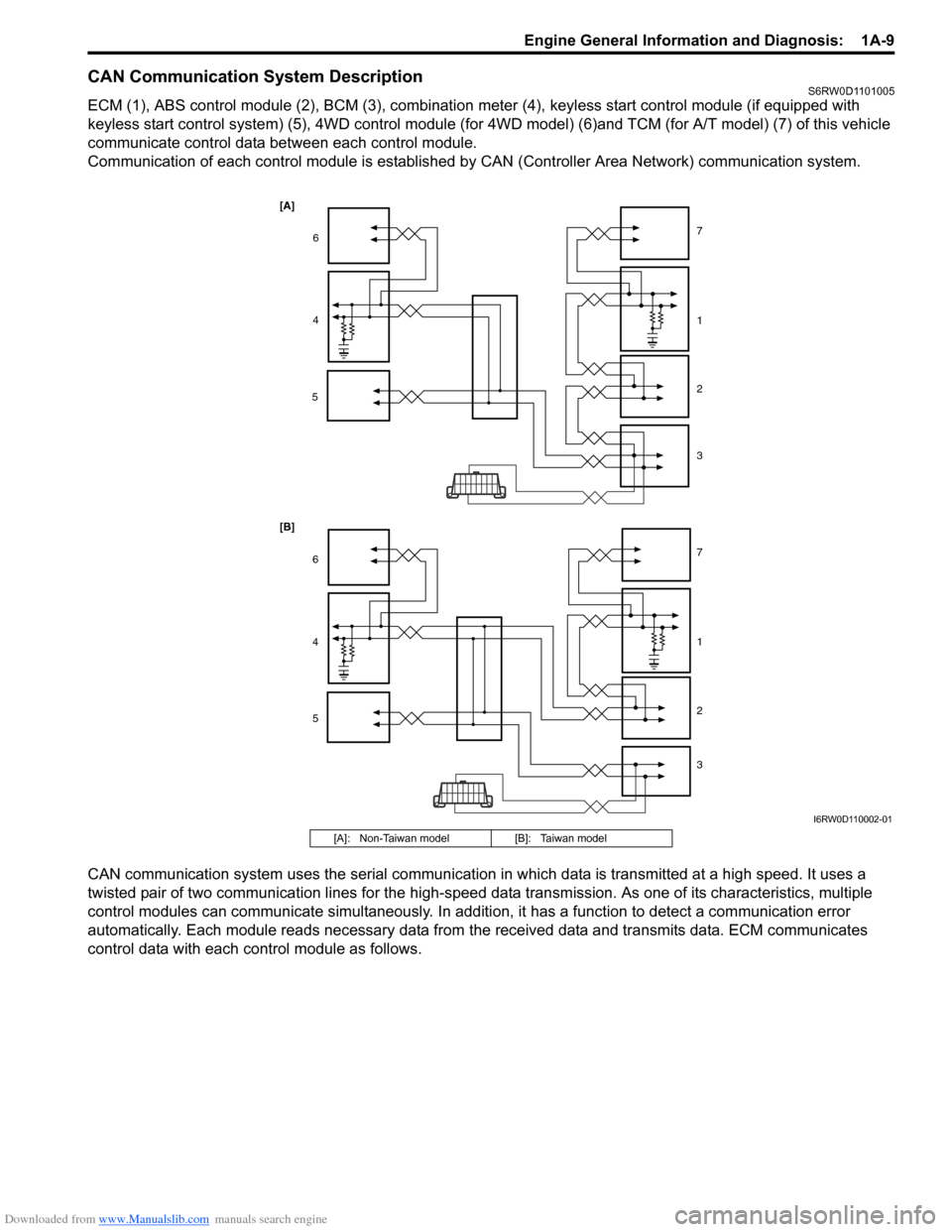
ECM (1), ABS control module (2), BCM (3), combination meter (4), keyless start control module (if equipped with
keyless start control system) (5), 4WD control module (for 4WD model) (6)and TCM (for A/T model) (7) of this vehicle
communicate control data between each control module.
Communication of each control module is established by CAN (Controller Area Network) communication system.
CAN communication system uses the serial communication in which data is transmitted at a high speed. It uses a
twisted pair of two communication lines for the high-speed data transmission. As one of its characteristics, multiple
control modules can communicate simultaneously. In addition, it has a function to detect a communication error
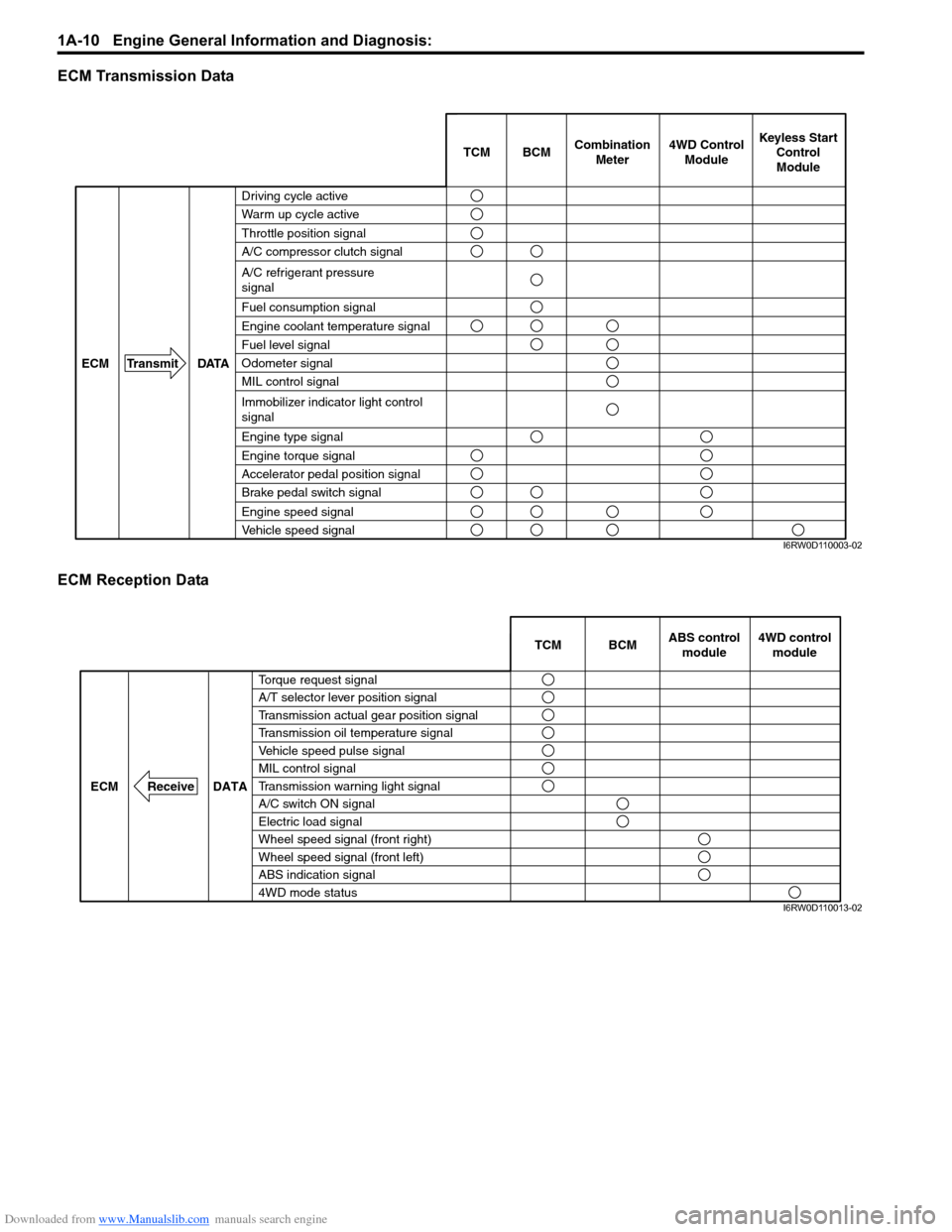
automatically. Each module reads necessary data from the received data and transmits data. ECM communicates
control data with each control module as follows.
[A]
[B]
6
4
51 7
2
3
6
4
51 7
2
3
I6RW0D110002-01
[A]: Non-Taiwan model [B]: Taiwan model
Page 60 of 1556
Downloaded from www.Manualslib.com manuals search engine 1A-10 Engine General Information and Diagnosis:
ECM Transmission Data
ECM Reception Data
BCM TCMCombination
Meter
DATA ECM Transmit
Brake pedal switch signal
Vehicle speed signal
Engine speed signal
Engine torque signal
Accelerator pedal position signal
4WD Control
ModuleKeyless Start
Control
Module
A/C refrigerant pressure
signal
A/C compressor clutch signal
Engine type signal
Immobilizer indicator light control
signal
MIL control signal
Engine coolant temperature signal
Fuel level signal
Fuel consumption signal
Throttle position signal
Driving cycle active
Warm up cycle active
Odometer signal
I6RW0D110003-02
DATA ECM Receive
ABS control
module
Transmission oil temperature signal
Transmission warning light signal Vehicle speed pulse signal A/T selector lever position signal
Transmission actual gear position signal
Wheel speed signal (front right)
Wheel speed signal (front left)
ABS indication signal
A/C switch ON signal
Electric load signalBCM
4WD mode status
Torque request signalTCM
MIL control signal4WD control
module
I6RW0D110013-02
Page 62 of 1556
Downloaded from www.Manualslib.com manuals search engine 1A-12 Engine General Information and Diagnosis:
Operation Description
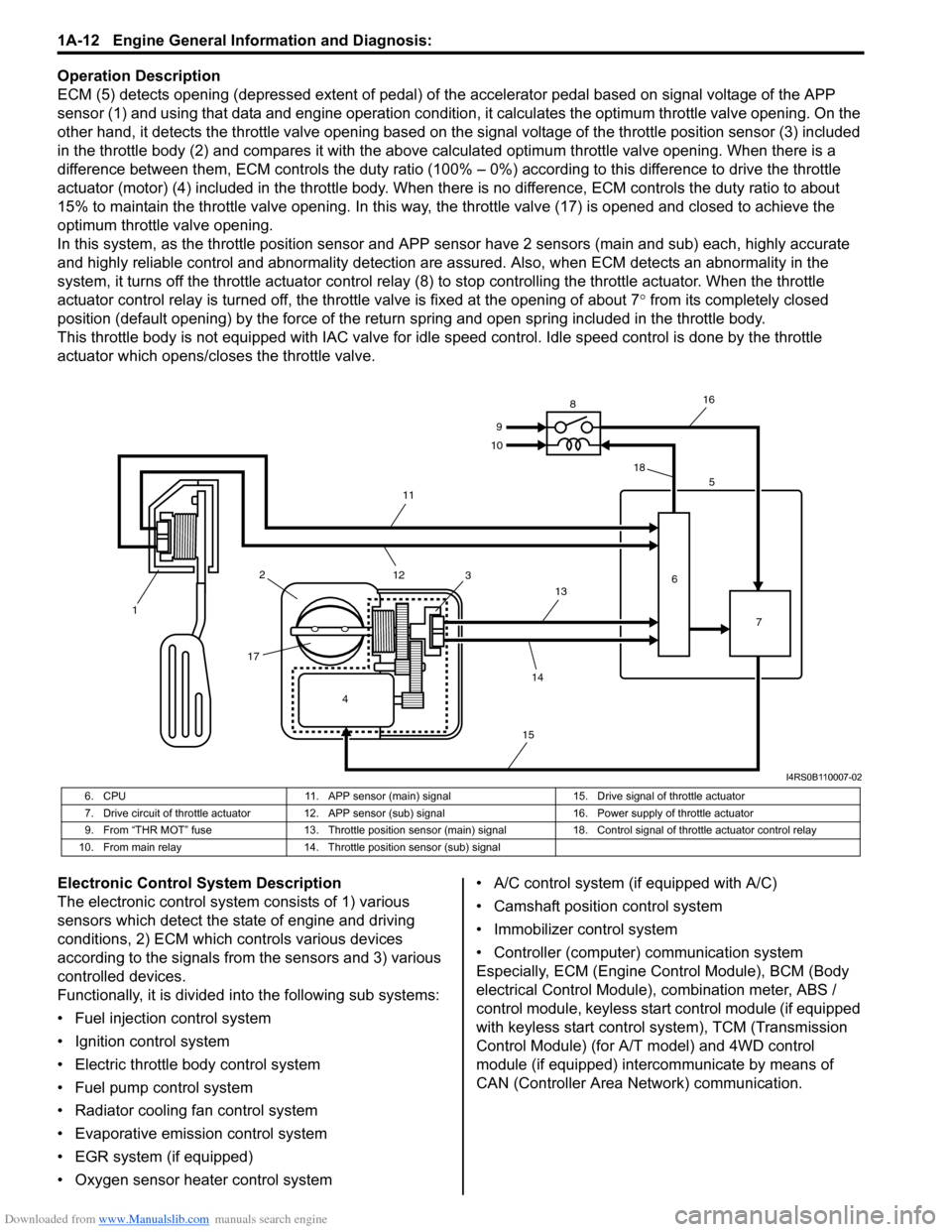
ECM (5) detects opening (depressed extent of pedal) of the accelerator pedal based on signal voltage of the APP
sensor (1) and using that data and engine operation condition, it calculates the optimum throttle valve opening. On the
other hand, it detects the throttle valve opening based on the signal voltage of the throttle position sensor (3) included
in the throttle body (2) and compares it with the above calculated optimum throttle valve opening. When there is a
difference between them, ECM controls the duty ratio (100% – 0%) according to this difference to drive the throttle
actuator (motor) (4) included in the throttle body. When there is no difference, ECM controls the duty ratio to about
15% to maintain the throttle valve opening. In this way, the throttle valve (17) is opened and closed to achieve the
optimum throttle valve opening.
In this system, as the throttle position sensor and APP sensor have 2 sensors (main and sub) each, highly accurate
and highly reliable control and abnormality detection are assured. Also, when ECM detects an abnormality in the
system, it turns off the throttle actuator control relay (8) to stop controlling the throttle actuator. When the throttle
actuator control relay is turned off, the throttle valve is fixed at the opening of about 7° from its completely closed
position (default opening) by the force of the return spring and open spring included in the throttle body.
This throttle body is not equipped with IAC valve for idle speed control. Idle speed control is done by the throttle
actuator which opens/closes the throttle valve.
Electronic Control System Description
The electronic control system consists of 1) various
sensors which detect the state of engine and driving
conditions, 2) ECM which controls various devices
according to the signals from the sensors and 3) various
controlled devices.
Functionally, it is divided into the following sub systems:
• Fuel injection control system
• Ignition control system
• Electric throttle body control system
• Fuel pump control system
• Radiator cooling fan control system
• Evaporative emission control system
• EGR system (if equipped)
• Oxygen sensor heater control system• A/C control system (if equipped with A/C)
• Camshaft position control system
• Immobilizer control system
• Controller (computer) communication system
Especially, ECM (Engine Control Module), BCM (Body
electrical Control Module), combination meter, ABS /
control module, keyless start control module (if equipped
with keyless start control system), TCM (Transmission
Control Module) (for A/T model) and 4WD control
module (if equipped) intercommunicate by means of
CAN (Controller Area Network) communication.
4 12
1735
6
7 8
9
10
11
12
13
14
1516
18
I4RS0B110007-02
6. CPU 11. APP sensor (main) signal 15. Drive signal of throttle actuator
7. Drive circuit of throttle actuator 12. APP sensor (sub) signal 16. Power supply of throttle actuator
9. From “THR MOT” fuse 13. Throttle position sensor (main) signal 18. Control signal of throttle actuator control relay
10. From main relay 14. Throttle position sensor (sub) signal
Page 63 of 1556
Downloaded from www.Manualslib.com manuals search engine Engine General Information and Diagnosis: 1A-13
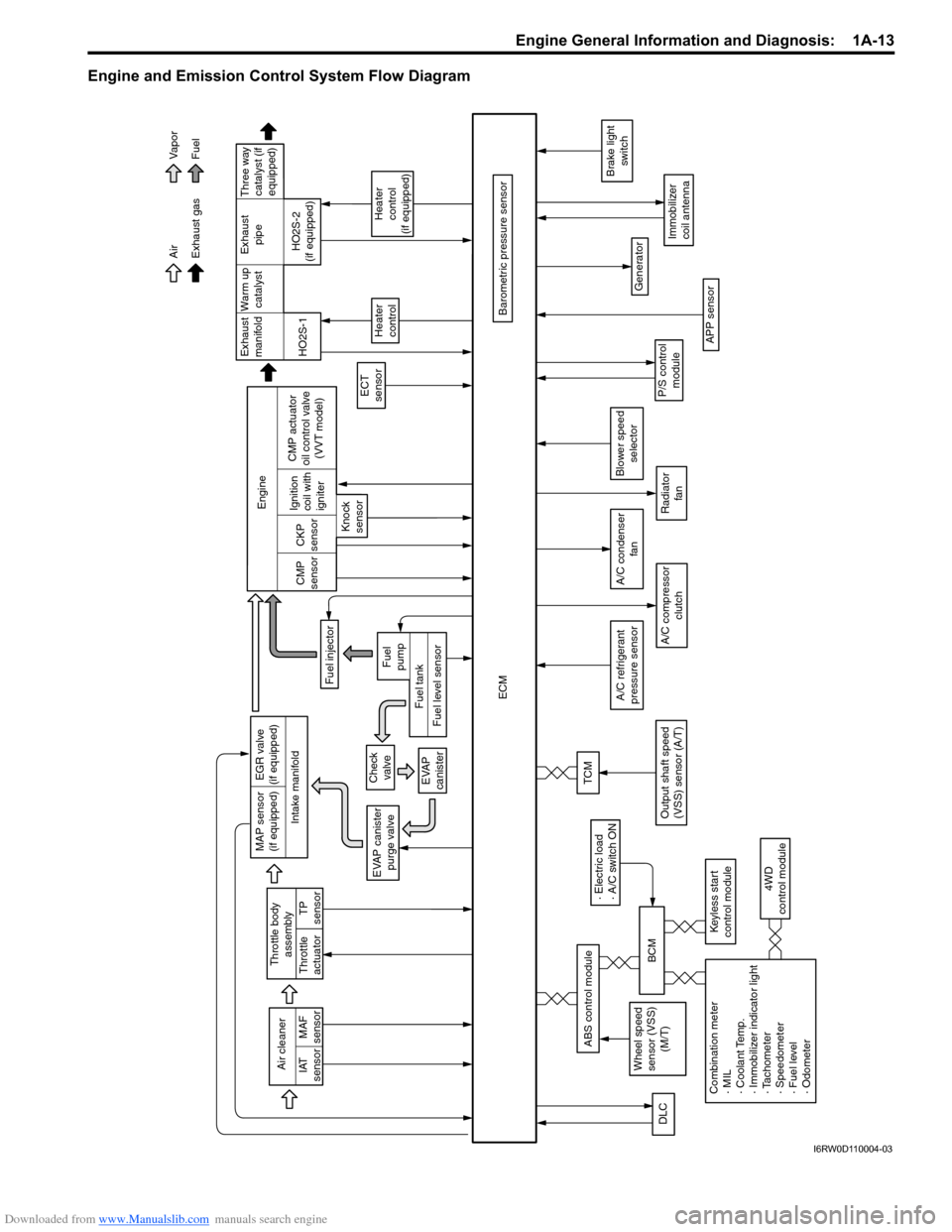
Engine and Emission Control System Flow Diagram
Intake manifoldExhaust
manifold
Exhaust gas Air
Fuel Vapor
War m up
catalystExhaust
pipe
EVAP canister
purge valve
Fuel injector
ECT
sensor
ECM
Heater
control
Heater
control
(if equipped)
Barometric pressure sensor HO2S-1HO2S-2
(if equipped) Engine
CMP
sensorCKP
sensor
Knock
sensorIgnition
coil with
igniter
APP sensor
A/C compressor
clutch
Generator
Immobilizer
coil antenna
P/S control
module
Brake light
switch
Air cleaner
IAT
sensorMAF
sensor
A/C refrigerant
pressure sensor
TP
sensor Throttle body
assembly
Throttle
actuator
A/C condenser
fan
DLC
Radiator
fan
Combination meter
· MIL
· Coolant Temp.
· Immobilizer indicator light
· Tachometer
· Speedometer
· Fuel level
· Odometer4WD
control module
Wheel speed
sensor (VSS)
(M/T)
· Electric load
· A/C switch ON
BCM
Keyless start
control module
ABS control module
Blower speed
selector
MAP sensor
(if equipped)EGR valve
(if equipped)
Check
valve
EVAP
canister
Fuel level sensorFuel tankFuel
pump
CMP actuator
oil control valve
(VVT model)
TCM
Output shaft speed
(VSS) sensor (A/T)
Three way
catalyst (if
equipped)
I6RW0D110004-03
Page 76 of 1556
Downloaded from www.Manualslib.com manuals search engine 1A-26 Engine General Information and Diagnosis:
• The MIL is turned on when the ECM and/or
TCM detect malfunction(s). Each ECM and
TCM stores diagnostic information as the
diagnostic trouble code (DTC) in its
memory and outputs the DTC to the scan
tool.
Therefore, check both of the ECM and TCM
for any DTC with the scan tool because the
DTC stored in ECM and TCM is not read
and displayed at a time. However, each of
the ECM and TCM needs not to be checked
with the generic scan tool because the
DTC stored in ECM and TCM is read and
displayed at a time.
1) Prepare CAN communication OBD generic scan tool
or SUZUKI scan tool.
Special tool
(A): SUZUKI scan tool (SUZUKI-SDT)
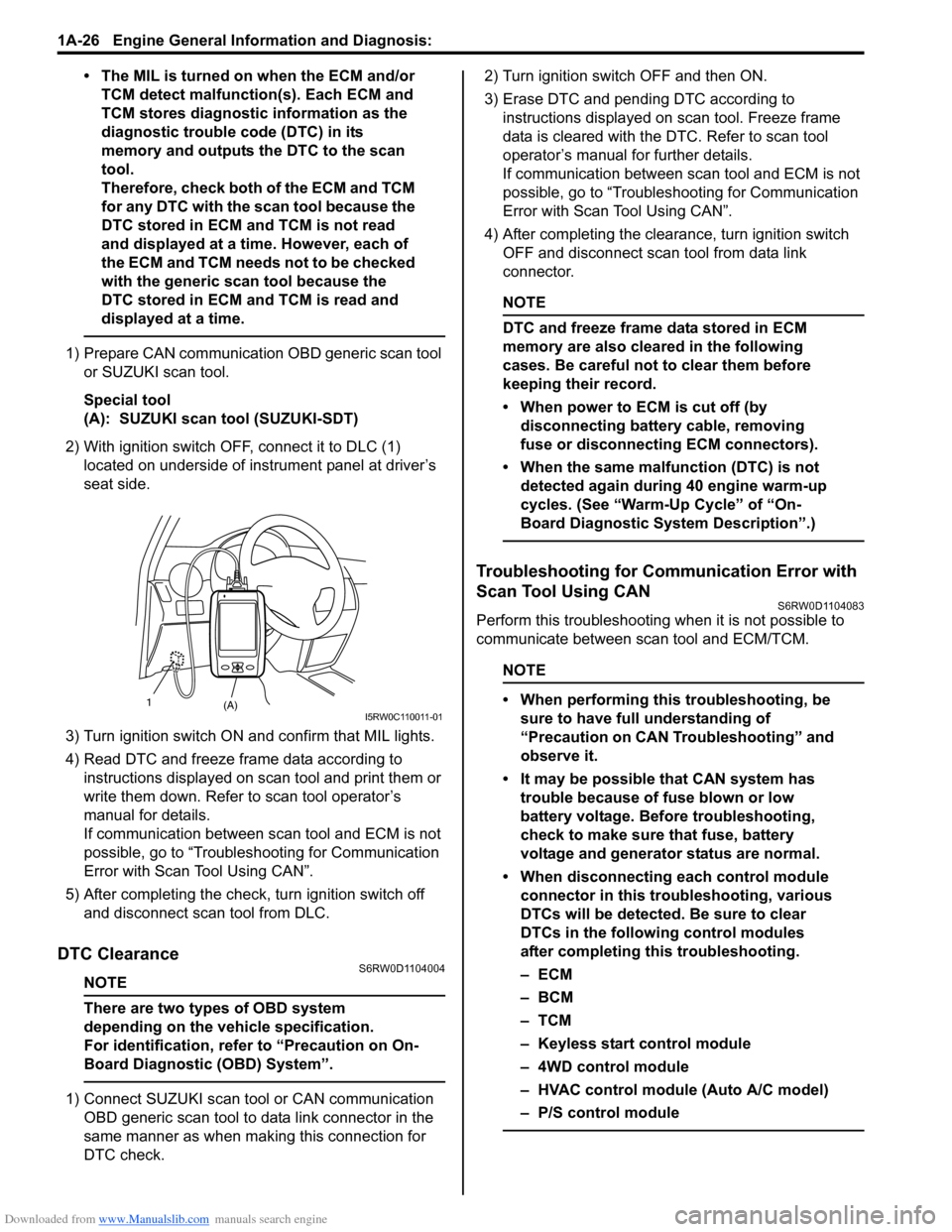
2) With ignition switch OFF, connect it to DLC (1)
located on underside of instrument panel at driver’s
seat side.
3) Turn ignition switch ON and confirm that MIL lights.
4) Read DTC and freeze frame data according to
instructions displayed on scan tool and print them or
write them down. Refer to scan tool operator’s
manual for details.
If communication between scan tool and ECM is not
possible, go to “Troubleshooting for Communication
Error with Scan Tool Using CAN”.
5) After completing the check, turn ignition switch off
and disconnect scan tool from DLC.
DTC ClearanceS6RW0D1104004
NOTE
There are two types of OBD system
depending on the vehicle specification.
For identification, refer to “Precaution on On-
Board Diagnostic (OBD) System”.
1) Connect SUZUKI scan tool or CAN communication
OBD generic scan tool to data link connector in the
same manner as when making this connection for
DTC check.2) Turn ignition switch OFF and then ON.
3) Erase DTC and pending DTC according to
instructions displayed on scan tool. Freeze frame
data is cleared with the DTC. Refer to scan tool
operator’s manual for further details.
If communication between scan tool and ECM is not
possible, go to “Troubleshooting for Communication
Error with Scan Tool Using CAN”.
4) After completing the clearance, turn ignition switch
OFF and disconnect scan tool from data link
connector.
NOTE
DTC and freeze frame data stored in ECM
memory are also cleared in the following
cases. Be careful not to clear them before
keeping their record.
• When power to ECM is cut off (by
disconnecting battery cable, removing
fuse or disconnecting ECM connectors).
• When the same malfunction (DTC) is not
detected again during 40 engine warm-up
cycles. (See “Warm-Up Cycle” of “On-
Board Diagnostic System Description”.)
Troubleshooting for Communication Error with
Scan Tool Using CAN
S6RW0D1104083
Perform this troubleshooting when it is not possible to
communicate between scan tool and ECM/TCM.
NOTE
• When performing this troubleshooting, be
sure to have full understanding of
“Precaution on CAN Troubleshooting” and
observe it.
• It may be possible that CAN system has
trouble because of fuse blown or low
battery voltage. Before troubleshooting,
check to make sure that fuse, battery
voltage and generator status are normal.
• When disconnecting each control module
connector in this troubleshooting, various
DTCs will be detected. Be sure to clear
DTCs in the following control modules
after completing this troubleshooting.
–ECM
–BCM
–TCM
– Keyless start control module
– 4WD control module
– HVAC control module (Auto A/C model)
– P/S control module
(A) 1I5RW0C110011-01
Page 78 of 1556
Downloaded from www.Manualslib.com manuals search engine 1A-28 Engine General Information and Diagnosis:
Trouble area
• Scan tool
• Connector related to CAN line (included in DLC)
• CAN line
• Power or ground circuit of DLC
• Control module communicated by CAN
–ECM
–TCM
– ABS control module
–BCM
– Combination meter
– Keyless start control module
– 4WD control module
• Power or ground circuit of control module communicated by CAN
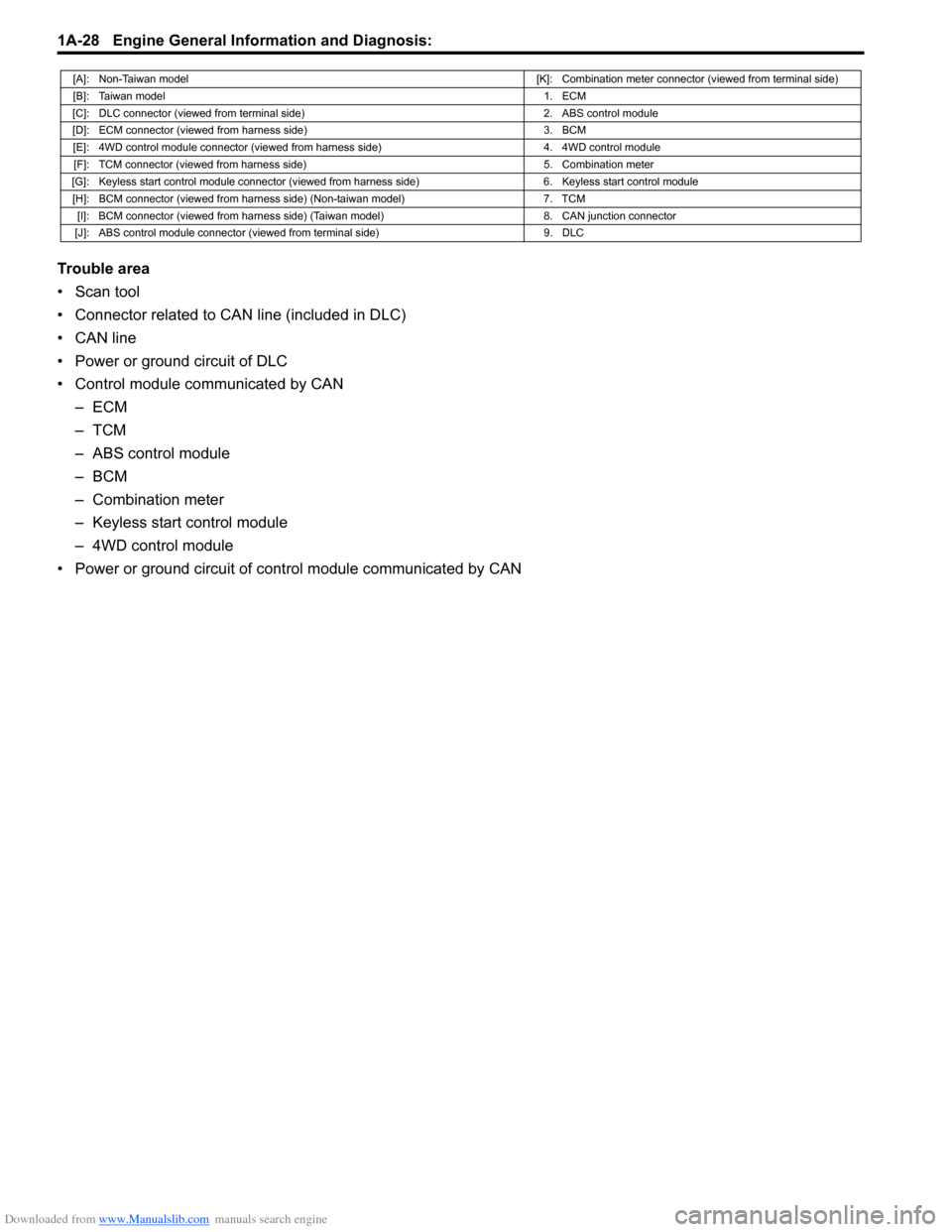
[A]: Non-Taiwan model[K]: Combination meter connector (viewed from terminal side)
[B]: Taiwan model1. ECM
[C]: DLC connector (viewed from terminal side) 2. ABS control module
[D]: ECM connector (viewed from harness side) 3. BCM
[E]: 4WD control module connector (viewed from harness side) 4. 4WD control module
[F]: TCM connector (viewed from harness side) 5. Combination meter
[G]: Keyless start control module connector (viewed from harness side) 6. Keyless start control module
[H]: BCM connector (viewed from harness side) (Non-taiwan model) 7. TCM
[I]: BCM connector (viewed from harness side) (Taiwan model) 8. CAN junction connector
[J]: ABS control module connector (viewed from terminal side) 9. DLC
Page 79 of 1556
Downloaded from www.Manualslib.com manuals search engine Engine General Information and Diagnosis: 1A-29
Troubleshooting
Step Action Yes No
1Scan tool check
1) Disconnect scan tool from DLC with ignition switch
turned OFF.
2) Check for proper connection to all terminals of scan tool
connector.
3) If OK, connect scan tool to another vehicle of this type
with ignition switch turned OFF.
4) Check communication between scan tool and ECM by
DTC check in ECM.
Is it possible to check DTC in ECM?Go to Step 2. Scan tool faulty. Refer
to its operator’s manual.
2DLC power circuit check
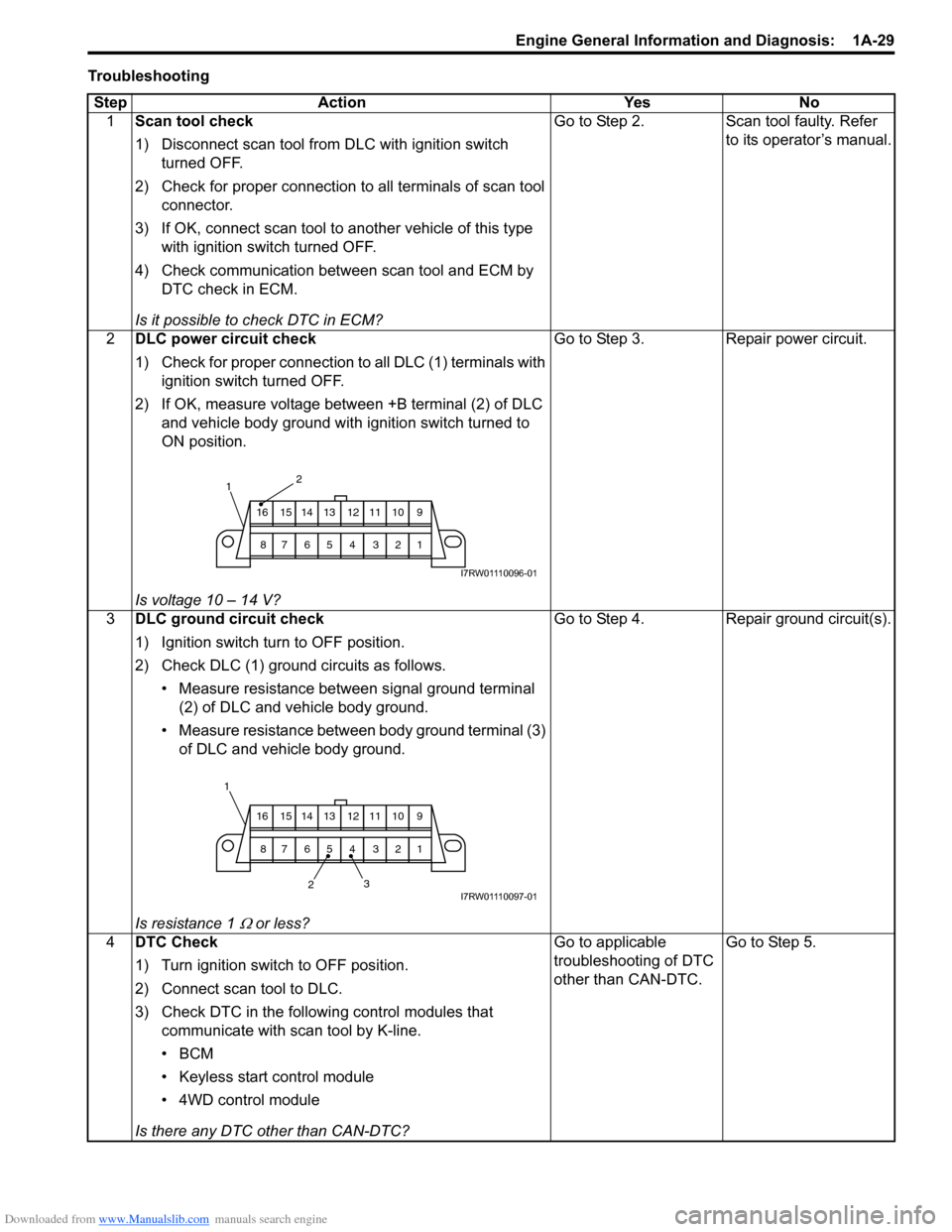
1) Check for proper connection to all DLC (1) terminals with
ignition switch turned OFF.
2) If OK, measure voltage between +B terminal (2) of DLC
and vehicle body ground with ignition switch turned to
ON position.
Is voltage 10 – 14 V?Go to Step 3. Repair power circuit.
3DLC ground circuit check
1) Ignition switch turn to OFF position.
2) Check DLC (1) ground circuits as follows.
• Measure resistance between signal ground terminal
(2) of DLC and vehicle body ground.
• Measure resistance between body ground terminal (3)
of DLC and vehicle body ground.
Is resistance 1
Ω or less?Go to Step 4. Repair ground circuit(s).
4DTC Check
1) Turn ignition switch to OFF position.
2) Connect scan tool to DLC.
3) Check DTC in the following control modules that
communicate with scan tool by K-line.
•BCM
• Keyless start control module
• 4WD control module
Is there any DTC other than CAN-DTC?Go to applicable
troubleshooting of DTC
other than CAN-DTC.Go to Step 5.
2
9 10 11 12 13 14 15 16
1 2 3 4 5 6 7 8
1
I7RW01110096-01
23 1
9 10 11 12 13 14 15 16
1 2 3 4 5 6 7 8
I7RW01110097-01
Page 80 of 1556
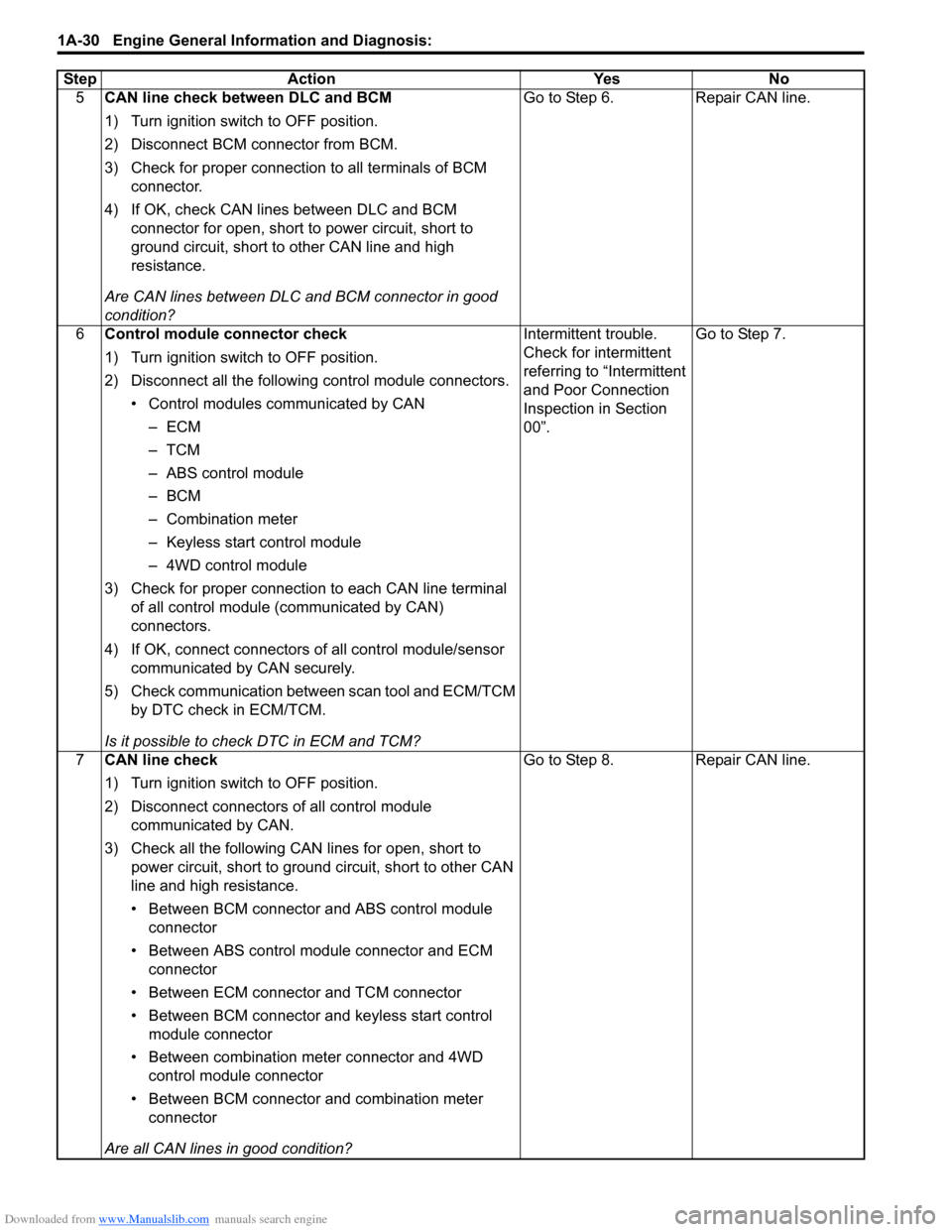
Downloaded from www.Manualslib.com manuals search engine 1A-30 Engine General Information and Diagnosis:
5CAN line check between DLC and BCM
1) Turn ignition switch to OFF position.
2) Disconnect BCM connector from BCM.
3) Check for proper connection to all terminals of BCM
connector.
4) If OK, check CAN lines between DLC and BCM
connector for open, short to power circuit, short to
ground circuit, short to other CAN line and high
resistance.
Are CAN lines between DLC and BCM connector in good
condition?Go to Step 6. Repair CAN line.
6Control module connector check
1) Turn ignition switch to OFF position.
2) Disconnect all the following control module connectors.
• Control modules communicated by CAN
–ECM
–TCM
– ABS control module
–BCM
– Combination meter
– Keyless start control module
– 4WD control module
3) Check for proper connection to each CAN line terminal
of all control module (communicated by CAN)
connectors.
4) If OK, connect connectors of all control module/sensor
communicated by CAN securely.
5) Check communication between scan tool and ECM/TCM
by DTC check in ECM/TCM.
Is it possible to check DTC in ECM and TCM?Intermittent trouble.
Check for intermittent
referring to “Intermittent
and Poor Connection
Inspection in Section
00”.Go to Step 7.
7CAN line check
1) Turn ignition switch to OFF position.
2) Disconnect connectors of all control module
communicated by CAN.
3) Check all the following CAN lines for open, short to
power circuit, short to ground circuit, short to other CAN
line and high resistance.
• Between BCM connector and ABS control module
connector
• Between ABS control module connector and ECM
connector
• Between ECM connector and TCM connector
• Between BCM connector and keyless start control
module connector
• Between combination meter connector and 4WD
control module connector
• Between BCM connector and combination meter
connector
Are all CAN lines in good condition?Go to Step 8. Repair CAN line. Step Action Yes No
Page 217 of 1556
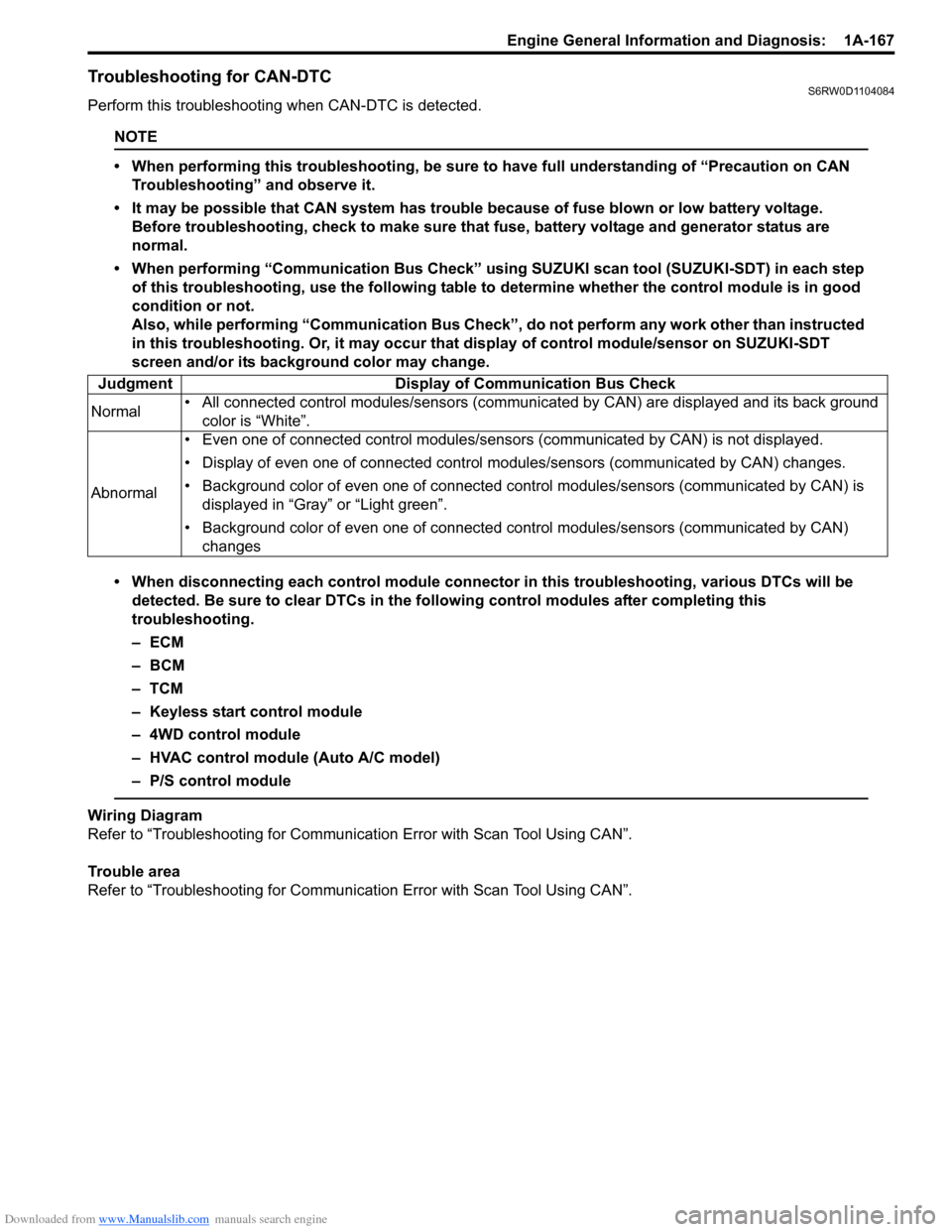
Downloaded from www.Manualslib.com manuals search engine Engine General Information and Diagnosis: 1A-167
Troubleshooting for CAN-DTCS6RW0D1104084
Perform this troubleshooting when CAN-DTC is detected.
NOTE
• When performing this troubleshooting, be sure to have full understanding of “Precaution on CAN
Troubleshooting” and observe it.
• It may be possible that CAN system has trouble because of fuse blown or low battery voltage.
Before troubleshooting, check to make sure that fuse, battery voltage and generator status are
normal.
• When performing “Communication Bus Check” using SUZUKI scan tool (SUZUKI-SDT) in each step
of this troubleshooting, use the following table to determine whether the control module is in good
condition or not.
Also, while performing “Communication Bus Check”, do not perform any work other than instructed
in this troubleshooting. Or, it may occur that display of control module/sensor on SUZUKI-SDT
screen and/or its background color may change.
• When disconnecting each control module connector in this troubleshooting, various DTCs will be
detected. Be sure to clear DTCs in the following control modules after completing this
troubleshooting.
–ECM
– BCM
–TCM
– Keyless start control module
– 4WD control module
– HVAC control module (Auto A/C model)
– P/S control module
Wiring Diagram
Refer to “Troubleshooting for Communication Error with Scan Tool Using CAN”.
Trouble area
Refer to “Troubleshooting for Communication Error with Scan Tool Using CAN”. Judgment Display of Communication Bus Check
Normal• All connected control modules/sensors (communicated by CAN) are displayed and its back ground
color is “White”.
Abnormal• Even one of connected control modules/sensors (communicated by CAN) is not displayed.
• Display of even one of connected control modules/sensors (communicated by CAN) changes.
• Background color of even one of connected control modules/sensors (communicated by CAN) is
displayed in “Gray” or “Light green”.
• Background color of even one of connected control modules/sensors (communicated by CAN)
changes