Starting system SUZUKI SX4 2006 1.G Service User Guide
[x] Cancel search | Manufacturer: SUZUKI, Model Year: 2006, Model line: SX4, Model: SUZUKI SX4 2006 1.GPages: 1556, PDF Size: 37.31 MB
Page 71 of 1556

Downloaded from www.Manualslib.com manuals search engine Engine General Information and Diagnosis: 1A-21
Component Location
Electronic Control System Components LocationS6RW0D1103001
NOTE
The figure shows left-hand steering vehicle. For right-hand steering vehicle, parts with (*) are installed
at the opposite side.
H*E*
10
D
G* C
6A
B*
e
3*
12*
a8 13
b
1
5-1
d
2
11
g
4
7
9
i
j
Fh k f
n
c J
5
K*
14
I6RW0D110016-03
Information sensors Control devices Others
1. MAF and IAT sensor a: Fuel injector A: ECM
2. Electric throttle body assembly
(built-in throttle position sensor and throttle
actuator)b: EVAP canister purge valve B: Combination meter
3. Brake light switch c: Fuel pump relay C: EVAP canister
4. ECT sensor d: EGR valve (if equipped) D: A/C evaporator outlet air temp. sensor
(if equipped with A/C)
5. Heated oxygen sensor-1 e: Malfunction indicator lamp E: Data link connector
5-1. Heated oxygen sensor-2 (if equipped) f: Radiator cooling fan relay F: A/C compressor relay (if equipped with A/C)
6. Battery g: Ignition coil assembly (with ignitor) G: BCM (included in junction block assembly)
7. CMP sensor (for engine with VVT system) h: Main relay H: Immobilizer coil antenna
8. MAP sensor (if equipped) i: Oil control valve (for engine with VVT system) J: A/C refrigerant pressure sensor
(if equipped with A/C)
9. CKP sensor j: A/C condenser cooling fan relay K: TCM (for A/T model)
10. Fuel level sensor k: Starting motor control relay
11. Knock sensor m: Immobilizer indicator lamp
12. APP sensor n: Throttle actuator control relay
13. Front wheel speed sensor (RH, LH) (VSS)
14. CMP sensor (for engine without VVT system)
Page 75 of 1556
Downloaded from www.Manualslib.com manuals search engine Engine General Information and Diagnosis: 1A-25
Step 2: DTC / Freeze Frame Data Check, Record and
Clearance
First, check DTC (including pending DTC), referring to
“DTC Check”. If DTC is indicated, print it and freeze
frame data or write them down and then clear them by
referring to “DTC Clearance”. DTC indicates malfunction
that occurred in the system but does not indicate
whether it exists now or it occurred in the past and the
normal condition has been restored now. To check which
case applies, check the symptom in question according
to Step 5 and recheck DTC according to Step 6 and 7.
Attempt to diagnose a trouble based on DTC in this step
only or failure to clear the DTC in this step will lead to
incorrect diagnosis, trouble diagnosis of a normal circuit
or difficulty in troubleshooting.
Step 3 and 4: Visual Inspection
As a preliminary step, be sure to perform visual check of
the items that support proper function of the engine
referring to “Visual Inspection”.
Step 5: Trouble Symptom Confirmation
Based on information obtained in “Step 1: Customer
Complaint Analysis: ” and “Step 2: DTC / Freeze Frame
Data Check, Record and Clearance: ”, confirm trouble
symptoms. Also, reconfirm DTC according to “DTC
Confirmation Procedure” described in each DTC diag.
flow.
Step 6 and 7: Rechecking and Record of DTC /
Freeze Frame Data
Refer to “DTC Check” for checking procedure.
Step 8: Engine Basic Inspection and Engine
Symptom Diagnosis
Perform basic engine check according to “Engine Basic
Inspection” first. When the end of the flow has been
reached, check the parts of the system suspected as a
possible cause referring to “Engine Symptom Diagnosis”
and based on symptoms appearing on the vehicle
(symptoms obtained through steps of customer
complaint analysis, trouble symptom confirmation and/or
basic engine check) and repair or replace faulty parts, if
any.
Step 9: Troubleshooting for DTC (See each DTC
Diag. Flow)
Based on the DTC indicated in Step 6 or 7 and referring
to the applicable DTC diag. flow, locate the cause of the
trouble, namely in a sensor, switch, wire harness,
connector, actuator, ECM or other part and repair or
replace faulty parts.Step 10: Intermittent Problems Check
Check parts where an intermittent trouble is easy to
occur (e.g., wire harness, connector, etc.), referring to
“Intermittent and Poor Connection Inspection in Section
00” and related circuit of DTC recorded in Step 2.
Step 11: Final Confirmation Test
Confirm that the problem symptom has gone and the
engine is free from any abnormal conditions. If what has
been repaired is related to the DTC, clear the DTC once,
perform DTC confirmation procedure and confirm that no
DTC is indicated.
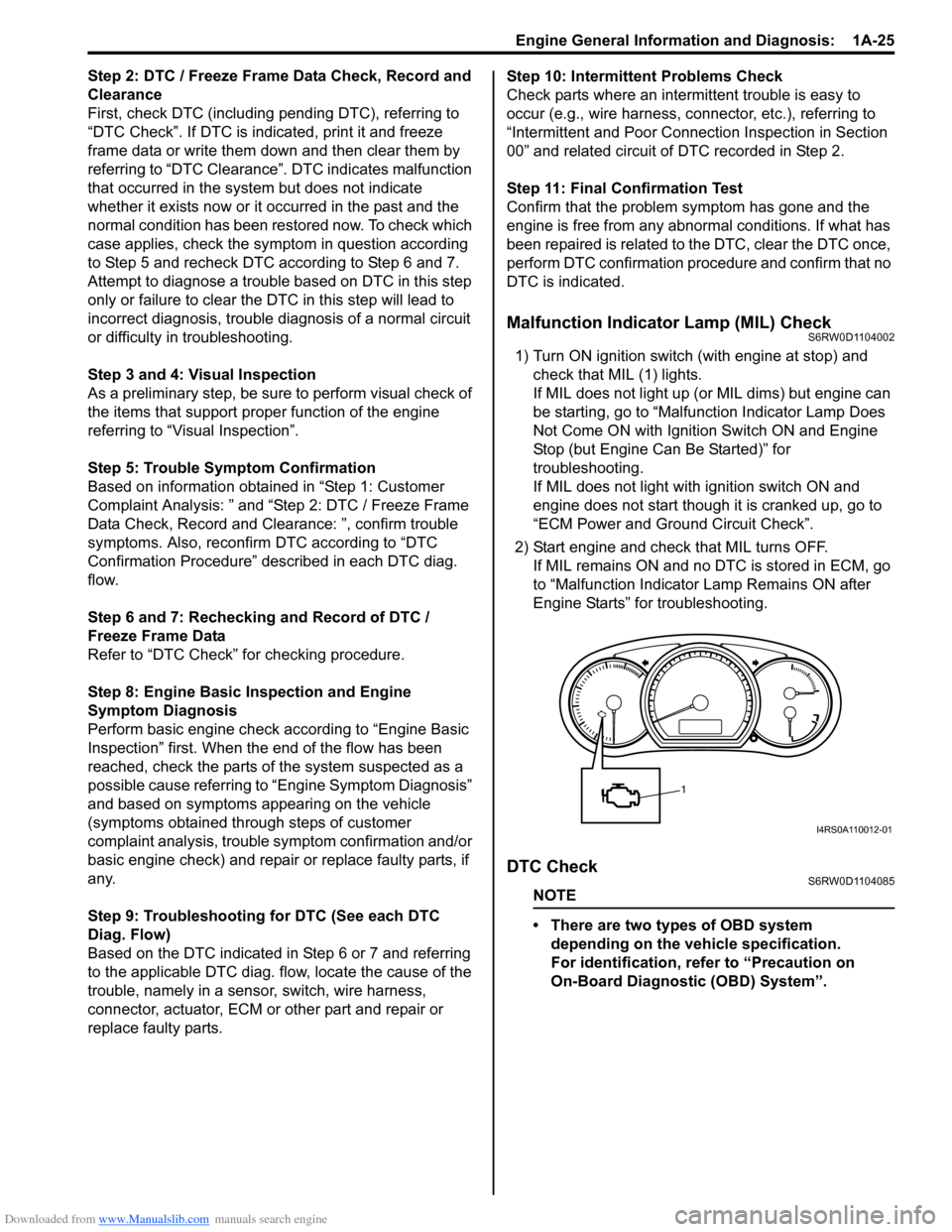
Malfunction Indicator Lamp (MIL) CheckS6RW0D1104002
1) Turn ON ignition switch (with engine at stop) and
check that MIL (1) lights.
If MIL does not light up (or MIL dims) but engine can
be starting, go to “Malfunction Indicator Lamp Does
Not Come ON with Ignition Switch ON and Engine
Stop (but Engine Can Be Started)” for
troubleshooting.
If MIL does not light with ignition switch ON and
engine does not start though it is cranked up, go to
“ECM Power and Ground Circuit Check”.
2) Start engine and check that MIL turns OFF.
If MIL remains ON and no DTC is stored in ECM, go
to “Malfunction Indicator Lamp Remains ON after
Engine Starts” for troubleshooting.
DTC CheckS6RW0D1104085
NOTE
• There are two types of OBD system
depending on the vehicle specification.
For identification, refer to “Precaution on
On-Board Diagnostic (OBD) System”.
1
I4RS0A110012-01
Page 83 of 1556
Downloaded from www.Manualslib.com manuals search engine Engine General Information and Diagnosis: 1A-33
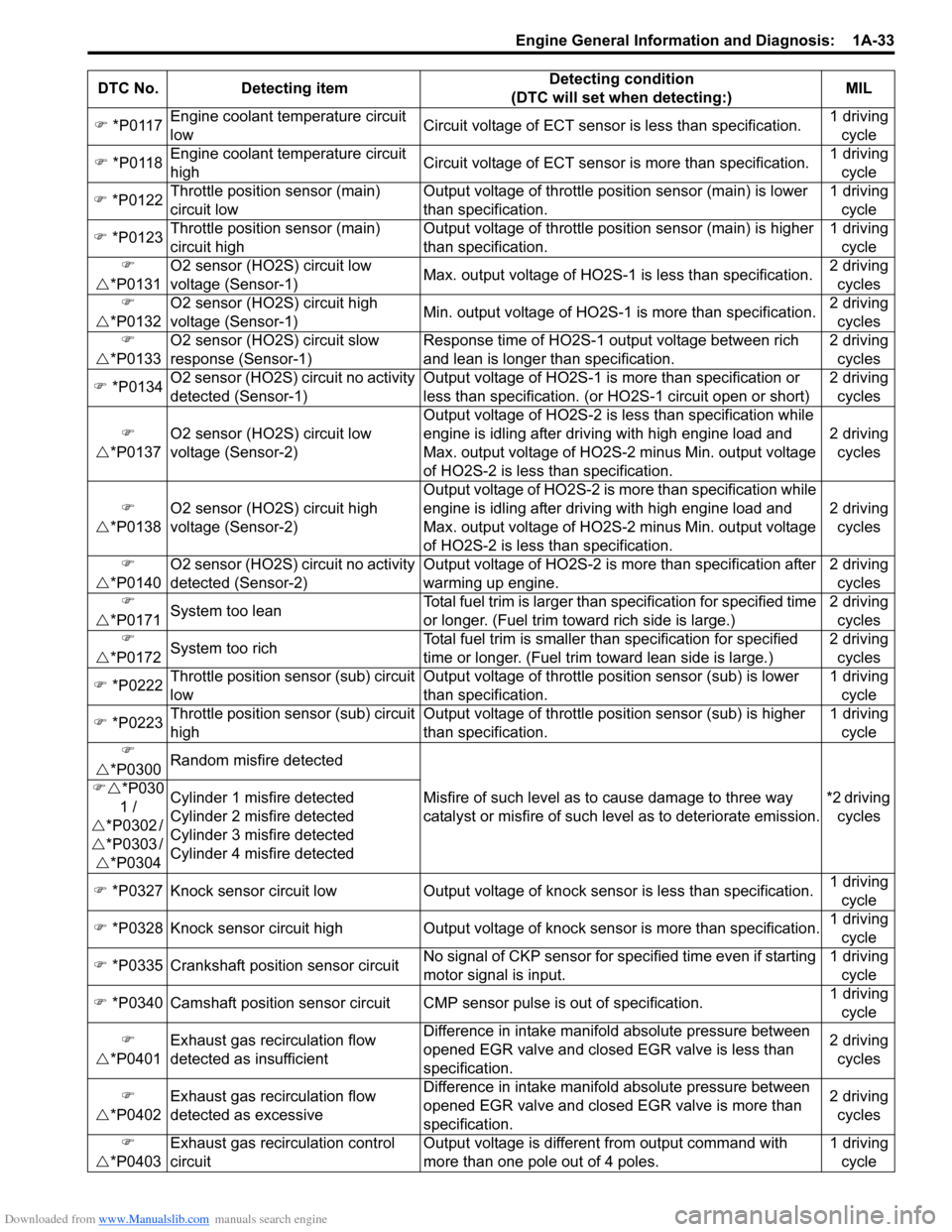
) *P0117Engine coolant temperature circuit
lowCircuit voltage of ECT sensor is less than specification.1 driving
cycle
) *P0118Engine coolant temperature circuit
highCircuit voltage of ECT sensor is more than specification.1 driving
cycle
) *P0122Throttle position sensor (main)
circuit lowOutput voltage of throttle position sensor (main) is lower
than specification.1 driving
cycle
) *P0123Throttle position sensor (main)
circuit highOutput voltage of throttle position sensor (main) is higher
than specification.1 driving
cycle
)
U*P0131O2 sensor (HO2S) circuit low
voltage (Sensor-1)Max. output voltage of HO2S-1 is less than specification.2 driving
cycles
)
U*P0132O2 sensor (HO2S) circuit high
voltage (Sensor-1)Min. output voltage of HO2S-1 is more than specification.2 driving
cycles
)
U*P0133O2 sensor (HO2S) circuit slow
response (Sensor-1)Response time of HO2S-1 output voltage between rich
and lean is longer than specification.2 driving
cycles
) *P0134O2 sensor (HO2S) circuit no activity
detected (Sensor-1)Output voltage of HO2S-1 is more than specification or
less than specification. (or HO2S-1 circuit open or short)2 driving
cycles
)
U*P0137O2 sensor (HO2S) circuit low
voltage (Sensor-2)Output voltage of HO2S-2 is less than specification while
engine is idling after driving with high engine load and
Max. output voltage of HO2S-2 minus Min. output voltage
of HO2S-2 is less than specification.2 driving
cycles
)
U*P0138O2 sensor (HO2S) circuit high
voltage (Sensor-2)Output voltage of HO2S-2 is more than specification while
engine is idling after driving with high engine load and
Max. output voltage of HO2S-2 minus Min. output voltage
of HO2S-2 is less than specification.2 driving
cycles
)
U*P0140O2 sensor (HO2S) circuit no activity
detected (Sensor-2)Output voltage of HO2S-2 is more than specification after
warming up engine.
2 driving
cycles
)
U*P0171System too leanTotal fuel trim is larger than specification for specified time
or longer. (Fuel trim toward rich side is large.)2 driving
cycles
)
U*P0172System too richTotal fuel trim is smaller than specification for specified
time or longer. (Fuel trim toward lean side is large.)2 driving
cycles
) *P0222Throttle position sensor (sub) circuit
lowOutput voltage of throttle position sensor (sub) is lower
than specification.1 driving
cycle
) *P0223Throttle position sensor (sub) circuit
highOutput voltage of throttle position sensor (sub) is higher
than specification.1 driving
cycle
)
U*P0300Random misfire detected
Misfire of such level as to cause damage to three way
catalyst or misfire of such level as to deteriorate emission.*2 driving
cycles )U*P030
1 /
U*P0302 /
U*P0303 /
U*P0304Cylinder 1 misfire detected
Cylinder 2 misfire detected
Cylinder 3 misfire detected
Cylinder 4 misfire detected
) *P0327 Knock sensor circuit low Output voltage of knock sensor is less than specification.1 driving
cycle
) *P0328 Knock sensor circuit high Output voltage of knock sensor is more than specification.1 driving
cycle
) *P0335 Crankshaft position sensor circuitNo signal of CKP sensor for specified time even if starting
motor signal is input.1 driving
cycle
) *P0340 Camshaft position sensor circuit CMP sensor pulse is out of specification.1 driving
cycle
)
U*P0401Exhaust gas recirculation flow
detected as insufficientDifference in intake manifold absolute pressure between
opened EGR valve and closed EGR valve is less than
specification.2 driving
cycles
)
U*P0402Exhaust gas recirculation flow
detected as excessive
Difference in intake manifold absolute pressure between
opened EGR valve and closed EGR valve is more than
specification.2 driving
cycles
)
U*P0403Exhaust gas recirculation control
circuitOutput voltage is different from output command with
more than one pole out of 4 poles.1 driving
cycle DTC No. Detecting itemDetecting condition
(DTC will set when detecting:)MIL
Page 84 of 1556
Downloaded from www.Manualslib.com manuals search engine 1A-34 Engine General Information and Diagnosis:
)
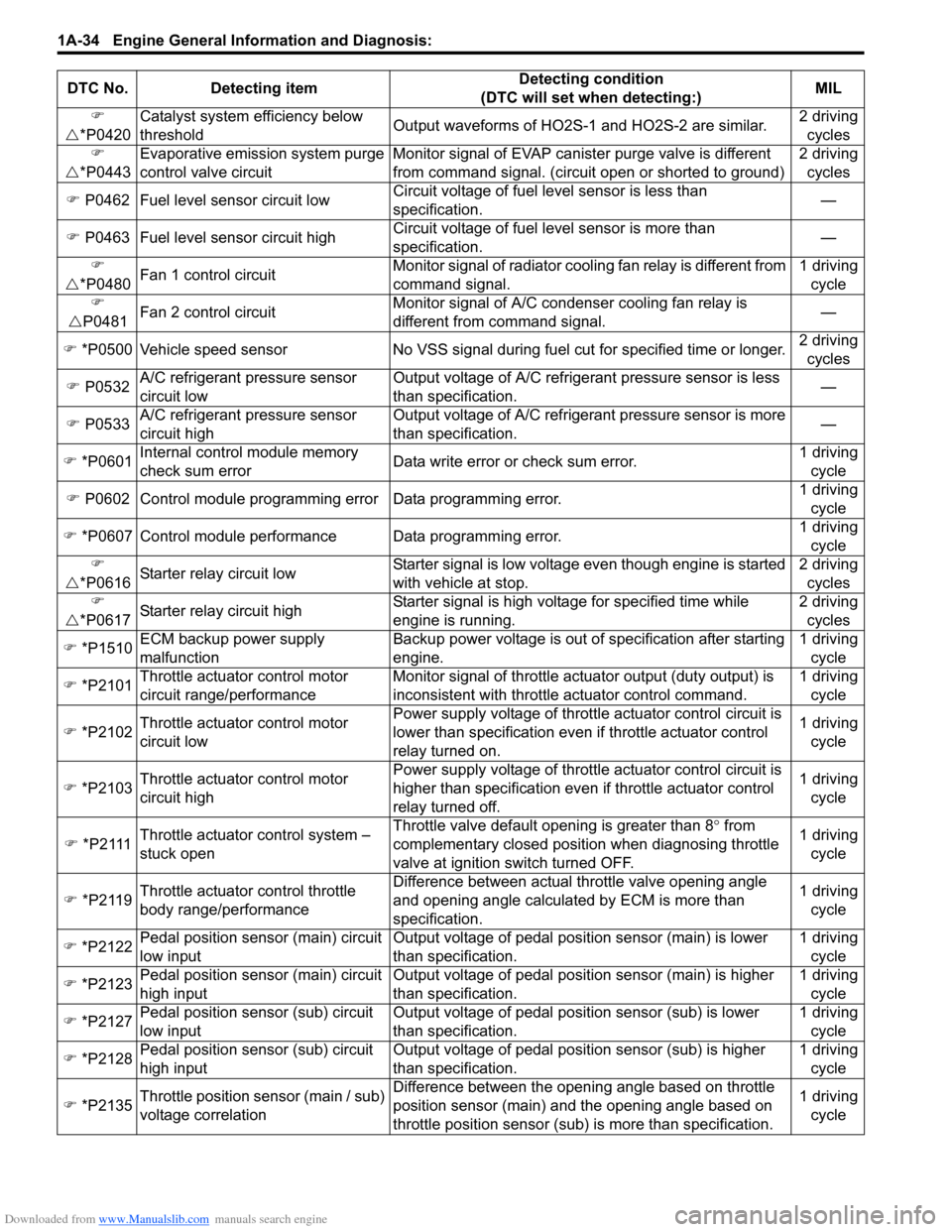
U*P0420Catalyst system efficiency below
thresholdOutput waveforms of HO2S-1 and HO2S-2 are similar.2 driving
cycles
)
U*P0443Evaporative emission system purge
control valve circuitMonitor signal of EVAP canister purge valve is different
from command signal. (circuit open or shorted to ground)2 driving
cycles
) P0462 Fuel level sensor circuit lowCircuit voltage of fuel level sensor is less than
specification.—
) P0463 Fuel level sensor circuit highCircuit voltage of fuel level sensor is more than
specification.—
)
U*P0480Fan 1 control circuitMonitor signal of radiator cooling fan relay is different from
command signal.1 driving
cycle
)
UP0481Fan 2 control circuitMonitor signal of A/C condenser cooling fan relay is
different from command signal.—
) *P0500 Vehicle speed sensor No VSS signal during fuel cut for specified time or longer.2 driving
cycles
) P0532A/C refrigerant pressure sensor
circuit lowOutput voltage of A/C refrigerant pressure sensor is less
than specification.—
) P0533A/C refrigerant pressure sensor
circuit highOutput voltage of A/C refrigerant pressure sensor is more
than specification.—
) *P0601Internal control module memory
check sum errorData write error or check sum error.1 driving
cycle
) P0602 Control module programming error Data programming error.1 driving
cycle
) *P0607 Control module performance Data programming error.1 driving
cycle
)
U*P0616Starter relay circuit lowStarter signal is low voltage even though engine is started
with vehicle at stop.2 driving
cycles
)
U*P0617Starter relay circuit highStarter signal is high voltage for specified time while
engine is running.2 driving
cycles
) *P1510
ECM backup power supply
malfunctionBackup power voltage is out of specification after starting
engine.1 driving
cycle
) *P2101Throttle actuator control motor
circuit range/performanceMonitor signal of throttle actuator output (duty output) is
inconsistent with throttle actuator control command.1 driving
cycle
) *P2102Throttle actuator control motor
circuit lowPower supply voltage of throttle actuator control circuit is
lower than specification even if throttle actuator control
relay turned on.1 driving
cycle
) *P2103Throttle actuator control motor
circuit highPower supply voltage of throttle actuator control circuit is
higher than specification even if throttle actuator control
relay turned off.1 driving
cycle
) *P2111Throttle actuator control system –
stuck openThrottle valve default opening is greater than 8° from
complementary closed position when diagnosing throttle
valve at ignition switch turned OFF.1 driving
cycle
) *P2119Throttle actuator control throttle
body range/performanceDifference between actual throttle valve opening angle
and opening angle calculated by ECM is more than
specification.1 driving
cycle
) *P2122Pedal position sensor (main) circuit
low inputOutput voltage of pedal position sensor (main) is lower
than specification.1 driving
cycle
) *P2123Pedal position sensor (main) circuit
high inputOutput voltage of pedal position sensor (main) is higher
than specification.1 driving
cycle
) *P2127Pedal position sensor (sub) circuit
low inputOutput voltage of pedal position sensor (sub) is lower
than specification.1 driving
cycle
) *P2128Pedal position sensor (sub) circuit
high inputOutput voltage of pedal position sensor (sub) is higher
than specification.1 driving
cycle
) *P2135Throttle position sensor (main / sub)
voltage correlationDifference between the opening angle based on throttle
position sensor (main) and the opening angle based on
throttle position sensor (sub) is more than specification.1 driving
cycle DTC No. Detecting itemDetecting condition
(DTC will set when detecting:)MIL
Page 95 of 1556
Downloaded from www.Manualslib.com manuals search engine Engine General Information and Diagnosis: 1A-45
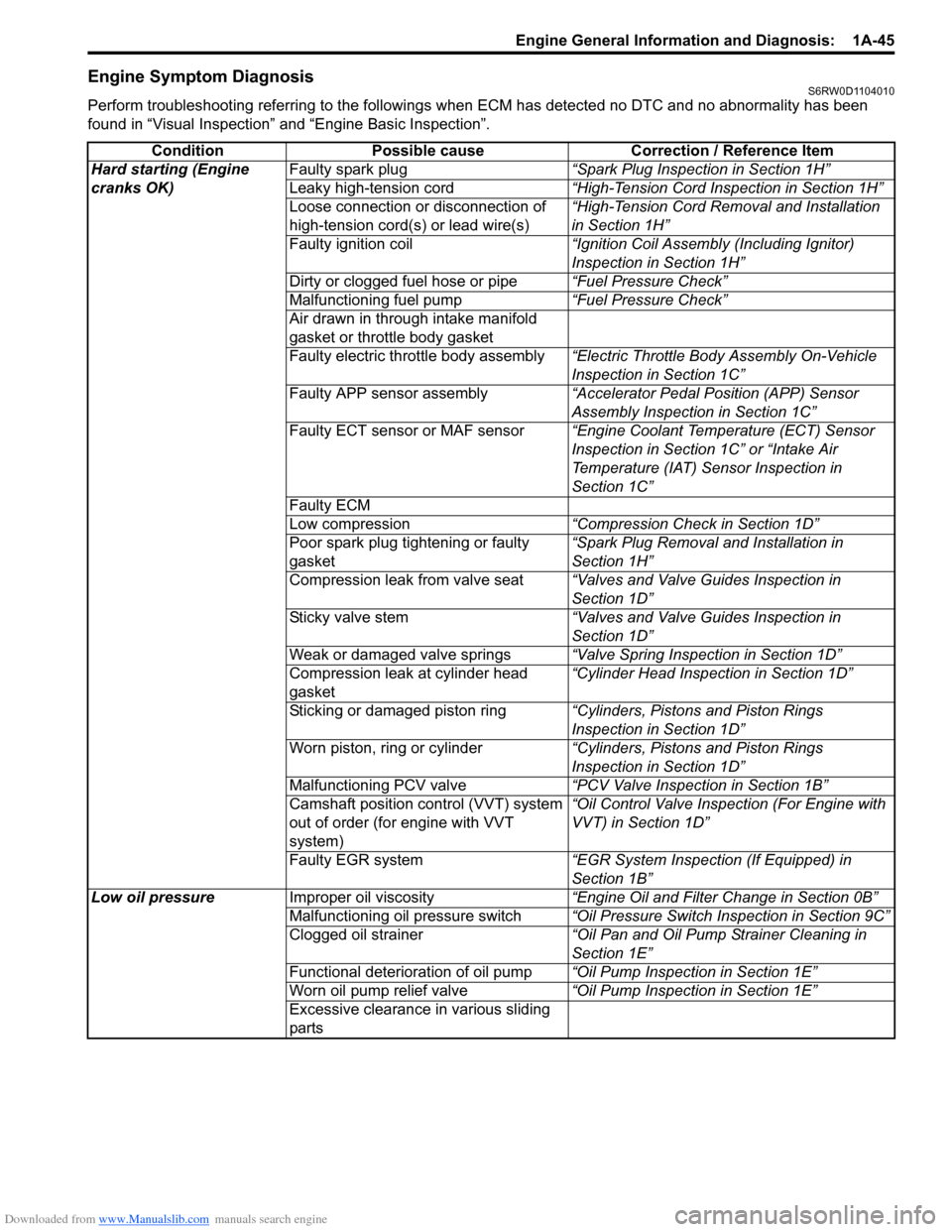
Engine Symptom DiagnosisS6RW0D1104010
Perform troubleshooting referring to the followings when ECM has detected no DTC and no abnormality has been
found in “Visual Inspection” and “Engine Basic Inspection”.
Condition Possible cause Correction / Reference Item
Hard starting (Engine
cranks OK)Faulty spark plug“Spark Plug Inspection in Section 1H”
Leaky high-tension cord“High-Tension Cord Inspection in Section 1H”
Loose connection or disconnection of
high-tension cord(s) or lead wire(s)“High-Tension Cord Removal and Installation
in Section 1H”
Faulty ignition coil“Ignition Coil Assembly (Including Ignitor)
Inspection in Section 1H”
Dirty or clogged fuel hose or pipe“Fuel Pressure Check”
Malfunctioning fuel pump“Fuel Pressure Check”
Air drawn in through intake manifold
gasket or throttle body gasket
Faulty electric throttle body assembly“Electric Throttle Body Assembly On-Vehicle
Inspection in Section 1C”
Faulty APP sensor assembly“Accelerator Pedal Position (APP) Sensor
Assembly Inspection in Section 1C”
Faulty ECT sensor or MAF sensor“Engine Coolant Temperature (ECT) Sensor
Inspection in Section 1C” or “Intake Air
Temperature (IAT) Sensor Inspection in
Section 1C”
Faulty ECM
Low compression“Compression Check in Section 1D”
Poor spark plug tightening or faulty
gasket“Spark Plug Removal and Installation in
Section 1H”
Compression leak from valve seat“Valves and Valve Guides Inspection in
Section 1D”
Sticky valve stem“Valves and Valve Guides Inspection in
Section 1D”
Weak or damaged valve springs“Valve Spring Inspection in Section 1D”
Compression leak at cylinder head
gasket“Cylinder Head Inspection in Section 1D”
Sticking or damaged piston ring“Cylinders, Pistons and Piston Rings
Inspection in Section 1D”
Worn piston, ring or cylinder“Cylinders, Pistons and Piston Rings
Inspection in Section 1D”
Malfunctioning PCV valve“PCV Valve Inspection in Section 1B”
Camshaft position control (VVT) system
out of order (for engine with VVT
system)“Oil Control Valve Inspection (For Engine with
VVT) in Section 1D”
Faulty EGR system“EGR System Inspection (If Equipped) in
Section 1B”
Low oil pressureImproper oil viscosity“Engine Oil and Filter Change in Section 0B”
Malfunctioning oil pressure switch“Oil Pressure Switch Inspection in Section 9C”
Clogged oil strainer“Oil Pan and Oil Pump Strainer Cleaning in
Section 1E”
Functional deterioration of oil pump“Oil Pump Inspection in Section 1E”
Worn oil pump relief valve“Oil Pump Inspection in Section 1E”
Excessive clearance in various sliding
parts
Page 191 of 1556

Downloaded from www.Manualslib.com manuals search engine Engine General Information and Diagnosis: 1A-141
DTC Detecting Condition and Trouble Area
DTC Confirmation Procedure
1) With ignition switch turned OFF, connect scan tool.
2) Turn ON ignition switch and clear DTC using scan tool.
3) Start engine.
4) Check DTC and pending DTC.
DTC Troubleshooting
NOTE
Before this troubleshooting is performed, read the precautions for DTC troubleshooting referring to
“Precautions for DTC Troubleshooting”.
DTC P0617: Starter Relay Circuit HighS6RW0D1104055
Wiring Diagram
Refer to “DTC P0616: Starter Relay Circuit Low”.
DTC Detecting Condition and Trouble Area
DTC Confirmation Procedure
1) With ignition switch turned OFF, connect scan tool.
2) Turn ON ignition switch and clear DTC using scan tool.
3) Start engine and run it at idle for 3 min. or more.
4) Check DTC and pending DTC.DTC detecting condition Trouble area
Engine starts even though vehicle is at stop and engine starter signal is low voltage.
(2 driving cycle detection logic)• Engine starter signal circuit
•ECM
Step Action Yes No
1Was “Engine and Emission Control System Check”
performed?Go to Step 2. Go to “Engine and
Emission Control
System Check”.
2Signal circuit check
1) Turn OFF ignition switch.
2) Remove ECM from its bracket with ECM connectors
connected.
3) Measure voltage at terminal “C01-48” of ECM connector,
under following condition.
Voltage at terminal “C01-48” of ECM connector
While engine cranking: 6 – 14 V
After starting engine: 0 – 1 V
Is each voltage within specified range?Poor “C01-48”
connection or
intermittent trouble.
Check for intermittent
referring to “Intermittent
and Poor Connection
Inspection in Section
00”.
If wire and connections
are OK, substitute a
known-good ECM and
recheck.“YEL/GRN” wire is open
or high resistance
circuit.
DTC detecting condition Trouble area
Engine starter signal is high voltage for 180 seconds while engine is running.
(2 driving cycle detection logic)• Engine starter signal circuit
•ECM
Page 192 of 1556
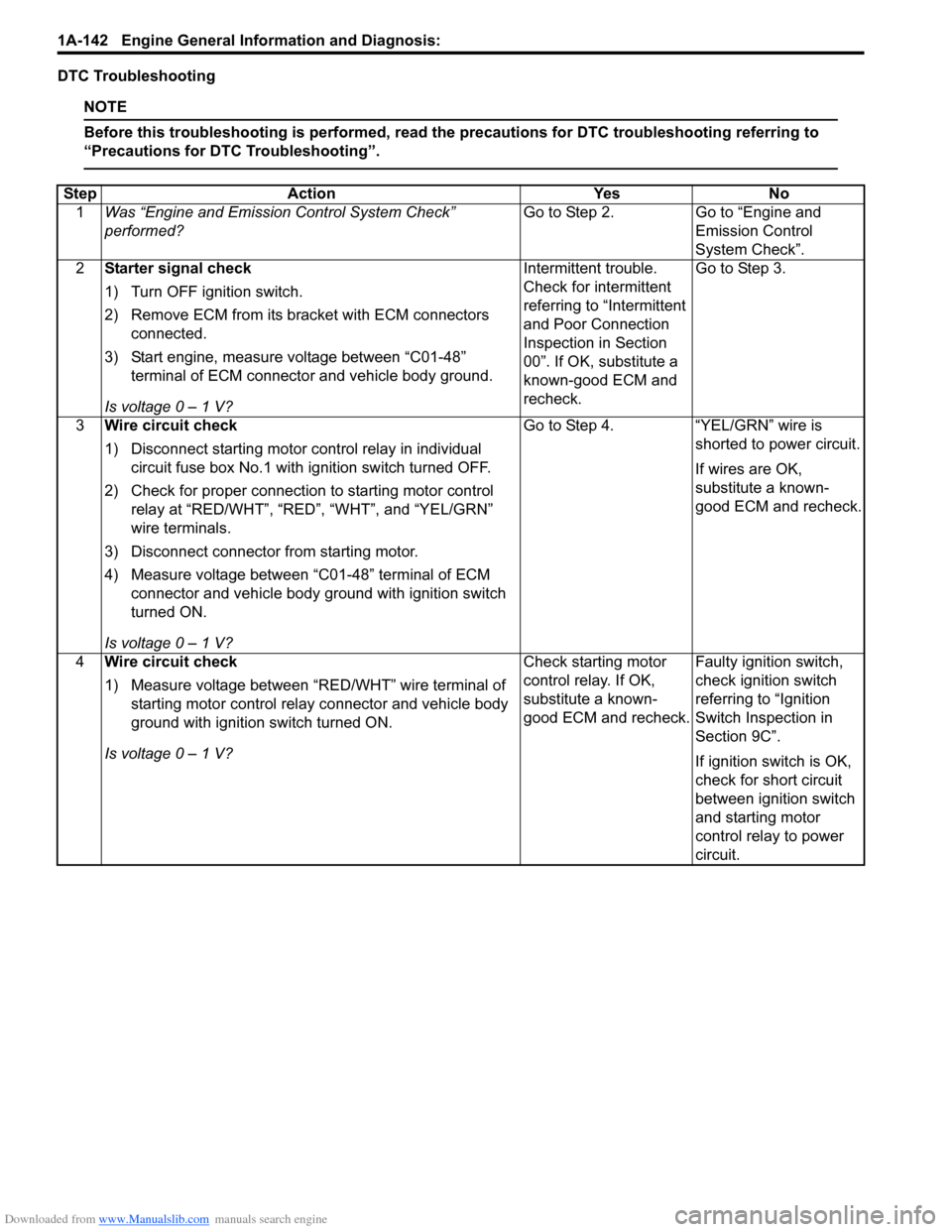
Downloaded from www.Manualslib.com manuals search engine 1A-142 Engine General Information and Diagnosis:
DTC Troubleshooting
NOTE
Before this troubleshooting is performed, read the precautions for DTC troubleshooting referring to
“Precautions for DTC Troubleshooting”.
Step Action Yes No
1Was “Engine and Emission Control System Check”
performed?Go to Step 2. Go to “Engine and
Emission Control
System Check”.
2Starter signal check
1) Turn OFF ignition switch.
2) Remove ECM from its bracket with ECM connectors
connected.
3) Start engine, measure voltage between “C01-48”
terminal of ECM connector and vehicle body ground.
Is voltage 0 – 1 V?Intermittent trouble.
Check for intermittent
referring to “Intermittent
and Poor Connection
Inspection in Section
00”. If OK, substitute a
known-good ECM and
recheck.Go to Step 3.
3Wire circuit check
1) Disconnect starting motor control relay in individual
circuit fuse box No.1 with ignition switch turned OFF.
2) Check for proper connection to starting motor control
relay at “RED/WHT”, “RED”, “WHT”, and “YEL/GRN”
wire terminals.
3) Disconnect connector from starting motor.
4) Measure voltage between “C01-48” terminal of ECM
connector and vehicle body ground with ignition switch
turned ON.
Is voltage 0 – 1 V?Go to Step 4. “YEL/GRN” wire is
shorted to power circuit.
If wires are OK,
substitute a known-
good ECM and recheck.
4Wire circuit check
1) Measure voltage between “RED/WHT” wire terminal of
starting motor control relay connector and vehicle body
ground with ignition switch turned ON.
Is voltage 0 – 1 V?Check starting motor
control relay. If OK,
substitute a known-
good ECM and recheck.Faulty ignition switch,
check ignition switch
referring to “Ignition
Switch Inspection in
Section 9C”.
If ignition switch is OK,
check for short circuit
between ignition switch
and starting motor
control relay to power
circuit.
Page 198 of 1556
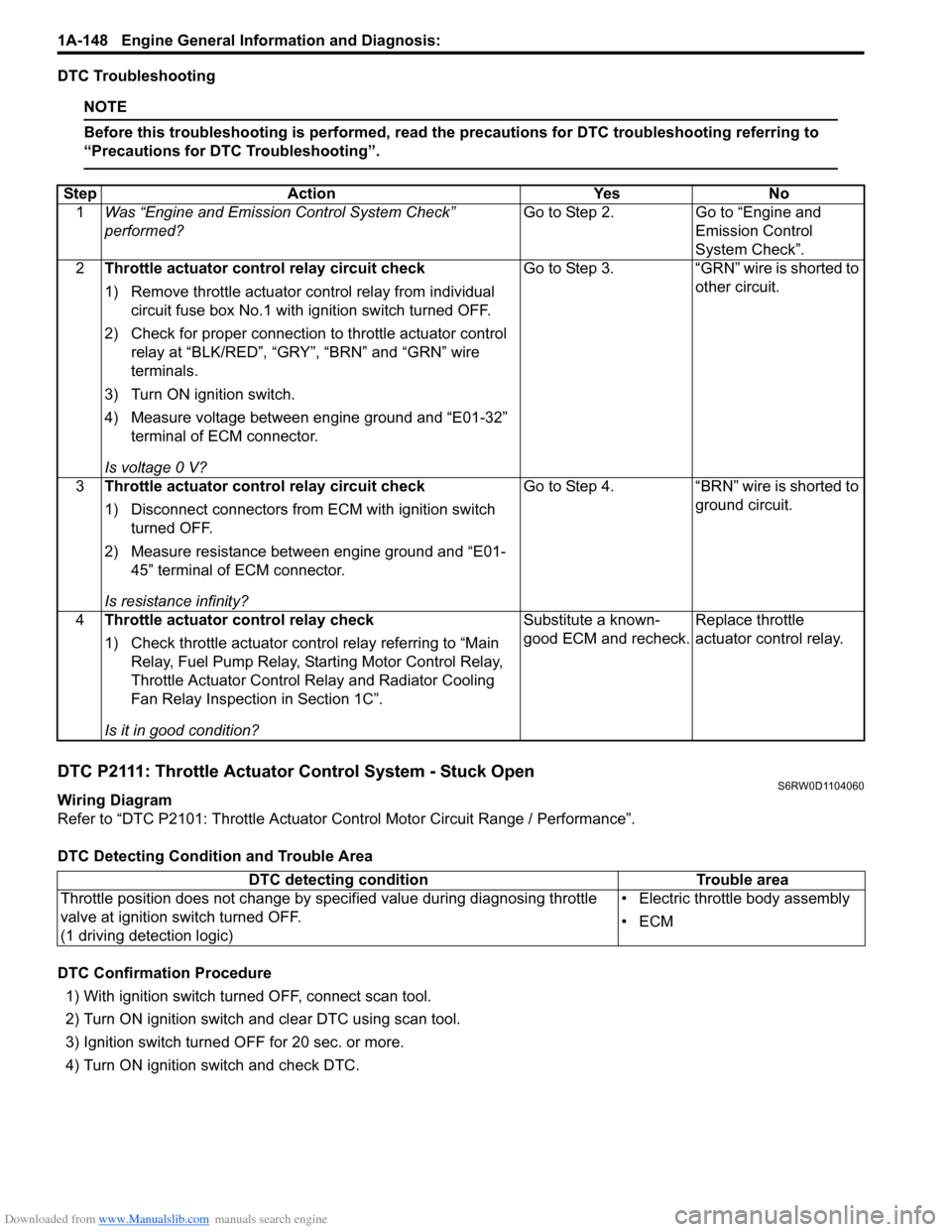
Downloaded from www.Manualslib.com manuals search engine 1A-148 Engine General Information and Diagnosis:
DTC Troubleshooting
NOTE
Before this troubleshooting is performed, read the precautions for DTC troubleshooting referring to
“Precautions for DTC Troubleshooting”.
DTC P2111: Throttle Actuator Control System - Stuck OpenS6RW0D1104060
Wiring Diagram
Refer to “DTC P2101: Throttle Actuator Control Motor Circuit Range / Performance”.
DTC Detecting Condition and Trouble Area
DTC Confirmation Procedure
1) With ignition switch turned OFF, connect scan tool.
2) Turn ON ignition switch and clear DTC using scan tool.
3) Ignition switch turned OFF for 20 sec. or more.
4) Turn ON ignition switch and check DTC. Step Action Yes No
1Was “Engine and Emission Control System Check”
performed?Go to Step 2. Go to “Engine and
Emission Control
System Check”.
2Throttle actuator control relay circuit check
1) Remove throttle actuator control relay from individual
circuit fuse box No.1 with ignition switch turned OFF.
2) Check for proper connection to throttle actuator control
relay at “BLK/RED”, “GRY”, “BRN” and “GRN” wire
terminals.
3) Turn ON ignition switch.
4) Measure voltage between engine ground and “E01-32”
terminal of ECM connector.
Is voltage 0 V?Go to Step 3. “GRN” wire is shorted to
other circuit.
3Throttle actuator control relay circuit check
1) Disconnect connectors from ECM with ignition switch
turned OFF.
2) Measure resistance between engine ground and “E01-
45” terminal of ECM connector.
Is resistance infinity?Go to Step 4. “BRN” wire is shorted to
ground circuit.
4Throttle actuator control relay check
1) Check throttle actuator control relay referring to “Main
Relay, Fuel Pump Relay, Starting Motor Control Relay,
Throttle Actuator Control Relay and Radiator Cooling
Fan Relay Inspection in Section 1C”.
Is it in good condition?Substitute a known-
good ECM and recheck.Replace throttle
actuator control relay.
DTC detecting condition Trouble area
Throttle position does not change by specified value during diagnosing throttle
valve at ignition switch turned OFF.
(1 driving detection logic)• Electric throttle body assembly
•ECM
Page 227 of 1556
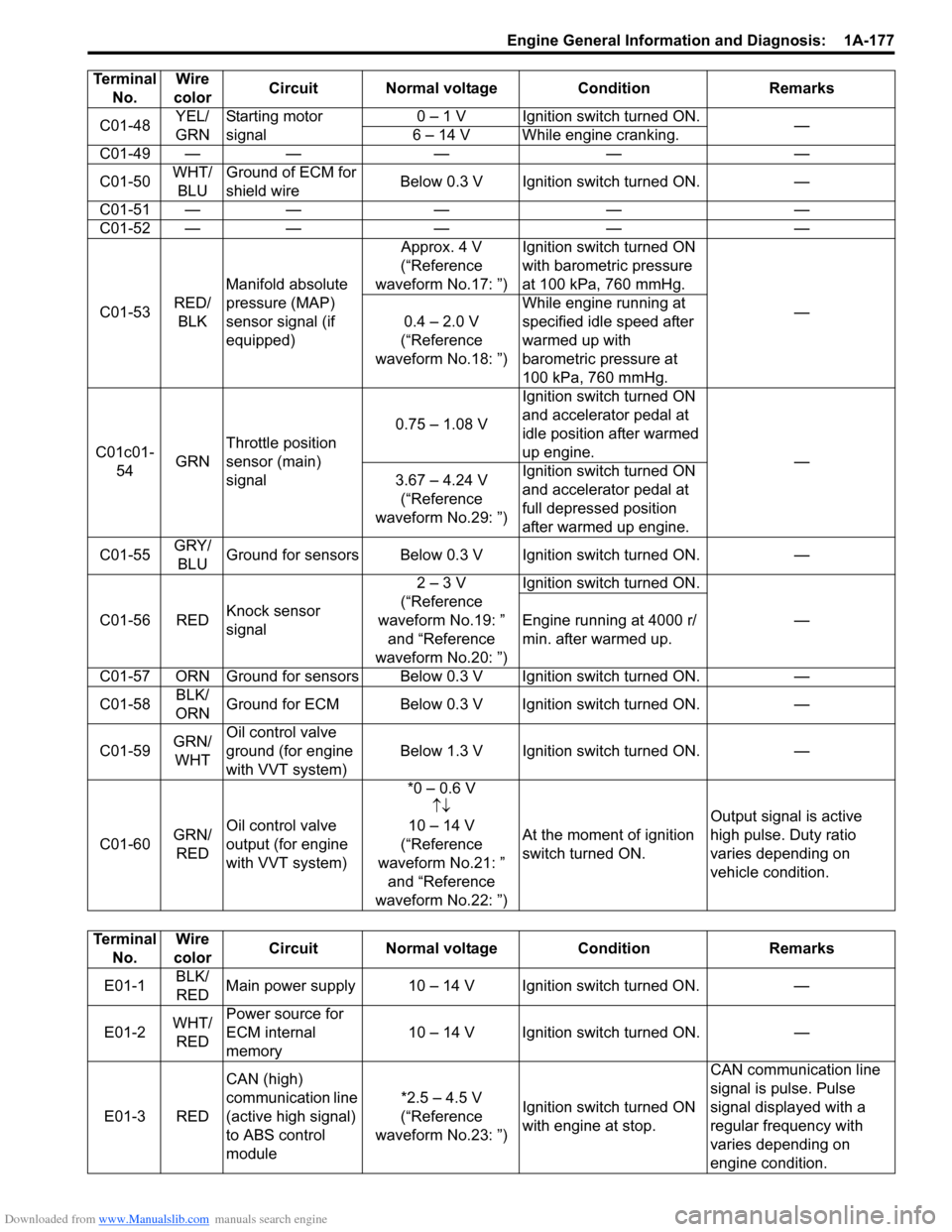
Downloaded from www.Manualslib.com manuals search engine Engine General Information and Diagnosis: 1A-177
C01-48YEL/
GRNStarting motor
signal0 – 1 V Ignition switch turned ON.
—
6 – 14 V While engine cranking.
C01-49 — — — — —
C01-50WHT/
BLUGround of ECM for
shield wireBelow 0.3 V Ignition switch turned ON. —
C01-51 — — — — —
C01-52 — — — — —
C01-53RED/
BLKManifold absolute
pressure (MAP)
sensor signal (if
equipped)Approx. 4 V
(“Reference
waveform No.17: ”)Ignition switch turned ON
with barometric pressure
at 100 kPa, 760 mmHg.
—
0.4 – 2.0 V
(“Reference
waveform No.18: ”)While engine running at
specified idle speed after
warmed up with
barometric pressure at
100 kPa, 760 mmHg.
C01c01-
54GRNThrottle position
sensor (main)
signal0.75 – 1.08 VIgnition switch turned ON
and accelerator pedal at
idle position after warmed
up engine.
—
3.67 – 4.24 V
(“Reference
waveform No.29: ”)Ignition switch turned ON
and accelerator pedal at
full depressed position
after warmed up engine.
C01-55GRY/
BLUGround for sensors Below 0.3 V Ignition switch turned ON. —
C01-56 REDKnock sensor
signal2 – 3 V
(“Reference
waveform No.19: ”
and “Reference
waveform No.20: ”)Ignition switch turned ON.
— Engine running at 4000 r/
min. after warmed up.
C01-57 ORN Ground for sensors Below 0.3 V Ignition switch turned ON. —
C01-58BLK/
ORNGround for ECM Below 0.3 V Ignition switch turned ON. —
C01-59GRN/
WHTOil control valve
ground (for engine
with VVT system)Below 1.3 V Ignition switch turned ON. —
C01-60GRN/
REDOil control valve
output (for engine
with VVT system)*0 – 0.6 V
↑↓
10 – 14 V
(“Reference
waveform No.21: ”
and “Reference
waveform No.22: ”)At the moment of ignition
switch turned ON.Output signal is active
high pulse. Duty ratio
varies depending on
vehicle condition. Terminal
No.Wire
colorCircuit Normal voltage Condition Remarks
Terminal
No.Wire
colorCircuit Normal voltage Condition Remarks
E01-1BLK/
REDMain power supply 10 – 14 V Ignition switch turned ON. —
E01-2WHT/
REDPower source for
ECM internal
memory10 – 14 V Ignition switch turned ON. —
E01-3 REDCAN (high)
communication line
(active high signal)
to ABS control
module*2.5 – 4.5 V
(“Reference
waveform No.23: ”)Ignition switch turned ON
with engine at stop.CAN communication line
signal is pulse. Pulse
signal displayed with a
regular frequency with
varies depending on
engine condition.
Page 249 of 1556
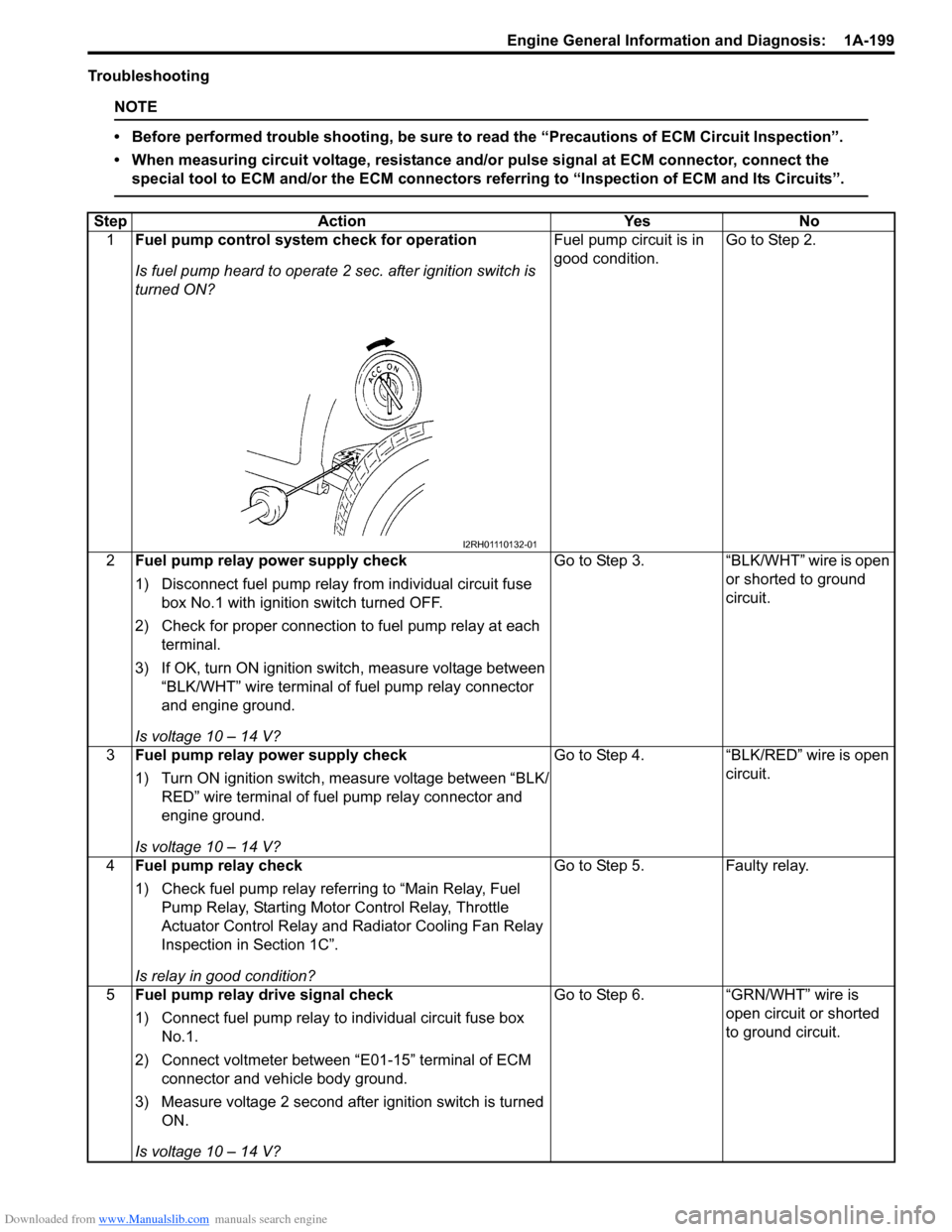
Downloaded from www.Manualslib.com manuals search engine Engine General Information and Diagnosis: 1A-199
Troubleshooting
NOTE
• Before performed trouble shooting, be sure to read the “Precautions of ECM Circuit Inspection”.
• When measuring circuit voltage, resistance and/or pulse signal at ECM connector, connect the
special tool to ECM and/or the ECM connectors referring to “Inspection of ECM and Its Circuits”.
Step Action Yes No
1Fuel pump control system check for operation
Is fuel pump heard to operate 2 sec. after ignition switch is
turned ON?Fuel pump circuit is in
good condition.Go to Step 2.
2Fuel pump relay power supply check
1) Disconnect fuel pump relay from individual circuit fuse
box No.1 with ignition switch turned OFF.
2) Check for proper connection to fuel pump relay at each
terminal.
3) If OK, turn ON ignition switch, measure voltage between
“BLK/WHT” wire terminal of fuel pump relay connector
and engine ground.
Is voltage 10 – 14 V?Go to Step 3. “BLK/WHT” wire is open
or shorted to ground
circuit.
3Fuel pump relay power supply check
1) Turn ON ignition switch, measure voltage between “BLK/
RED” wire terminal of fuel pump relay connector and
engine ground.
Is voltage 10 – 14 V?Go to Step 4. “BLK/RED” wire is open
circuit.
4Fuel pump relay check
1) Check fuel pump relay referring to “Main Relay, Fuel
Pump Relay, Starting Motor Control Relay, Throttle
Actuator Control Relay and Radiator Cooling Fan Relay
Inspection in Section 1C”.
Is relay in good condition?Go to Step 5. Faulty relay.
5Fuel pump relay drive signal check
1) Connect fuel pump relay to individual circuit fuse box
No.1.
2) Connect voltmeter between “E01-15” terminal of ECM
connector and vehicle body ground.
3) Measure voltage 2 second after ignition switch is turned
ON.
Is voltage 10 – 14 V?Go to Step 6. “GRN/WHT” wire is
open circuit or shorted
to ground circuit.
I2RH01110132-01