terminal SUZUKI SX4 2006 1.G Service Workshop Manual
[x] Cancel search | Manufacturer: SUZUKI, Model Year: 2006, Model line: SX4, Model: SUZUKI SX4 2006 1.GPages: 1556, PDF Size: 37.31 MB
Page 933 of 1556
Downloaded from www.Manualslib.com manuals search engine Heater and Ventilation: 7A-5
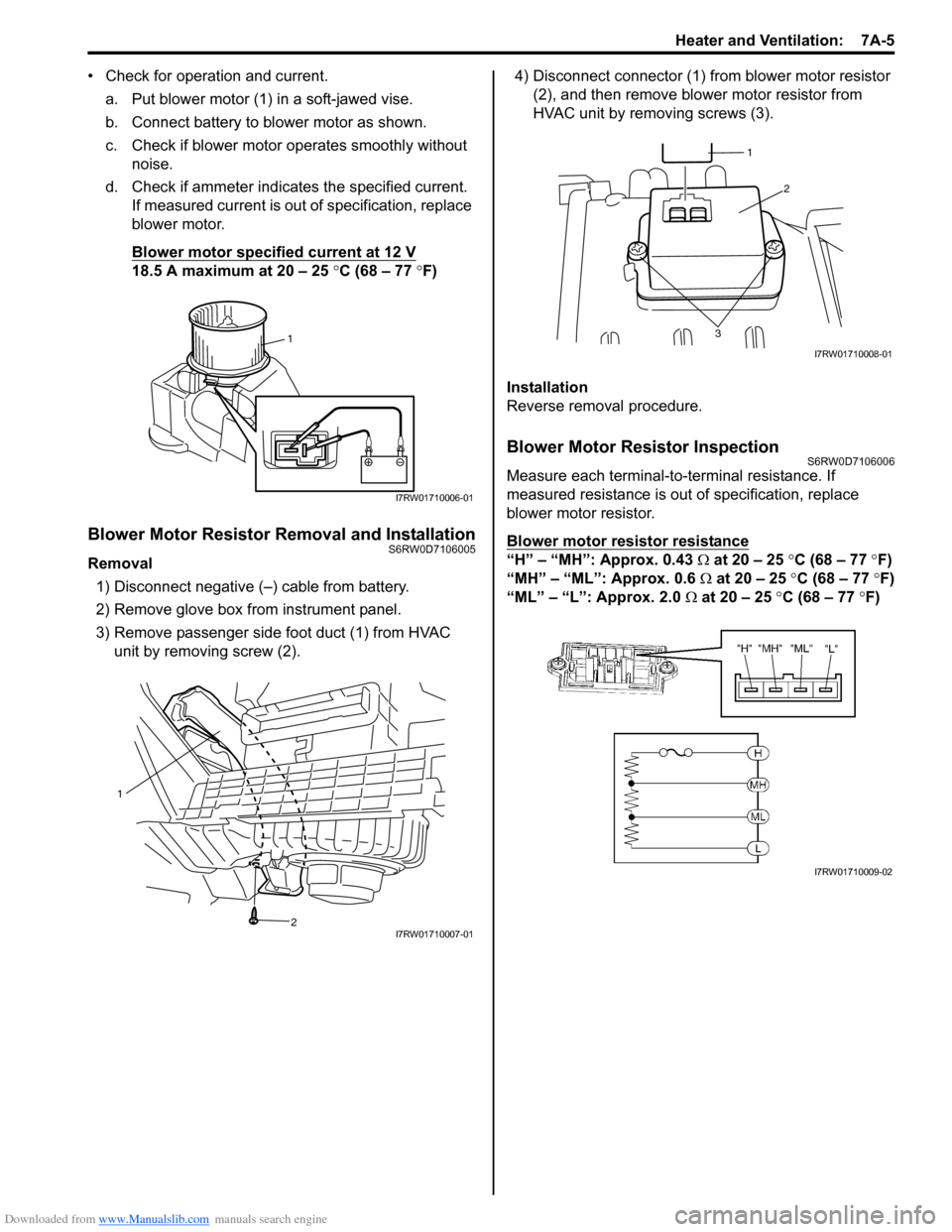
• Check for operation and current.
a. Put blower motor (1) in a soft-jawed vise.
b. Connect battery to blower motor as shown.
c. Check if blower motor operates smoothly without
noise.
d. Check if ammeter indicates the specified current.
If measured current is out of specification, replace
blower motor.
Blower motor specified current at 12 V
18.5 A maximum at 20 – 25 °C (68 – 77 °F)
Blower Motor Resistor Removal and InstallationS6RW0D7106005
Removal
1) Disconnect negative (–) cable from battery.
2) Remove glove box from instrument panel.
3) Remove passenger side foot duct (1) from HVAC
unit by removing screw (2).4) Disconnect connector (1) from blower motor resistor
(2), and then remove blower motor resistor from
HVAC unit by removing screws (3).
Installation
Reverse removal procedure.
Blower Motor Resistor InspectionS6RW0D7106006
Measure each terminal-to-terminal resistance. If
measured resistance is out of specification, replace
blower motor resistor.
Blower motor resistor resistance
“H” – “MH”: Approx. 0.43 Ω at 20 – 25 °C (68 – 77 °F)
“MH” – “ML”: Approx. 0.6 Ω at 20 – 25 °C (68 – 77 °F)
“ML” – “L”: Approx. 2.0 Ω at 20 – 25 °C (68 – 77 °F)
1
I7RW01710006-01
1
2
I7RW01710007-01
2
3
1
I7RW01710008-01
I7RW01710009-02
Page 934 of 1556
Downloaded from www.Manualslib.com manuals search engine 7A-6 Heater and Ventilation:
Blower Motor Relay InspectionS6RW0D7106007
1) Disconnect negative (–) cable at battery.
2) Disable air bag system referring to “Disabling Air
Bag System in Section 8B”.
3) Remove junction block assembly (2).
4) Disconnect blower motor relay (1) from junction
block assembly (2).
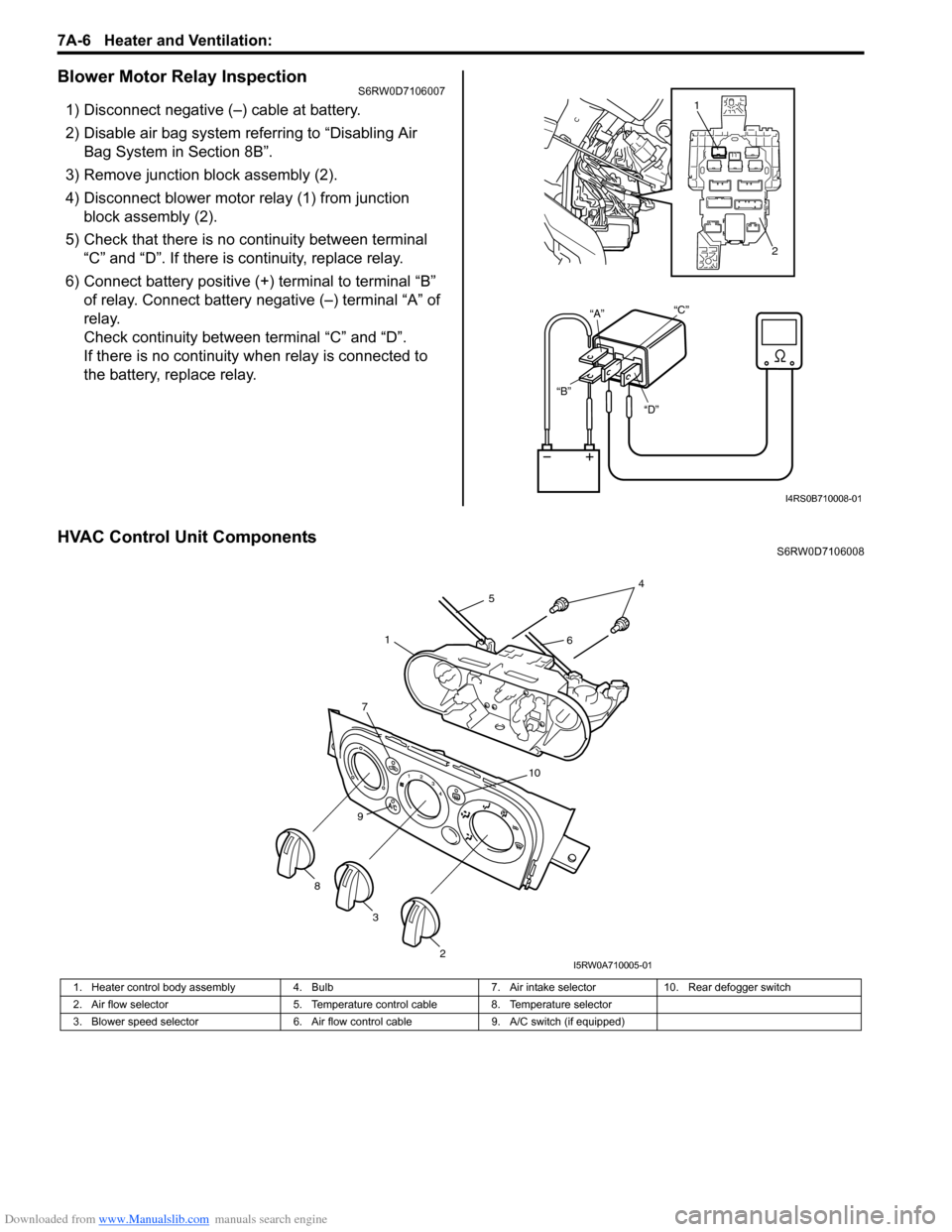
5) Check that there is no continuity between terminal
“C” and “D”. If there is continuity, replace relay.
6) Connect battery positive (+) terminal to terminal “B”
of relay. Connect battery negative (–) terminal “A” of
relay.
Check continuity between terminal “C” and “D”.
If there is no continuity when relay is connected to
the battery, replace relay.
HVAC Control Unit ComponentsS6RW0D7106008
“D” “B”“A”“C”
1
2
I4RS0B710008-01
1. Heater control body assembly 4. Bulb 7. Air intake selector 10. Rear defogger switch
2. Air flow selector 5. Temperature control cable 8. Temperature selector
3. Blower speed selector 6. Air flow control cable 9. A/C switch (if equipped)
7
10
9
2
3 8
45
61
I5RW0A710005-01
Page 937 of 1556
Downloaded from www.Manualslib.com manuals search engine Heater and Ventilation: 7A-9
Blower Speed Selector InspectionS6RW0D7106010
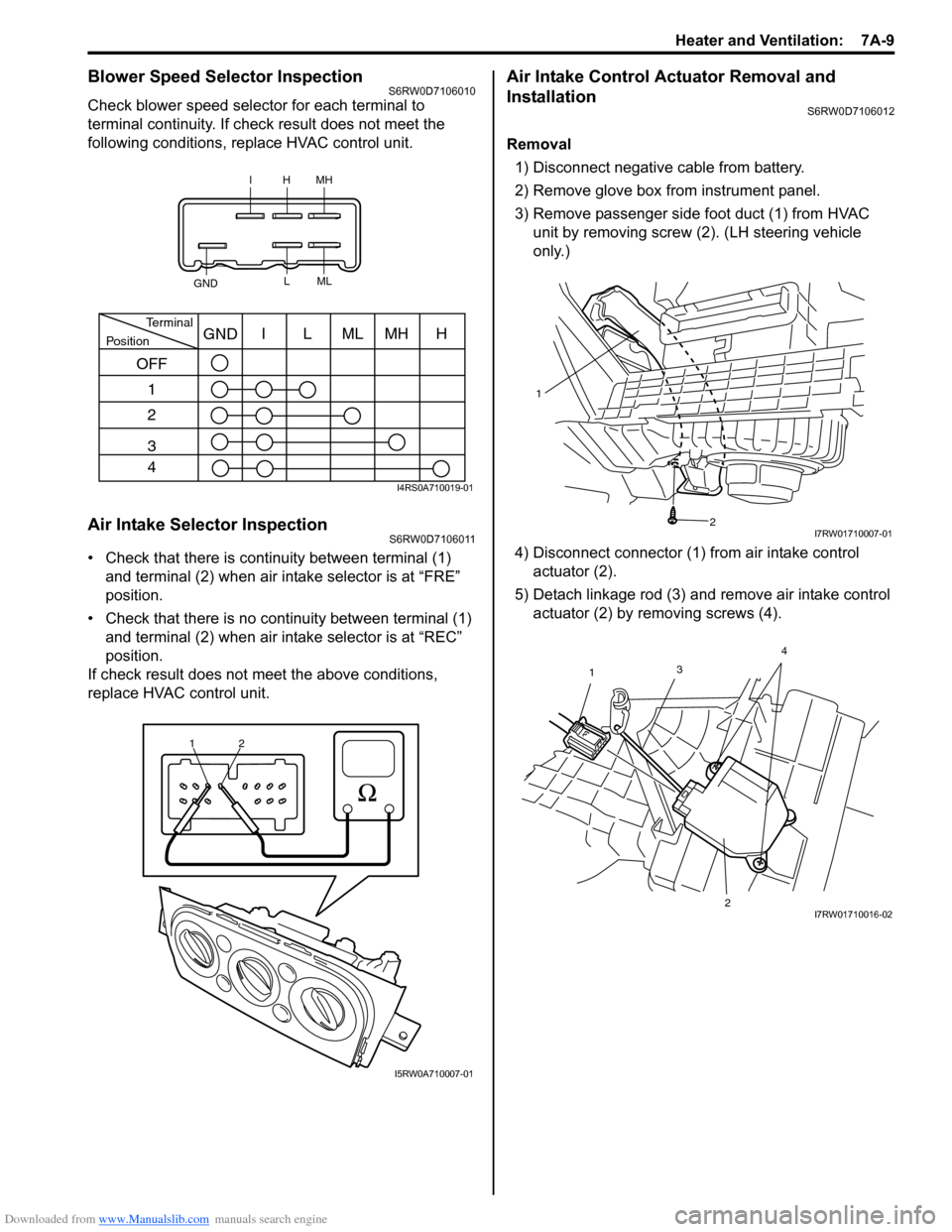
Check blower speed selector for each terminal to
terminal continuity. If check result does not meet the
following conditions, replace HVAC control unit.
Air Intake Selector InspectionS6RW0D7106011
• Check that there is continuity between terminal (1)
and terminal (2) when air intake selector is at “FRE”
position.
• Check that there is no continuity between terminal (1)
and terminal (2) when air intake selector is at “REC”
position.
If check result does not meet the above conditions,
replace HVAC control unit.
Air Intake Control Actuator Removal and
Installation
S6RW0D7106012
Removal
1) Disconnect negative cable from battery.
2) Remove glove box from instrument panel.
3) Remove passenger side foot duct (1) from HVAC
unit by removing screw (2). (LH steering vehicle
only.)
4) Disconnect connector (1) from air intake control
actuator (2).
5) Detach linkage rod (3) and remove air intake control
actuator (2) by removing screws (4).
IHMH
GNDLML
PositionTerminalI
OFF
1
2
3
4LMLMHHGND
I4RS0A710019-01
1
2
I5RW0A710007-01
1
2
I7RW01710007-01
3
1
24I7RW01710016-02
Page 938 of 1556

Downloaded from www.Manualslib.com manuals search engine 7A-10 Heater and Ventilation:
Installation
Reverse removal procedure noting the following
instruction.
• Be sure to insert the linkage rod (1) into the hole (2) of
air intake control actuator.Air Intake Control Actuator InspectionS6RW0D7106013
Check air intake control actuator as follows:
1) Using service wire, connect battery positive terminal
to “d” terminal and battery negative terminal to
terminal “a”. And, check if air intake selector link
operates smoothly and it stops at “FRE” position (1).
2) Using service wire, connect battery positive terminal
to “d” terminal and battery negative terminal to
terminal “c”. And, check if air intake selector link
operates smoothly and it stops at “REC” position (2).
3) For auto A/C model, using service wire, connect
battery positive terminal to “d” terminal and battery
negative terminal to “b” terminal. And, check air
intake selector link operates smoothly and it stops at
MIX position (3).
If malfunction is found, replace air intake control
actuator.
21
I7RW01710017-02
4. Motor rotation direction
“a” “b” “c” “d”
1 3
2
4“a”
“b”
“c” “d”
I7RW01710018-05
Page 952 of 1556
Downloaded from www.Manualslib.com manuals search engine 7B-12 Air Conditioning System: Manual Type
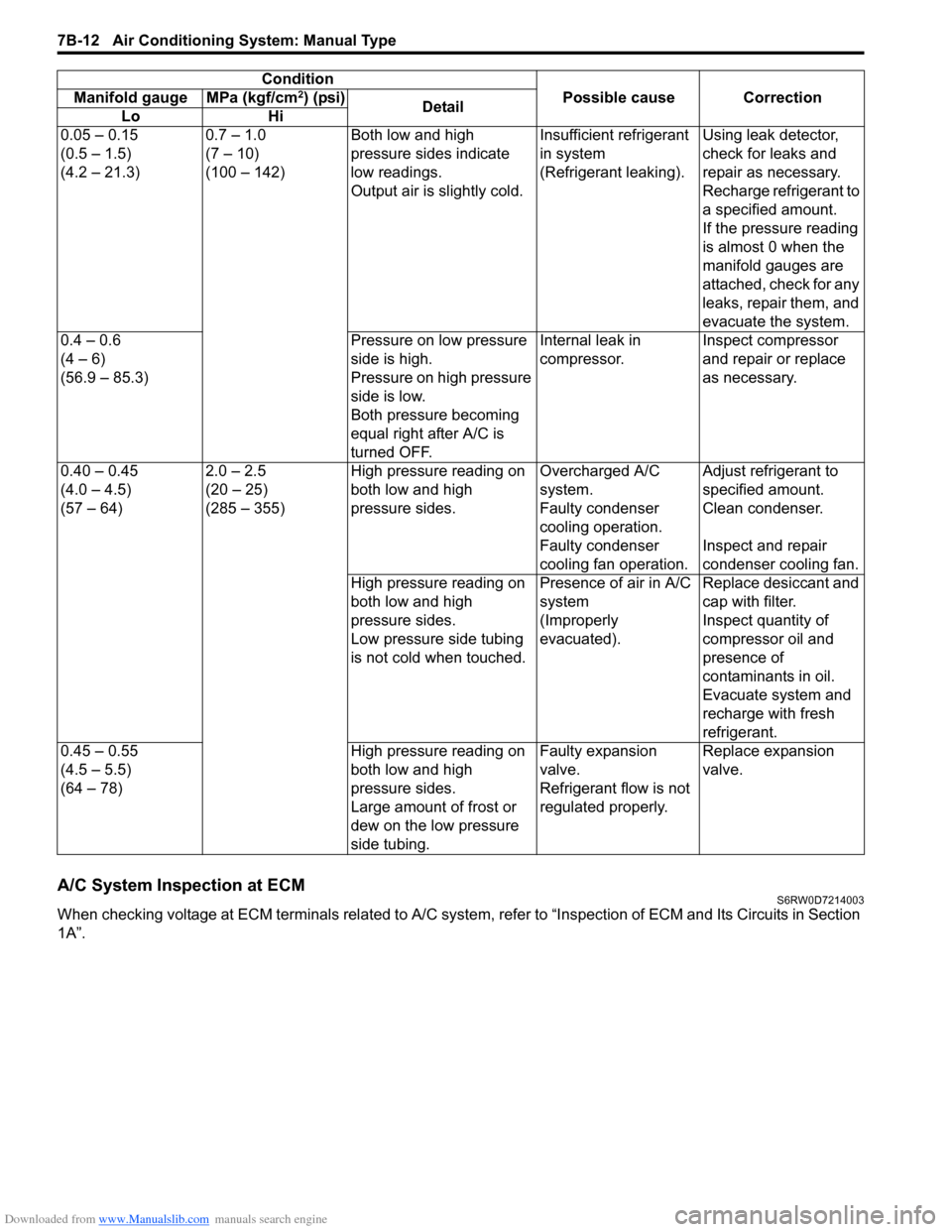
A/C System Inspection at ECMS6RW0D7214003
When checking voltage at ECM terminals related to A/C system, refer to “Inspection of ECM and Its Circuits in Section
1A”.0.05 – 0.15
(0.5 – 1.5)
(4.2 – 21.3)0.7 – 1.0
(7 – 10)
(100 – 142)Both low and high
pressure sides indicate
low readings.
Output air is slightly cold.Insufficient refrigerant
in system
(Refrigerant leaking).Using leak detector,
check for leaks and
repair as necessary.
Recharge refrigerant to
a specified amount.
If the pressure reading
is almost 0 when the
manifold gauges are
attached, check for any
leaks, repair them, and
evacuate the system.
0.4 – 0.6
(4 – 6)
(56.9 – 85.3)Pressure on low pressure
side is high.
Pressure on high pressure
side is low.
Both pressure becoming
equal right after A/C is
turned OFF.Internal leak in
compressor.Inspect compressor
and repair or replace
as necessary.
0.40 – 0.45
(4.0 – 4.5)
(57 – 64)2.0 – 2.5
(20 – 25)
(285 – 355)High pressure reading on
both low and high
pressure sides.Overcharged A/C
system.Adjust refrigerant to
specified amount.
Faulty condenser
cooling operation.Clean condenser.
Faulty condenser
cooling fan operation.Inspect and repair
condenser cooling fan.
High pressure reading on
both low and high
pressure sides.
Low pressure side tubing
is not cold when touched.Presence of air in A/C
system
(Improperly
evacuated).Replace desiccant and
cap with filter.
Inspect quantity of
compressor oil and
presence of
contaminants in oil.
Evacuate system and
recharge with fresh
refrigerant.
0.45 – 0.55
(4.5 – 5.5)
(64 – 78)High pressure reading on
both low and high
pressure sides.
Large amount of frost or
dew on the low pressure
side tubing.Faulty expansion
valve.
Refrigerant flow is not
regulated properly.Replace expansion
valve. Condition
Possible cause Correction Manifold gauge MPa (kgf/cm
2) (psi)
Detail
Lo Hi
Page 963 of 1556
Downloaded from www.Manualslib.com manuals search engine Air Conditioning System: Manual Type 7B-23
Condenser Cooling Fan InspectionS6RW0D7216003
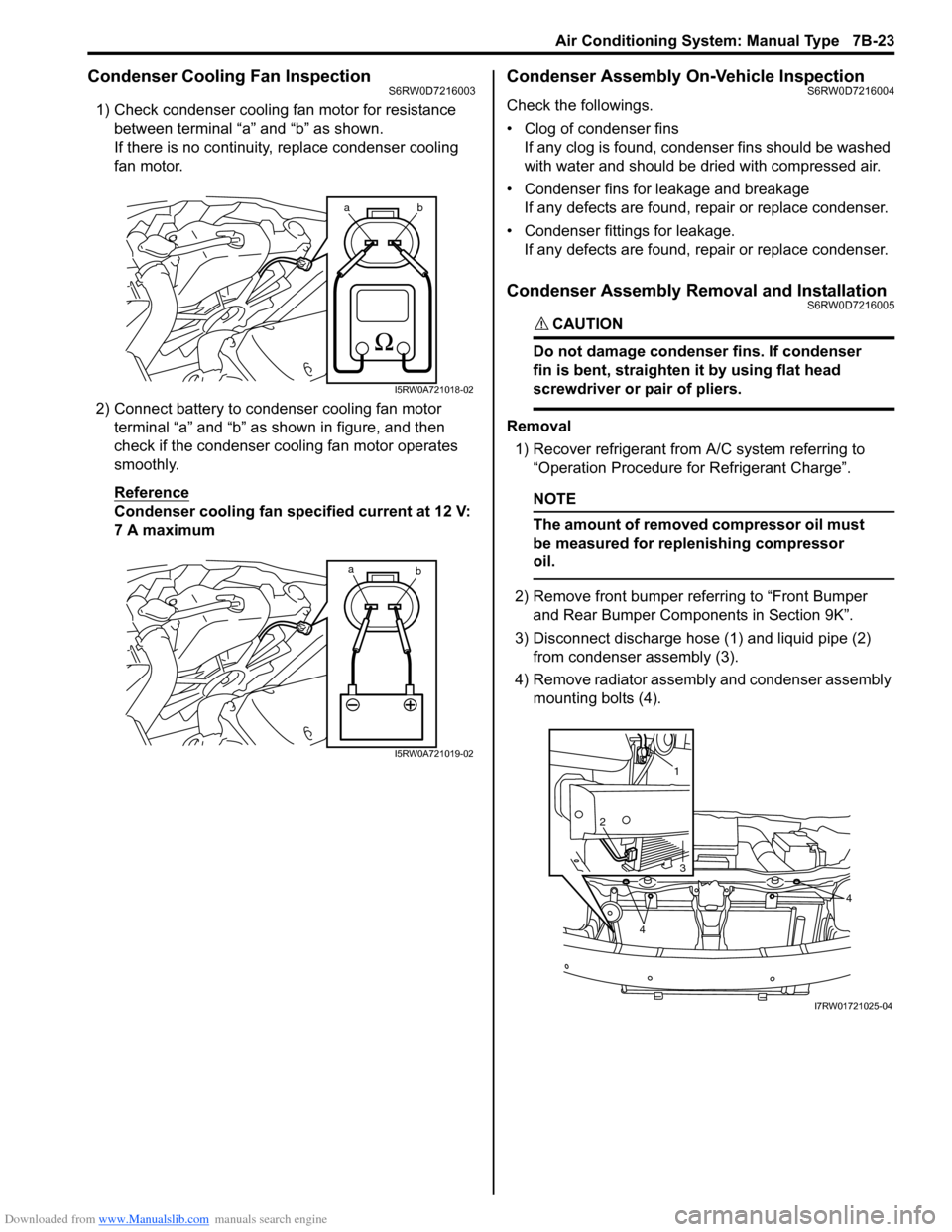
1) Check condenser cooling fan motor for resistance
between terminal “a” and “b” as shown.
If there is no continuity, replace condenser cooling
fan motor.
2) Connect battery to condenser cooling fan motor
terminal “a” and “b” as shown in figure, and then
check if the condenser cooling fan motor operates
smoothly.
Reference
Condenser cooling fan specified current at 12 V:
7 A maximum
Condenser Assembly On-Vehicle InspectionS6RW0D7216004
Check the followings.
• Clog of condenser fins
If any clog is found, condenser fins should be washed
with water and should be dried with compressed air.
• Condenser fins for leakage and breakage
If any defects are found, repair or replace condenser.
• Condenser fittings for leakage.
If any defects are found, repair or replace condenser.
Condenser Assembly Removal and InstallationS6RW0D7216005
CAUTION!
Do not damage condenser fins. If condenser
fin is bent, straighten it by using flat head
screwdriver or pair of pliers.
Removal
1) Recover refrigerant from A/C system referring to
“Operation Procedure for Refrigerant Charge”.
NOTE
The amount of removed compressor oil must
be measured for replenishing compressor
oil.
2) Remove front bumper referring to “Front Bumper
and Rear Bumper Components in Section 9K”.
3) Disconnect discharge hose (1) and liquid pipe (2)
from condenser assembly (3).
4) Remove radiator assembly and condenser assembly
mounting bolts (4).
ab
I5RW0A721018-02
a
b
I5RW0A721019-02
1
2
3
4
4
I7RW01721025-04
Page 968 of 1556

Downloaded from www.Manualslib.com manuals search engine 7B-28 Air Conditioning System: Manual Type
Evaporator Temperature Sensor InspectionS6RW0D7216011
Check resistance between terminals of evaporator
temperature sensor (1).
If check results are as not specified, replace evaporator
temperature sensor.
Evaporator temperature sensor resistance
0 °C (32 °F): 6.6 – 6.8 kΩ
25 °C (77 °F): 2.0 – 2.1 kΩ
Expansion Valve Removal and InstallationS6RW0D7216012
Removal
1) Recover refrigerant from the A/C system with
recovery and recycling equipment referring to
“Recovery” in “Operation Procedure for Refrigerant
Charge”.
2) Loosen a bolt (1) and remove pipes from expansion
valve (2).
3) Loosen bolts (3) and remove expansion valve.
Installation
Reverse removal procedure noting the following
instructions.
• Apply compressor oil to O-ring of expansion valve and
pipes.
• Tighten expansion valve bolts to specified torque.
Tightening torque
Expansion valve bolt: 4.5 N·m (0.45 kgf-m, 3.5 lb-
ft)
• Evacuate and charge the A/C system referring to
“Evacuation” and “Charge” in “Operation Procedure
for Refrigerant Charge”.
Expansion Valve InspectionS6RW0D7216013
Refer to “A/C System Performance Inspection”.
[A]: Resistance
[B]: Temperature
(kΩ)
6.75
2.00
0
3225
77 [A]
[B]
(˚C)
(˚F)
1
I7RW01721020-01
1
22 3
I4RS0A720028-01
Page 969 of 1556

Downloaded from www.Manualslib.com manuals search engine Air Conditioning System: Manual Type 7B-29
A/C Refrigerant Pressure Sensor and Its Circuit
Inspection
S6RW0D7216014
1) Disconnect A/C refrigerant pressure sensor
connector.
2) Turn ignition switch to ON position.
3) Check if voltage between “RED” wire terminal and
“ORN” wire terminal of A/C refrigerant pressure
sensor connector is 4.75 V to 5.25 V.
If not, check A/C refrigerant pressure sensor circuit.
4) Connect A/C refrigerant pressure sensor connector
with ignition switch turned OFF.
5) Connect manifold gauge set to the charging valves.
6) Check A/C refrigerant pressure sensor voltage of
ECM connector referring to “A/C System Inspection
at ECM”.
If voltage is not as specified below, replace A/C
refrigerant pressure sensor.
A/C refrigerant pressure sensor voltage
specifications (A/C refrigerant pressure measured
by manifold gauge)
0.8 MPa (8.0 kgf/cm2, 116 psi): 1.40 – 1.78 V
1.4 MPa (14 kgf/cm2, 203 psi): 2.18 – 2.64 V
1.6 MPa (16 kgf/cm2, 232 psi): 2.44 – 2.92 V
1.8 MPa (18 kgf/cm2, 261 psi): 2.70 – 3.21 V
A/C Refrigerant Pressure Sensor Removal and
Installation
S6RW0D7216015
Removal
1) Recover refrigerant from the A/C system with the
recovery and recycling equipment referring to
“Recovery” in “Operation Procedure for Refrigerant
Charge”.
2) Disconnect negative (–) cable from battery.
3) Disconnect A/C refrigerant pressure sensor
connector.
4) Remove A/C refrigerant pressure sensor (1) from
liquid pipe (2).Installation
Reverse removal procedure noting the following
instructions.
• Apply compressor oil to O-ring of A/C refrigerant
pressure sensor.
• Tighten A/C refrigerant pressure sensor to specified
torque.
Tightening torque
A/C refrigerant pressure sensor (a): 11 N·m (1.1
kgf-m, 8.0 lb-ft)
• Evacuate and charge the A/C system referring to
“Evacuation” and “Charge” in “Operation Procedure
for Refrigerant Charge”.
A/C Switch InspectionS6RW0D7216016
• Check that there is continuity between terminal (1)
and terminal (2) when A/C switch is at ON position.
• Check that there is no continuity between terminal (1)
and terminal (2) when A/C switch is at OFF position.
If check result does not meet the above conditions,
replace HVAC control unit.
2
1
I5RW0A721029-01
(a)
I5RW0A721030-01
1
2
I5RW0A721031-01
Page 970 of 1556

Downloaded from www.Manualslib.com manuals search engine 7B-30 Air Conditioning System: Manual Type
A/C System Relay InspectionS6RW0D7216017
NOTE
Do not use blue relay for the substitute of
white relay because internal durability of a
blue relay is different from the durability of a
white relay.
1) Disconnect negative (–) cable from battery.
2) Remove compressor relay (1) or condenser cooling
fan relay (2) from main fuse box (3).
3) Check that there is no continuity between terminal
“c” and “d”. If there is continuity, replace relay.
4) Connect battery positive (+) terminal to terminal “b”
of relay and battery negative (–) terminal to terminal
“a” of relay, and then check continuity between
terminal “c” and “d”. If there is no continuity, replace
relay.
Compressor Drive Belt Inspection and
Adjustment
S6RW0D7216018
Inspection
• Check compressor drive belt (1) for wear, crack,
deformation and cleanliness. If any defect is found,
replace the belt with new one referring to
“Compressor Drive Belt Removal and Installation”.
• Check compressor drive belt tension by measuring
how much it deflects when pushed intermediate point
between magnet clutch pulley (6) and crankshaft
pulley (3) with about 100 N (10 kg) force after rotating
crankshaft pulley 360°. If belt tension is out of
specification, adjust belt tension referring to
“Adjustment”.
Compressor drive belt tension
“a”
: 7 – 8 mm (0.28 – 0.31 in.)
NOTE
When replacing drive belt, adjust drive belt
tension to the following specifications.
New compressor drive belt tension “a”
: 6 – 7 mm (0.24 – 0.28 in.)
Adjustment
1) Loosen tension pulley nut (4).
2) Adjust belt tension by tighten or loosen tension
pulley adjusting bolt (5).
3) Tighten tension pulley nut.
4) Rotate the crankshaft pulley 360°, and then recheck
belt tension.
3
1
2
“a”
“b”“c”
“d”
I5RW0B721023-01
2. Tension pulley
I5RW0A721033-01
Page 974 of 1556
Downloaded from www.Manualslib.com manuals search engine 7B-34 Air Conditioning System: Manual Type
Installation
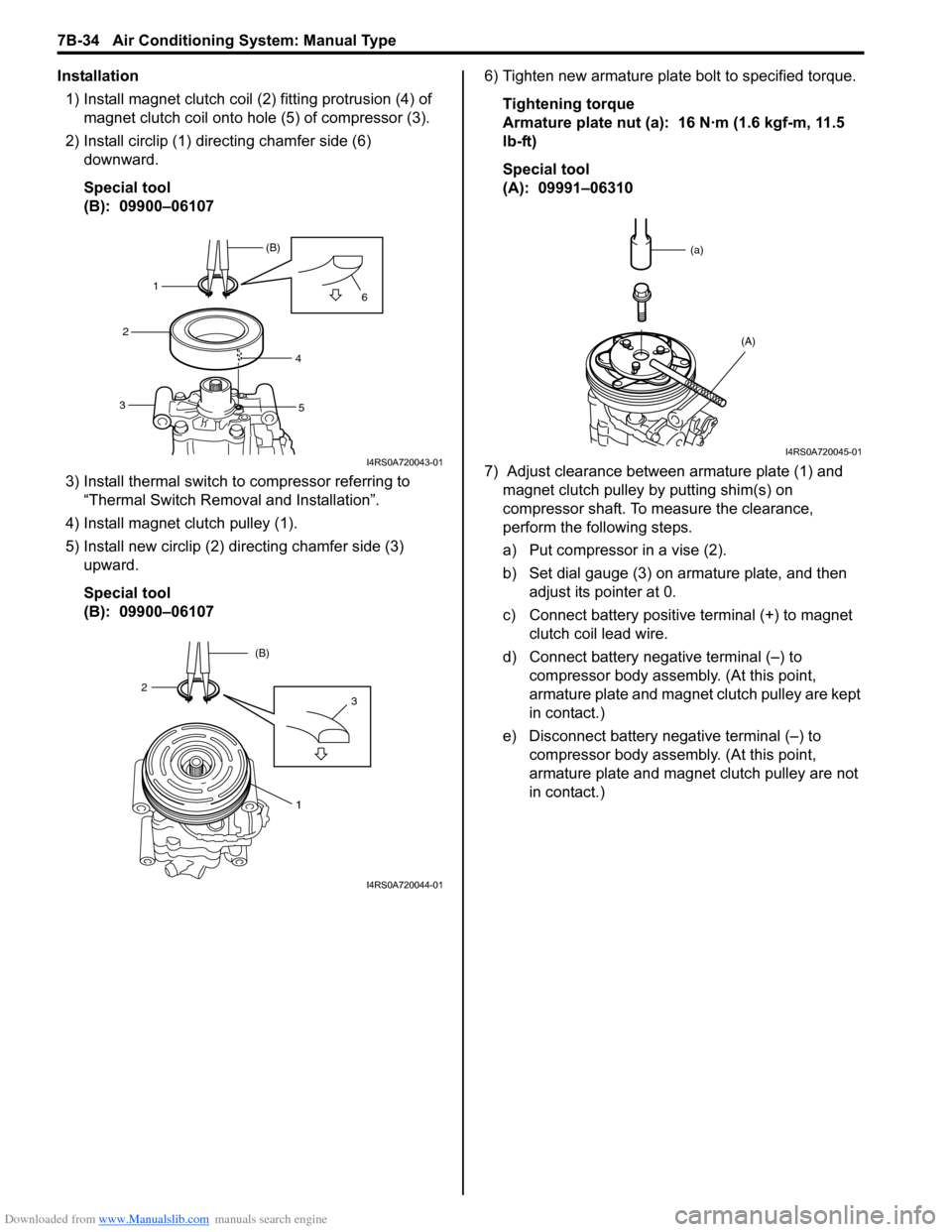
1) Install magnet clutch coil (2) fitting protrusion (4) of
magnet clutch coil onto hole (5) of compressor (3).
2) Install circlip (1) directing chamfer side (6)
downward.
Special tool
(B): 09900–06107
3) Install thermal switch to compressor referring to
“Thermal Switch Removal and Installation”.
4) Install magnet clutch pulley (1).
5) Install new circlip (2) directing chamfer side (3)
upward.
Special tool
(B): 09900–061076) Tighten new armature plate bolt to specified torque.
Tightening torque
Armature plate nut (a): 16 N·m (1.6 kgf-m, 11.5
lb-ft)
Special tool
(A): 09991–06310
7) Adjust clearance between armature plate (1) and
magnet clutch pulley by putting shim(s) on
compressor shaft. To measure the clearance,
perform the following steps.
a) Put compressor in a vise (2).
b) Set dial gauge (3) on armature plate, and then
adjust its pointer at 0.
c) Connect battery positive terminal (+) to magnet
clutch coil lead wire.
d) Connect battery negative terminal (–) to
compressor body assembly. (At this point,
armature plate and magnet clutch pulley are kept
in contact.)
e) Disconnect battery negative terminal (–) to
compressor body assembly. (At this point,
armature plate and magnet clutch pulley are not
in contact.)
1(B)
2
34
56
I4RS0A720043-01
1
32(B)
I4RS0A720044-01
(a)
(A)
I4RS0A720045-01