transmission SUZUKI SX4 2006 1.G Service Owner's Manual
[x] Cancel search | Manufacturer: SUZUKI, Model Year: 2006, Model line: SX4, Model: SUZUKI SX4 2006 1.GPages: 1556, PDF Size: 37.31 MB
Page 406 of 1556
Downloaded from www.Manualslib.com manuals search engine 1I-1 Starting System:
Engine
Starting System
Schematic and Routing Diagram
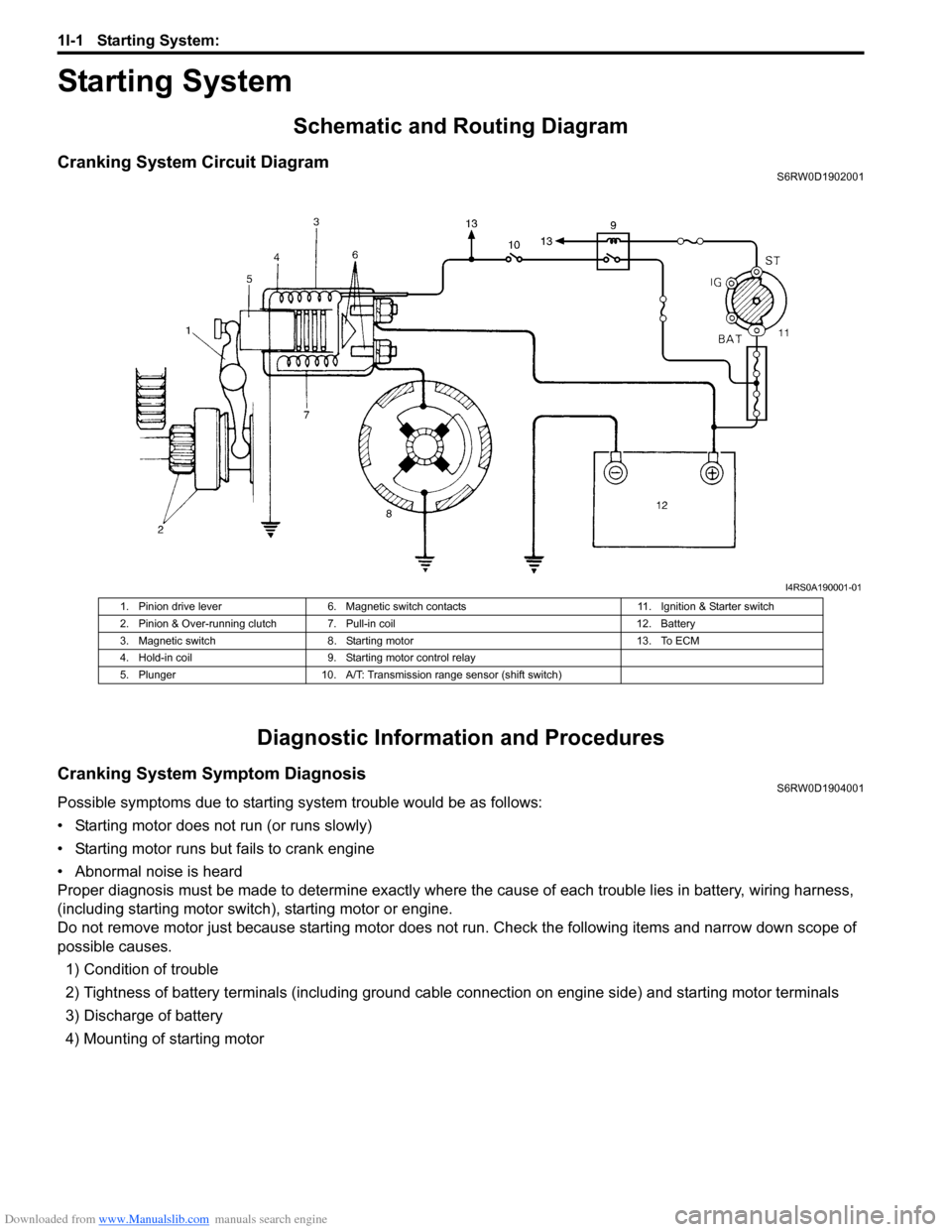
Cranking System Circuit DiagramS6RW0D1902001
Diagnostic Information and Procedures
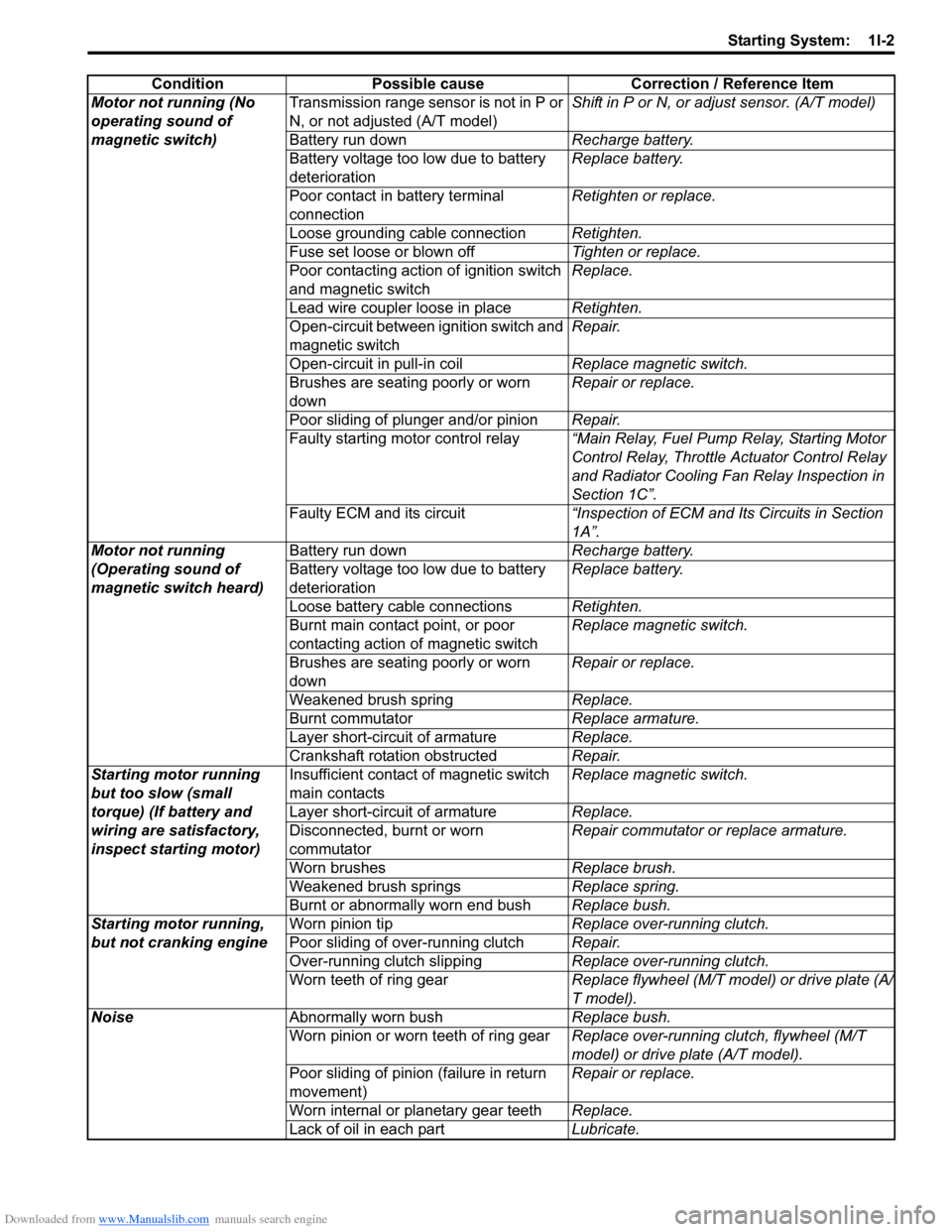
Cranking System Symptom DiagnosisS6RW0D1904001
Possible symptoms due to starting system trouble would be as follows:
• Starting motor does not run (or runs slowly)
• Starting motor runs but fails to crank engine
• Abnormal noise is heard
Proper diagnosis must be made to determine exactly where the cause of each trouble lies in battery, wiring harness,
(including starting motor switch), starting motor or engine.
Do not remove motor just because starting motor does not run. Check the following items and narrow down scope of
possible causes.
1) Condition of trouble
2) Tightness of battery terminals (including ground cable connection on engine side) and starting motor terminals
3) Discharge of battery
4) Mounting of starting motor
I4RS0A190001-01
1. Pinion drive lever 6. Magnetic switch contacts 11. Ignition & Starter switch
2. Pinion & Over-running clutch 7. Pull-in coil 12. Battery
3. Magnetic switch 8. Starting motor 13. To ECM
4. Hold-in coil 9. Starting motor control relay
5. Plunger 10. A/T: Transmission range sensor (shift switch)
Page 407 of 1556
Downloaded from www.Manualslib.com manuals search engine Starting System: 1I-2
Condition Possible cause Correction / Reference Item
Motor not running (No
operating sound of
magnetic switch)Transmission range sensor is not in P or
N, or not adjusted (A/T model)Shift in P or N, or adjust sensor. (A/T model)
Battery run downRecharge battery.
Battery voltage too low due to battery
deteriorationReplace battery.
Poor contact in battery terminal
connectionRetighten or replace.
Loose grounding cable connectionRetighten.
Fuse set loose or blown offTighten or replace.
Poor contacting action of ignition switch
and magnetic switchReplace.
Lead wire coupler loose in placeRetighten.
Open-circuit between ignition switch and
magnetic switchRepair.
Open-circuit in pull-in coilReplace magnetic switch.
Brushes are seating poorly or worn
downRepair or replace.
Poor sliding of plunger and/or pinionRepair.
Faulty starting motor control relay“Main Relay, Fuel Pump Relay, Starting Motor
Control Relay, Throttle Actuator Control Relay
and Radiator Cooling Fan Relay Inspection in
Section 1C”.
Faulty ECM and its circuit“Inspection of ECM and Its Circuits in Section
1A”.
Motor not running
(Operating sound of
magnetic switch heard)Battery run downRecharge battery.
Battery voltage too low due to battery
deteriorationReplace battery.
Loose battery cable connectionsRetighten.
Burnt main contact point, or poor
contacting action of magnetic switchReplace magnetic switch.
Brushes are seating poorly or worn
downRepair or replace.
Weakened brush springReplace.
Burnt commutatorReplace armature.
Layer short-circuit of armatureReplace.
Crankshaft rotation obstructedRepair.
Starting motor running
but too slow (small
torque) (If battery and
wiring are satisfactory,
inspect starting motor)Insufficient contact of magnetic switch
main contactsReplace magnetic switch.
Layer short-circuit of armatureReplace.
Disconnected, burnt or worn
commutatorRepair commutator or replace armature.
Worn brushesReplace brush.
Weakened brush springsReplace spring.
Burnt or abnormally worn end bushReplace bush.
Starting motor running,
but not cranking engineWorn pinion tipReplace over-running clutch.
Poor sliding of over-running clutchRepair.
Over-running clutch slippingReplace over-running clutch.
Worn teeth of ring gearReplace flywheel (M/T model) or drive plate (A/
T model).
NoiseAbnormally worn bushReplace bush.
Worn pinion or worn teeth of ring gearReplace over-running clutch, flywheel (M/T
model) or drive plate (A/T model).
Poor sliding of pinion (failure in return
movement)Repair or replace.
Worn internal or planetary gear teethReplace.
Lack of oil in each partLubricate.
Page 504 of 1556
Downloaded from www.Manualslib.com manuals search engine 3B-7 Differential:
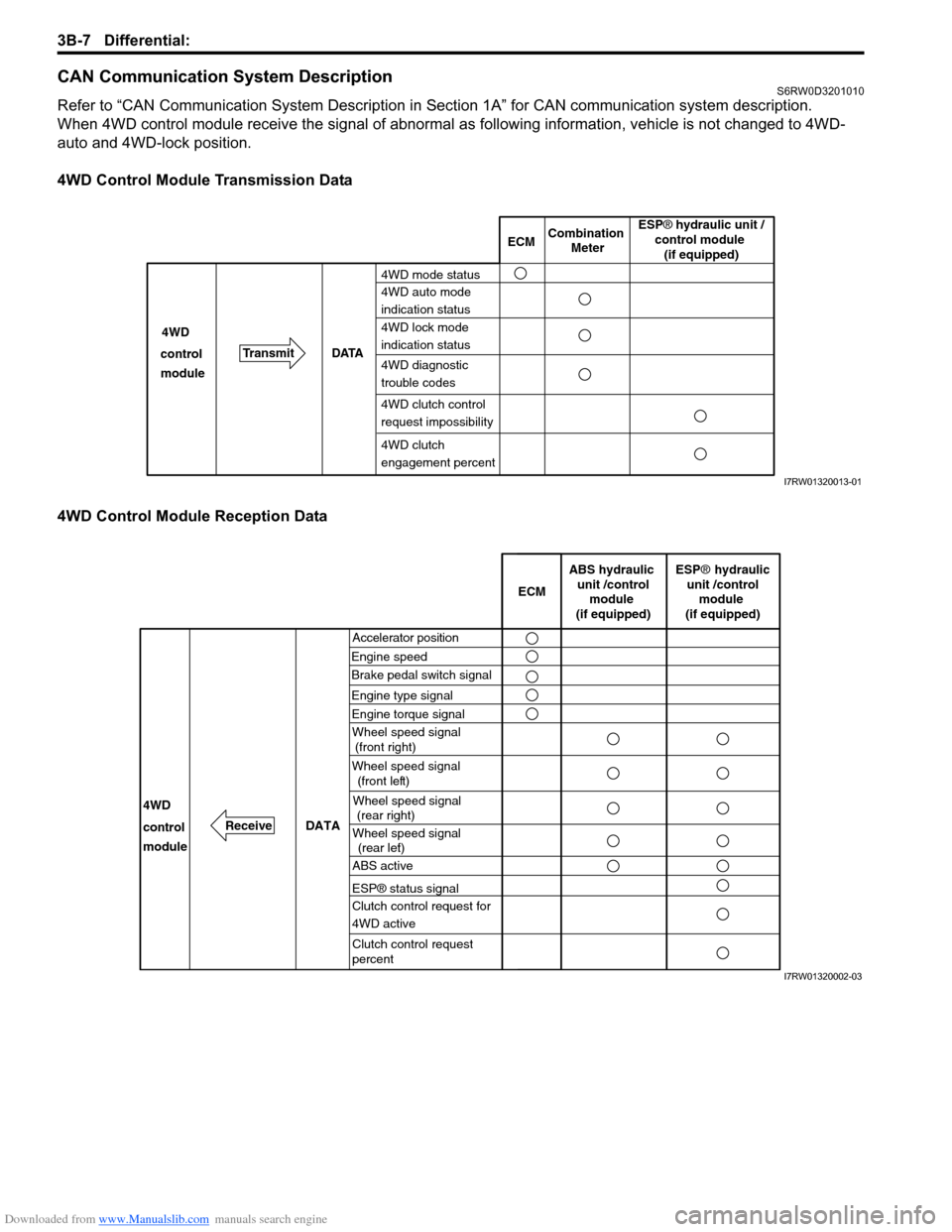
CAN Communication System DescriptionS6RW0D3201010
Refer to “CAN Communication System Description in Section 1A” for CAN communication system description.
When 4WD control module receive the signal of abnormal as following information, vehicle is not changed to 4WD-
auto and 4WD-lock position.
4WD Control Module Transmission Data
4WD Control Module Reception Data
ECMCombination
Meter
TransmitDATA 4WD
4WD mode status
4WD auto mode
indication status
4WD lock mode
indication status
4WD diagnostic
trouble codes control
module
4WD clutch
engagement percent
ESP® hydraulic unit /
control module
(if equipped)
4WD clutch control
request impossibility
I7RW01320013-01
Accelerator position
Engine speedECM
DATA
Brake pedal switch signal
4WD
control
moduleWheel speed signal
(front right)
Wheel speed signal
(front left)
Wheel speed signal
(rear right)
Wheel speed signal
(rear left)
ABS hydraulic
unit /control
module
(if equipped)
ESP® hydraulic
unit /control
module
(if equipped)
ABS active
ESP® status signal
Clutch control request for
4WD active
Clutch control request
percent
Engine type signal
Engine torque signal
Receive
I7RW01320002-03
Page 508 of 1556
Downloaded from www.Manualslib.com manuals search engine 3B-11 Differential:
Visual InspectionS6RW0D3204004
Check the following parts and systems visually.
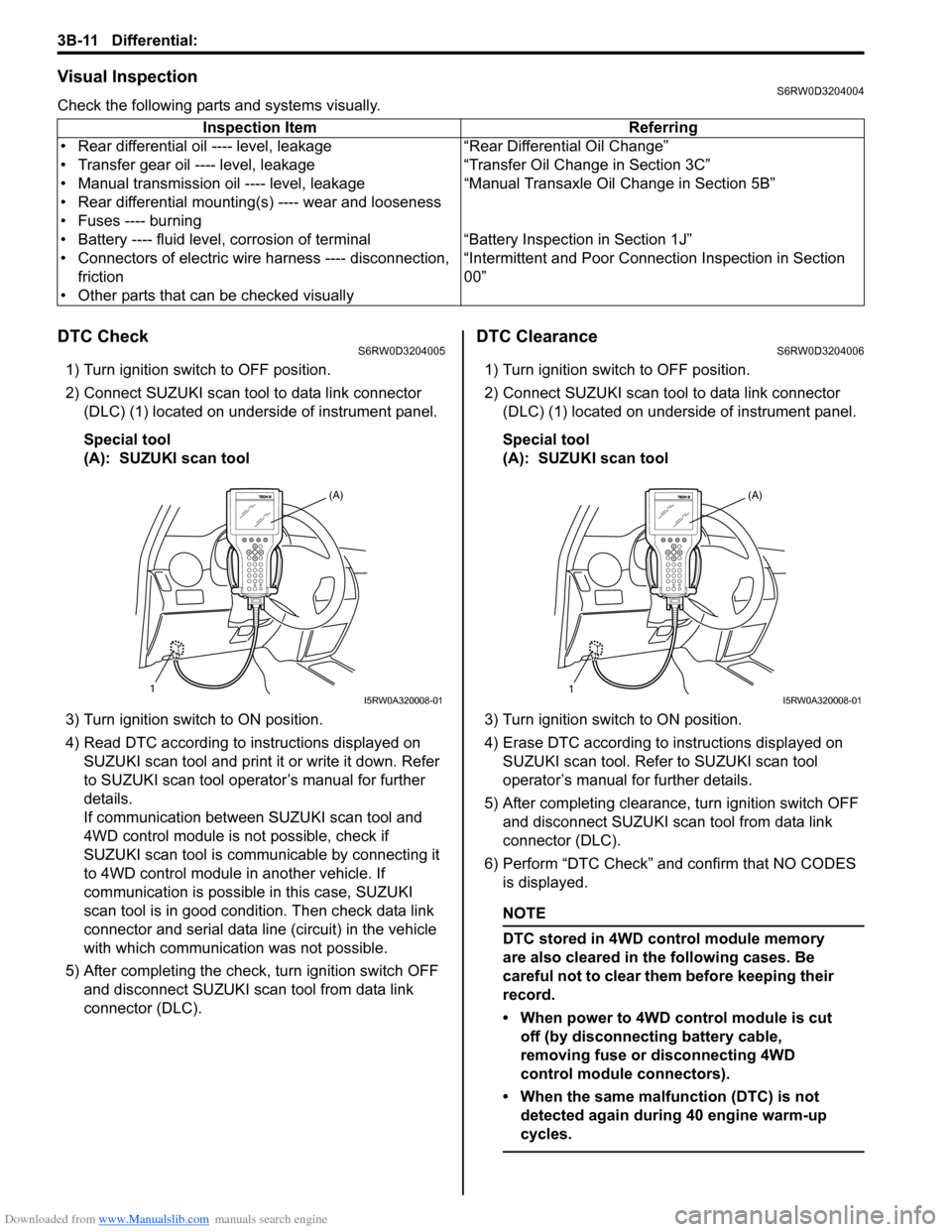
DTC CheckS6RW0D3204005
1) Turn ignition switch to OFF position.
2) Connect SUZUKI scan tool to data link connector
(DLC) (1) located on underside of instrument panel.
Special tool
(A): SUZUKI scan tool
3) Turn ignition switch to ON position.
4) Read DTC according to instructions displayed on
SUZUKI scan tool and print it or write it down. Refer
to SUZUKI scan tool operator’s manual for further
details.
If communication between SUZUKI scan tool and
4WD control module is not possible, check if
SUZUKI scan tool is communicable by connecting it
to 4WD control module in another vehicle. If
communication is possible in this case, SUZUKI
scan tool is in good condition. Then check data link
connector and serial data line (circuit) in the vehicle
with which communication was not possible.
5) After completing the check, turn ignition switch OFF
and disconnect SUZUKI scan tool from data link
connector (DLC).
DTC ClearanceS6RW0D3204006
1) Turn ignition switch to OFF position.
2) Connect SUZUKI scan tool to data link connector
(DLC) (1) located on underside of instrument panel.
Special tool
(A): SUZUKI scan tool
3) Turn ignition switch to ON position.
4) Erase DTC according to instructions displayed on
SUZUKI scan tool. Refer to SUZUKI scan tool
operator’s manual for further details.
5) After completing clearance, turn ignition switch OFF
and disconnect SUZUKI scan tool from data link
connector (DLC).
6) Perform “DTC Check” and confirm that NO CODES
is displayed.
NOTE
DTC stored in 4WD control module memory
are also cleared in the following cases. Be
careful not to clear them before keeping their
record.
• When power to 4WD control module is cut
off (by disconnecting battery cable,
removing fuse or disconnecting 4WD
control module connectors).
• When the same malfunction (DTC) is not
detected again during 40 engine warm-up
cycles.
Inspection Item Referring
• Rear differential oil ---- level, leakage “Rear Differential Oil Change”
• Transfer gear oil ---- level, leakage “Transfer Oil Change in Section 3C”
• Manual transmission oil ---- level, leakage “Manual Transaxle Oil Change in Section 5B”
• Rear differential mounting(s) ---- wear and looseness
• Fuses ---- burning
• Battery ---- fluid level, corrosion of terminal “Battery Inspection in Section 1J”
• Connectors of electric wire harness ---- disconnection,
friction“Intermittent and Poor Connection Inspection in Section
00”
• Other parts that can be checked visually
1(A)I5RW0A320008-011(A)I5RW0A320008-01
Page 531 of 1556
Downloaded from www.Manualslib.com manuals search engine Differential: 3B-34
Front Mounting Arm and/or Rear Mounting
Bracket Assembly Removal and Installation
S6RW0D3206010
Remove and install front mounting arm and/or rear
mounting bracket after rear differential removed.
For tightening torque of each bolt and nut, refer to “Rear
Differential Mountings Components”.
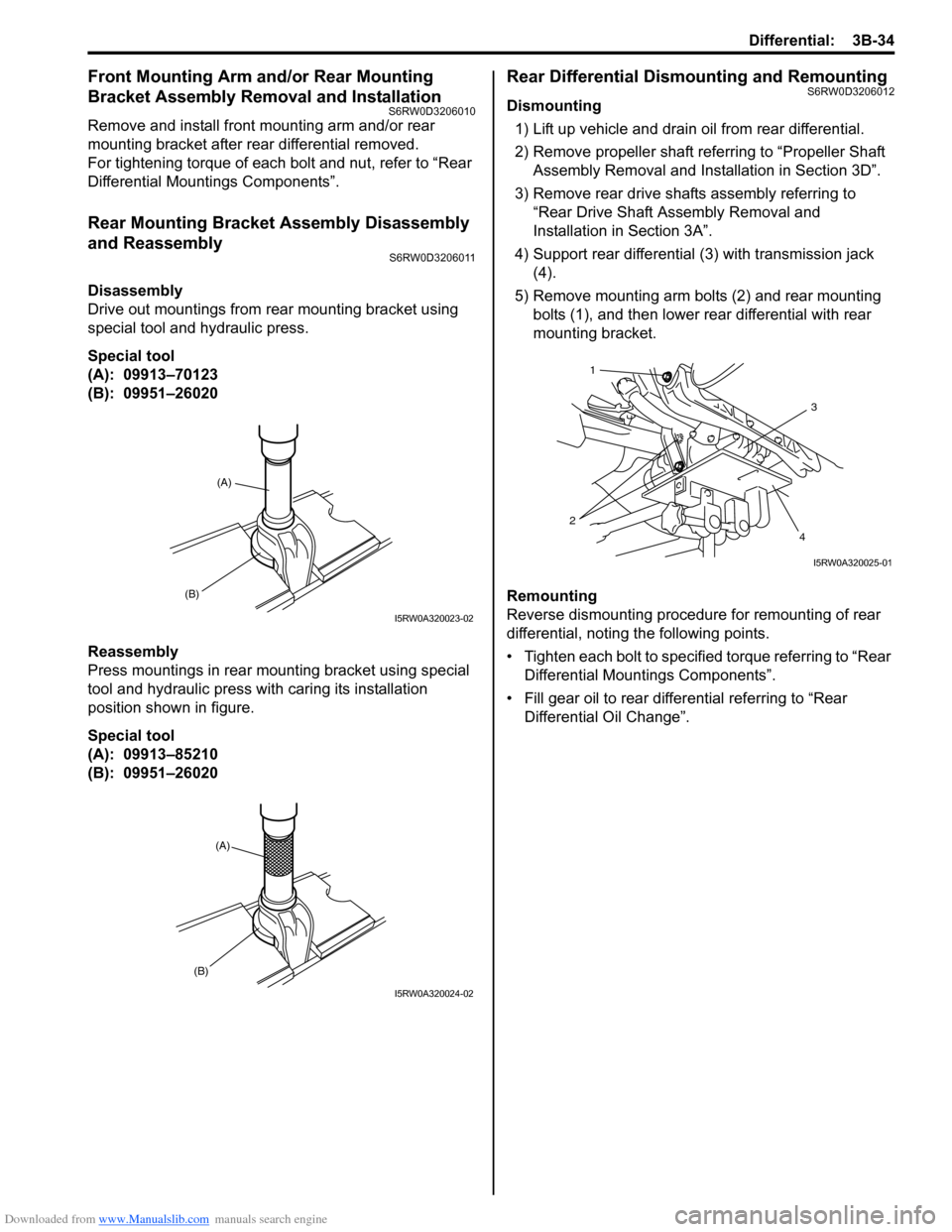
Rear Mounting Bracket Assembly Disassembly
and Reassembly
S6RW0D3206011
Disassembly
Drive out mountings from rear mounting bracket using
special tool and hydraulic press.
Special tool
(A): 09913–70123
(B): 09951–26020
Reassembly
Press mountings in rear mounting bracket using special
tool and hydraulic press with caring its installation
position shown in figure.
Special tool
(A): 09913–85210
(B): 09951–26020
Rear Differential Dismounting and RemountingS6RW0D3206012
Dismounting
1) Lift up vehicle and drain oil from rear differential.
2) Remove propeller shaft referring to “Propeller Shaft
Assembly Removal and Installation in Section 3D”.
3) Remove rear drive shafts assembly referring to
“Rear Drive Shaft Assembly Removal and
Installation in Section 3A”.
4) Support rear differential (3) with transmission jack
(4).
5) Remove mounting arm bolts (2) and rear mounting
bolts (1), and then lower rear differential with rear
mounting bracket.
Remounting
Reverse dismounting procedure for remounting of rear
differential, noting the following points.
• Tighten each bolt to specified torque referring to “Rear
Differential Mountings Components”.
• Fill gear oil to rear differential referring to “Rear
Differential Oil Change”.
(B)
(A)
I5RW0A320023-02
(A)
(B)
I5RW0A320024-02
3
4 21
I5RW0A320025-01
Page 547 of 1556
Downloaded from www.Manualslib.com manuals search engine Differential: 3B-50
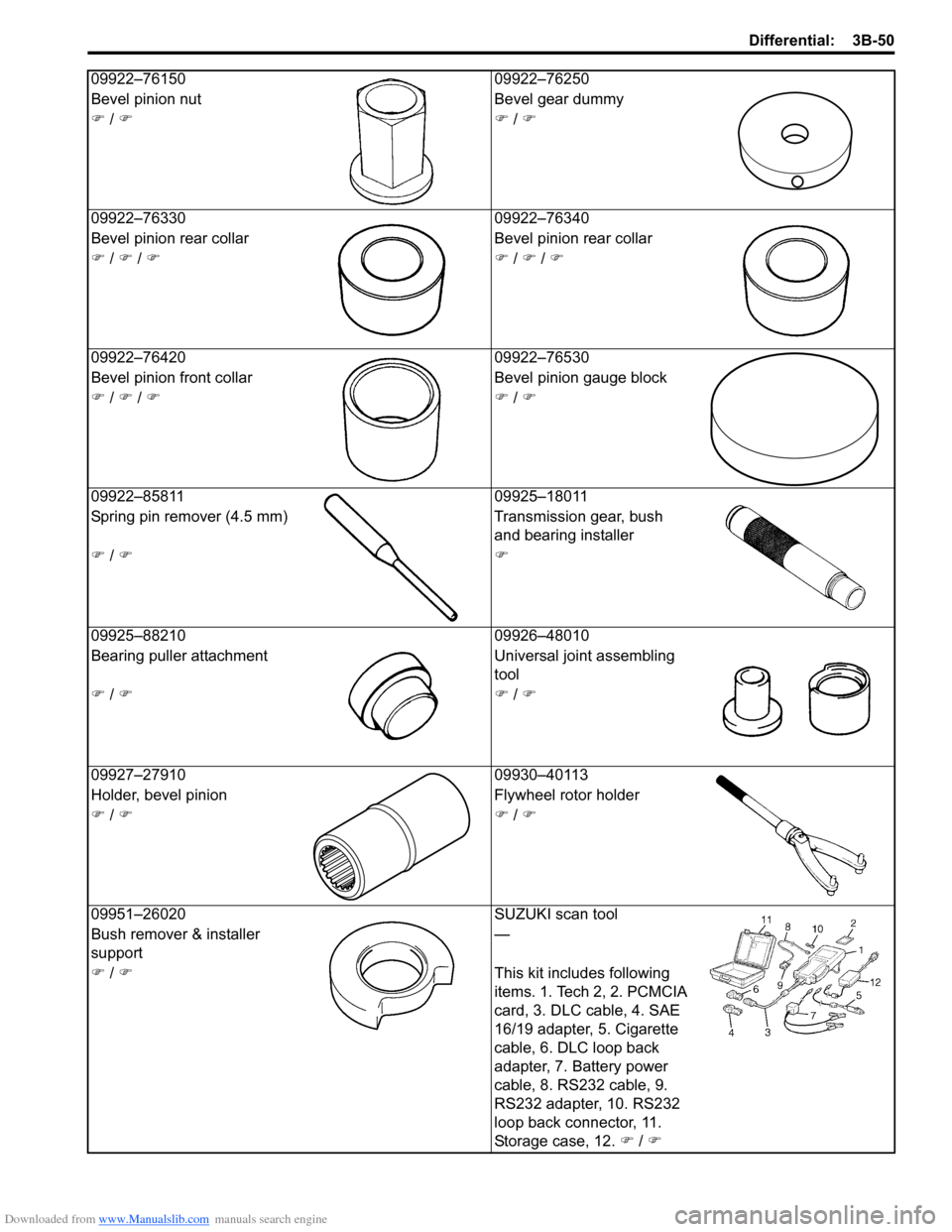
09922–76150 09922–76250
Bevel pinion nut Bevel gear dummy
) / )) / )
09922–76330 09922–76340
Bevel pinion rear collar Bevel pinion rear collar
) / ) / )) / ) / )
09922–76420 09922–76530
Bevel pinion front collar Bevel pinion gauge block
) / ) / )) / )
09922–85811 09925–18011
Spring pin remover (4.5 mm) Transmission gear, bush
and bearing installer
) / ))
09925–88210 09926–48010
Bearing puller attachment Universal joint assembling
tool
) / )) / )
09927–27910 09930–40113
Holder, bevel pinion Flywheel rotor holder
) / )) / )
09951–26020 SUZUKI scan tool
Bush remover & installer
support—
) / )This kit includes following
items. 1. Tech 2, 2. PCMCIA
card, 3. DLC cable, 4. SAE
16/19 adapter, 5. Cigarette
cable, 6. DLC loop back
adapter, 7. Battery power
cable, 8. RS232 cable, 9.
RS232 adapter, 10. RS232
loop back connector, 11.
Storage case, 12. ) / )
Page 550 of 1556
Downloaded from www.Manualslib.com manuals search engine 3C-3 Transfer:
Transfer Dismounting and RemountingS6RW0D3306003
Dismounting
1) Disconnect negative cable at battery.
2) Drain transaxle oil and transfer oil.
3) Remove drive shafts assembly referring to “Front
Drive Shaft Assembly Removal and Installation in
Section 3A”.
4) Remove exhaust No.1, No.2 and center pipes
referring to “Exhaust Pipe and Muffler Removal and
Installation in Section 1K”.
5) Remove suspension frame, engine front mounting
member and mounting member referring to “Front
Suspension Frame, Stabilizer Bar and/or Bushing
Removal and Installation in Section 2B” and “Engine
Assembly Removal and Installation in Section 1D”.
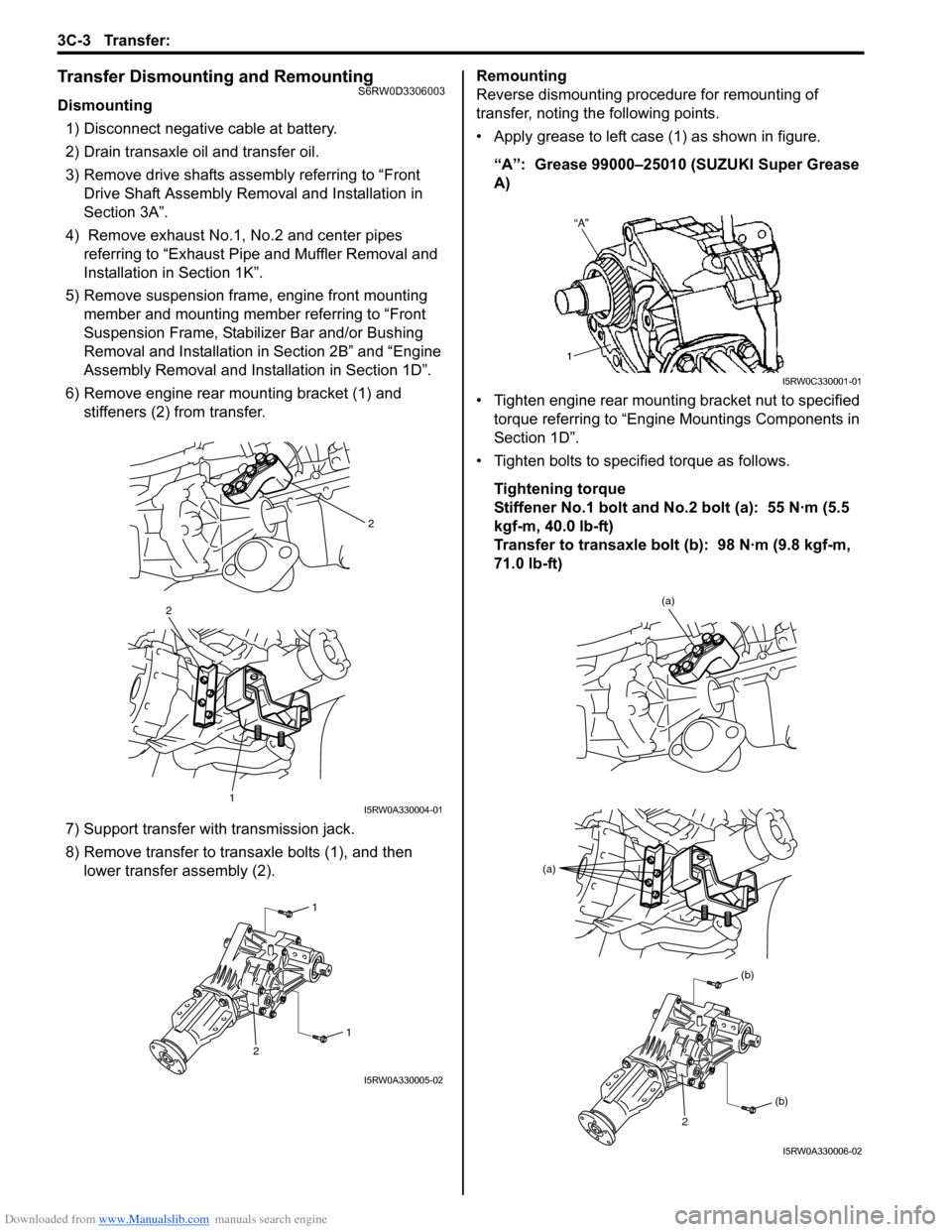
6) Remove engine rear mounting bracket (1) and
stiffeners (2) from transfer.
7) Support transfer with transmission jack.
8) Remove transfer to transaxle bolts (1), and then
lower transfer assembly (2).Remounting
Reverse dismounting procedure for remounting of
transfer, noting the following points.
• Apply grease to left case (1) as shown in figure.
“A”: Grease 99000–25010 (SUZUKI Super Grease
A)
• Tighten engine rear mounting bracket nut to specified
torque referring to “Engine Mountings Components in
Section 1D”.
• Tighten bolts to specified torque as follows.
Tightening torque
Stiffener No.1 bolt and No.2 bolt (a): 55 N·m (5.5
kgf-m, 40.0 lb-ft)
Transfer to transaxle bolt (b): 98 N·m (9.8 kgf-m,
71.0 lb-ft)
2
2
1I5RW0A330004-01
1
1
2
I5RW0A330005-02
I5RW0C330001-01
(a)
(a)
(b)
(b)
2
I5RW0A330006-02
Page 565 of 1556
Downloaded from www.Manualslib.com manuals search engine Transfer: 3C-18
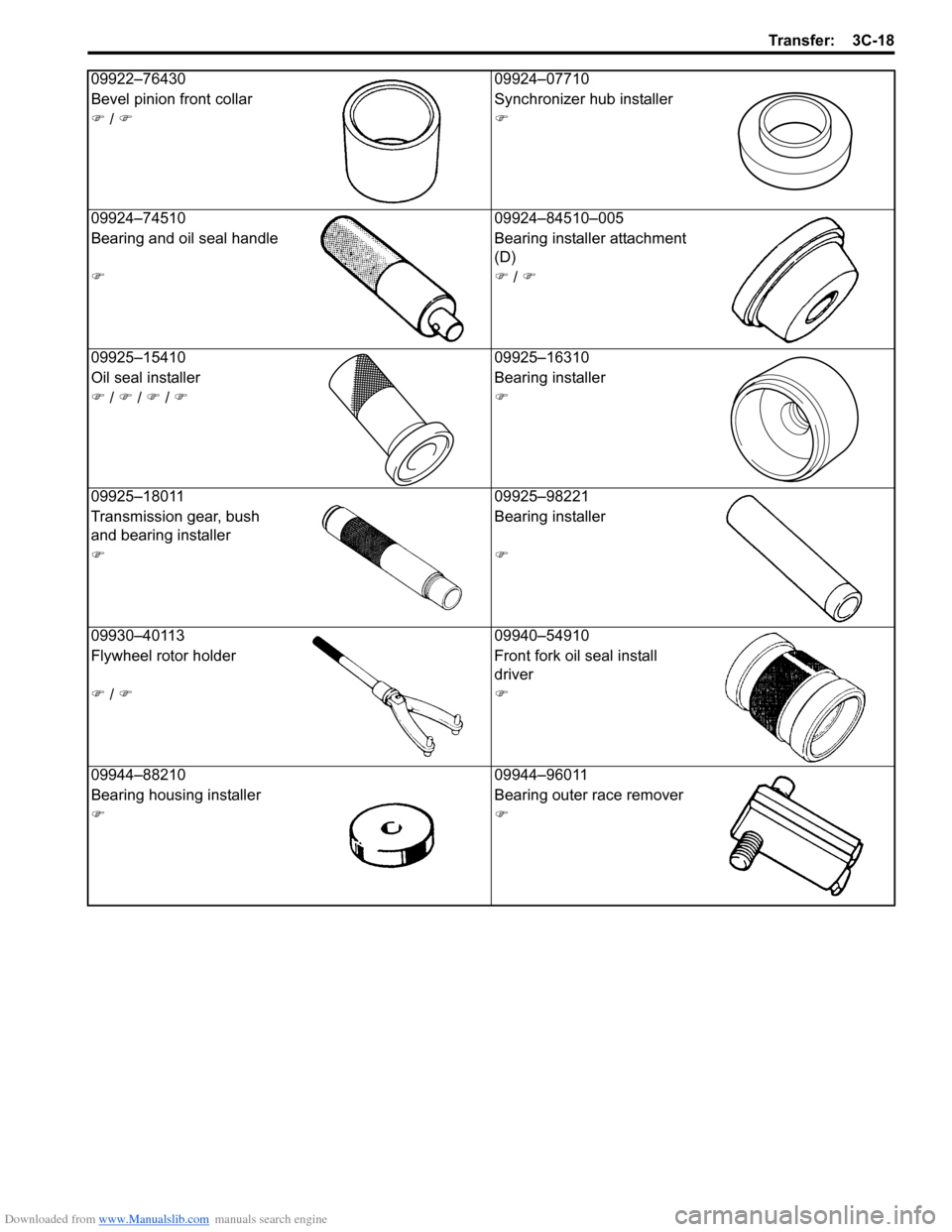
09922–76430 09924–07710
Bevel pinion front collar Synchronizer hub installer
) / ))
09924–74510 09924–84510–005
Bearing and oil seal handle Bearing installer attachment
(D)
)) / )
09925–15410 09925–16310
Oil seal installer Bearing installer
) / ) / ) / ))
09925–18011 09925–98221
Transmission gear, bush
and bearing installerBearing installer
))
09930–40113 09940–54910
Flywheel rotor holder Front fork oil seal install
driver
) / ))
09944–88210 09944–96011
Bearing housing installer Bearing outer race remover
))
Page 608 of 1556
Downloaded from www.Manualslib.com manuals search engine 4E-3 ABS:
ABS Hydraulic Unit / Control Module Assembly
Description
S6RW0D4501002
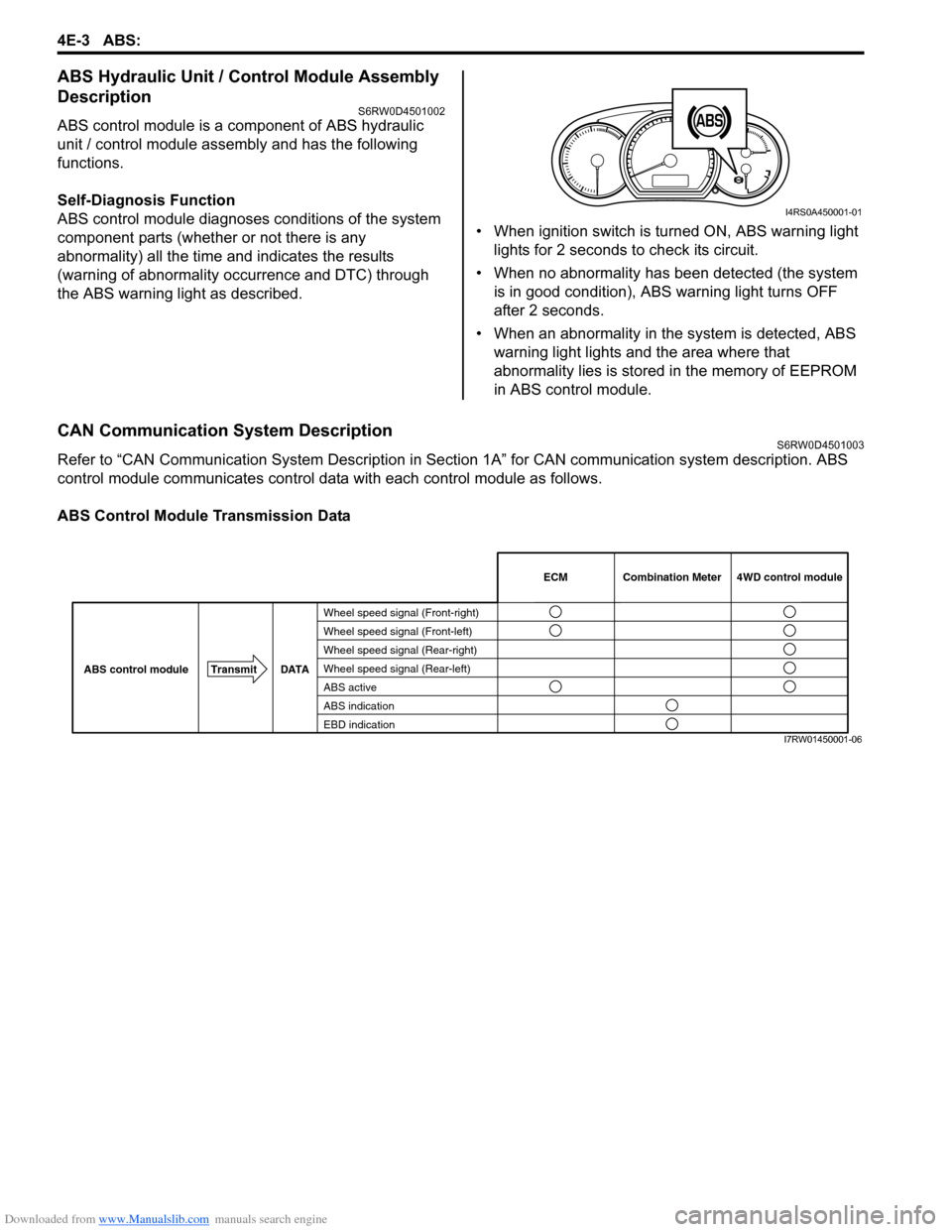
ABS control module is a component of ABS hydraulic
unit / control module assembly and has the following
functions.
Self-Diagnosis Function
ABS control module diagnoses conditions of the system
component parts (whether or not there is any
abnormality) all the time and indicates the results
(warning of abnormality occurrence and DTC) through
the ABS warning light as described.• When ignition switch is turned ON, ABS warning light
lights for 2 seconds to check its circuit.
• When no abnormality has been detected (the system
is in good condition), ABS warning light turns OFF
after 2 seconds.
• When an abnormality in the system is detected, ABS
warning light lights and the area where that
abnormality lies is stored in the memory of EEPROM
in ABS control module.
CAN Communication System DescriptionS6RW0D4501003
Refer to “CAN Communication System Description in Section 1A” for CAN communication system description. ABS
control module communicates control data with each control module as follows.
ABS Control Module Transmission Data
1
I4RS0A450001-01
Wheel speed signal (Front-right)
Wheel speed signal (Front-left)
Wheel speed signal (Rear-right)
Wheel speed signal (Rear-left)
ABS active
ABS indication
EBD indicationCombination Meter
TransmitDATA
ABS control module ECM 4WD control module
I7RW01450001-06
Page 636 of 1556
Downloaded from www.Manualslib.com manuals search engine 4E-31 ABS:
Troubleshooting
Repair Instructions
ABS Hydraulic Unit Operation CheckS6RW0D4506001
1) Check that basic brake system other than ABS is in
good condition.
2) Check that battery voltage is 11 V or more.
3) Hoist vehicle.
4) Set transmission to neutral (P range for A/T) and
release parking brake.
5) Turn each wheel gradually by hand to check if brake
dragging occurs. If it does, correct.
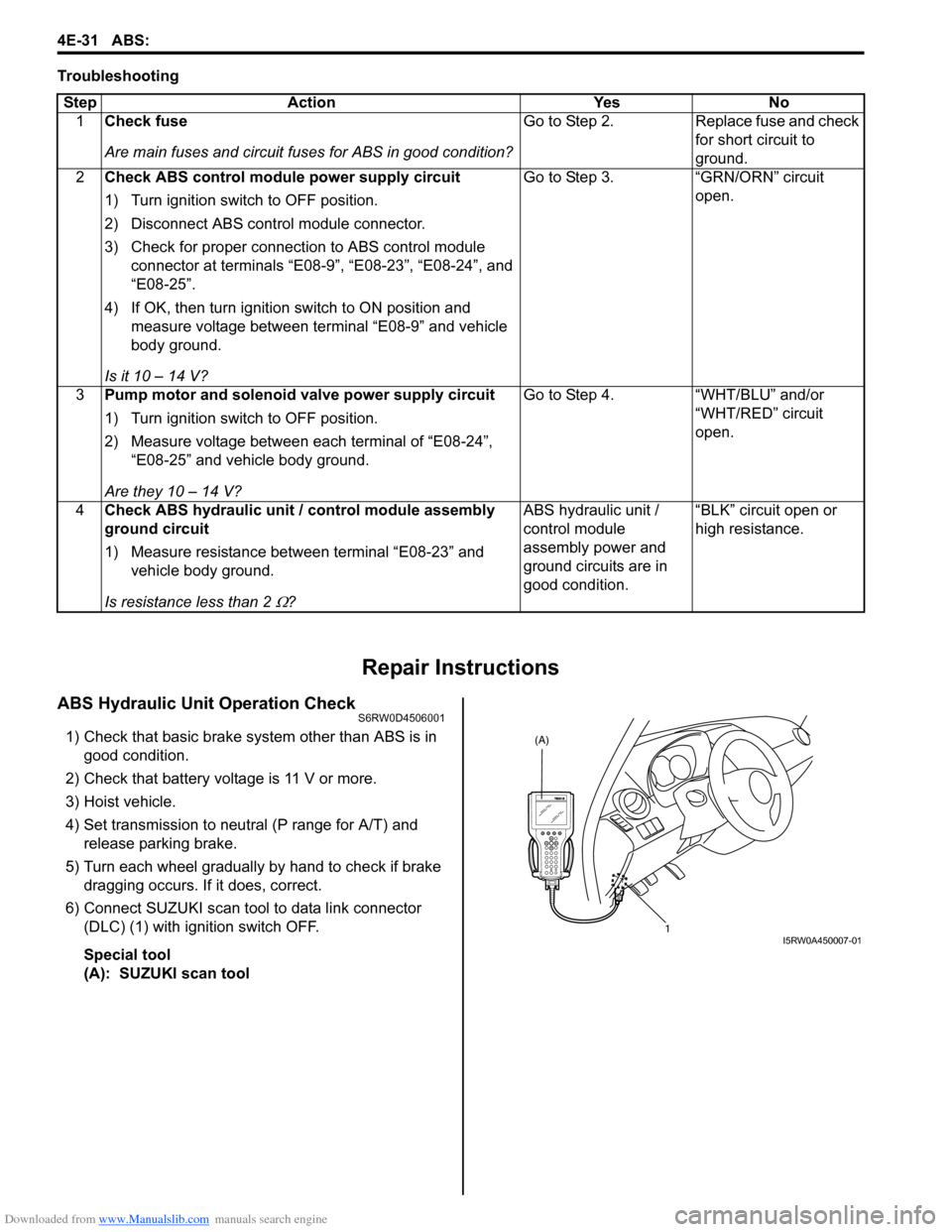
6) Connect SUZUKI scan tool to data link connector
(DLC) (1) with ignition switch OFF.
Special tool
(A): SUZUKI scan tool Step Action Yes No
1Check fuse
Are main fuses and circuit fuses for ABS in good condition?Go to Step 2. Replace fuse and check
for short circuit to
ground.
2Check ABS control module power supply circuit
1) Turn ignition switch to OFF position.
2) Disconnect ABS control module connector.
3) Check for proper connection to ABS control module
connector at terminals “E08-9”, “E08-23”, “E08-24”, and
“E08-25”.
4) If OK, then turn ignition switch to ON position and
measure voltage between terminal “E08-9” and vehicle
body ground.
Is it 10 – 14 V?Go to Step 3. “GRN/ORN” circuit
open.
3Pump motor and solenoid valve power supply circuit
1) Turn ignition switch to OFF position.
2) Measure voltage between each terminal of “E08-24”,
“E08-25” and vehicle body ground.
Are they 10 – 14 V?Go to Step 4. “WHT/BLU” and/or
“WHT/RED” circuit
open.
4Check ABS hydraulic unit / control module assembly
ground circuit
1) Measure resistance between terminal “E08-23” and
vehicle body ground.
Is resistance less than 2
Ω?ABS hydraulic unit /
control module
assembly power and
ground circuits are in
good condition.“BLK” circuit open or
high resistance.
(A)
1
I5RW0A450007-01