wheel TESLA MODEL 3 2018 Owner's Guide
[x] Cancel search | Manufacturer: TESLA, Model Year: 2018, Model line: MODEL 3, Model: TESLA MODEL 3 2018Pages: 165, PDF Size: 8.63 MB
Page 118 of 165
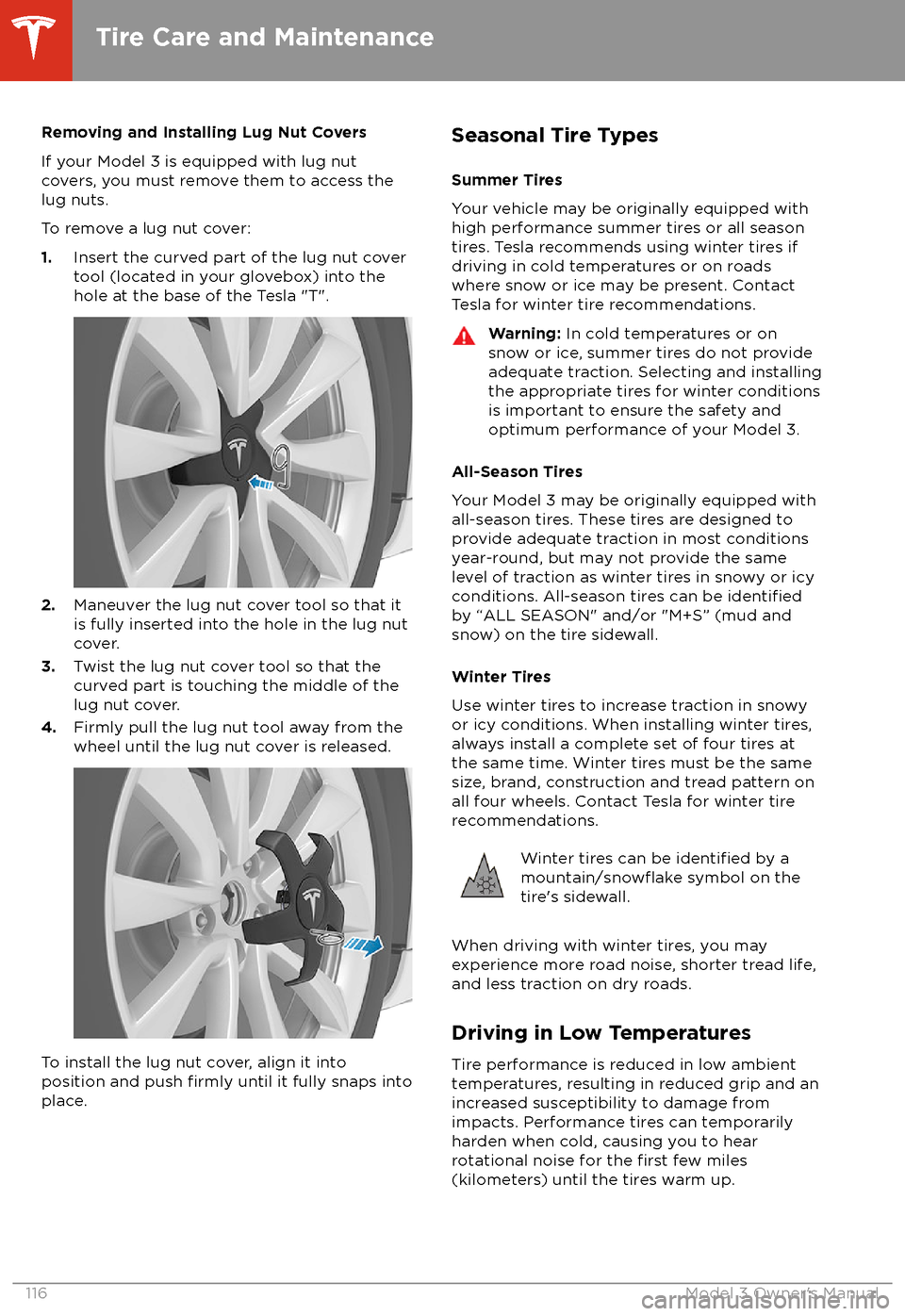
Removing and Installing Lug Nut Covers
If your Model 3 is equipped with lug nut covers, you must remove them to access the
lug nuts.
To remove a lug nut cover:
1. Insert the curved part of the lug nut cover
tool (located in your glovebox) into the hole at the base of the Tesla "T".
2. Maneuver the lug nut cover tool so that it
is fully inserted into the hole in the lug nut
cover.
3. Twist the lug nut cover tool so that the
curved part is touching the middle of the
lug nut cover.
4. Firmly pull the lug nut tool away from the
wheel until the lug nut cover is released.
To install the lug nut cover, align it into
position and push firmly until it fully snaps into
place.
Seasonal Tire Types
Summer Tires
Your vehicle may be originally equipped with high performance summer tires or all season
tires. Tesla recommends using winter tires if
driving in cold temperatures or on roads
where snow or ice may be present. Contact Tesla for winter tire recommendations.Warning: In cold temperatures or on
snow or ice, summer tires do not provide adequate traction. Selecting and installingthe appropriate tires for winter conditions
is important to ensure the safety and
optimum performance of your Model 3.
All-Season Tires
Your Model 3 may be originally equipped with
all-season tires. These tires are designed to provide adequate traction in most conditions
year-round, but may not provide the same level of traction as winter tires in snowy or icy
conditions. All-season tires can be
identifiedby “ALL SEASON" and/or "M+S” (mud and
snow) on the tire sidewall.
Winter Tires
Use winter tires to increase traction in snowy
or icy conditions. When installing winter tires,
always install a complete set of four tires at
the same time. Winter tires must be the same
size, brand, construction and tread pattern on all four wheels. Contact Tesla for winter tire
recommendations.
Winter tires can be identified by amountain/snowflake symbol on the
tire
Page 120 of 165
driven 15 mph (25 km/h) for longer than 10
minutes.
Replacing a Tire Sensor
If the Tire Pressure warning indicator displays frequently, contact Tesla to determine if a tire
sensor needs to be replaced. If a non-Tesla Service Center repairs or replaces a tire, the
tire sensor may not work until Tesla performs
the setup procedure.
TPMS Malfunction
Model 3 has also been equipped with a TPMS
malfunction indicator to indicate when the
system is not operating properly.The TPMS malfunction indicator is
combined with the tire pressure
indicator light. When the system
detects a malfunction, the indicator
flashes for approximately one minute
after Model 3 powers on, and then
remains continuously lit. This
sequence continues upon
subsequent vehicle start-ups as long
as the malfunction exists. When the
TPMS malfunction indicator is on,
the system might not be able to
detect or signal under- and
over-
inflated tires as intended.
TPMS malfunctions can occur for a variety of
reasons, including installing replacement or
alternate tires or wheels that prevent the
TPMS from functioning properly. Always check
the TPMS malfunction indicator light after replacing one or more tires or wheels on yourvehicle to ensure that the replacement tires or
wheels allow the TPMS to continue to function
properly.
Note: If a tire has been replaced or repaired
using a
different tire sealant than the one
available from Tesla, and a low tire pressure is
detected, it is possible that the tire sensor has been damaged. Contact Tesla to have the fault
repaired as soon as possible.
Tire Care and Maintenance
118Model 3 Owner
Page 121 of 165
Cleaning the ExteriorTo prevent damage to the paint, immediately
remove corrosive substances (bird droppings, tree resin, dead insects, tar spots, road salt,
industrial fallout, etc.). Do not wait until Model
3 is due for a complete wash. If necessary, use
denatured alcohol to remove tar spots and
stubborn grease stains, then immediately wash the area with water and a mild, non-detergent soap to remove the alcohol.
Follow these steps when washing the exterior
of Model 3:
1. Rinse Thoroughly
Before washing,
flush grime and grit from
the bodywork using a hose. Flush away
accumulations of mud in areas where
debris easily collects (such as wheel
arches and panel seams). If salt has been
used on the highways (such as during
winter months), thoroughly rinse all traces
of road salt from the underside of the vehicle.
2. Hand Wash
Hand wash Model 3 using a clean soft
cloth and cold or lukewarm water
containing a mild, high-quality car
shampoo.
3. Rinse with Clean Water
After washing, rinse with clean water to
prevent soap from drying on the surfaces.
4. Dry Thoroughly and Clean Exterior Glass
After washing and rinsing, dry thoroughly
with a chamois.
Clean windows and mirrors using an automotive glass cleaner. Do not scrape,
or use any abrasive cleaning
fluid on glass
or mirrored surfaces.
Cautions for Exterior CleaningCaution: Do not use windshield treatmentfluids. Doing so can interfere with wiper
friction and cause a chattering sound.Caution: Do not use hot water or
detergents.Caution: Do not wash in direct sunlight.Caution: If using a pressure washer,
maintain a distance of at least 12" (30 cm)
between the nozzle and the surface of
Model 3. Keep the nozzle moving and do not concentrate the water jet on any one
area.Caution: Do not aim water hoses directly
at window, door or hood seals, or through
wheel apertures onto brake components.Caution: Avoid using tight-napped or
rough cloths, such as washing mitts.Caution: If washing in an automatic car
wash, use Touchless car washes only. These car washes have no parts (brushes,
etc.) that touch the surfaces of Model 3.
Using any other type of car wash could
cause damage that is not covered by the
warranty.Caution: Ensure the wipers are off before
washing Model 3 to avoid the risk of damaging the wipers.Caution: Do not use chemical based
wheel cleaners. These can damage the
finish on the wheels.
Caution: Avoid using a high pressure
power washer on the camera(s) or
parking sensors (if equipped) and do not
clean a sensor or camera lens with a
sharp or abrasive object that can scratch
or damage its surface.Warning: Never spray liquid at a high
velocity (for example, if using a pressure
washer) towards the charge port while
Model 3 is charging. Failure to follow
these instructions can result in serious
injury or damage to the vehicle, charging
equipment, or property.
Cleaning
Maintenance119
Page 129 of 165
Parts, Accessories, and
Modifications
Use only genuine Tesla parts and accessories.
Tesla performs rigorous testing on parts to
ensure their suitability, safety, and reliability. Purchase these parts from Tesla, where they
are professionally installed and where you can receive expert advice about
modifications to
Model 3. Accessories are available for
purchase from Tesla stores or online at www.tesla.com/shop.
Tesla is unable to assess parts manufactured
by other distributors and therefore accepts no
responsibility if you use non-Tesla parts on
Model 3.
Warning: Installing non-approved parts
and accessories, or performing non- approved
modifications, can affect the
performance of Model 3 and the safety of
its occupants. Any damage caused by
using or installing non-approved parts, or by performing non-approved
modifications, is not covered by the
warranty.
Warning: Tesla does not accept liability
for death, personal injury or damage that
occurs if you use or install non-approved
accessories or make non-approved
modifications.
Accessory Wheels and Tires
If your Model 3 is
fitted with Tesla accessory
wheels or tires, the Gross Axle Weight Rating
(GAWR), wheel, tire, and loading information
may be
different from the labels shown on the
vehicle. Refer to the relevant following section
for updated information.
Note: If your vehicle is not
fitted with Tesla
accessory wheels or tires (it is fitted with the
factory original wheels and tires, including
Tesla genuine replacement parts), refer to the
labels attached to the center door pillar for
the most accurate information for your Model 3.
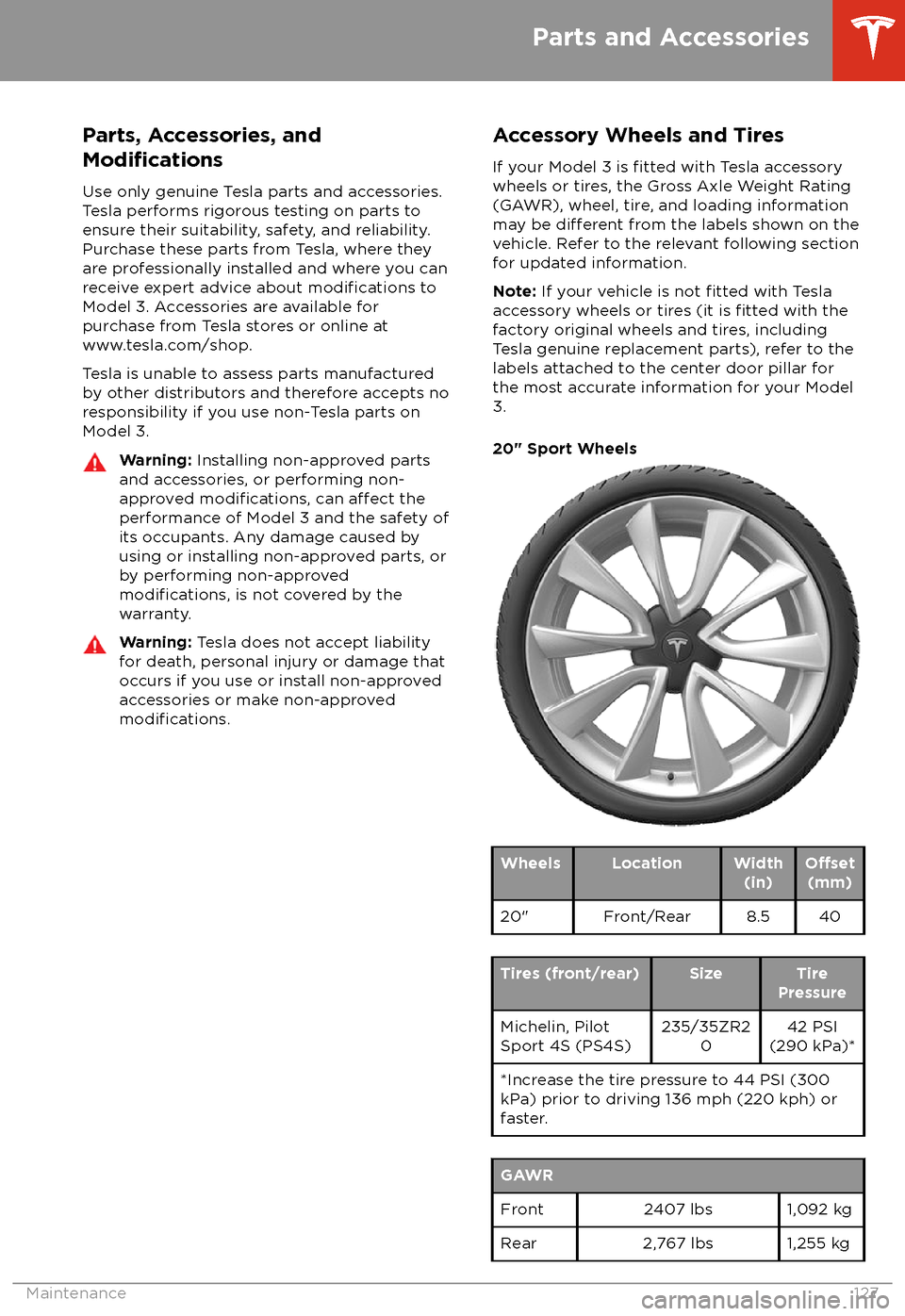
20" Sport Wheels
WheelsLocationWidth (in)O
Page 130 of 165

19" Sport WheelsWheelsLocationWidth(in)O
Page 133 of 165
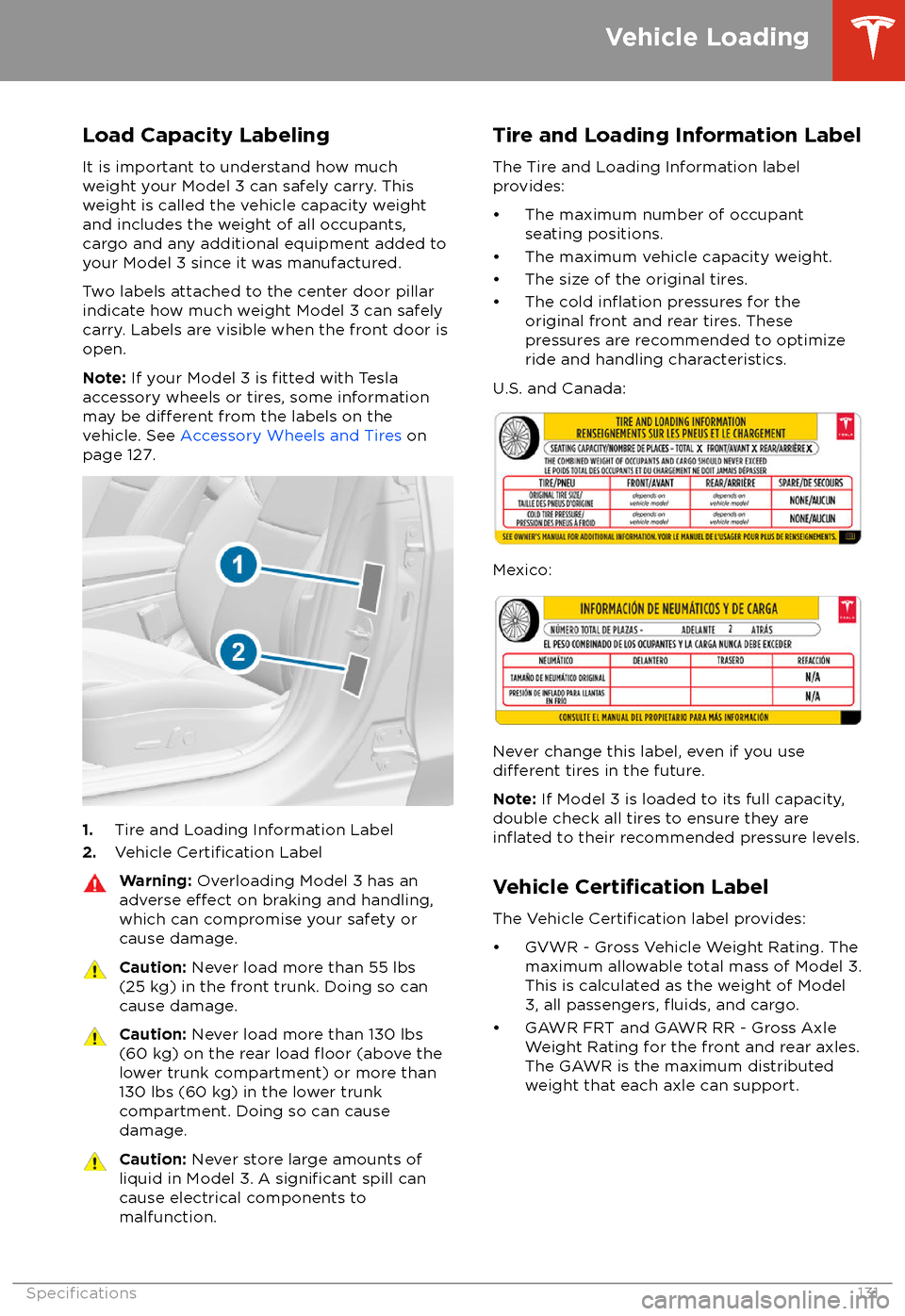
Load Capacity Labeling
It is important to understand how much weight your Model 3 can safely carry. Thisweight is called the vehicle capacity weight
and includes the weight of all occupants, cargo and any additional equipment added toyour Model 3 since it was manufactured.
Two labels attached to the center door pillar
indicate how much weight Model 3 can safely
carry. Labels are visible when the front door is
open.
Note: If your Model 3 is
fitted with Tesla
accessory wheels or tires, some information
may be
different from the labels on the
vehicle. See Accessory Wheels and Tires on
page 127.
1. Tire and Loading Information Label
2. Vehicle Certification Label
Warning:
Overloading Model 3 has an
adverse effect on braking and handling,
which can compromise your safety or cause damage.Caution: Never load more than 55 lbs
(25 kg) in the front trunk. Doing so can
cause damage.Caution: Never load more than 130 lbs
(60 kg) on the rear load floor (above the
lower trunk compartment) or more than
130 lbs (60 kg) in the lower trunk
compartment. Doing so can cause
damage.Caution: Never store large amounts of
liquid in Model 3. A significant spill can
cause electrical components to
malfunction.Tire and Loading Information Label
The Tire and Loading Information label
provides:
Page 136 of 165
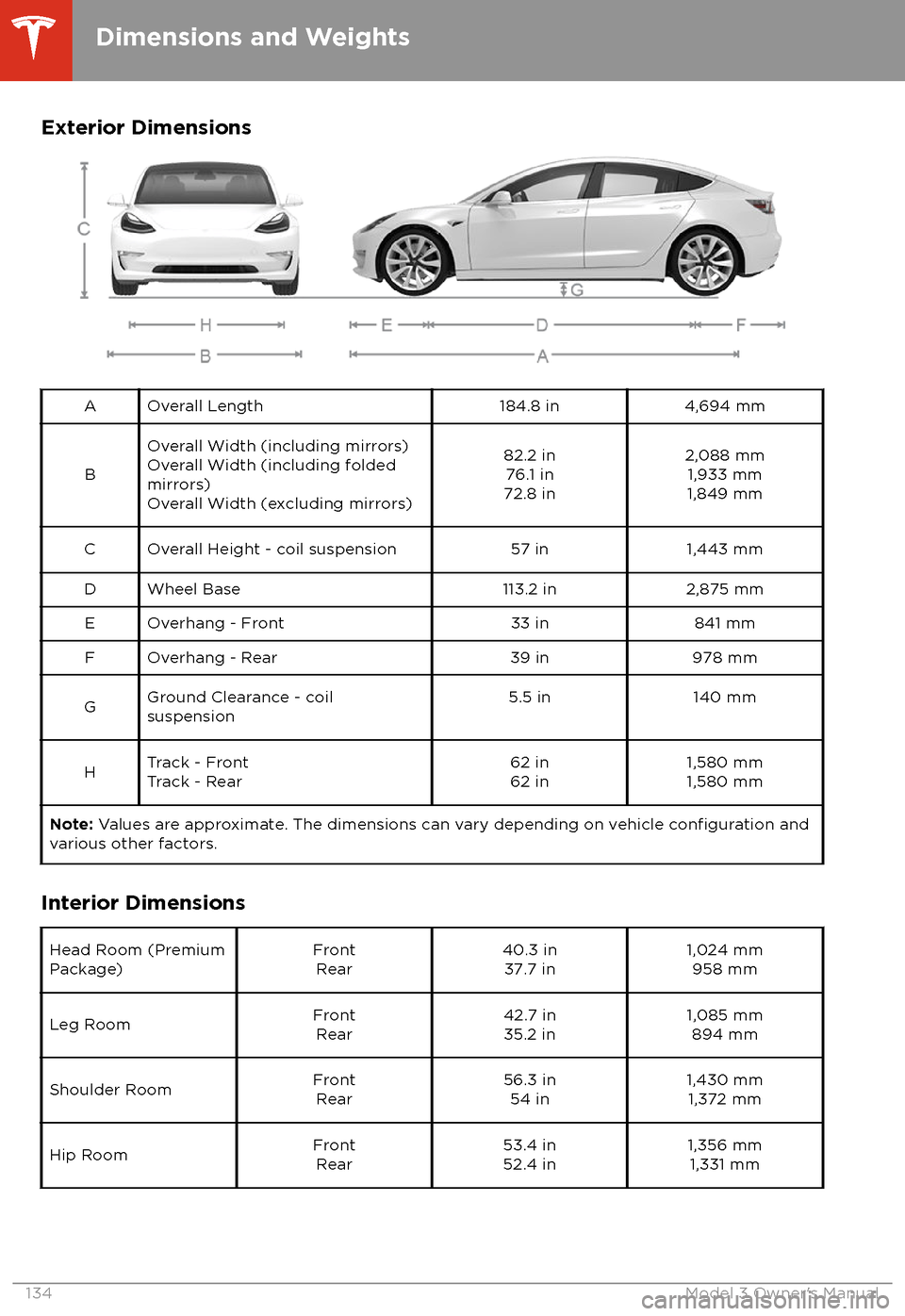
Exterior DimensionsAOverall Length184.8 in4,694 mm
B
Overall Width (including mirrors)Overall Width (including folded
mirrors)
Overall Width (excluding mirrors)82.2 in 76.1 in
72.8 in2,088 mm 1,933 mm
1,849 mmCOverall Height - coil suspension57 in1,443 mmDWheel Base113.2 in2,875 mmEOverhang - Front33 in841 mmFOverhang - Rear39 in978 mmGGround Clearance - coil
suspension5.5 in140 mmHTrack - Front
Track - Rear62 in
62 in1,580 mm
1,580 mmNote: Values are approximate. The dimensions can vary depending on vehicle configuration and
various other factors.
Interior Dimensions
Head Room (Premium
Package)Front Rear40.3 in37.7 in1,024 mm 958 mmLeg RoomFrontRear42.7 in35.2 in1,085 mm 894 mmShoulder RoomFrontRear56.3 in 54 in1,430 mm1,372 mmHip RoomFront Rear53.4 in52.4 in1,356 mm 1,331 mm
Dimensions and Weights
134Model 3 Owner
Page 137 of 165
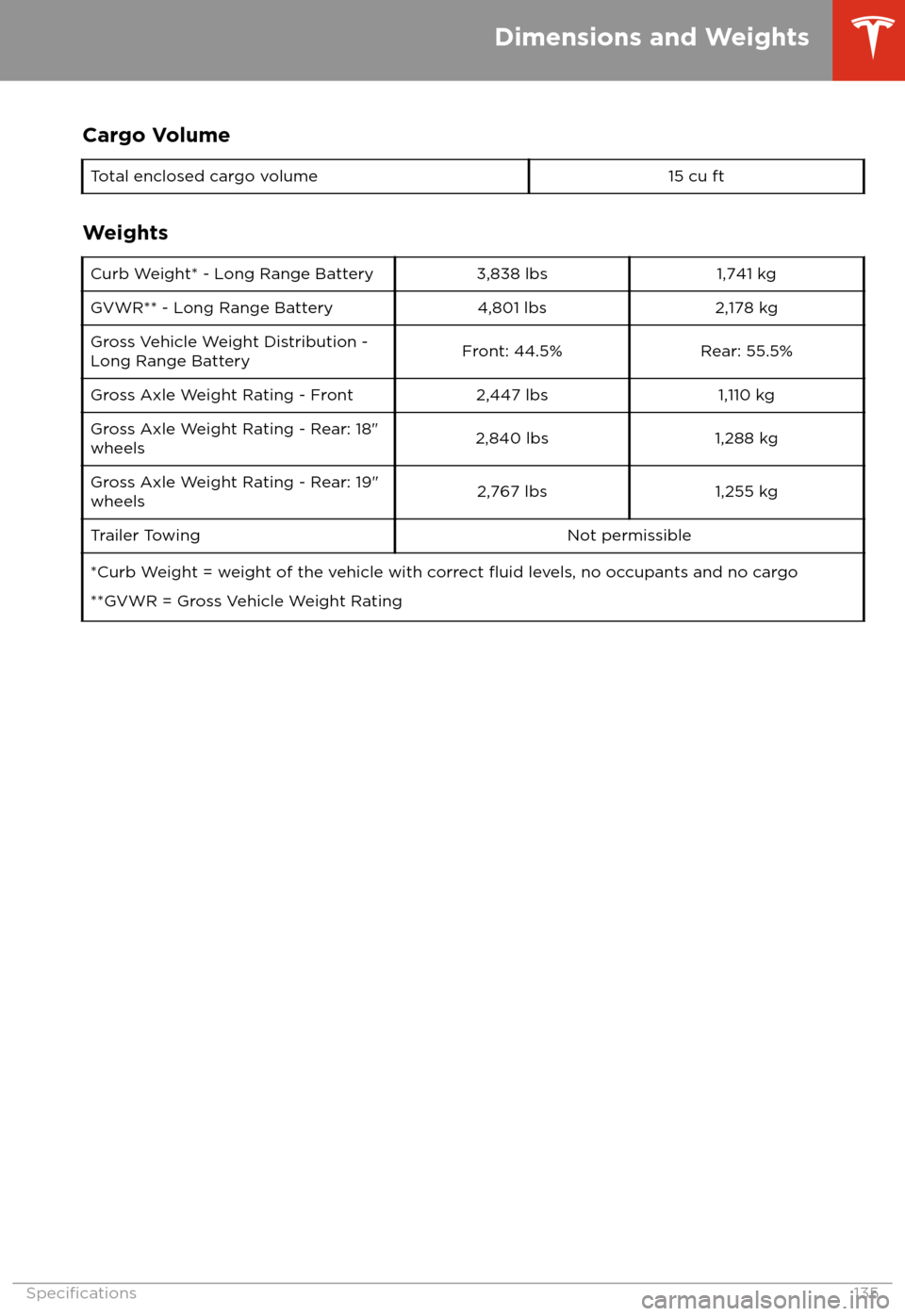
Cargo VolumeTotal enclosed cargo volume15 cu ft
Weights
Curb Weight* - Long Range Battery3,838 lbs1,741 kgGVWR** - Long Range Battery4,801 lbs2,178 kgGross Vehicle Weight Distribution -Long Range BatteryFront: 44.5%Rear: 55.5%Gross Axle Weight Rating - Front2,447 lbs1,110 kgGross Axle Weight Rating - Rear: 18"
wheels2,840 lbs1,288 kgGross Axle Weight Rating - Rear: 19"
wheels2,767 lbs1,255 kgTrailer TowingNot permissible*Curb Weight = weight of the vehicle with correct fluid levels, no occupants and no cargo
**GVWR = Gross Vehicle Weight Rating
Dimensions and Weights
Specifications135
Page 138 of 165
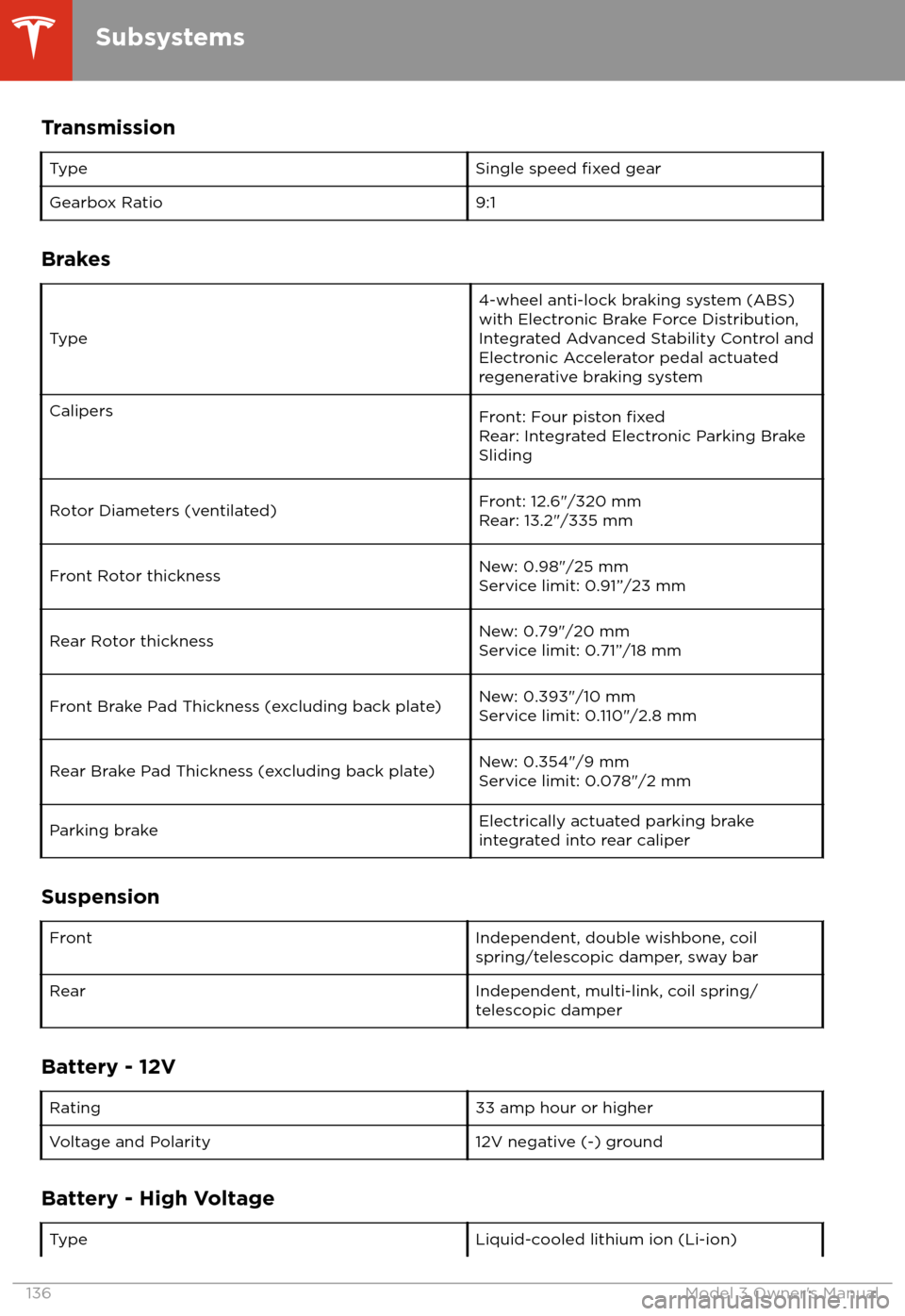
TransmissionTypeSingle speed fixed gearGearbox Ratio9:1
Brakes
Type
4-wheel anti-lock braking system (ABS)
with Electronic Brake Force Distribution,
Integrated Advanced Stability Control and
Electronic Accelerator pedal actuated
regenerative braking systemCalipersFront: Four piston fixedRear: Integrated Electronic Parking Brake
SlidingRotor Diameters (ventilated)Front: 12.6"/320 mm
Rear: 13.2"/335 mmFront Rotor thicknessNew: 0.98"/25 mm
Service limit: 0.91”/23 mmRear Rotor thicknessNew: 0.79"/20 mm
Service limit: 0.71”/18 mmFront Brake Pad Thickness (excluding back plate)New: 0.393"/10 mm
Service limit: 0.110"/2.8 mmRear Brake Pad Thickness (excluding back plate)New: 0.354"/9 mm
Service limit: 0.078"/2 mmParking brakeElectrically actuated parking brake
integrated into rear caliper
Suspension
FrontIndependent, double wishbone, coil
spring/telescopic damper, sway barRearIndependent, multi-link, coil spring/
telescopic damper
Battery - 12V
Rating33 amp hour or higherVoltage and Polarity12V negative (-) ground
Battery - High Voltage
TypeLiquid-cooled lithium ion (Li-ion)
Subsystems
136Model 3 Owner
Page 140 of 165

Wheel SpecificationsWheel DiameterLocationWidth (in)O