passenger seat TESLA MODEL 3 2018 Owner's Manual
[x] Cancel search | Manufacturer: TESLA, Model Year: 2018, Model line: MODEL 3, Model: TESLA MODEL 3 2018Pages: 165, PDF Size: 8.63 MB
Page 21 of 165
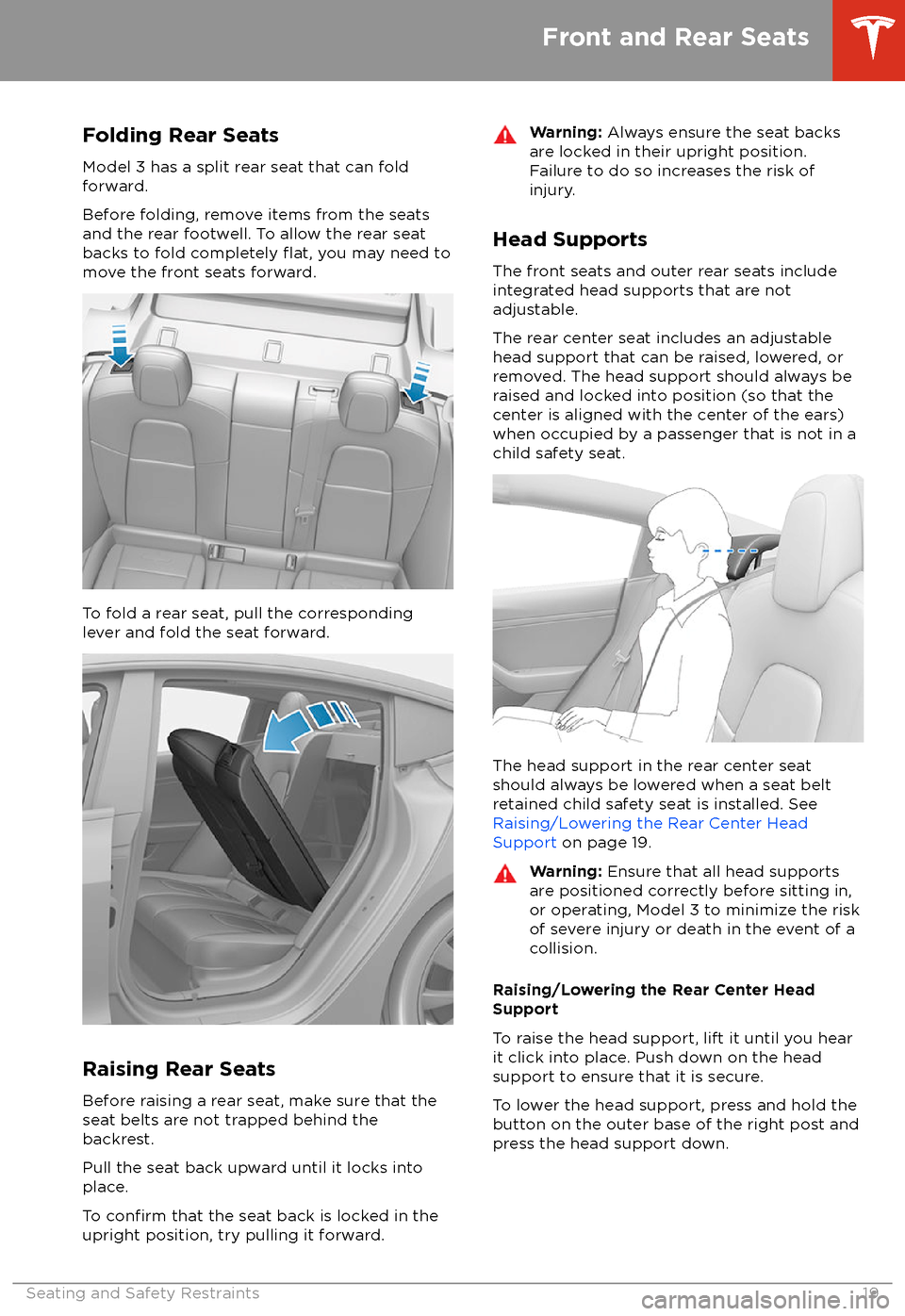
Folding Rear Seats
Model 3 has a split rear seat that can fold
forward.
Before folding, remove items from the seats
and the rear footwell. To allow the rear seat
backs to fold completely
flat, you may need to
move the front seats forward.
To fold a rear seat, pull the corresponding
lever and fold the seat forward.
Raising Rear Seats
Before raising a rear seat, make sure that the
seat belts are not trapped behind the backrest.
Pull the seat back upward until it locks into
place.
To
confirm that the seat back is locked in the
upright position, try pulling it forward.
Warning: Always ensure the seat backs
are locked in their upright position.
Failure to do so increases the risk of injury.
Head Supports
The front seats and outer rear seats include
integrated head supports that are not adjustable.
The rear center seat includes an adjustable head support that can be raised, lowered, or
removed. The head support should always be
raised and locked into position (so that the
center is aligned with the center of the ears) when occupied by a passenger that is not in a
child safety seat.
The head support in the rear center seat
should always be lowered when a seat belt
retained child safety seat is installed. See
Raising/Lowering the Rear Center Head Support on page 19.
Warning:
Ensure that all head supports
are positioned correctly before sitting in, or operating, Model 3 to minimize the risk
of severe injury or death in the event of a
collision.
Raising/Lowering the Rear Center Head
Support
To raise the head support, lift it until you hear
it click into place. Push down on the head support to ensure that it is secure.
To lower the head support, press and hold the button on the outer base of the right post and
press the head support down.
Front and Rear Seats
Seating and Safety Restraints19
Page 23 of 165
Wearing Seat BeltsUsing seat belts and child safety seats is the
most
effective way to protect occupants if a
collision occurs. Therefore, wearing a seat belt is required by law in most jurisdictions.
Both the driver and passenger seats are
equipped with three-point inertia reel seat
belts. Inertia reel belts are automatically
tensioned to allow occupants to move
comfortably during normal driving conditions.
To securely hold child safety seats, all
passenger seating positions are equipped with
an automatic locking retractor (ALR) that, by
pulling the seat belt beyond the length
needed for a typical adult occupant, locks the
belt into place until the seat belt is unbuckled
(see Installing Seat Belt Retained Child Seats
on page 26).
The seat belt reel automatically locks to prevent movement of occupants if Model 3
experiences a force associated with hard acceleration, braking, cornering, or an impact
in a collision.
The seat belt reminder on the
touchscreen alerts you if a seat belt
for an occupied seat is not fastened. If the belt remains unfastened, the
reminder
flashes and an intermittent
chime sounds. If all occupants are
buckled up and the reminder stays
on, re-fasten seat belts to ensure
they are correctly latched. Also
remove any heavy objects (such as a
briefcase) from an unoccupied seat.
If the reminder light continues to
stay on, contact Tesla.
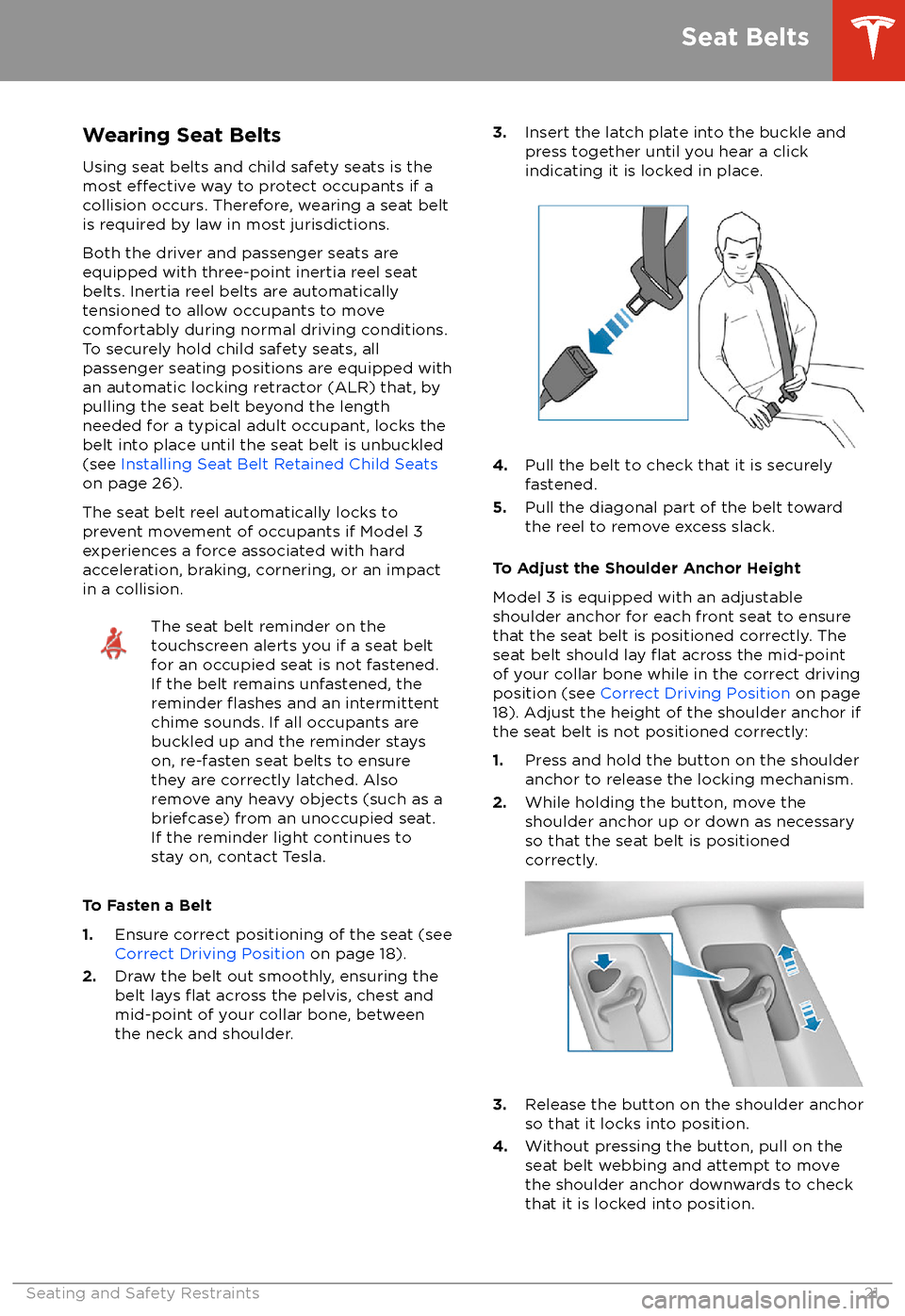
To Fasten a Belt
1. Ensure correct positioning of the seat (see
Correct Driving Position on page 18).
2. Draw the belt out smoothly, ensuring the
belt lays
flat across the pelvis, chest and
mid-point of your collar bone, between
the neck and shoulder.
3. Insert the latch plate into the buckle and
press together until you hear a click
indicating it is locked in place.
4. Pull the belt to check that it is securely
fastened.
5. Pull the diagonal part of the belt toward
the reel to remove excess slack.
To Adjust the Shoulder Anchor Height
Model 3 is equipped with an adjustable shoulder anchor for each front seat to ensure
that the seat belt is positioned correctly. The
seat belt should lay
flat across the mid-point
of your collar bone while in the correct driving
position (see Correct Driving Position on page
18). Adjust the height of the shoulder anchor if
the seat belt is not positioned correctly:
1. Press and hold the button on the shoulder
anchor to release the locking mechanism.
2. While holding the button, move the
shoulder anchor up or down as necessary
so that the seat belt is positioned correctly.
3. Release the button on the shoulder anchor
so that it locks into position.
4. Without pressing the button, pull on the
seat belt webbing and attempt to move
the shoulder anchor downwards to check that it is locked into position.
Seat Belts
Seating and Safety Restraints21
Page 30 of 165
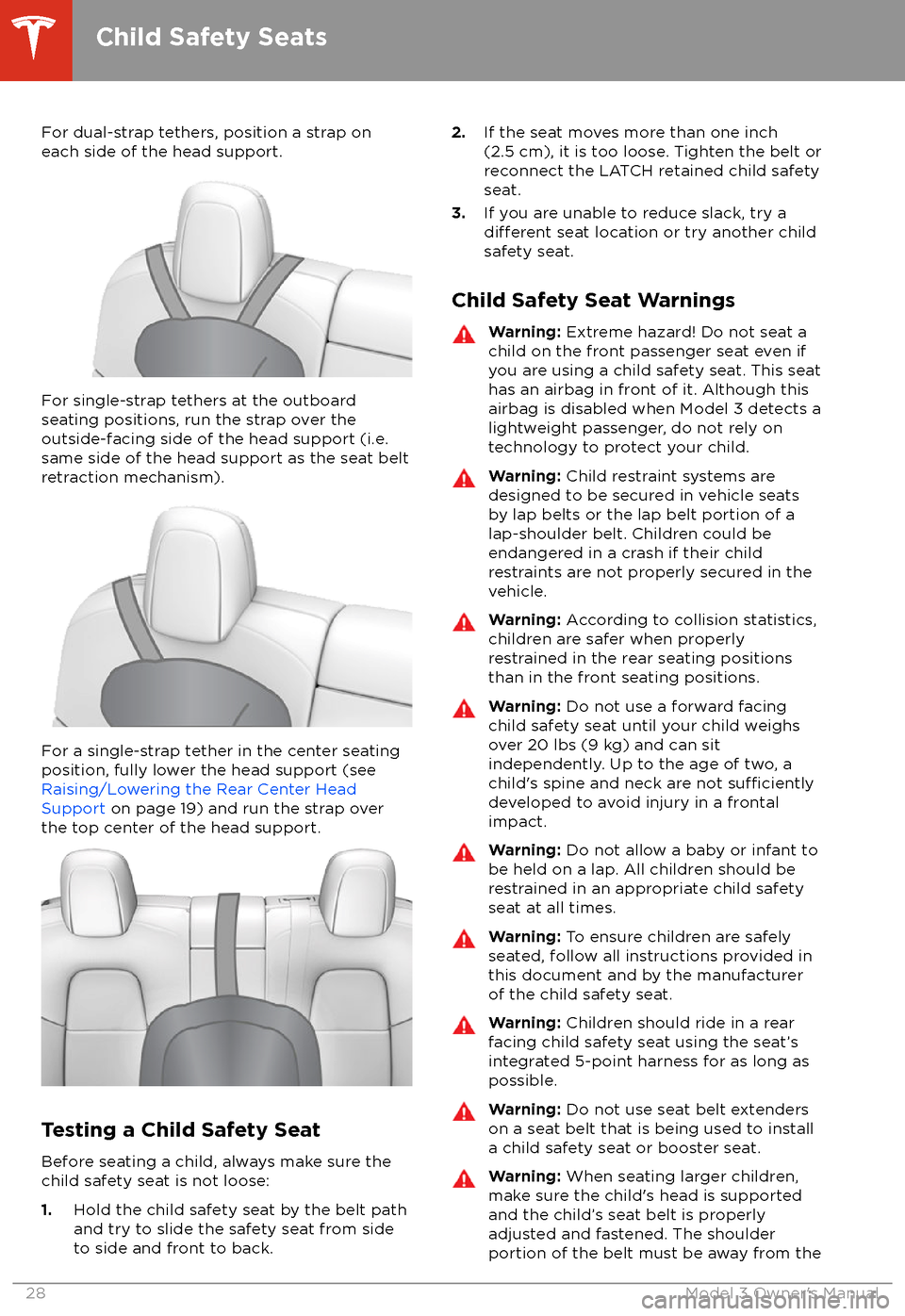
For dual-strap tethers, position a strap oneach side of the head support.
For single-strap tethers at the outboard
seating positions, run the strap over the outside-facing side of the head support (i.e.
same side of the head support as the seat belt
retraction mechanism).
For a single-strap tether in the center seating
position, fully lower the head support (see Raising/Lowering the Rear Center HeadSupport on page 19) and run the strap over
the top center of the head support.
Testing a Child Safety Seat
Before seating a child, always make sure the
child safety seat is not loose:
1. Hold the child safety seat by the belt path
and try to slide the safety seat from side
to side and front to back.
2. If the seat moves more than one inch
(2.5 cm), it is too loose. Tighten the belt or
reconnect the LATCH retained child safety
seat.
3. If you are unable to reduce slack, try a
different seat location or try another child
safety seat.
Child Safety Seat Warnings
Warning: Extreme hazard! Do not seat a
child on the front passenger seat even if
you are using a child safety seat. This seat
has an airbag in front of it. Although this airbag is disabled when Model 3 detects a
lightweight passenger, do not rely on
technology to protect your child.Warning: Child restraint systems are
designed to be secured in vehicle seats
by lap belts or the lap belt portion of a lap-shoulder belt. Children could be
endangered in a crash if their child restraints are not properly secured in the
vehicle.Warning: According to collision statistics,
children are safer when properly
restrained in the rear seating positions
than in the front seating positions.Warning: Do not use a forward facing
child safety seat until your child weighs
over 20 lbs (9 kg) and can sit
independently. Up to the age of two, a
child
Page 34 of 165
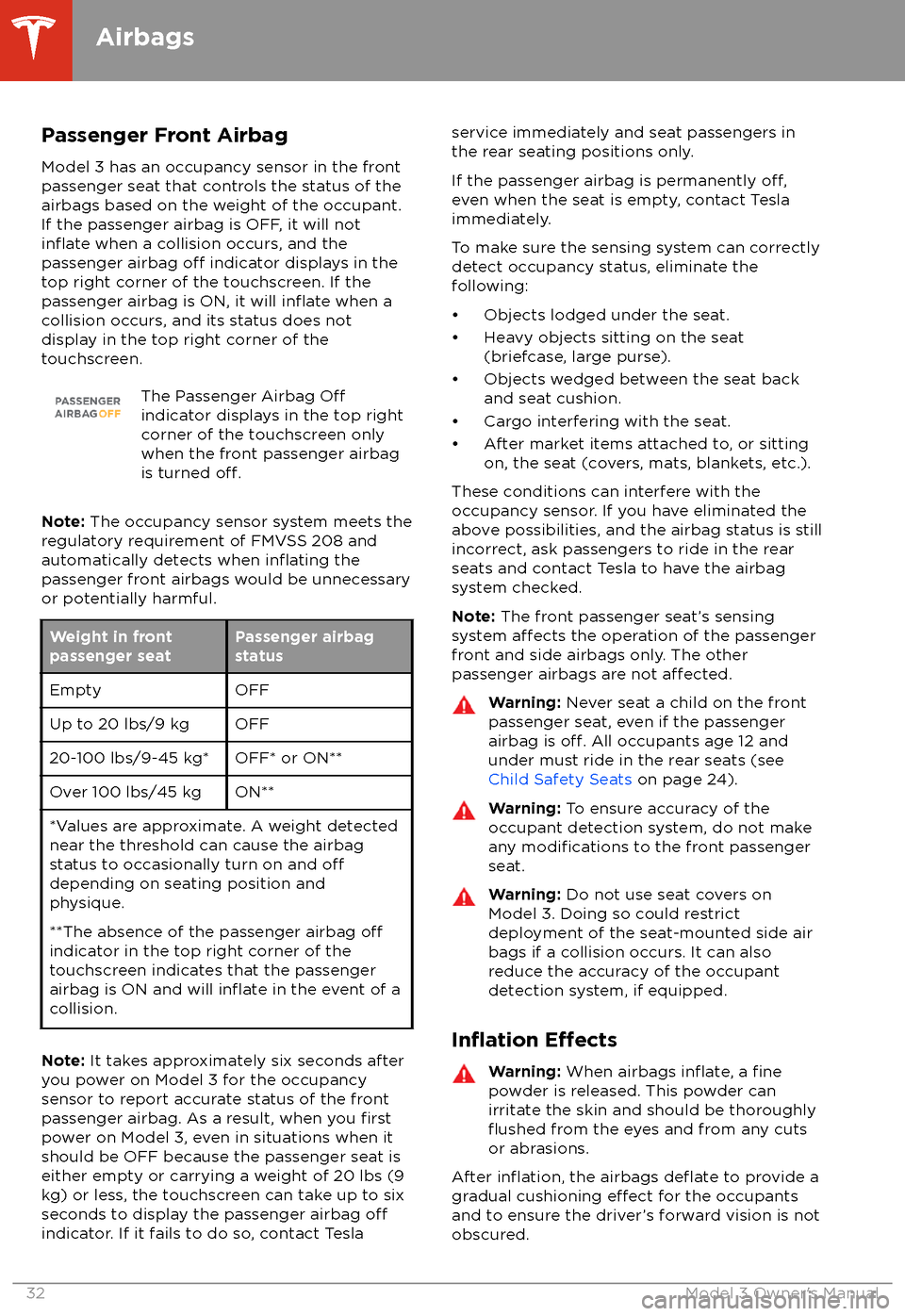
Passenger Front AirbagModel 3 has an occupancy sensor in the front
passenger seat that controls the status of the
airbags based on the weight of the occupant. If the passenger airbag is OFF, it will not
inflate when a collision occurs, and the
passenger airbag off indicator displays in the
top right corner of the touchscreen. If the
passenger airbag is ON, it will
inflate when a
collision occurs, and its status does not
display in the top right corner of the
touchscreen.
The Passenger Airbag Offindicator displays in the top right
corner of the touchscreen only
when the front passenger airbag
is turned
off.
Note: The occupancy sensor system meets the
regulatory requirement of FMVSS 208 and
automatically detects when
inflating the
passenger front airbags would be unnecessary
or potentially harmful.
Weight in front
passenger seatPassenger airbag
statusEmptyOFFUp to 20 lbs/9 kgOFF20-100 lbs/9-45 kg*OFF* or ON**Over 100 lbs/45 kgON***Values are approximate. A weight detected
near the threshold can cause the airbag
status to occasionally turn on and
offdepending on seating position and
physique.
**The absence of the passenger airbag
offindicator in the top right corner of the
touchscreen indicates that the passenger
airbag is ON and will
inflate in the event of a
collision.
Note: It takes approximately six seconds after
you power on Model 3 for the occupancy
sensor to report accurate status of the front
passenger airbag. As a result, when you
firstpower on Model 3, even in situations when it
should be OFF because the passenger seat is
either empty or carrying a weight of 20 lbs (9
kg) or less, the touchscreen can take up to six seconds to display the passenger airbag
offindicator. If it fails to do so, contact Tesla
service immediately and seat passengers in
the rear seating positions only.
If the passenger airbag is permanently
off,even when the seat is empty, contact Tesla
immediately.
To make sure the sensing system can correctly detect occupancy status, eliminate the
following:
Page 90 of 165
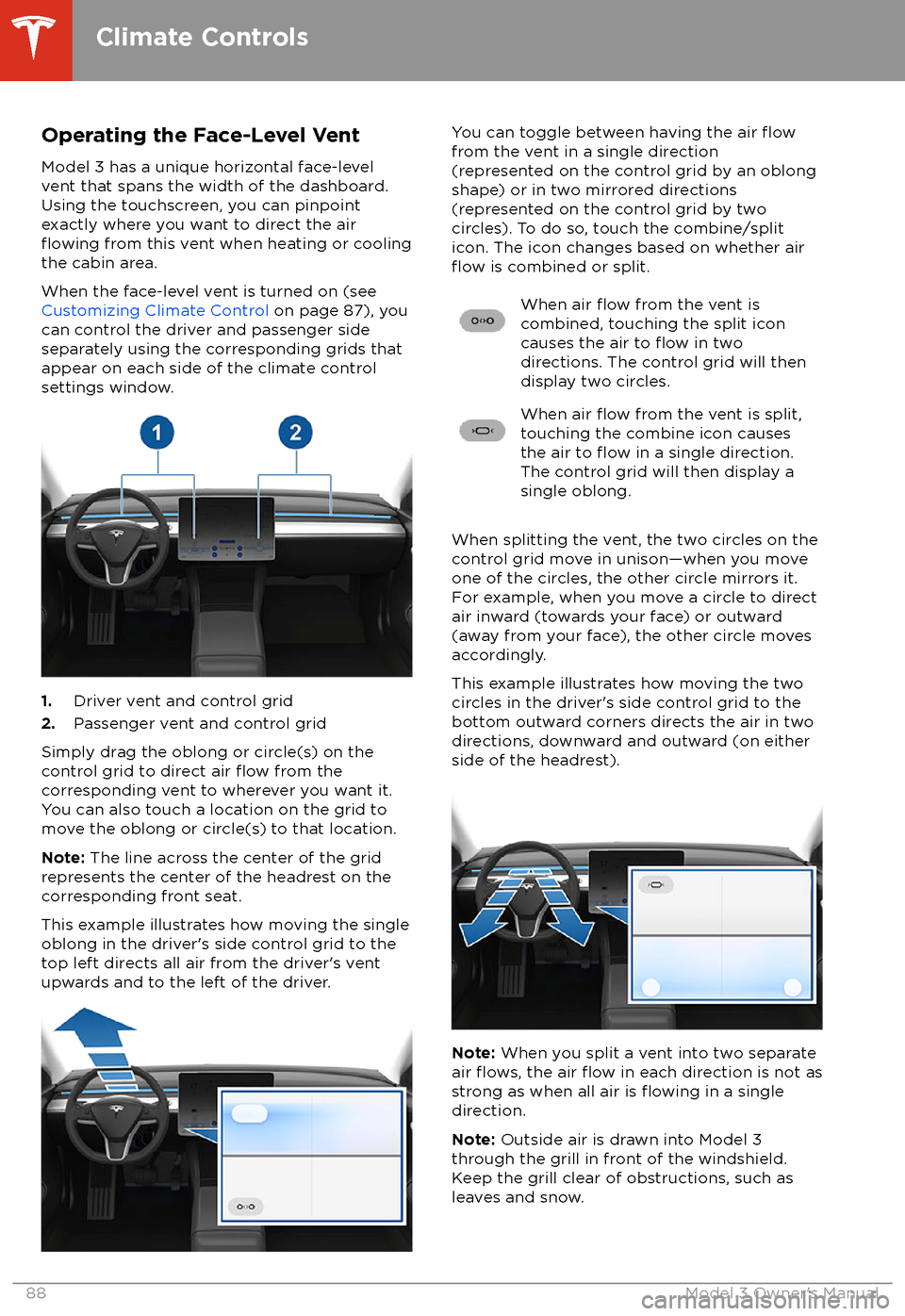
Operating the Face-Level Vent
Model 3 has a unique horizontal face-level
vent that spans the width of the dashboard.
Using the touchscreen, you can pinpoint
exactly where you want to direct the air
flowing from this vent when heating or cooling
the cabin area.
When the face-level vent is turned on (see
Customizing Climate Control on page 87), you
can control the driver and passenger side
separately using the corresponding grids that
appear on each side of the climate control
settings window.
1. Driver vent and control grid
2. Passenger vent and control grid
Simply drag the oblong or circle(s) on the control grid to direct air
flow from the
corresponding vent to wherever you want it. You can also touch a location on the grid tomove the oblong or circle(s) to that location.
Note: The line across the center of the grid
represents the center of the headrest on the
corresponding front seat.
This example illustrates how moving the single
oblong in the driver
Page 91 of 165
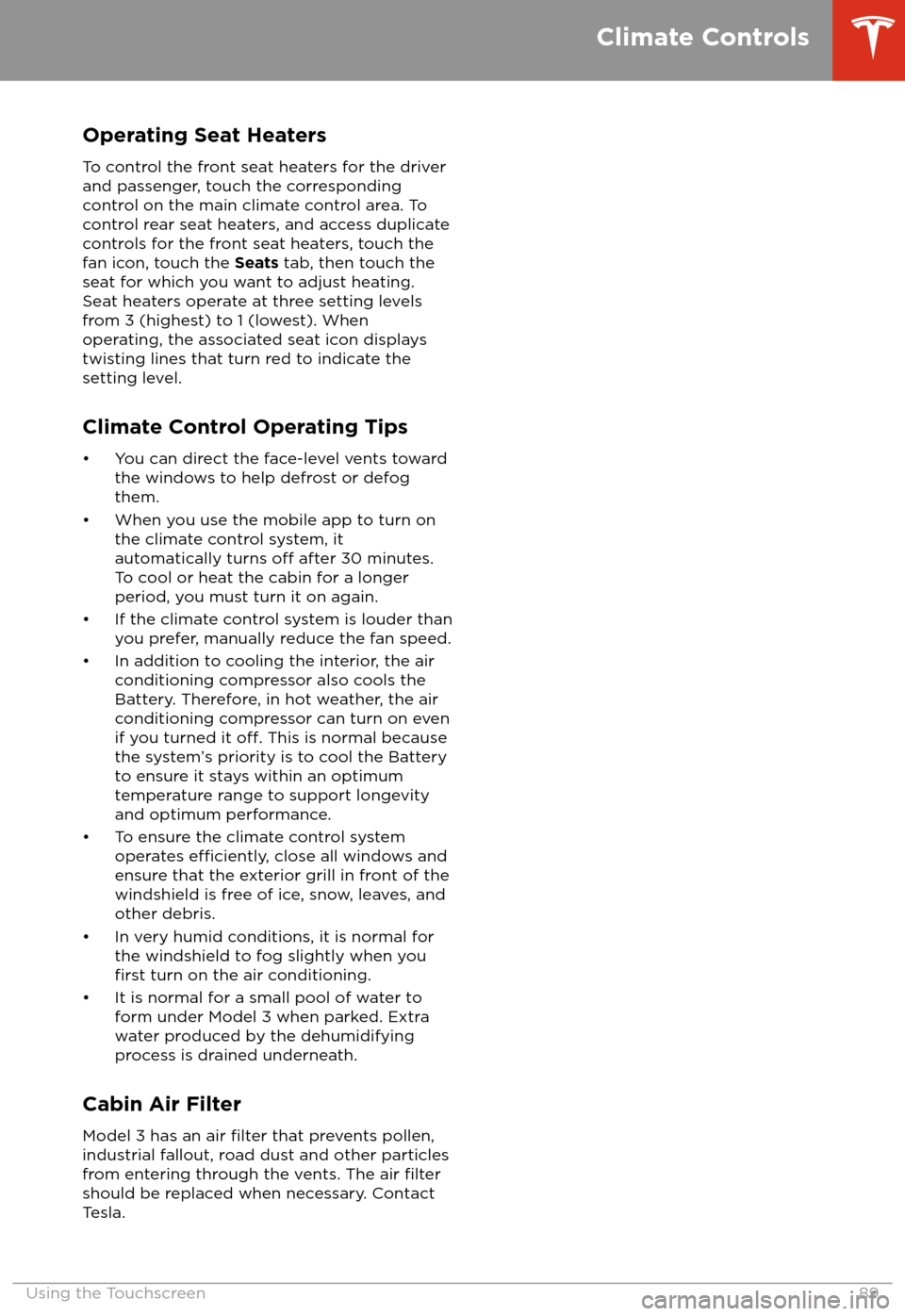
Operating Seat Heaters
To control the front seat heaters for the driver
and passenger, touch the corresponding
control on the main climate control area. To
control rear seat heaters, and access duplicate
controls for the front seat heaters, touch the
fan icon, touch the Seats tab, then touch the
seat for which you want to adjust heating.
Seat heaters operate at three setting levels
from 3 (highest) to 1 (lowest). When
operating, the associated seat icon displays
twisting lines that turn red to indicate the
setting level.
Climate Control Operating Tips
Page 144 of 165
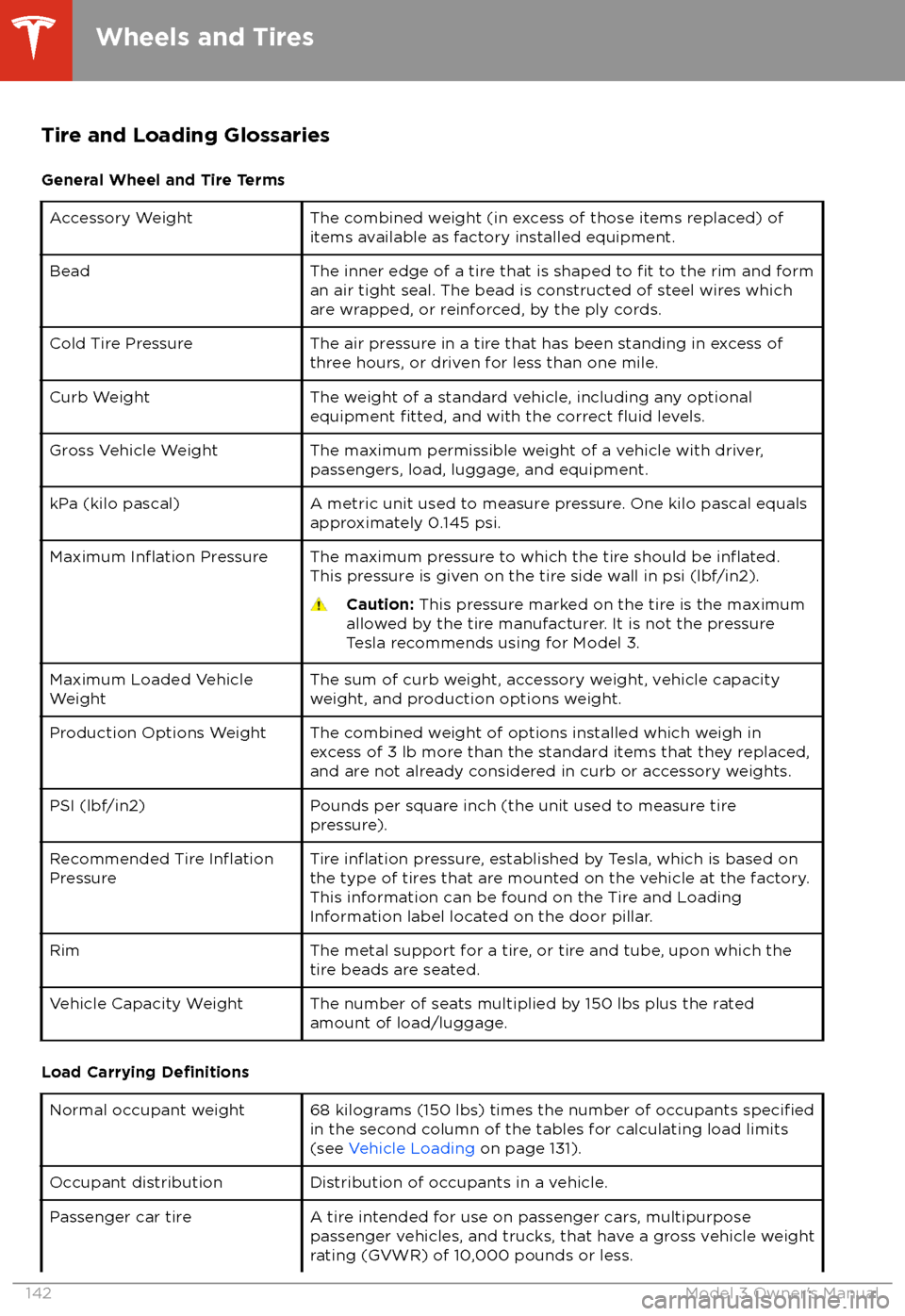
Tire and Loading GlossariesGeneral Wheel and Tire TermsAccessory WeightThe combined weight (in excess of those items replaced) of
items available as factory installed equipment.BeadThe inner edge of a tire that is shaped to fit to the rim and form
an air tight seal. The bead is constructed of steel wires which
are wrapped, or reinforced, by the ply cords.Cold Tire PressureThe air pressure in a tire that has been standing in excess of
three hours, or driven for less than one mile.Curb WeightThe weight of a standard vehicle, including any optional
equipment fitted, and with the correct fluid levels.Gross Vehicle WeightThe maximum permissible weight of a vehicle with driver,
passengers, load, luggage, and equipment.kPa (kilo pascal)A metric unit used to measure pressure. One kilo pascal equals
approximately 0.145 psi.Maximum Inflation PressureThe maximum pressure to which the tire should be inflated.This pressure is given on the tire side wall in psi (lbf/in2).
Caution: This pressure marked on the tire is the maximum
allowed by the tire manufacturer. It is not the pressure
Tesla recommends using for Model 3.Maximum Loaded Vehicle
WeightThe sum of curb weight, accessory weight, vehicle capacity
weight, and production options weight.Production Options WeightThe combined weight of options installed which weigh in
excess of 3 lb more than the standard items that they replaced, and are not already considered in curb or accessory weights.PSI (lbf/in2)Pounds per square inch (the unit used to measure tire
pressure).Recommended Tire InflationPressureTire inflation pressure, established by Tesla, which is based on
the type of tires that are mounted on the vehicle at the factory. This information can be found on the Tire and Loading
Information label located on the door pillar.RimThe metal support for a tire, or tire and tube, upon which the
tire beads are seated.Vehicle Capacity WeightThe number of seats multiplied by 150 lbs plus the rated
amount of load/luggage.
Load Carrying Definitions
Normal occupant weight68 kilograms (150 lbs) times the number of occupants specifiedin the second column of the tables for calculating load limits
(see Vehicle Loading on page 131).Occupant distributionDistribution of occupants in a vehicle.Passenger car tireA tire intended for use on passenger cars, multipurpose
passenger vehicles, and trucks, that have a gross vehicle weight
rating (GVWR) of 10,000 pounds or less.
Wheels and Tires
142Model 3 Owner
Page 161 of 165
contact information (continued)Tesla 154coolantBattery, checking level of 124
Battery, replacement interval 112
copyrights 151
cruise control 61
D
dashboard overview 2
data recording 152
data sharing 152
declarations of conformity 155
delivery mileage 153
devicesBluetooth, playing audio files 92
connecting 16
playing audio
files from 92
dimensions 134
dome (map) lights 45
door handles 9
door labels 131
doorsChild Lock 10
exterior door handles 9
interior locking and unlocking 10
keyless entry 9
locking 9
opening from exterior 9
opening from interior 9
Unlock on Park 10
unlocking 9
Walk Away Lock 10
Drive gear 41
driverprofiles 34
seat adjustment 18drivingseating position 18
starting 39
E
Easter Eggs 150
easy entry, driver
profile 34
EDR (event data recorder) 152
electric parking brake 50
emergency braking 76
emergency
flashers 47
emission label 130
energygained from regenerative braking 49
range information 42
energy use predictions (navigating) 97
event data recording 152
exteriorexterior (continued)car cover 121
cleaning 119
dimensions 134
lights 45
overview 3
polishing, touch up, & repair 120
F
fan speed, interior 87
favorite destinations 98
Favorites (Media Player) 91
Favorites (navigation) 95
FCC
certifications 155
features, downloading new 104
firmware (software) updates 104flash drives, playing audio files from 92flashers, warning 47floor mats 121
fluidsreplacement intervals 112
reservoirs, checking 124
fog lights 45
forward collision warning 76
front passenger detection 32
front trunk 14
G
garage doors, opening 101
gates, opening 101
GAWR 131
gears 41
glovebox 16
Gross Axle Weight Rating 131
Gross Vehicle Weight Rating 131
ground clearance 134
GVWR 131
H hazard warning
flashers 47
head supports 19
headlightsafter exit 46
controlling 45
high beams 45
heating 86
high beam headlights 45
high voltageBattery specifications 136
components 105
safety 112
hills, stopping on 54
hitches 132
Index
Index159
Page 162 of 165
Home location 98HomeLinkFCC certification 156
programming and using 101
hood 14
horn 37
hub caps 115
I
IC
certifications 155identification labels 130
interiorcleaning 120
dimensions 134
lights 45
overview 2
temperature control 86
Internet radio 91
J
J1772 106
jacking 126
jump starting 148
K
keyFCC and IC certifications 155
key card 7
keyless entry 9
keysdeleting phone authenticated phones 7
displaying a list of 7
overview 6
L
labelTire and Loading Information 131
vehicle certification 131
lane assist 74
lane change, automatic 70
lane departure warning 74
LATCH child seats, installing 26
lifting 126
lightshazard warning 47
headlights after exit 46
turn signals 46
load limits 131
location tracking 95
locking 9
lug nut covers 116
lumbar adjustment (premium)
18
Mmaintenancebrake fluid, checking 124
cleaning 119
daily and monthly checks 112
fluid replacement intervals 112
panel, removing 124
replacing wiper blades 122
service intervals 112
tires 113
washer
fluid, topping up 125
washer jets, cleaning 122
map orientation 95
map updates 98
mats 121
media 90
mileage upon delivery 153
mirrors 38
mobile app 7
Mobile Connectordescription 106
using 108
modifications 127
my car does what? 150
N naming 85
navigating 95
NCC
certifications 155
Neutral gear 41
NHTSA, contacting 154
O occupancy sensor 32
odometer 5
offset from speed limit 79
Online Routing 97
opening hood without power 148
overhang dimensions 134
overtake acceleration 61
Owner Information, about 151
P Park Assist 52
Park gear 41
parking brake 50
parking, automatic 72
parts replacement 127
passenger detection 32
Index
160Model 3 Owner
Page 163 of 165
passenger front airbag 32phoneauthenticating as a key 6
pairing and using 93
removing as a key 7
phone key 6
PIN 34
power socket 17
power windows 11
powering on and
off 39
Proposition 65 153
public charging stations 106
R radar 58
radio 90
Radio Frequency information 155
rangeregenerative braking 49
range assurance 55
Re-route 97
rear seats, folding and raising 19
rear view camera 56
rear window switches, disabling 11
Recent (Media Player) 91
Recents (navigation) 95
regenerative braking 49
relative speed limit 79
release notes 104
restarting the touchscreen 39
Reverse gear 41
RFID transponders 127
roadside assistance 145
roof racks 133
rotating tires 114
Round Trip Energy (navigating) 97
Routing Preferences 97
S safety defects, reporting 154
safety informationairbags 33
child seats 28
seat belts 23seat beltscleaning 120
in a collision 22
overview of 21
pre-tensioners 22
wearing when pregnant 22
seat covers 20
seat heaters 86, 89
seating capacity 131
seatsadjusting 18seats (continued)heaters 86
security settings 100
sensors 58
service data recording 152
service intervals 112
shifting gears 41
side collision warning 74
slip start 51
smartphoneauthenticating as a key 6
removing as a key 7
software updates 104
software version 5
specificationscargo volume 135
dimensions 134
exterior 134
interior 134
tires 138
weights 135
wheels 138
speed assist 79
speed limit warning 79
stability control 51
starting 39
steering wheeladjusting position 36
adjusting sensitivity 36
buttons 36
lights, controlling 45
scroll buttons 36
steering, automatic 67
Streaming radio 91
summer tires 116
superchargingdescribed 111
idle fees 111
pay-per-use fees 111
suspension specifications 136
T telematics 152
temperatureBattery (high voltage), limits 107
cabin, controls for 86
outside 42
tires 141
tie-down straps 147
Tire and Loading Information label 131
tire noise 116
Tire Pressure Monitoring SystemFCC certification 156
overview of 117
tire pressures, checking 113
tiresall-season 116
Index
Index161