ESP TESLA MODEL 3 2019 Owner's Manual (Europe)
[x] Cancel search | Manufacturer: TESLA, Model Year: 2019, Model line: MODEL 3, Model: TESLA MODEL 3 2019Pages: 179, PDF Size: 9.18 MB
Page 17 of 179
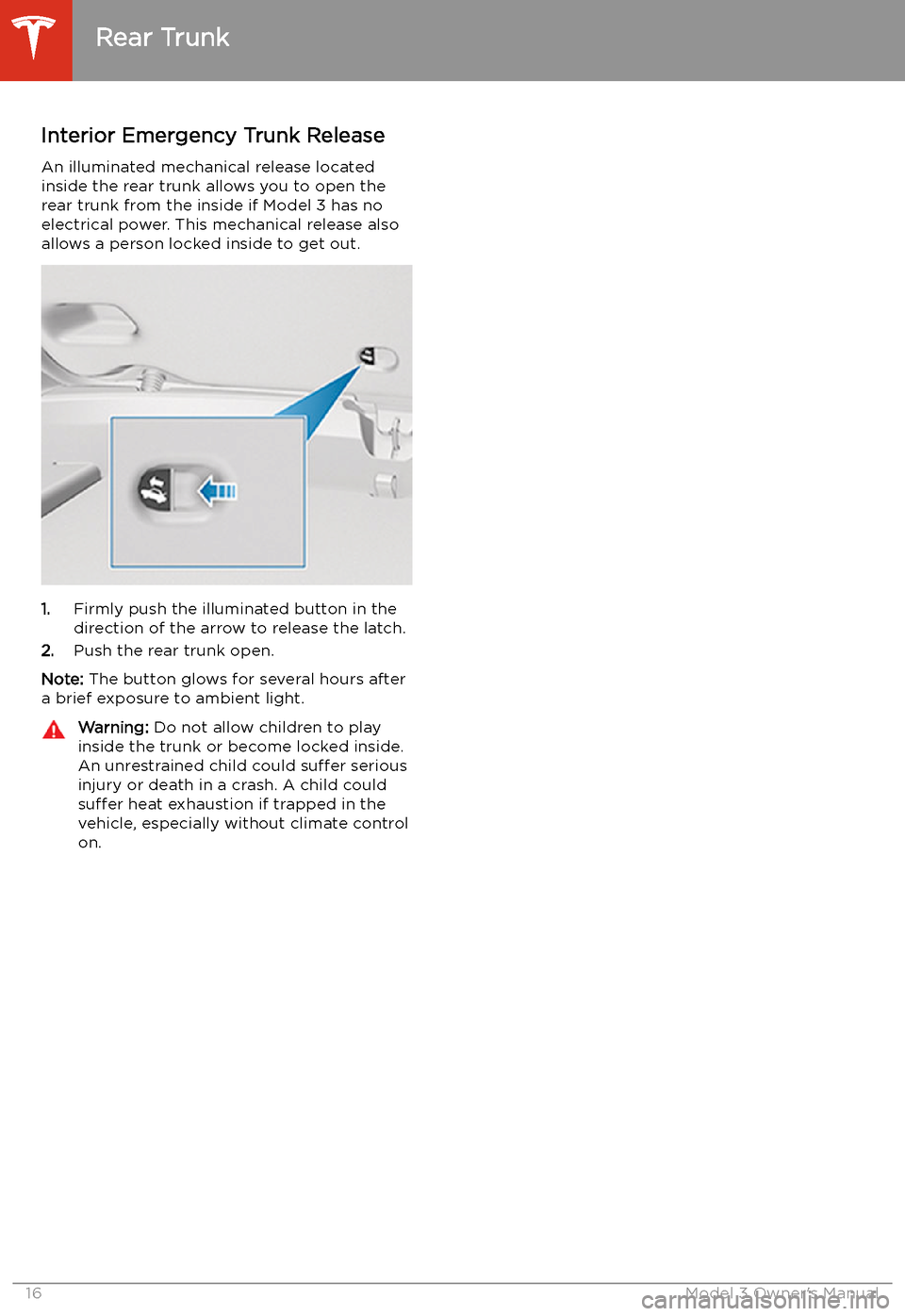
Interior Emergency Trunk ReleaseAn illuminated mechanical release located
inside the rear trunk allows you to open the rear trunk from the inside if Model 3 has no
electrical power. This mechanical release also
allows a person locked inside to get out.
1. Firmly push the illuminated button in the
direction of the arrow to release the latch.
2. Push the rear trunk open.
Note: The button glows for several hours after
a brief exposure to ambient light.
Warning: Do not allow children to play
inside the trunk or become locked inside.
An unrestrained child could suffer serious
injury or death in a crash. A child could
suffer heat exhaustion if trapped in the
vehicle, especially without climate control
on.
Rear Trunk
16Model 3 Owner
Page 43 of 179
Disabling the Passenger Front
Airbag
When a child is seated in the front passenger
seat (even when the child is seated in a child safety seat or booster seat), you must disable
the passenger front airbag to prevent it from
injurying the child if a collision occurs.
To turn off the front airbag on the passenger
side of the vehicle, touch Controls > Safety &
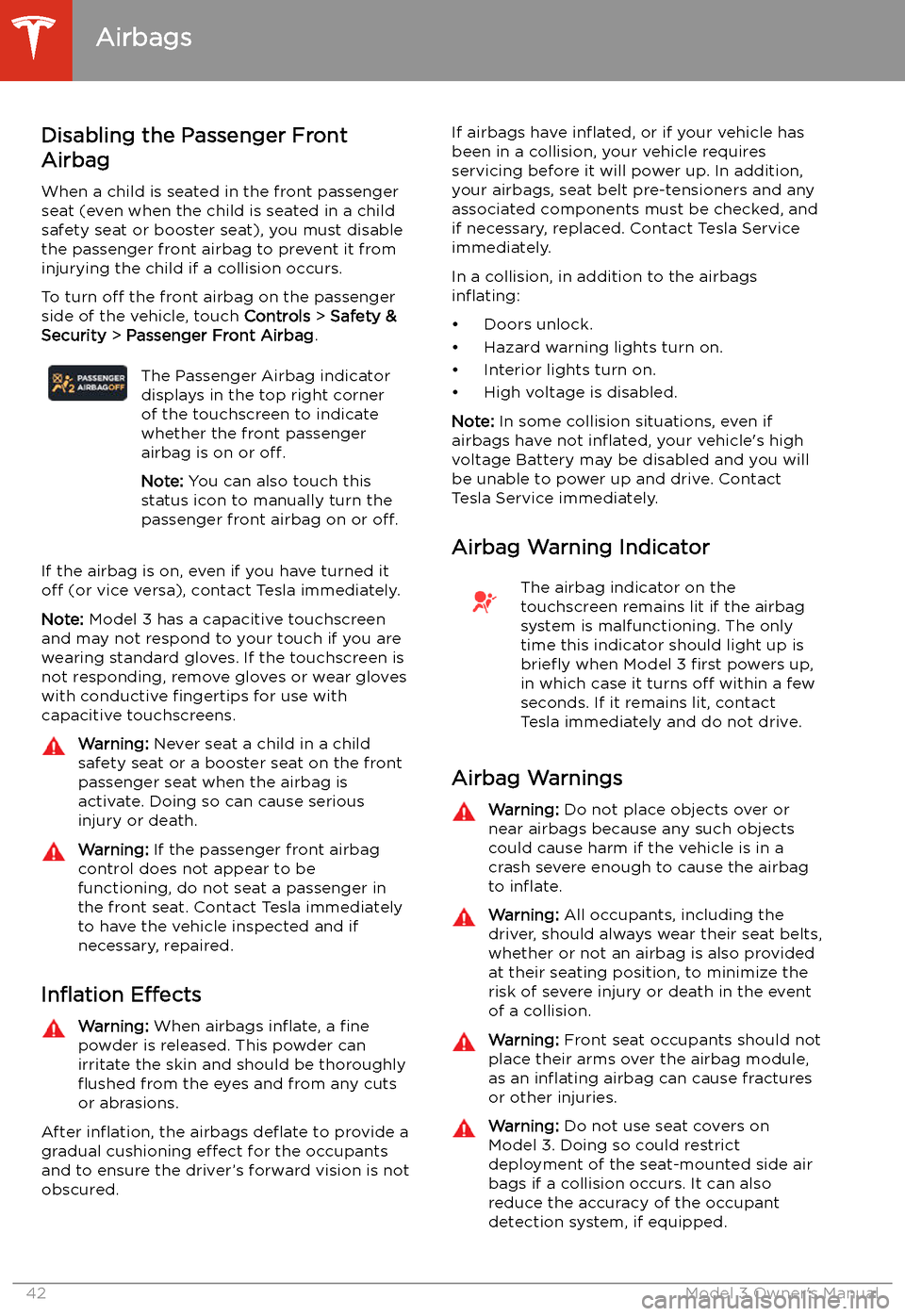
Security > Passenger Front Airbag .The Passenger Airbag indicator
displays in the top right corner
of the touchscreen to indicate
whether the front passenger
airbag is on or off.
Note: You can also touch this
status icon to manually turn the
passenger front airbag on or off.
If the airbag is on, even if you have turned it
off (or vice versa), contact Tesla immediately.
Note: Model 3 has a capacitive touchscreen
and may not respond to your touch if you are
wearing standard gloves. If the touchscreen is
not responding, remove gloves or wear gloves
with conductive fingertips for use with
capacitive touchscreens.
Warning: Never seat a child in a child
safety seat or a booster seat on the front
passenger seat when the airbag is
activate. Doing so can cause serious
injury or death.Warning: If the passenger front airbag
control does not appear to be
functioning, do not seat a passenger in
the front seat. Contact Tesla immediately
to have the vehicle inspected and if
necessary, repaired.
In
Page 88 of 179
Lane Assist
The cameras monitor the markers on the lane
you are driving in and the ultrasonic sensors
and Autopilot cameras monitor the
surrounding areas and the blind spot for the
presence of a vehicle or other objects.
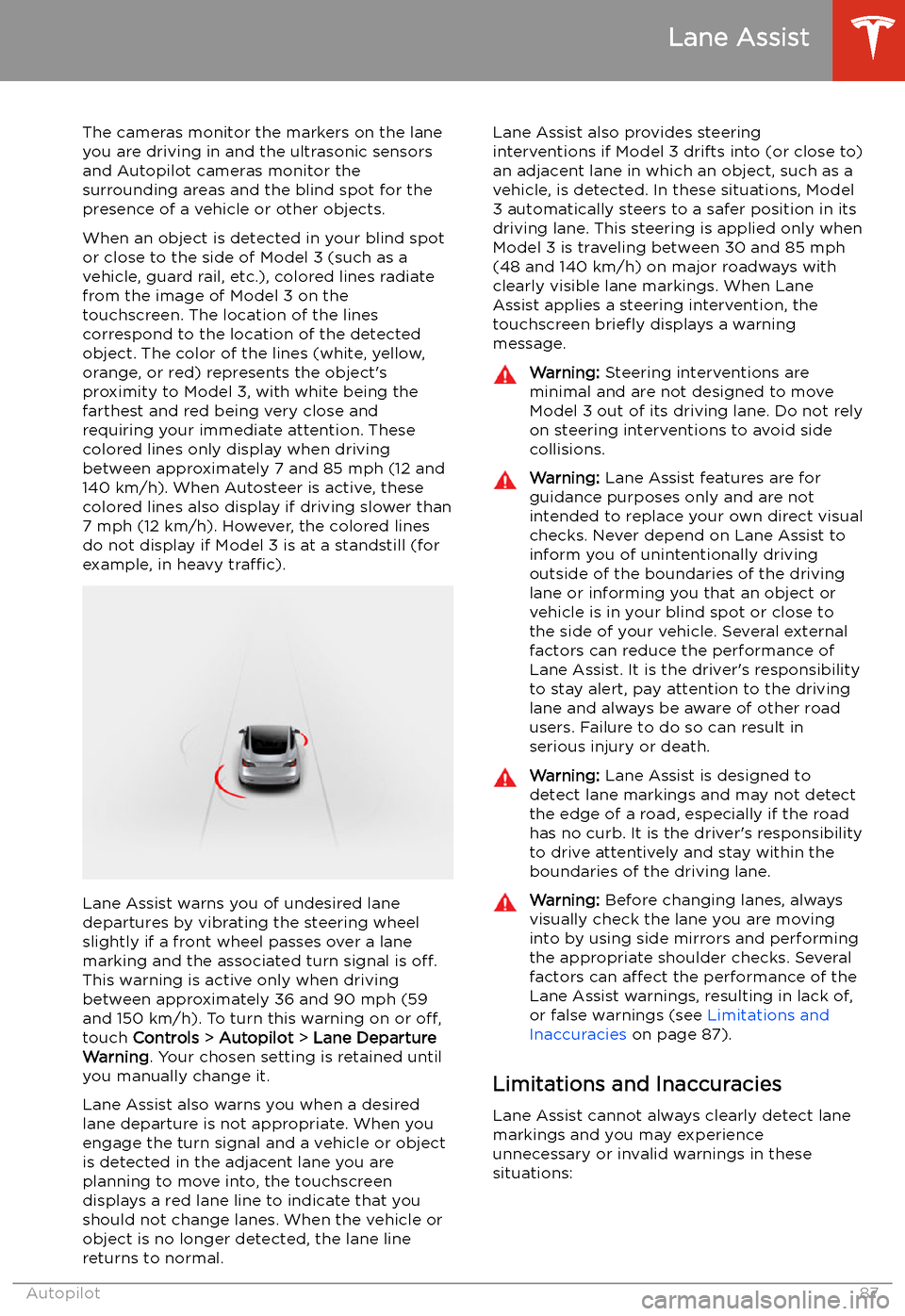
When an object is detected in your blind spot
or close to the side of Model 3 (such as a
vehicle, guard rail, etc.), colored lines radiate
from the image of Model 3 on the
touchscreen. The location of the lines
correspond to the location of the detected object. The color of the lines (white, yellow,
orange, or red) represents the object
Page 98 of 179
DrivingAcceleration: Adjust the amount of acceleration. Chill limits acceleration for
a slightly smoother and gentler ride, whereas Standard provides the normal
level of acceleration.
Note: When Chill is selected, Chill displays on the touchscreen above the
driving speed.
Steering Mode : Adjust the amount of effort required to turn the steering
wheel. Sport feels more responsive whereas Comfort feels easier to drive
and park (see Adjusting Steering Effort on page 46).
Regenerative Braking : When you release the accelerator when driving,
regenerative braking slows Model 3 and feeds any surplus energy back to
the Battery. If set to LOW, Model 3 does not slow down as quickly, but also
feeds less energy back to the Battery (see Regenerative Braking on page
60).
Note: Regardless of the setting selected, the energy gained by regenerative
braking is reduced if the Battery is full, or is extremely cold or hot (in which
case, surplus energy is used to heat or cool it).
Traction Control : Turn slip start on to allow wheels to spin (see Traction
Control on page 62).
Creep : When on, Model 3 applies forward torque in Drive and backwards
torque in Reverse when you release the brake pedal (similar to a
conventional vehicle with an automatic transmission). The torque moves the
vehicle slowly on
Page 104 of 179
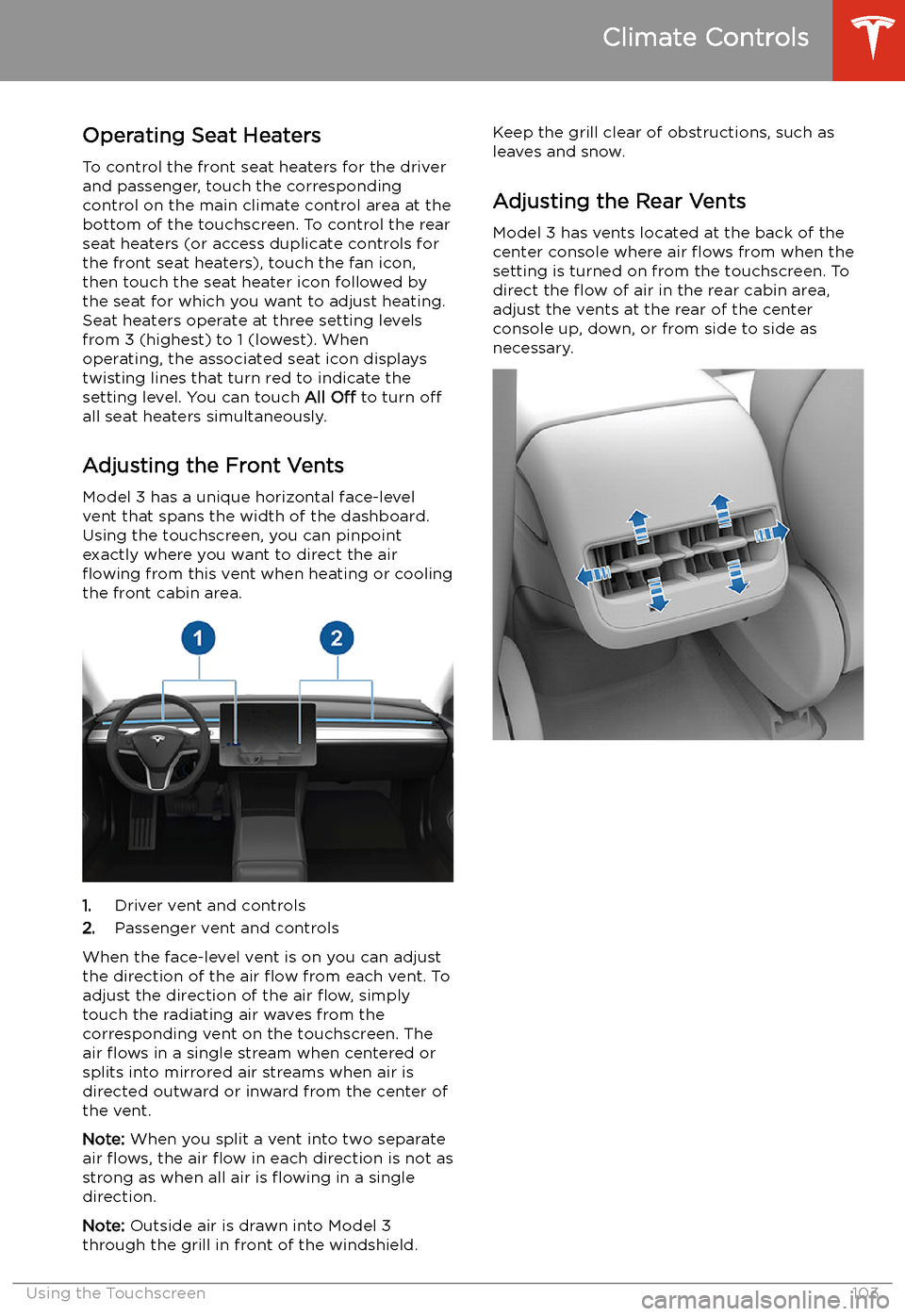
Operating Seat Heaters
To control the front seat heaters for the driver
and passenger, touch the corresponding
control on the main climate control area at the
bottom of the touchscreen. To control the rear
seat heaters (or access duplicate controls for
the front seat heaters), touch the fan icon,
then touch the seat heater icon followed by
the seat for which you want to adjust heating.
Seat heaters operate at three setting levels
from 3 (highest) to 1 (lowest). When
operating, the associated seat icon displays
twisting lines that turn red to indicate the
setting level. You can touch All Off to turn off
all seat heaters simultaneously.
Adjusting the Front Vents
Model 3 has a unique horizontal face-level
vent that spans the width of the dashboard. Using the touchscreen, you can pinpoint
exactly where you want to direct the air
Page 108 of 179
Increase or decrease the volume of
spoken navigation instructions by
touching - or +, respectively.
Decreasing all the way to the left
mutes the instructions. You can
also mute navigation instructions
when a navigation route is active
by touching the volume icon on the
turn-by-turn direction list.
Customize how the navigation
system works by adjusting these settings:
Page 122 of 179
Connecting to Wi-Fi
Wi-Fi is available as a data connection method and is often faster than cellular data networks.
Connecting to Wi-Fi is especially useful in areas with limited or no cellular connectivity.
To ensure fast, reliable delivery of Model 3
updates (see Software Updates on page 122),
Tesla recommends leaving Wi-Fi turned on and connected to a Wi-Fi network. To connectto a Wi-Fi network:
1. Touch the LTE (or 3G) icon in the
touchscreen status bar. Model 3 will start
scanning and display the Wi-Fi networks
that are within range.
2. Select the Wi-Fi network you want to use,
enter the password (if necessary), then
touch Connect .
You can also connect to a hidden network that
isn
Page 124 of 179
Charging
Electric Vehicle Components
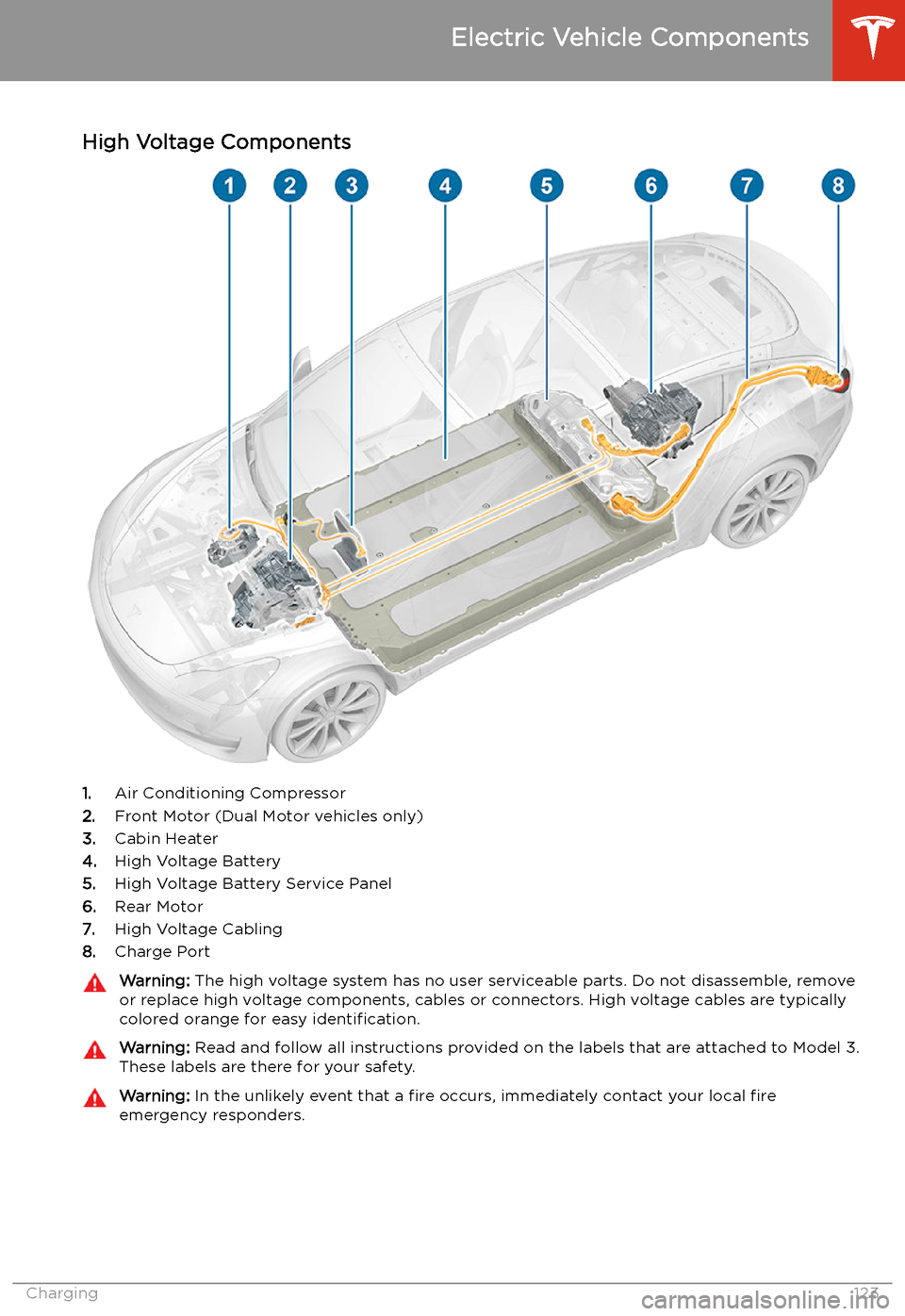
High Voltage Components
1. Air Conditioning Compressor
2. Front Motor (Dual Motor vehicles only)
3. Cabin Heater
4. High Voltage Battery
5. High Voltage Battery Service Panel
6. Rear Motor
7. High Voltage Cabling
8. Charge Port
Warning:
The high voltage system has no user serviceable parts. Do not disassemble, remove
or replace high voltage components, cables or connectors. High voltage cables are typically colored orange for easy identification.Warning: Read and follow all instructions provided on the labels that are attached to Model 3.
These labels are there for your safety.Warning: In the unlikely event that a fire occurs, immediately contact your local fire
emergency responders.
Electric Vehicle Components
Charging123
Page 126 of 179
Battery Information
About the Battery
Model 3 has one of the most sophisticated
battery systems in the world. The most
important way to preserve the Battery is to LEAVE YOUR VEHICLE PLUGGED IN when
you are not using it. This is particularly important if you are not planning to drive
Model 3 for several weeks. When plugged in,
Model 3 wakes up when needed to
automatically maintain a charge level that
maximizes the lifetime of the Battery.
Note: When left idle and unplugged, your
vehicle periodically uses energy from the Battery for system tests and recharging the
12V battery when necessary.
There is no advantage to waiting until the
Battery’s level is low before charging. In fact, the Battery performs best when charged
regularly.
Note: If the Model 3 Battery becomes
completely discharged in a situation in which
towing is required, the owner is responsible
for towing expenses. Discharge-related towing
expenses are not covered under the Roadside
Assistance policy.
The peak charging rate of the Battery may
decrease slightly after a large number of DC
Fast Charging sessions, such as those at
Superchargers. To ensure maximum driving
range and Battery safety, the Battery charge
rate is decreased when the Battery is too cold,
when the Battery’s charge is nearly full, and when the Battery conditions change with
usage and age. These changes in the condition of the Battery are driven by battery physics
and may increase the total Supercharging
duration by a few minutes over time.
Battery Care
Never allow the Battery to fully discharge.
Even when Model 3 is not being driven, its
Battery discharges very slowly to power the
onboard electronics. The Battery can
discharge at a rate of approximately 1% per day, though the discharge rate may vary
depending on environmental factors (such as
cold weather), vehicle configuration, and your
selected settings on the touchscreen.
Situations can arise in which you must leave
Model 3 unplugged for an extended period of time (for example, at an airport when
traveling). In these situations, keep the 1% in
mind to ensure that you leave the Battery with a sufficient charge level. For example, over a
two week period (14 days), the Battery may
discharge by approximately 14%.
Discharging the Battery to 0% may result in
damage to vehicle components. To protect
against a complete discharge, Model 3 enters
a low-power consumption mode when the
displayed charge level drops to approximately
0%. In this mode, the Battery stops supporting
the onboard electronics and auxiliary 12V
battery. Once this low-power consumption
mode is active, immediately plug in Model 3 to
prevent a jump-start and 12V battery
replacement.
Note: If the vehicle is unresponsive and will
not unlock, open, or charge, then the 12V
battery may have become discharged. In this
situation, contact Tesla.
Temperature Limits
For better long-term performance, avoid
exposing Model 3 to ambient temperatures
above 140
Page 146 of 179
Parts and Accessories
Parts, Accessories, and
Modifications
Use only genuine Tesla parts and accessories.
Tesla performs rigorous testing on parts to
ensure their suitability, safety, and reliability.
Purchase these parts from Tesla, where they
are professionally installed and where you can receive expert advice about modifications to
Model 3. Accessories are available for
purchase from Tesla stores or online at www.tesla.com/shop .
Tesla is unable to assess parts manufactured
by other distributors and therefore accepts no
responsibility if you use non-Tesla parts onModel 3.
Warning: Installing non-approved parts
and accessories, or performing non- approved modifications, can affect the
performance of Model 3 and the safety of
its occupants. Any damage caused by
using or installing non-approved parts, or by performing non-approved
modifications, is not covered by the
warranty.Warning: Tesla does not accept liability
for death, personal injury or damage that
occurs if you use or install non-approved
accessories or make non-approved
modifications.Body Repairs
If Model 3 is in a collision, contact Tesla toensure that it is repaired with genuine Tesla
parts. Tesla has selected and approved body
shops that meet strict requirements for
training, equipment, quality, and customer
satisfaction.
Some repair shops and insurance companies
might suggest using non-original equipment
or salvaged parts to save money. However,
these parts do not meet Tesla