door TESLA MODEL 3 2020 s User Guide
[x] Cancel search | Manufacturer: TESLA, Model Year: 2020, Model line: MODEL 3, Model: TESLA MODEL 3 2020Pages: 220, PDF Size: 9.65 MB
Page 25 of 220
Interior Storage and Electronics
Glovebox
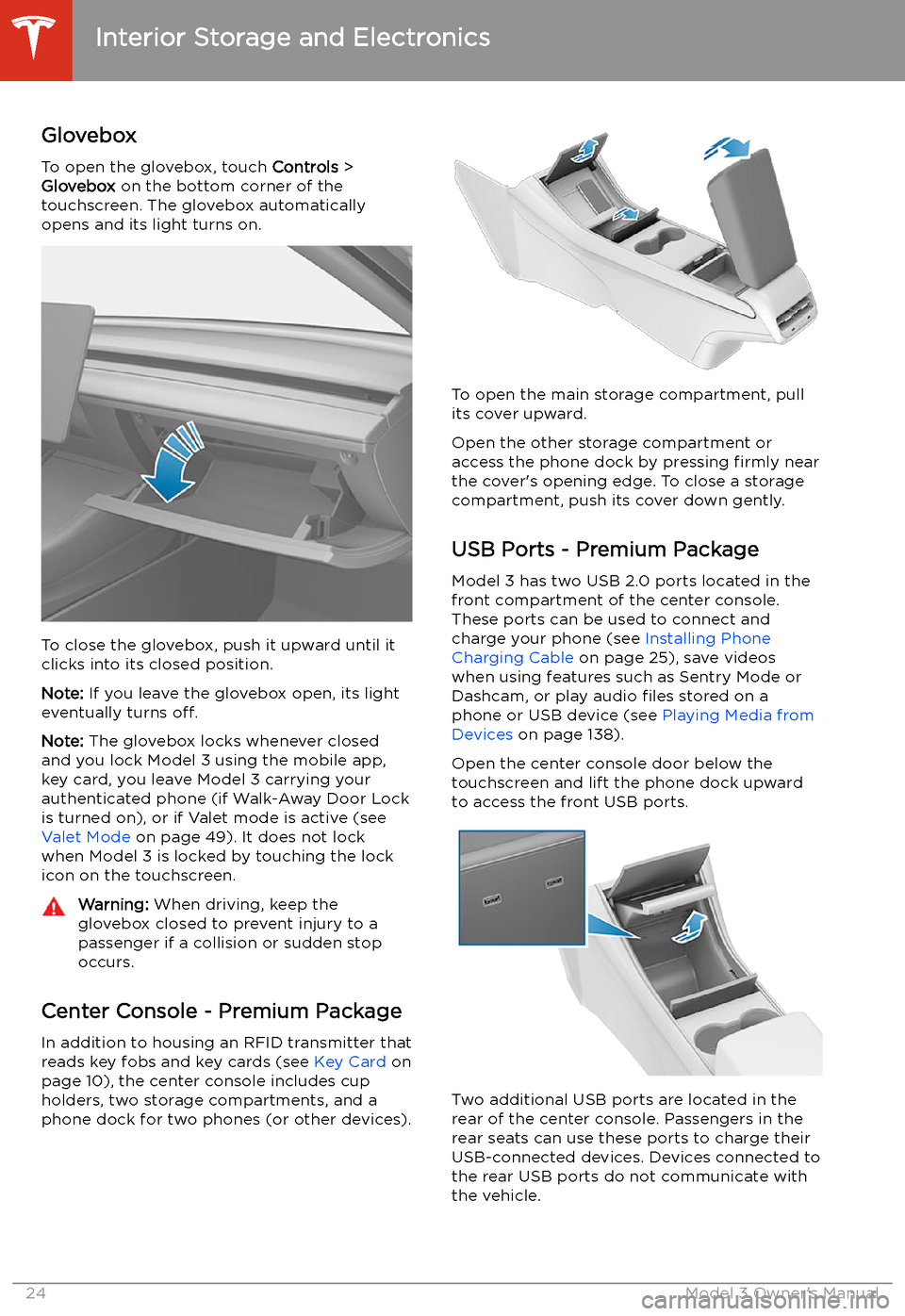
To open the glovebox, touch Controls >
Glovebox on the bottom corner of the
touchscreen. The glovebox automatically
opens and its light turns on.
To close the glovebox, push it upward until it
clicks into its closed position.
Note: If you leave the glovebox open, its light
eventually turns off.
Note: The glovebox locks whenever closed
and you lock Model 3 using the mobile app,
key card, you leave Model 3 carrying your authenticated phone (if Walk-Away Door Lock
is turned on), or if Valet mode is active (see Valet Mode on page 49). It does not lock
when Model 3 is locked by touching the lock
icon on the touchscreen.
Warning: When driving, keep the
glovebox closed to prevent injury to a
passenger if a collision or sudden stop occurs.
Center Console - Premium Package
In addition to housing an RFID transmitter that reads key fobs and key cards (see Key Card on
page 10), the center console includes cup
holders, two storage compartments, and a
phone dock for two phones (or other devices).
To open the main storage compartment, pull its cover upward.
Open the other storage compartment or
access the phone dock by pressing firmly near
the cover
Page 26 of 220
Note: Power is available whenever the vehicle
is considered "awake". The vehicle may be
awake for many reasons. For example, when
using features such as Summon, or when features such as Cabin Overheat Protection,Keep Climate On, Dog Mode, Sentry Mode,
etc. are enabled. The vehicle is also awake
whenever the 12V battery is being charged or
is in use, during HV charging, when the vehicle
is communicating with the mobile app, etc. Leaving an accessory plugged in does notdeplete the 12V battery.
Note: Always use USB 2.0 compliant cables
when connecting devices to the USB ports.
Using non-compliant cables can result in
slower charging and, if plugged into either of the front two ports, can result in potential connection problems or degraded
performance when trying to access media files
on the device.
Note: Do not connect multiple devices using a
USB hub. This can prevent connected devices from charging or from being recognized by
Media Player, Sentry Mode, Dashcam, etc.
Installing Phone Charging Cable To make it easy to connect your phone while
keeping the console free of clutter, you can install a phone charging cable in Model 3.
Note: The phone dock supports two phones
side-by-side.
To install a phone charging cable:
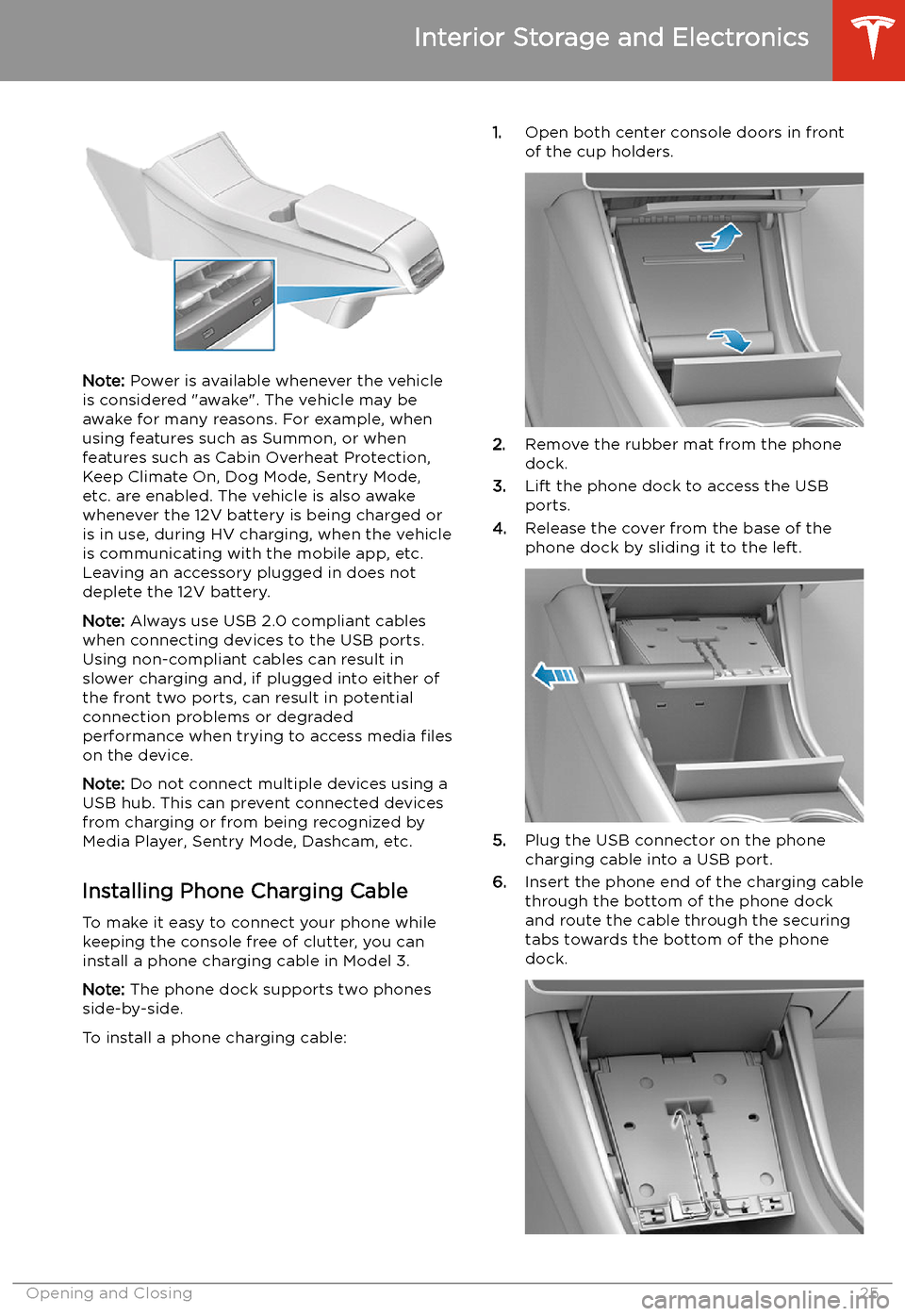
1. Open both center console doors in front
of the cup holders.
2. Remove the rubber mat from the phone
dock.
3. Lift the phone dock to access the USB
ports.
4. Release the cover from the base of the
phone dock by sliding it to the left.
5. Plug the USB connector on the phone
charging cable into a USB port.
6. Insert the phone end of the charging cable
through the bottom of the phone dock
and route the cable through the securing
tabs towards the bottom of the phone dock.
Interior Storage and Electronics
Opening and Closing25
Page 55 of 220
Starting and Powering
Off
Starting When you open a door, Model 3 powers on the
touchscreen and you can operate all controls.
To drive Model 3:
1. PRESS THE BRAKE PEDAL - Model 3
powers on and is ready to drive.
2. SELECT A GEAR - Move the gear lever all
the way down for Drive and all the way up
for Reverse. See Shifting Gears on page
56.
Note: If the PIN to Drive feature is enabled
(see PIN to Drive on page 143), you must also
enter a valid PIN on the touchscreen before
you can drive Model 3.
Note: If Passive Entry is off and you do not
press the brake pedal to start Model 3 within
approximately five minutes, a message
displays on the touchscreen and you must use
the key to lock then unlock Model 3 again before starting the vehicle.
Everything you need to know when driving
Model 3 displays on the touchscreen.
Drive Disabled - Requires Authentication
If Model 3 does not detect a key when you
press the brake (an authenticated phone is not
detected, or 30 seconds has passed since you
used the key card), the touchscreen displays a
message telling you that driving requires
authentication.
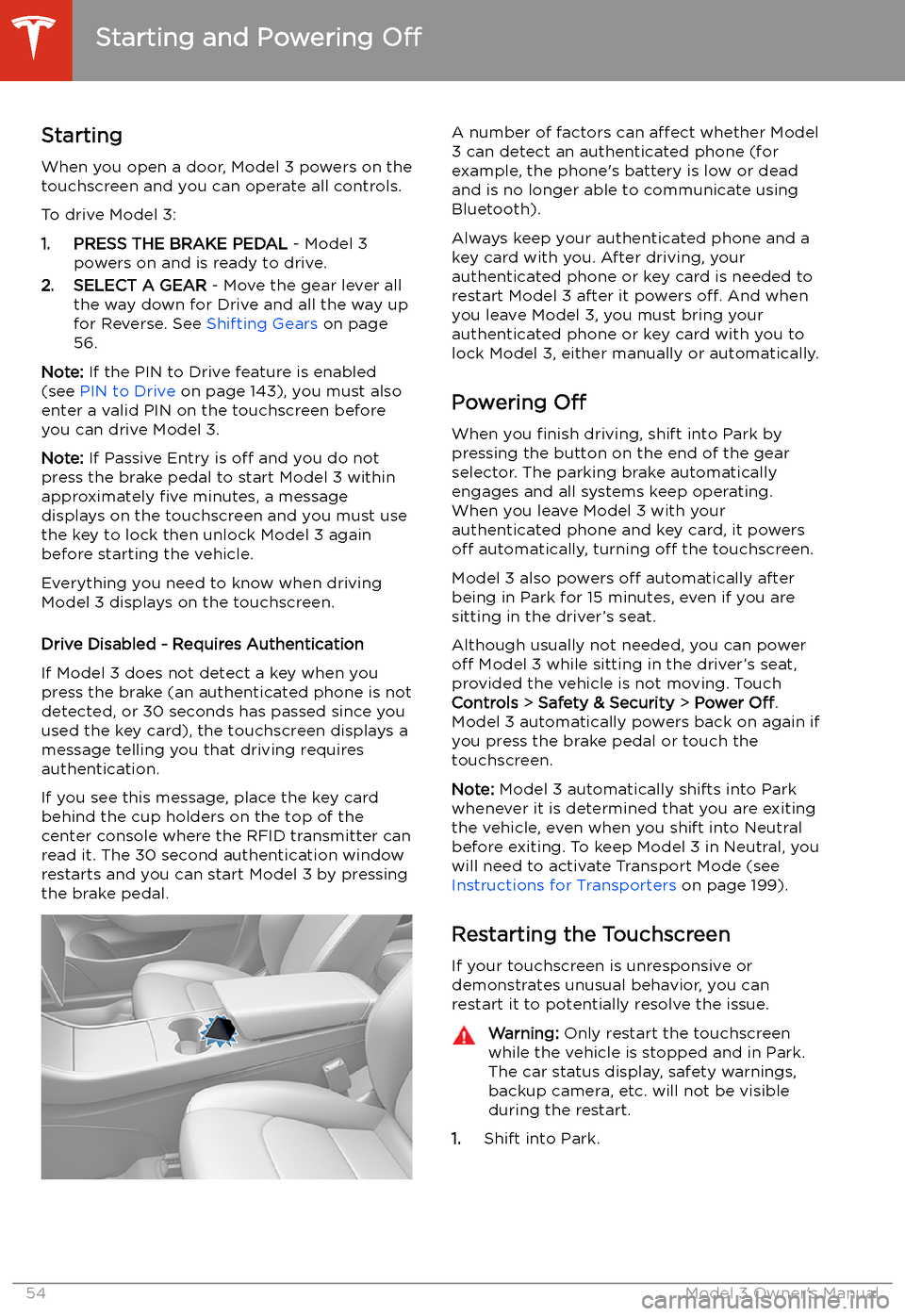
If you see this message, place the key card
behind the cup holders on the top of the center console where the RFID transmitter canread it. The 30 second authentication window
restarts and you can start Model 3 by pressing
the brake pedal.
A number of factors can affect whether Model
3 can detect an authenticated phone (for
example, the phone
Page 56 of 220
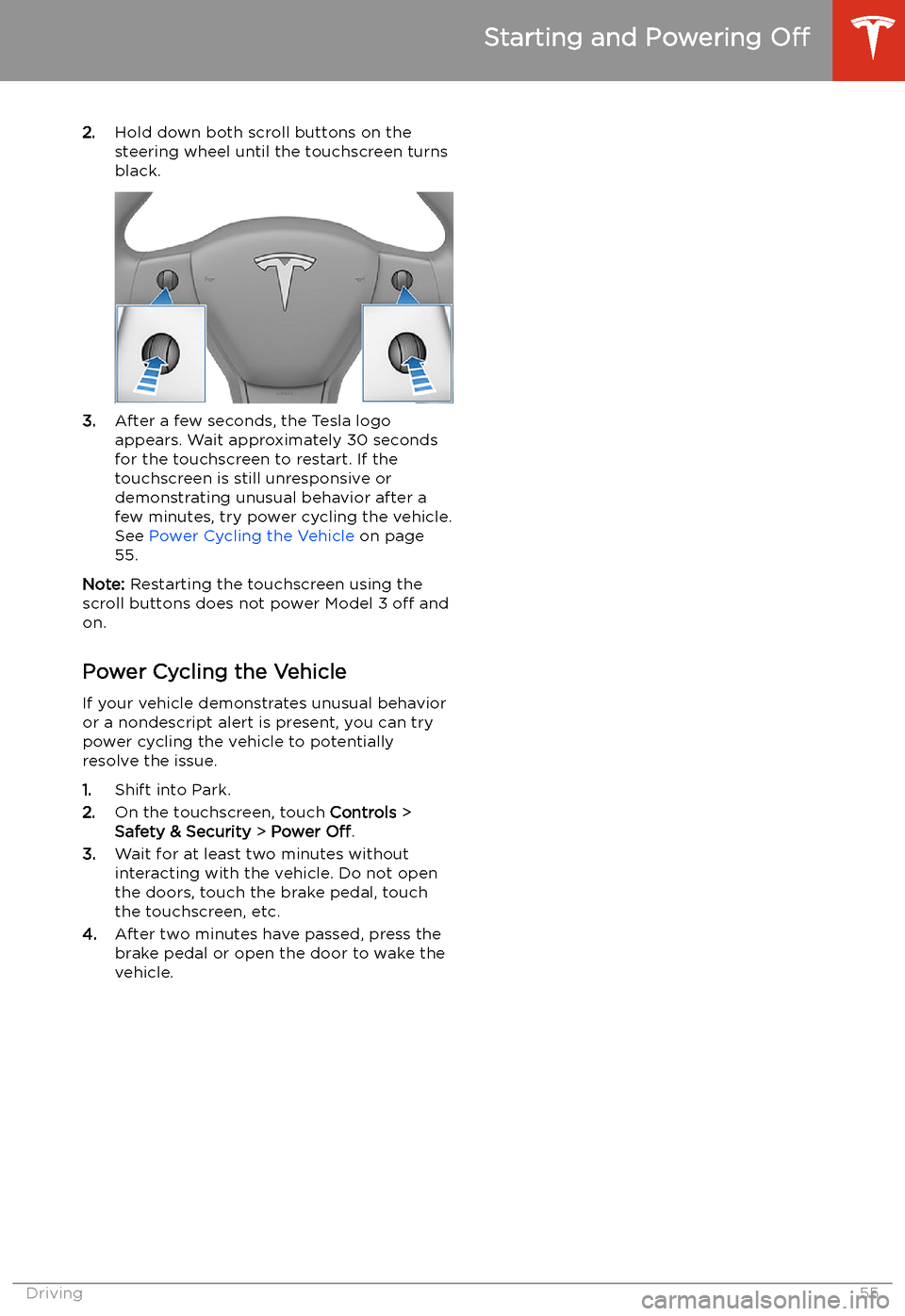
2.Hold down both scroll buttons on the
steering wheel until the touchscreen turns
black.
3. After a few seconds, the Tesla logo
appears. Wait approximately 30 seconds for the touchscreen to restart. If the
touchscreen is still unresponsive or
demonstrating unusual behavior after a
few minutes, try power cycling the vehicle.
See Power Cycling the Vehicle on page
55.
Note: Restarting the touchscreen using the
scroll buttons does not power Model 3 off and
on.
Power Cycling the Vehicle
If your vehicle demonstrates unusual behavior or a nondescript alert is present, you can try
power cycling the vehicle to potentially
resolve the issue.
1. Shift into Park.
2. On the touchscreen, touch Controls >
Safety & Security > Power Off.
3. Wait for at least two minutes without
interacting with the vehicle. Do not open
the doors, touch the brake pedal, touch the touchscreen, etc.
4. After two minutes have passed, press the
brake pedal or open the door to wake the
vehicle.
Starting and Powering Off
Driving55
Page 58 of 220

To make it convenient to pick up passengers,
you can also unlock all doors at any time by
shifting into Park then pressing the Park
button a second time.
Gears
Driving57
Page 59 of 220
Lights
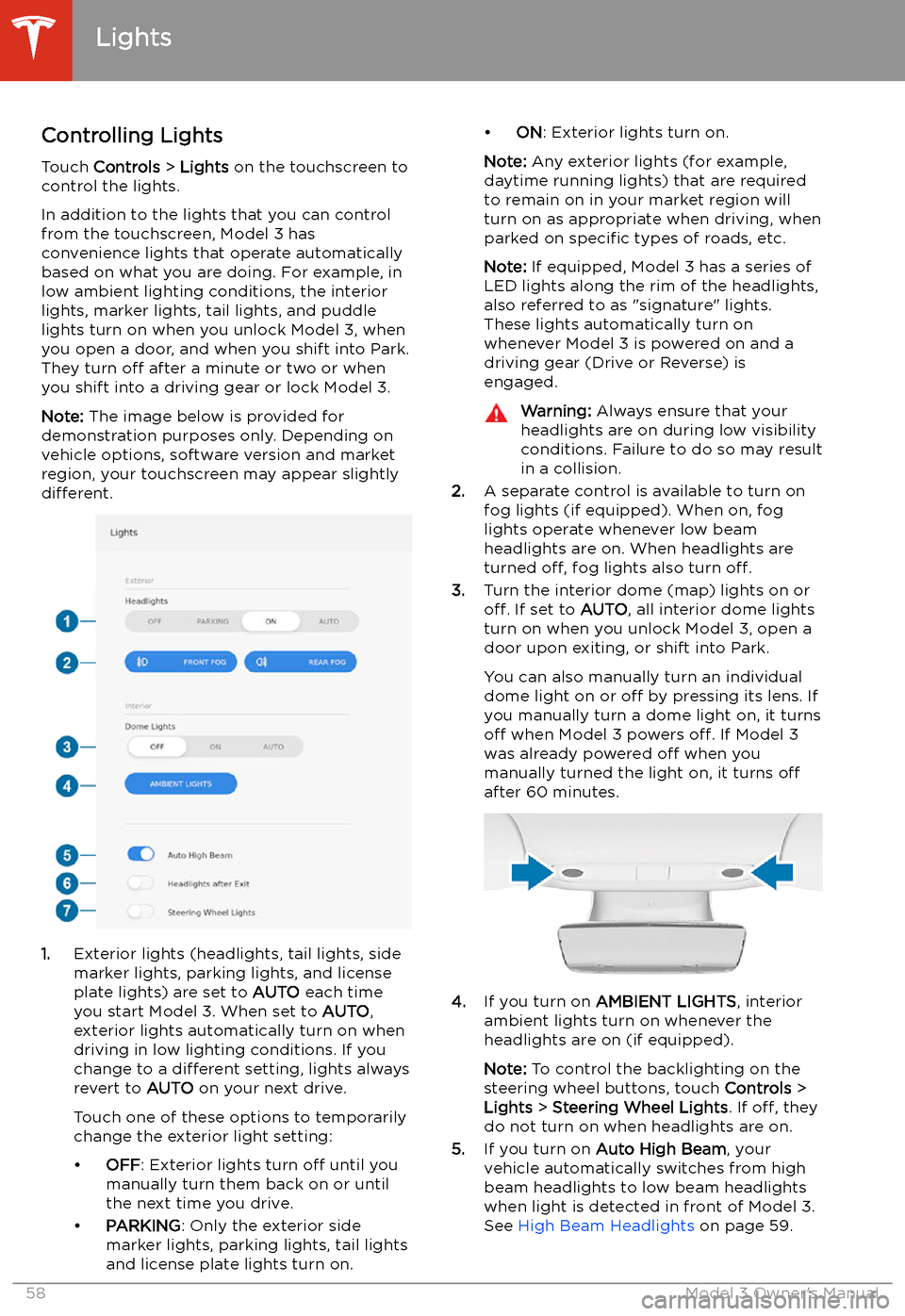
Controlling Lights Touch Controls > Lights on the touchscreen to
control the lights.
In addition to the lights that you can control
from the touchscreen, Model 3 has
convenience lights that operate automatically
based on what you are doing. For example, in
low ambient lighting conditions, the interior lights, marker lights, tail lights, and puddle
lights turn on when you unlock Model 3, when
you open a door, and when you shift into Park.
They turn off after a minute or two or when
you shift into a driving gear or lock Model 3.
Note: The image below is provided for
demonstration purposes only. Depending on vehicle options, software version and market
region, your touchscreen may appear slightly
different.
1. Exterior lights (headlights, tail lights, side
marker lights, parking lights, and license
plate lights) are set to AUTO each time
you start Model 3. When set to AUTO,
exterior lights automatically turn on when
driving in low lighting conditions. If you
change to a different setting, lights always
revert to AUTO on your next drive.
Touch one of these options to temporarily
change the exterior light setting:
Page 83 of 220
performing the procedure, and do not
attempt to use tools or excessive force.
Note: Preemptively applying WD-40 to the
door handle pivot pins can help prevent ice buildup inside your door handle. See Applying
WD-40 to Door Handle Pivot Pins for
instructions.
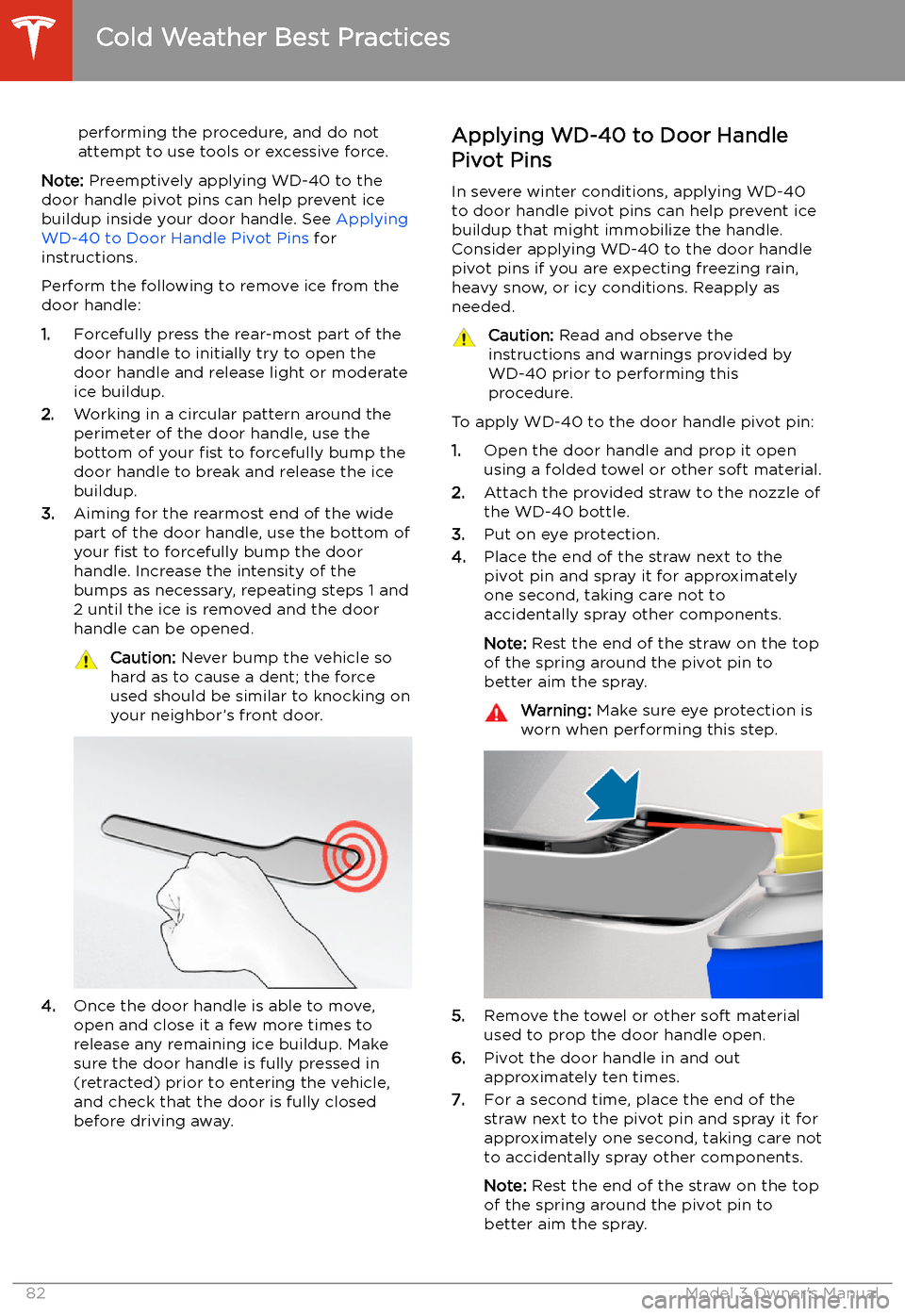
Perform the following to remove ice from the door handle:
1. Forcefully press the rear-most part of the
door handle to initially try to open the
door handle and release light or moderate ice buildup.
2. Working in a circular pattern around the
perimeter of the door handle, use the
bottom of your fist to forcefully bump the
door handle to break and release the ice
buildup.
3. Aiming for the rearmost end of the wide
part of the door handle, use the bottom of
your fist to forcefully bump the door
handle. Increase the intensity of the
bumps as necessary, repeating steps 1 and
2 until the ice is removed and the door
handle can be opened.
Caution: Never bump the vehicle so
hard as to cause a dent; the force
used should be similar to knocking on
your neighbor’s front door.
4. Once the door handle is able to move,
open and close it a few more times to
release any remaining ice buildup. Make
sure the door handle is fully pressed in
(retracted) prior to entering the vehicle,
and check that the door is fully closed
before driving away.
Applying WD-40 to Door Handle
Pivot Pins
In severe winter conditions, applying WD-40
to door handle pivot pins can help prevent ice
buildup that might immobilize the handle.
Consider applying WD-40 to the door handle pivot pins if you are expecting freezing rain,heavy snow, or icy conditions. Reapply as
needed.Caution: Read and observe the
instructions and warnings provided by
WD-40 prior to performing this
procedure.
To apply WD-40 to the door handle pivot pin:
1. Open the door handle and prop it open
using a folded towel or other soft material.
2. Attach the provided straw to the nozzle of
the WD-40 bottle.
3. Put on eye protection.
4. Place the end of the straw next to the
pivot pin and spray it for approximately
one second, taking care not to
accidentally spray other components.
Note: Rest the end of the straw on the top
of the spring around the pivot pin to
better aim the spray.
Warning: Make sure eye protection is
worn when performing this step.
5. Remove the towel or other soft material
used to prop the door handle open.
6. Pivot the door handle in and out
approximately ten times.
7. For a second time, place the end of the
straw next to the pivot pin and spray it for
approximately one second, taking care not
to accidentally spray other components.
Note: Rest the end of the straw on the top
of the spring around the pivot pin to better aim the spray.
Cold Weather Best Practices
82Model 3 Owner
Page 84 of 220

8.Remove the towel or other soft material
used to prop the door handle open.
9. Pivot the door handle in and out
approximately ten times.
10. Perform this procedure on the other three
door handles.
Cold Weather Best Practices
Driving83
Page 85 of 220
Autopilot
About Autopilot
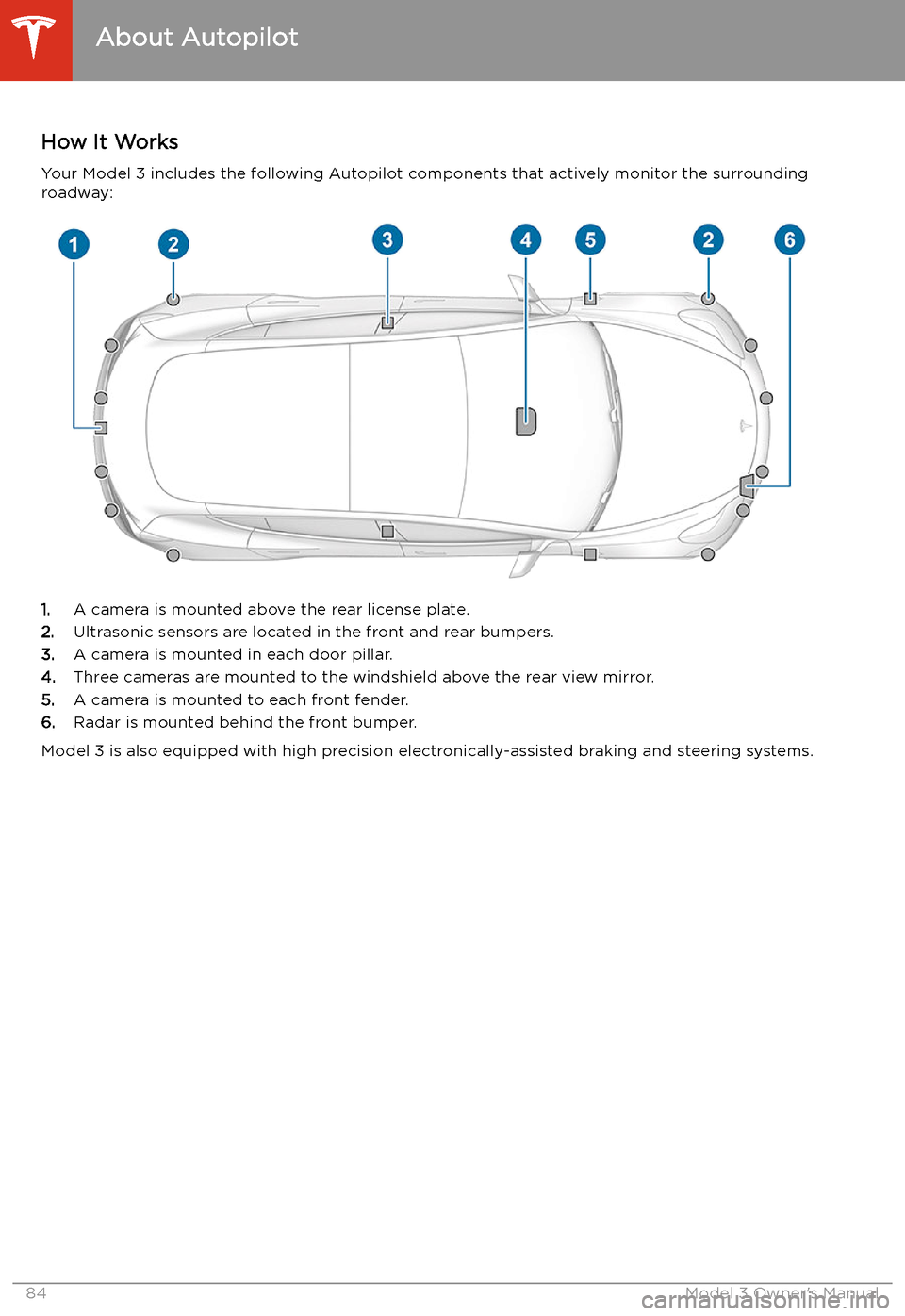
How It Works Your Model 3 includes the following Autopilot components that actively monitor the surrounding
roadway:
1. A camera is mounted above the rear license plate.
2. Ultrasonic sensors are located in the front and rear bumpers.
3. A camera is mounted in each door pillar.
4. Three cameras are mounted to the windshield above the rear view mirror.
5. A camera is mounted to each front fender.
6. Radar is mounted behind the front bumper.
Model 3 is also equipped with high precision electronically-assisted braking and steering systems.
About Autopilot
84Model 3 Owner
Page 114 of 220
Obstacle-Aware AccelerationObstacle-Aware Acceleration is designed toreduce the impact of a collision by reducing
motor torque if Model 3 detects an object in
its driving path. For example, Model 3, while
parked in front of a closed garage door with
the Drive gear engaged, detects that you have
pressed hard on the accelerator pedal.
Although Model 3 still accelerates and hits the
garage door, the reduced torque may result in
less damage.
Obstacle-Aware Acceleration is designed to operate only when all of these conditions are
simultaneously met: