door TESLA MODEL 3 2020 s Owner's Guide
[x] Cancel search | Manufacturer: TESLA, Model Year: 2020, Model line: MODEL 3, Model: TESLA MODEL 3 2020Pages: 220, PDF Size: 9.65 MB
Page 144 of 220
Security Settings
About the Security System
If Model 3 does not detect an authenticated
phone, key fob, or key card and a locked door
or trunk is opened, an alarm sounds and the
headlights and turn signals
Page 155 of 220
Charging Equipment
Charging equipment designed specifically to
charge your Model 3 is available from Tesla. A
Tesla Wall Connector, which installs in your
garage, is the fastest way to charge Model 3 at
home.
In most market regions, Model 3 is equipped with a Mobile Connector and the adapter(s)
needed to plug into the most commonly used power outlets. When using the MobileConnector, first plug the Mobile Connector
into the power outlet, and then plug in Model 3. For more information about your Mobile
Connector, see the Mobile Connector Owner’s
Manual (available on the touchscreen).
Additional adapters can be purchased from
Tesla.
Tesla offers adapters (for example, J1772 and
CHAdeMO) to allow you to plug into the most commonly used public charging stations in
your region. Open the charge port door using the touchscreen (see Charging Instructions on
page 157), plug the adapter into the charging
port on Model 3, and then connect the
station
Page 158 of 220
Charging Instructions
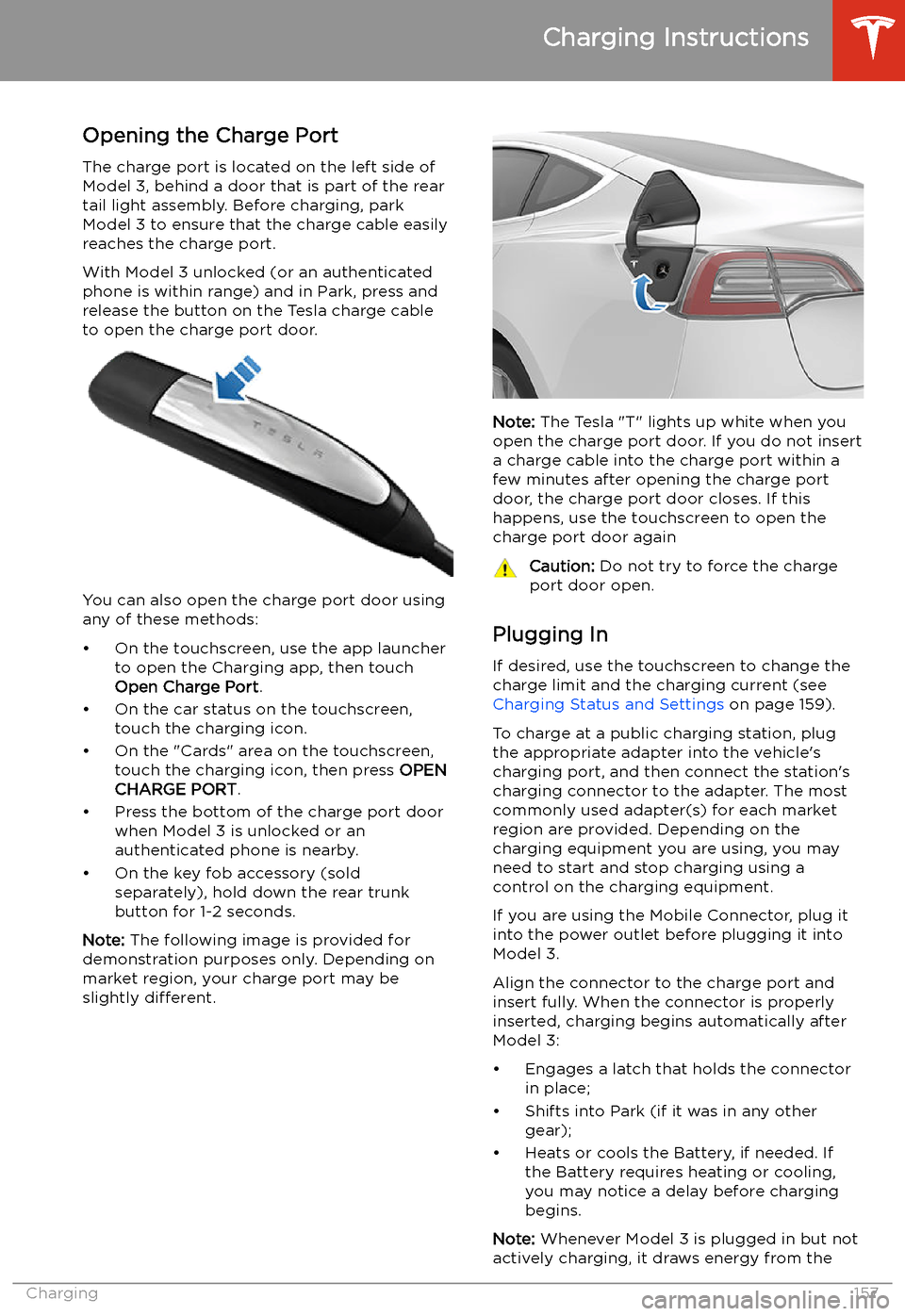
Opening the Charge Port The charge port is located on the left side of
Model 3, behind a door that is part of the rear
tail light assembly. Before charging, park
Model 3 to ensure that the charge cable easily reaches the charge port.
With Model 3 unlocked (or an authenticated
phone is within range) and in Park, press and
release the button on the Tesla charge cable
to open the charge port door.
You can also open the charge port door using
any of these methods:
Page 166 of 220
Checking and Adjusting Tire PressuresFollow these steps when tires are cold andModel 3 has been stationary for over three
hours:
1. Refer to the Tire and Loading Information
label located on the driver’s center door
pillar for the target tire pressure.
2. Remove the valve cap.
3. Firmly press an accurate tire pressure
gauge onto the valve to measure pressure.
4. If required, add or remove air to reach the
recommended pressure.
Note: You can release air by pressing the
metal stem in the center of the valve.
5. Re-check pressure using the accurate tire
gauge.
6. Repeat steps 3 and 4 as necessary until
the tire pressure is correct.
7. Reinstall the valve cap to prevent dirt from
entering. Periodically check the valve for
damage and leaks.Inspecting and Maintaining Tires
Regularly inspect the tread and side walls for
any sign of distortion (bulges), foreign objects,
cuts or wear.Warning: Do not drive Model 3 if a tire is
damaged, excessively worn, or in
Page 180 of 220
Parts and Accessories
Parts, Accessories, and
Modifications
Use only genuine Tesla parts and accessories.
Tesla performs rigorous testing on parts to
ensure their suitability, safety, and reliability.
Purchase these parts from Tesla, where they
are professionally installed and where you can receive expert advice about modifications to
Model 3. Accessories are available for
purchase from Tesla stores or online at www.tesla.com .
Note: Some accessories may not be available
in your market region.
Tesla is unable to assess parts manufactured
by other distributors and therefore accepts no responsibility if you use non-Tesla parts onModel 3.
Warning: Installing non-approved parts
and accessories, or performing non- approved modifications, can affect the
performance of Model 3 and the safety of
its occupants. Any damage caused by
using or installing non-approved parts, or by performing non-approved
modifications, is not covered by the
warranty.Warning: Tesla does not accept liability
for death, personal injury or damage that
occurs if you use or install non-approved
accessories or make non-approved
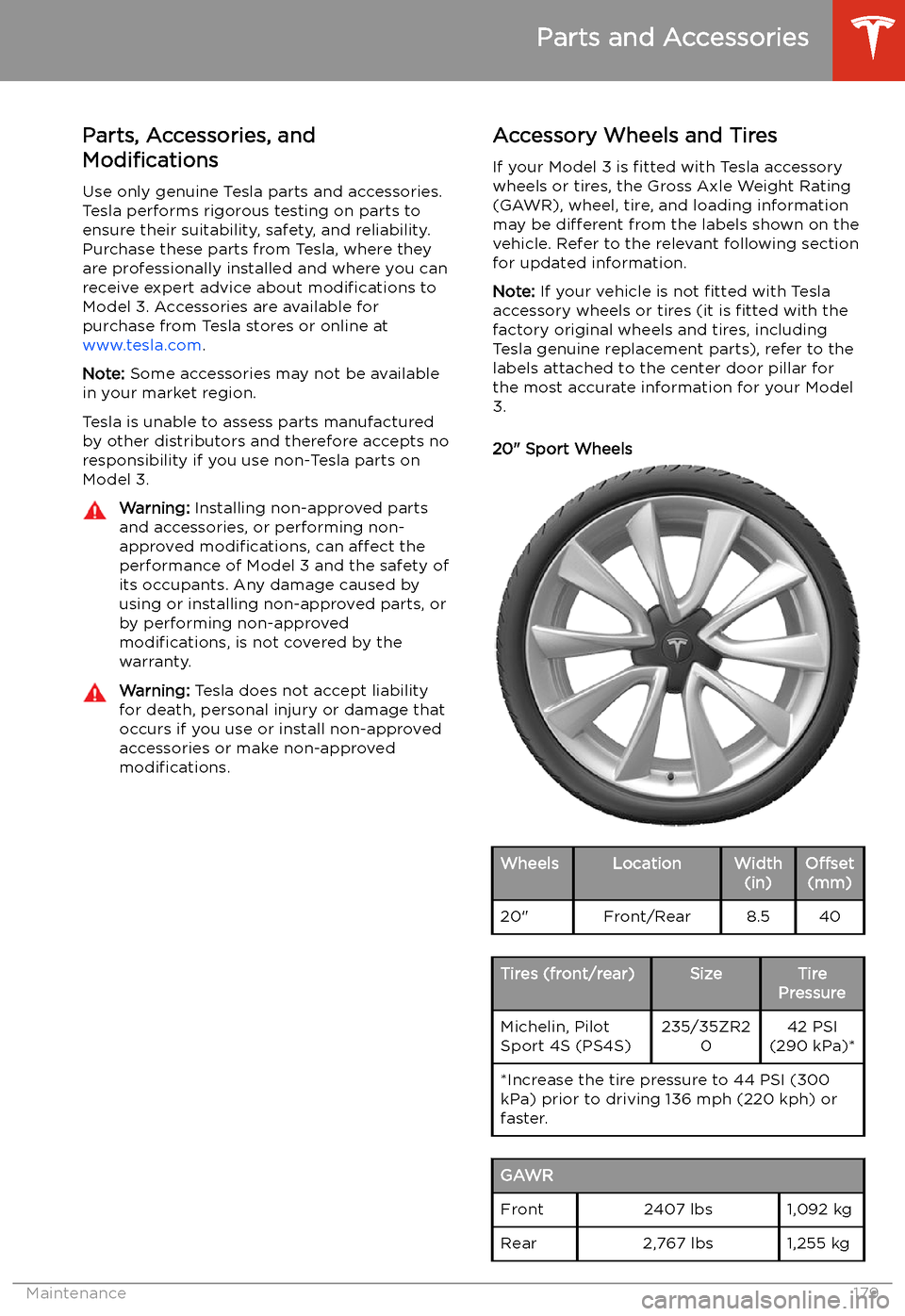
modifications.Accessory Wheels and Tires
If your Model 3 is fitted with Tesla accessory
wheels or tires, the Gross Axle Weight Rating
(GAWR), wheel, tire, and loading information
may be different from the labels shown on the
vehicle. Refer to the relevant following section
for updated information.
Note: If your vehicle is not fitted with Tesla
accessory wheels or tires (it is fitted with the
factory original wheels and tires, including
Tesla genuine replacement parts), refer to the
labels attached to the center door pillar for
the most accurate information for your Model 3.
20" Sport WheelsWheelsLocationWidth (in)Offset(mm)20"Front/Rear8.540Tires (front/rear)SizeTire
PressureMichelin, Pilot
Sport 4S (PS4S)235/35ZR2 042 PSI
(290 kPa)**Increase the tire pressure to 44 PSI (300
kPa) prior to driving 136 mph (220 kph) or faster.GAWRFront2407 lbs1,092 kgRear2,767 lbs1,255 kg
Parts and Accessories
Maintenance179
Page 185 of 220
Vehicle Loading
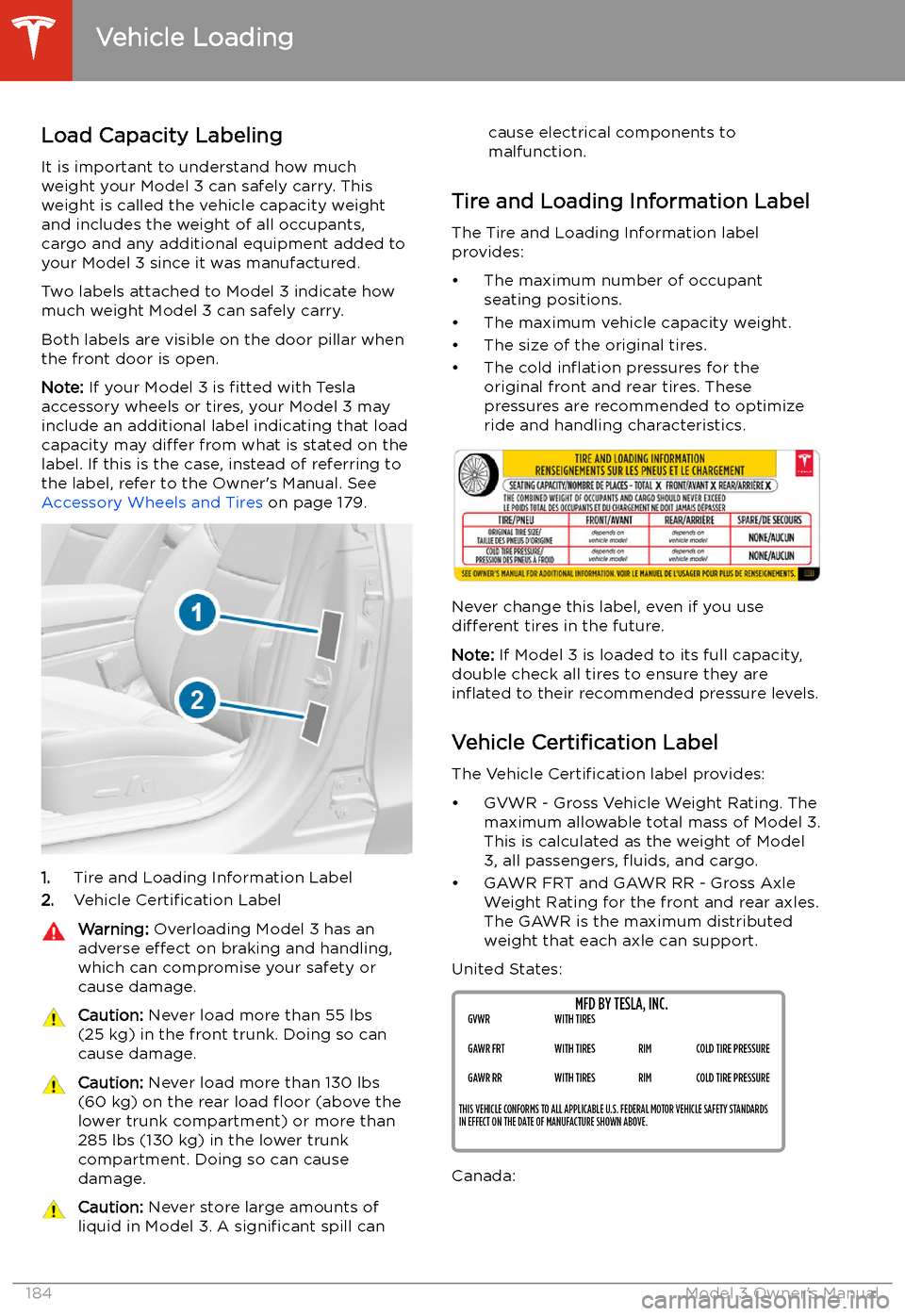
Load Capacity Labeling It is important to understand how much
weight your Model 3 can safely carry. This weight is called the vehicle capacity weight
and includes the weight of all occupants,
cargo and any additional equipment added to your Model 3 since it was manufactured.
Two labels attached to Model 3 indicate how
much weight Model 3 can safely carry.
Both labels are visible on the door pillar when the front door is open.
Note: If your Model 3 is fitted with Tesla
accessory wheels or tires, your Model 3 may
include an additional label indicating that loadcapacity may differ from what is stated on the
label. If this is the case, instead of referring to
the label, refer to the Owner
Page 192 of 220
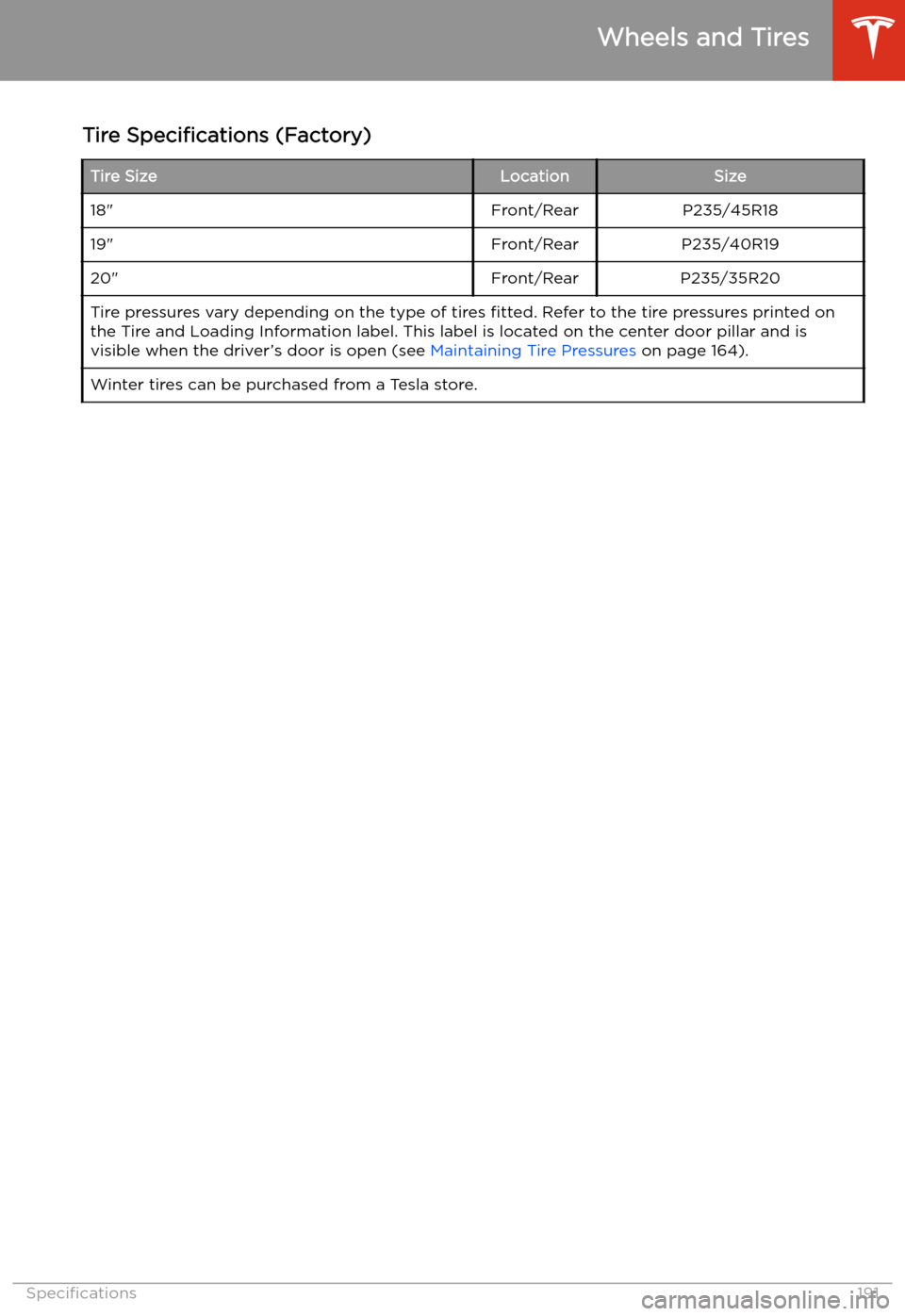
Tire Specifications (Factory)Tire SizeLocationSize18"Front/RearP235/45R1819"Front/RearP235/40R1920"Front/RearP235/35R20Tire pressures vary depending on the type of tires fitted. Refer to the tire pressures printed on
the Tire and Loading Information label. This label is located on the center door pillar and is
visible when the driver’s door is open (see Maintaining Tire Pressures on page 164).Winter tires can be purchased from a Tesla store.
Wheels and Tires
Specifications191
Page 215 of 220
charging (continued)public charging stations 154
scheduling 159
charging locations, finding 132
child protectiondisabling rear window switches 18child seatsinstalling and using 35
child-protection locks 17
cleaning 172
climate controls 125
coat hangers 26
cold weather driving 80
collision avoidance assist 111
connecting to Wi-Fi 150
console12V power socket 26
opening 24
rear 26
USB ports 24
consumption chart 74
contact informationroadside assistance 198
Tesla 208
copyrights 204
cruise control 87
D dashboard overview 2
Dashcam 76
data recording 206
data sharing 206
declarations of conformity 209
delivery mileage 207
devicesBluetooth, playing audio files 138
connecting 24
playing audio files from 138
dimensions 186
Dog Mode 128
dome (map) lights 58
door handles 15
door labels 184
doorsChild Lock 17
exterior door handles 15
interior locking and unlocking 16
keyless entry 15
locking 15
opening from exterior 15
opening from interior 15
Unlock on Park 17
unlocking 15doorsfunctionWalk-Away Door Lock 16
drive away locking 16
Drive gear 56
driverprofiles 48drivingseating position 28
starting 54
tips to maximize range 74
E
Easter Eggs 203
easy entry, driver profile 48
EDR (event data recorder) 206
electric parking brake 67
emergency braking 111
emergency