trunk TESLA MODEL S 2014 (Europe) User Guide
[x] Cancel search | Manufacturer: TESLA, Model Year: 2014, Model line: MODEL S, Model: TESLA MODEL S 2014Pages: 152, PDF Size: 17.5 MB
Page 33 of 152
Tesla Built In Rear Facing Child Seats
SEATING AND SAFETY RESTRAINTS 3.11
Tesla Built In Rear Facing Child SeatsUsage Restrictions
The Tesla built in rear facing child seats are child
restraint systems and are approved to United
Nations ECE Regulation R44.04 standards for
use by children in Mass Groups II and III,
weighing 15 - 36 kg. These seats must only be
used for children who are between 3 and 12
years old, and 98 - 135 cm tall.
Always ensure the top of the child’s head
cannot contact the vehicle and that the child is
seated comfortably with the seat belts
positioned and latched correctly. The child’s
pelvis must be held securely in place by the lap
belt. Follow all instructions provided and do
not use supplemental child safety seats in
these seats.
NOTE: To draw more air into the rear seating
areas, it is recommended that whenever a child
is seated in the Tesla built in rear facing child
seats, you set the climate control system to
draw outside air into Model S, instead of
recirculating the air. See page 5.9.
Opening
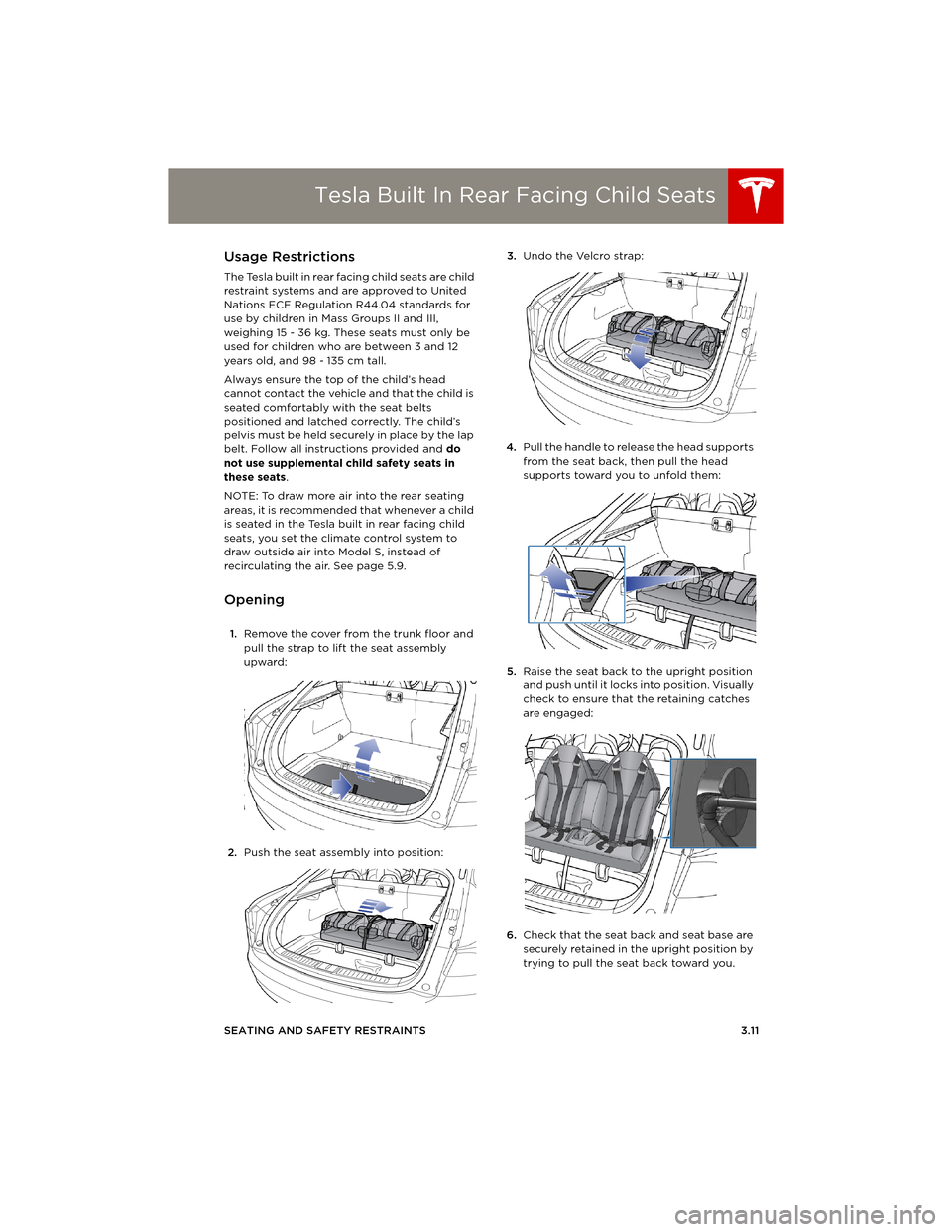
1.Remove the cover from the trunk floor and
pull the strap to lift the seat assembly
upward:
2.Push the seat assembly into position:3.Undo the Velcro strap:
4.Pull the handle to release the head supports
from the seat back, then pull the head
supports toward you to unfold them:
5.Raise the seat back to the upright position
and push until it locks into position. Visually
check to ensure that the retaining catches
are engaged:
6.Check that the seat back and seat base are
securely retained in the upright position by
trying to pull the seat back toward you.
book.book Page 11 Friday, July 19, 2013 12:53 PM
Page 34 of 152
Tesla Built In Rear Facing Child SeatsTesla Built In Rear Facing Child Seats
3.12MODEL S OWNERS MANUAL
Folding
CAUTION: Before folding the seats,
fasten the seat belts to prevent them
from getting trapped in the seat
mechanism and being damaged.
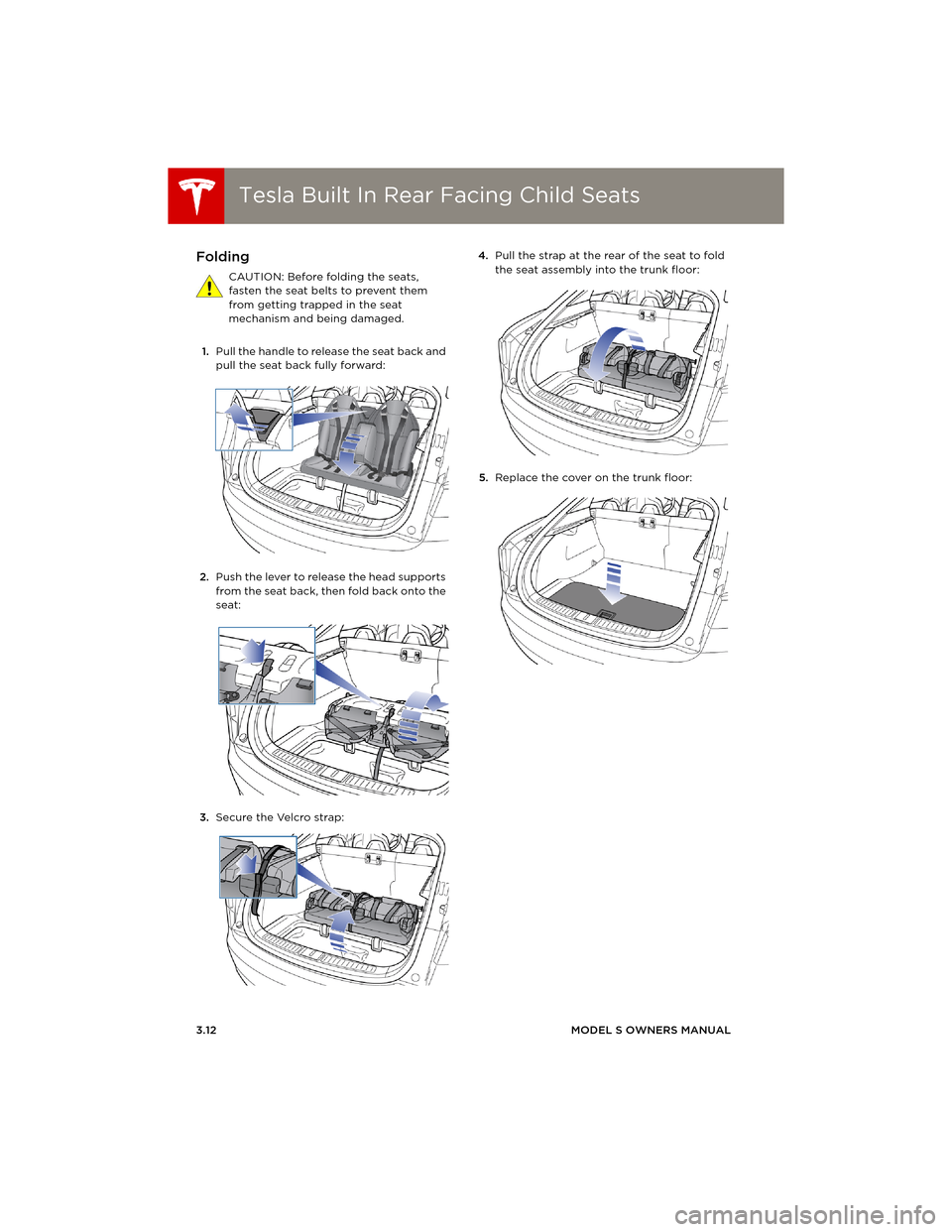
1.Pull the handle to release the seat back and
pull the seat back fully forward:
2.Push the lever to release the head supports
from the seat back, then fold back onto the
seat:
3.Secure the Velcro strap:4.Pull the strap at the rear of the seat to fold
the seat assembly into the trunk floor:
5.Replace the cover on the trunk floor:
book.book Page 12 Friday, July 19, 2013 12:53 PM
Page 43 of 152
Steering Wheel
DRIVING4.3
Steering WheelAdjusting Position
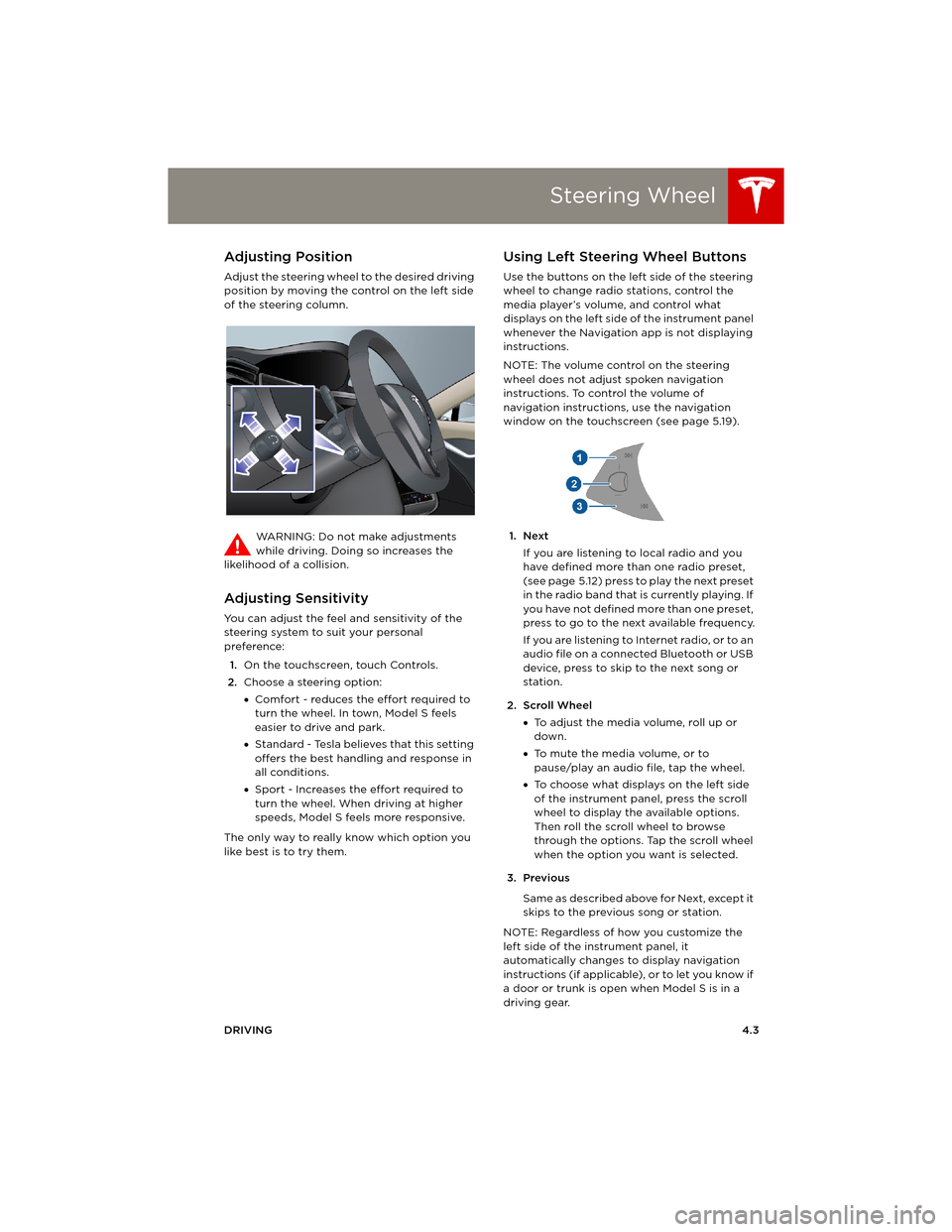
Adjust the steering wheel to the desired driving
position by moving the control on the left side
of the steering column.
WARNING: Do not make adjustments
while driving. Doing so increases the
likelihood of a collision.
Adjusting Sensitivity
You can adjust the feel and sensitivity of the
steering system to suit your personal
preference:
1.On the touchscreen, touch Controls.
2.Choose a steering option:
•Comfort - reduces the effort required to
turn the wheel. In town, Model S feels
easier to drive and park.
•Standard - Tesla believes that this setting
offers the best handling and response in
all conditions.
•Sport - Increases the effort required to
turn the wheel. When driving at higher
speeds, Model S feels more responsive.
The only way to really know which option you
like best is to try them.
Using Left Steering Wheel Buttons
Use the buttons on the left side of the steering
wheel to change radio stations, control the
media player’s volume, and control what
displays on the left side of the instrument panel
whenever the Navigation app is not displaying
instructions.
NOTE: The volume control on the steering
wheel does not adjust spoken navigation
instructions. To control the volume of
navigation instructions, use the navigation
window on the touchscreen (see page 5.19).
1. Next
If you are listening to local radio and you
have defined more than one radio preset,
(see page 5.12) press to play the next preset
in the radio band that is currently playing. If
you have not defined more than one preset,
press to go to the next available frequency.
If you are listening to Internet radio, or to an
audio file on a connected Bluetooth or USB
device, press to skip to the next song or
station.
2. Scroll Wheel
•To adjust the media volume, roll up or
down.
•To mute the media volume, or to
pause/play an audio file, tap the wheel.
•To choose what displays on the left side
of the instrument panel, press the scroll
wheel to display the available options.
Then roll the scroll wheel to browse
through the options. Tap the scroll wheel
when the option you want is selected.
3. Previous
Same as described above for Next, except it
skips to the previous song or station.
NOTE: Regardless of how you customize the
left side of the instrument panel, it
automatically changes to display navigation
instructions (if applicable), or to let you know if
a door or trunk is open when Model S is in a
driving gear.
book.book Page 3 Friday, July 19, 2013 12:53 PM
Page 50 of 152
Instrument PanelInstrument Panel
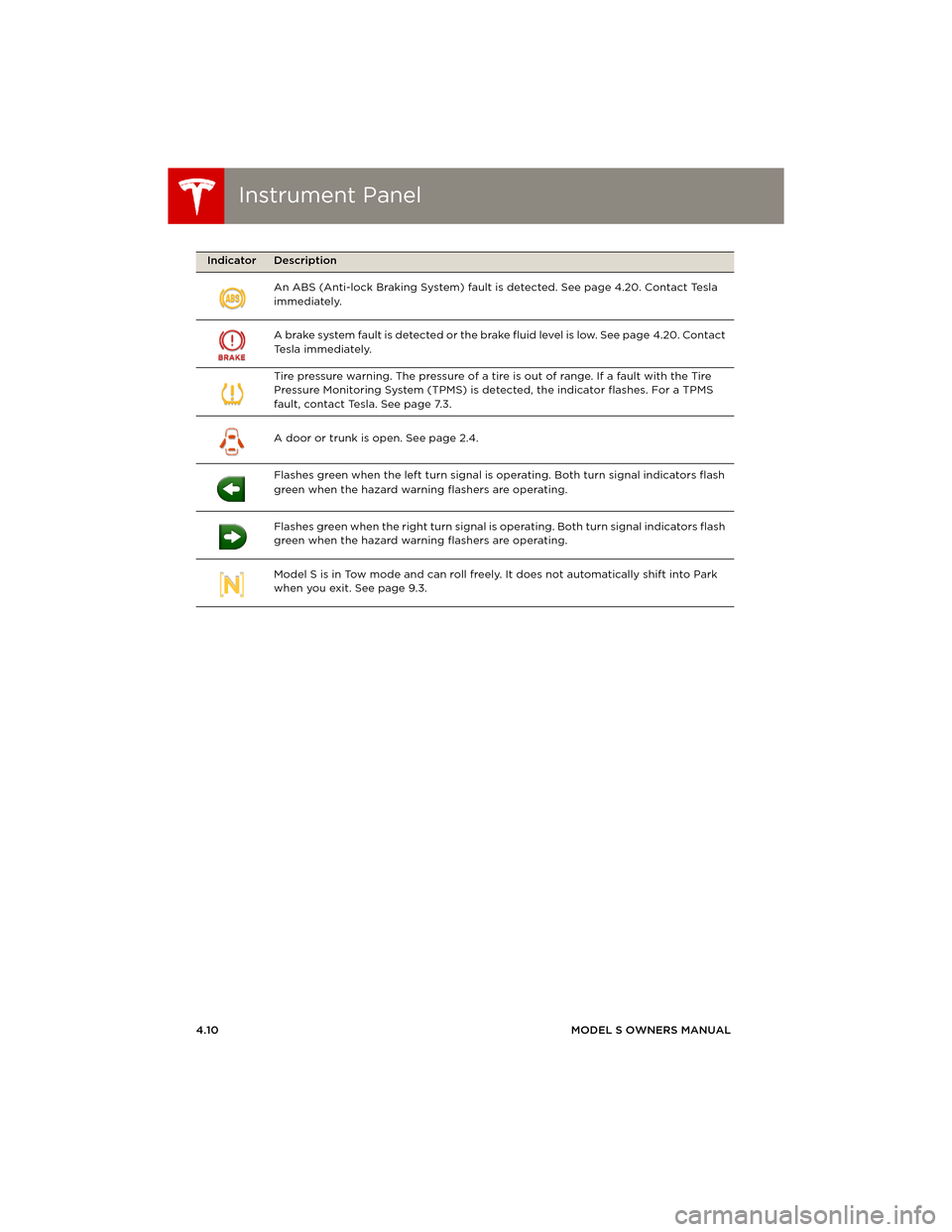
4.10MODEL S OWNERS MANUAL An ABS (Anti-lock Braking System) fault is detected. See page 4.20. Contact Tesla
immediately.
A brake system fault is detected or the brake fluid level is low. See page 4.20. Contact
Tesla immediately.
Tire pressure warning. The pressure of a tire is out of range. If a fault with the Tire
Pressure Monitoring System (TPMS) is detected, the indicator flashes. For a TPMS
fault, contact Tesla. See page 7.3.
A door or trunk is open. See page 2.4.
Flashes green when the left turn signal is operating. Both turn signal indicators flash
green when the hazard warning flashers are operating.
Flashes green when the right turn signal is operating. Both turn signal indicators flash
green when the hazard warning flashers are operating.
Model S is in Tow mode and can roll freely. It does not automatically shift into Park
when you exit. See page 9.3.
Indicator Description
book.book Page 10 Friday, July 19, 2013 12:53 PM
Page 52 of 152
LightsLights
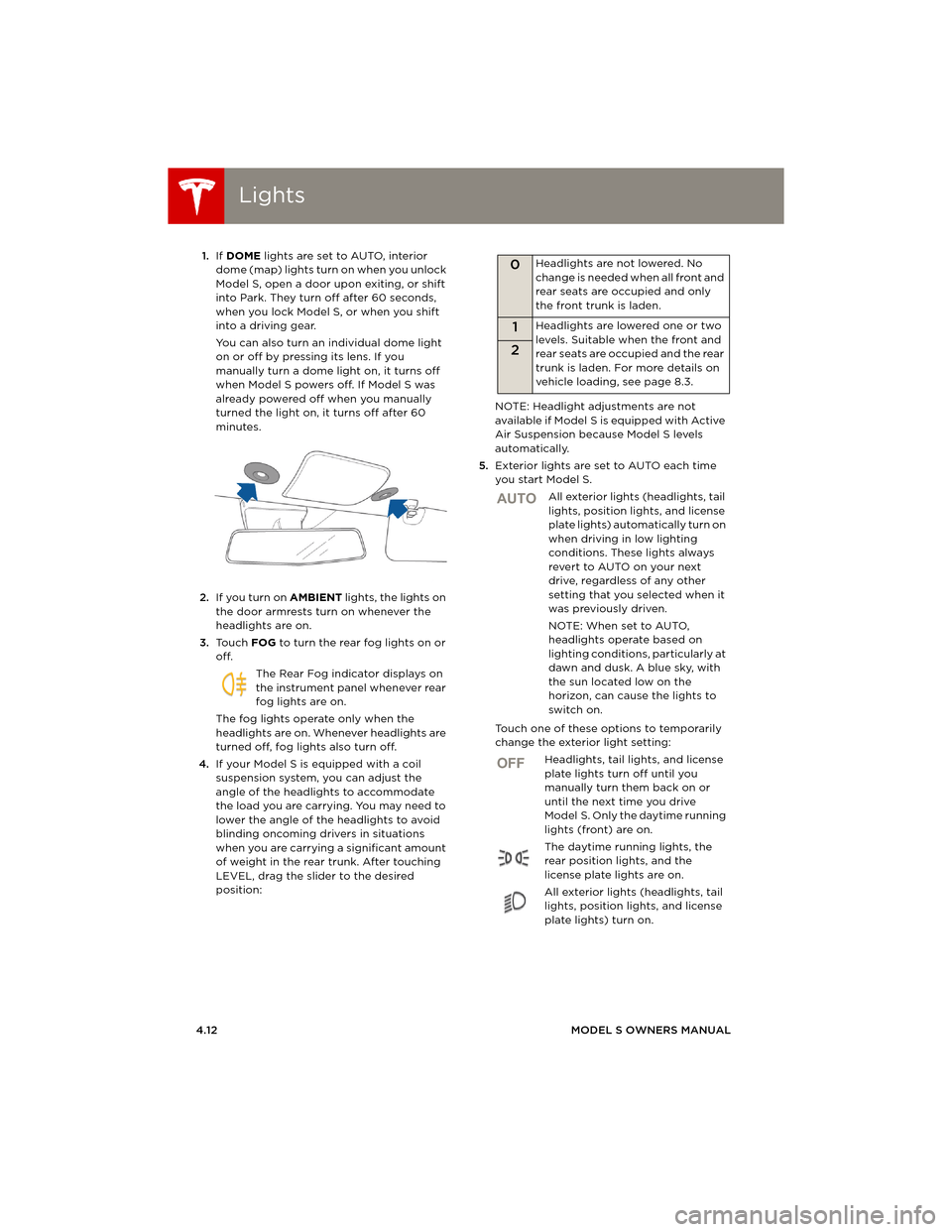
4.12MODEL S OWNERS MANUAL 1.If DOME lights are set to AUTO, interior
dome (map) lights turn on when you unlock
Model S, open a door upon exiting, or shift
into Park. They turn off after 60 seconds,
when you lock Model S, or when you shift
into a driving gear.
You can also turn an individual dome light
on or off by pressing its lens. If you
manually turn a dome light on, it turns off
when Model S powers off. If Model S was
already powered off when you manually
turned the light on, it turns off after 60
minutes.
2.If you turn on AMBIENT lights, the lights on
the door armrests turn on whenever the
headlights are on.
3.To u c h FOG to turn the rear fog lights on or
off.
The Rear Fog indicator displays on
the instrument panel whenever rear
fog lights are on.
The fog lights operate only when the
headlights are on. Whenever headlights are
turned off, fog lights also turn off.
4.If your Model S is equipped with a coil
suspension system, you can adjust the
angle of the headlights to accommodate
the load you are carrying. You may need to
lower the angle of the headlights to avoid
blinding oncoming drivers in situations
when you are carrying a significant amount
of weight in the rear trunk. After touching
LEVEL, drag the slider to the desired
position:NOTE: Headlight adjustments are not
available if Model S is equipped with Active
Air Suspension because Model S levels
automatically.
5.Exterior lights are set to AUTO each time
you start Model S.
All exterior lights (headlights, tail
lights, position lights, and license
plate lights) automatically turn on
when driving in low lighting
conditions. These lights always
revert to AUTO on your next
drive, regardless of any other
setting that you selected when it
was previously driven.
NOTE: When set to AUTO,
headlights operate based on
lighting conditions, particularly at
dawn and dusk. A blue sky, with
the sun located low on the
horizon, can cause the lights to
switch on.
Touch one of these options to temporarily
change the exterior light setting:
Headlights, tail lights, and license
plate lights turn off until you
manually turn them back on or
until the next time you drive
Model S. Only the daytime running
lights (front) are on.
The daytime running lights, the
rear position lights, and the
license plate lights are on.
All exterior lights (headlights, tail
lights, position lights, and license
plate lights) turn on.
0Headlights are not lowered. No
change is needed when all front and
rear seats are occupied and only
the front trunk is laden.
1Headlights are lowered one or two
levels. Suitable when the front and
rear seats are occupied and the rear
trunk is laden. For more details on
vehicle loading, see page 8.3.
2
AUTO
OFF
book.book Page 12 Friday, July 19, 2013 12:53 PM
Page 86 of 152
Security SettingsSecurity Settings
5.22MODEL S OWNERS MANUAL
Security SettingsAbout the Security System
If Model S does not detect a key nearby and a
locked door or trunk is opened, the horn beeps
and headlights and turn signals flash. To
deactivate the alarm, press any button on the
key.
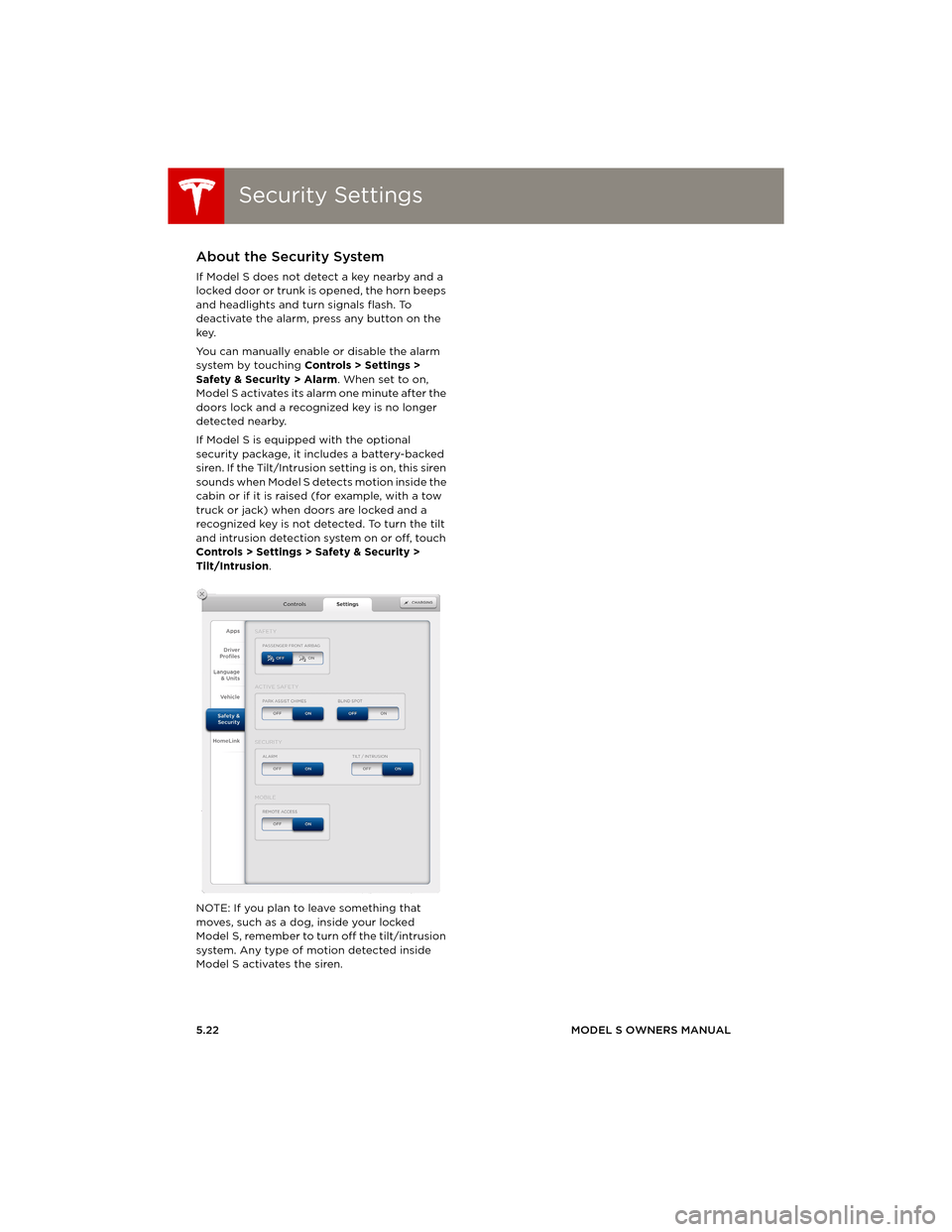
You can manually enable or disable the alarm
system by touching Controls > Settings >
Safety & Security > Alarm. When set to on,
Model S activates its alarm one minute after the
doors lock and a recognized key is no longer
detected nearby.
If Model S is equipped with the optional
security package, it includes a battery-backed
siren. If the Tilt/Intrusion setting is on, this siren
sounds when Model S detects motion inside the
cabin or if it is raised (for example, with a tow
truck or jack) when doors are locked and a
recognized key is not detected. To turn the tilt
and intrusion detection system on or off, touch
Controls > Settings > Safety & Security >
Tilt/Intrusion.
NOTE: If you plan to leave something that
moves, such as a dog, inside your locked
Model S, remember to turn off the tilt/intrusion
system. Any type of motion detected inside
Model S activates the siren.
book.book Page 22 Friday, July 19, 2013 12:53 PM
Page 114 of 152
Fluid ReservoirsFluid Reservoirs
7.16MODEL S OWNERS MANUAL
Fluid ReservoirsRemoving the Maintenance Panel
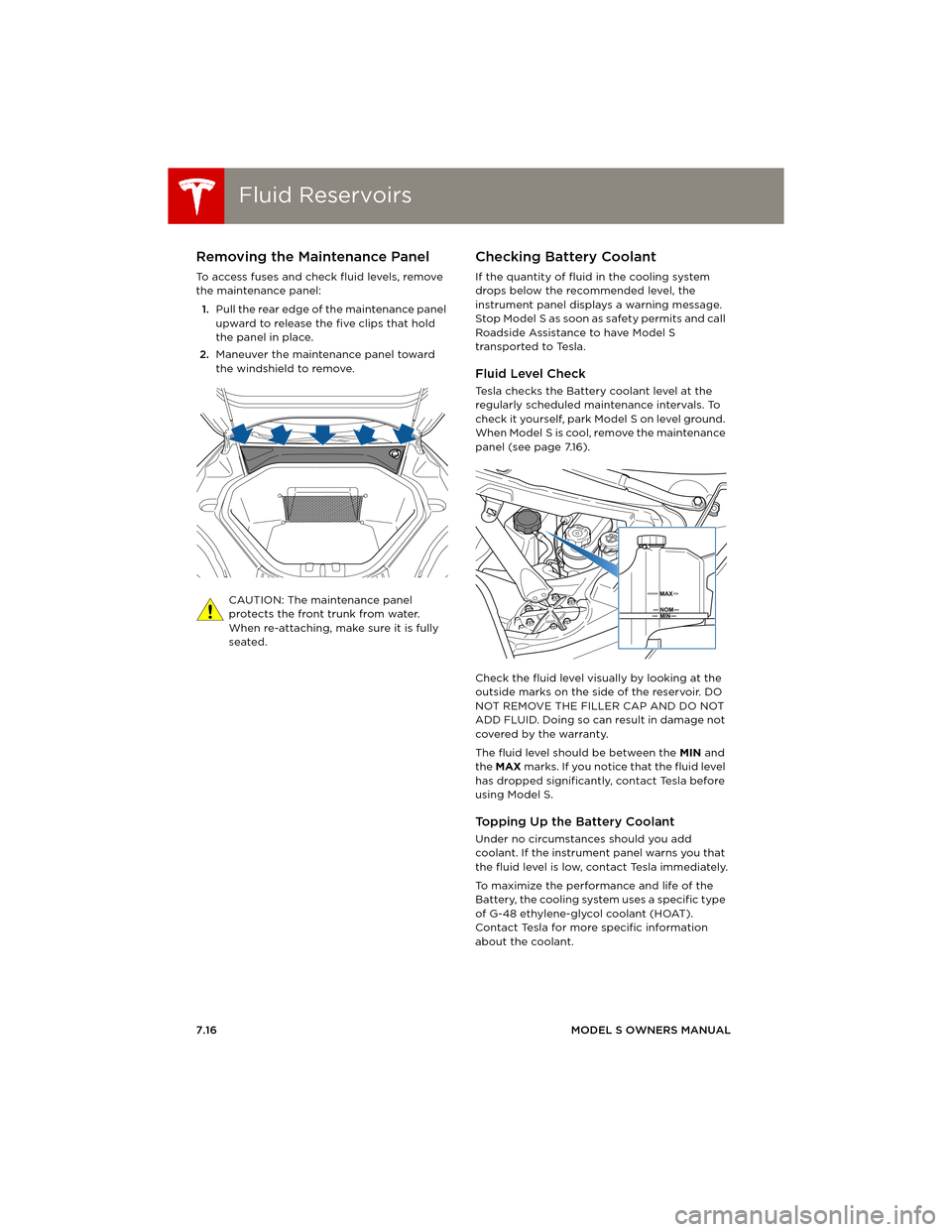
To access fuses and check fluid levels, remove
the maintenance panel:
1.Pull the rear edge of the maintenance panel
upward to release the five clips that hold
the panel in place.
2.Maneuver the maintenance panel toward
the windshield to remove.
CAUTION: The maintenance panel
protects the front trunk from water.
When re-attaching, make sure it is fully
seated.
Checking Battery Coolant
If the quantity of fluid in the cooling system
drops below the recommended level, the
instrument panel displays a warning message.
Stop Model S as soon as safety permits and call
Roadside Assistance to have Model S
transported to Tesla.
Fluid Level Check
Tesla checks the Battery coolant level at the
regularly scheduled maintenance intervals. To
check it yourself, park Model S on level ground.
When Model S is cool, remove the maintenance
panel (see page 7.16).
Check the fluid level visually by looking at the
outside marks on the side of the reservoir. DO
NOT REMOVE THE FILLER CAP AND DO NOT
ADD FLUID. Doing so can result in damage not
covered by the warranty.
The fluid level should be between the MIN and
the MAX marks. If you notice that the fluid level
has dropped significantly, contact Tesla before
using Model S.
To p p i n g U p t h e B a t t e r y C o o l a n t
Under no circumstances should you add
coolant. If the instrument panel warns you that
the fluid level is low, contact Tesla immediately.
To maximize the performance and life of the
Battery, the cooling system uses a specific type
of G-48 ethylene-glycol coolant (HOAT).
Contact Tesla for more specific information
about the coolant.
book.book Page 16 Friday, July 19, 2013 12:53 PM
Page 116 of 152
Fluid ReservoirsFluid Reservoirs
7.18MODEL S OWNERS MANUAL
Topping Up Washer Fluid
Model S has only one reservoir into which you
can add fluid. This is the washer fluid reservoir
under the front trunk. When the level is low, a
message displays on the instrument panel. Fill
until the fluid level is visible just below the filler
neck.
Do not use formulated washer fluids that
contain water repellent or bug wash. These
fluids can cause streaking, smearing, and
squeaking, or other noises.
Operate the washers periodically to check that
the nozzles are clear and properly directed.
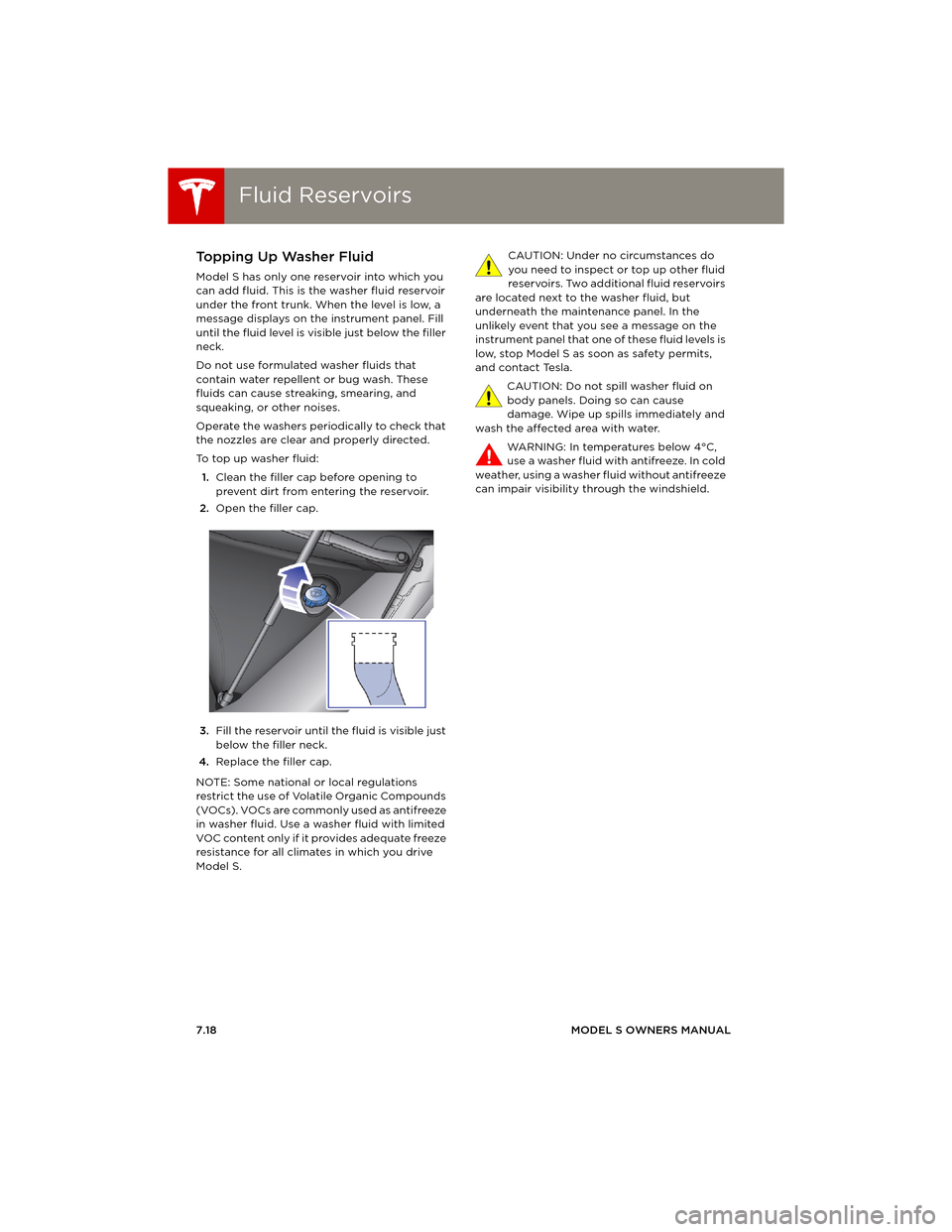
To top up washer fluid:
1.Clean the filler cap before opening to
prevent dirt from entering the reservoir.
2.Open the filler cap.
3.Fill the reservoir until the fluid is visible just
below the filler neck.
4.Replace the filler cap.
NOTE: Some national or local regulations
restrict the use of Volatile Organic Compounds
(VOCs). VOCs are commonly used as antifreeze
in washer fluid. Use a washer fluid with limited
VOC content only if it provides adequate freeze
resistance for all climates in which you drive
Model S.CAUTION: Under no circumstances do
you need to inspect or top up other fluid
reservoirs. Two additional fluid reservoirs
are located next to the washer fluid, but
underneath the maintenance panel. In the
unlikely event that you see a message on the
instrument panel that one of these fluid levels is
low, stop Model S as soon as safety permits,
and contact Tesla.
CAUTION: Do not spill washer fluid on
body panels. Doing so can cause
damage. Wipe up spills immediately and
wash the affected area with water.
WARNING: In temperatures below 4°C,
use a washer fluid with antifreeze. In cold
weather, using a washer fluid without antifreeze
can impair visibility through the windshield.
book.book Page 18 Friday, July 19, 2013 12:53 PM
Page 117 of 152
Fuses
MAINTENANCE7.19
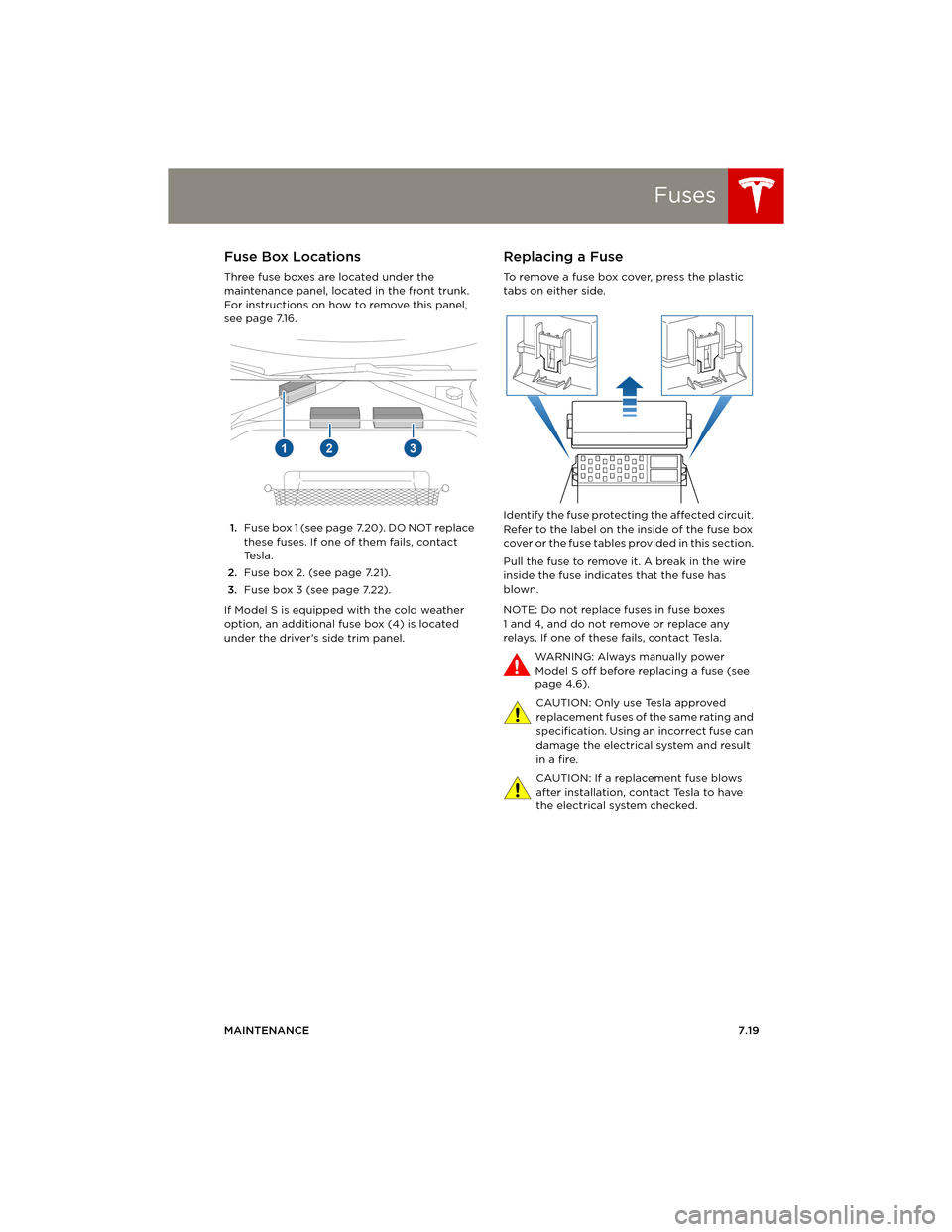
FusesFuse Box Locations
Three fuse boxes are located under the
maintenance panel, located in the front trunk.
For instructions on how to remove this panel,
see page 7.16.
1.Fuse box 1 (see page 7.20). DO NOT replace
these fuses. If one of them fails, contact
Te s l a .
2.Fuse box 2. (see page 7.21).
3.Fuse box 3 (see page 7.22).
If Model S is equipped with the cold weather
option, an additional fuse box (4) is located
under the driver’s side trim panel.
Replacing a Fuse
To remove a fuse box cover, press the plastic
tabs on either side.
Identify the fuse protecting the affected circuit.
Refer to the label on the inside of the fuse box
cover or the fuse tables provided in this section.
Pull the fuse to remove it. A break in the wire
inside the fuse indicates that the fuse has
blown.
NOTE: Do not replace fuses in fuse boxes
1 and 4, and do not remove or replace any
relays. If one of these fails, contact Tesla.
WARNING: Always manually power
Model S off before replacing a fuse (see
page 4.6).
CAUTION: Only use Tesla approved
replacement fuses of the same rating and
specification. Using an incorrect fuse can
damage the electrical system and result
in a fire.
CAUTION: If a replacement fuse blows
after installation, contact Tesla to have
the electrical system checked.
book.book Page 19 Friday, July 19, 2013 12:53 PM
Page 125 of 152
Vehicle Loading
SPECIFICATIONS8.3
Ve h i c l e L o a d i n gLoad Capacity Labeling
It is important to understand how much weight
your Model S can safely carry. This weight is
called the vehicle capacity weight and includes
the weight of all occupants, cargo and any
additional equipment added to your Model S
since it was manufactured.
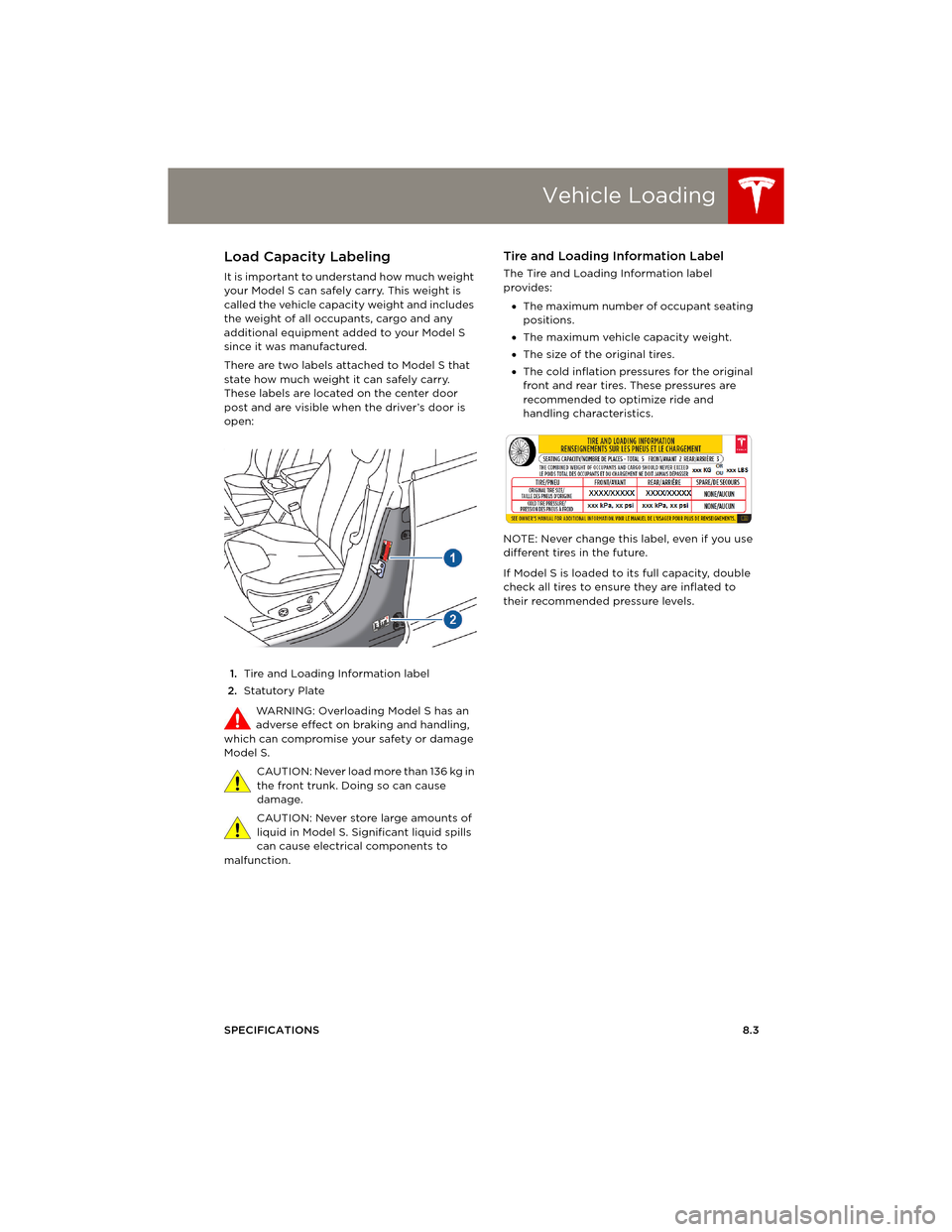
There are two labels attached to Model S that
state how much weight it can safely carry.
These labels are located on the center door
post and are visible when the driver’s door is
open:
1.Tire and Loading Information label
2.Statutory Plate
WARNING: Overloading Model S has an
adverse effect on braking and handling,
which can compromise your safety or damage
Model S.
C A U T I O N : N e v e r l o a d m o r e t h a n 1 3 6 k g i n
the front trunk. Doing so can cause
damage.
CAUTION: Never store large amounts of
liquid in Model S. Significant liquid spills
can cause electrical components to
malfunction.
Tire and Loading Information Label
The Tire and Loading Information label
provides:
•The maximum number of occupant seating
positions.
•The maximum vehicle capacity weight.
•The size of the original tires.
•The cold inflation pressures for the original
front and rear tires. These pressures are
recommended to optimize ride and
handling characteristics.
NOTE: Never change this label, even if you use
different tires in the future.
If Model S is loaded to its full capacity, double
check all tires to ensure they are inflated to
their recommended pressure levels.
book.book Page 3 Friday, July 19, 2013 12:53 PM