wheel TESLA MODEL S 2014 (Europe) Owner's Guide
[x] Cancel search | Manufacturer: TESLA, Model Year: 2014, Model line: MODEL S, Model: TESLA MODEL S 2014Pages: 152, PDF Size: 17.5 MB
Page 79 of 152
Media and Audio
USING THE TOUCHSCREEN5.15
Favorites
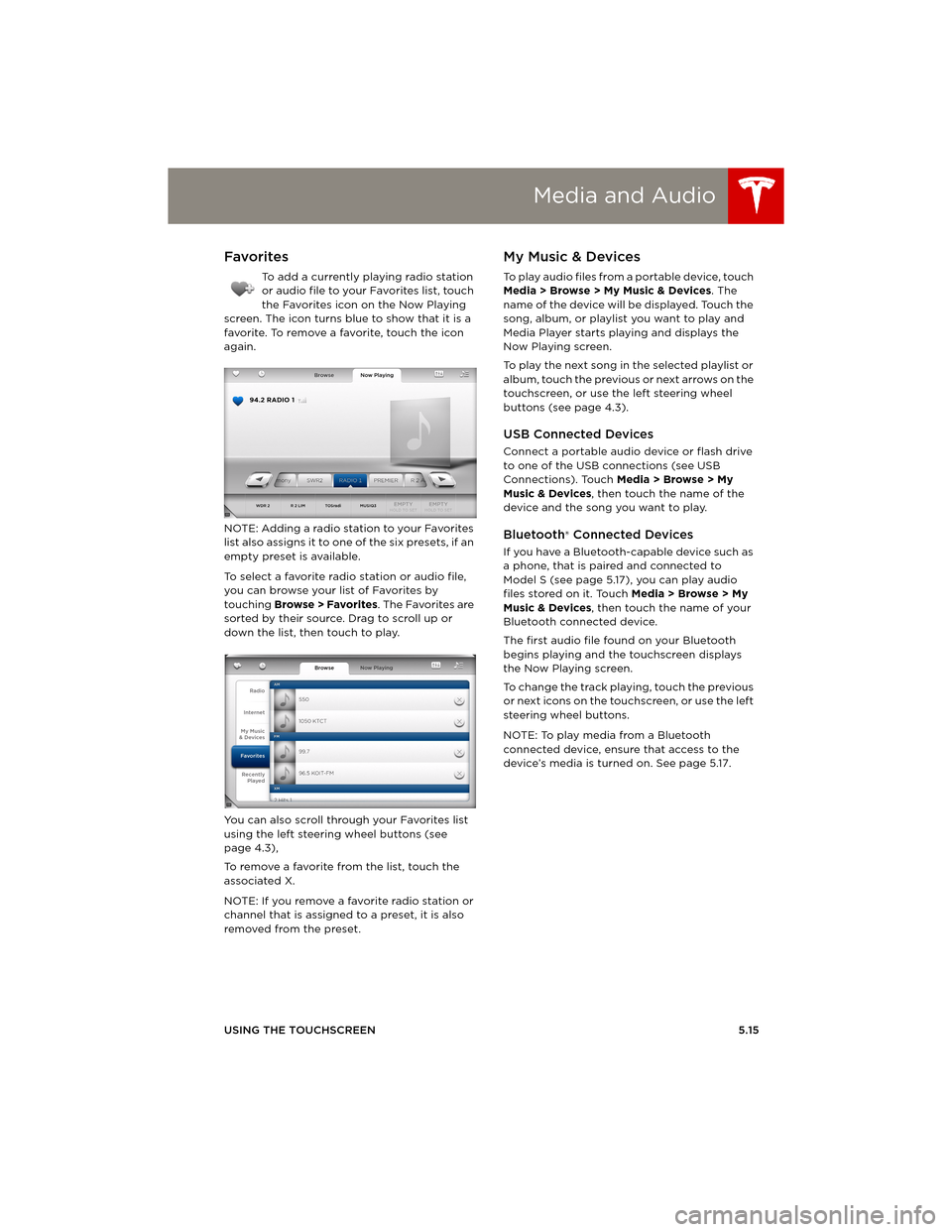
To add a currently playing radio station
or audio file to your Favorites list, touch
the Favorites icon on the Now Playing
screen. The icon turns blue to show that it is a
favorite. To remove a favorite, touch the icon
again.
NOTE: Adding a radio station to your Favorites
list also assigns it to one of the six presets, if an
empty preset is available.
To select a favorite radio station or audio file,
you can browse your list of Favorites by
touching Browse > Favorites. The Favorites are
sorted by their source. Drag to scroll up or
down the list, then touch to play.
You can also scroll through your Favorites list
using the left steering wheel buttons (see
page 4.3),
To remove a favorite from the list, touch the
associated X.
NOTE: If you remove a favorite radio station or
channel that is assigned to a preset, it is also
removed from the preset.
My Music & Devices
To play audio files from a portable device, touch
Media > Browse > My Music & Devices. The
name of the device will be displayed. Touch the
song, album, or playlist you want to play and
Media Player starts playing and displays the
Now Playing screen.
To play the next song in the selected playlist or
album, touch the previous or next arrows on the
touchscreen, or use the left steering wheel
buttons (see page 4.3).
USB Connected Devices
Connect a portable audio device or flash drive
to one of the USB connections (see USB
Connections). Touch Media > Browse > My
Music & Devices, then touch the name of the
device and the song you want to play.
Bluetooth® Connected Devices
If you have a Bluetooth-capable device such as
a phone, that is paired and connected to
Model S (see page 5.17), you can play audio
files stored on it. Touch Media > Browse > My
Music & Devices, then touch the name of your
Bluetooth connected device.
The first audio file found on your Bluetooth
begins playing and the touchscreen displays
the Now Playing screen.
To change the track playing, touch the previous
or next icons on the touchscreen, or use the left
steering wheel buttons.
NOTE: To play media from a Bluetooth
connected device, ensure that access to the
device’s media is turned on. See page 5.17.
book.book Page 15 Friday, July 19, 2013 12:53 PM
Page 82 of 152
PhonePhone
5.18MODEL S OWNERS MANUAL
Connecting to a Paired Phone
Model S automatically connects with the last
phone to which it was connected, provided it is
within operating range and has Bluetooth
turned on.
To connect to a different phone:
1.On the Model S touchscreen’s status bar,
touch (the Bluetooth icon).
2.The Model S touchscreen displays the list of
paired phones. If the phone is not on the list,
follow the instructions on page 5.17 to pair
it.
3.Choose the phone you want to connect to
from the list of paired phones, then touch
Connect.
When connected, the Model S touchscreen
displays the Bluetooth symbol next to the
phone name to show that the connection is
active.
Making a Phone Call
You can make a phone call by using the Model S
on-screen dialer, or by choosing a contact from
your contact list, and then touching the
contact’s number you want to call.
To make a phone call using the on-screen dialer:
1.To u c h t h e Phone app on the touchscreen,
then touch Dialer.
NOTE: If a phone is not currently
connected, the touchscreen displays the
Connect Phone message.
2. Enter the phone number on the dialer.
3.To u c h Call. The touchscreen displays the
call screen and the number you are calling.
To make a phone call by choosing a contact:
1.To u c h t h e Phone app on the touchscreen,
then touch Contacts.
NOTE: Ensure that access to the phone’s
contacts is turned on. See page 5.17.
2.Touch the name of the contact you want to
call to display details about the contact.
3.Touch the number you want to dial (there
may be more than one). The touchscreen
displays the call screen and the name of the
contact you are calling.
NOTE: If it is safe and legal to do so, you can
also initiate a call by dialing the number or
selecting the contact directly from your phone.
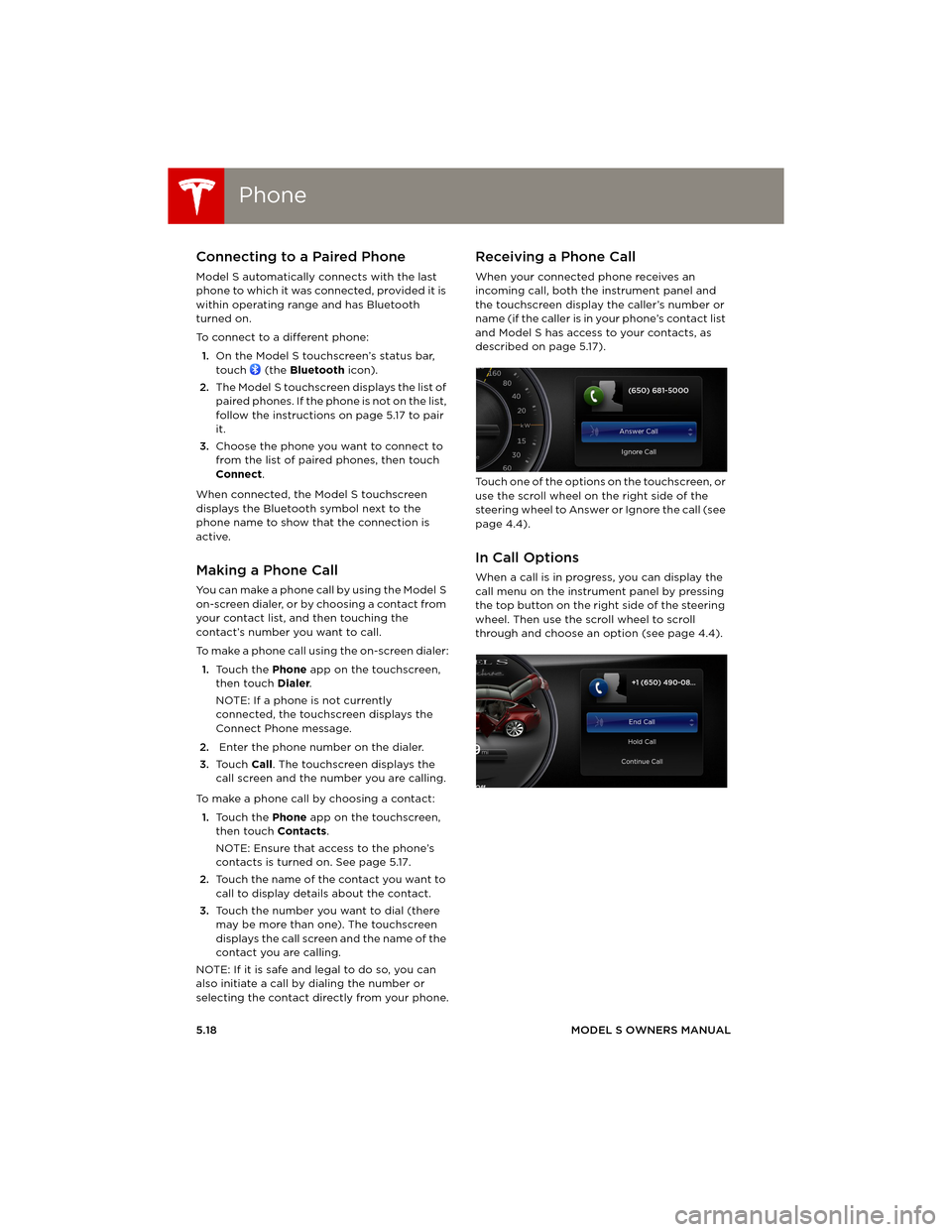
Receiving a Phone Call
When your connected phone receives an
incoming call, both the instrument panel and
the touchscreen display the caller’s number or
name (if the caller is in your phone’s contact list
and Model S has access to your contacts, as
described on page 5.17).
Touch one of the options on the touchscreen, or
use the scroll wheel on the right side of the
steering wheel to Answer or Ignore the call (see
page 4.4).
In Call Options
When a call is in progress, you can display the
call menu on the instrument panel by pressing
the top button on the right side of the steering
wheel. Then use the scroll wheel to scroll
through and choose an option (see page 4.4).
book.book Page 18 Friday, July 19, 2013 12:53 PM
Page 99 of 152
7.1
MAINTENANCE
Maintenance Schedule
Service Intervals................................................ 7.2
Daily and Monthly Checks............................. 7.2
High Voltage Safety ........................................ 7.2
Tire Care and Maintenance
Maintaining Tire Pressures ............................ 7.3
Inspecting and Maintaining Tires .............. 7.4
Replacing Tires and Wheels ......................... 7.5
Using Tire Chains .............................................. 7.6
Tire Pressure Monitoring ............................... 7.6
Temporary Tire RepairTire Repair Kit .................................................... 7.8
Inflating with Sealant and Air ...................... 7.9
Inflating with Air Only................................... 7.10
Replacing the Sealant Canister .................. 7.11
Cleaning
Cleaning the Exterior .................................... 7.12
Cleaning the Interior ..................................... 7.13
Polishing, Touch Up, and Body Repair... 7.14
Using a Car Cover .......................................... 7.14
Floor Mats ......................................................... 7.14
Wiper Blades and Washer Jets
Checking and Replacing Wiper Blades.. 7.15
Cleaning Washer Jets ................................... 7.15
Fluid ReservoirsRemoving the Maintenance Panel ........... 7.16
Checking Battery Coolant........................... 7.16
Checking Brake Fluid .................................... 7.17
Topping Up Washer Fluid ........................... 7.18
Fuses
Fuse Box Locations ....................................... 7.19
Replacing a Fuse ............................................ 7.19
Fuse Box 1 ........................................................ 7.20
Fuse Box 2......................................................... 7.21
Fuse Box 3 ....................................................... 7.22
Fuse Box 4 ....................................................... 7.22
Jacking and Lifting
Jacking Procedure ........................................ 7.23
Parts and Accessories
Parts, Accessories, and Modifications ... 7.24
Body Repairs ................................................... 7.24
book.book Page 1 Friday, July 19, 2013 12:53 PM
Page 102 of 152
Tire Care and MaintenanceTire Care and Maintenance
7.4MODEL S OWNERS MANUAL
Inspecting and Maintaining Tires
Regularly inspect the tread and side walls for
any sign of distortion (bulges), cuts or wear.
WARNING: Do not drive Model S if a tire
is damaged, excessively worn, or inflated
to an incorrect pressure. Check tires regularly
for wear, and ensure there are no cuts, bulges or
exposure of the ply/cord structure.
Tire Wear
Model S is originally fitted with tires that have
wear indicators molded into the tread pattern.
When the tread has been worn down to 1.6 mm,
the indicators start to appear at the surface of
the tread pattern, producing the effect of a
continuous band of rubber across the width of
the tire.
Replace a tire as soon as an indicator band
becomes visible or the tread depth reaches the
minimum permitted by law.
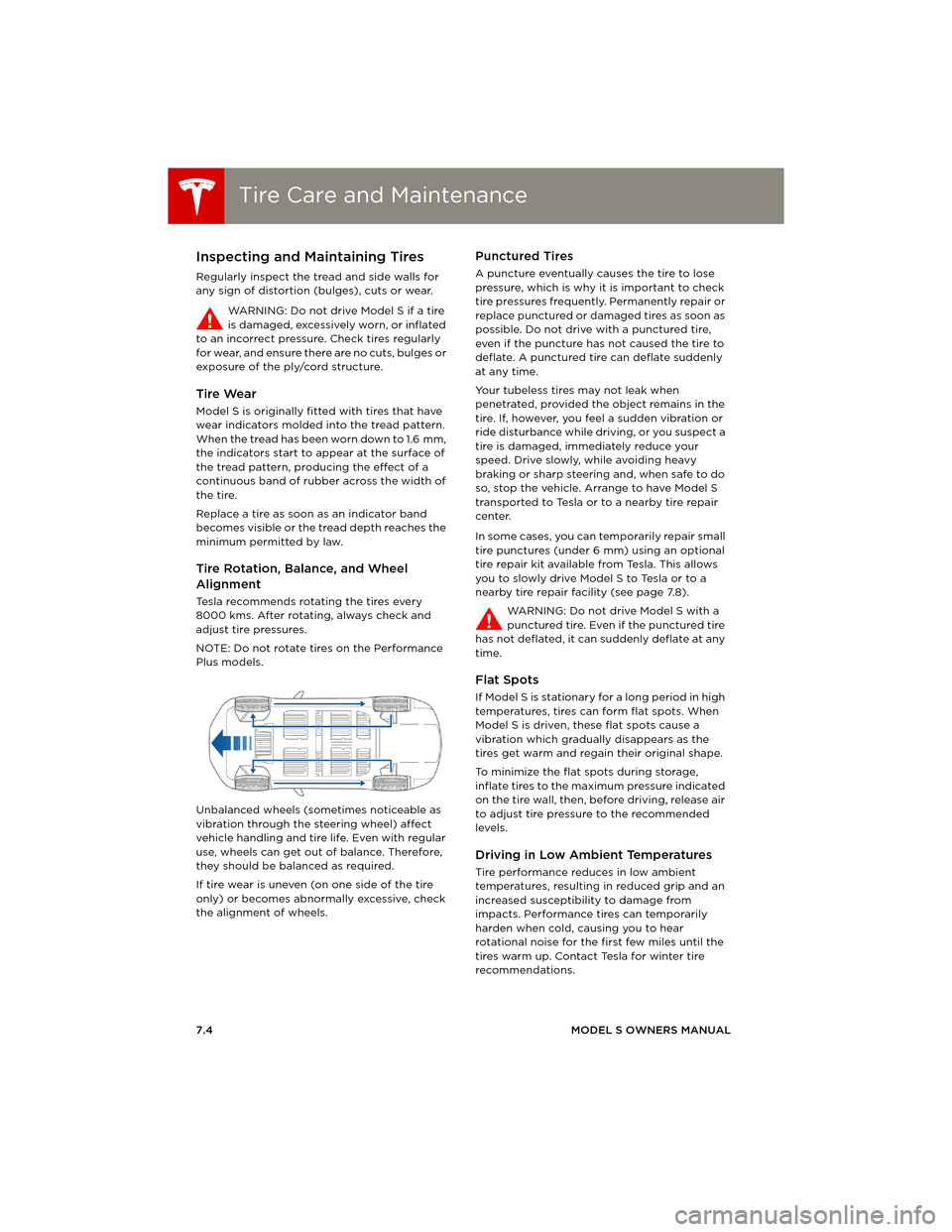
Tire Rotation, Balance, and Wheel
Alignment
Tesla recommends rotating the tires every
8000 kms. After rotating, always check and
adjust tire pressures.
NOTE: Do not rotate tires on the Performance
Plus models.
Unbalanced wheels (sometimes noticeable as
vibration through the steering wheel) affect
vehicle handling and tire life. Even with regular
use, wheels can get out of balance. Therefore,
they should be balanced as required.
If tire wear is uneven (on one side of the tire
only) or becomes abnormally excessive, check
the alignment of wheels.
Punctured Tires
A puncture eventually causes the tire to lose
pressure, which is why it is important to check
tire pressures frequently. Permanently repair or
replace punctured or damaged tires as soon as
possible. Do not drive with a punctured tire,
even if the puncture has not caused the tire to
deflate. A punctured tire can deflate suddenly
at any time.
Your tubeless tires may not leak when
penetrated, provided the object remains in the
tire. If, however, you feel a sudden vibration or
ride disturbance while driving, or you suspect a
tire is damaged, immediately reduce your
speed. Drive slowly, while avoiding heavy
braking or sharp steering and, when safe to do
so, stop the vehicle. Arrange to have Model S
transported to Tesla or to a nearby tire repair
center.
In some cases, you can temporarily repair small
tire punctures (under 6 mm) using an optional
tire repair kit available from Tesla. This allows
you to slowly drive Model S to Tesla or to a
nearby tire repair facility (see page 7.8).
WARNING: Do not drive Model S with a
punctured tire. Even if the punctured tire
has not deflated, it can suddenly deflate at any
time.
Flat Spots
If Model S is stationary for a long period in high
temperatures, tires can form flat spots. When
Model S is driven, these flat spots cause a
vibration which gradually disappears as the
tires get warm and regain their original shape.
To minimize the flat spots during storage,
inflate tires to the maximum pressure indicated
on the tire wall, then, before driving, release air
to adjust tire pressure to the recommended
levels.
Driving in Low Ambient Temperatures
Tire performance reduces in low ambient
temperatures, resulting in reduced grip and an
increased susceptibility to damage from
impacts. Performance tires can temporarily
harden when cold, causing you to hear
rotational noise for the first few miles until the
tires warm up. Contact Tesla for winter tire
recommendations.
book.book Page 4 Friday, July 19, 2013 12:53 PM
Page 103 of 152
Tire Care and Maintenance
MAINTENANCE7.5
Improving Tire Mileage
To improve the mileage you get from your tires,
maintain tires at the recommended tire
pressures (see page 7.3), observe speed limits
and advisory speeds, and avoid:
•Pulling away quickly, or hard acceleration.
•Fast turns and heavy braking.
•Potholes and objects in the road.
•Hitting curbs when parking.
•Contaminating tires with fluids that can
cause damage.
Replacing Tires and Wheels
Tires degrade over time due to the effects of
ultraviolet light, extreme temperatures, high
loads, and environmental conditions. It is
recommended that tires are replaced every six
years, or sooner if required.
Wheel rims and tires are matched to suit the
handling characteristics of the vehicle.
Replacement tires must comply with the
original specification. If tires other than those
specified are used, ensure that the load and
speed ratings marked on the tire (see
page 8.10) equal or exceed those of the original
specification.
Ideally, you should replace all four tires at the
same time. If this is not possible, replace the
tires in pairs (both front or both rear). When
replacing tires, always re-balance and check
the alignment of wheels.
For the specification of the original wheels and
tires installed on Model S, see page 8.8.
WARNING: For your safety, use only tires
and wheels that match the original
specification. Tires that do not match the
original specification can affect the operation
of the Tire Pressure Monitoring System (TPMS).
Asymmetric Tires
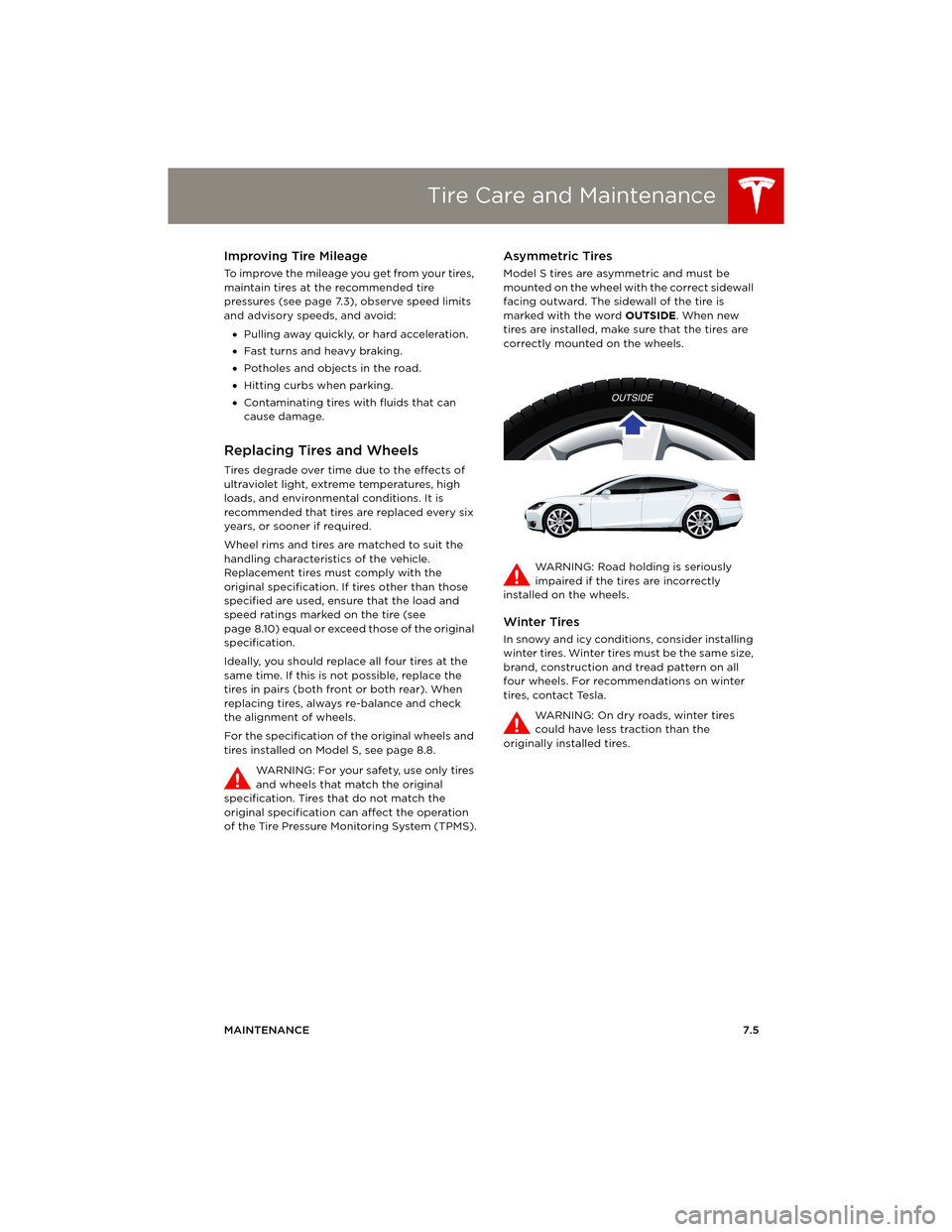
Model S tires are asymmetric and must be
mounted on the wheel with the correct sidewall
facing outward. The sidewall of the tire is
marked with the word OUTSIDE. When new
tires are installed, make sure that the tires are
correctly mounted on the wheels.
WARNING: Road holding is seriously
impaired if the tires are incorrectly
installed on the wheels.
Winter Tires
In snowy and icy conditions, consider installing
winter tires. Winter tires must be the same size,
brand, construction and tread pattern on all
four wheels. For recommendations on winter
tires, contact Tesla.
WARNING: On dry roads, winter tires
could have less traction than the
originally installed tires.
book.book Page 5 Friday, July 19, 2013 12:53 PM
Page 104 of 152
Tire Care and MaintenanceTire Care and Maintenance
7.6MODEL S OWNERS MANUAL
Using Tire Chains
Tesla has tested and approved Security Chain
Company (SCC) Model Z-563 chains for use on
the rear wheels. These chains must only be
used if your Model S has 245/45R19 rear tires
installed. Do not use chains on 21” tires.
When installing tire chains, follow the
instructions provided by the tire chain
manufacturer. Mount them as tightly as
possible.
When using tire chains:
•Drive slowly—do not exceed 48 km/h.
•Avoid heavily loading Model S (heavy loads
can reduce the clearance between the tires
and the body).
•Remove the tire chains as soon as
conditions allow.
NOTE: Tire chains are prohibited in some
jurisdictions. Check local laws before installing
tire chains.
CAUTION: Using non-recommended tire
chains, or using tire chains on other sized
tires, can damage the suspension, body,
wheels, and/or brake lines. Damage caused by
using non-recommended tire chains is not
covered by the warranty.
CAUTION: Ensure that tire chains cannot
touch suspension components or brake
lines. If you hear the chains making
unusual noises that would indicate contact with
Model S, stop and investigate immediately.
Tire Pressure Monitoring
Each tire should be checked monthly when
cold and inflated to the recommended
pressures that are printed on the Tire and
Loading Information label located on the
driver’s door pillar (see page 7.3). If your
vehicle has tires of a different size than the size
indicated on the vehicle placard or tire inflation
pressure label, determine the proper tire
inflation pressure for those tires.
As an added safety feature, your vehicle has
been equipped with a tire pressure monitoring
system (TPMS) that displays a low tire pressure
telltale (Tire Pressure Warning) on the
instrument panel when one or more of your
tires is significantly under-inflated. Accordingly,
when the Tire Pressure indicator light displays
on the instrument panel alerting you of low tire pressure, stop and check your tires as soon as
possible, and inflate them to the proper
pressure (see page 7.3). Driving on a
significantly under-inflated tire causes the tire
to overheat and can lead to tire failure.
Under-inflation also reduces fuel efficiency and
tire tread life, and may affect the vehicle's
handling and stopping ability.
If Model S detects a fault with the Tire
Pressure Monitoring System (TPMS),
this indicator flashes for one minute
whenever you power on Model S.
NOTE: Installing accessories that are not
approved by Tesla can interfere with the TPMS
system.
WARNING: The TPMS is not a substitute
for proper tire maintenance, including
manually checking tire pressures and regularly
inspecting the condition of tires. It is the
driver's responsibility to maintain correct tire
pressure, even if under-inflation has not
reached the level for the TPMS to trigger the
Tire Pressure Warning on the instrument panel.
TPMS Malfunction
Model S has also been equipped with a TPMS
malfunction indicator to indicate when the
system is not operating properly.
The TPMS malfunction indicator is combined
with the low tire pressure indicator light. When
the system detects a malfunction, the indicator
light flashes for approximately one minute after
Model S powers on, and then remains
continuously lit. This sequence continues upon
subsequent vehicle start-ups as long as the
malfunction exists.
When the TPMS malfunction indicator is on, the
system might not be able to detect or signal
low tire pressure as intended. TPMS
malfunctions can occur for a variety of reasons,
including installing replacement or alternate
tires or wheels on the vehicle that prevent the
TPMS from functioning properly. Always check
the TPMS malfunction indicator light after
replacing one or more tires or wheels on your
vehicle to ensure that the replacement or
alternate tires and wheels allow the TPMS to
continue to function properly.
NOTE: If a tire has been replaced or repaired
using a different tire sealant than the one
available from Tesla, and a low tire pressure is
book.book Page 6 Friday, July 19, 2013 12:53 PM
Page 107 of 152
Temporary Tire Repair
MAINTENANCE7.9
Inflating with Sealant and Air
If you have a Tesla tire repair kit as described on
page 7.8, follow these steps to temporarily
repair a small tire puncture (less than 6 mm).
1.Stop Model S in a safe place away from
traffic and ask passengers to wait in a safe
area.
2.Turn on the hazard warning flashers to alert
other road users.
3.If possible, position the wheel with the
puncture at the bottom.
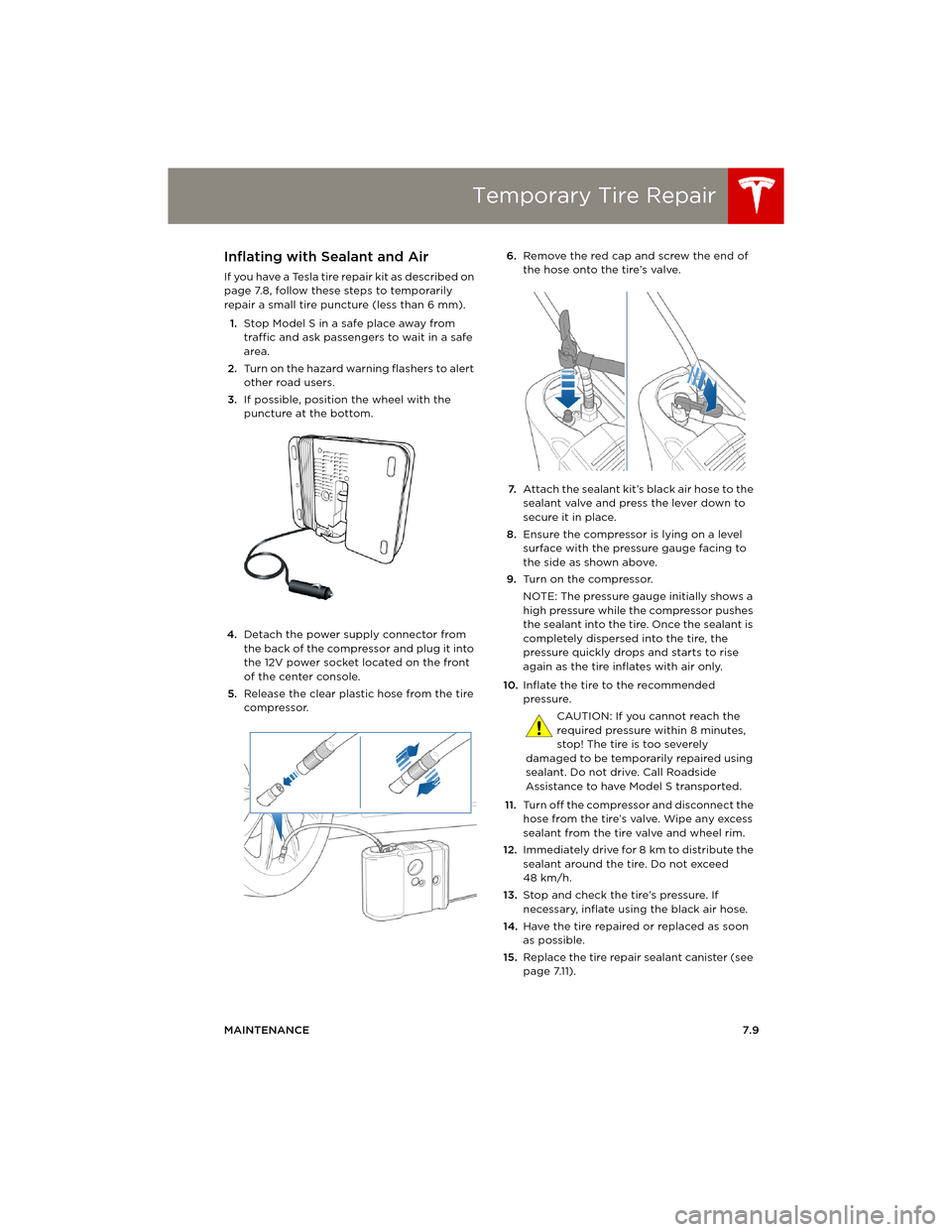
4.Detach the power supply connector from
the back of the compressor and plug it into
the 12V power socket located on the front
of the center console.
5.Release the clear plastic hose from the tire
compressor.6.Remove the red cap and screw the end of
the hose onto the tire’s valve.
7.Attach the sealant kit’s black air hose to the
sealant valve and press the lever down to
secure it in place.
8.Ensure the compressor is lying on a level
surface with the pressure gauge facing to
the side as shown above.
9.Tu r n o n t h e c o m p r e s s o r.
NOTE: The pressure gauge initially shows a
high pressure while the compressor pushes
the sealant into the tire. Once the sealant is
completely dispersed into the tire, the
pressure quickly drops and starts to rise
again as the tire inflates with air only.
10.Inflate the tire to the recommended
pressure.
CAUTION: If you cannot reach the
required pressure within 8 minutes,
stop! The tire is too severely
damaged to be temporarily repaired using
sealant. Do not drive. Call Roadside
Assistance to have Model S transported.
11.Turn off the compressor and disconnect the
hose from the tire’s valve. Wipe any excess
sealant from the tire valve and wheel rim.
12.Immediately drive for 8 km to distribute the
sealant around the tire. Do not exceed
48 km/h.
13.Stop and check the tire’s pressure. If
necessary, inflate using the black air hose.
14.Have the tire repaired or replaced as soon
as possible.
15.Replace the tire repair sealant canister (see
page 7.11).
book.book Page 9 Friday, July 19, 2013 12:53 PM
Page 110 of 152
CleaningCleaning
7.12MODEL S OWNERS MANUAL
CleaningCleaning the Exterior
To prevent damage to the paint, immediately
remove corrosive substances (bird droppings,
tree resin, dead insects, tar spots, road salt,
industrial fallout, etc). Do not wait until Model S
is due for a complete wash. If necessary, use
denatured alcohol to remove tar spots and
stubborn grease stains, then immediately wash
the area with water and a mild, non-detergent
soap to remove the alcohol.
Follow these steps when washing the exterior
of Model S:
1.Rinse Thoroughly
Before washing, flush grime and grit from
the bodywork using a hose. Flush away
accumulations of mud in areas where debris
easily collects (such as wheel arches and
panel seams). If salt has been used on the
highways (such as during winter months),
thoroughly rinse all traces of road salt from
the underside of the vehicle.
2.Hand Wash
Hand wash Model S using a soft cloth and
cold or lukewarm water containing a mild,
good quality car shampoo.
3.Rinse with Clean Water
After washing, rinse with clean water to
prevent soap from drying on the surfaces.
4.Dry Thoroughly and Clean Exterior Glass
After washing and rinsing, dry thoroughly
with a chamois.
Clean windows and mirrors using an
automotive glass cleaner. Do not scrape, or
use any abrasive cleaning fluid on glass or
mirrored surfaces.
Cautions for Exterior Cleaning
CAUTION: Do not use hot water and
detergents.
CAUTION: In hot weather, do not wash in
direct sunlight.
CAUTION: If using a pressure washer,
maintain a distance of at least 30 cm
between the nozzle and the surface of
Model S. Keep the nozzle moving and do
not concentrate the water jet on any one
area.
CAUTION: Do not aim water hoses
d i r e c t l y a t w i n d o w, d o o r o r h o o d s e a l s , o r
through wheel apertures onto brake
components.
CAUTION: Avoid using tight-napped or
rough cloths, such as washing mitts.
CAUTION: If washing in an automatic car
wash, use Touchless car washes only.
These car washes have no parts (brushes,
etc.) that touch the surfaces of Model S.
Using any other type of car wash could
cause damage that is not covered by the
warranty.
CAUTION: Do not used chemical based
wheel cleaners. These can damage the
finish on the wheels.
CAUTION: Avoid using a high pressure
power washer on the rear view camera or
parking sensors (if equipped) and do not
clean a sensor or camera lens with a
sharp or abrasive object that can scratch
or damage its surface.
Some cleaning products contain
chemicals that are hazardous to the
environment. Always take precautions to
prevent spilling. It is illegal to pollute
drains, rivers and waterways. Used toxic
chemicals must be disposed of at
authorized waste disposal sites only.
book.book Page 12 Friday, July 19, 2013 12:53 PM
Page 123 of 152
8.1
SPECIFICATIONS
Identification Labels
Vehicle Identification Number..................... 8.2
Vehicle Loading
Load Capacity Labeling ................................. 8.3
Calculating Load Limits ................................ 8.4
Towing a Trailer ............................................... 8.4
Dimensions and Weights
Exterior Dimensions ........................................ 8.5
Weights ................................................................ 8.5
Subsystems
Motor .................................................................... 8.6
Transmission...................................................... 8.6
Steering ............................................................... 8.6
Brakes .................................................................. 8.6
Suspension .......................................................... 8.7
Battery - 12V ....................................................... 8.7
Battery - High Voltage ................................... 8.7
Wheels and Tires
Wheel Specifications ..................................... 8.8
Wheel Alignment Values .............................. 8.8
Tire Specifications........................................... 8.8
Understanding Tire Markings..................... 8.10
book.book Page 1 Friday, July 19, 2013 12:53 PM
Page 127 of 152
Dimensions and Weights
SPECIFICATIONS8.5
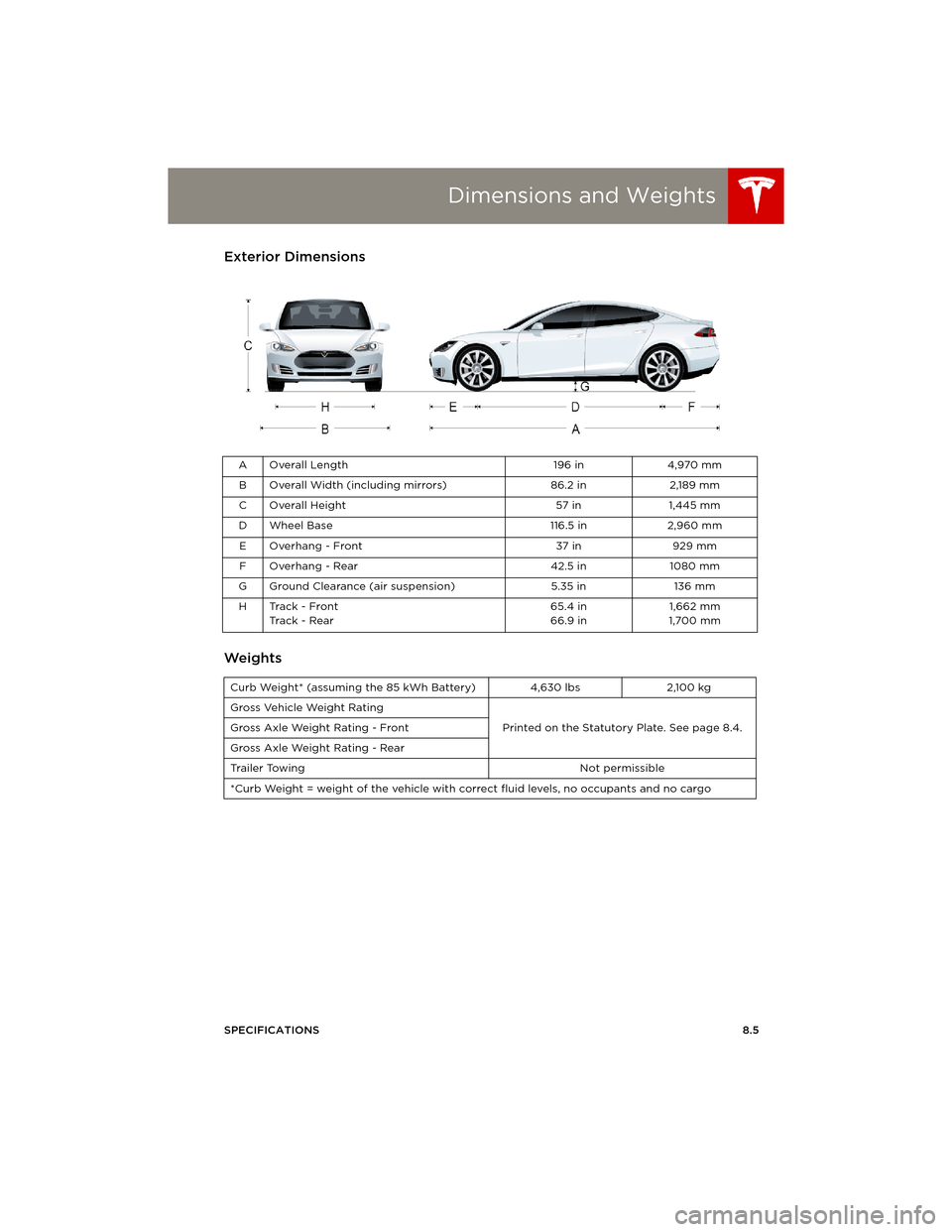
Dimensions and WeightsExterior Dimensions
Weights
AOverall Length 196 in 4,970 mm
B Overall Width (including mirrors) 86.2 in 2,189 mm
C Overall Height 57 in 1,445 mm
D Wheel Base 116.5 in 2,960 mm
EOverhang - Front 37 in 929 mm
F Overhang - Rear 42.5 in 1080 mm
G Ground Clearance (air suspension) 5.35 in 136 mm
HTrack - Front
Track - Rear65.4 in
66.9 in1,662 mm
1,700 mm
Curb Weight* (assuming the 85 kWh Battery) 4,630 lbs 2,100 kg
Gross Vehicle Weight Rating
Printed on the Statutory Plate. See page 8.4. Gross Axle Weight Rating - Front
Gross Axle Weight Rating - Rear
Trailer Towing Not permissible
*Curb Weight = weight of the vehicle with correct fluid levels, no occupants and no cargo
book.book Page 5 Friday, July 19, 2013 12:53 PM