belt TESLA MODEL S 2014 (North America) User Guide
[x] Cancel search | Manufacturer: TESLA, Model Year: 2014, Model line: MODEL S, Model: TESLA MODEL S 2014Pages: 159, PDF Size: 6.14 MB
Page 28 of 159
Testing a Child Safety SeatBefore seating a child, always make sure thechild safety seat is not loose:
1. Hold the child safety seat by the belt path
and try to slide the safety seat from side
to side and front to back.
2. If the seat moves more than one inch
(2.5 cm), it is too loose. Tighten the belt
or reconnect the LATCH retained child
safety seat.
3. If you are unable to reduce slack, try a
different seat location or try another child
safety seat.
Warnings - Child Safety SeatsWarning: Extreme hazard! Do not seat a
child on the front passenger seat even if
you are using a child safety seat. This seat has an airbag in front of it. Although this
airbag is disabled when Model S detects a lightweight passenger, do not rely on
technology to protect your child.Warning: Do not use a forward facing
child safety seat until your child weighs
over 20 lbs (9 kg) and can sit
independently. Up to the age of two, a child's spine and neck are not sufficientlydeveloped to avoid injury in a frontal
impact.Warning: Do not allow a baby or infant to
be held on a lap. All children should be
restrained in an appropriate child safety
seat at all times.Warning: To ensure children are safely
seated, follow all instructions provided in this document and by the manufacturerof the child safety seat.Warning: Children should ride in a rear
facing child safety seat using the seat’s
integrated 5-point harness for as long as
possible.Warning: Do not use seat belt extenders
when installing a child safety seat or booster seat.Warning: When seating larger children,
make sure the child's head is supported and the child’s seat belt is properlyadjusted and fastened. The shoulder
portion of the belt must be away from the face and neck, and the lap portion mustnot be over the stomach.Warning: Never attach two child safety
seats to one anchor point. In a collision,one anchor point may be incapable of
securing both seats.Warning: Child restraint anchorages are
designed to withstand only those loads imposed by correctly fitted child
restraints. Under no circumstances are
they to be used for adult seatbelts,
harnesses, or for attaching other items or equipment to the vehicle.Warning: Always check harnesses and
tether straps for damage and wear.Warning: Do not use seat belt extenders
on a seat belt that is being used to install
a child safety seat or booster seat.Warning: Never leave a child unattended,
even if the child is secured in a child
safety seat.Warning: Never use a child safety seat
that has been involved in an accident.
Have the seat inspected or replaced as a
described in the child safety seat
manufacturer’s instructions.
Child Safety Seats
26Model S Owner's Manual
Page 29 of 159
Usage Restrictions
The optional Tesla built-in rear facing child
seats are child restraint systems and must
only be used for children over 37" (94 cm) tall
and weighing between 35 and 77 lbs (16.2 to
35.2 kg).
Always ensure the top of the child’s head
cannot contact the vehicle and that the child
is seated comfortably with the seat belts positioned and latched correctly. The child’spelvis must be held securely in place by thelap belt. Follow all instructions provided anddo not use supplemental child safety seats inthese seats.
Note: Whenever a child is seated in the Tesla
built-in rear facing child seats, it is
recommended that you set the climate control
system to draw outside air into Model S
instead of recirculating the air. This draws
more air into the rear seating areas.
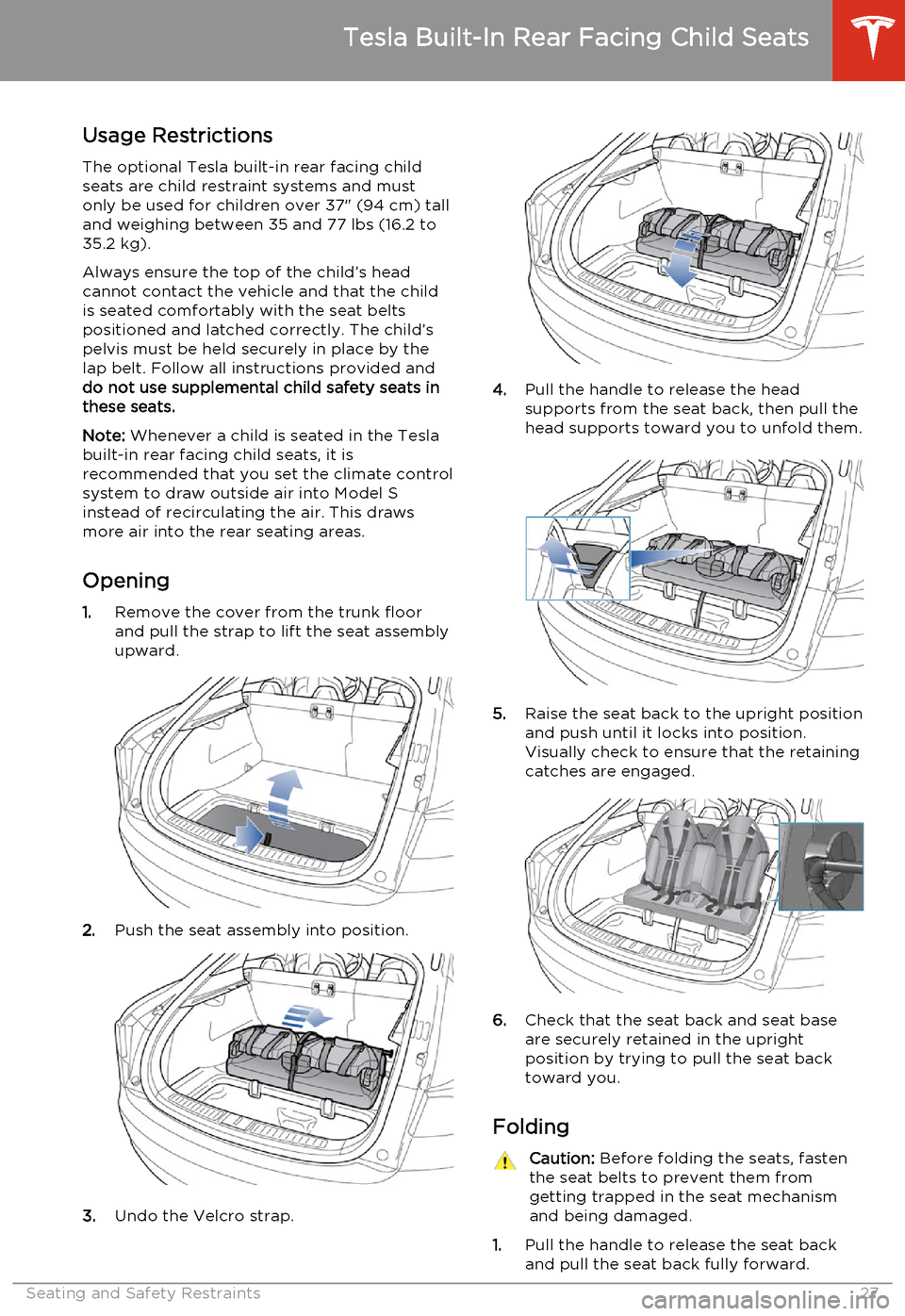
Opening 1. Remove the cover from the trunk floor
and pull the strap to lift the seat assembly
upward.
2. Push the seat assembly into position.
3.Undo the Velcro strap.
4.Pull the handle to release the head
supports from the seat back, then pull the
head supports toward you to unfold them.
5. Raise the seat back to the upright position
and push until it locks into position.
Visually check to ensure that the retaining catches are engaged.
6. Check that the seat back and seat base
are securely retained in the upright
position by trying to pull the seat back toward you.
Folding
Caution: Before folding the seats, fasten
the seat belts to prevent them from
getting trapped in the seat mechanism and being damaged.
1. Pull the handle to release the seat back
and pull the seat back fully forward.
Tesla Built-In Rear Facing Child Seats
Seating and Safety Restraints27
Page 31 of 159
Seating a ChildThe Tesla built-in rear facing child seats arechild restraint systems and must only be used
for children over 37" (94 cm) tall and
weighing between 35 and 77 lbs (16.2 to 35.2
kg).
Always ensure the top of the child’s head
cannot contact the vehicle and that the child
is seated comfortably with the seat belts positioned and latched correctly. The child’spelvis must be held securely in place by thelap belt. Follow all instructions provided anddo not use supplemental child safety seats inthese seats.
Note: Whenever a child is seated in the Tesla
built-in rear facing child seats, it is
recommended that you set the climate control
system to draw outside air into Model S
instead of recirculating the air. This draws
more air into the rear seating areas.
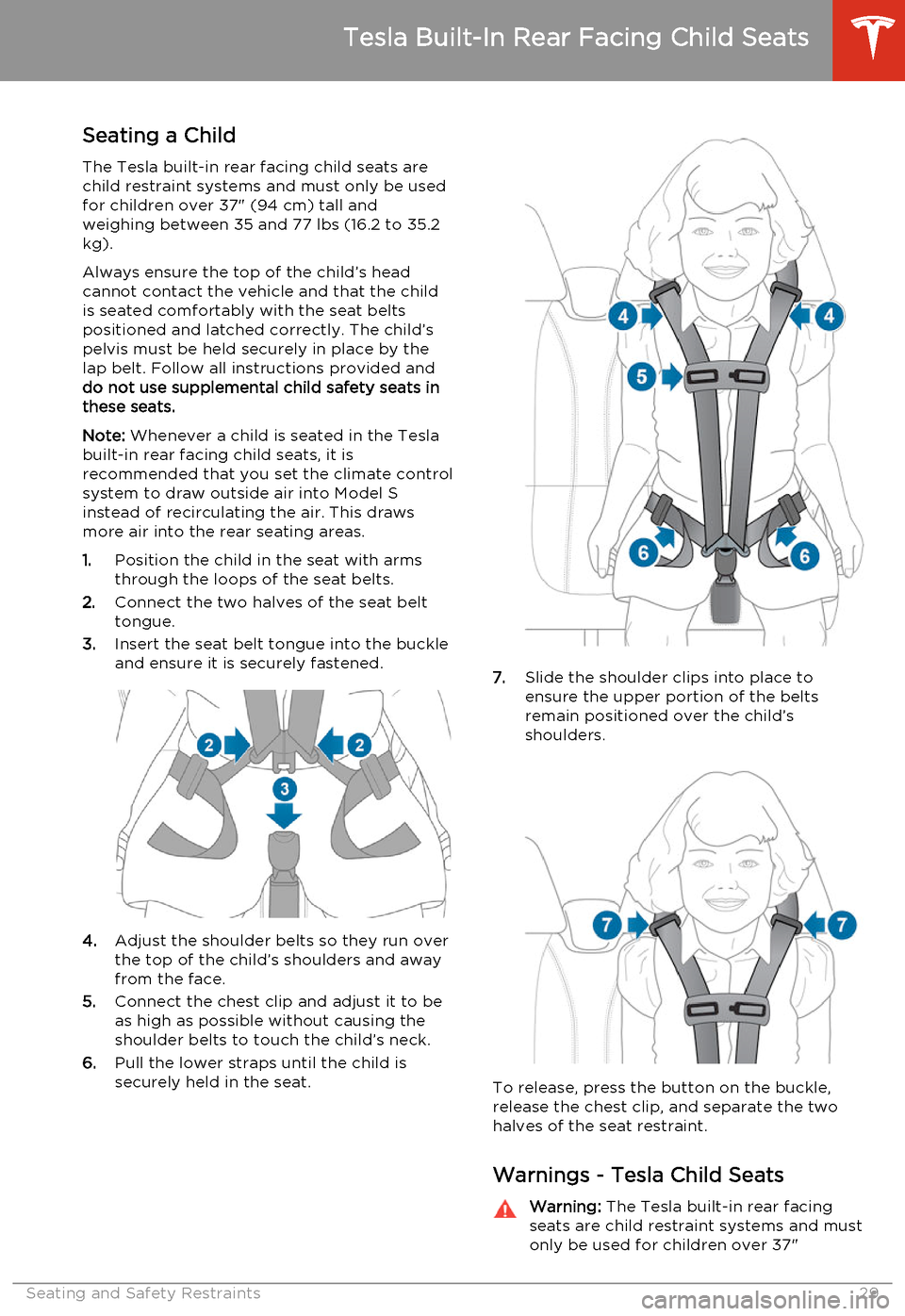
1. Position the child in the seat with arms
through the loops of the seat belts.
2. Connect the two halves of the seat belt
tongue.
3. Insert the seat belt tongue into the buckle
and ensure it is securely fastened.
4. Adjust the shoulder belts so they run over
the top of the child’s shoulders and away
from the face.
5. Connect the chest clip and adjust it to be
as high as possible without causing the
shoulder belts to touch the child’s neck.
6. Pull the lower straps until the child is
securely held in the seat.
7. Slide the shoulder clips into place to
ensure the upper portion of the belts
remain positioned over the child’s
shoulders.
To release, press the button on the buckle,
release the chest clip, and separate the two
halves of the seat restraint.
Warnings - Tesla Child Seats
Warning: The Tesla built-in rear facing
seats are child restraint systems and must
only be used for children over 37"
Tesla Built-In Rear Facing Child Seats
Seating and Safety Restraints29
Page 32 of 159
(94 cm) tall and weighing between 35and 77 lbs (16.2 to 35.2 kg).Warning: Do not use supplemental child
restraint systems, including booster seats,
in the Tesla built-in rear facing child seats.Warning: Always ensure that the top of
the child’s head cannot touch the vehicle and that the child is seated comfortablywith the seat belts correctly fastened.Warning: Follow all instructions and heed
all warnings related to the Tesla built-in
rear facing child seats. Failure to do so
can compromise occupant safety.Warning: Read all safety warnings and
labels attached to the seats.Warning: Do not leave children
unattended in Model S, even if the child is secured in a child safety seat or a Tesla
built-in rear facing child seat. In hot
weather, the interior temperature can reach dangerous levels that can result in
dehydration, serious injury or death.Warning: Do not remove or replace the
fabric on a Tesla built-in rear facing child
seat. The covers are an integral part of the restraint’s performance and shouldnot be removed or replaced with any
other type than those supplied by Tesla.Warning: If the Tesla built-in rear facing
child seats have been worn in an
accident, they must be inspected or
replaced by Tesla, even if damage is not
obvious.Warning: Before allowing a child to ride in
the Tesla built-in rear facing child seats, check that the seat is securely held in theupright position by trying to pull the seat
back toward you.Warning: Do not remove the built-in rear
facing child seats for any reason,
including cleaning. To ensure safety of
occupants, removal and installation must
be performed by qualified Tesla service
technicians.Warning: Do not make modifications or
additions that can interfere with the
operation of the Tesla built-in rear facing
child seats.Warning: To prevent injury, ensure all
loose items (bags, luggage, etc.) are
secured. In an accident, or during hard
braking and sharp turns, loose items
could cause injury.
Tesla Built-In Rear Facing Child Seats
30Model S Owner's Manual
Page 34 of 159
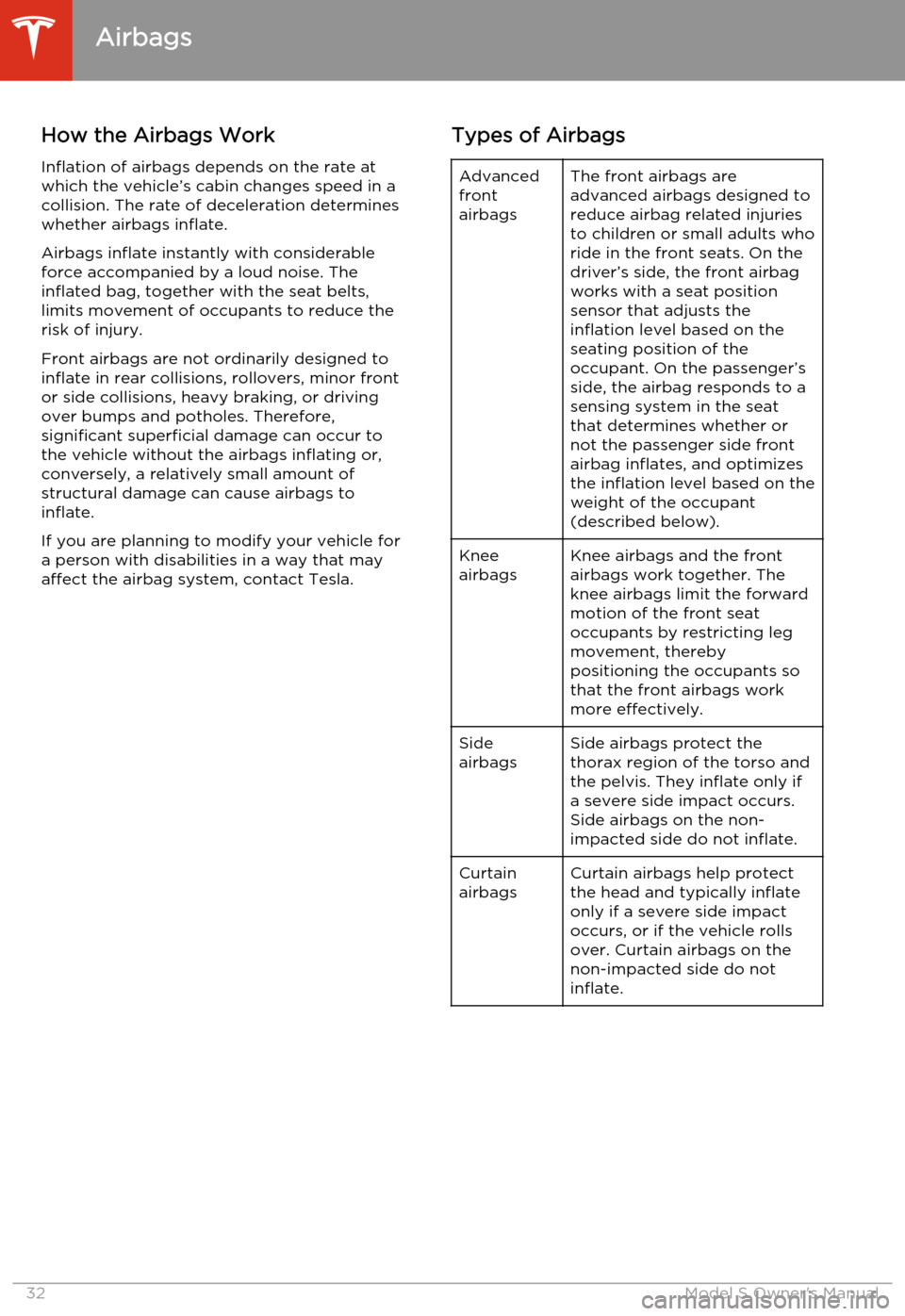
How the Airbags WorkInflation of airbags depends on the rate at
which the vehicle’s cabin changes speed in a collision. The rate of deceleration determineswhether airbags inflate.
Airbags inflate instantly with considerable force accompanied by a loud noise. The
inflated bag, together with the seat belts,
limits movement of occupants to reduce the
risk of injury.
Front airbags are not ordinarily designed to inflate in rear collisions, rollovers, minor frontor side collisions, heavy braking, or driving
over bumps and potholes. Therefore,
significant superficial damage can occur to
the vehicle without the airbags inflating or,
conversely, a relatively small amount of
structural damage can cause airbags to
inflate.
If you are planning to modify your vehicle for
a person with disabilities in a way that may
affect the airbag system, contact Tesla.Types of AirbagsAdvanced
front
airbagsThe front airbags are
advanced airbags designed to
reduce airbag related injuries
to children or small adults who
ride in the front seats. On the
driver’s side, the front airbag
works with a seat position
sensor that adjusts the
inflation level based on the
seating position of the
occupant. On the passenger’s side, the airbag responds to a
sensing system in the seat
that determines whether or
not the passenger side front
airbag inflates, and optimizes
the inflation level based on the
weight of the occupant
(described below).Knee
airbagsKnee airbags and the front
airbags work together. The
knee airbags limit the forward
motion of the front seat
occupants by restricting leg
movement, thereby
positioning the occupants so
that the front airbags work
more effectively.Side
airbagsSide airbags protect the
thorax region of the torso and
the pelvis. They inflate only if
a severe side impact occurs.
Side airbags on the non-
impacted side do not inflate.Curtain
airbagsCurtain airbags help protect
the head and typically inflate
only if a severe side impact
occurs, or if the vehicle rolls
over. Curtain airbags on the
non-impacted side do not
inflate.
Airbags
32Model S Owner's Manual
Page 35 of 159
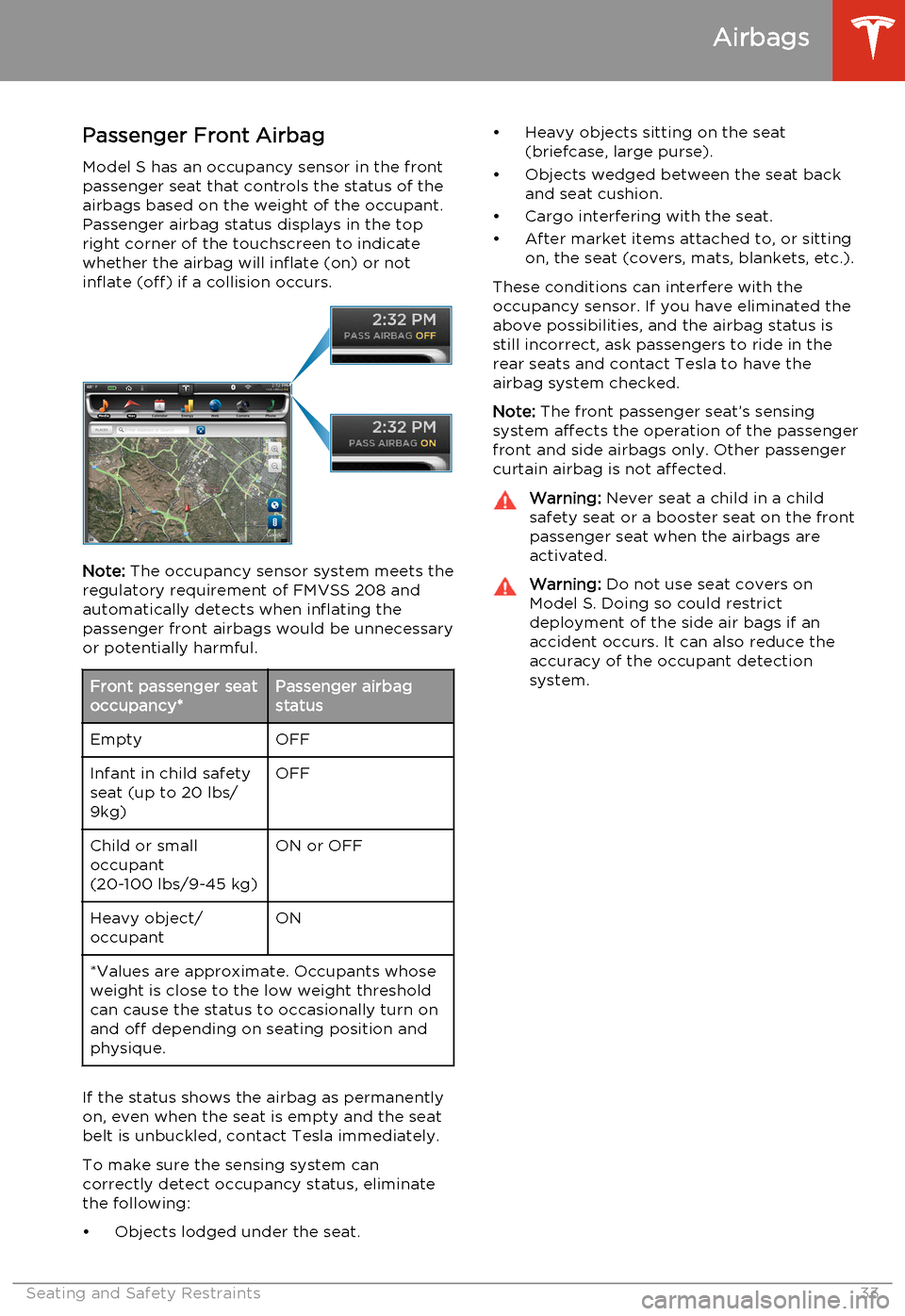
Passenger Front Airbag
Model S has an occupancy sensor in the front passenger seat that controls the status of theairbags based on the weight of the occupant.Passenger airbag status displays in the top
right corner of the touchscreen to indicate
whether the airbag will inflate (on) or not
inflate (off) if a collision occurs.
Note: The occupancy sensor system meets the
regulatory requirement of FMVSS 208 and automatically detects when inflating the
passenger front airbags would be unnecessary or potentially harmful.
Front passenger seat
occupancy*Passenger airbag
statusEmptyOFFInfant in child safety
seat (up to 20 lbs/
9kg)OFFChild or small
occupant
(20-100 lbs/9-45 kg)ON or OFFHeavy object/
occupantON*Values are approximate. Occupants whose
weight is close to the low weight threshold
can cause the status to occasionally turn on and off depending on seating position and
physique.
If the status shows the airbag as permanently
on, even when the seat is empty and the seat
belt is unbuckled, contact Tesla immediately.
To make sure the sensing system can
correctly detect occupancy status, eliminate
the following:
• Objects lodged under the seat.
• Heavy objects sitting on the seat (briefcase, large purse).
• Objects wedged between the seat back and seat cushion.
• Cargo interfering with the seat.
• After market items attached to, or sitting on, the seat (covers, mats, blankets, etc.).
These conditions can interfere with the
occupancy sensor. If you have eliminated the above possibilities, and the airbag status is
still incorrect, ask passengers to ride in the rear seats and contact Tesla to have the
airbag system checked.
Note: The front passenger seat’s sensing
system affects the operation of the passenger front and side airbags only. Other passengercurtain airbag is not affected.Warning: Never seat a child in a child
safety seat or a booster seat on the front
passenger seat when the airbags are
activated.Warning: Do not use seat covers on
Model S. Doing so could restrict
deployment of the side air bags if an
accident occurs. It can also reduce the
accuracy of the occupant detection
system.
Airbags
Seating and Safety Restraints33
Page 36 of 159
Inflation Effects
When airbags inflate, a fine powder is
released. This powder can irritate the skin and should be thoroughly flushed from the eyes
and from any cuts or abrasions.
After inflation, the airbags deflate to provide a
gradual cushioning effect for the occupants and to ensure the driver’s forward vision is notobscured.
If airbags have inflated, or if your vehicle has been in an accident, always have the airbags,
seat belt pre-tensioners and any associated
components checked and, if necessary,
replaced by Tesla.
In a collision, in addition to the airbags
inflating:
• Doors unlock and the door handles extend.
• Hazard warning lights turn on.
• Interior lights turn on.
• High voltage is disabled.
To restore Battery power, use the touchscreen
to manually power off Model S, then press the
brake to power it back on again.
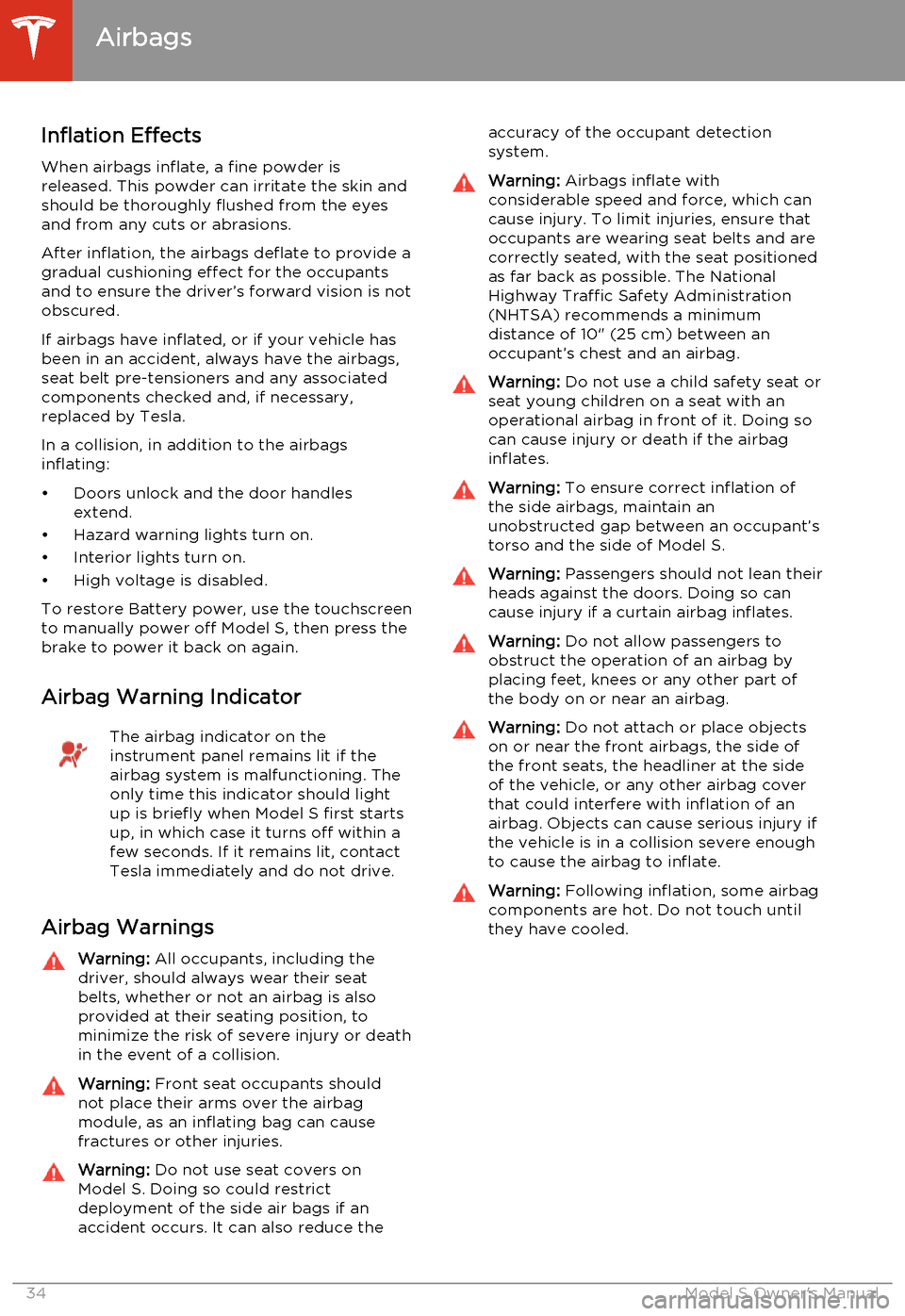
Airbag Warning IndicatorThe airbag indicator on the
instrument panel remains lit if the
airbag system is malfunctioning. The
only time this indicator should light
up is briefly when Model S first starts
up, in which case it turns off within a few seconds. If it remains lit, contact
Tesla immediately and do not drive.
Airbag Warnings
Warning: All occupants, including the
driver, should always wear their seat
belts, whether or not an airbag is also
provided at their seating position, to
minimize the risk of severe injury or death
in the event of a collision.Warning: Front seat occupants should
not place their arms over the airbag
module, as an inflating bag can cause
fractures or other injuries.Warning: Do not use seat covers on
Model S. Doing so could restrict
deployment of the side air bags if an
accident occurs. It can also reduce theaccuracy of the occupant detection
system.Warning: Airbags inflate with
considerable speed and force, which can
cause injury. To limit injuries, ensure that
occupants are wearing seat belts and are
correctly seated, with the seat positioned
as far back as possible. The National
Highway Traffic Safety Administration (NHTSA) recommends a minimum
distance of 10" (25 cm) between an occupant’s chest and an airbag.Warning: Do not use a child safety seat or
seat young children on a seat with an operational airbag in front of it. Doing socan cause injury or death if the airbaginflates.Warning: To ensure correct inflation of
the side airbags, maintain an
unobstructed gap between an occupant’s
torso and the side of Model S.Warning: Passengers should not lean their
heads against the doors. Doing so can cause injury if a curtain airbag inflates.Warning: Do not allow passengers to
obstruct the operation of an airbag by
placing feet, knees or any other part of the body on or near an airbag.Warning: Do not attach or place objects
on or near the front airbags, the side of
the front seats, the headliner at the side of the vehicle, or any other airbag coverthat could interfere with inflation of an
airbag. Objects can cause serious injury if the vehicle is in a collision severe enoughto cause the airbag to inflate.Warning: Following inflation, some airbag
components are hot. Do not touch until
they have cooled.
Airbags
34Model S Owner's Manual
Page 45 of 159
10.Pay attention to alert messages that appear at the bottom center of the instrument panel. If
any alerts are in effect, you can view information about them by touching the alert icon
(exclamation mark) on the touchscreen’s status bar (the topmost area of the touchscreen).
11. Currently selected gear: Park, Reverse, Neutral, or Drive.
12. Dashed lines appear on the power meter if Model S is limiting power. The dashed lines appear
on the top portion when power available for acceleration is being limited, and on the bottom
portion when power that can be gained by regenerative braking is limited. Model S limits
power for many reasons. Here are just a few examples:
• Acceleration may be limited when the Battery is reaching a low state of charge or if the powertrain is hot.
• Both acceleration and regenerative braking may be limited when the ambient temperature is either very high or very low.
• Regenerative braking may be limited when the Battery is fully charged.
13. Date and time
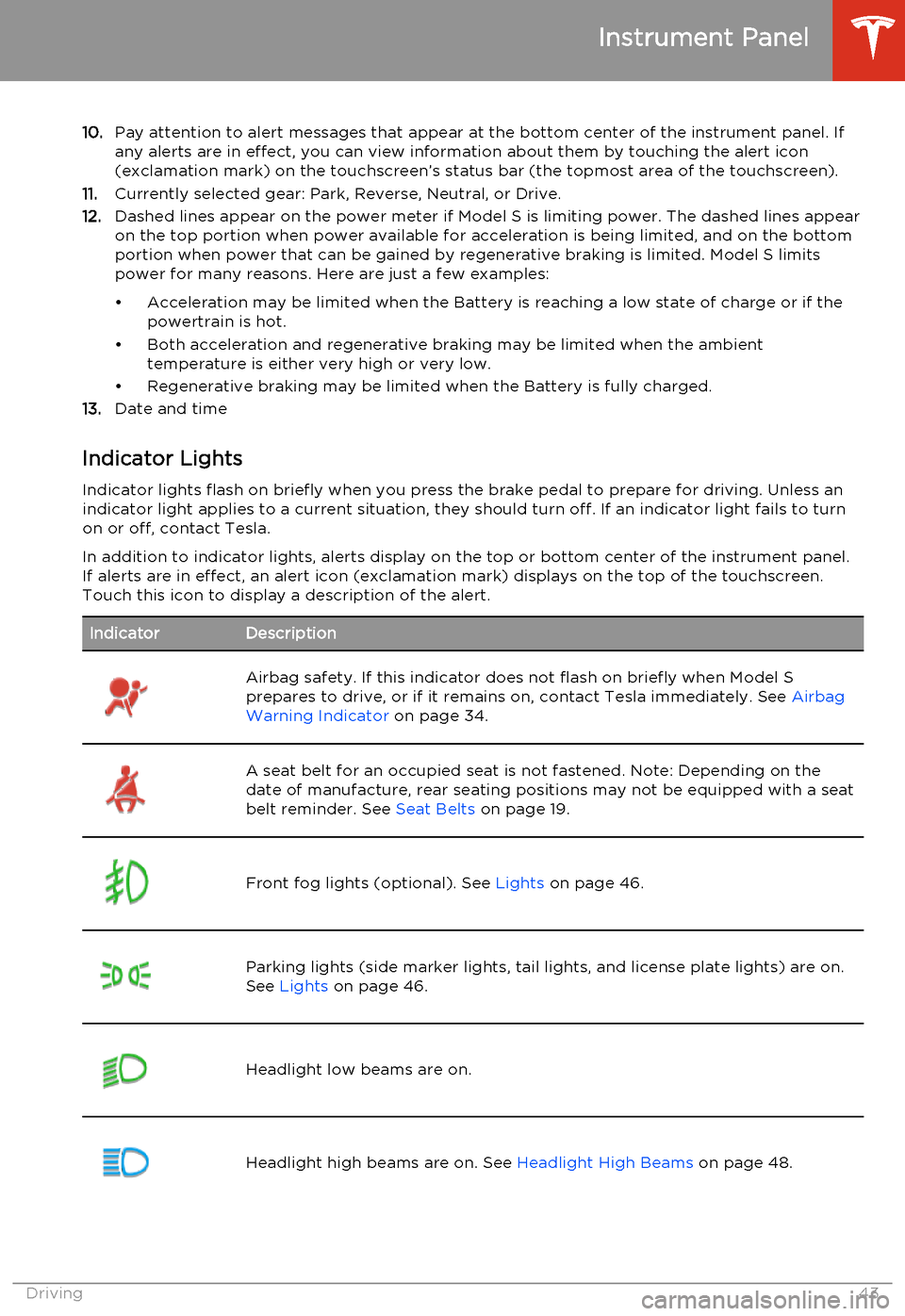
Indicator Lights Indicator lights flash on briefly when you press the brake pedal to prepare for driving. Unless anindicator light applies to a current situation, they should turn off. If an indicator light fails to turnon or off, contact Tesla.
In addition to indicator lights, alerts display on the top or bottom center of the instrument panel.
If alerts are in effect, an alert icon (exclamation mark) displays on the top of the touchscreen.
Touch this icon to display a description of the alert.IndicatorDescriptionAirbag safety. If this indicator does not flash on briefly when Model S
prepares to drive, or if it remains on, contact Tesla immediately. See Airbag
Warning Indicator on page 34.A seat belt for an occupied seat is not fastened. Note: Depending on the
date of manufacture, rear seating positions may not be equipped with a seat
belt reminder. See Seat Belts on page 19.Front fog lights (optional). See Lights on page 46.Parking lights (side marker lights, tail lights, and license plate lights) are on.
See Lights on page 46.Headlight low beams are on.Headlight high beams are on. See Headlight High Beams on page 48.Instrument Panel
Driving43
Page 101 of 159
Service Intervals
Regular maintenance is the key to ensuring
the continued reliability and efficiency of your
Model S.
Rotate the tires every 5000 miles (8000 km),
maintain the correct tire pressures, and take Model S to Tesla at the regularly scheduledmaintenance intervals of every 12 months, orevery 12,500 miles (20,000 km), whichever
comes first. It is also important to perform the
daily and monthly checks described below.
Model S must be serviced by Tesla-certified
technicians. Damages or failures caused by
maintenance or repairs performed by non-
Tesla certified technicians are not covered by
the warranty.
Daily Checks • Check the Battery’s charge level, displayed on the instrument panel.
• Check that all exterior lights, horn, turn signals, and wipers and washers are
working.
• Check the operation of the brakes, including the parking brake.
• Check the operation of the seat belts (see Seat Belts on page 19).
• Look for fluid deposits underneath Model S that might indicate a leak. It is
normal for a small pool of water to form
(caused by the air conditioning system’s dehumidifying process).
Monthly Checks • Check the mileage to determine if the tires need to be rotated (every
5000 miles/8000 km), and check the
condition and pressure of each tire (see
Tire Care and Maintenance on page 100).
• Check washer fluid level and top up if necessary (see Topping Up Washer Fluid
on page 116).
• Check that the air conditioning system is operating (see Climate Controls on page
72).Warning: Contact Tesla immediately if
you notice any significant or sudden drop in fluid levels or uneven tire wear.Fluid Replacement Intervals
Do not change or top up Battery coolant and
brake fluid yourself. Tesla service technicians replace fluids at the regularly scheduled
service intervals:
• Brake fluid. Every 2 years or 25,000 miles (40,000 km), whichever comes first.
• Battery coolant. Every 5 years or 62,500 miles (100,000 km), whichever
comes first.
Note: Any damage from opening the Battery
coolant reservoir is excluded from the warranty.
High Voltage Safety Your Model S has been designed and built
with safety as a priority. However, be aware of these precautions to protect yourself from the
risk of injury inherent in all high-voltage
systems:
• Read and follow all instructions provided on the labels that are attached to Model S.These labels are there for your safety.
• The high voltage system has no user- serviceable parts. Do not disassemble,
remove or replace high voltage components, cables or connectors. High
voltage cables are colored orange for
easy identification.
• If an accident occurs, do not touch any high voltage wiring, connectors, or
components connected to the wiring.
• In the unlikely event that a fire occurs, immediately contact your local fire
emergency responders.Warning: Always disconnect the charge
cable before working underneath Model S, even if charging is not in
progress.Warning: Keep your hands and clothing
away from cooling fans. Some fans
operate even when Model S is powered
off.Caution: Some fluids (battery acid,
Battery coolant, brake fluid, windshield
washer additives, etc.) used in motor
vehicles are poisonous and should not be
inhaled, swallowed, or brought into contact with open wounds. For your
safety, always read and follow
instructions printed on fluid containers.
Maintenance Schedule
Maintenance99
Page 112 of 159
Cleaning the InteriorFrequently inspect and clean the interior to
maintain its appearance and to prevent premature wear. If possible, immediately wipe
up spills and remove marks. For general
cleaning, wipe interior surfaces using a soft cloth (such as micro fiber) dampened with amixture of warm water and mild non-detergent cleaner (test all cleaners on a
concealed area before use). To avoid streaks,
dry immediately with a soft lint-free cloth.
Interior Glass
Do not scrape, or use any abrasive cleaning
fluid on glass or mirrored surfaces. This can
damage the reflective surface of the mirror
and the heating elements in the rear window.
Airbags
Do not allow any substance to enter an airbag
cover. This could affect correct operation.
Dashboard and Plastic Surfaces
Do not polish the upper surfaces of the
dashboard. Polished surfaces are reflective
and could interfere with your driving view.
Leather Seats
Leather is prone to dye-transfer which can cause discoloration, particularly on light
colored leather. White and tan leather is
coated with an anti-soiling treatment. Wipe
spills as soon as possible using a soft cloth
moistened with warm water and non-
detergent soap. Wipe gently in a circular
motion. Then wipe dry using a soft, lint-free
cloth. Using detergents or commercially
available leather cleaners and conditioners is
not recommended because they can discolor or dry out the leather.
Cloth Seats
Wipe spills as soon as possible using a soft cloth moistened with warm water and non-
detergent soap. Wipe gently in a circular motion. Then wipe dry using a soft, lint-free
cloth. Vacuum the seats as needed to remove
any loose dirt.
Carpets
Avoid over-wetting carpets. For heavily soiled
areas, use a diluted upholstery cleaner.Seat Belts
Extend the belts to wipe. Do not use any type
of detergent or chemical cleaning agent. Allow the belts to dry naturally while
extended, preferably away from direct sunlight.
Tesla Built-In Rear Facing Child Seats
Vacuum the seats to remove any loose dirt.
Wipe the seats with a soft cloth dampened
with warm water. You can also use an
upholstery cleaner designer for automotive use. Extend the belts to wipe. Allow the belts
to dry naturally, preferably away from direct
sunlight.
Touchscreen and Instrument Panel
Clean the touchscreen and instrument panel using a soft lint-free cloth specificallydesigned to clean monitors and displays. Donot use cleaners (such as a glass cleaner) and
do not use a wet wipe or a dry statically- charged cloth (such as a recently washed
microfiber). To wipe the touchscreen without
activating buttons and changing settings, you
can enter screen cleaning mode. Touch
Controls > Displays > Enter Screen Cleaning .
The display darkens to make it easy to see
dust and smudges.
Chrome and Metal Surfaces
Polish, abrasive cleaners or hard cloths can
damage the finish on chrome and metal surfaces.
Cautions for Interior CleaningWarning: If you notice any damage on an
airbag or seat belt, contact Tesla
immediately.Warning: Do not allow any water,
cleaners, or fabric to enter a seat belt
mechanism.Caution: Using solvents (including
alcohol), bleach, citrus, naphtha, or
silicone based products or additives on
interior components can cause damage.
Cleaning
110Model S Owner's Manual