maintenance TESLA MODEL S 2014 (North America) User Guide
[x] Cancel search | Manufacturer: TESLA, Model Year: 2014, Model line: MODEL S, Model: TESLA MODEL S 2014Pages: 159, PDF Size: 6.14 MB
Page 106 of 159
To reset TPMS sensors:
1. Inflate all tires to their recommend
pressures, as indicated on the Tire and
Loading Information label located on the
driver’s door pillar.
2. Get ready to drive for ten minutes, then,
on the Model S touchscreen, touch
Controls > Settings > Vehicle > Tire
Pressure Monitor > Reset Sensors .
3. Follow the onscreen instructions.
Replacing a Tire Sensor
If the Tire Pressure warning indicator displays
frequently, contact Tesla to determine if a tire
sensor needs to be replaced. Tire sensors
must be replaced by a Tesla service technician
who can perform a brief setup procedure. If a
non-Tesla service center repairs or replaces a
tire, the tire sensor will not work until Tesla
performs the setup procedure.
TPMS Malfunction
Model S has also been equipped with a TPMS
malfunction indicator to indicate when the
system is not operating properly.The TPMS malfunction indicator is
combined with the tire pressure
indicator light. When the system
detects a malfunction, the indicator
flashes for approximately one
minute after Model S powers on, and
then remains continuously lit. This
sequence continues upon
subsequent vehicle start-ups as long
as the malfunction exists. When the
TPMS malfunction indicator is on,
the system might not be able to
detect or signal under- and over-
inflated tires as intended.
TPMS malfunctions can occur for a variety of
reasons, including installing replacement oralternate tires or wheels on the vehicle thatprevent the TPMS from functioning properly.Always check the TPMS malfunction indicator
light after replacing one or more tires or
wheels on your vehicle to ensure that the replacement or alternate tires and wheels
allow the TPMS to continue to function
properly.
Note: If a tire has been replaced or repaired
using a different tire sealant than the one
available from Tesla, and a low tire pressure is
detected, it is possible that the tire sensor has
been damaged. Contact Tesla to have the
fault repaired as soon as possible.
Tire Care and Maintenance
104Model S Owner's Manual
Page 107 of 159
Tire Repair KitYour Model S has no spare tire. Depending on
the legislations that apply to the region in which you purchased Model S, a tire repair kitmay or may not be included. If a tire repair kitwas not provided in Model S upon delivery,you can purchase one from Tesla.
Note: Although Model S does not have a spare
tire, in the event of a flat tire, Roadside
Assistance provides towing coverage for up
to 50 miles.
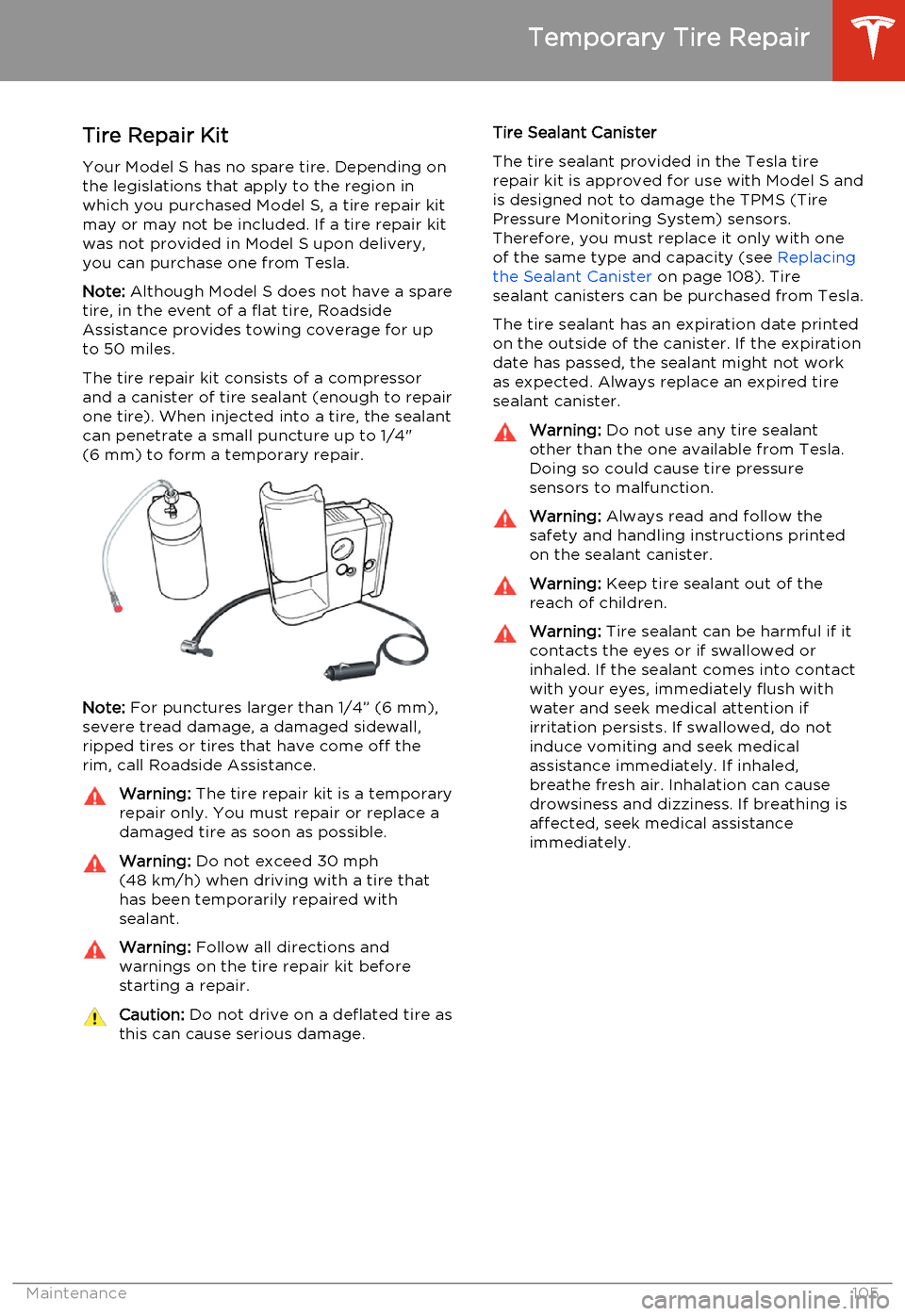
The tire repair kit consists of a compressor
and a canister of tire sealant (enough to repair
one tire). When injected into a tire, the sealant
can penetrate a small puncture up to 1/4"
(6 mm) to form a temporary repair.
Note: For punctures larger than 1/4” (6 mm),
severe tread damage, a damaged sidewall,
ripped tires or tires that have come off the
rim, call Roadside Assistance.
Warning: The tire repair kit is a temporary
repair only. You must repair or replace a
damaged tire as soon as possible.Warning: Do not exceed 30 mph
(48 km/h) when driving with a tire that
has been temporarily repaired with sealant.Warning: Follow all directions and
warnings on the tire repair kit before
starting a repair.Caution: Do not drive on a deflated tire as
this can cause serious damage.Tire Sealant Canister
The tire sealant provided in the Tesla tire repair kit is approved for use with Model S andis designed not to damage the TPMS (TirePressure Monitoring System) sensors.
Therefore, you must replace it only with one
of the same type and capacity (see Replacing
the Sealant Canister on page 108). Tire
sealant canisters can be purchased from Tesla.
The tire sealant has an expiration date printed
on the outside of the canister. If the expiration
date has passed, the sealant might not work as expected. Always replace an expired tire
sealant canister.Warning: Do not use any tire sealant
other than the one available from Tesla. Doing so could cause tire pressure
sensors to malfunction.Warning: Always read and follow the
safety and handling instructions printed on the sealant canister.Warning: Keep tire sealant out of the
reach of children.Warning: Tire sealant can be harmful if it
contacts the eyes or if swallowed or
inhaled. If the sealant comes into contact with your eyes, immediately flush withwater and seek medical attention ifirritation persists. If swallowed, do notinduce vomiting and seek medical
assistance immediately. If inhaled,
breathe fresh air. Inhalation can cause
drowsiness and dizziness. If breathing is
affected, seek medical assistance
immediately.
Temporary Tire Repair
Maintenance105
Page 109 of 159
Inflating with Air Only
If you have a Tesla tire repair kit, follow these steps to inflate a tire with air:
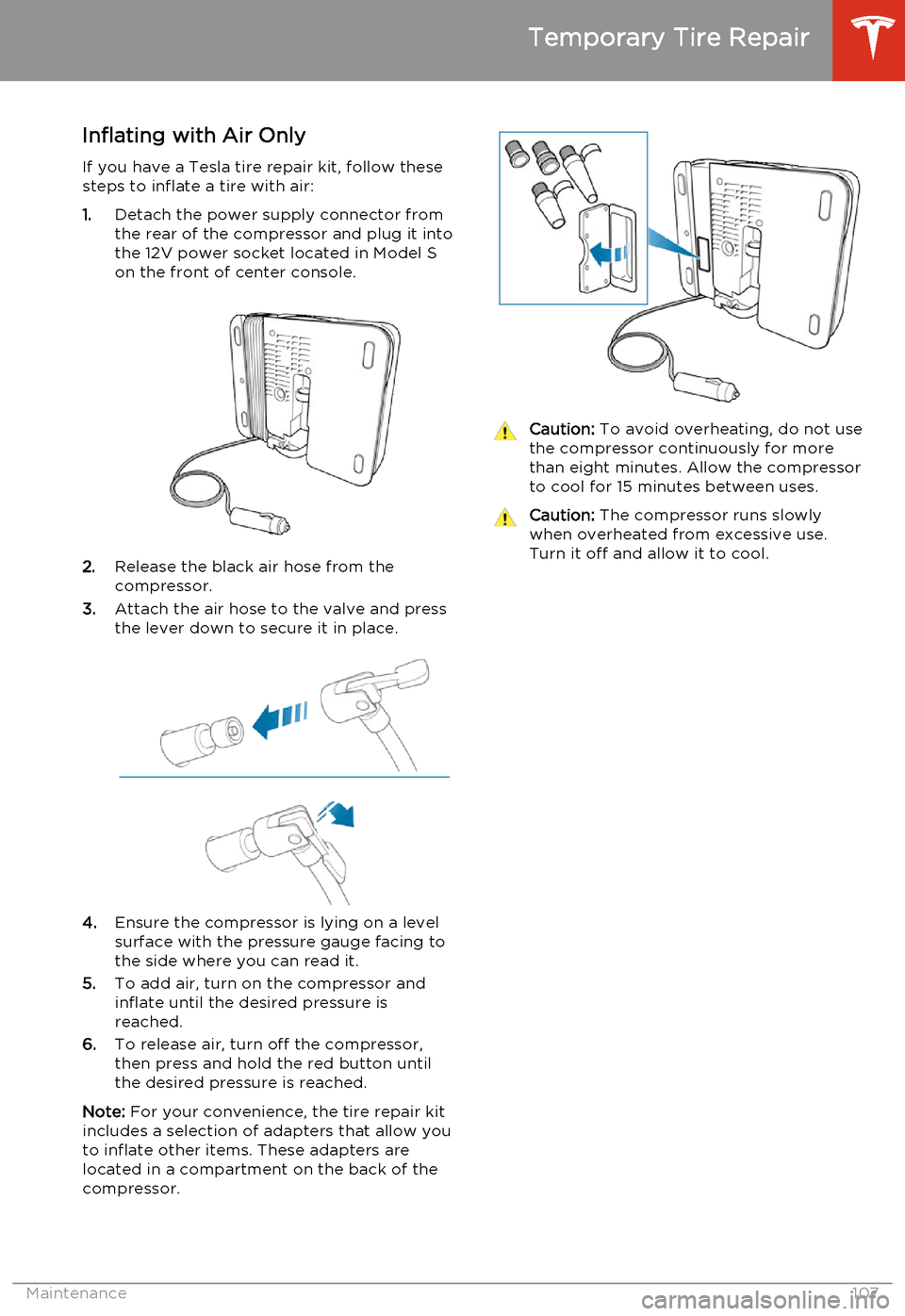
1. Detach the power supply connector from
the rear of the compressor and plug it into
the 12V power socket located in Model S
on the front of center console.
2. Release the black air hose from the
compressor.
3. Attach the air hose to the valve and press
the lever down to secure it in place.
4. Ensure the compressor is lying on a level
surface with the pressure gauge facing to the side where you can read it.
5. To add air, turn on the compressor and
inflate until the desired pressure is
reached.
6. To release air, turn off the compressor,
then press and hold the red button until the desired pressure is reached.
Note: For your convenience, the tire repair kit
includes a selection of adapters that allow you to inflate other items. These adapters arelocated in a compartment on the back of thecompressor.
Caution: To avoid overheating, do not use
the compressor continuously for more than eight minutes. Allow the compressorto cool for 15 minutes between uses.Caution: The compressor runs slowly
when overheated from excessive use.
Turn it off and allow it to cool.
Temporary Tire Repair
Maintenance107
Page 111 of 159
Cleaning the Exterior
To prevent damage to the paint, immediately
remove corrosive substances (bird droppings, tree resin, dead insects, tar spots, road salt,industrial fallout, etc). Do not wait untilModel S is due for a complete wash. If
necessary, use denatured alcohol to remove
tar spots and stubborn grease stains, then
immediately wash the area with water and a
mild, non-detergent soap to remove the
alcohol.
Follow these steps when washing the exterior of Model S:
1. Rinse Thoroughly
Before washing, flush grime and grit from
the bodywork using a hose. Flush away accumulations of mud in areas where
debris easily collects (such as wheel arches and panel seams). If salt has beenused on the highways (such as duringwinter months), thoroughly rinse all tracesof road salt from the underside of the
vehicle.
2. Hand Wash
Hand wash Model S using a soft cloth and cold or lukewarm water containing a mild,
good quality car shampoo.
3. Rinse with Clean Water
After washing, rinse with clean water to
prevent soap from drying on the surfaces.
4. Dry Thoroughly and Clean Exterior Glass
After washing and rinsing, dry thoroughly with a chamois.
Clean windows and mirrors using an
automotive glass cleaner. Do not scrape,
or use any abrasive cleaning fluid on glass
or mirrored surfaces.Cautions for Exterior CleaningCaution: Do not use windshield treatment
fluids. Doing so can interfere with wiper
friction and cause a chattering sound.Caution: Do not use hot water and
detergents.Caution: In hot weather, do not wash in
direct sunlight.Caution: If using a pressure washer,
maintain a distance of at least 12" (30 cm) between the nozzle and the surface ofModel S. Keep the nozzle moving and do
not concentrate the water jet on any one area.Caution: Do not aim water hoses directly
at window, door or hood seals, or through wheel apertures onto brake components.Caution: Avoid using tight-napped or
rough cloths, such as washing mitts.Caution: If washing in an automatic car
wash, use Touchless car washes only. These car washes have no parts (brushes,etc.) that touch the surfaces of Model S.Using any other type of car wash could
cause damage that is not covered by the warranty.Caution: Do not used chemical based
wheel cleaners. These can damage the finish on the wheels.Caution: Avoid using a high pressure
power washer on the rear view camera or
parking sensors (if equipped) and do not
clean a sensor or camera lens with a
sharp or abrasive object that can scratch
or damage its surface.
Cleaning
Maintenance109
Page 113 of 159
Polishing, Touch Up, and Body
Repair
To preserve the cosmetic appearance of the
body, you can occasionally treat the paint
surfaces with an approved polish containing:
• Very mild abrasive to remove surface contamination without removing or
damaging the paint.
• Filling compounds that fill scratches and reduce their visibility.
• Wax to provide a protective coating between the paint and environmental
elements.
Regularly inspect the exterior paint for
damage. Treat minor chips and scratches
using a paint touch up pen (available for
purchase from Tesla). Use the touch-up pen
after washing but before polishing or waxing.
Repair rock chips, fractures or scratches. Body
repairs should be performed only by a Tesla approved body repair facility. Contact Tesla
for a list of approved facilities.Caution: Do not use cutting pastes, color
restoration compounds, or polishes
containing harsh abrasives. These can
scour the surface and permanently
damage the paint.Caution: Do not use chrome polish or
other abrasive cleaners.Using a Car Cover
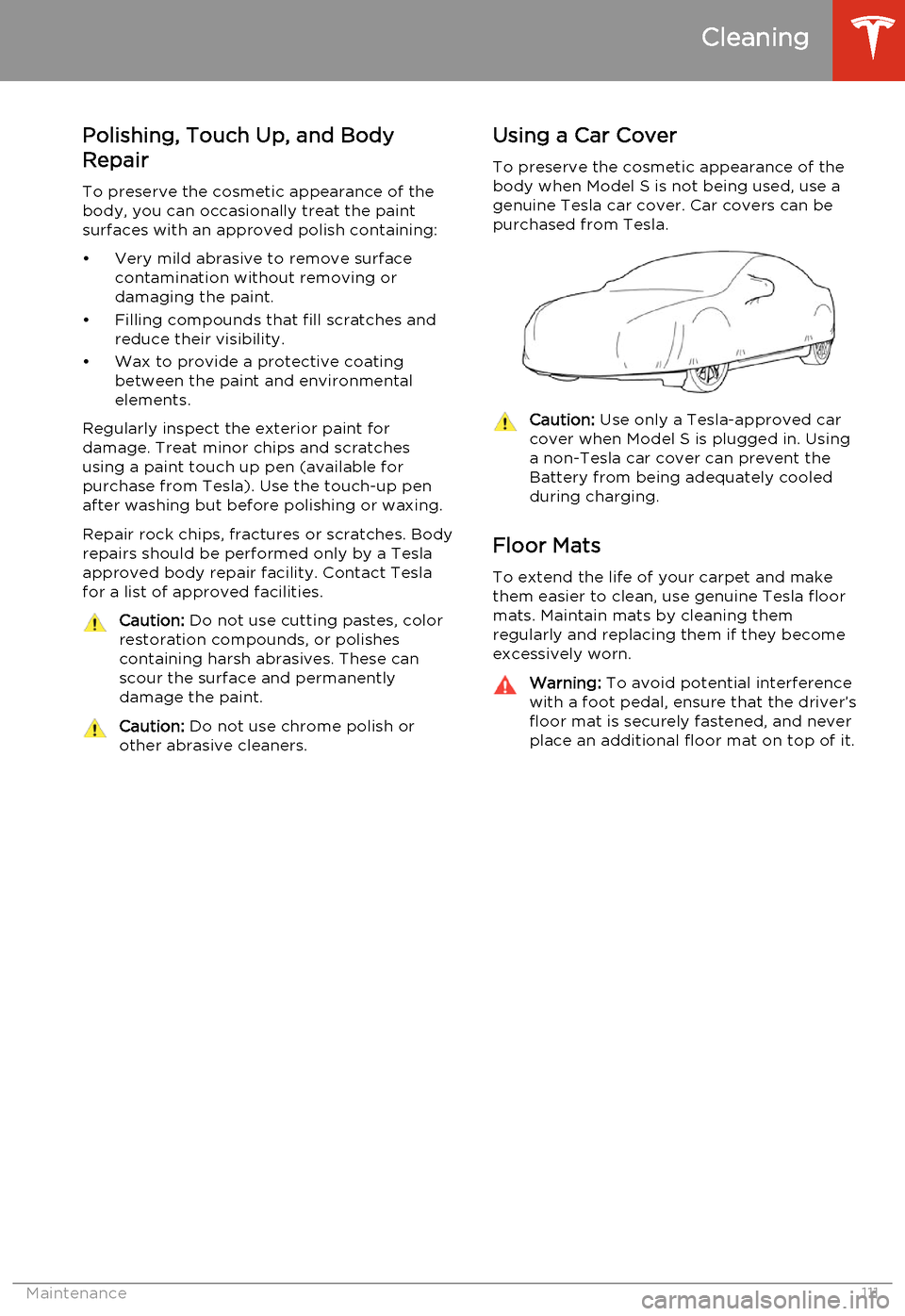
To preserve the cosmetic appearance of the
body when Model S is not being used, use a
genuine Tesla car cover. Car covers can be purchased from Tesla.Caution: Use only a Tesla-approved car
cover when Model S is plugged in. Using
a non-Tesla car cover can prevent the
Battery from being adequately cooled
during charging.
Floor Mats
To extend the life of your carpet and make
them easier to clean, use genuine Tesla floor mats. Maintain mats by cleaning them
regularly and replacing them if they become
excessively worn.
Warning: To avoid potential interference
with a foot pedal, ensure that the driver’s
floor mat is securely fastened, and never place an additional floor mat on top of it.
Cleaning
Maintenance111
Page 115 of 159
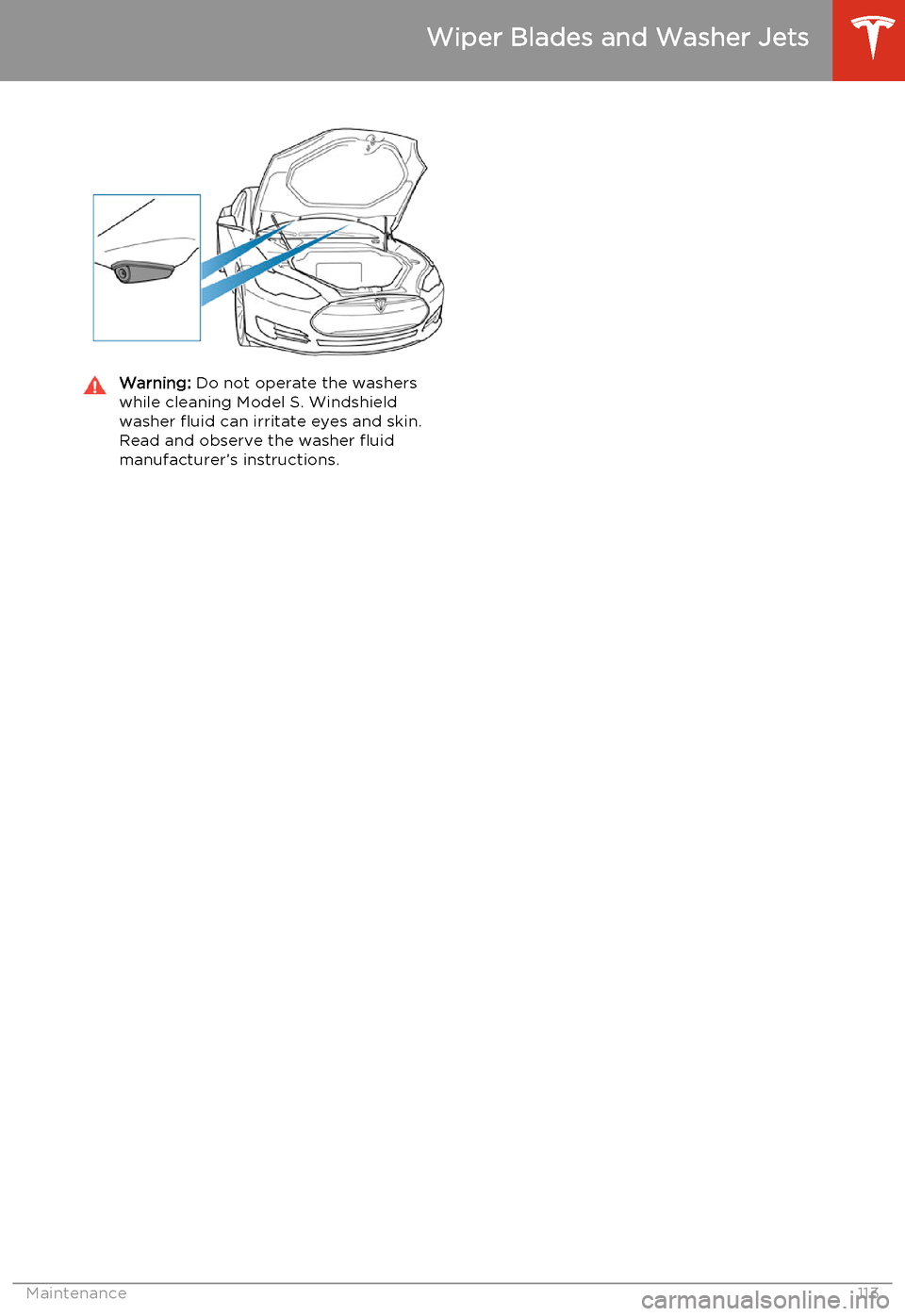
Warning: Do not operate the washers
while cleaning Model S. Windshield
washer fluid can irritate eyes and skin. Read and observe the washer fluid
manufacturer’s instructions.
Wiper Blades and Washer Jets
Maintenance113
Page 116 of 159
Removing the Maintenance Panel
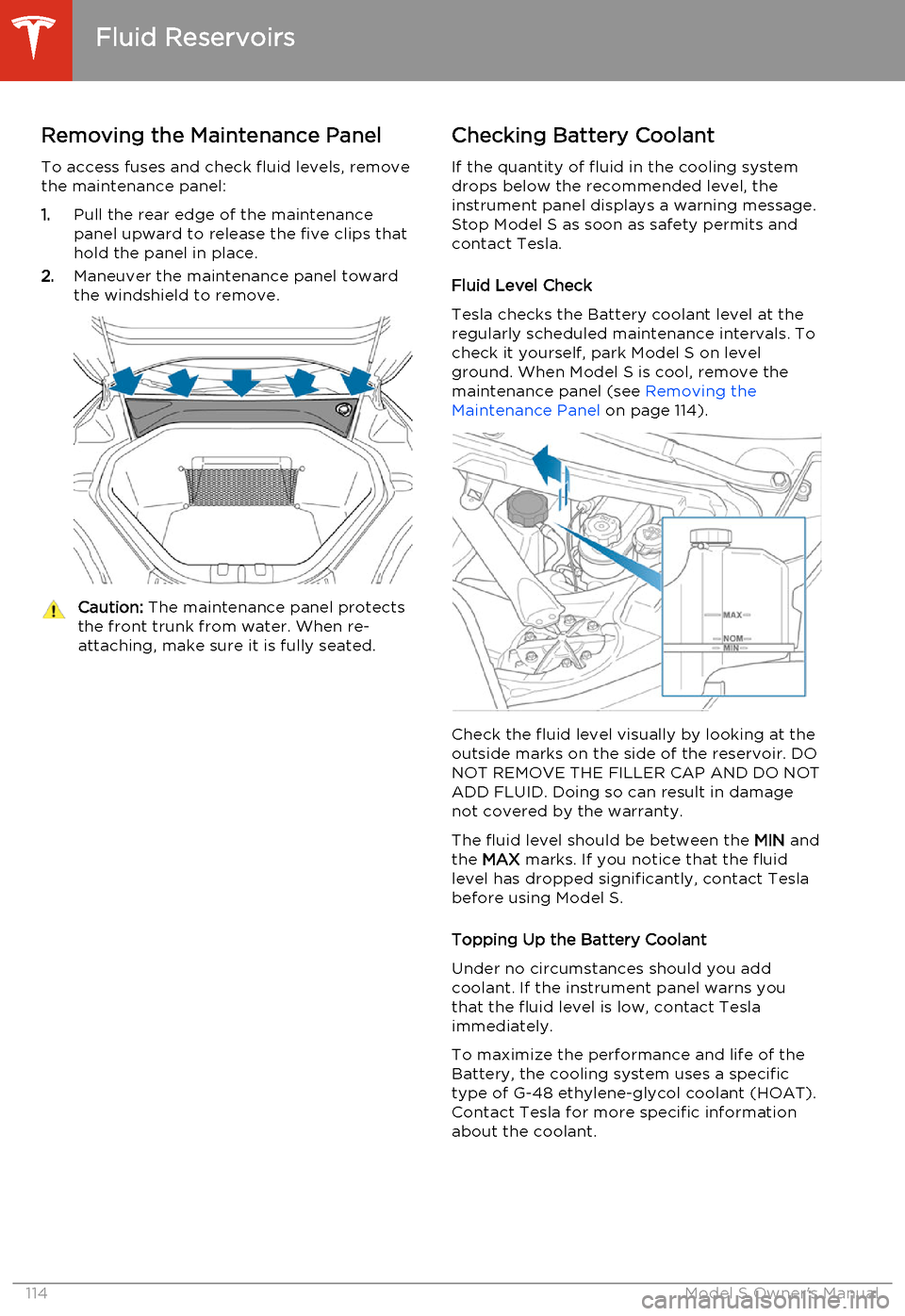
To access fuses and check fluid levels, remove the maintenance panel:
1. Pull the rear edge of the maintenance
panel upward to release the five clips that
hold the panel in place.
2. Maneuver the maintenance panel toward
the windshield to remove.Caution: The maintenance panel protects
the front trunk from water. When re- attaching, make sure it is fully seated.Checking Battery Coolant
If the quantity of fluid in the cooling system
drops below the recommended level, the
instrument panel displays a warning message.
Stop Model S as soon as safety permits and
contact Tesla.
Fluid Level Check
Tesla checks the Battery coolant level at the
regularly scheduled maintenance intervals. To
check it yourself, park Model S on level
ground. When Model S is cool, remove the
maintenance panel (see Removing the
Maintenance Panel on page 114).
Check the fluid level visually by looking at the
outside marks on the side of the reservoir. DO
NOT REMOVE THE FILLER CAP AND DO NOT ADD FLUID. Doing so can result in damage
not covered by the warranty.
The fluid level should be between the MIN and
the MAX marks. If you notice that the fluid
level has dropped significantly, contact Tesla before using Model S.
Topping Up the Battery Coolant
Under no circumstances should you add coolant. If the instrument panel warns youthat the fluid level is low, contact Teslaimmediately.
To maximize the performance and life of the Battery, the cooling system uses a specific
type of G-48 ethylene-glycol coolant (HOAT).
Contact Tesla for more specific information
about the coolant.
Fluid Reservoirs
114Model S Owner's Manual
Page 117 of 159
Checking Brake FluidWarning: Contact Tesla immediately if
you notice increased movement of the
brake pedal or a significant loss of brake
fluid. Driving under these conditions can result in extended stopping distances orcomplete brake failure.The Brake indicator on the
instrument panel alerts you if the
quantity of fluid in the brake
reservoir drops below the
recommended level. If it displays
while driving, stop as soon as safety
permits by gently applying the
brakes. Do not continue driving.
Contact Tesla immediately.
Fluid Level Check
Tesla checks the brake fluid level at the
regularly scheduled maintenance intervals. To check it yourself, park Model S on level
ground. When Model S is cool, remove the maintenance panel (see Removing the
Maintenance Panel on page 114.
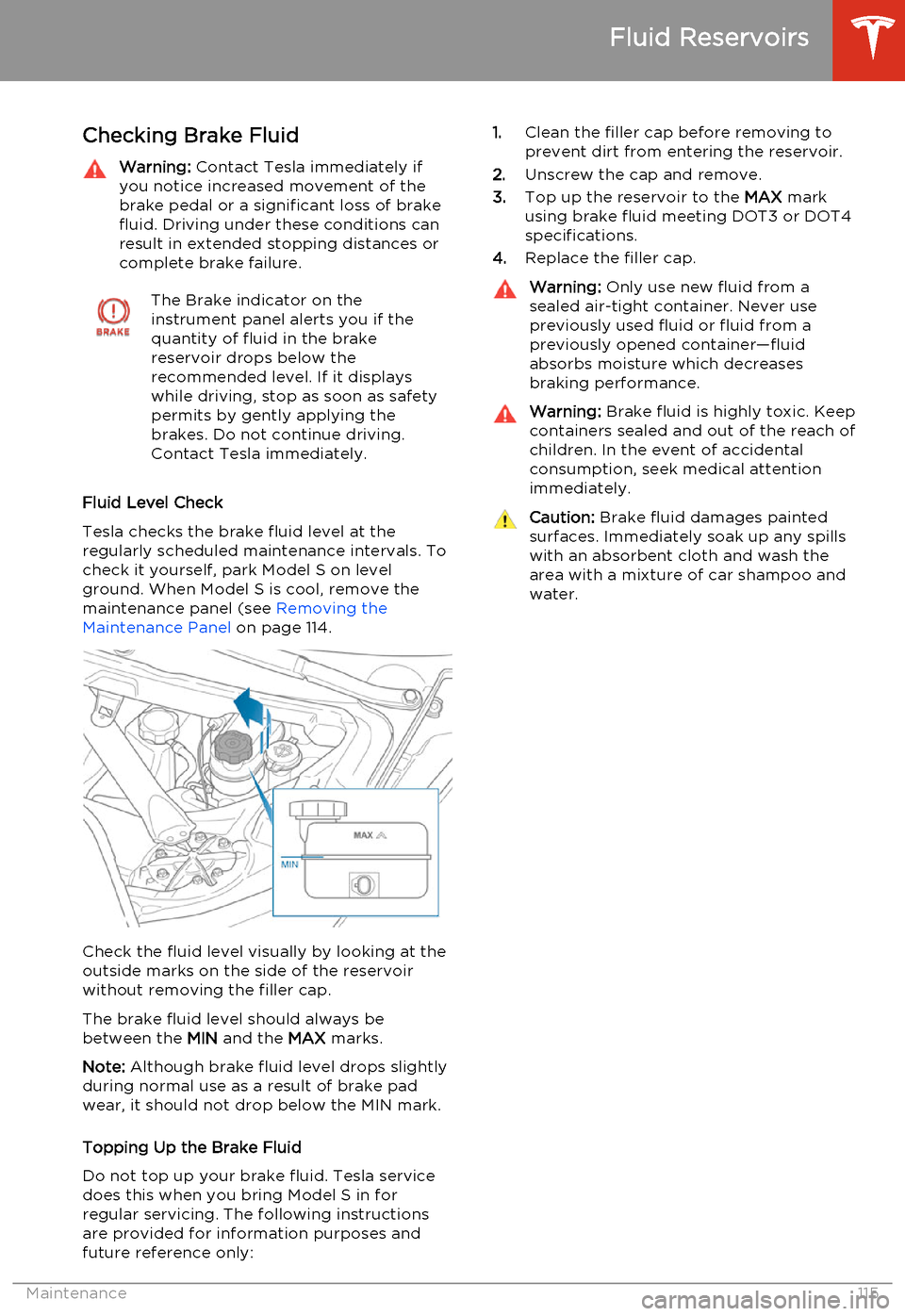
Check the fluid level visually by looking at the
outside marks on the side of the reservoir
without removing the filler cap.
The brake fluid level should always be
between the MIN and the MAX marks.
Note: Although brake fluid level drops slightly
during normal use as a result of brake pad wear, it should not drop below the MIN mark.
Topping Up the Brake Fluid
Do not top up your brake fluid. Tesla service does this when you bring Model S in for
regular servicing. The following instructions are provided for information purposes andfuture reference only:
1. Clean the filler cap before removing to
prevent dirt from entering the reservoir.
2. Unscrew the cap and remove.
3. Top up the reservoir to the MAX mark
using brake fluid meeting DOT3 or DOT4 specifications.
4. Replace the filler cap.Warning: Only use new fluid from a
sealed air-tight container. Never use previously used fluid or fluid from apreviously opened container—fluid
absorbs moisture which decreases
braking performance.Warning: Brake fluid is highly toxic. Keep
containers sealed and out of the reach of children. In the event of accidentalconsumption, seek medical attention
immediately.Caution: Brake fluid damages painted
surfaces. Immediately soak up any spills
with an absorbent cloth and wash the
area with a mixture of car shampoo and
water.
Fluid Reservoirs
Maintenance115
Page 118 of 159
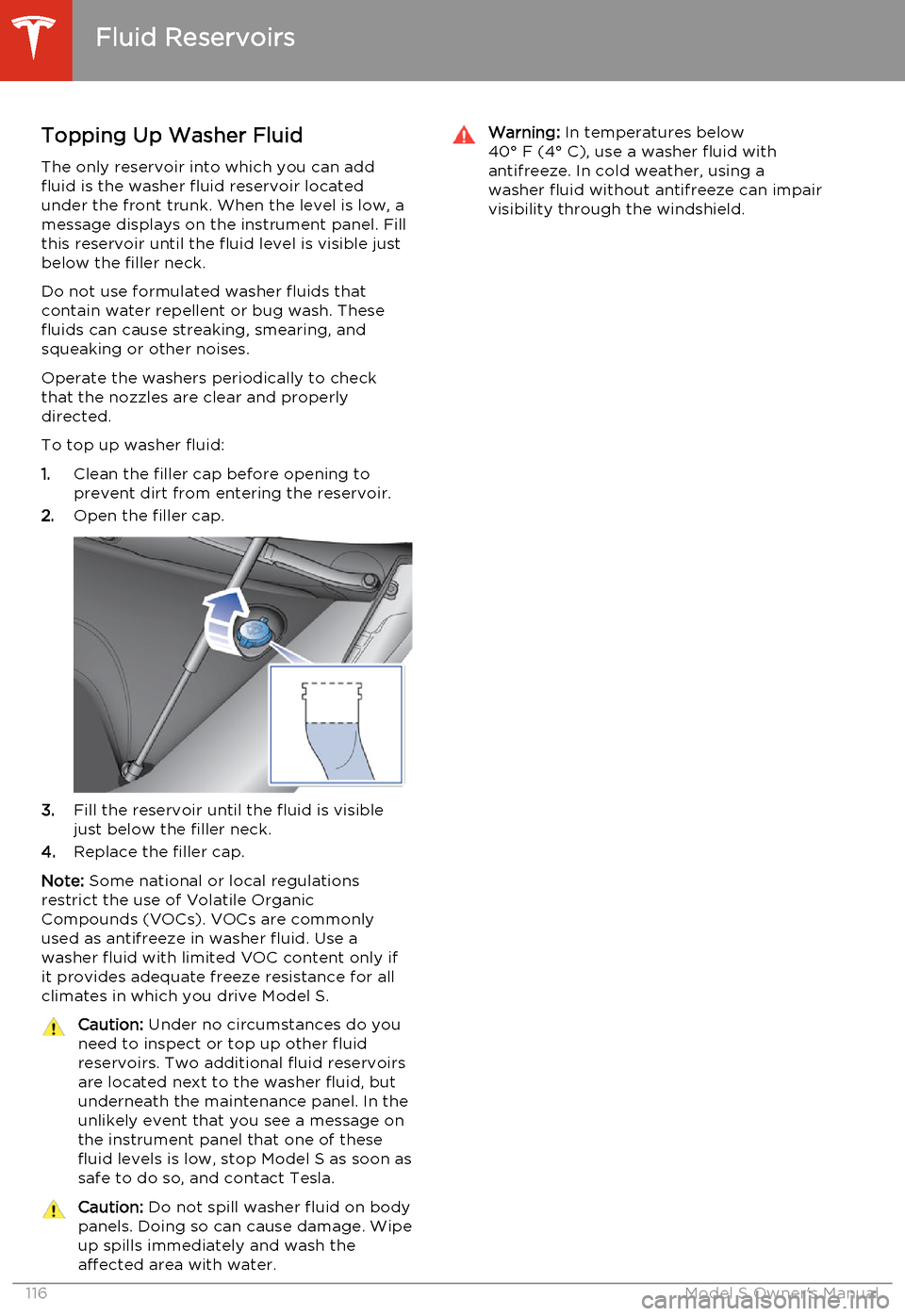
Topping Up Washer Fluid
The only reservoir into which you can add
fluid is the washer fluid reservoir located
under the front trunk. When the level is low, a
message displays on the instrument panel. Fill
this reservoir until the fluid level is visible just
below the filler neck.
Do not use formulated washer fluids that contain water repellent or bug wash. These
fluids can cause streaking, smearing, and squeaking or other noises.
Operate the washers periodically to check
that the nozzles are clear and properly
directed.
To top up washer fluid:
1. Clean the filler cap before opening to
prevent dirt from entering the reservoir.
2. Open the filler cap.
3.Fill the reservoir until the fluid is visible
just below the filler neck.
4. Replace the filler cap.
Note: Some national or local regulations
restrict the use of Volatile Organic
Compounds (VOCs). VOCs are commonly used as antifreeze in washer fluid. Use a
washer fluid with limited VOC content only if
it provides adequate freeze resistance for all climates in which you drive Model S.
Caution: Under no circumstances do you
need to inspect or top up other fluid
reservoirs. Two additional fluid reservoirs
are located next to the washer fluid, but underneath the maintenance panel. In the
unlikely event that you see a message on the instrument panel that one of these
fluid levels is low, stop Model S as soon as safe to do so, and contact Tesla.Caution: Do not spill washer fluid on body
panels. Doing so can cause damage. Wipe
up spills immediately and wash the
affected area with water.Warning: In temperatures below
40° F (4° C), use a washer fluid with
antifreeze. In cold weather, using a
washer fluid without antifreeze can impair
visibility through the windshield.
Fluid Reservoirs
116Model S Owner's Manual
Page 119 of 159
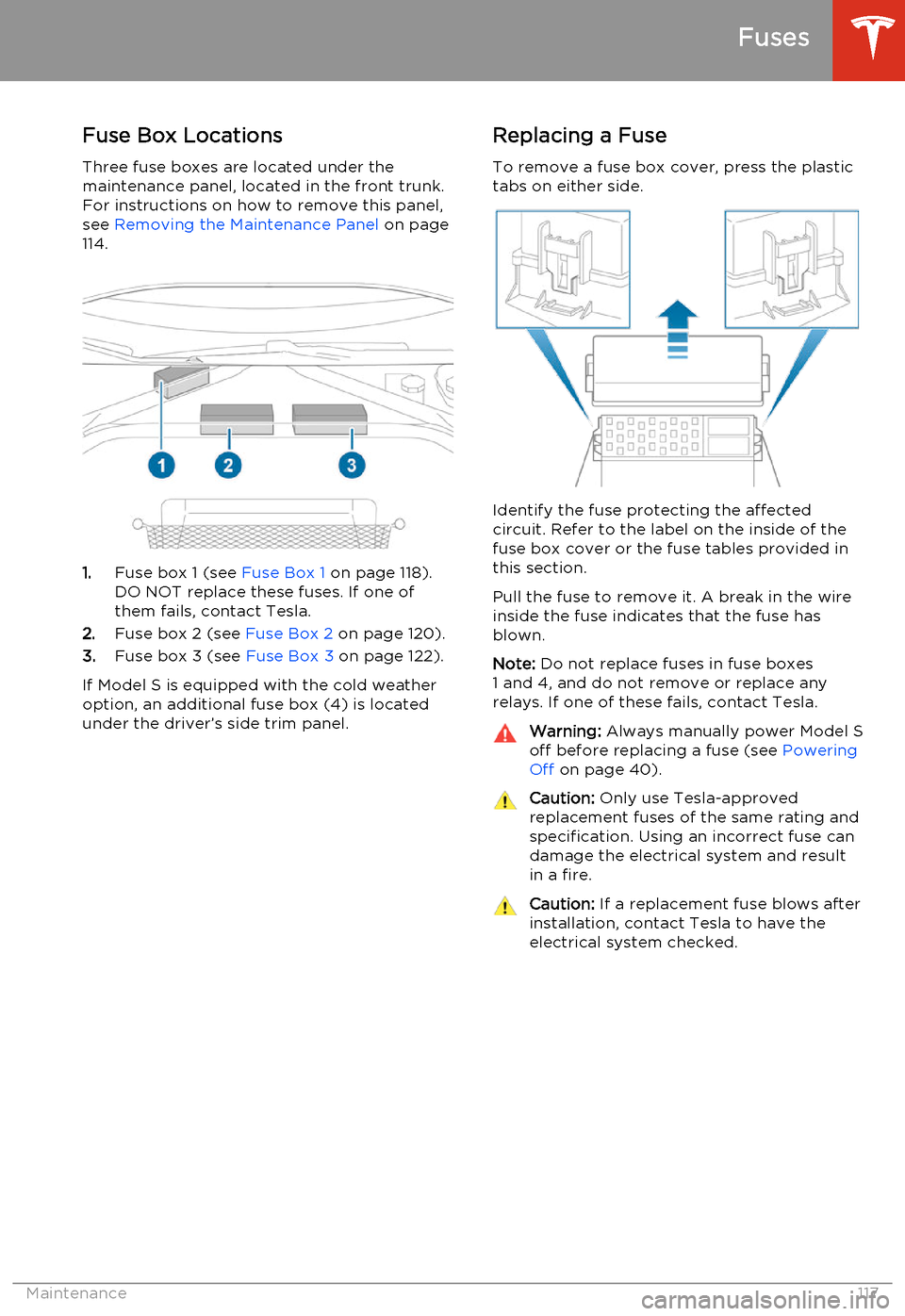
Fuse Box Locations
Three fuse boxes are located under the
maintenance panel, located in the front trunk.
For instructions on how to remove this panel,
see Removing the Maintenance Panel on page
114.
1. Fuse box 1 (see Fuse Box 1 on page 118).
DO NOT replace these fuses. If one of them fails, contact Tesla.
2. Fuse box 2 (see Fuse Box 2 on page 120).
3. Fuse box 3 (see Fuse Box 3 on page 122).
If Model S is equipped with the cold weather
option, an additional fuse box (4) is located
under the driver’s side trim panel.
Replacing a Fuse
To remove a fuse box cover, press the plastic
tabs on either side.
Identify the fuse protecting the affected
circuit. Refer to the label on the inside of the fuse box cover or the fuse tables provided in
this section.
Pull the fuse to remove it. A break in the wire inside the fuse indicates that the fuse hasblown.
Note: Do not replace fuses in fuse boxes
1 and 4, and do not remove or replace any relays. If one of these fails, contact Tesla.
Warning: Always manually power Model S
off before replacing a fuse (see Powering
Off on page 40).Caution: Only use Tesla-approved
replacement fuses of the same rating and specification. Using an incorrect fuse can
damage the electrical system and result in a fire.Caution: If a replacement fuse blows after
installation, contact Tesla to have the electrical system checked.
Fuses
Maintenance117