mirror TESLA MODEL S 2014 (North America) User Guide
[x] Cancel search | Manufacturer: TESLA, Model Year: 2014, Model line: MODEL S, Model: TESLA MODEL S 2014Pages: 159, PDF Size: 6.14 MB
Page 72 of 159
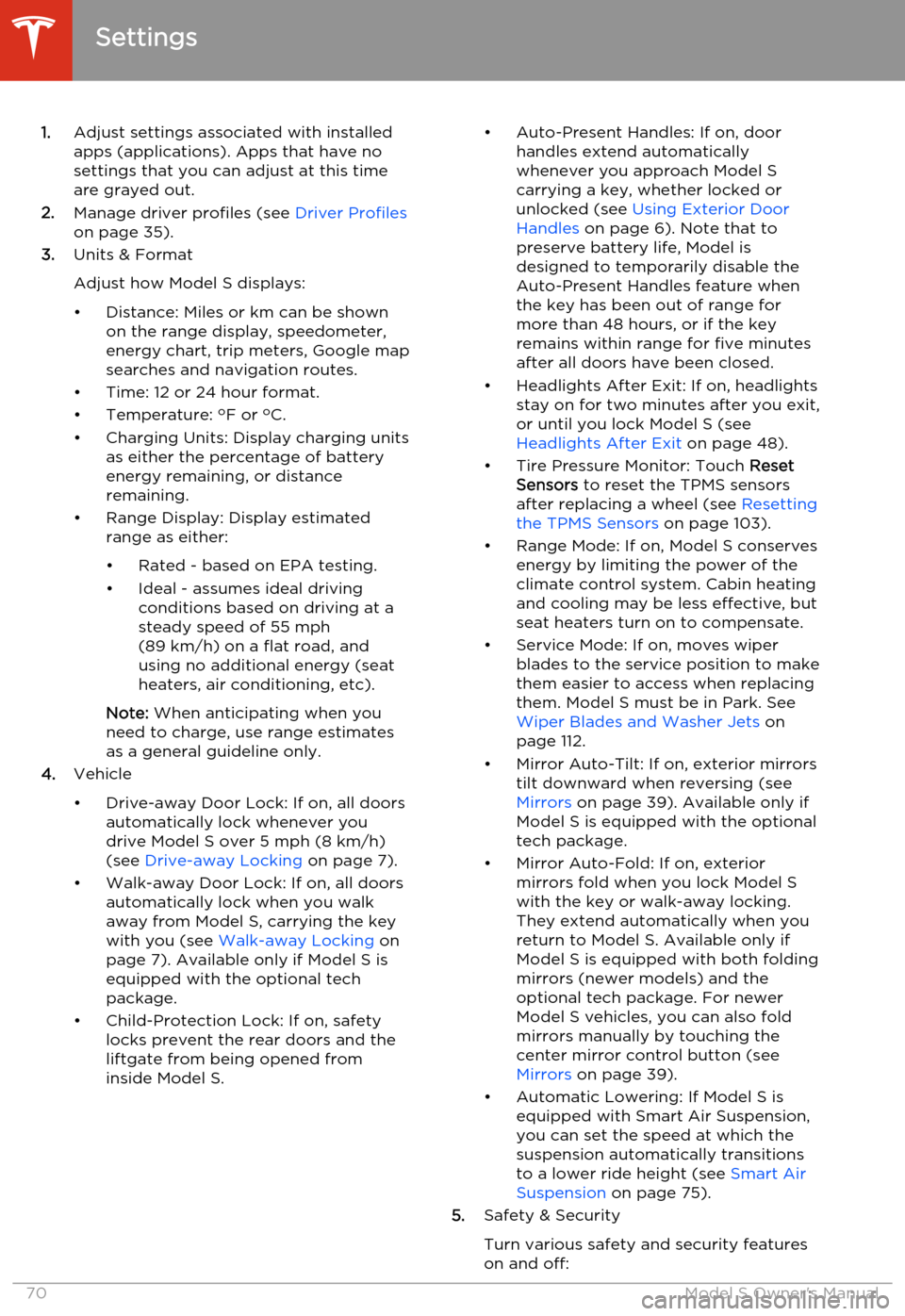
1.Adjust settings associated with installed
apps (applications). Apps that have no settings that you can adjust at this time
are grayed out.
2. Manage driver profiles (see Driver Profiles
on page 35).
3. Units & Format
Adjust how Model S displays:
• Distance: Miles or km can be shown on the range display, speedometer,
energy chart, trip meters, Google map searches and navigation routes.
• Time: 12 or 24 hour format.
• Temperature: o
F or o
C.
• Charging Units: Display charging units as either the percentage of battery
energy remaining, or distance
remaining.
• Range Display: Display estimated range as either:
• Rated - based on EPA testing. • Ideal - assumes ideal driving conditions based on driving at a
steady speed of 55 mph
(89 km/h) on a flat road, and using no additional energy (seat heaters, air conditioning, etc).
Note: When anticipating when you
need to charge, use range estimates as a general guideline only.
4. Vehicle
• Drive-away Door Lock: If on, all doors automatically lock whenever you
drive Model S over 5 mph (8 km/h)
(see Drive-away Locking on page 7).
• Walk-away Door Lock: If on, all doors automatically lock when you walk
away from Model S, carrying the key
with you (see Walk-away Locking on
page 7). Available only if Model S is
equipped with the optional tech
package.
• Child-Protection Lock: If on, safety locks prevent the rear doors and theliftgate from being opened from
inside Model S.• Auto-Present Handles: If on, door handles extend automatically
whenever you approach Model S carrying a key, whether locked orunlocked (see Using Exterior Door
Handles on page 6). Note that to
preserve battery life, Model is
designed to temporarily disable the
Auto-Present Handles feature when
the key has been out of range for
more than 48 hours, or if the key
remains within range for five minutes
after all doors have been closed.
• Headlights After Exit: If on, headlights stay on for two minutes after you exit,
or until you lock Model S (see
Headlights After Exit on page 48).
• Tire Pressure Monitor: Touch Reset
Sensors to reset the TPMS sensors
after replacing a wheel (see Resetting
the TPMS Sensors on page 103).
• Range Mode: If on, Model S conserves energy by limiting the power of theclimate control system. Cabin heatingand cooling may be less effective, butseat heaters turn on to compensate.
• Service Mode: If on, moves wiper blades to the service position to make
them easier to access when replacing
them. Model S must be in Park. See
Wiper Blades and Washer Jets on
page 112.
• Mirror Auto-Tilt: If on, exterior mirrors tilt downward when reversing (see Mirrors on page 39). Available only if
Model S is equipped with the optional tech package.
• Mirror Auto-Fold: If on, exterior mirrors fold when you lock Model S
with the key or walk-away locking. They extend automatically when you return to Model S. Available only ifModel S is equipped with both folding
mirrors (newer models) and the
optional tech package. For newer
Model S vehicles, you can also fold
mirrors manually by touching the
center mirror control button (see
Mirrors on page 39).
• Automatic Lowering: If Model S is equipped with Smart Air Suspension,you can set the speed at which the
suspension automatically transitions to a lower ride height (see Smart Air
Suspension on page 75).
5. Safety & Security
Turn various safety and security features
on and off:
Settings
70Model S Owner's Manual
Page 74 of 159
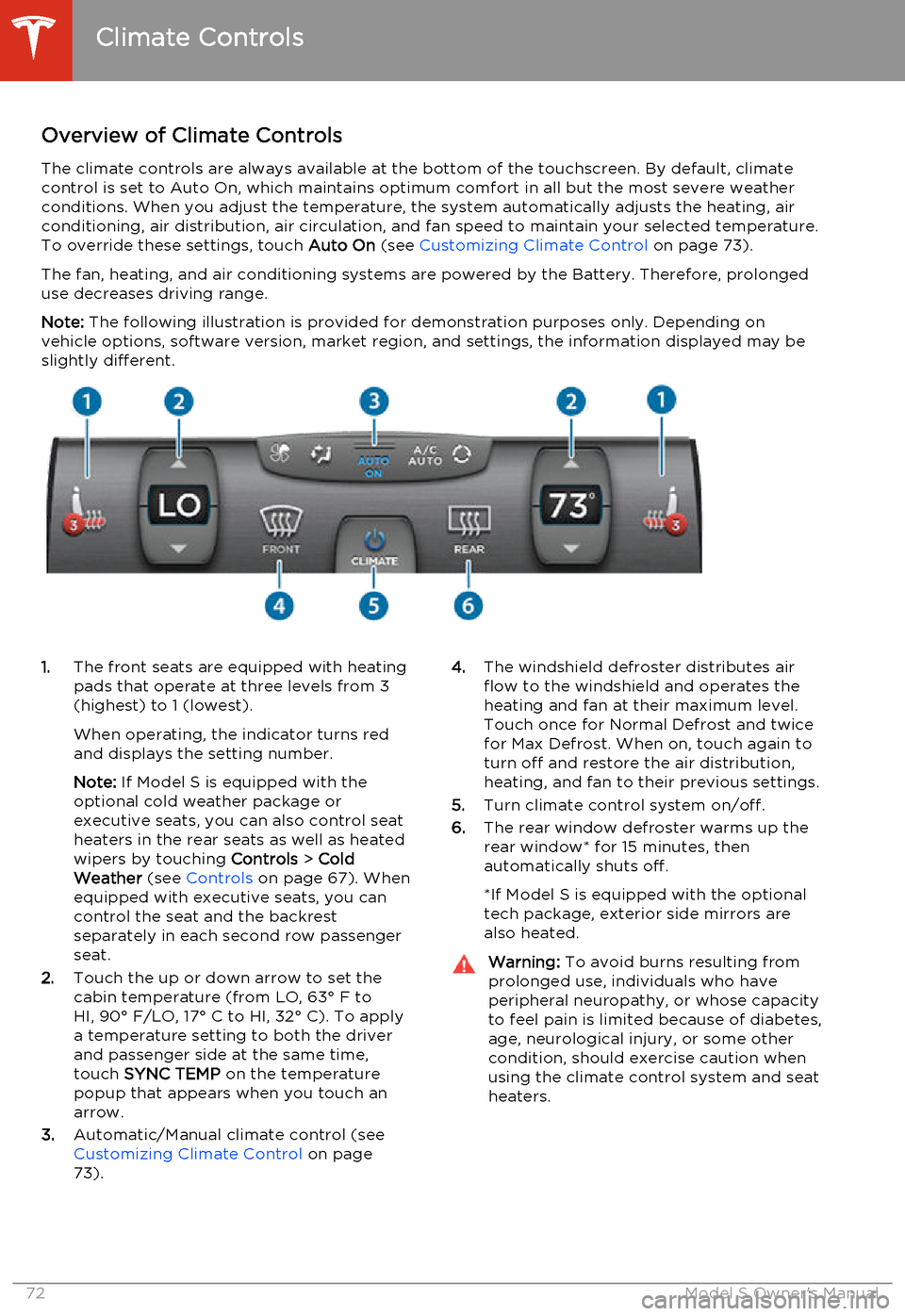
Overview of Climate ControlsThe climate controls are always available at the bottom of the touchscreen. By default, climate
control is set to Auto On, which maintains optimum comfort in all but the most severe weather conditions. When you adjust the temperature, the system automatically adjusts the heating, air
conditioning, air distribution, air circulation, and fan speed to maintain your selected temperature.
To override these settings, touch Auto On (see Customizing Climate Control on page 73).
The fan, heating, and air conditioning systems are powered by the Battery. Therefore, prolonged use decreases driving range.
Note: The following illustration is provided for demonstration purposes only. Depending on
vehicle options, software version, market region, and settings, the information displayed may be
slightly different.1. The front seats are equipped with heating
pads that operate at three levels from 3
(highest) to 1 (lowest).
When operating, the indicator turns red
and displays the setting number.
Note: If Model S is equipped with the
optional cold weather package or
executive seats, you can also control seat
heaters in the rear seats as well as heated wipers by touching Controls > Cold
Weather (see Controls on page 67). When
equipped with executive seats, you can
control the seat and the backrest
separately in each second row passenger
seat.
2. Touch the up or down arrow to set the
cabin temperature (from LO, 63° F to
HI, 90° F/LO, 17° C to HI, 32° C). To apply a temperature setting to both the driver
and passenger side at the same time,
touch SYNC TEMP on the temperature
popup that appears when you touch an
arrow.
3. Automatic/Manual climate control (see
Customizing Climate Control on page
73).4. The windshield defroster distributes air
flow to the windshield and operates the
heating and fan at their maximum level.
Touch once for Normal Defrost and twice
for Max Defrost. When on, touch again to
turn off and restore the air distribution,
heating, and fan to their previous settings.
5. Turn climate control system on/off.
6. The rear window defroster warms up the
rear window* for 15 minutes, then
automatically shuts off.
*If Model S is equipped with the optional
tech package, exterior side mirrors are
also heated.Warning: To avoid burns resulting from
prolonged use, individuals who have
peripheral neuropathy, or whose capacity to feel pain is limited because of diabetes,
age, neurological injury, or some other
condition, should exercise caution when using the climate control system and seat
heaters.
Climate Controls
72Model S Owner's Manual
Page 111 of 159
Cleaning the Exterior
To prevent damage to the paint, immediately
remove corrosive substances (bird droppings, tree resin, dead insects, tar spots, road salt,industrial fallout, etc). Do not wait untilModel S is due for a complete wash. If
necessary, use denatured alcohol to remove
tar spots and stubborn grease stains, then
immediately wash the area with water and a
mild, non-detergent soap to remove the
alcohol.
Follow these steps when washing the exterior of Model S:
1. Rinse Thoroughly
Before washing, flush grime and grit from
the bodywork using a hose. Flush away accumulations of mud in areas where
debris easily collects (such as wheel arches and panel seams). If salt has beenused on the highways (such as duringwinter months), thoroughly rinse all tracesof road salt from the underside of the
vehicle.
2. Hand Wash
Hand wash Model S using a soft cloth and cold or lukewarm water containing a mild,
good quality car shampoo.
3. Rinse with Clean Water
After washing, rinse with clean water to
prevent soap from drying on the surfaces.
4. Dry Thoroughly and Clean Exterior Glass
After washing and rinsing, dry thoroughly with a chamois.
Clean windows and mirrors using an
automotive glass cleaner. Do not scrape,
or use any abrasive cleaning fluid on glass
or mirrored surfaces.Cautions for Exterior CleaningCaution: Do not use windshield treatment
fluids. Doing so can interfere with wiper
friction and cause a chattering sound.Caution: Do not use hot water and
detergents.Caution: In hot weather, do not wash in
direct sunlight.Caution: If using a pressure washer,
maintain a distance of at least 12" (30 cm) between the nozzle and the surface ofModel S. Keep the nozzle moving and do
not concentrate the water jet on any one area.Caution: Do not aim water hoses directly
at window, door or hood seals, or through wheel apertures onto brake components.Caution: Avoid using tight-napped or
rough cloths, such as washing mitts.Caution: If washing in an automatic car
wash, use Touchless car washes only. These car washes have no parts (brushes,etc.) that touch the surfaces of Model S.Using any other type of car wash could
cause damage that is not covered by the warranty.Caution: Do not used chemical based
wheel cleaners. These can damage the finish on the wheels.Caution: Avoid using a high pressure
power washer on the rear view camera or
parking sensors (if equipped) and do not
clean a sensor or camera lens with a
sharp or abrasive object that can scratch
or damage its surface.
Cleaning
Maintenance109
Page 112 of 159
Cleaning the InteriorFrequently inspect and clean the interior to
maintain its appearance and to prevent premature wear. If possible, immediately wipe
up spills and remove marks. For general
cleaning, wipe interior surfaces using a soft cloth (such as micro fiber) dampened with amixture of warm water and mild non-detergent cleaner (test all cleaners on a
concealed area before use). To avoid streaks,
dry immediately with a soft lint-free cloth.
Interior Glass
Do not scrape, or use any abrasive cleaning
fluid on glass or mirrored surfaces. This can
damage the reflective surface of the mirror
and the heating elements in the rear window.
Airbags
Do not allow any substance to enter an airbag
cover. This could affect correct operation.
Dashboard and Plastic Surfaces
Do not polish the upper surfaces of the
dashboard. Polished surfaces are reflective
and could interfere with your driving view.
Leather Seats
Leather is prone to dye-transfer which can cause discoloration, particularly on light
colored leather. White and tan leather is
coated with an anti-soiling treatment. Wipe
spills as soon as possible using a soft cloth
moistened with warm water and non-
detergent soap. Wipe gently in a circular
motion. Then wipe dry using a soft, lint-free
cloth. Using detergents or commercially
available leather cleaners and conditioners is
not recommended because they can discolor or dry out the leather.
Cloth Seats
Wipe spills as soon as possible using a soft cloth moistened with warm water and non-
detergent soap. Wipe gently in a circular motion. Then wipe dry using a soft, lint-free
cloth. Vacuum the seats as needed to remove
any loose dirt.
Carpets
Avoid over-wetting carpets. For heavily soiled
areas, use a diluted upholstery cleaner.Seat Belts
Extend the belts to wipe. Do not use any type
of detergent or chemical cleaning agent. Allow the belts to dry naturally while
extended, preferably away from direct sunlight.
Tesla Built-In Rear Facing Child Seats
Vacuum the seats to remove any loose dirt.
Wipe the seats with a soft cloth dampened
with warm water. You can also use an
upholstery cleaner designer for automotive use. Extend the belts to wipe. Allow the belts
to dry naturally, preferably away from direct
sunlight.
Touchscreen and Instrument Panel
Clean the touchscreen and instrument panel using a soft lint-free cloth specificallydesigned to clean monitors and displays. Donot use cleaners (such as a glass cleaner) and
do not use a wet wipe or a dry statically- charged cloth (such as a recently washed
microfiber). To wipe the touchscreen without
activating buttons and changing settings, you
can enter screen cleaning mode. Touch
Controls > Displays > Enter Screen Cleaning .
The display darkens to make it easy to see
dust and smudges.
Chrome and Metal Surfaces
Polish, abrasive cleaners or hard cloths can
damage the finish on chrome and metal surfaces.
Cautions for Interior CleaningWarning: If you notice any damage on an
airbag or seat belt, contact Tesla
immediately.Warning: Do not allow any water,
cleaners, or fabric to enter a seat belt
mechanism.Caution: Using solvents (including
alcohol), bleach, citrus, naphtha, or
silicone based products or additives on
interior components can cause damage.
Cleaning
110Model S Owner's Manual
Page 120 of 159
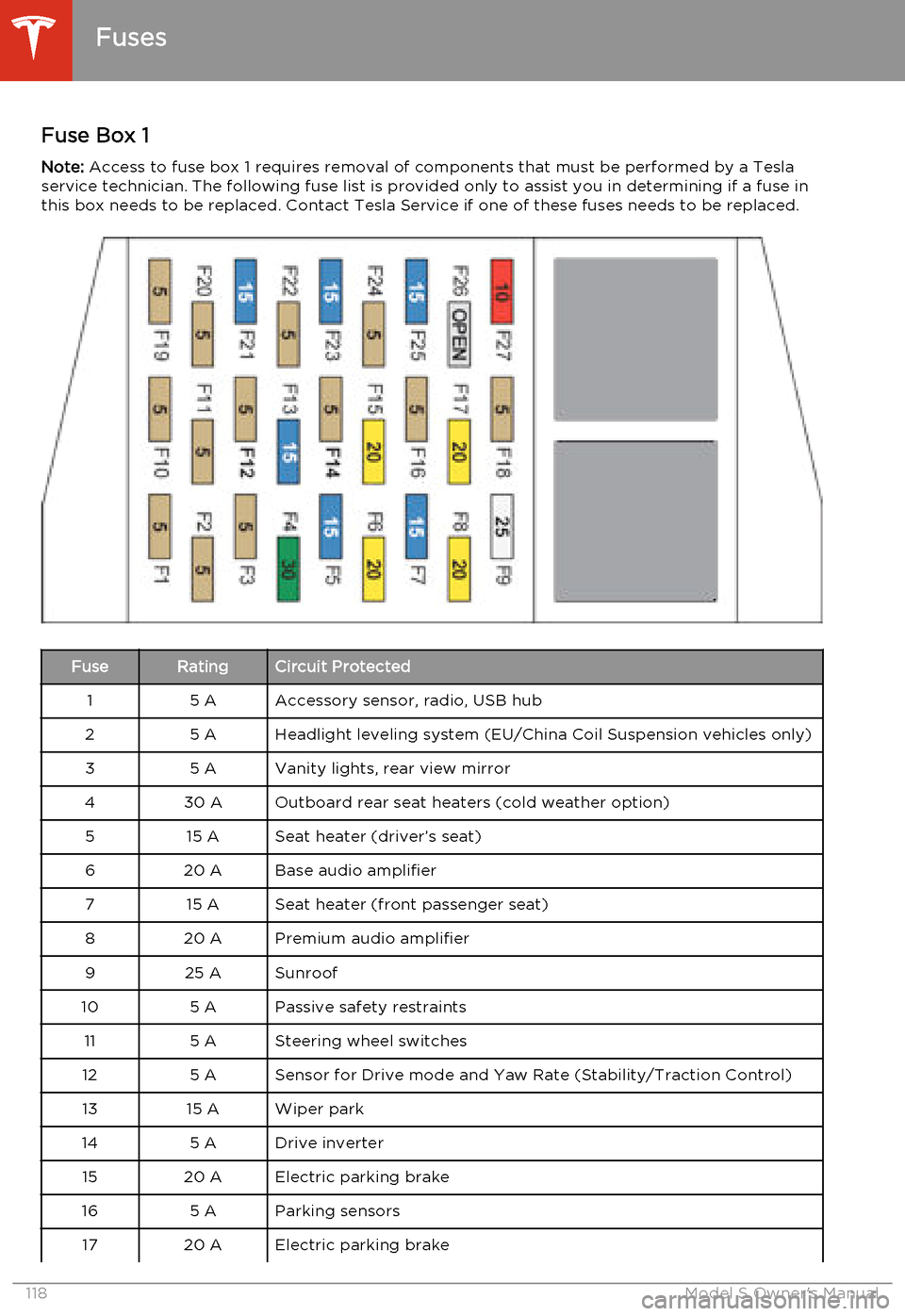
Fuse Box 1Note: Access to fuse box 1 requires removal of components that must be performed by a Tesla
service technician. The following fuse list is provided only to assist you in determining if a fuse in this box needs to be replaced. Contact Tesla Service if one of these fuses needs to be replaced.FuseRatingCircuit Protected15 AAccessory sensor, radio, USB hub25 AHeadlight leveling system (EU/China Coil Suspension vehicles only)35 AVanity lights, rear view mirror430 AOutboard rear seat heaters (cold weather option)515 ASeat heater (driver’s seat)620 ABase audio amplifier715 ASeat heater (front passenger seat)820 APremium audio amplifier925 ASunroof105 APassive safety restraints115 ASteering wheel switches125 ASensor for Drive mode and Yaw Rate (Stability/Traction Control)1315 AWiper park145 ADrive inverter1520 AElectric parking brake165 AParking sensors1720 AElectric parking brake
Fuses
118Model S Owner's Manual
Page 132 of 159
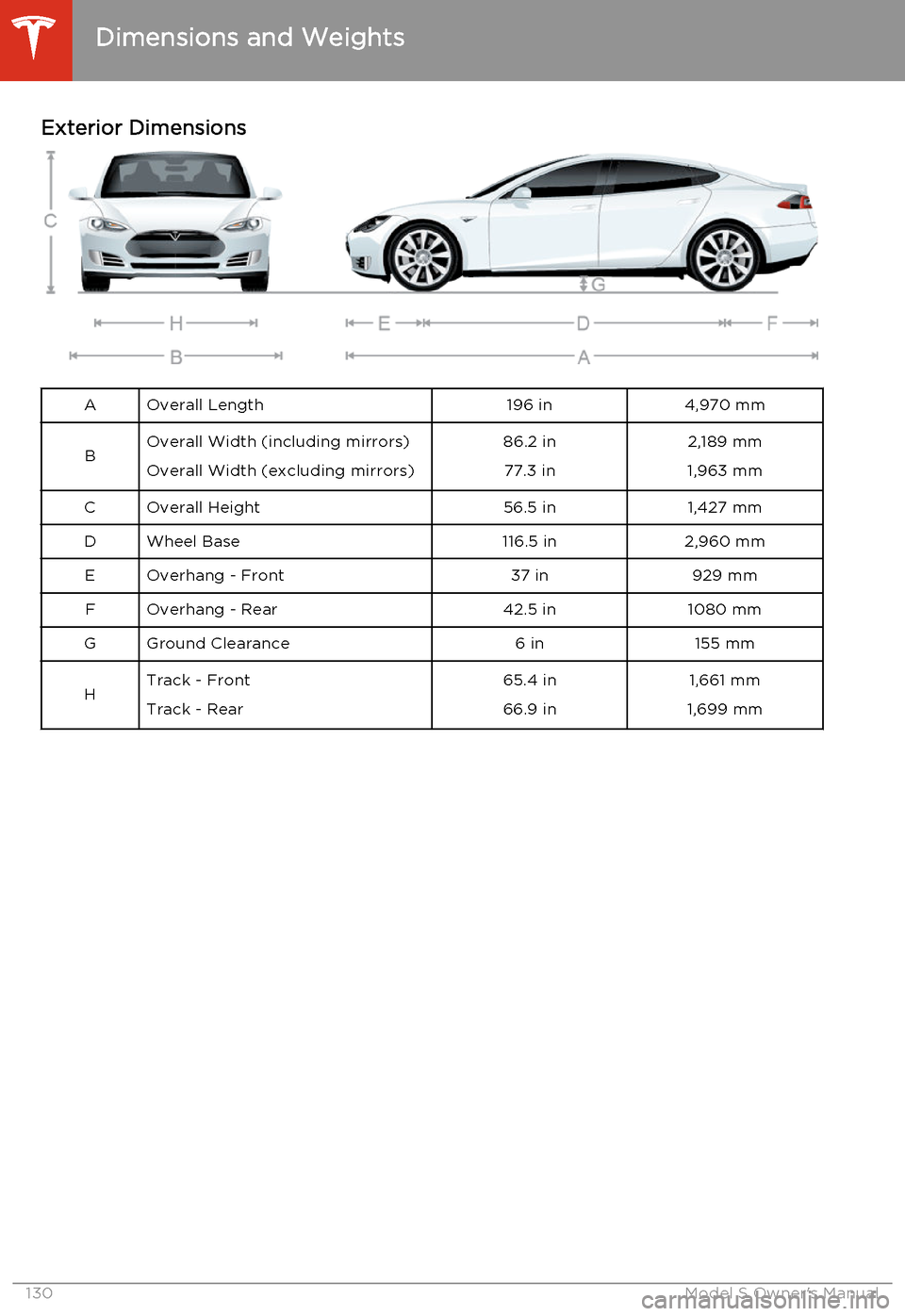
Exterior DimensionsAOverall Length196 in4,970 mmBOverall Width (including mirrors)
Overall Width (excluding mirrors)86.2 in 77.3 in2,189 mm
1,963 mmCOverall Height56.5 in1,427 mmDWheel Base116.5 in2,960 mmEOverhang - Front37 in929 mmFOverhang - Rear42.5 in1080 mmGGround Clearance6 in155 mmHTrack - Front
Track - Rear65.4 in
66.9 in1,661 mm
1,699 mm
Dimensions and Weights
130Model S Owner's Manual
Page 156 of 159
interiorcleaning 110
lights 46
overview 2
temperature control 72
Internet radio 77
intrusion detection 86
J
J1772 93
Jack mode 76
jacking Model S 124
K
keyFCC and IC certifications 149
how to use 4
key not inside 40
ordering extras 5
replacing battery 5
keyless entry
4
L
labelTire and Loading Information 127
vehicle certification 128
lane change flash 49
lane departure warning 53
LATCH child seats, installing 25
liftgateadjust opening height 10
opening 10
lifting Model S 124
lightscornering lights 48
hazard warning 49
headlights after exit 48
turn signals 49
load limits 127
location-based suspension 75
lock/unlock status 42
locking and unlocking doors 4
lumbar support 17
M
maintenancebrake fluid, checking 115
cleaning 109
daily and monthly checks 99
fluid replacement intervals 99
panel, removing 114
replacing fuses 117
replacing wiper blades 112
service intervals 99
tires 100
washer fluid, topping up 116
washer jets, cleaning 112
maps 81
mats 111
media 77
mileage upon delivery 147
mirrors 39
mobile app 91Mobile Connectordescription 93
using 95
modifications 125
motor specifications 132
N navigation 81
NCC certifications 149
Neutral gear 41
NHTSA, contacting 148
O occupancy sensor 33
odometeron instrument panel 42
resetting trip odometer 56
overhang dimensions 130
Owner Information, about 145, 146
P Park Assist 54
Park gear 41
parking brake 59
parts replacement 125
passenger detection 33
passenger front airbag 33
phone
Index
154Model S Owner's Manual