warning light TESLA MODEL S 2014 (North America) User Guide
[x] Cancel search | Manufacturer: TESLA, Model Year: 2014, Model line: MODEL S, Model: TESLA MODEL S 2014Pages: 159, PDF Size: 6.14 MB
Page 36 of 159
Inflation Effects
When airbags inflate, a fine powder is
released. This powder can irritate the skin and should be thoroughly flushed from the eyes
and from any cuts or abrasions.
After inflation, the airbags deflate to provide a
gradual cushioning effect for the occupants and to ensure the driver’s forward vision is notobscured.
If airbags have inflated, or if your vehicle has been in an accident, always have the airbags,
seat belt pre-tensioners and any associated
components checked and, if necessary,
replaced by Tesla.
In a collision, in addition to the airbags
inflating:
• Doors unlock and the door handles extend.
• Hazard warning lights turn on.
• Interior lights turn on.
• High voltage is disabled.
To restore Battery power, use the touchscreen
to manually power off Model S, then press the
brake to power it back on again.
Airbag Warning IndicatorThe airbag indicator on the
instrument panel remains lit if the
airbag system is malfunctioning. The
only time this indicator should light
up is briefly when Model S first starts
up, in which case it turns off within a few seconds. If it remains lit, contact
Tesla immediately and do not drive.
Airbag Warnings
Warning: All occupants, including the
driver, should always wear their seat
belts, whether or not an airbag is also
provided at their seating position, to
minimize the risk of severe injury or death
in the event of a collision.Warning: Front seat occupants should
not place their arms over the airbag
module, as an inflating bag can cause
fractures or other injuries.Warning: Do not use seat covers on
Model S. Doing so could restrict
deployment of the side air bags if an
accident occurs. It can also reduce theaccuracy of the occupant detection
system.Warning: Airbags inflate with
considerable speed and force, which can
cause injury. To limit injuries, ensure that
occupants are wearing seat belts and are
correctly seated, with the seat positioned
as far back as possible. The National
Highway Traffic Safety Administration (NHTSA) recommends a minimum
distance of 10" (25 cm) between an occupant’s chest and an airbag.Warning: Do not use a child safety seat or
seat young children on a seat with an operational airbag in front of it. Doing socan cause injury or death if the airbaginflates.Warning: To ensure correct inflation of
the side airbags, maintain an
unobstructed gap between an occupant’s
torso and the side of Model S.Warning: Passengers should not lean their
heads against the doors. Doing so can cause injury if a curtain airbag inflates.Warning: Do not allow passengers to
obstruct the operation of an airbag by
placing feet, knees or any other part of the body on or near an airbag.Warning: Do not attach or place objects
on or near the front airbags, the side of
the front seats, the headliner at the side of the vehicle, or any other airbag coverthat could interfere with inflation of an
airbag. Objects can cause serious injury if the vehicle is in a collision severe enoughto cause the airbag to inflate.Warning: Following inflation, some airbag
components are hot. Do not touch until
they have cooled.
Airbags
34Model S Owner's Manual
Page 38 of 159
Adjusting Position
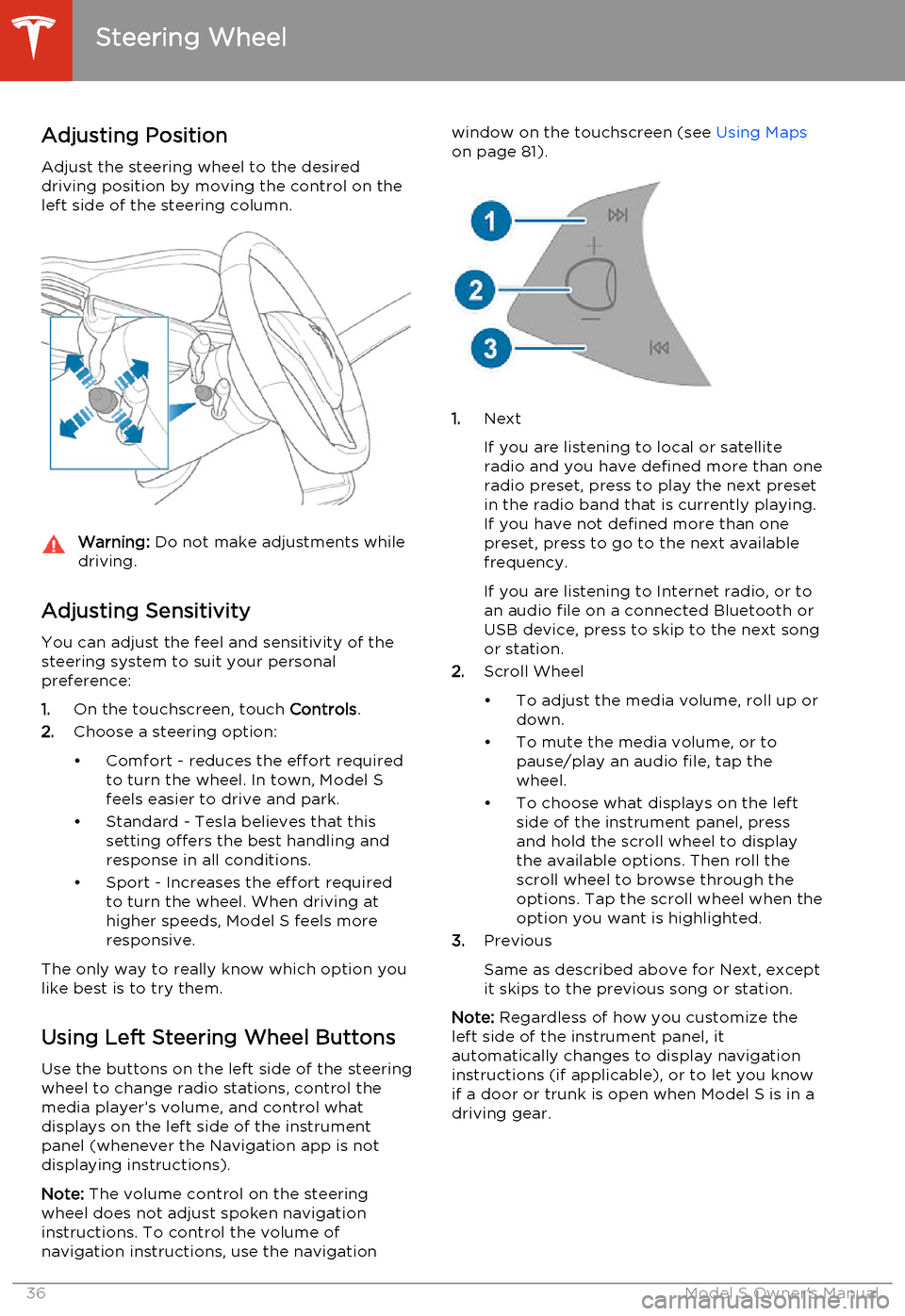
Adjust the steering wheel to the desired driving position by moving the control on the
left side of the steering column.Warning: Do not make adjustments while
driving.
Adjusting Sensitivity
You can adjust the feel and sensitivity of the
steering system to suit your personal preference:
1. On the touchscreen, touch Controls.
2. Choose a steering option:
• Comfort - reduces the effort required to turn the wheel. In town, Model S
feels easier to drive and park.
• Standard - Tesla believes that this setting offers the best handling andresponse in all conditions.
• Sport - Increases the effort required to turn the wheel. When driving athigher speeds, Model S feels more
responsive.
The only way to really know which option you
like best is to try them.
Using Left Steering Wheel Buttons
Use the buttons on the left side of the steering
wheel to change radio stations, control the
media player’s volume, and control what
displays on the left side of the instrument panel (whenever the Navigation app is not
displaying instructions).
Note: The volume control on the steering
wheel does not adjust spoken navigation instructions. To control the volume of
navigation instructions, use the navigation
window on the touchscreen (see Using Maps
on page 81).
1. Next
If you are listening to local or satellite
radio and you have defined more than one
radio preset, press to play the next preset in the radio band that is currently playing.
If you have not defined more than one
preset, press to go to the next available
frequency.
If you are listening to Internet radio, or to
an audio file on a connected Bluetooth or USB device, press to skip to the next song
or station.
2. Scroll Wheel
• To adjust the media volume, roll up or down.
• To mute the media volume, or to pause/play an audio file, tap the
wheel.
• To choose what displays on the left side of the instrument panel, press
and hold the scroll wheel to display
the available options. Then roll the
scroll wheel to browse through the
options. Tap the scroll wheel when the option you want is highlighted.
3. Previous
Same as described above for Next, except
it skips to the previous song or station.
Note: Regardless of how you customize the
left side of the instrument panel, it
automatically changes to display navigation instructions (if applicable), or to let you knowif a door or trunk is open when Model S is in a
driving gear.
Steering Wheel
36Model S Owner's Manual
Page 45 of 159
10.Pay attention to alert messages that appear at the bottom center of the instrument panel. If
any alerts are in effect, you can view information about them by touching the alert icon
(exclamation mark) on the touchscreen’s status bar (the topmost area of the touchscreen).
11. Currently selected gear: Park, Reverse, Neutral, or Drive.
12. Dashed lines appear on the power meter if Model S is limiting power. The dashed lines appear
on the top portion when power available for acceleration is being limited, and on the bottom
portion when power that can be gained by regenerative braking is limited. Model S limits
power for many reasons. Here are just a few examples:
• Acceleration may be limited when the Battery is reaching a low state of charge or if the powertrain is hot.
• Both acceleration and regenerative braking may be limited when the ambient temperature is either very high or very low.
• Regenerative braking may be limited when the Battery is fully charged.
13. Date and time
Indicator Lights Indicator lights flash on briefly when you press the brake pedal to prepare for driving. Unless anindicator light applies to a current situation, they should turn off. If an indicator light fails to turnon or off, contact Tesla.
In addition to indicator lights, alerts display on the top or bottom center of the instrument panel.
If alerts are in effect, an alert icon (exclamation mark) displays on the top of the touchscreen.
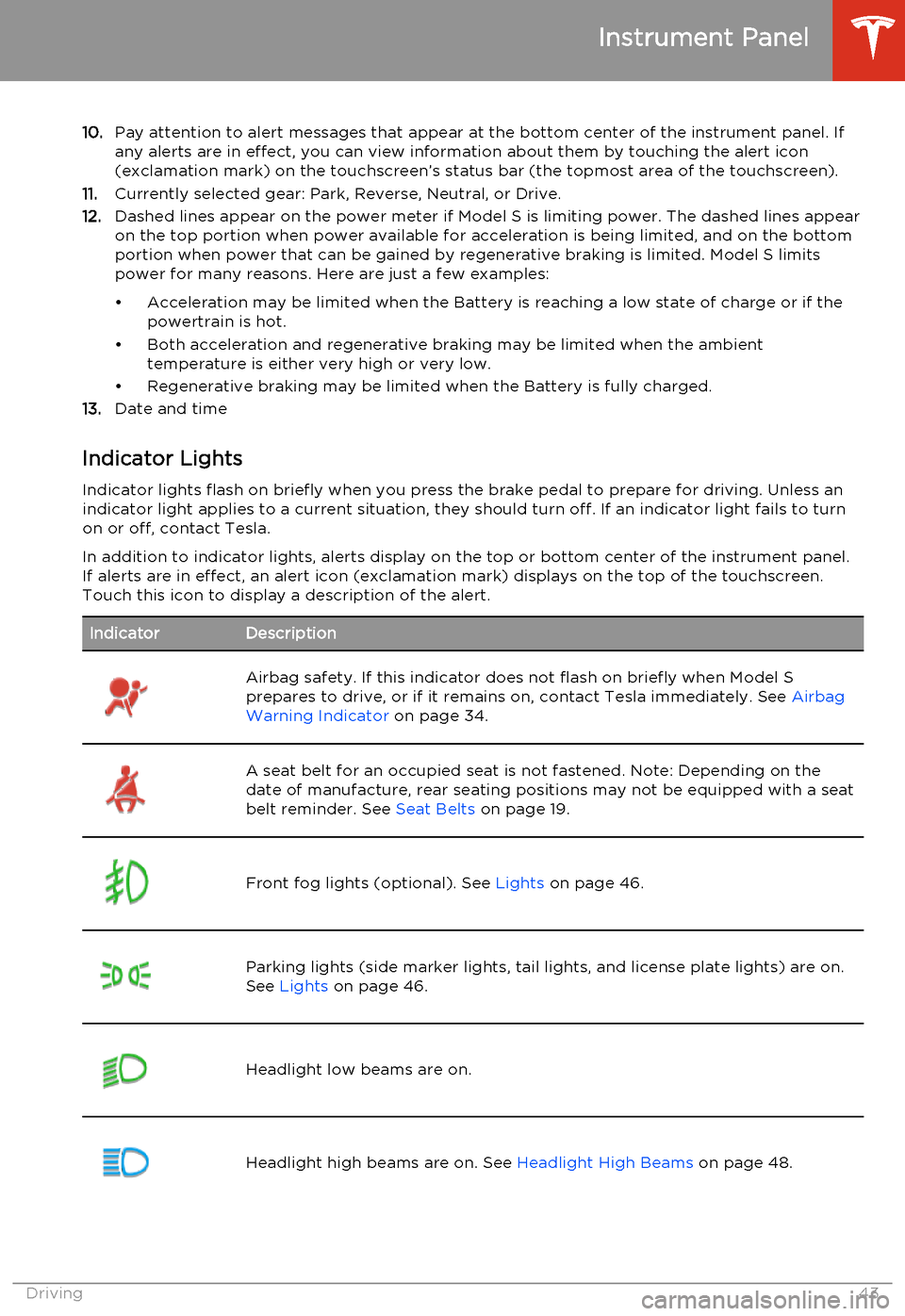
Touch this icon to display a description of the alert.IndicatorDescriptionAirbag safety. If this indicator does not flash on briefly when Model S
prepares to drive, or if it remains on, contact Tesla immediately. See Airbag
Warning Indicator on page 34.A seat belt for an occupied seat is not fastened. Note: Depending on the
date of manufacture, rear seating positions may not be equipped with a seat
belt reminder. See Seat Belts on page 19.Front fog lights (optional). See Lights on page 46.Parking lights (side marker lights, tail lights, and license plate lights) are on.
See Lights on page 46.Headlight low beams are on.Headlight high beams are on. See Headlight High Beams on page 48.Instrument Panel
Driving43
Page 46 of 159
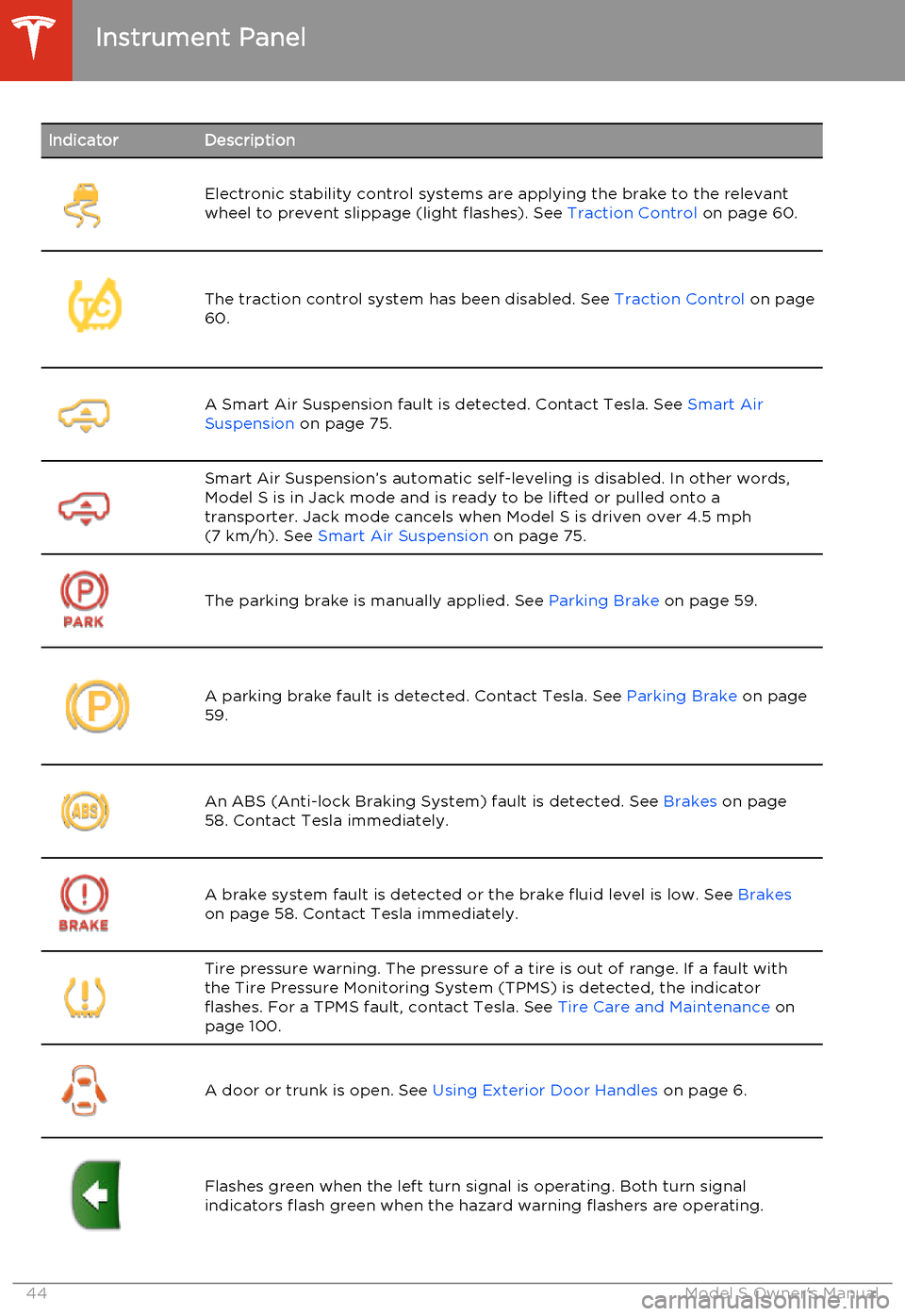
IndicatorDescriptionElectronic stability control systems are applying the brake to the relevant
wheel to prevent slippage (light flashes). See Traction Control on page 60.The traction control system has been disabled. See Traction Control on page
60.A Smart Air Suspension fault is detected. Contact Tesla. See Smart Air
Suspension on page 75.Smart Air Suspension’s automatic self-leveling is disabled. In other words,
Model S is in Jack mode and is ready to be lifted or pulled onto a transporter. Jack mode cancels when Model S is driven over 4.5 mph(7 km/h). See Smart Air Suspension on page 75.
The parking brake is manually applied. See Parking Brake on page 59.A parking brake fault is detected. Contact Tesla. See Parking Brake on page
59.An ABS (Anti-lock Braking System) fault is detected. See Brakes on page
58. Contact Tesla immediately.A brake system fault is detected or the brake fluid level is low. See Brakes
on page 58. Contact Tesla immediately.Tire pressure warning. The pressure of a tire is out of range. If a fault with
the Tire Pressure Monitoring System (TPMS) is detected, the indicator
flashes. For a TPMS fault, contact Tesla. See Tire Care and Maintenance on
page 100.
A door or trunk is open. See Using Exterior Door Handles on page 6.Flashes green when the left turn signal is operating. Both turn signal
indicators flash green when the hazard warning flashers are operating.Instrument Panel
44Model S Owner's Manual
Page 51 of 159
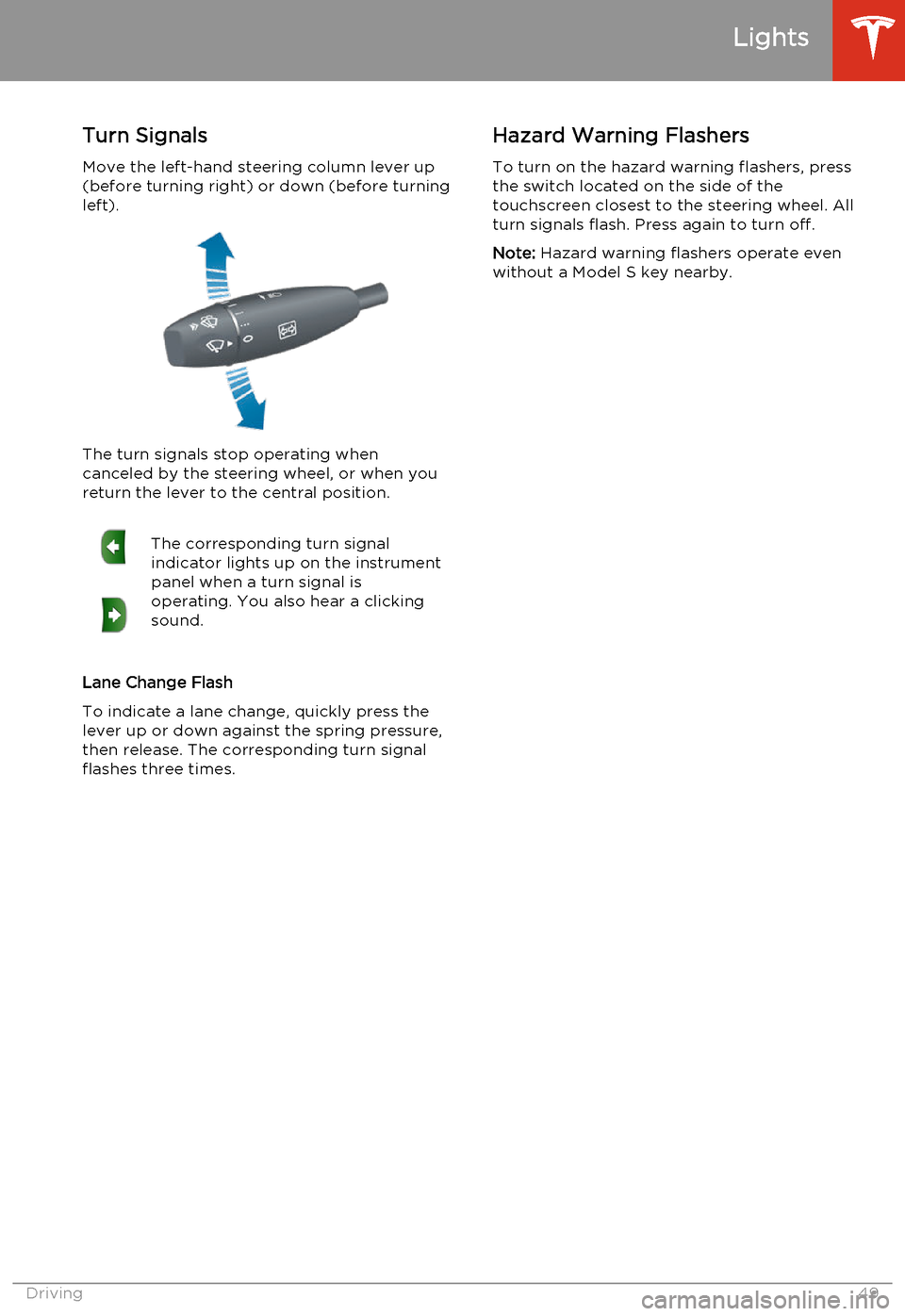
Turn SignalsMove the left-hand steering column lever up(before turning right) or down (before turning
left).
The turn signals stop operating when
canceled by the steering wheel, or when you return the lever to the central position.
The corresponding turn signal
indicator lights up on the instrument
panel when a turn signal is
operating. You also hear a clicking
sound.
Lane Change Flash
To indicate a lane change, quickly press the
lever up or down against the spring pressure, then release. The corresponding turn signal
flashes three times.
Hazard Warning Flashers
To turn on the hazard warning flashers, press
the switch located on the side of the
touchscreen closest to the steering wheel. All
turn signals flash. Press again to turn off.
Note: Hazard warning flashers operate even
without a Model S key nearby.
Lights
Driving49
Page 55 of 159
How Lane Departure Warning
Works
If Model S is equipped with Driver Assistance
features, a camera mounted on the windshield
behind the interior rear view mirror monitors
the markers on the lane you are driving in. If a
front wheel passes over a lane marking and
the associated turn signal is off, you feel three
slight vibrations in the steering wheel.
Lane Departure Warning operates only when
Model S is traveling over approximately
30 mph (50 km/h).Warning: Never depend on Lane
Departure Warning to inform you of
unintentionally driving outside of the
boundaries of the driving lane. Several
external factors can reduce the
performance of Lane Departure Warning,
causing either no readings or false
readings. Therefore, depending on this
system to stay within the boundaries of the driving lane can result in serious injury
or death. Lane Departure Warning is for
guidance purposes only. Always keep
your eyes on the road when driving. It is
the driver's responsibility to stay alert,
drive safely, ensure the vehicle stays in
the traveling lane, and be in control of the
vehicle at all times.Caution: If your Model S is equipped with
Lane Departure Warning, you must take
your vehicle to Tesla Service if a
windshield replacement is needed. Failure
to do so can cause Lane Departure
Warning to malfunction.Controlling Lane Departure
Warning
To turn Lane Assist on or off, touch Controls >
Settings > Driver Assistance > Lane Departure
Warning .
Limitations and Inaccuracies
Lane Departure Warning can not always
clearly detect lane markings and you may experience unnecessary or invalid warnings inthese situations:
• Visibility is poor and lane markings are not clearly visible (due to heavy rain, snow,fog, etc.).
• Bright light (oncoming headlights or direct sunlight) is interfering with thecamera's view.
• Model S is being driven very close to a vehicle in front of it which is blocking thecamera's view.
• The windshield area in the camera's field of view is obstructed (fogged over, dirty,covered by a sticker, etc.).
• Lane markings are excessively worn or have been adjusted due to road
construction.
• Lane markings are changing quickly (for example, lanes branching off, crossing
over, or merging).
• The road is narrow or winding. • Objects or landscape features are casting strong shadows on lane markers.
Lane Departure Warning
Driving53
Page 60 of 159
Braking SystemsModel S has an anti-lock braking system
(ABS) that prevents the wheels from locking
when you apply maximum brake pressure. This improves steering control during heavy
braking in most road conditions.
During emergency braking conditions, the
ABS constantly monitors the speed of each
wheel and varies the brake pressure according
to the grip available.
The alteration of brake pressure can be felt as
a pulsing sensation through the brake pedal.
This demonstrates that the ABS is operating
and is not a cause for concern. Keep firm and
steady pressure on the brake pedal while
experiencing the pulsing.The ABS indicator flashes briefly on
the instrument panel when you first
start Model S. If this indicator lights
up at any other time, an ABS fault
has occurred and the ABS is not
operating. Contact Tesla. The
braking system remains fully
operational and is not affected by an
ABS failure. However, braking
distances may increase.If the instrument panel displays this
indicator at any time other than
displaying briefly when you first start
Model S, a brake system fault is
detected or the brake fluid level is
low. Contact Tesla immediately.Emergency Braking
In an emergency, fully press the brake pedal
and maintain firm pressure, even on low
traction surfaces. The ABS varies the braking pressure to each wheel according to the
amount of traction available. This prevents wheels from locking and ensures that you
stop as safely as possible.Warning: Do not pump the brake pedal.
Doing so interrupts operation of the ABS
and can increase braking distance.Warning: Always maintain a safe distance
from the vehicle in front of you and be aware of hazardous driving conditions.
While the ABS can improve stopping
distance, it cannot overcome the laws of physics. It also does not prevent the
danger of hydroplaning (where a layer of
water prevents direct contact between
the tires and the road).
Brake Wear
Model S brake pads are equipped with wearindicators. A wear indicator is a thin metalstrip attached to the brake pad that squeals as
it rubs against the rotor when the pad wears
down. This squealing sound indicates that the
brake pads have reached the end of their
service life and require replacement. To stop
the squealing, contact Tesla Service.
Warning: Neglecting to replace worn
brake pads results in damage to the
braking system and can create a braking
hazard.
Brakes
58Model S Owner's Manual
Page 63 of 159
Operating Cruise Control
Cruise control makes it easy for you to
maintain a consistent speed without holding your foot on the accelerator. This is usefulwhen driving at the same speed over a longdistance.
You must be driving over 17 mph (27 km/h) to operate cruise control.Warning: Do not use cruise control on
winding or slippery road surfaces, or
when traffic conditions make it unsafe to drive at a consistent speed.
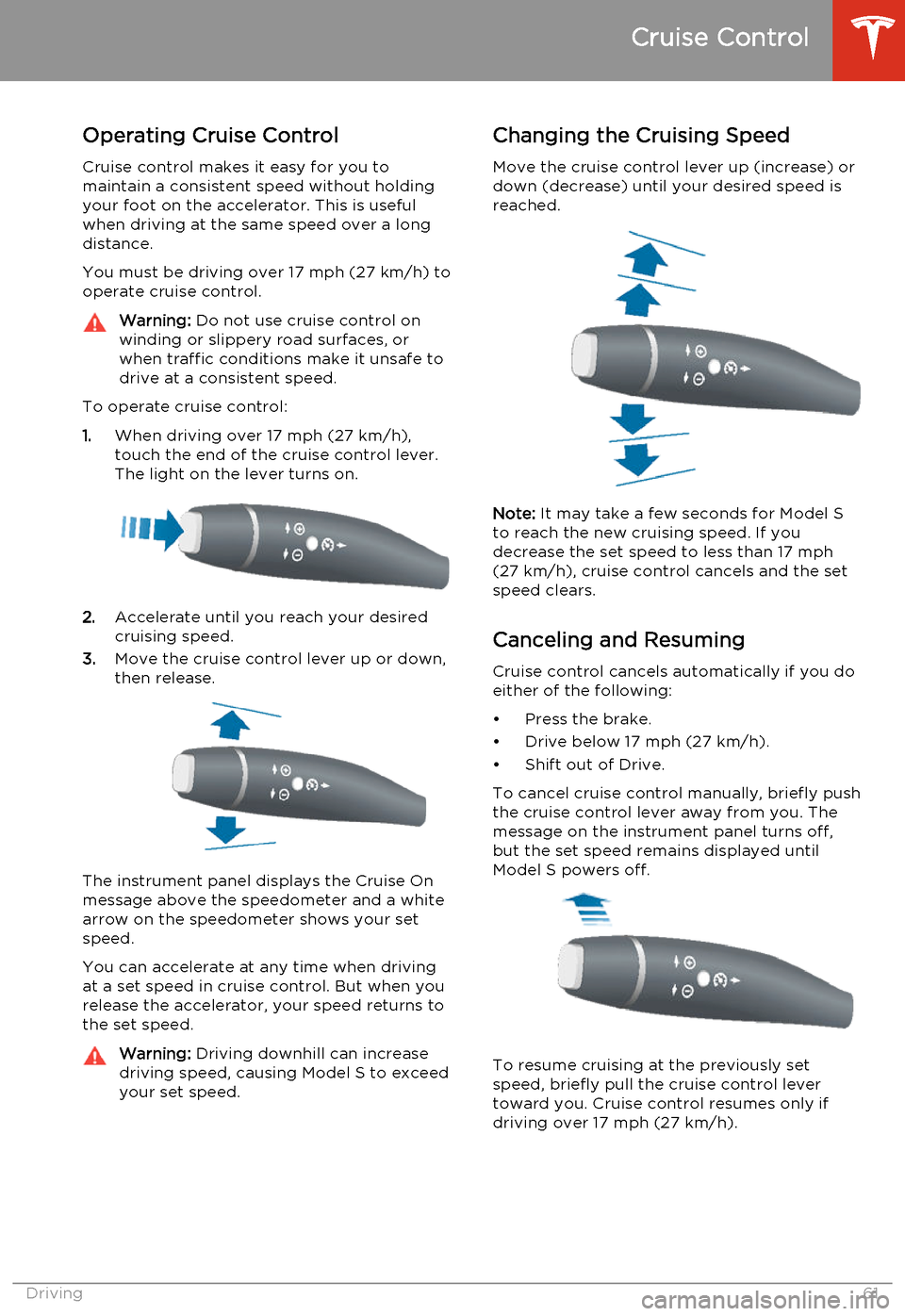
To operate cruise control:
1. When driving over 17 mph (27 km/h),
touch the end of the cruise control lever.
The light on the lever turns on.
2. Accelerate until you reach your desired
cruising speed.
3. Move the cruise control lever up or down,
then release.
The instrument panel displays the Cruise On
message above the speedometer and a white
arrow on the speedometer shows your set speed.
You can accelerate at any time when driving at a set speed in cruise control. But when yourelease the accelerator, your speed returns tothe set speed.
Warning: Driving downhill can increase
driving speed, causing Model S to exceed
your set speed.Changing the Cruising Speed
Move the cruise control lever up (increase) ordown (decrease) until your desired speed is
reached.
Note: It may take a few seconds for Model S
to reach the new cruising speed. If you decrease the set speed to less than 17 mph
(27 km/h), cruise control cancels and the set speed clears.
Canceling and Resuming Cruise control cancels automatically if you doeither of the following:
• Press the brake.
• Drive below 17 mph (27 km/h).
• Shift out of Drive.
To cancel cruise control manually, briefly push the cruise control lever away from you. The
message on the instrument panel turns off, but the set speed remains displayed untilModel S powers off.
To resume cruising at the previously set
speed, briefly pull the cruise control lever
toward you. Cruise control resumes only if driving over 17 mph (27 km/h).
Cruise Control
Driving61
Page 68 of 159
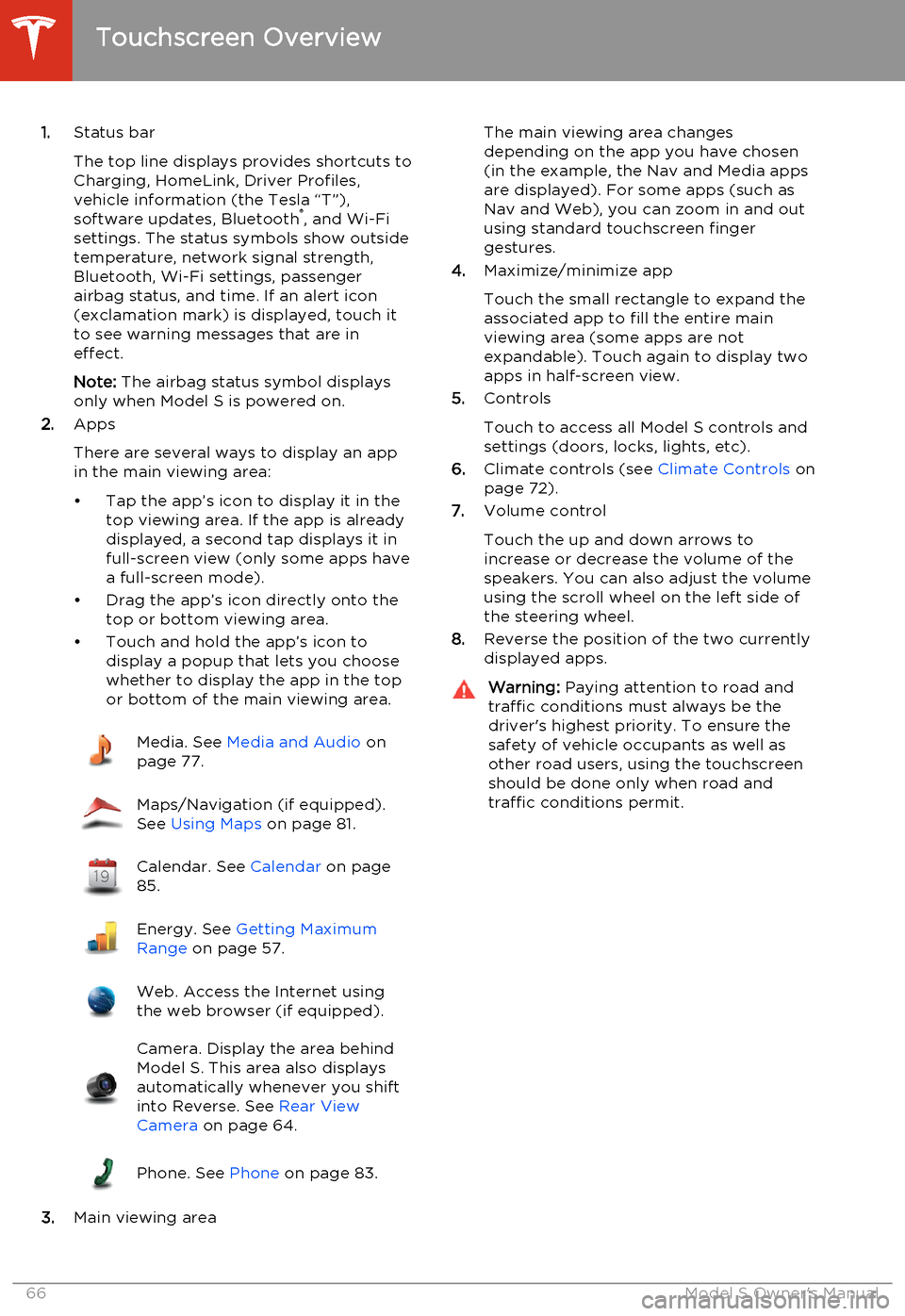
1.Status bar
The top line displays provides shortcuts to
Charging, HomeLink, Driver Profiles,
vehicle information (the Tesla “T”),
software updates, Bluetooth ®
, and Wi-Fi
settings. The status symbols show outside
temperature, network signal strength,
Bluetooth, Wi-Fi settings, passenger
airbag status, and time. If an alert icon
(exclamation mark) is displayed, touch it
to see warning messages that are in
effect.
Note: The airbag status symbol displays
only when Model S is powered on.
2. Apps
There are several ways to display an app
in the main viewing area:
• Tap the app’s icon to display it in the top viewing area. If the app is alreadydisplayed, a second tap displays it infull-screen view (only some apps have a full-screen mode).
• Drag the app’s icon directly onto the top or bottom viewing area.
• Touch and hold the app’s icon to display a popup that lets you choose
whether to display the app in the top or bottom of the main viewing area.Media. See Media and Audio on
page 77.Maps/Navigation (if equipped).
See Using Maps on page 81.Calendar. See Calendar on page
85.Energy. See Getting Maximum
Range on page 57.Web. Access the Internet using
the web browser (if equipped).Camera. Display the area behind
Model S. This area also displays
automatically whenever you shift
into Reverse. See Rear View
Camera on page 64.Phone. See Phone on page 83.
3.Main viewing area
The main viewing area changes
depending on the app you have chosen
(in the example, the Nav and Media apps
are displayed). For some apps (such as
Nav and Web), you can zoom in and out
using standard touchscreen finger
gestures.
4. Maximize/minimize app
Touch the small rectangle to expand the
associated app to fill the entire main
viewing area (some apps are not
expandable). Touch again to display two
apps in half-screen view.
5. Controls
Touch to access all Model S controls and settings (doors, locks, lights, etc).
6. Climate controls (see Climate Controls on
page 72).
7. Volume control
Touch the up and down arrows to
increase or decrease the volume of the
speakers. You can also adjust the volume
using the scroll wheel on the left side of
the steering wheel.
8. Reverse the position of the two currently
displayed apps.Warning: Paying attention to road and
traffic conditions must always be the
driver's highest priority. To ensure the
safety of vehicle occupants as well as other road users, using the touchscreenshould be done only when road andtraffic conditions permit.
Touchscreen Overview
66Model S Owner's Manual
Page 70 of 159
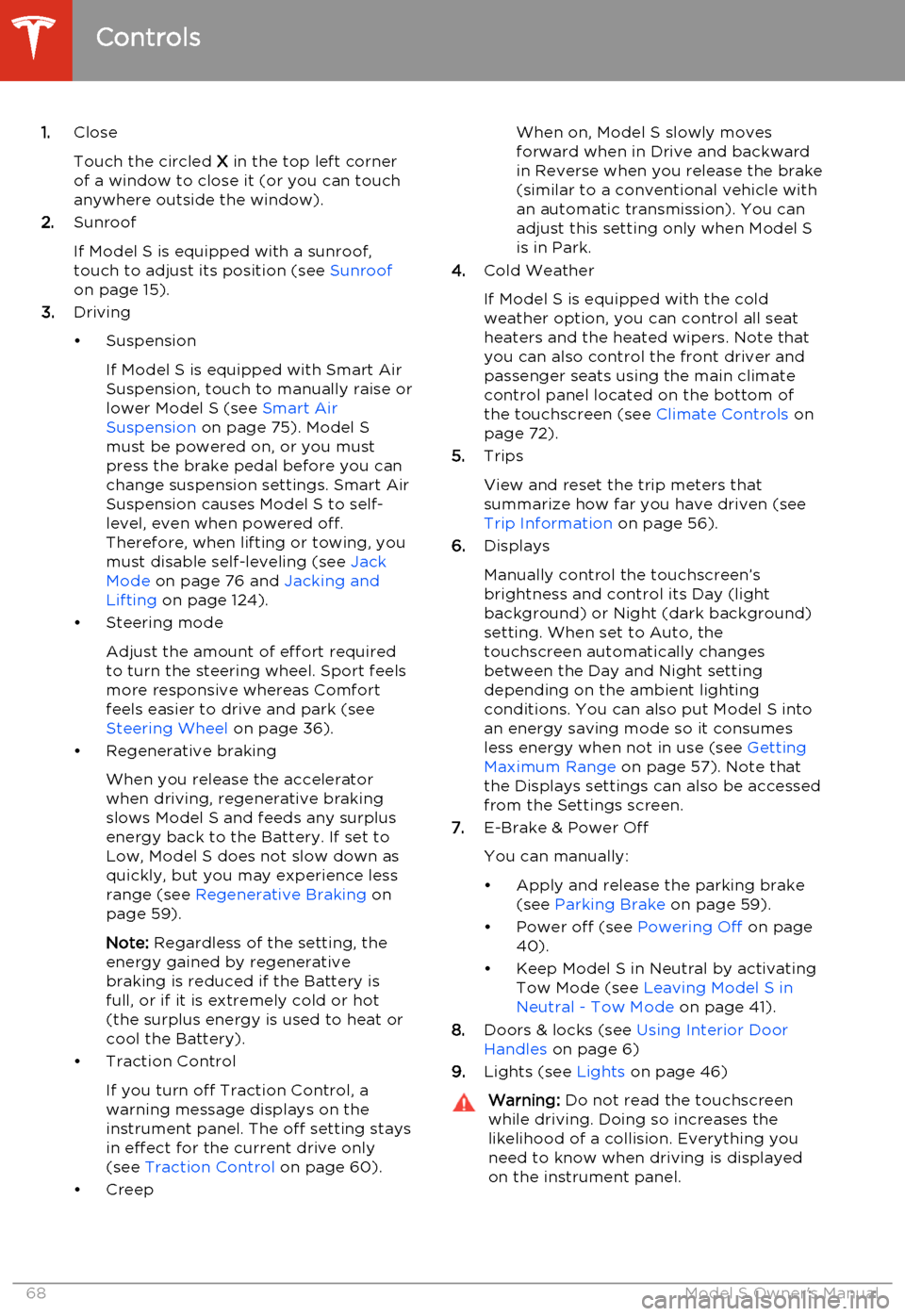
1.Close
Touch the circled X in the top left corner
of a window to close it (or you can touch anywhere outside the window).
2. Sunroof
If Model S is equipped with a sunroof,
touch to adjust its position (see Sunroof
on page 15).
3. Driving
• Suspension If Model S is equipped with Smart AirSuspension, touch to manually raise orlower Model S (see Smart Air
Suspension on page 75). Model S
must be powered on, or you must
press the brake pedal before you can change suspension settings. Smart Air
Suspension causes Model S to self- level, even when powered off.
Therefore, when lifting or towing, you
must disable self-leveling (see Jack
Mode on page 76 and Jacking and
Lifting on page 124).
• Steering mode
Adjust the amount of effort requiredto turn the steering wheel. Sport feels
more responsive whereas Comfort
feels easier to drive and park (see
Steering Wheel on page 36).
• Regenerative braking
When you release the accelerator
when driving, regenerative braking slows Model S and feeds any surplusenergy back to the Battery. If set to
Low, Model S does not slow down as
quickly, but you may experience less
range (see Regenerative Braking on
page 59).
Note: Regardless of the setting, the
energy gained by regenerative
braking is reduced if the Battery is full, or if it is extremely cold or hot(the surplus energy is used to heat orcool the Battery).
• Traction Control
If you turn off Traction Control, a
warning message displays on the
instrument panel. The off setting stays
in effect for the current drive only (see Traction Control on page 60).
• CreepWhen on, Model S slowly moves
forward when in Drive and backward in Reverse when you release the brake
(similar to a conventional vehicle with an automatic transmission). You can
adjust this setting only when Model S is in Park.
4. Cold Weather
If Model S is equipped with the cold weather option, you can control all seatheaters and the heated wipers. Note that
you can also control the front driver and
passenger seats using the main climate
control panel located on the bottom of
the touchscreen (see Climate Controls on
page 72).
5. Trips
View and reset the trip meters that
summarize how far you have driven (see
Trip Information on page 56).
6. Displays
Manually control the touchscreen’s
brightness and control its Day (light
background) or Night (dark background)
setting. When set to Auto, the
touchscreen automatically changes
between the Day and Night setting
depending on the ambient lighting
conditions. You can also put Model S into
an energy saving mode so it consumes
less energy when not in use (see Getting
Maximum Range on page 57). Note that
the Displays settings can also be accessed
from the Settings screen.
7. E-Brake & Power Off
You can manually:
• Apply and release the parking brake (see Parking Brake on page 59).
• Power off (see Powering Off on page
40).
• Keep Model S in Neutral by activating Tow Mode (see Leaving Model S in
Neutral - Tow Mode on page 41).
8. Doors & locks (see Using Interior Door
Handles on page 6)
9. Lights (see Lights on page 46)Warning:
Do not read the touchscreen
while driving. Doing so increases the
likelihood of a collision. Everything you need to know when driving is displayed
on the instrument panel.
Controls
68Model S Owner's Manual