phone TESLA MODEL S 2014 Owner's manual (North America)
[x] Cancel search | Manufacturer: TESLA, Model Year: 2014, Model line: MODEL S, Model: TESLA MODEL S 2014Pages: 159, PDF Size: 6.14 MB
Page 2 of 159

DOCUMENT APPLICABILITY
Features released in the most recent versions of software may not be described in this document but are
described in Release Notes. Display Release Notes on the touchscreen by touching the Tesla “T” at the top
center of the touchscreen, then touching the Release Notes link. If information provided in this document
conflicts with information in the Release Notes, the Release Notes take precedence.
ILLUSTRATIONS
The illustrations provided in this document are for demonstration purposes only. Depending on vehicle options,
software version and market region, the information displayed on the touchscreen in your Model S may appear
slightly different.
PRODUCT SPECIFICATIONS
All specifications and descriptions contained in this document are verified to be accurate at the time of printing.
However, because continuous improvement is a goal at Tesla, we reserve the right to make product
modifications at any time.
ERRORS OR OMISSIONS
To communicate any inaccuracies or omissions in this document, please send an email to:
ownersmanualfeedback @teslamotors.com.
The Model S Owners Manual is available on the touchscreen.
To view it, touch CONTROLS > SETTINGS > MANUAL
(located in the lower left corner).
More information about your Model S is available at
www.teslamotors.com/mytesla .
To contact Tesla, call 1-877-79TESLA (1-877-798-3752) .
©2012-2014 TESLA MOTORS, INC. All rights reserved.
All information in this document and all MODEL S® software is subject to copyright and other intellectual property
rights of Tesla Motors, Inc. and its licensors. This material may not be modified, reproduced or copied, in whole or in
part, without the prior written permission of Tesla Motors, Inc. and its licensors. Additional information is available
upon request. The following are trademarks or registered tr ademarks of Tesla Motors, Inc. in the United States and
other countries:
HOMELINK® and the HOMELINK® house icon are registered trademarks of Johnson Controls, Inc. Bluetooth® is a
registered trademark of Bluetooth SIG, Inc. iPhone® is a registered trademark of Apple, Inc. Android™ and
Google Maps™ are trademarks of Google, Inc. Sirius, XM and all related marks and logos are trademarks of Sirius XM
Radio Inc. Pandora is a registered trad emark of Pandora Media, Inc. Spotify is a registered trademark of the Spotify
Group. All other trademarks contained in this document are the property of their respective owners and their use
herein does not imply sponsorship or endorsement of their products or services. The unauthorized use of any
trademark displayed in this document or on the vehicle is strictly prohibited. TESLA TESLA MOTORS TESLA
ROADSTER MODEL S
Cover - North America 5.8.2.fm Page 2
Thursday, January 16, 2014 3:10 PM
Page 3 of 159
Overview............................................ 2Interior Overview........................................................................ 2
Exterior Overview....................................................................... 3
Opening and Closing.....................4 Doors............................................................................................... 4
Keyless Locking and Unlocking 4Using the Key 4Using Exterior Door Handles 6Using Interior Door Handles 6Interior Locking and Unlocking 6Child-protection Lock 7Drive-away Locking 7Walk-away Locking 7Unlocking When the Key Doesn't Work 7Opening Interior Doors with No Power 8
Windows........................................................................................ 9
Opening and Closing 9Locking Rear Windows 9
Rear Trunk................................................................................... 10
Opening 10Closing 10Adjusting the Opening Height 10Interior Release 11Opening with No Power 11
Front Trunk.................................................................................. 12
Opening 12Closing 12Interior Emergency Release 13Opening with No Power 13
Glove Box..................................................................................... 14
Opening and Closing 14
Sunroof.......................................................................................... 15
Opening and Closing 15
Cup Holders................................................................................. 16
Opening and Closing 16
Seating and Safety
Restraints..........................................17 Front and Rear Seats............................................................... 17
Correct Driving Position 17Adjusting the Driver’s Seat 17Folding Rear Seats 18Raising Rear Seats 18Head Supports 18Seat Covers 18
Seat Belts......................................................................................19
Wearing Seat Belts 19Wearing Seat Belts When Pregnant 19Seat Belt Pre-tensioners 20Testing Seat Belts 20Seat Belt Warnings 20
Child Safety Seats.................................................................... 22
Guidelines for Seating Children 22Choosing a Child Safety Seat 23Seating Larger Children 24Installing Child Safety Seats 24Installing Seat Belt Retained Child Seats 24Installing LATCHChild Seats 25Attaching Upper Tether Straps 25Testing a Child Safety Seat 26Warnings - Child Safety Seats 26
Tesla Built-In Rear Facing Child Seats............................. 27
Usage Restrictions 27Opening 27Folding 27Seating a Child 29Warnings - Tesla Child Seats 29
Airbags.......................................................................................... 31
Location of Airbags 31How the Airbags Work 32Types of Airbags 32Passenger Front Airbag 33Inflation Effects 34Airbag Warning Indicator 34Airbag Warnings 34
Driving.............................................. 35Driver Profiles............................................................................ 35
Creating a Driver Profile 35Restoring a Driver’s Profile 35Saved Driver Settings 35
Steering Wheel..........................................................................36
Adjusting Position 36Adjusting Sensitivity 36Using Left Steering Wheel Buttons 36Using Right Steering Wheel Buttons 37Using Voice Commands 37Horn 38
Mirrors...........................................................................................39
Adjusting Exterior Side Mirrors 39Rear View Mirror 39
Starting and Powering Off................................................... 40
Starting Model S 40Powering Off 40
Gears.............................................................................................. 41
Shifting Gears 41Leaving Model S in Neutral - Tow Mode 41
Instrument Panel.......................................................................42
Instrument Panel Overview 42Indicator Lights 43
Lights............................................................................................ 46
Controlling Lights 46Headlight High Beams 48Headlights After Exit 48Cornering Lights 48Turn Signals 49Hazard Warning Flashers 49
Wipers and Washers...............................................................50
Wipers 50Washers 50
Speed Assist................................................................................ 51
How Speed Assist Works 51Controlling Speed Assist 52Limitations and Inaccuracies 52
Lane Departure Warning....................................................... 53
How Lane Departure Warning Works 53Controlling Lane Departure Warning 53Limitations and Inaccuracies 53
Park Assist.................................................................................. 54
How Park Assist Works 54Visual and Audio Feedback 54Controlling Audible Feedback 54Limitations and False Warnings 55Other Parking Aids 55
Trip Information........................................................................ 56
Displaying Trip Information 56
Getting Maximum Range....................................................... 57
Driving Tips to Maximize Range 57Saving Energy 57
Brakes........................................................................................... 58
Braking Systems 58Brake Wear 58Regenerative Braking 59Parking Brake 59
Traction Control....................................................................... 60
How It Works 60
Cruise Control............................................................................. 61
Operating Cruise Control 61Changing the Cruising Speed 61Canceling and Resuming 61
Hill Start Assist.......................................................................... 63
Rear View Camera................................................................... 64
Camera Location 64
Using the Touchscreen.............. 65Touchscreen Overview.......................................................... 65
The Big Picture 65
Controls........................................................................................ 67
Controlling Model S Features 67
Settings........................................................................................ 69
Customizing Model S 69
Climate Controls....................................................................... 72
Overview of Climate Controls 72Customizing Climate Control 73Ventilation 74Climate Control Operating Tips 74
Smart Air Suspension..............................................................75
Manual Height Adjustments 75Location-Based Suspension 75Automatic Lowering 76Jack Mode 76
Media and Audio....................................................................... 77
Overview 77AM and FM Radio Services 77XM Radio 77Internet Radio 77Media Settings 78Favorites 78My Music & Devices 79USB Connections 7912V Power Socket 80
Maps and Navigation............................................................... 81
Overview 81Using Maps 81Starting Navigation 81During Navigation 82Favorite Destinations 82Updated Maps 82
Phone............................................................................................ 83
Bluetooth®Compatibility 83Pairing a Bluetooth Phone 83Importing Contacts 83Unpairing a Bluetooth Phone 83Connecting to a Paired Phone 84Making a Phone Call 84Receiving a Phone Call 84In Call Options 84
Calendar....................................................................................... 85
Overview 85Calendar and Navigation 85
Security Settings...................................................................... 86
About the Security System 86
HomeLink ®
Universal Transceiver....................................... 87
About HomeLink 87Programming HomeLink 87Troubleshooting HomeLink 87
Connecting to Wi-Fi................................................................ 89
Software Updates.................................................................... 90
Loading New Software 90Viewing Release Notes 90
Mobile App...................................................................................91
Model S Mobile App 91Charging.......................................... 92
Electric Vehicle Components.............................................. 92
High Voltage Components 92Charging Equipment 93
Battery Information................................................................. 94
About the Battery 94Battery Care 94
Charging Model S..................................................................... 95
Opening the Charge Port 95Plugging In 95During Charging 96Stopping Charging 96Charge Port Light 96Changing Charge Settings 97Charging Status 98
Maintenance................................... 99
Maintenance Schedule........................................................... 99
Service Intervals 99Daily Checks 99Monthly Checks 99Fluid Replacement Intervals 99High Voltage Safety 99
Tire Care and Maintenance.................................................100
Maintaining Tire Pressures 100Inspecting and Maintaining Tires 101Replacing Tires and Wheels 102Using Tire Chains 103Tire Pressure Monitoring 103
Temporary Tire Repair......................................................... 105
Tire Repair Kit 105Inflating with Sealant and Air 106Inflating with Air Only 107Replacing the Sealant Canister 108
Cleaning..................................................................................... 109
Cleaning the Exterior 109Cleaning the Interior 110Polishing, Touch Up, and Body Repair 111Using a Car Cover 111Floor Mats 111
Wiper Blades and Washer Jets.......................................... 112
Checking and Replacing Wiper Blades 112Cleaning Washer Jets 112
Fluid Reservoirs........................................................................ 114
Removing the Maintenance Panel 114Checking Battery Coolant 114Checking Brake Fluid 115Topping Up Washer Fluid 116
Fuses............................................................................................. 117
Fuse Box Locations 117Replacing a Fuse 117Fuse Box 1 118Fuse Box 2 120Fuse Box 3 122Fuse Box 4 123
Jacking and Lifting................................................................. 124
Jacking Procedure 124
Parts and Accessories........................................................... 125
Parts, Accessories, and Modifications 125Body Repairs 125
Specifications............................... 126
Identification Labels.............................................................. 126
Vehicle Identification Number 126Emission Control Label 126
Vehicle Loading....................................................................... 127
Load Capacity Labeling 127Calculating Load Limits 128Towing a Trailer 129Roof Racks 129
Dimensions and Weights..................................................... 130
Exterior Dimensions 130Weights 131
Subsystems............................................................................... 132
Motor 132Transmission 132Steering 132Brakes 133Suspension 133Battery - 12V 133Battery - High Voltage 134
Wheels and Tires..................................................................... 135
Wheel Specifications 135Wheel Alignment Values 135Tire Specifications 136Understanding Tire Markings 137Uniform Tire Quality Grading 139Wheels and Tires Glossary 140
Roadside Assistance.................. 141
Contacting Roadside Assistance....................................... 141 Instructions for Transporters............................................. 142
Use a Flatbed Only 142Disable Self-Leveling (air suspension vehicles only) 142Activate Tow Mode 142Connect the Tow Chain 143Pull Onto the Trailer and Secure the Wheels 144
Consumer Information..............145
About this Owner Information.......................................... 145
Illustrations 145Errors or Inaccuracies 145Location of Components 145Document Applicability 145Copyrights and Trademarks 146
Disclaimers................................................................................ 147
Vehicle Telematics/Data Recorders 147Quality Control 147California Proposition 65 147
Reporting Concerns...............................................................148
Contacting Tesla 148Reporting Safety Defects - US 148Reporting Safety Defects - Canada 148
Declarations of Conformity................................................ 149
Key and Passive Unlocking System 149Tire Pressure Monitoring System 150Media Control Unit 150HomeLink 151Radio Frequency Information 151Contents
Page 7 of 159
Radio equipment on a similar frequency canaffect the key. If this happens, move the key
at least one foot (30 cm) away from other
electronic devices (phone, laptop, etc). If the key does not work, you may need to changeits battery. If the key’s battery is discharged,
you can open Model S by following the
unlocking procedure. See Unlocking When the
Key Doesn't Work on page 7.Caution: Remember to bring the key with
you when you drive. Although you can
drive Model S away from its key, you will
be unable to power it back on after it powers off.Caution: Protect the key from impact,
high temperatures, and damage from
liquids. Avoid contact with solvents,
waxes and abrasive cleaners.
Replacing the Key Battery
The key’s battery lasts for approximately a
year. When the battery is low, a message
displays on the instrument panel. Follow these
steps to replace it:
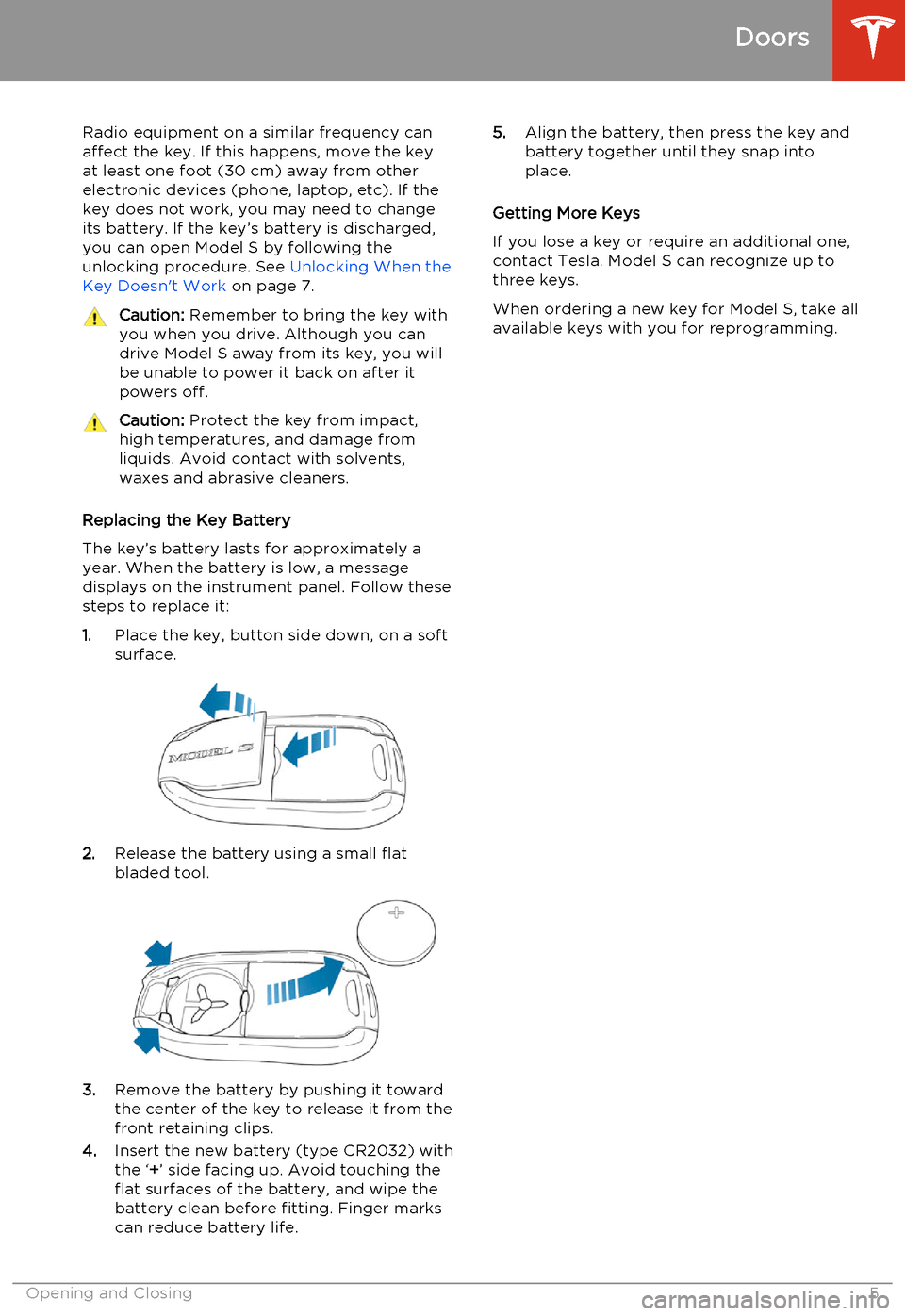
1. Place the key, button side down, on a soft
surface.
2. Release the battery using a small flat
bladed tool.
3. Remove the battery by pushing it toward
the center of the key to release it from the
front retaining clips.
4. Insert the new battery (type CR2032) with
the ‘ +’ side facing up. Avoid touching the
flat surfaces of the battery, and wipe the
battery clean before fitting. Finger marks
can reduce battery life.
5. Align the battery, then press the key and
battery together until they snap into
place.
Getting More Keys
If you lose a key or require an additional one, contact Tesla. Model S can recognize up to
three keys.
When ordering a new key for Model S, take all available keys with you for reprogramming.
Doors
Opening and Closing5
Page 39 of 159
Using Right Steering Wheel Buttons
Use the buttons on the right side of the steering wheel to control the phone, tochoose and control a Model S feature bytapping the scroll wheel, to use voice
commands, and to choose what displays on the right side of the instrument panel.
Note: Regardless of how you customize the
right side of the instrument panel, it automatically displays the phone menu to
help you easily handle phone calls on your
Bluetooth connected phone.
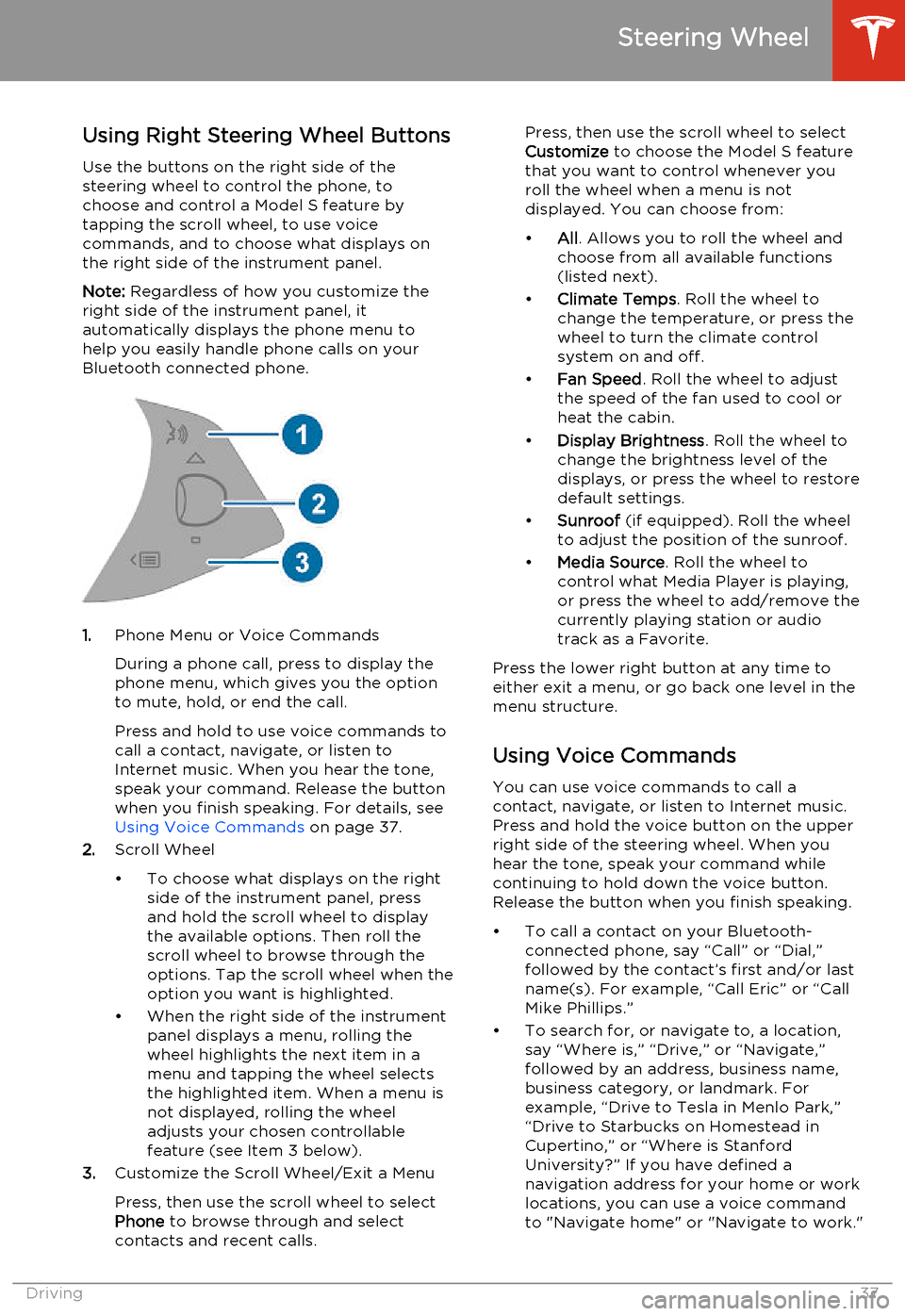
1. Phone Menu or Voice Commands
During a phone call, press to display the phone menu, which gives you the option
to mute, hold, or end the call.
Press and hold to use voice commands to
call a contact, navigate, or listen to
Internet music. When you hear the tone,
speak your command. Release the button
when you finish speaking. For details, see Using Voice Commands on page 37.
2. Scroll Wheel
• To choose what displays on the right side of the instrument panel, pressand hold the scroll wheel to displaythe available options. Then roll the
scroll wheel to browse through the options. Tap the scroll wheel when the
option you want is highlighted.
• When the right side of the instrument panel displays a menu, rolling the
wheel highlights the next item in a
menu and tapping the wheel selects
the highlighted item. When a menu is
not displayed, rolling the wheel
adjusts your chosen controllable
feature (see Item 3 below).
3. Customize the Scroll Wheel/Exit a Menu
Press, then use the scroll wheel to select
Phone to browse through and select
contacts and recent calls.
Press, then use the scroll wheel to select
Customize to choose the Model S feature
that you want to control whenever you
roll the wheel when a menu is not
displayed. You can choose from:
• All. Allows you to roll the wheel and
choose from all available functions
(listed next).
• Climate Temps . Roll the wheel to
change the temperature, or press the
wheel to turn the climate control
system on and off.
• Fan Speed . Roll the wheel to adjust
the speed of the fan used to cool or
heat the cabin.
• Display Brightness . Roll the wheel to
change the brightness level of the
displays, or press the wheel to restore default settings.
• Sunroof (if equipped). Roll the wheel
to adjust the position of the sunroof.
• Media Source . Roll the wheel to
control what Media Player is playing,
or press the wheel to add/remove the
currently playing station or audio track as a Favorite.
Press the lower right button at any time to either exit a menu, or go back one level in the
menu structure.
Using Voice Commands
You can use voice commands to call a
contact, navigate, or listen to Internet music.
Press and hold the voice button on the upper
right side of the steering wheel. When you
hear the tone, speak your command while
continuing to hold down the voice button.
Release the button when you finish speaking.
• To call a contact on your Bluetooth- connected phone, say “Call” or “Dial,”
followed by the contact’s first and/or last name(s). For example, “Call Eric” or “Call
Mike Phillips.”
• To search for, or navigate to, a location, say “Where is,” “Drive,” or “Navigate,”followed by an address, business name,business category, or landmark. Forexample, “Drive to Tesla in Menlo Park,”
“Drive to Starbucks on Homestead in
Cupertino,” or “Where is Stanford
University?” If you have defined a navigation address for your home or work
locations, you can use a voice command to "Navigate home" or "Navigate to work."
Steering Wheel
Driving37
Page 44 of 159
Instrument Panel OverviewNote: The following illustration is provided for demonstration purposes only. Depending on
vehicle options, software version, and market region, the information displayed may be slightly different.
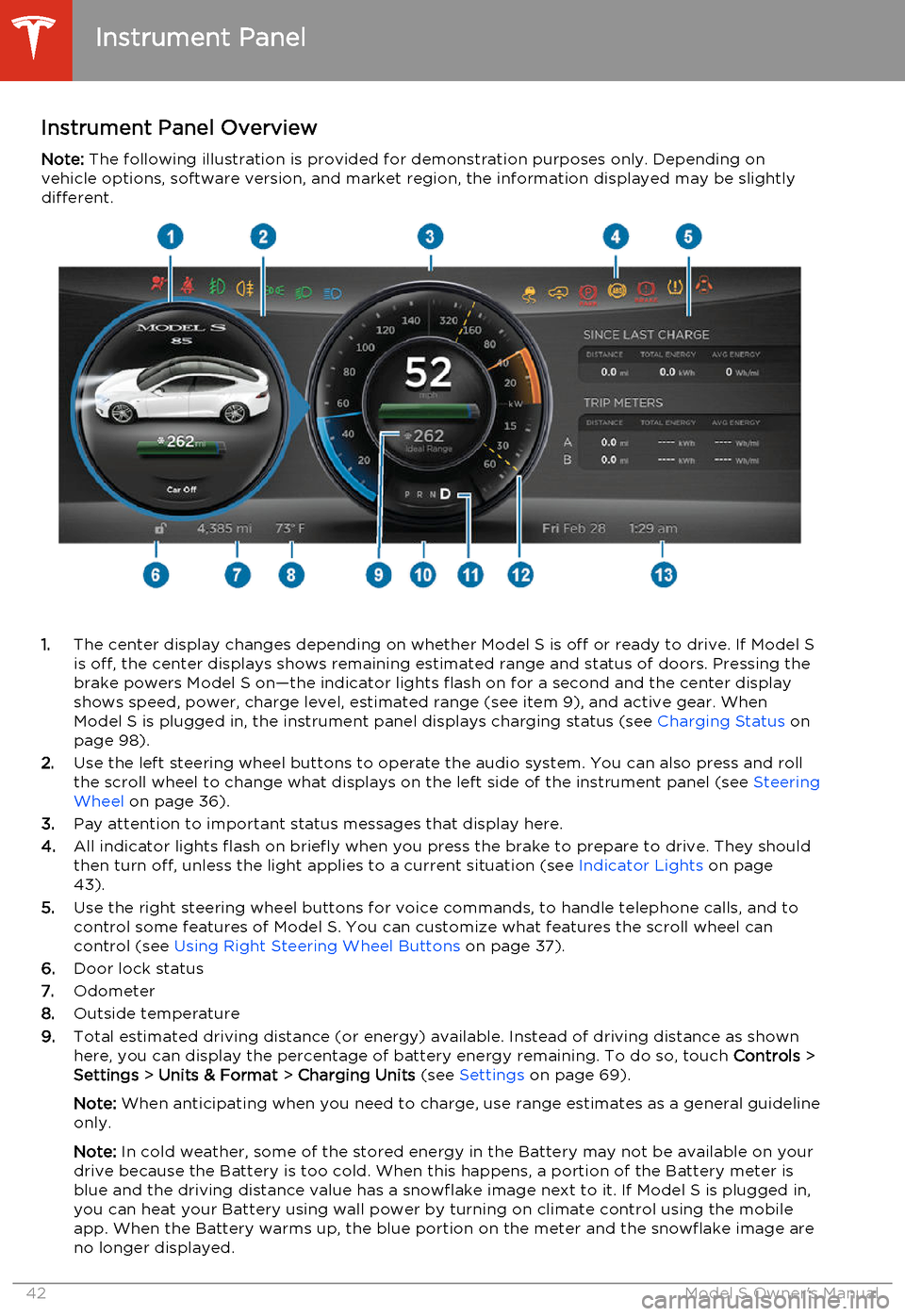
1. The center display changes depending on whether Model S is off or ready to drive. If Model S
is off, the center displays shows remaining estimated range and status of doors. Pressing thebrake powers Model S on—the indicator lights flash on for a second and the center display
shows speed, power, charge level, estimated range (see item 9), and active gear. When
Model S is plugged in, the instrument panel displays charging status (see Charging Status on
page 98).
2. Use the left steering wheel buttons to operate the audio system. You can also press and roll
the scroll wheel to change what displays on the left side of the instrument panel (see Steering
Wheel on page 36).
3. Pay attention to important status messages that display here.
4. All indicator lights flash on briefly when you press the brake to prepare to drive. They should
then turn off, unless the light applies to a current situation (see Indicator Lights on page
43).
5. Use the right steering wheel buttons for voice commands, to handle telephone calls, and to
control some features of Model S. You can customize what features the scroll wheel can control (see Using Right Steering Wheel Buttons on page 37).
6. Door lock status
7. Odometer
8. Outside temperature
9. Total estimated driving distance (or energy) available. Instead of driving distance as shown
here, you can display the percentage of battery energy remaining. To do so, touch Controls >
Settings > Units & Format > Charging Units (see Settings on page 69).
Note: When anticipating when you need to charge, use range estimates as a general guideline
only.
Note: In cold weather, some of the stored energy in the Battery may not be available on your
drive because the Battery is too cold. When this happens, a portion of the Battery meter is
blue and the driving distance value has a snowflake image next to it. If Model S is plugged in,
you can heat your Battery using wall power by turning on climate control using the mobile
app. When the Battery warms up, the blue portion on the meter and the snowflake image are
no longer displayed.
Instrument Panel
42Model S Owner's Manual
Page 68 of 159
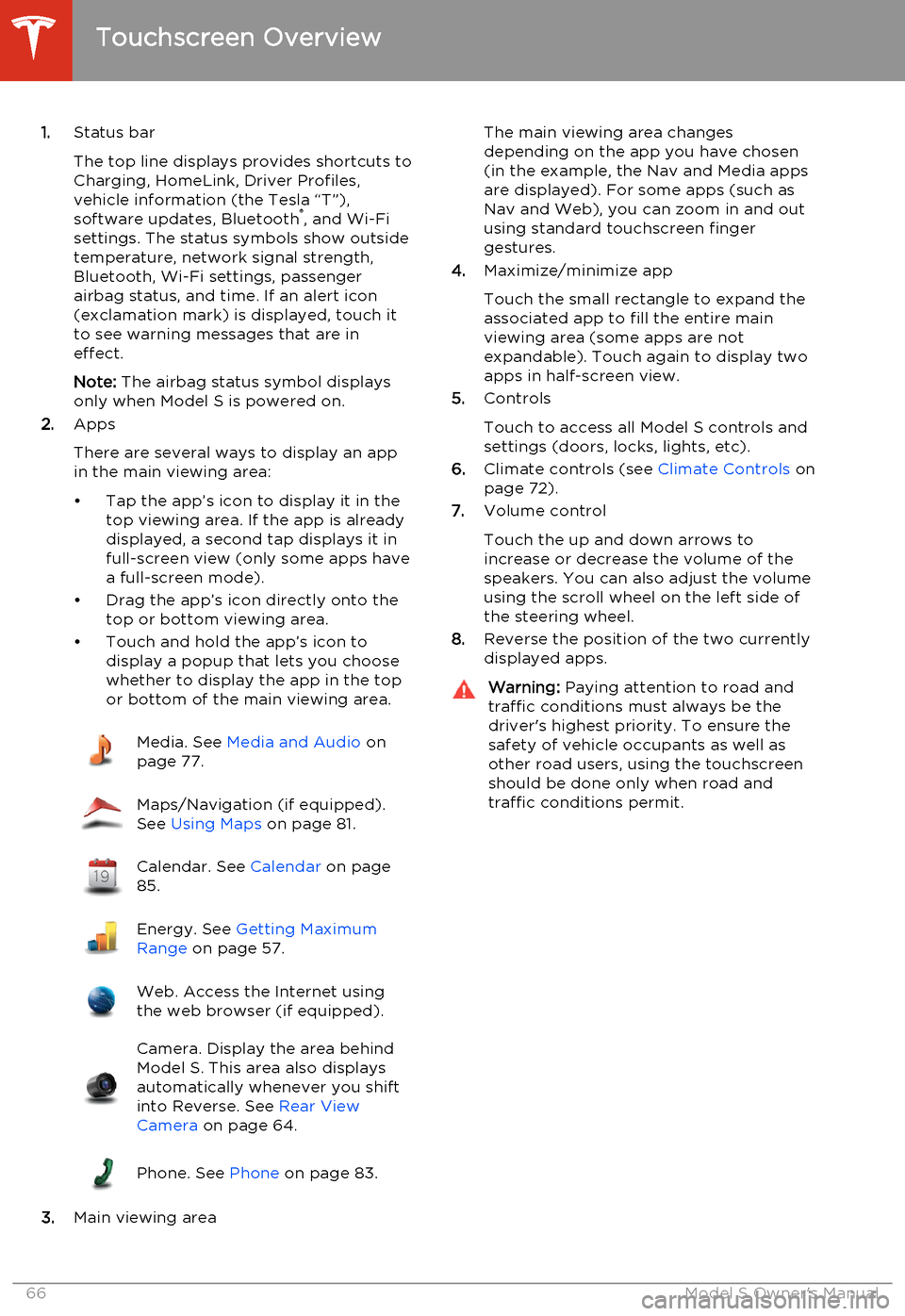
1.Status bar
The top line displays provides shortcuts to
Charging, HomeLink, Driver Profiles,
vehicle information (the Tesla “T”),
software updates, Bluetooth ®
, and Wi-Fi
settings. The status symbols show outside
temperature, network signal strength,
Bluetooth, Wi-Fi settings, passenger
airbag status, and time. If an alert icon
(exclamation mark) is displayed, touch it
to see warning messages that are in
effect.
Note: The airbag status symbol displays
only when Model S is powered on.
2. Apps
There are several ways to display an app
in the main viewing area:
• Tap the app’s icon to display it in the top viewing area. If the app is alreadydisplayed, a second tap displays it infull-screen view (only some apps have a full-screen mode).
• Drag the app’s icon directly onto the top or bottom viewing area.
• Touch and hold the app’s icon to display a popup that lets you choose
whether to display the app in the top or bottom of the main viewing area.Media. See Media and Audio on
page 77.Maps/Navigation (if equipped).
See Using Maps on page 81.Calendar. See Calendar on page
85.Energy. See Getting Maximum
Range on page 57.Web. Access the Internet using
the web browser (if equipped).Camera. Display the area behind
Model S. This area also displays
automatically whenever you shift
into Reverse. See Rear View
Camera on page 64.Phone. See Phone on page 83.
3.Main viewing area
The main viewing area changes
depending on the app you have chosen
(in the example, the Nav and Media apps
are displayed). For some apps (such as
Nav and Web), you can zoom in and out
using standard touchscreen finger
gestures.
4. Maximize/minimize app
Touch the small rectangle to expand the
associated app to fill the entire main
viewing area (some apps are not
expandable). Touch again to display two
apps in half-screen view.
5. Controls
Touch to access all Model S controls and settings (doors, locks, lights, etc).
6. Climate controls (see Climate Controls on
page 72).
7. Volume control
Touch the up and down arrows to
increase or decrease the volume of the
speakers. You can also adjust the volume
using the scroll wheel on the left side of
the steering wheel.
8. Reverse the position of the two currently
displayed apps.Warning: Paying attention to road and
traffic conditions must always be the
driver's highest priority. To ensure the
safety of vehicle occupants as well as other road users, using the touchscreenshould be done only when road andtraffic conditions permit.
Touchscreen Overview
66Model S Owner's Manual
Page 81 of 159
My Music & DevicesTo play audio files from a USB-connectedflash drive or a Bluetooth-connected device,
touch Media > Browse > My Music & Devices .
The name of the device will be displayed.
Touch the song, album, or playlist you want to
play and Media Player starts playing and
displays the Now Playing screen.
To play the next song in the selected playlist
or album, touch the previous or next arrows on the touchscreen, or use the left steering
wheel (see Using Left Steering Wheel Buttons
on page 36).
USB Connected Flash Drives
Connect a flash drive to one of the USB connections (see USB Connections on page
79). Touch Media > Browse > My Music &
Devices , then touch the name of the flash
drive and the song you want to play.
Note: To play media from a USB connection,
Model S recognizes flash drives only. To play media from other types of devices (such as aniPod), connect using Bluetooth (if supportedby the device).
Bluetooth ®
Connected Devices
If you have a Bluetooth-capable device such
as a phone, that is paired and connected to
Model S (see Pairing a Bluetooth Phone on
page 83), you can play audio files stored on
it, and you can stream a music service (for example, Pandora or Spotify). Touch Media >
Browse > My Music & Devices , then touch the
name of your Bluetooth-connected device.
Your Bluetooth device begins playing the
audio file that was currently active on your
device, and the touchscreen displays the Now
Playing screen.
To change the track playing, touch the previous or next icons on the touchscreen, or
use the left steering wheel controls.
Note: To play media from a Bluetooth-
connected device, ensure that access to the device’s media is turned on. See Phone on
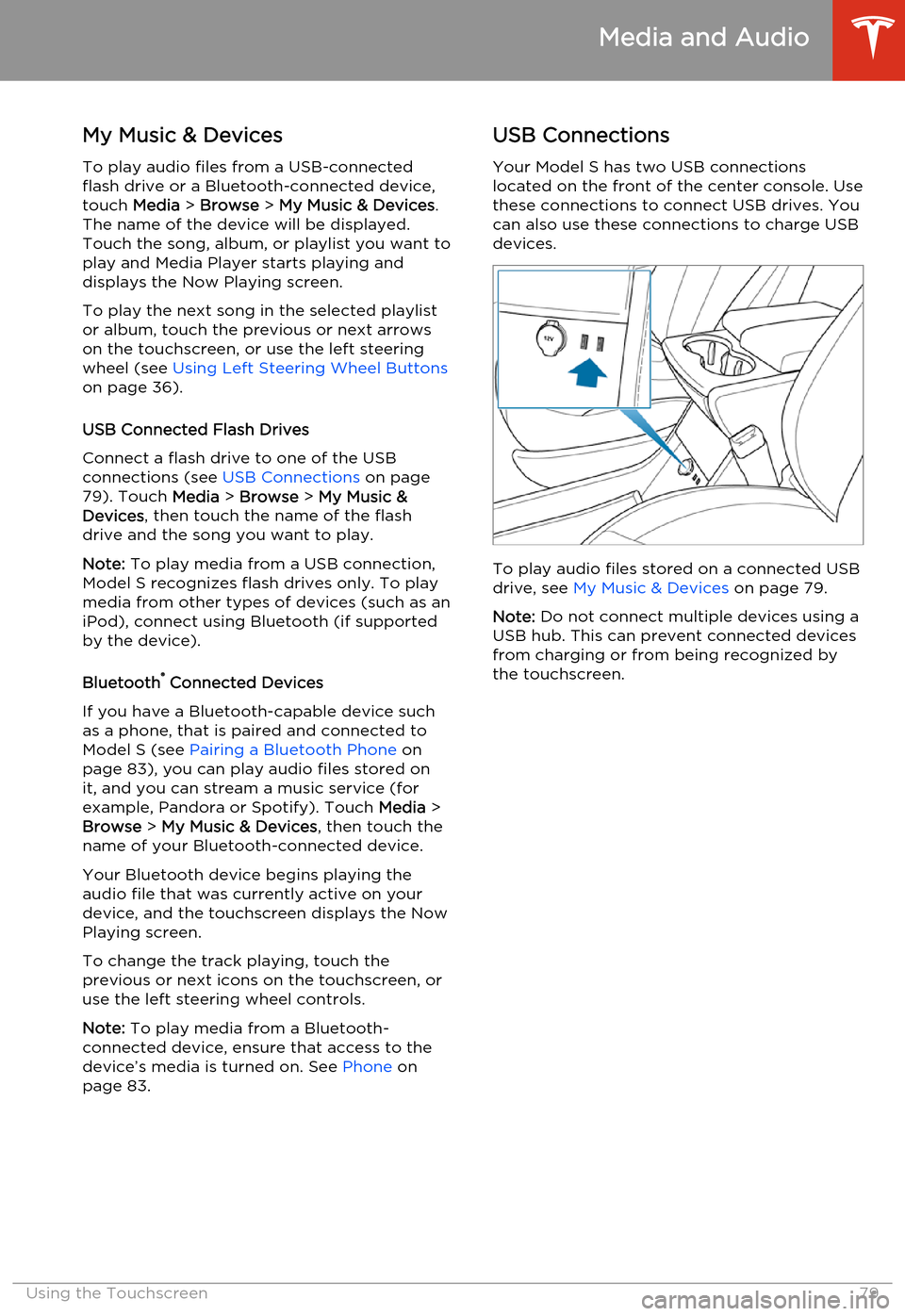
page 83.USB Connections
Your Model S has two USB connections
located on the front of the center console. Use these connections to connect USB drives. Youcan also use these connections to charge USBdevices.
To play audio files stored on a connected USBdrive, see My Music & Devices on page 79.
Note: Do not connect multiple devices using a
USB hub. This can prevent connected devices from charging or from being recognized bythe touchscreen.
Media and Audio
Using the Touchscreen79
Page 83 of 159
OverviewTouch the Map (or Nav) icon to view and
search for a location on Google Maps TM
. If
Model S is equipped with the navigation
option, the app is labeled Nav and onboard
maps are available. Onboard maps allow you to navigate to any location, even if a data
connection is not available. When you specify
a location, the touchscreen displays the route and provides turn-by-turn instructions. IfModel S is not equipped with the navigationoption, onboard maps are not available, but ifyou have a data connection, you can find and
display any location.
Using MapsTouch the search field, or speak a voice
command to specify a location (for details on
how to use voice commands, see Using Voice
Commands on page 37). You can enter or
speak an address, landmark, business, etc. You
can also touch PLACES and choose from a list
of recent locations and searches, favorite
destinations, Supercharger locations, and
charging stations you've visited. To mark a
destination as a Favorite, select its “pin” (from
search results or “Recents”), and then touch
the heart icon.
Touch the North/Heading Up icon to the right
of the search bar to center the map on your
car and have the map track your position as
you drive. The icon is blue when the map is tracking your position and by touching the
icon, you can change the orientation of the
map:North Up - North is always at the
top of the screen.Heading Up - The direction you are
heading is always at the top of the
screen. The map rotates when you
change direction.
You can rotate the map in any direction.
When you rotate the map you’ll notice the
icon turn gray, indicating the map is no longer
tracking your position. Touch the icon again to track your position.
Whenever the map is in the
Heading Up orientation (where
North is not at the top), a compass
appears on the map. The arrow on
the compass points North and the
text on the compass indicates the
direction you are driving. You can
touch the compass to switch to
North Up (described above).
Starting Navigation
1. Touch the Nav icon to display the map.
2. Touch the search bar to enter the
destination, then touch GO. You can also
use voice commands to specify the
destination (for details, see Using Voice
Commands on page 37). If you have a
data connection, you can start entering
the destination, then choose one of the
auto-complete entries that appear. For example, you can enter just the street,business name, or category (such as
hotels, coffee, etc). If you don’t have a data connection, you must enter completeand exact location information.
A list of matching destinations appears on
the left, and their corresponding pins
(with letters A, B, C, etc) appear on the
map.
Note: You can also touch PLACES and
choose a location from the list of Recent
locations and searches, Favorite locations, Supercharger locations, or Visited
Chargers.
3. Touch any destination in the list to
immediately start navigation, or touch the
lettered pin on the map to view the
destination popup, which also allows you
to place a phone call to the destination (in
situations where a phone number is
available).
Note: If you have set up your phone's calendar
to work with Model S, and a calendar event
includes a specific location, you are given the
option to navigate to the location (see
Calendar on page 85.
Maps and Navigation
Using the Touchscreen81
Page 85 of 159
Bluetooth®
Compatibility
You can use your Bluetooth-capable phone
hands-free in Model S provided your phone is within operating range. Although Bluetooth
typically supports wireless communication
over distances of up to approximately 30 feet
(9 meters), performance can vary based on
the phone you are using.
Before using your phone with Model S, you
must pair it. Pairing sets up Model S to work
with your Bluetooth-capable phone (see Pairing a Bluetooth Phone on page 83).
You can pair up to ten Bluetooth phones.
Model S always automatically connects to the
last phone that was used (provided it is within
range). If you want to connect to a different phone, see Connecting to a Paired Phone on
page 84.
Note: On many phones, Bluetooth turns off if
the phone’s battery is low.
Note: In addition to phones, you can also pair
Bluetooth-enabled devices with Model S. For example, you can pair an iPod Touch or an
iPad or Android tablet to stream music.
Pairing a Bluetooth Phone
Pairing sets up Model S to work with your
Bluetooth-capable phone. Once a phone is paired, Model S can connect to it wheneverthe phone is within range.
To pair a phone, follow these steps while
sitting inside Model S:
1. Ensure both the touchscreen and the
phone are powered on.
2. On the touchscreen’s status bar, touch the
Bluetooth icon.
3. On your phone, enable Bluetooth and set
it to discoverable.
4. On the Model S touchscreen, touch Start
Search. The touchscreen searches then
displays the list of all available Bluetooth devices within operating distance.
5. On the Model S touchscreen, touch the
phone with which you want to pair. Within
a few seconds, the touchscreen displays a
randomly generated number, and your
phone should display the same number.
6. Check that the number displayed on your
phone matches the number displayed on
the touchscreen. Then, on your phone,
confirm that you want to pair.When paired, Model S automatically connects to the phone, and the touchscreen displays
the Bluetooth symbol next to the phone’s name to show that the connection is active.
Importing Contacts
Once paired, you can use the Bluetooth
settings screen to specify whether you want
to allow access to your phone’s contacts and recent calls.
If access is turned on, you can see your list of contacts on the Model S touchscreen. Touch
Phone > Contacts . You can then touch a
contact to dial its phone number or navigate
to its address.
Note: Before contacts can be imported, you
may need to either set your phone to allow syncing, or respond to a popup on your phone
to confirm that it is OK to sync contacts. This
varies depending on the type of phone you are using. For details, refer to the owner
documentation provided with your phone.
If access is turned on, imported information is
displayed when you touch the contacts tab on
the Phone app.
Unpairing a Bluetooth Phone
If you want to disconnect your phone and use it again later, simply touch Disconnect on the
Bluetooth settings screen. If you do not want
to use your phone with Model S again, touch
Forget This Device. Once you forget a device,
you need to pair it again if you want to use it
with Model S (see Pairing a Bluetooth Phone
on page 83).
Note: Your phone automatically disconnects
whenever you leave Model S.
Phone
Using the Touchscreen83
Page 86 of 159
Connecting to a Paired Phone
Model S automatically connects with the last
phone to which it was connected, provided it is within operating range and has Bluetooth
turned on. If the last phone is not within range,
it attempts to connect with the next phone
that it has been paired with.
To connect to a different phone, touch the
Bluetooth icon on the touchscreen's status
bar. The Bluetooth window displays a list of paired phones. Choose the phone you want to
connect to, then touch Connect. If the phone
you want to connect to is not listed, follow the instructions on Pairing a Bluetooth Phone on
page 83.
When connected, the Model S touchscreendisplays the Bluetooth symbol next to the
phone name to show that the connection is
active.
Making a Phone Call You can make a phone call by:
• Speaking a voice command. For details, see Using Voice Commands on page 37.
• Choosing a contact from your contact list (described above).
• Using the Model S on-screen dialer.
To make a phone call using the on-screen dialer:
1. Touch the Phone app on the touchscreen,
then touch Dialer.
2. Enter the phone number on the dialer.
3. Touch Call. The touchscreen displays the
call screen and the number you are
calling.
To make a phone call by choosing a contact: 1. Touch the Phone app on the touchscreen,
then touch Contacts.
Note: Ensure that access to the phone’s
contacts is turned on.
2. Touch the name of the contact you want
to call to display details about the
contact.
3. Touch the number you want to dial (there
may be more than one). The touchscreendisplays the call screen and the name ofthe contact you are calling.
Note: If it is safe and legal to do so, you can
also initiate a call by dialing the number or
selecting the contact directly from your
phone.Receiving a Phone Call
When your phone receives an incoming call,
both the instrument panel and the
touchscreen display the caller’s number or
name (if the caller is in your phone’s contact list and Model S has access to your contacts).
Touch one of the options on the touchscreen,or use the scroll wheel on the right side of thesteering wheel to Answer or Ignore the call
(see Using Right Steering Wheel Buttons on
page 37).
In Call OptionsWhen a call is in progress, you can display the
call menu on the instrument panel by pressing
the top button on the right side of the
steering wheel. Then use the scroll wheel to
scroll through and choose an option (see
Using Right Steering Wheel Buttons on page
37).
Phone
84Model S Owner's Manual