Cool TESLA MODEL S 2015 User Guide
[x] Cancel search | Manufacturer: TESLA, Model Year: 2015, Model line: MODEL S, Model: TESLA MODEL S 2015Pages: 164, PDF Size: 4.78 MB
Page 116 of 164

Inflating with Air Only
If you have a Tesla tire repair kit, follow these steps to inflate a tire with air:
1. Detach the power supply connector from
the rear of the compressor and plug it into
the 12V power socket located in Model S
on the front of center console.
2. Release the black air hose from the
compressor.
3. Attach the air hose to the valve and press
the lever down to secure it in place.
4. Ensure the compressor is lying on a level
surface with the pressure gauge facing to the side where you can read it.
5. To add air, turn on the compressor and
inflate until the desired pressure is
reached.
6. To release air, turn off the compressor,
then press and hold the red button until the desired pressure is reached.
Note: For your convenience, the tire repair kit
includes a selection of adapters that allow you to inflate other items. These adapters arelocated in a compartment on the back of thecompressor.
Caution: To avoid overheating, do not use
the compressor continuously for more than eight minutes. Allow the compressorto cool for 15 minutes between uses.Caution: The compressor runs slowly
when overheated from excessive use.
Turn it off and allow it to cool.
Temporary Tire Repair
116Model S Owner's Manual
Page 120 of 164

Polishing, Touch Up, and Body
Repair
To preserve the cosmetic appearance of the
body, you can occasionally treat the paint
surfaces with an approved polish containing:
• Very mild abrasive to remove surface contamination without removing or
damaging the paint.
• Filling compounds that fill scratches and reduce their visibility.
• Wax to provide a protective coating between the paint and environmental
elements.
Regularly inspect the exterior paint for
damage. Treat minor chips and scratches
using a paint touch up pen (available for
purchase from Tesla). Use the touch-up pen
after washing but before polishing or waxing.
Repair rock chips, fractures or scratches. Body
repairs should be performed only by a Tesla approved body shop. Contact Tesla for a listof approved body shops.Caution: Do not use cutting pastes, color
restoration compounds, or polishes
containing harsh abrasives. These can
scour the surface and permanently
damage the paint.Caution: Do not use chrome polish or
other abrasive cleaners.Using a Car Cover
To preserve the cosmetic appearance of the
body when Model S is not being used, use a
genuine Tesla car cover. Car covers can be purchased from Tesla.Caution: Use only a Tesla-approved car
cover when Model S is plugged in. Using
a non-Tesla car cover can prevent the
Battery from being adequately cooled
during charging.
Floor Mats
To extend the life of your carpet and make
them easier to clean, use genuine Tesla floor mats. Maintain mats by cleaning them
regularly and replacing them if they become
excessively worn.
Warning: To avoid potential interference
with a foot pedal, ensure that the driver’s
floor mat is securely fastened, and never place an additional floor mat on top of it.
Cleaning
120Model S Owner's Manual
Page 123 of 164
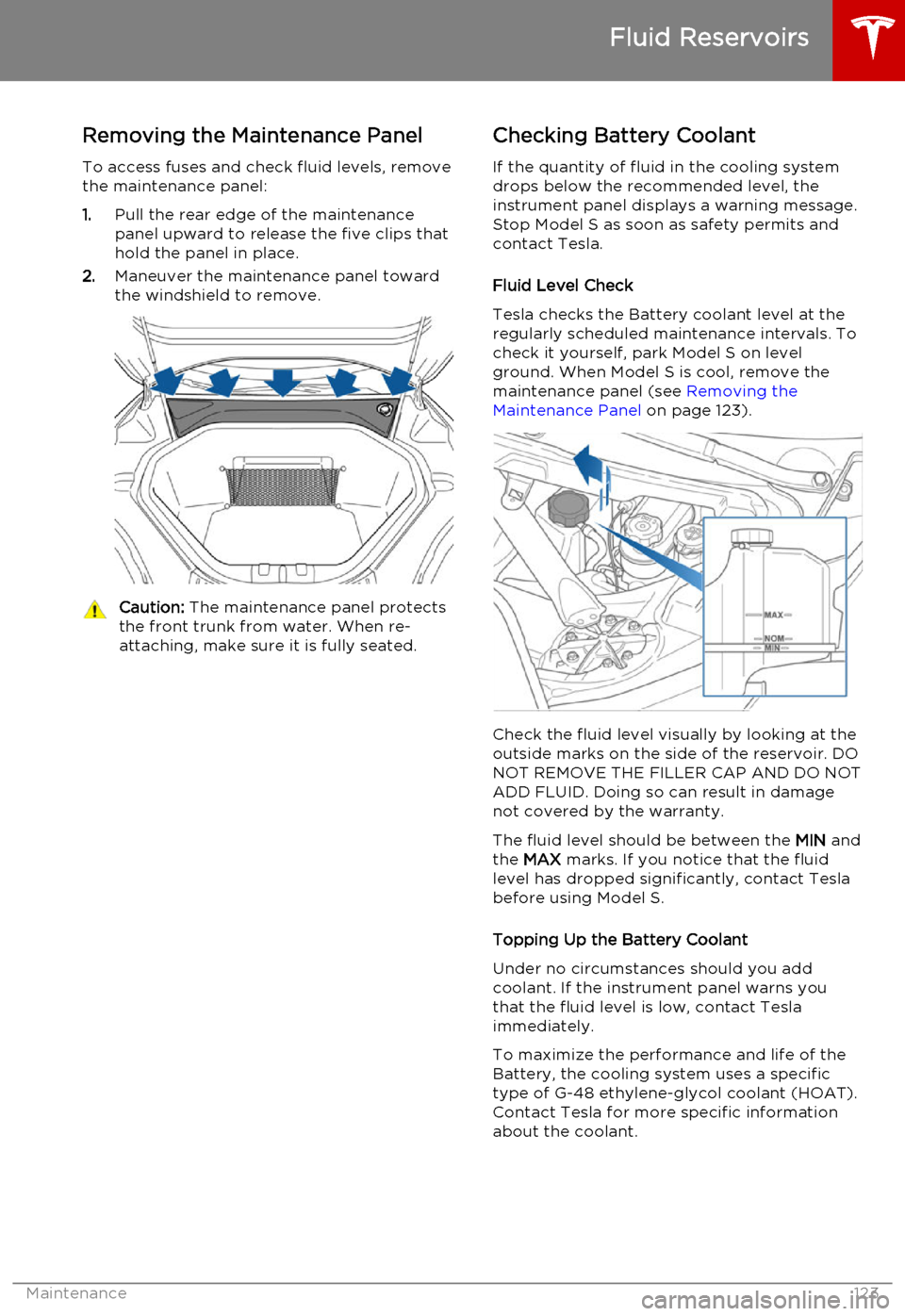
Removing the Maintenance Panel
To access fuses and check fluid levels, remove the maintenance panel:
1. Pull the rear edge of the maintenance
panel upward to release the five clips that
hold the panel in place.
2. Maneuver the maintenance panel toward
the windshield to remove.Caution: The maintenance panel protects
the front trunk from water. When re- attaching, make sure it is fully seated.Checking Battery Coolant
If the quantity of fluid in the cooling system
drops below the recommended level, the
instrument panel displays a warning message.
Stop Model S as soon as safety permits and
contact Tesla.
Fluid Level Check
Tesla checks the Battery coolant level at the
regularly scheduled maintenance intervals. To
check it yourself, park Model S on level
ground. When Model S is cool, remove the
maintenance panel (see Removing the
Maintenance Panel on page 123).
Check the fluid level visually by looking at the
outside marks on the side of the reservoir. DO
NOT REMOVE THE FILLER CAP AND DO NOT ADD FLUID. Doing so can result in damage
not covered by the warranty.
The fluid level should be between the MIN and
the MAX marks. If you notice that the fluid
level has dropped significantly, contact Tesla before using Model S.
Topping Up the Battery Coolant
Under no circumstances should you add coolant. If the instrument panel warns youthat the fluid level is low, contact Teslaimmediately.
To maximize the performance and life of the Battery, the cooling system uses a specific
type of G-48 ethylene-glycol coolant (HOAT).
Contact Tesla for more specific information
about the coolant.
Fluid Reservoirs
Maintenance123
Page 124 of 164

Checking Brake FluidWarning: Contact Tesla immediately if
you notice increased movement of the
brake pedal or a significant loss of brake
fluid. Driving under these conditions can result in extended stopping distances orcomplete brake failure.The Brake indicator on the
instrument panel alerts you if the
quantity of fluid in the brake
reservoir drops below the
recommended level. If it displays
while driving, stop as soon as safety
permits by gently applying the
brakes. Do not continue driving.
Contact Tesla immediately.
Fluid Level Check
Tesla checks the brake fluid level at the
regularly scheduled maintenance intervals. To check it yourself, park Model S on level
ground. When Model S is cool, remove the maintenance panel (see Removing the
Maintenance Panel on page 123).
Check the fluid level visually by looking at the
outside marks on the side of the reservoir
without removing the filler cap.
The brake fluid level should always be
between the MIN and the MAX marks.
Note: Although brake fluid level drops slightly
during normal use as a result of brake pad wear, it should not drop below the MIN mark.
Topping Up the Brake Fluid
Do not top up your brake fluid. Tesla service does this when you bring Model S in for
regular servicing. The following instructions are provided for information purposes andfuture reference only:
1. Clean the filler cap before removing to
prevent dirt from entering the reservoir.
2. Unscrew the cap and remove.
3. Top up the reservoir to the MAX mark
using brake fluid meeting DOT3 or DOT4 specifications.
4. Replace the filler cap.Warning: Only use new fluid from a
sealed air-tight container. Never use previously used fluid or fluid from apreviously opened container—fluid
absorbs moisture which decreases
braking performance.Warning: Brake fluid is highly toxic. Keep
containers sealed and out of the reach of children. In the event of accidentalconsumption, seek medical attention
immediately.Caution: Brake fluid damages painted
surfaces. Immediately soak up any spills
with an absorbent cloth and wash the
area with a mixture of car shampoo and
water.
Fluid Reservoirs
124Model S Owner's Manual
Page 127 of 164
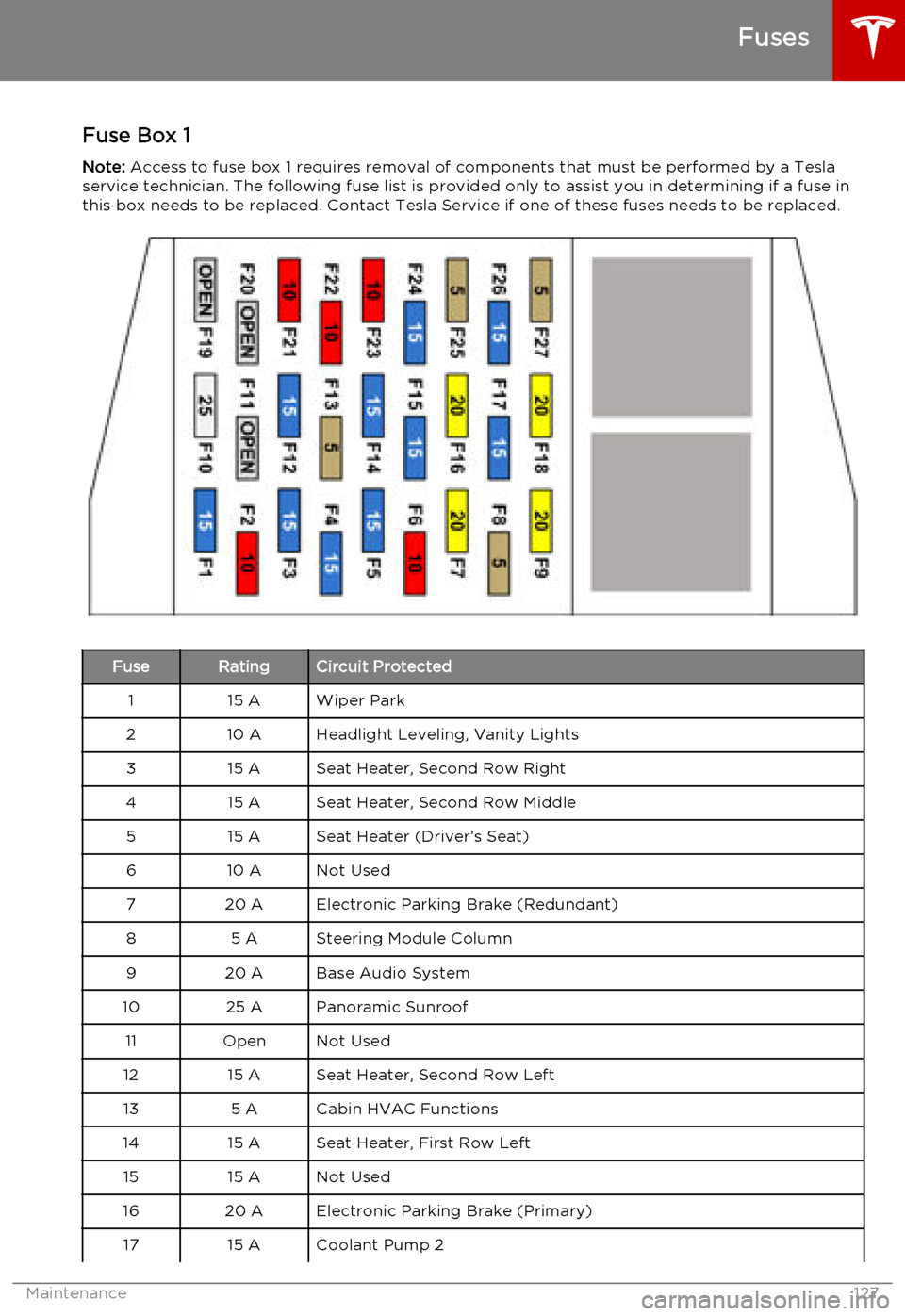
Fuse Box 1Note: Access to fuse box 1 requires removal of components that must be performed by a Tesla
service technician. The following fuse list is provided only to assist you in determining if a fuse in this box needs to be replaced. Contact Tesla Service if one of these fuses needs to be replaced.FuseRatingCircuit Protected115 AWiper Park210 AHeadlight Leveling, Vanity Lights315 ASeat Heater, Second Row Right415 ASeat Heater, Second Row Middle515 ASeat Heater (Driver’s Seat)610 ANot Used720 AElectronic Parking Brake (Redundant)85 ASteering Module Column920 ABase Audio System1025 APanoramic Sunroof11OpenNot Used1215 ASeat Heater, Second Row Left135 ACabin HVAC Functions1415 ASeat Heater, First Row Left1515 ANot Used1620 AElectronic Parking Brake (Primary)1715 ACoolant Pump 2
Fuses
Maintenance127
Page 128 of 164

FuseRatingCircuit Protected1820 APremium Audio Amplifier19OpenNot Used20OpenNot Used2115 APark Assist225 AThermal System Controls2315 ANot Used245 ACoolant Pump 32515 ADrive Inverter26-Coolant Pump 12710 ARestraints Control Module
Fuses
128Model S Owner's Manual
Page 140 of 164

MotorTypeAC induction motor, liquid-cooled, with
variable frequency driveRating375 VoltsMaximum Speed16000 rpm
Transmission
TypeSingle speed fixed gearOverall Final Drive Ratio9.73:1Reverse GearReverse direction of motor, limited to
24 km/h
Steering
TypeRack and pinion with electronic power
steering
Variable ratio and speed sensitiveNumber of turns lock to lock2.45Turning Circle (curb to curb)11.3 metres
Subsystems
140Model S Owner's Manual
Page 142 of 164

Battery - High VoltageTypeLiquid-cooled lithium ion (Li-ion)Rating60 or 85 kWh (at beginning of life)Voltage and Polarity366V DC negative (-) groundTemperature RangeDo not expose Model S to ambient
temperatures above 140° F (60° C) or
below -22° F (-30° C) for more than 24
hours at a time.
Subsystems
142Model S Owner's Manual
Page 160 of 164
AABS (Anti-lock Braking System) 52
Acceleration (dual motor) 74
access panel, removing 123accessoriesinstalling 133
plugging into power socket 87
air circulation 81
air conditioning 80
air distribution 81
air filter 82
air suspension 84
air vents 82
airbags 32
alarm 95
all-season tires 111
always connected, setting 70
anti-lock braking (ABS) 52
audioplaying files 85
steering wheel buttons 37
auto-raising suspension 83
B
backup camera 71
battery (12V)complete discharge 103
specifications 141Battery (high voltage)care of 103
coolant 123
specifications 142
temperature limits 103
battery (key), replacing 5
Bluetoothdevices, playing audio files from 86
general information 88
phone, pairing and using 88
body repairs 133
body touch up 120
brake fluid replacement 108
brakesfluid level 124
overview of 52
specifications 141
brightness of displays 77
C
cabin temperature control 80
calendar 93
California Proposition 65 155
camera (rear view) 71
car cover 120
car washes 118
carpets, cleaning 119
CE certifications 157
CHAdeMO 102
chains 112
change of ownership 79
charge port 104
charge port light 105chargingcharge settings 106
components and equipment 101
instructions 104
public charging stations 102
scheduling 106
status of 107child protectiondisabling liftgate and rear door handles 7
disabling rear window switches 9child seatscleaning 119
installing and using 23
Tesla built-in rear facing 28
cleaning 118
climate controls 80
climate ionizer 77
Cold Weather controls 74
collision avoidance 58
console12V power socket 87
cup holders 16
USB ports 87contact informationroadside assistance 149
Tesla 156coolantBattery, checking level of 123
Battery, replacement interval 108
copyrights 153, 154
cornering lights 50
Creep 74
cruise control 60
cup holders 16
customizing Model S 77
D dashboard overview 2
data recording 155
day mode 77
delivery mileage 155
devices
Index
160Model S Owner's Manual