battery TESLA MODEL S 2015 User Guide
[x] Cancel search | Manufacturer: TESLA, Model Year: 2015, Model line: MODEL S, Model: TESLA MODEL S 2015Pages: 164, PDF Size: 4.78 MB
Page 70 of 164

Driving Tips to Maximize RangeYou can maximize your driving range usingthe same driving habits that you use to
conserve fuel in a gasoline-powered vehicle. In
addition to driving habits, energy
consumption depends on environmental conditions (such as cold weather and hillyroads). To get the maximum mileage from a
charge:
• Avoid frequent and rapid acceleration. • Instead of using the brake to slow down, move your foot off the accelerator.
Whenever Model S is moving and your
foot is off the accelerator, regenerative
braking slows down Model S and feeds
surplus energy back to the Battery (see
Regenerative Braking on page 53).
• Keep tires at the recommended inflation pressures (see Tire Care and Maintenance
on page 109).
• Lighten your load by removing any unnecessary cargo.
• Limit the use of resources such as heating and air conditioning. Using seat heaters to
keep warm is more efficient than heating the cabin. To automatically limit the
amount of power that the climate control system uses to maintain the temperatureof the Battery and the cabin area, touch
Controls > Driving > Range Mode > ON .
Note: On Dual Motor vehicles, you can turn on
Range Mode only when acceleration is set to Sport (if you change Acceleration to Insane,Range Mode automatically turns off).
The power meter on the instrument panel and
the Energy app (described next) provide
feedback on energy usage. With this
feedback, you will soon become familiar with how driving habits and environmental
conditions impact how much energy Model S
is using.
Energy App Use the energy app to view real-time and
projected energy usage. Choose from two
types of charts:
• Consumption Chart: - display how much energy Model S has consumed over thepast 5, 15 or 30 miles (10, 25 or 50 kms).
• Trip Chart - If your Model S is equipped with the navigation option, you can trackthe amount of energy being consumed
while navigating to a destination. The gray
line represents predicted usage and the
green line represents actual usage. Touchthe zoom icon in the top right corner to change the zoom level.
Note: The Trip Chart displays energy usage
only if you are currently navigating to a destination.
Note: In some situations, values and distances
on the Trip chart may be inaccurate. For example, when charging Model S during anactive navigation route. To resolve
inaccuracies, cancel and reinitiate navigation to the destination.
Saving Energy Model S has an energy-saving feature that
reduces the amount of energy being
consumed when Model S is not in use. Touch Controls > Displays > Energy Saving and
choose from the following options:
• OFF . All display systems remain powered
when Model S is not in use, providing the most responsive experience. More energy
is consumed.
• NIGHTLY . Model S shifts to the energy-
saving mode at night (10 pm to 5 am).
• ON. Significantly less energy is consumed
whenever Model S is not in use. The start-
up time of the instrument panel and
Bluetooth could be slower.
• Always Connected . Preserves cell
connectivity when energy saving is active.
This allows the mobile app to connect to
Model S more quickly, and provides
immediate 3G internet access when entering the car. Slightly more energy isconsumed.
Getting Maximum Range
70Model S Owner's Manual
Page 75 of 164

1.Close
Touch the circled X in the top left corner
of a window to close it (or you can touch anywhere outside the window).
2. Sunroof
If Model S is equipped with a sunroof,
touch to adjust its position (see Sunroof
on page 15).
3. Suspension
If Model S is equipped with Smart Air
Suspension, touch to manually raise or lower Model S, or to remove a previously
saved auto-raising location (see Smart Air
Suspension on page 83). Model S must
be powered on and you must press the
brake pedal before you can change
suspension settings. Smart Air Suspension
causes Model S to self-level, even when
powered off. Therefore, when towing or
lifting, you must disable self-leveling (see
Instructions for Transporters on page 150
and Jacking and Lifting on page 132).
4. Driving
• Steering mode Adjust the amount of effort requiredto turn the steering wheel. Sport feels
more responsive whereas Comfort
feels easier to drive and park (see
Steering Wheel on page 37).
• Acceleration (Dual Motor vehicles only)
Choose an acceleration level. Sport is the standard level of acceleration and allows you to maximize driving range(see the Range Mode setting below).
Choose Insane if you want to increase
peak torque by approximately 50 per cent. If you choose Insane, the Range
mode setting, if on, automatically turns off.
• Creep
When on, Model S slowly movesforward when in Drive and backward
in Reverse when you release the brake
(similar to a conventional vehicle with an automatic transmission). You can
adjust this setting only when Model S
is in Park.
• Traction ControlTo allow the wheels to spin on a
standard single motor Model S, you can turn off traction control. On a dualmotor Model S, you can enable Slip
Start. If you turn off Traction Control
(or enable Slip Start), a warning
message displays on the instrument
panel. Traction control turns off for
the current drive only. On dual motor
vehicles, traction control is
automatically turned on again when the speed exceeds 40 mph
(64 km/h). See Traction Control on
page 54.
• Regenerative braking
When you release the accelerator
when driving, regenerative braking
slows Model S and feeds any surplus
energy back to the Battery. If set to
Low, Model S does not slow down as
quickly, but you may experience less range (see Regenerative Braking on
page 53).
Note: Regardless of the setting, the
energy gained by regenerative
braking is reduced if the Battery is
full, or if it is extremely cold or hot
(the surplus energy is used to heat or
cool the Battery).
• Range Mode
If on, Model S conserves energy by
limiting the power of the climate
control system. Cabin heating and
cooling may be less effective, but seat
heaters turn on to compensate. In
Dual Motor vehicles, Range Mode can
be turned on only when acceleration
is set to Sport (see above).
5. Cold Weather
If Model S is equipped with the cold
weather option, you can control all seat heaters as well as the heated wipers andsteering wheel. Heaters that are turned on
are displayed in red. To turn off all seat
heaters, touch All Off. Note that you can
also control the front driver and
passenger seats using the main climate
control panel located on the bottom of
the touchscreen (see Climate Controls on
page 80).
6. Trips
View and reset the trip meters that
summarize how far you have driven (see
Trip Information on page 69).
7. Displays
Controls
Using the Touchscreen75
Page 78 of 164

1.Adjust settings associated with installed
apps (applications). Settings associated with apps that are either unavailable on
your Model , or have no settings that you
can adjust at this time, are grayed out.
2. Manage driver profiles (see Driver Profiles
on page 36).
3. Units & Format
Adjust how Model S displays:
• Distance: Miles or km can be shown on the range display, speedometer,
energy chart, trip meters, Google map searches and navigation routes.
• Time Format: 12 or 24 hour.
• Temperature: o
C or o
F.
• Energy & Charging: Display remaining energy and charging units as either a
percentage of battery energy
remaining, or as an estimate of the
distance that you can drive. When you choose Distance, you can display
mileage based on either:
• Rated - based on EPA testing.
• Ideal - assumes ideal driving conditions based on driving at a
steady speed of 55 mph
(89 km/h) on a flat road, and using no additional energy (seat
heaters, air conditioning, etc).
Note: When anticipating when you
need to charge, use range estimates as a general guideline only.
4. Vehicle
• Drive-away Door Lock: If on, all doors automatically lock whenever you
drive Model S over 5 mph (8 km/h)
(see Drive-away Locking on page 7).
• Walk-away Door Lock: If on, all doors automatically lock when you walkaway from Model S, carrying the key with you (see Walk-away Locking on
page 7). Available only if Model S is
equipped with the optional tech
package.
• Child-Protection Lock: If on, safety locks prevent the rear doors and theliftgate from being opened from
inside Model S.• Auto-Present Handles: If on, door handles extend automatically
whenever you approach Model S carrying a key, whether locked orunlocked (see Using Exterior Door
Handles on page 6). Note that to
preserve battery life, Model is
designed to temporarily disable the
Auto-Present Handles feature when
the key has been out of range for
more than 48 hours, or if the key
remains within range for five minutes
after all doors have been closed.
• Headlights After Exit: If on, headlights stay on for two minutes after you exit,
or until you lock Model S (see
Headlights After Exit on page 50).
• Mirror Auto-Tilt: If on, exterior mirrors tilt downward when reversing (see Mirrors on page 40). Available only if
Model S is equipped with the optional tech package.
• Mirror Auto-Fold: If on, exterior mirrors fold when you lock Model S
with the key or walk-away locking. They extend automatically when you
return to Model S. Available only if
Model S is equipped with both folding mirrors (newer models) and the
optional tech package. For newer
Model S vehicles, you can also fold
mirrors manually by touching the
center mirror control button (see
Mirrors on page 40).
• Ionizer: If on, the air ionizer freshens the air in the cabin.
• Smart Preconditioning: If on, Model S predicts your driving schedule and
adjusts the temperature of the cabin and the Battery so the vehicle is
comfortable and ready to drive. It may take some time for Model S to
learn your driving habits.
5. Safety & Security
Turn various safety and security features
on and off:
• Active safety devices Model S is equipped with, such as Park Assist
Chimes (see Park Assist on page 66).
• Alarm, and security options Model S is equipped with (see Security Settings
on page 95).
• Remote access by Tesla’s mobile applications (see Mobile App on page
100).
6. Displays
Settings
78Model S Owner's Manual
Page 80 of 164
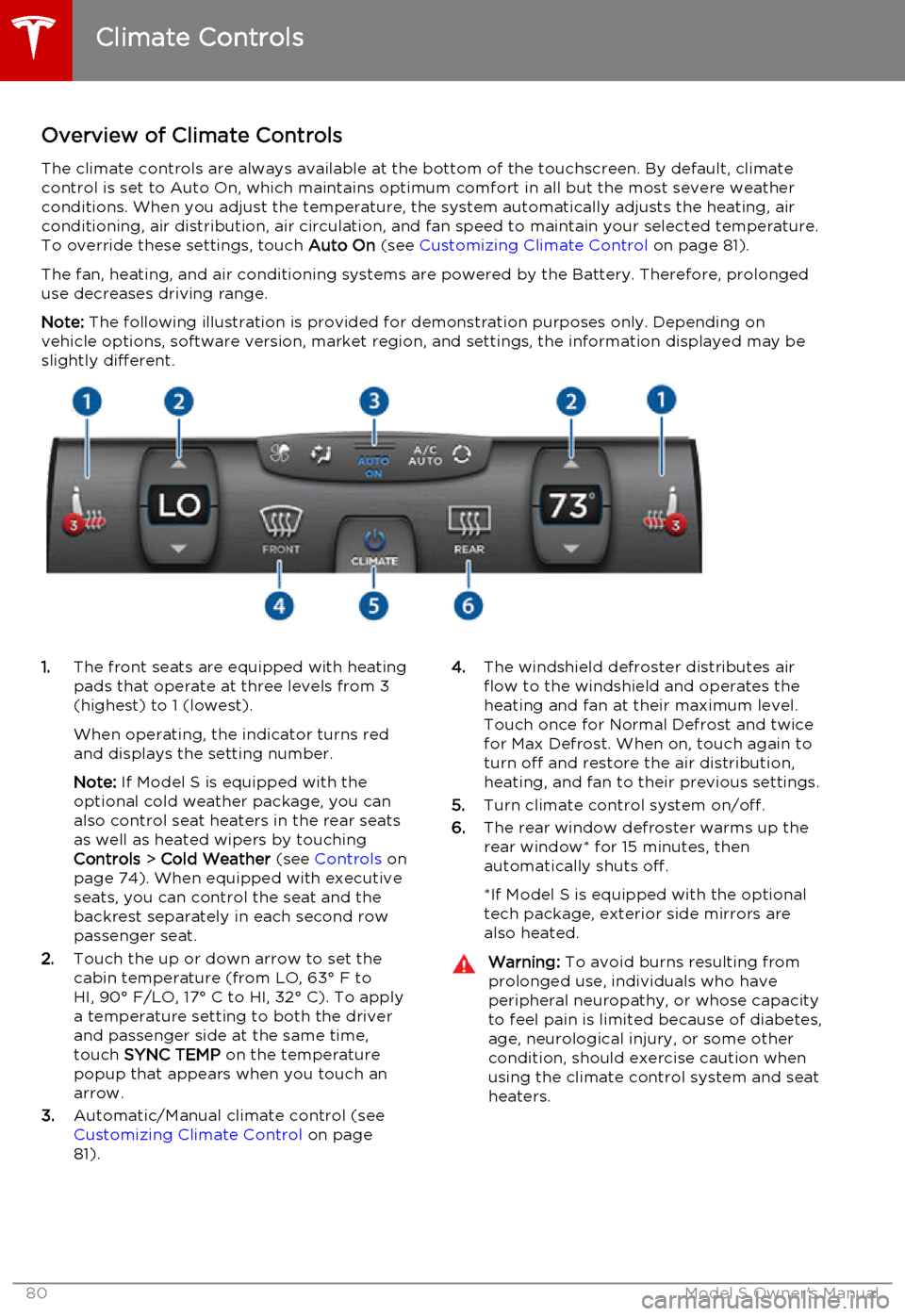
Overview of Climate ControlsThe climate controls are always available at the bottom of the touchscreen. By default, climate
control is set to Auto On, which maintains optimum comfort in all but the most severe weather conditions. When you adjust the temperature, the system automatically adjusts the heating, air
conditioning, air distribution, air circulation, and fan speed to maintain your selected temperature.
To override these settings, touch Auto On (see Customizing Climate Control on page 81).
The fan, heating, and air conditioning systems are powered by the Battery. Therefore, prolonged use decreases driving range.
Note: The following illustration is provided for demonstration purposes only. Depending on
vehicle options, software version, market region, and settings, the information displayed may be
slightly different.1. The front seats are equipped with heating
pads that operate at three levels from 3
(highest) to 1 (lowest).
When operating, the indicator turns red
and displays the setting number.
Note: If Model S is equipped with the
optional cold weather package, you can
also control seat heaters in the rear seats
as well as heated wipers by touching
Controls > Cold Weather (see Controls on
page 74). When equipped with executive seats, you can control the seat and the
backrest separately in each second row
passenger seat.
2. Touch the up or down arrow to set the
cabin temperature (from LO, 63° F to
HI, 90° F/LO, 17° C to HI, 32° C). To apply
a temperature setting to both the driver
and passenger side at the same time,
touch SYNC TEMP on the temperature
popup that appears when you touch an
arrow.
3. Automatic/Manual climate control (see
Customizing Climate Control on page
81).4. The windshield defroster distributes air
flow to the windshield and operates the
heating and fan at their maximum level.
Touch once for Normal Defrost and twice
for Max Defrost. When on, touch again to
turn off and restore the air distribution,
heating, and fan to their previous settings.
5. Turn climate control system on/off.
6. The rear window defroster warms up the
rear window* for 15 minutes, then
automatically shuts off.
*If Model S is equipped with the optional
tech package, exterior side mirrors are
also heated.Warning: To avoid burns resulting from
prolonged use, individuals who have
peripheral neuropathy, or whose capacity to feel pain is limited because of diabetes,
age, neurological injury, or some other
condition, should exercise caution when using the climate control system and seat
heaters.
Climate Controls
80Model S Owner's Manual
Page 82 of 164
Ventilation
Outside air is drawn into Model S through the
grill in front of the windshield. Keep the grill
clear of obstructions such as leaves and snow.
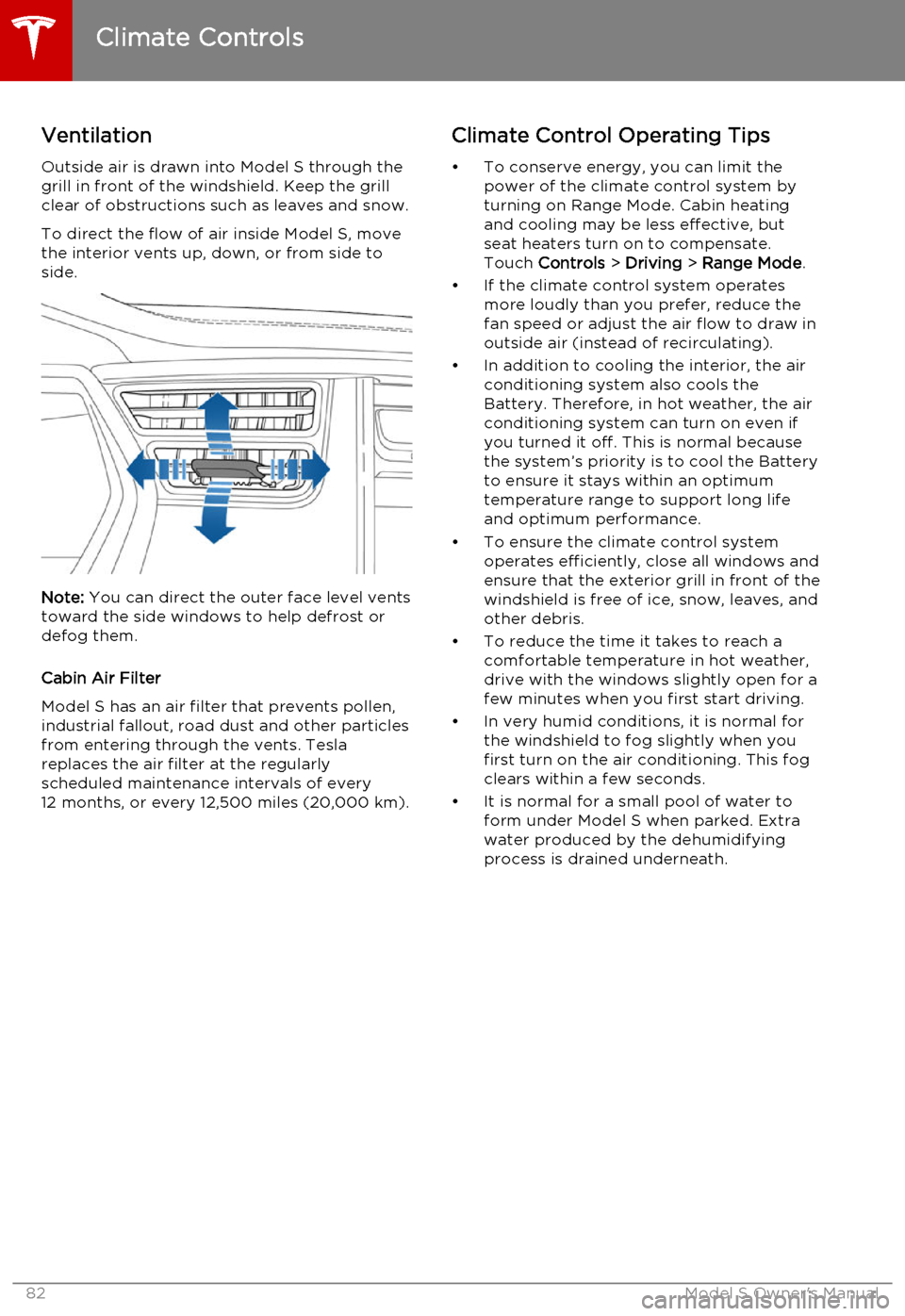
To direct the flow of air inside Model S, move
the interior vents up, down, or from side to
side.
Note: You can direct the outer face level vents
toward the side windows to help defrost or defog them.
Cabin Air Filter
Model S has an air filter that prevents pollen,
industrial fallout, road dust and other particles
from entering through the vents. Tesla replaces the air filter at the regularly
scheduled maintenance intervals of every 12 months, or every 12,500 miles (20,000 km).
Climate Control Operating Tips
• To conserve energy, you can limit the power of the climate control system by
turning on Range Mode. Cabin heating and cooling may be less effective, butseat heaters turn on to compensate.
Touch Controls > Driving > Range Mode .
• If the climate control system operates more loudly than you prefer, reduce thefan speed or adjust the air flow to draw in
outside air (instead of recirculating).
• In addition to cooling the interior, the air conditioning system also cools the
Battery. Therefore, in hot weather, the air
conditioning system can turn on even if
you turned it off. This is normal because the system’s priority is to cool the Battery
to ensure it stays within an optimum
temperature range to support long life and optimum performance.
• To ensure the climate control system operates efficiently, close all windows and
ensure that the exterior grill in front of the
windshield is free of ice, snow, leaves, and
other debris.
• To reduce the time it takes to reach a comfortable temperature in hot weather,
drive with the windows slightly open for a
few minutes when you first start driving.
• In very humid conditions, it is normal for the windshield to fog slightly when you
first turn on the air conditioning. This fog
clears within a few seconds.
• It is normal for a small pool of water to form under Model S when parked. Extra
water produced by the dehumidifying
process is drained underneath.
Climate Controls
82Model S Owner's Manual
Page 87 of 164
USB Connections
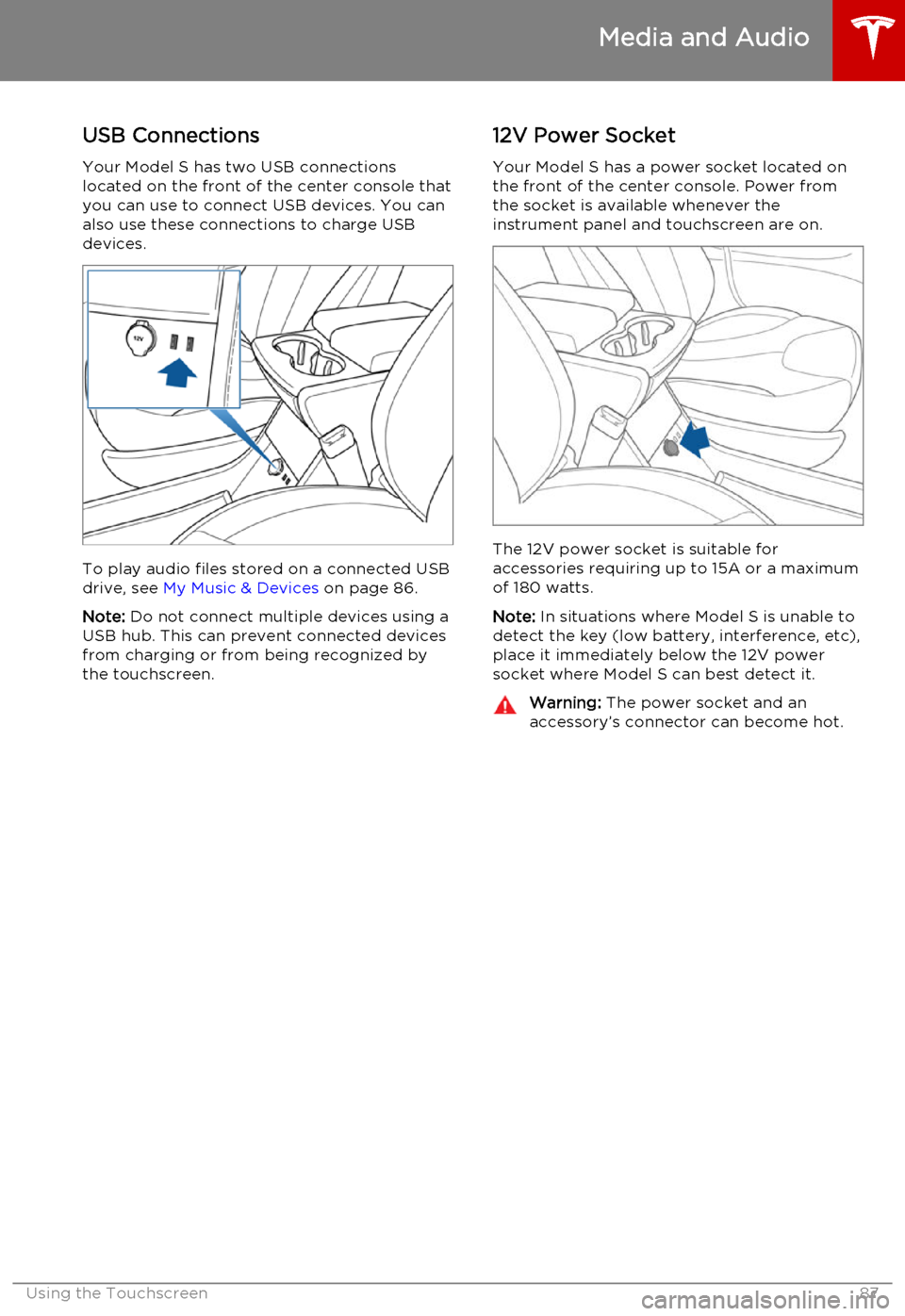
Your Model S has two USB connections
located on the front of the center console that
you can use to connect USB devices. You can
also use these connections to charge USB devices.
To play audio files stored on a connected USBdrive, see My Music & Devices on page 86.
Note: Do not connect multiple devices using a
USB hub. This can prevent connected devices from charging or from being recognized bythe touchscreen.
12V Power Socket
Your Model S has a power socket located on
the front of the center console. Power from
the socket is available whenever the
instrument panel and touchscreen are on.
The 12V power socket is suitable for
accessories requiring up to 15A or a maximum
of 180 watts.
Note: In situations where Model S is unable to
detect the key (low battery, interference, etc), place it immediately below the 12V power
socket where Model S can best detect it.
Warning: The power socket and an
accessory’s connector can become hot.
Media and Audio
Using the Touchscreen87
Page 88 of 164

Bluetooth®
Compatibility
You can use your Bluetooth-capable phone
hands-free in Model S provided your phone is within operating range. Although Bluetooth
typically supports wireless communication
over distances of up to approximately 30 feet
(9 meters), performance can vary based on
the phone you are using.
Before using your phone with Model S, you
must pair it. Pairing sets up Model S to work
with your Bluetooth-capable phone (see Pairing a Bluetooth Phone on page 88).
You can pair up to ten Bluetooth phones.
Model S always automatically connects to the
last phone that was used (provided it is within
range). If you want to connect to a different phone, see Connecting to a Paired Phone on
page 89.
Note: On many phones, Bluetooth turns off if
the phone’s battery is low.
Note: In addition to phones, you can also pair
Bluetooth-enabled devices with Model S. For example, you can pair an iPod Touch or an
iPad or Android tablet to stream music.
Pairing a Bluetooth Phone
Pairing sets up Model S to work with your
Bluetooth-capable phone. Once a phone is paired, Model S can connect to it wheneverthe phone is within range.
To pair a phone, follow these steps while
sitting inside Model S:
1. Ensure both the touchscreen and the
phone are powered on.
2. On the touchscreen’s status bar, touch the
Bluetooth icon.
3. On your phone, enable Bluetooth and set
it to discoverable.
4. On the Model S touchscreen, touch Start
Search. The touchscreen searches then
displays the list of all available Bluetooth devices within operating distance.
5. On the Model S touchscreen, touch the
phone with which you want to pair. Within
a few seconds, the touchscreen displays a
randomly generated number, and your
phone should display the same number.
6. Check that the number displayed on your
phone matches the number displayed on
the touchscreen. Then, on your phone,
confirm that you want to pair.When paired, Model S automatically connects to the phone, and the touchscreen displays
the Bluetooth symbol next to the phone’s name to show that the connection is active.
Importing Contacts
Once paired, you can use the Bluetooth
settings screen to specify whether you want
to allow access to your phone’s contacts and recent calls.
If access is turned on, you can see your list of contacts on the Model S touchscreen. Touch
Phone > Contacts . You can then touch a
contact to dial its phone number or navigate
to its address.
Note: Before contacts can be imported, you
may need to either set your phone to allow syncing, or respond to a popup on your phone
to confirm that it is OK to sync contacts. This
varies depending on the type of phone you are using. For details, refer to the owner
documentation provided with your phone.
If access is turned on, imported information is
displayed when you touch the contacts tab on
the Phone app.
Unpairing a Bluetooth Phone
If you want to disconnect your phone and use it again later, simply touch Disconnect on the
Bluetooth settings screen. If you do not want
to use your phone with Model S again, touch
Forget This Device. Once you forget a device,
you need to pair it again if you want to use it
with Model S (see Pairing a Bluetooth Phone
on page 88).
Note: Your phone automatically disconnects
whenever you leave Model S.
Phone
88Model S Owner's Manual
Page 91 of 164
During Navigation
During navigation, the touchscreen displays the navigation route on the map. Dependingon the map’s zoom level, you might not be
able to see the entire route. But as you drive,
the map shows your location on the map.
Whenever a navigation route is active, you
can display an overview of the route by touching the route overview icon:The route overview icon is
available on the right side of the
search bar whenever a navigation
route is active. You can toggle
between North Up, Heading Up
and Route Overview (see Using
Maps on page 90). As you travel
on your navigation route, the zoom
level adjusts to display an overview
of the route between your current
location and your destination.
The touchscreen also displays a turn-by-turn
direction list that includes estimated driving time, arrival time, and an estimate of howmuch energy will remain when you arrive atyour destination (see Predicting Energy Usage
on page 91).
During navigation, the instrument panel also
displays the turn-by-turn directions and you
will hear spoken instructions.
Model S detects real-time traffic conditions
and automatically adjusts the estimated
driving and arrival times based on traffic conditions. In situations where traffic
conditions will delay your estimated time of
arrival and an alternate route is available,
Model S reroutes you to your destination. You
can turn this feature off by touching
Controls > Settings > Apps > Maps &
Navigation > Traffic-Based Routing > Off .
Note: Traffic-based navigation is a BETA
feature in Release 6.0.
When you display the traffic layer on the map,
green traffic lines display under the route line,
whereas yellow and red traffic lines display on
top of the route line to ensure that heavy
traffic areas are easy to identify.
Model S can also monitor traffic to your work
location (on weekday mornings) and to your
home location (on weekday evenings) and
advise you if there is a better route in
situations where traffic conditions will cause a delay. You can set the time savings required
before the advice is given by touching
Controls > Settings > Apps > Maps &
Navigation > Min Improvement for Commute
Advice .
Note: Commute advice is available only if you
have saved a Home and Work Location (see Favorite Destinations on page 92).
Predicting Energy Usage
When navigating to a destination, Model S helps you anticipate your charging needs bycalculating the amount of energy that willremain when you reach your destination. Thecalculation is an estimate based on drivingand environmental factors such as predicted
speed and elevation changes. The
touchscreen displays this calculation in the
lower right corner of the turn-by-turn
direction list.
Throughout your route, Model S monitors
energy usage and updates the calculation as
needed. A popup warning displays above the
calculated amount advising you when:
• A yellow warning displays when you should drive slowly to converse energy.
Model S predicts that you will have very little energy remaining when you reach
your destination. For tips on conserving energy, see Getting Maximum Range on
page 70.
• A red warning displays when you must charge Model S to reach your destination.
Model S also lets you know if you have
enough energy for a round trip. Tap the
battery icon at the bottom of the turn-by-turn
navigation list to determine if Model S has
enough energy to get to your destination and
then return back to your starting point.
When navigating, the energy app displays
real-time energy usage for the current trip.
See Getting Maximum Range on page 70.
Maps and Navigation
Using the Touchscreen91
Page 101 of 164

High Voltage Components1.Battery
2. DC-DC converter and junction box
3. High voltage cabling (colored orange)
4. 10 kW on-board master charger
5. OPTIONAL: 10 kW on-board charger
6. Charge port
7. Drive unitWarning: The high voltage system has no
user serviceable parts. Do not
disassemble, remove or replace high
voltage components, cables or
connectors. High voltage cables are
colored orange for easy identification.Warning: Read and follow all instructions
provided on the labels that are attached to Model S. These labels are there for
your safetyWarning: In the unlikely event that a fire
occurs, immediately contact your local
fire emergency responders.
Electric Vehicle Components
Charging101
Page 103 of 164
About the Battery
Model S has one of the most sophisticated
battery systems in the world. The most important way to preserve the Battery is to
LEAVE YOUR MODEL S PLUGGED IN when
you are not using it. This is particularly
important if you are not planning to drive
Model S for several weeks. When plugged in,
Model S wakes up when needed to
automatically maintain a charge level that
maximizes the lifetime of the Battery.
There is no advantage to waiting until the
Battery’s level is low before charging. In fact,
the Battery performs best when charged
regularly.
Note: If the Model S Battery becomes
completely discharged in a situation in which
towing is required, the owner is responsible for towing expenses. Discharge-related
towing expenses are not covered under the
Roadside Assistance policy.
Battery Care
Never allow the Battery to fully discharge.
Even when Model S is not being driven, its
Battery discharges very slowly to power the
onboard electronics. On average, the Battery discharges at a rate of 1% per day. Situations
can arise in which you must leave Model S
unplugged for an extended period of time (for
example, at an airport when traveling). In these situations, keep the 1% in mind to ensure
that you leave the Battery with a sufficient
charge level. For example, over a two week
period (14 days), the Battery discharges by
approximately 14%.
Discharging the Battery to 0% may
permanently damage the Battery. To protect against a complete discharge, Model S enters
a low-power consumption mode when the
charge level drops to 5%. In this mode, the
Battery stops supporting the onboard electronics to slow the discharge rate to
approximately 4% per month. Once this low-
power consumption mode is active, it is
important to plug in Model S within two
months to avoid Battery damage.
Note: When the low-power consumption
mode is active, the auxiliary 12V battery is no
longer being charged and can completely
discharge within 12 hours. In the unlikely event
that this occurs, you may need to jump start
or replace the 12V battery before you can
charge. In this situation, contact Tesla.Temperature Limits
For better long-term performance, avoid
exposing Model S to ambient temperatures above 140° F (60° C) or below -22° F (-30° C)
for more than 24 hours at a time.
Energy Saving Feature
Model S has an energy-saving feature that
reduces the amount of energy being consumed when Model S is not in use. Touch
Controls > Displays > Energy Saving . For more
information on maximizing range and saving
energy, see Getting Maximum Range on page
70.
Battery Warnings and CautionsWarning: The Battery has no parts that an
owner or a non-Tesla authorized service technician can service. Under no
circumstances should you open or
tamper with the Battery. Always contact Tesla to arrange for Battery servicing.Caution: If the Battery’s charge level falls
to 0%, you must plug it in. If you leave it
unplugged for an extended period, it may
not be possible to charge Model S or use
the vehicle without jump starting or
replacing the 12V battery. Leaving Model S unplugged for an extendedperiod can also result in permanent
Battery damage. If you are unable to
charge Model S, contact Tesla
immediately.Caution: The Battery requires no owner
maintenance. Do not remove the filler cap
and do not add fluid. If the instrument
panel warns you that the fluid level is low, contact Tesla immediately.
Battery Information
Charging103