trunk TESLA MODEL S 2015 User Guide
[x] Cancel search | Manufacturer: TESLA, Model Year: 2015, Model line: MODEL S, Model: TESLA MODEL S 2015Pages: 164, PDF Size: 4.78 MB
Page 29 of 164

2.Push the lever to release the head
supports from the seat back, then fold
back onto the seat.
3. Secure the Velcro strap.
4.Pull the strap at the rear of the seat to
fold the seat assembly into the trunk floor.
5. Replace the cover on the trunk floor.
Tesla Built-In Rear Facing Child Seats
Seating and Safety Restraints29
Page 37 of 164
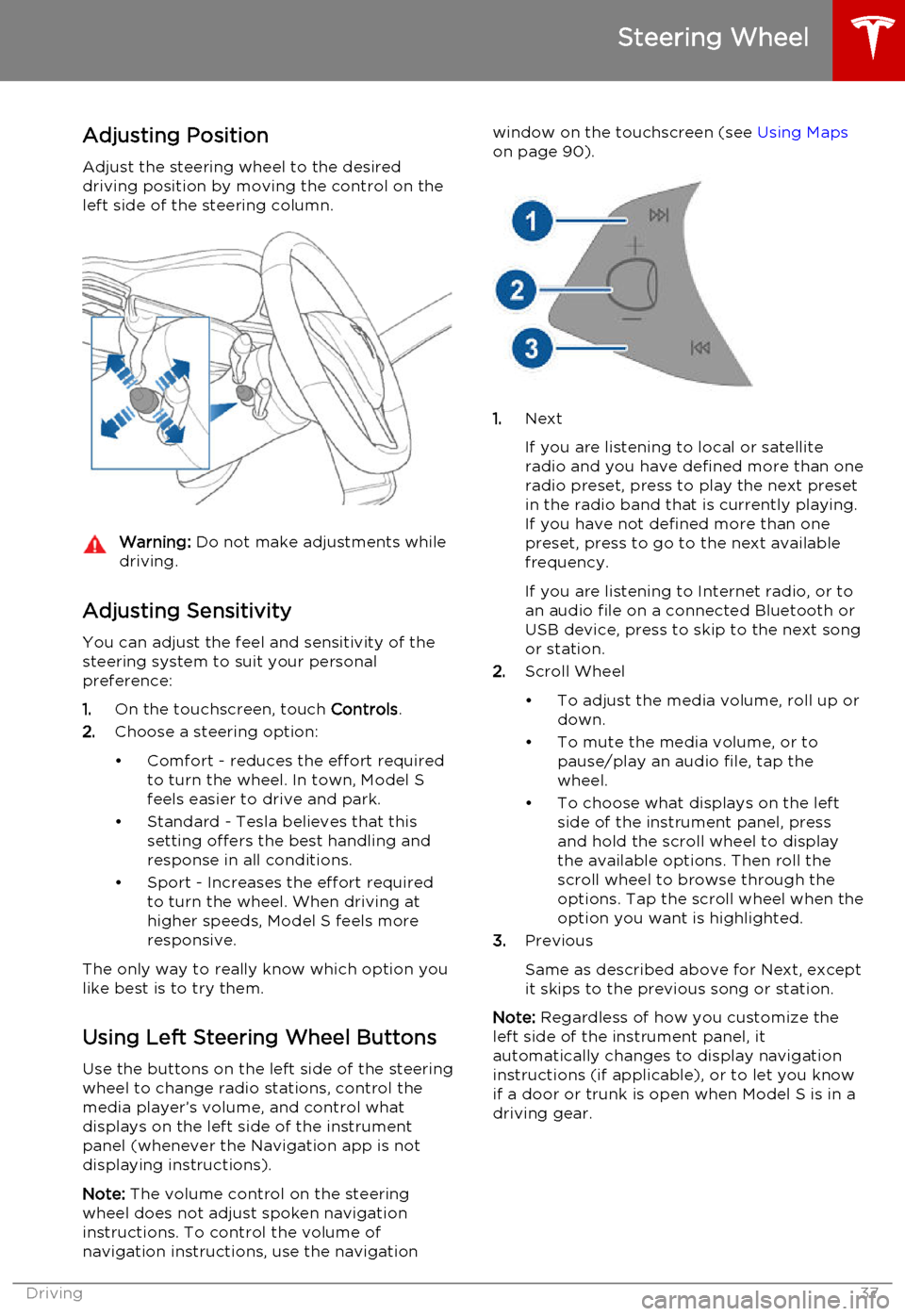
Adjusting Position
Adjust the steering wheel to the desired driving position by moving the control on the
left side of the steering column.Warning: Do not make adjustments while
driving.
Adjusting Sensitivity
You can adjust the feel and sensitivity of the
steering system to suit your personal preference:
1. On the touchscreen, touch Controls.
2. Choose a steering option:
• Comfort - reduces the effort required to turn the wheel. In town, Model S
feels easier to drive and park.
• Standard - Tesla believes that this setting offers the best handling andresponse in all conditions.
• Sport - Increases the effort required to turn the wheel. When driving athigher speeds, Model S feels more
responsive.
The only way to really know which option you
like best is to try them.
Using Left Steering Wheel Buttons
Use the buttons on the left side of the steering
wheel to change radio stations, control the
media player’s volume, and control what
displays on the left side of the instrument panel (whenever the Navigation app is not
displaying instructions).
Note: The volume control on the steering
wheel does not adjust spoken navigation instructions. To control the volume of
navigation instructions, use the navigation
window on the touchscreen (see Using Maps
on page 90).
1. Next
If you are listening to local or satellite
radio and you have defined more than one
radio preset, press to play the next preset in the radio band that is currently playing.
If you have not defined more than one
preset, press to go to the next available
frequency.
If you are listening to Internet radio, or to
an audio file on a connected Bluetooth or USB device, press to skip to the next song
or station.
2. Scroll Wheel
• To adjust the media volume, roll up or down.
• To mute the media volume, or to pause/play an audio file, tap the
wheel.
• To choose what displays on the left side of the instrument panel, press
and hold the scroll wheel to display
the available options. Then roll the
scroll wheel to browse through the
options. Tap the scroll wheel when the option you want is highlighted.
3. Previous
Same as described above for Next, except
it skips to the previous song or station.
Note: Regardless of how you customize the
left side of the instrument panel, it
automatically changes to display navigation instructions (if applicable), or to let you knowif a door or trunk is open when Model S is in a
driving gear.
Steering Wheel
Driving37
Page 46 of 164
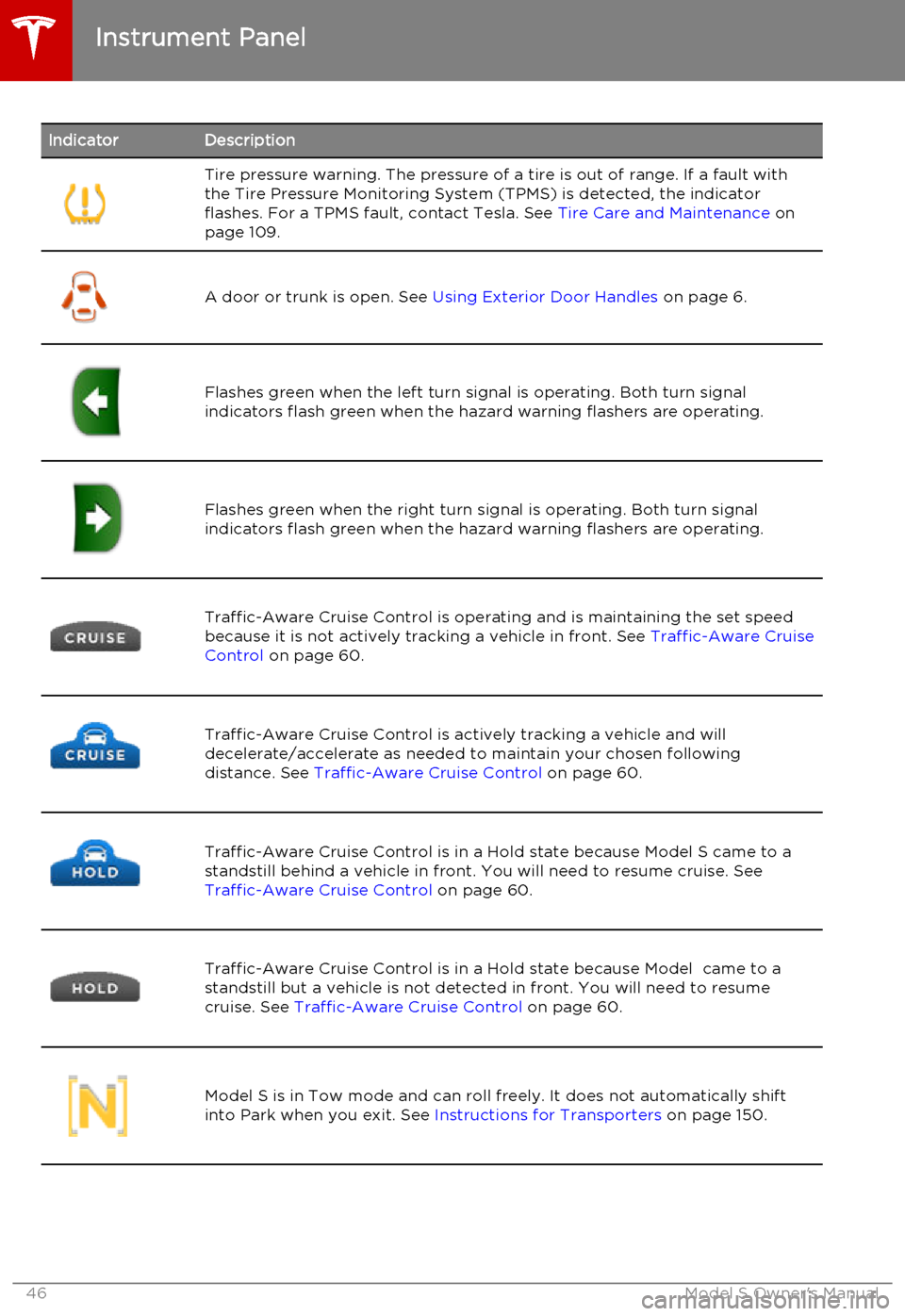
IndicatorDescriptionTire pressure warning. The pressure of a tire is out of range. If a fault with
the Tire Pressure Monitoring System (TPMS) is detected, the indicator
flashes. For a TPMS fault, contact Tesla. See Tire Care and Maintenance on
page 109.
A door or trunk is open. See Using Exterior Door Handles on page 6.Flashes green when the left turn signal is operating. Both turn signal
indicators flash green when the hazard warning flashers are operating.Flashes green when the right turn signal is operating. Both turn signal
indicators flash green when the hazard warning flashers are operating.Traffic-Aware Cruise Control is operating and is maintaining the set speed
because it is not actively tracking a vehicle in front. See Traffic-Aware Cruise
Control on page 60.Traffic-Aware Cruise Control is actively tracking a vehicle and will
decelerate/accelerate as needed to maintain your chosen following
distance. See Traffic-Aware Cruise Control on page 60.Traffic-Aware Cruise Control is in a Hold state because Model S came to a
standstill behind a vehicle in front. You will need to resume cruise. See
Traffic-Aware Cruise Control on page 60.Traffic-Aware Cruise Control is in a Hold state because Model came to a
standstill but a vehicle is not detected in front. You will need to resume
cruise. See Traffic-Aware Cruise Control on page 60.Model S is in Tow mode and can roll freely. It does not automatically shift
into Park when you exit. See Instructions for Transporters on page 150.Instrument Panel
46Model S Owner's Manual
Page 95 of 164

About the Security System
If Model S does not detect a key nearby and a locked door or trunk is opened, an alarmsounds and headlights and turn signals flash.
To deactivate the alarm, press any button on
the key.
To manually enable or disable the alarm
system, touch Controls > Settings > Safety &
Security > Alarm . When set to on, Model S
activates its alarm one minute after the doors
lock and a recognized key is no longer
detected nearby.
Security Settings
Using the Touchscreen95
Page 104 of 164
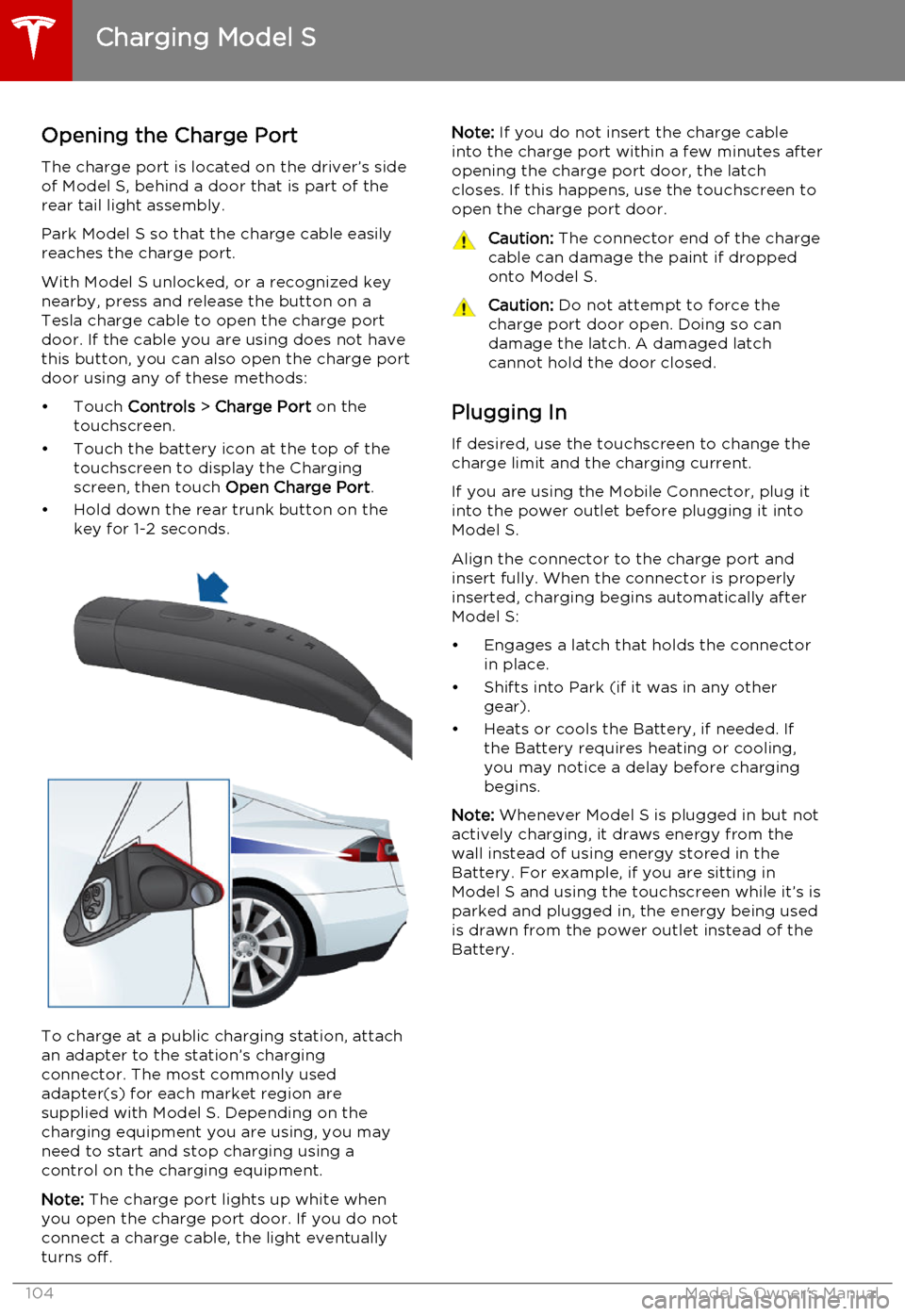
Opening the Charge Port
The charge port is located on the driver’s side of Model S, behind a door that is part of therear tail light assembly.
Park Model S so that the charge cable easily
reaches the charge port.
With Model S unlocked, or a recognized key
nearby, press and release the button on a
Tesla charge cable to open the charge port door. If the cable you are using does not havethis button, you can also open the charge portdoor using any of these methods:
• Touch Controls > Charge Port on the
touchscreen.
• Touch the battery icon at the top of the touchscreen to display the Charging
screen, then touch Open Charge Port.
• Hold down the rear trunk button on the key for 1-2 seconds.
To charge at a public charging station, attach
an adapter to the station’s chargingconnector. The most commonly usedadapter(s) for each market region aresupplied with Model S. Depending on thecharging equipment you are using, you may
need to start and stop charging using a control on the charging equipment.
Note: The charge port lights up white when
you open the charge port door. If you do not
connect a charge cable, the light eventually
turns off.
Note: If you do not insert the charge cable
into the charge port within a few minutes after
opening the charge port door, the latch
closes. If this happens, use the touchscreen to
open the charge port door.Caution: The connector end of the charge
cable can damage the paint if dropped onto Model S.Caution: Do not attempt to force the
charge port door open. Doing so can
damage the latch. A damaged latch
cannot hold the door closed.
Plugging In
If desired, use the touchscreen to change the
charge limit and the charging current.
If you are using the Mobile Connector, plug it into the power outlet before plugging it intoModel S.
Align the connector to the charge port and
insert fully. When the connector is properly
inserted, charging begins automatically after Model S:
• Engages a latch that holds the connector in place.
• Shifts into Park (if it was in any other gear).
• Heats or cools the Battery, if needed. If the Battery requires heating or cooling,
you may notice a delay before charging begins.
Note: Whenever Model S is plugged in but not
actively charging, it draws energy from the wall instead of using energy stored in the
Battery. For example, if you are sitting in
Model S and using the touchscreen while it’s is
parked and plugged in, the energy being used
is drawn from the power outlet instead of the
Battery.
Charging Model S
104Model S Owner's Manual
Page 123 of 164
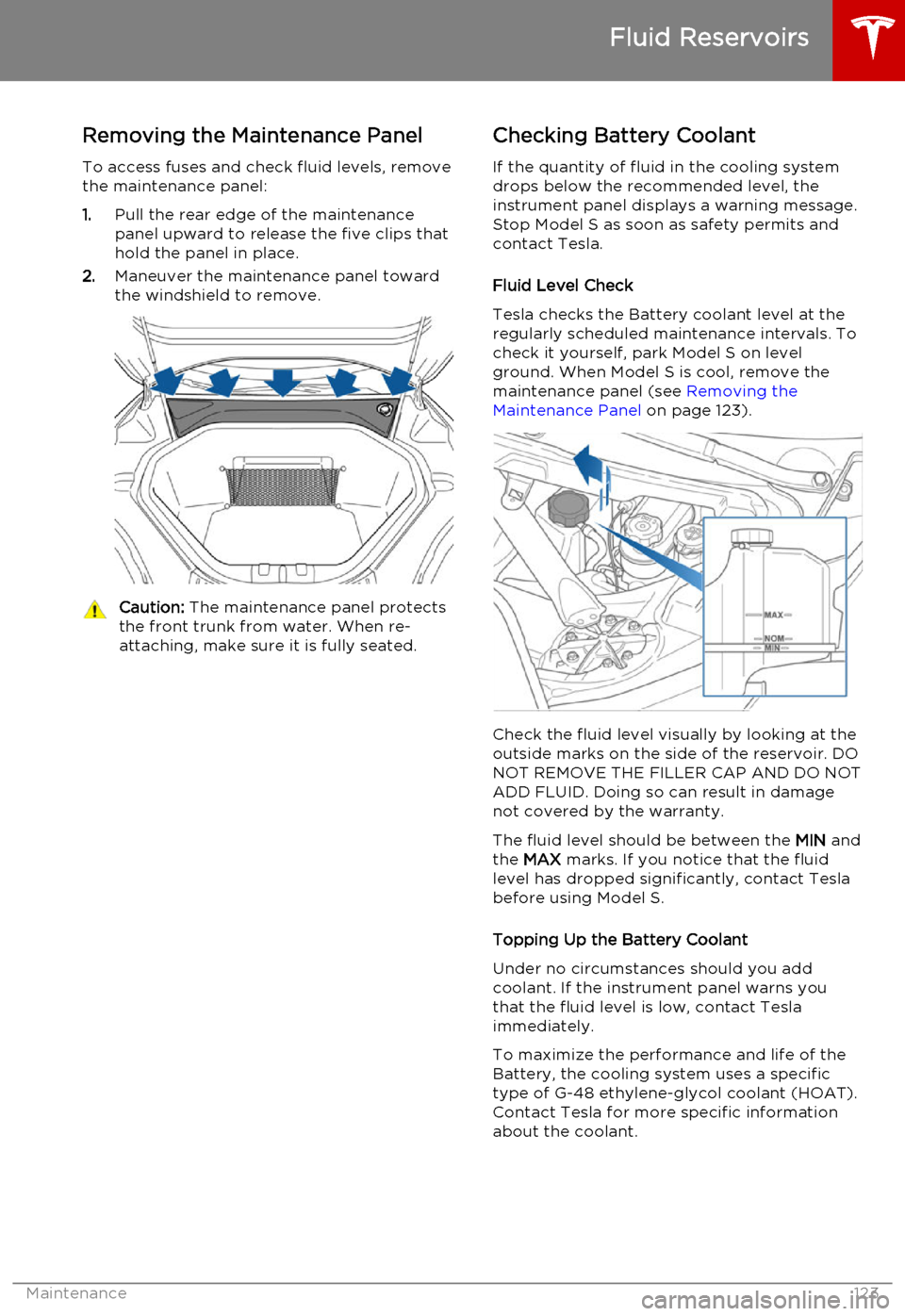
Removing the Maintenance Panel
To access fuses and check fluid levels, remove the maintenance panel:
1. Pull the rear edge of the maintenance
panel upward to release the five clips that
hold the panel in place.
2. Maneuver the maintenance panel toward
the windshield to remove.Caution: The maintenance panel protects
the front trunk from water. When re- attaching, make sure it is fully seated.Checking Battery Coolant
If the quantity of fluid in the cooling system
drops below the recommended level, the
instrument panel displays a warning message.
Stop Model S as soon as safety permits and
contact Tesla.
Fluid Level Check
Tesla checks the Battery coolant level at the
regularly scheduled maintenance intervals. To
check it yourself, park Model S on level
ground. When Model S is cool, remove the
maintenance panel (see Removing the
Maintenance Panel on page 123).
Check the fluid level visually by looking at the
outside marks on the side of the reservoir. DO
NOT REMOVE THE FILLER CAP AND DO NOT ADD FLUID. Doing so can result in damage
not covered by the warranty.
The fluid level should be between the MIN and
the MAX marks. If you notice that the fluid
level has dropped significantly, contact Tesla before using Model S.
Topping Up the Battery Coolant
Under no circumstances should you add coolant. If the instrument panel warns youthat the fluid level is low, contact Teslaimmediately.
To maximize the performance and life of the Battery, the cooling system uses a specific
type of G-48 ethylene-glycol coolant (HOAT).
Contact Tesla for more specific information
about the coolant.
Fluid Reservoirs
Maintenance123
Page 125 of 164
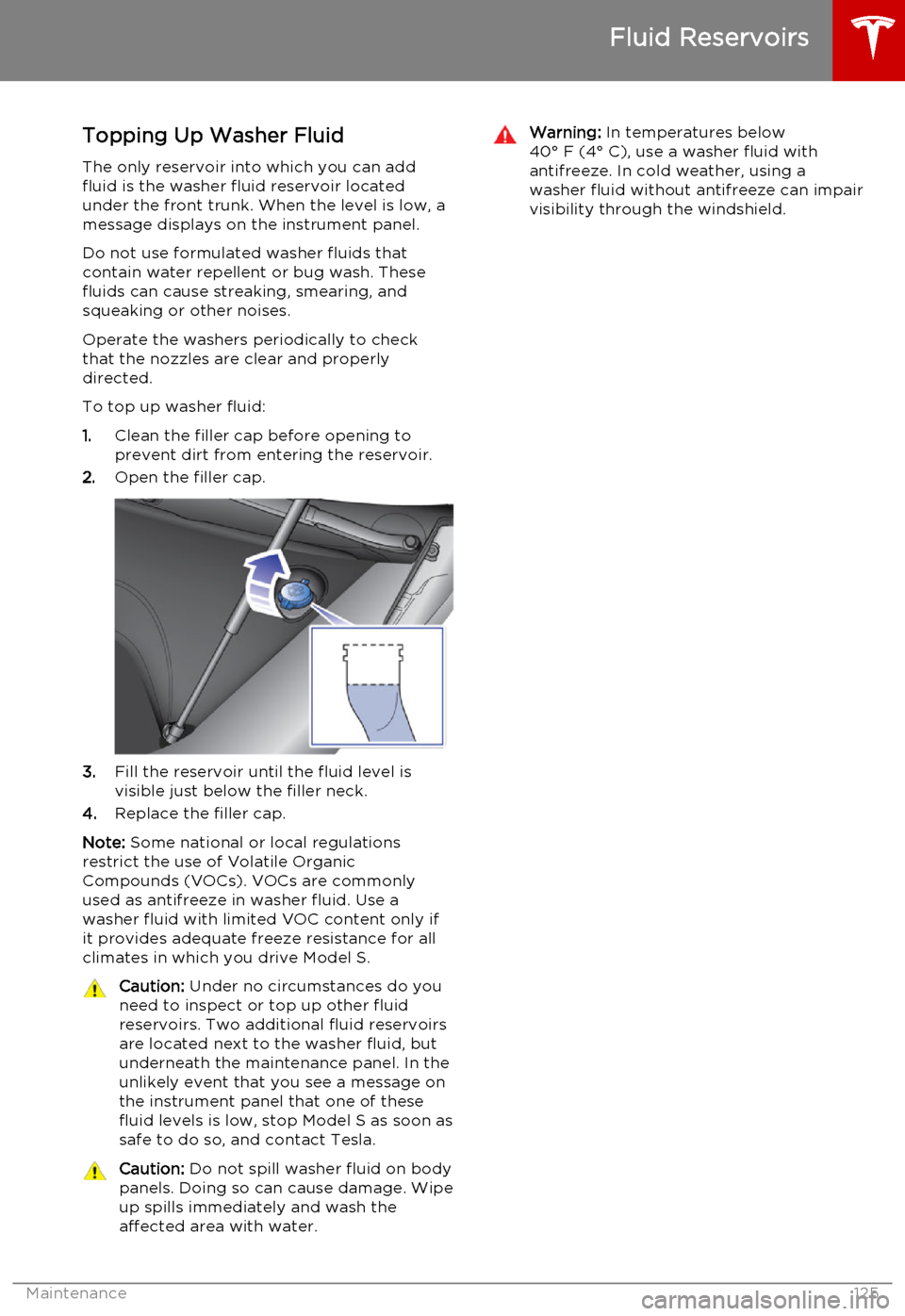
Topping Up Washer Fluid
The only reservoir into which you can add
fluid is the washer fluid reservoir located
under the front trunk. When the level is low, a
message displays on the instrument panel.
Do not use formulated washer fluids that contain water repellent or bug wash. These
fluids can cause streaking, smearing, and squeaking or other noises.
Operate the washers periodically to check
that the nozzles are clear and properly
directed.
To top up washer fluid:
1. Clean the filler cap before opening to
prevent dirt from entering the reservoir.
2. Open the filler cap.
3.Fill the reservoir until the fluid level is
visible just below the filler neck.
4. Replace the filler cap.
Note: Some national or local regulations
restrict the use of Volatile Organic
Compounds (VOCs). VOCs are commonly used as antifreeze in washer fluid. Use a
washer fluid with limited VOC content only if
it provides adequate freeze resistance for all climates in which you drive Model S.
Caution: Under no circumstances do you
need to inspect or top up other fluid
reservoirs. Two additional fluid reservoirs
are located next to the washer fluid, but underneath the maintenance panel. In the
unlikely event that you see a message on the instrument panel that one of these
fluid levels is low, stop Model S as soon as safe to do so, and contact Tesla.Caution: Do not spill washer fluid on body
panels. Doing so can cause damage. Wipe
up spills immediately and wash the
affected area with water.Warning: In temperatures below
40° F (4° C), use a washer fluid with
antifreeze. In cold weather, using a
washer fluid without antifreeze can impair
visibility through the windshield.
Fluid Reservoirs
Maintenance125
Page 126 of 164
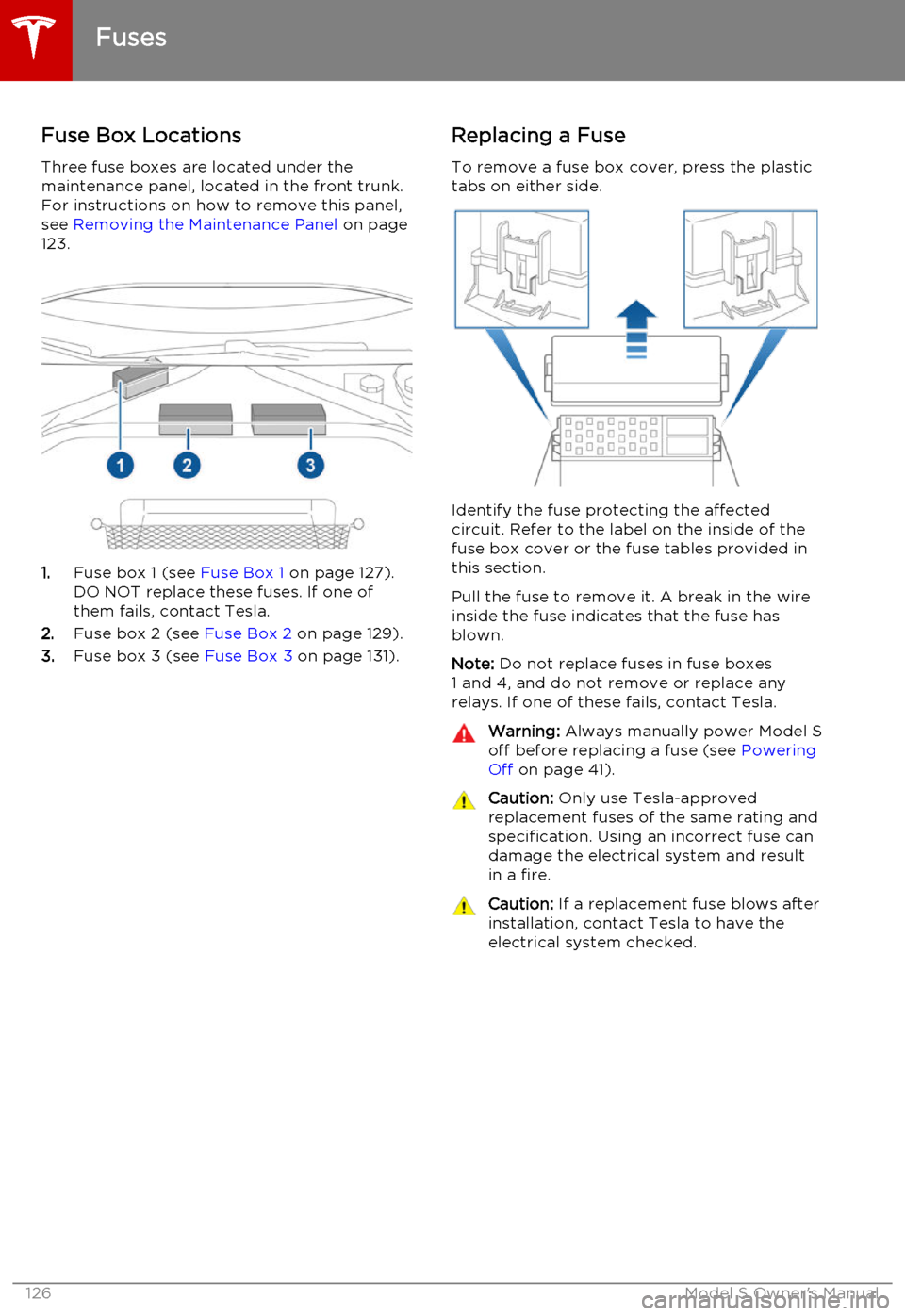
Fuse Box Locations
Three fuse boxes are located under the
maintenance panel, located in the front trunk.
For instructions on how to remove this panel,
see Removing the Maintenance Panel on page
123.
1. Fuse box 1 (see Fuse Box 1 on page 127).
DO NOT replace these fuses. If one of them fails, contact Tesla.
2. Fuse box 2 (see Fuse Box 2 on page 129).
3. Fuse box 3 (see Fuse Box 3 on page 131).
Replacing a Fuse
To remove a fuse box cover, press the plastic
tabs on either side.
Identify the fuse protecting the affected
circuit. Refer to the label on the inside of the fuse box cover or the fuse tables provided in
this section.
Pull the fuse to remove it. A break in the wire inside the fuse indicates that the fuse hasblown.
Note: Do not replace fuses in fuse boxes
1 and 4, and do not remove or replace any relays. If one of these fails, contact Tesla.
Warning: Always manually power Model S
off before replacing a fuse (see Powering
Off on page 41).Caution: Only use Tesla-approved
replacement fuses of the same rating and specification. Using an incorrect fuse can
damage the electrical system and result in a fire.Caution: If a replacement fuse blows after
installation, contact Tesla to have the electrical system checked.
Fuses
126Model S Owner's Manual
Page 135 of 164
Load Capacity LabelingIt is important to understand how much
weight your Model S can safely carry. This
weight is called the vehicle capacity weight
and includes the weight of all occupants,
cargo and any additional equipment added to
your Model S since it was manufactured.
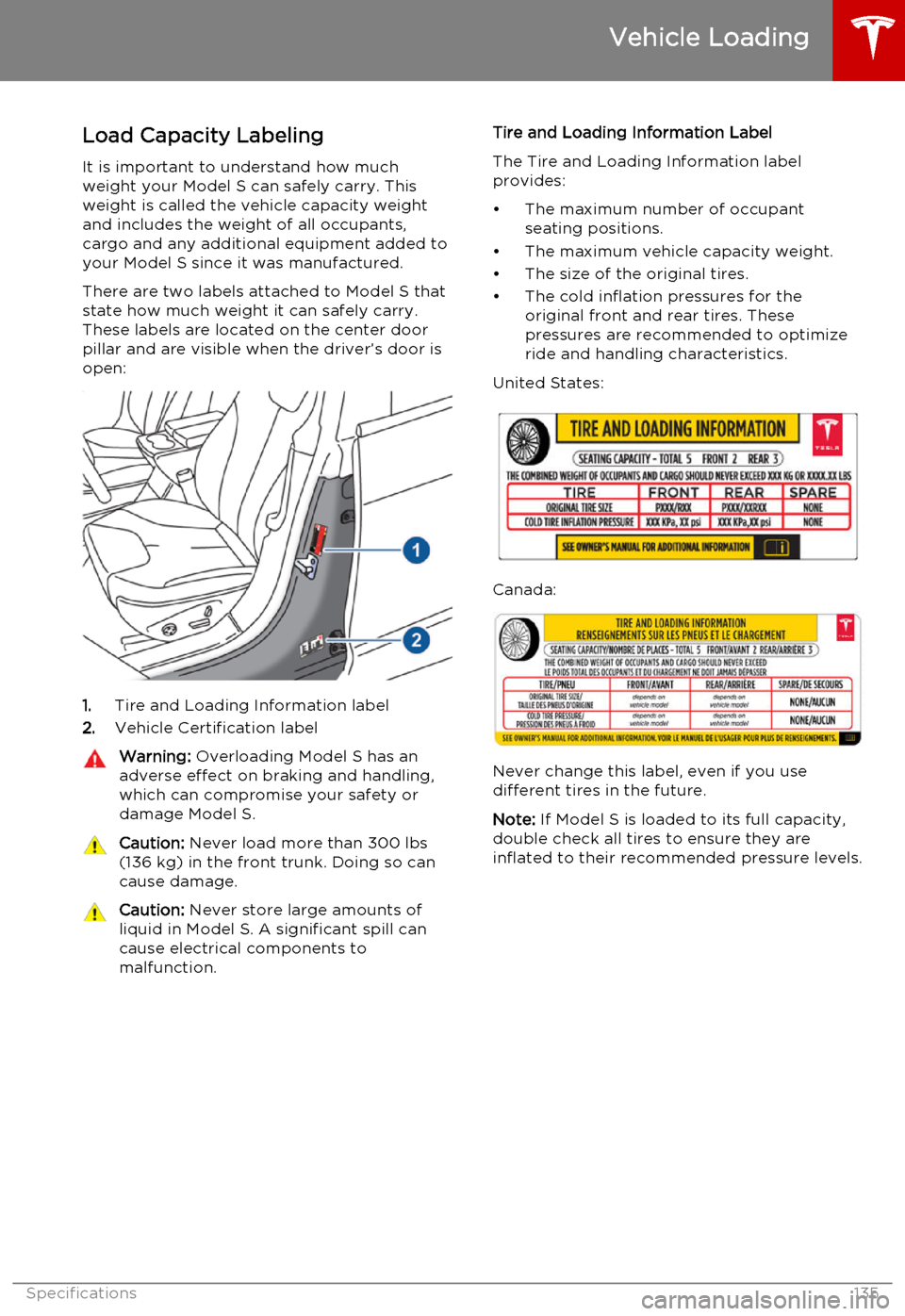
There are two labels attached to Model S that
state how much weight it can safely carry.
These labels are located on the center door
pillar and are visible when the driver’s door is open:
1. Tire and Loading Information label
2. Vehicle Certification label
Warning:
Overloading Model S has an
adverse effect on braking and handling,
which can compromise your safety or
damage Model S.Caution: Never load more than 300 lbs
(136 kg) in the front trunk. Doing so can
cause damage.Caution: Never store large amounts of
liquid in Model S. A significant spill can
cause electrical components to
malfunction.Tire and Loading Information Label
The Tire and Loading Information label provides:
• The maximum number of occupant seating positions.
• The maximum vehicle capacity weight.
• The size of the original tires.
• The cold inflation pressures for the original front and rear tires. These
pressures are recommended to optimize
ride and handling characteristics.
United States:
Canada:
Never change this label, even if you use different tires in the future.
Note: If Model S is loaded to its full capacity,
double check all tires to ensure they are
inflated to their recommended pressure levels.
Vehicle Loading
Specifications135
Page 136 of 164
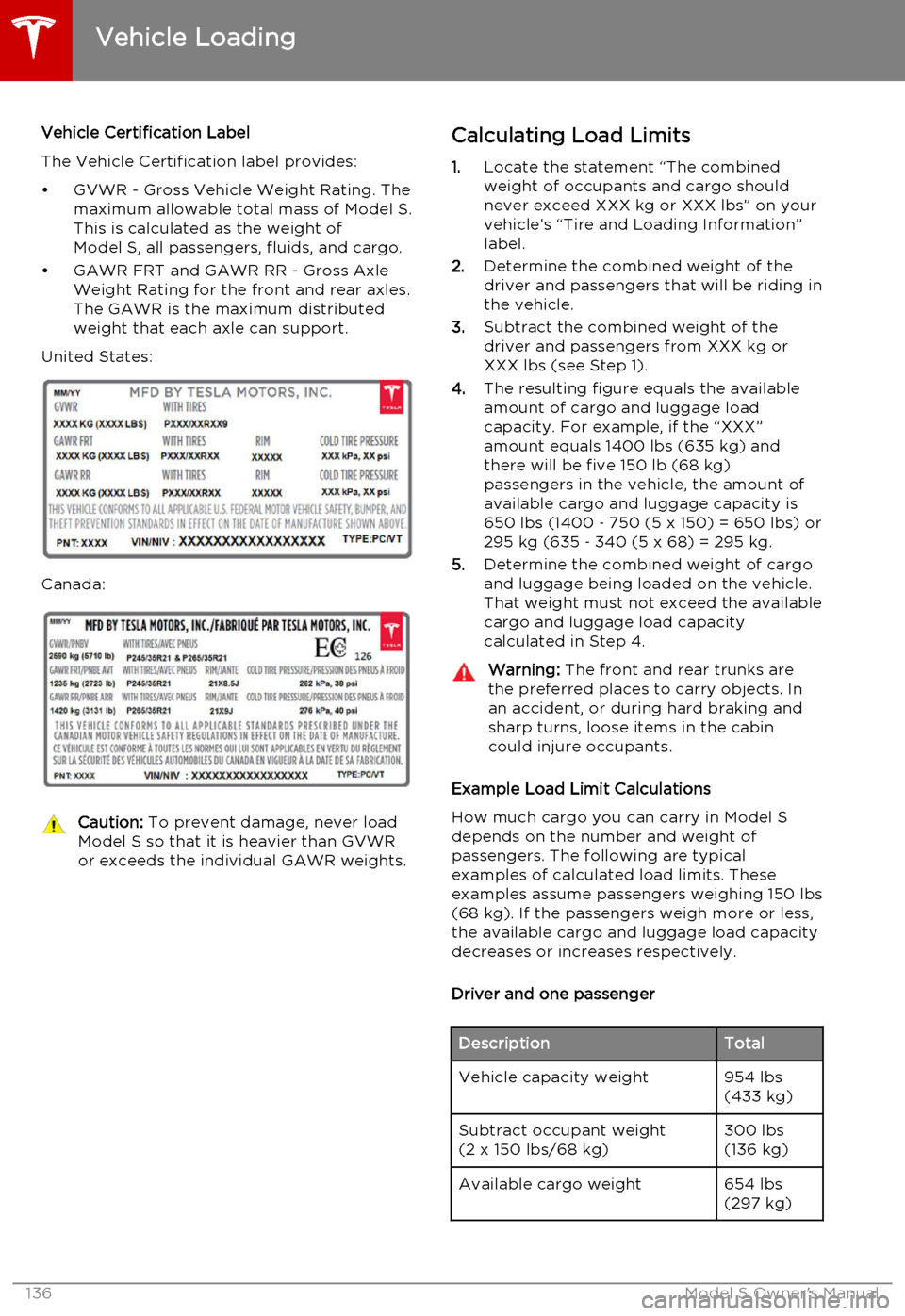
Vehicle Certification Label
The Vehicle Certification label provides:
• GVWR - Gross Vehicle Weight Rating. The maximum allowable total mass of Model S.
This is calculated as the weight of Model S, all passengers, fluids, and cargo.
• GAWR FRT and GAWR RR - Gross Axle Weight Rating for the front and rear axles.
The GAWR is the maximum distributed
weight that each axle can support.
United States:
Canada:
Caution: To prevent damage, never load
Model S so that it is heavier than GVWR
or exceeds the individual GAWR weights.Calculating Load Limits
1. Locate the statement “The combined
weight of occupants and cargo should
never exceed XXX kg or XXX lbs” on your
vehicle’s “Tire and Loading Information”
label.
2. Determine the combined weight of the
driver and passengers that will be riding in
the vehicle.
3. Subtract the combined weight of the
driver and passengers from XXX kg or
XXX lbs (see Step 1).
4. The resulting figure equals the available
amount of cargo and luggage load
capacity. For example, if the “XXX”
amount equals 1400 lbs (635 kg) and
there will be five 150 lb (68 kg)
passengers in the vehicle, the amount of
available cargo and luggage capacity is
650 lbs (1400 ‑ 750 (5 x 150) = 650 lbs) or
295 kg (635 ‑ 340 (5 x 68) = 295 kg.
5. Determine the combined weight of cargo
and luggage being loaded on the vehicle.
That weight must not exceed the available
cargo and luggage load capacity
calculated in Step 4.Warning: The front and rear trunks are
the preferred places to carry objects. In
an accident, or during hard braking and sharp turns, loose items in the cabin
could injure occupants.
Example Load Limit Calculations
How much cargo you can carry in Model S
depends on the number and weight of
passengers. The following are typical
examples of calculated load limits. These
examples assume passengers weighing 150 lbs (68 kg). If the passengers weigh more or less,
the available cargo and luggage load capacity decreases or increases respectively.
Driver and one passenger
DescriptionTotalVehicle capacity weight954 lbs
(433 kg)Subtract occupant weight
(2 x 150 lbs/68 kg)300 lbs
(136 kg)Available cargo weight654 lbs
(297 kg)
Vehicle Loading
136Model S Owner's Manual