brake TESLA MODEL S 2019 User Guide
[x] Cancel search | Manufacturer: TESLA, Model Year: 2019, Model line: MODEL S, Model: TESLA MODEL S 2019Pages: 207, PDF Size: 5.41 MB
Page 88 of 207
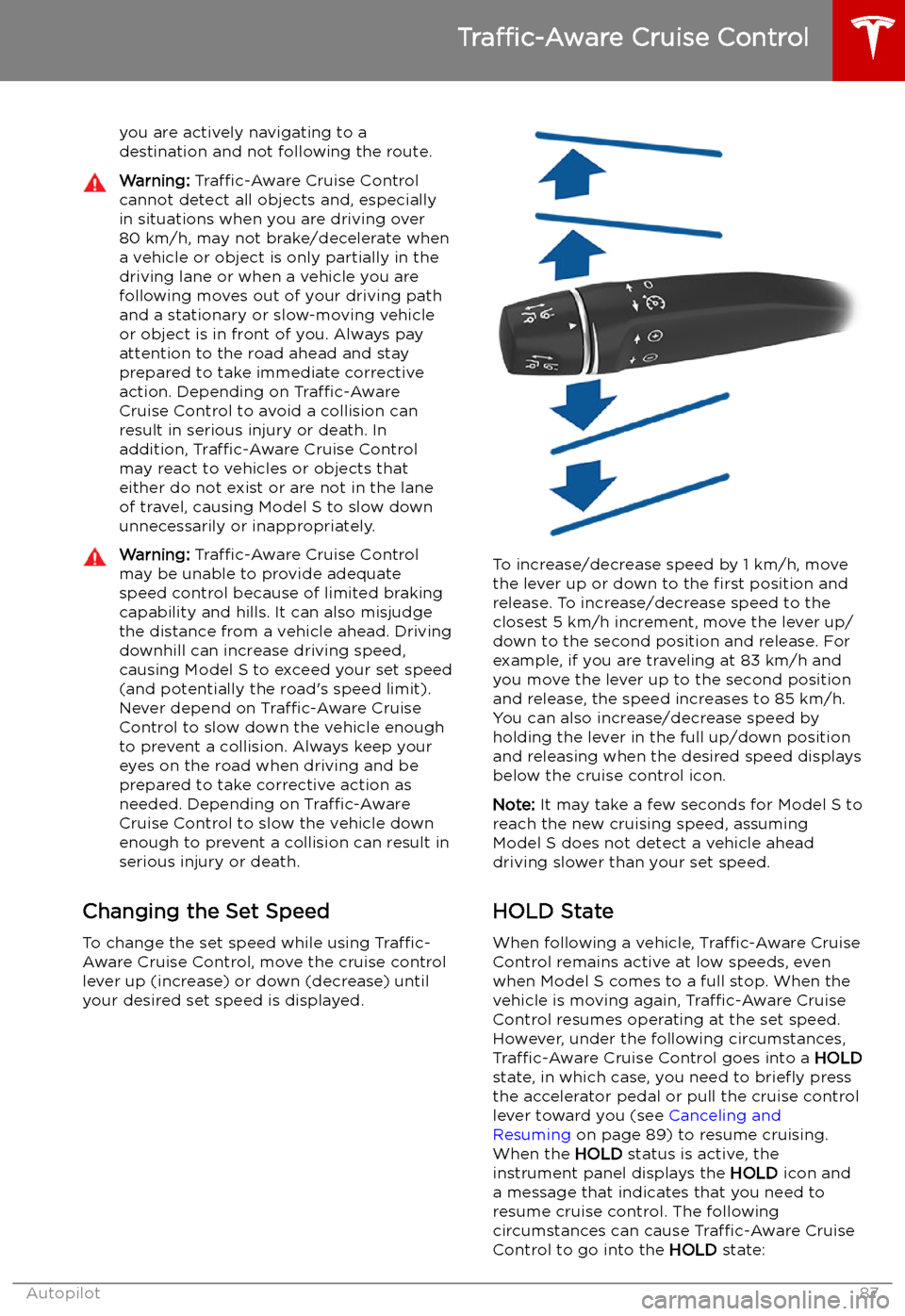
you are actively navigating to a
destination and not following the route.Warning: Traffic-Aware Cruise Control
cannot detect all objects and, especially
in situations when you are driving over 80 km/h, may not brake/decelerate when
a vehicle or object is only partially in the
driving lane or when a vehicle you are
following moves out of your driving path and a stationary or slow-moving vehicle
or object is in front of you. Always pay
attention to the road ahead and stay
prepared to take immediate corrective
action. Depending on Traffic-Aware
Cruise Control to avoid a collision can
result in serious injury or death. In
addition, Traffic-Aware Cruise Control
may react to vehicles or objects that
either do not exist or are not in the lane of travel, causing Model S to slow down
unnecessarily or inappropriately.Warning: Traffic-Aware Cruise Control
may be unable to provide adequate
speed control because of limited braking capability and hills. It can also misjudgethe distance from a vehicle ahead. Driving
downhill can increase driving speed, causing Model S to exceed your set speed
(and potentially the road
Page 106 of 207

Warning: Forward Collision Warning is
designed only to provide visual and
audible alerts. It does not attempt to
apply the brakes or decelerate Model S.
When seeing and/or hearing a warning, it
is the driver
Page 107 of 207

Obstacle-Aware AccelerationObstacle-Aware Acceleration is designed toreduce the impact of a collision by reducing
motor torque and in some cases applying the
brakes, if Model S detects an object in its driving path. For example, Model S, while
parked in front of a closed garage door with
the Drive gear engaged, detects that you have
pressed hard on the accelerator pedal.
Although Model S still accelerates and hits the
garage door, the reduced torque may result in
less damage.
Obstacle-Aware Acceleration is designed to
operate only when all of these conditions are
simultaneously met:
Page 117 of 207

Safety &
SecurityYou can manually apply and release the PARKING BRAKE see Parking Brake
on page 68), POWER OFF the vehicle (see Powering Off on page 52), limit
the acceleration and max speed (see Speed Limit Mode on page 117), and
turn the following features on or off:
Page 137 of 207

Auto-Raising SuspensionAuto-raising suspension saves you from
manually having to raise the suspension every
time you arrive at a frequently-used location
where you have previously raised the
suspension. Whenever you raise the
suspension to HIGH or VERY HIGH , Model S
saves the location. When you return to the saved location, Model S raises the suspension
and the instrument panel displays this
message:
Note: When returning to a saved location and
driving faster than the High and Very High
suspension settings allow, the suspension
does not raise until Model S slows down.
Note: After leaving a saved location, the
suspension may not lower until you are driving
faster than the speed threshold at which the
suspension lowers.
Note: If Model S reaches a saved location and
the existing suspension setting is already
higher than the level that has been saved for
that location, the ride height is not adjusted.
To remove an auto-raising location
If you do not want the suspension to auto-
raise at a saved location, touch the X in the
auto-raising location status message that
displays at a saved location. Doing so removes
the auto-raise location and the suspension no
longer raises automatically when you arrive at
the location.
Note: Manually lowering the suspension to
STANDARD or LOW while at a saved location
also removes the auto-raising location.
Jack Mode Before jacking or lifting, set the suspension to
Jack mode to prevent the self-leveling that
occurs even when Model S is powered off.
Press the brake pedal, then touch Controls >
Suspension > Jack .
To deactivate, touch Jack again.
Note: Jack mode automatically cancels when
you drive over 7 km/h.
Note: Model S also sets Jack mode
automatically if it detects that the vehicle
cannot lower to its target height, or if it
detects that an object is supporting the
vehicle
Page 169 of 207

Checking Brake FluidWarning: Contact Tesla immediately if you
notice increased movement of the brake
pedal or a significant loss of brake
Page 179 of 207

TransmissionTypeSingle speed fixed gearOverall Final Drive RatioSmall motor: 9.325:1
Large motor: 9.734:1Reverse GearReverse direction of motor, limited to
24 km/h
Steering
TypeRack and pinion with electronic power steering, speed sensitiveNumber of turns lock to lock2.05Turning Circle (curb to curb)11.3 meters
Brakes
Type
4-wheel anti-lock braking system (ABS)
with Electronic Brake Force Distribution,
Integrated Advanced Stability Control and
Electronic Accelerator pedal actuated
regenerative braking systemCalipersFour piston fixedRotor Diameters (ventilated)Front: 13.98”/355 mm
Rear: 14.37”/365 mmFront Rotor thicknessNew: 1.26”/32 mm
Service limit: 1.18”/30 mmRear Rotor thicknessNew: 1.10”/28 mm
Service limit: 1.02”/26 mmFront Brake Pad Thickness (excluding back plate)0.393”/10 mmRear Brake Pad Thickness (excluding back plate)0.354”/9 mmParking brakeElectrically actuated parking brake
calipers
Subsystems
178Model S Owner
Page 189 of 207

Disable the Self-Leveling AirSuspension System
If Model S is equipped with the air suspension
system, it automatically self-levels, even when
power is off. To prevent damage, you must
activate Jack Mode to disable self-leveling:
1. Touch Controls > Suspension on the
touchscreen.
2. Press the brake pedal, then touch Very
High to maximize height.
3. Touch Jack.When Jack Mode is active, Model S
displays this red indicator light on
the instrument panel, along with a message telling you that active
suspension is disabled.
Note: Jack Mode cancels when driving speed
exceeds 7 kph.
Warning: Failure to activate Jack Mode on
a vehicle equipped with the air
suspension system can result in the
vehicle becoming loose during transport,
which may cause significant damage.
Activate Transport Mode
Transport Mode keeps the parking brake
disengaged while winching Model S onto a
Page 201 of 207
Index
A ABS (Anti-lock Braking System) 67
absolute speed limit 107
Acceleration settings 74
access panel, removing 167
accessoriesplugging into power socket 20
active hood 76
adaptive headlights 57
Adaptive Suspension Damping 135
air circulation 121
air conditioning 119
air distribution 121
air filter 124
air suspension 135
air vents 124
airbag, front passenger, disabling 43
airbags 41
alarm 138
all-season tires 161
always connected, setting 78
Always Show Estimated Round Trip Energy 128
anti-lock braking (ABS) 67
audioplaying files 130
steering wheel buttons 47
volume control 130
Auto High Beam 57
Auto Lane Change 93
auto-raising suspension 135
automatic emergency braking 105
Autopark 98
autopilotblind spot warning 102
side collision warning 102
staying inside lane markings 102AutopilotAuto Lane Change 93
automatic emergency braking 104
Autopark 98
Autosteer 91
collision avoidance assist 104
forward collision warning 104
Navigate on Autopilot 94
overtake acceleration 85
overview 82
speed assist 107
speed limit warning 107
staying within speed limits 107
Summon 100
Traffic-Aware Cruise Control 85
Autopilot components 82
Autosteer 91
average range 78
B
backup camera 80battery (12V)complete discharge 147
specifications 179Battery (high voltage)care of 147
coolant 167
specifications 179
temperature limits 147
battery (key), replacing 10
blind spot warning 102
blind spot warning chime 102
Bluetoothdevices, playing audio files from 132
general information 133
phone, pairing and using 133
body repairs 171
body touch up 165
brakesautomatic in emergencies 105
Page 202 of 207

child protection (continued)disabling rear window switches 14child seatscleaning 164
disabling front passenger airbag 43
installing and using 30
Tesla built-in rear facing 37child-protectiondisabling liftgate and rear door handles
12
Chill acceleration 74
cleaning 163
climate controls 119
collision avoidance assist 104
connecting to Wi-Fi 142
console12V power socket 20
cup holders 22
USB ports 20
consumption chart 78
contact informationroadside assistance 184
copyrights 192
cruise control 85
cup holders 22
D DAB radio 131
dashboard overview 2
Dashcam 81
data recording 193
data sharing 193
declarations of conformity 195
delivery mileage 193
devicesBluetooth, playing audio files 132
connecting 20
playing audio files from 132
dimensions 175
Dog Mode 123
dome (map) lights 55
door handles 11
door labels 173
Door Unlock Mode 11
doors 9
doors, opening 9
drive away locking 12
Drive gear 54
driverprofiles 45
seat adjustment 24drivingseating position 24
starting 52
tips to maximize range 78E
Easter Eggs 190
easy entry, driver profile 45
electric parking brake 68
emergency braking 104
emergency