set TESLA MODEL S 2019 Owner's Guide
[x] Cancel search | Manufacturer: TESLA, Model Year: 2019, Model line: MODEL S, Model: TESLA MODEL S 2019Pages: 207, PDF Size: 5.41 MB
Page 124 of 207

Keep Climate On and Dog Mode
The Keep Climate On and Dog settings allow you to keep the climate control system running when
in Park, even after you
Page 126 of 207

Maps and Navigation
Overview
The touchscreen displays a map at all times.
Hold and drag a finger to move the map in any
direction. Rotate the map in any direction by
holding and turning two fingers.
Touch the icon in the top right corner of the
map to set the map
Page 127 of 207

Increase or decrease the volume of
spoken navigation instructions by
touching - or +, respectively.
Decreasing all the way to the left
mutes the instructions. You can
also mute navigation instructions
when a navigation route is active
by touching the volume icon on the
turn-by-turn direction list.
Customize how the navigation
system works by adjusting these settings:
Page 128 of 207

If Navigate on Autopilot is enabled, you canturn it on for the navigation route by touchingNavigate on Autopilot in the turn-by-turn
direction list. Navigate on Autopilot is an
extension of Autosteer that automatically
changes lanes and steers Model S onto the
appropriate exit(s) when navigating on
controlled access roads (such as freeways).
For details, see Navigate on Autopilot on page
94.The route overview icon displays
when a navigation route is active.
Touch this icon at any time to view
an overview of your navigation
route, or to change the orientation
of the map (see Overview on page
125), which also zooms the map to
show the current leg of your trip.
The black pin at the end of the
route line represents your
destination.Mute/unmute navigation volume.
Note: You can also mute the
volume of the navigation system by
pressing the scroll button on the
left side of the steering wheel while
navigation instructions are being
spoken. A volume control specific
to navigation instructions is also
available by touching the settings
icon on the map (see Overview on
page 125).
To stop navigating, touch CANCEL, located
below the turn-by-turn direction list.
Note: If a data connection is not available,
onboard maps allow you to navigate to any location, but you must enter the location
Page 137 of 207

Auto-Raising SuspensionAuto-raising suspension saves you from
manually having to raise the suspension every
time you arrive at a frequently-used location
where you have previously raised the
suspension. Whenever you raise the
suspension to HIGH or VERY HIGH , Model S
saves the location. When you return to the saved location, Model S raises the suspension
and the instrument panel displays this
message:
Note: When returning to a saved location and
driving faster than the High and Very High
suspension settings allow, the suspension
does not raise until Model S slows down.
Note: After leaving a saved location, the
suspension may not lower until you are driving
faster than the speed threshold at which the
suspension lowers.
Note: If Model S reaches a saved location and
the existing suspension setting is already
higher than the level that has been saved for
that location, the ride height is not adjusted.
To remove an auto-raising location
If you do not want the suspension to auto-
raise at a saved location, touch the X in the
auto-raising location status message that
displays at a saved location. Doing so removes
the auto-raise location and the suspension no
longer raises automatically when you arrive at
the location.
Note: Manually lowering the suspension to
STANDARD or LOW while at a saved location
also removes the auto-raising location.
Jack Mode Before jacking or lifting, set the suspension to
Jack mode to prevent the self-leveling that
occurs even when Model S is powered off.
Press the brake pedal, then touch Controls >
Suspension > Jack .
To deactivate, touch Jack again.
Note: Jack mode automatically cancels when
you drive over 7 km/h.
Note: Model S also sets Jack mode
automatically if it detects that the vehicle
cannot lower to its target height, or if it
detects that an object is supporting the
vehicle
Page 139 of 207

Security Settings
About the Security System
If Model S does not detect a key nearby and a
locked door or trunk is opened, an alarm sounds and the headlights and turn signals
Page 140 of 207

prior to the event that triggered the Alert
state, provided that a properly configured USB
drive is inserted into one of the USB ports (see
Dashcam on page 81).
In the Alarm state, the security alarm
activates, the audio system generates a loud
and unexpected sound, and the message on
the touchscreen increases to maximum brightness. Sentry Mode returns from Alarm to
Standby after 30 seconds.
Location-Based Settings
You can customize Sentry Mode to
automatically enable near certain locations
when the vehicle is parked. The available
settings are:
Page 142 of 207

Resetting the Location of the
HomeLink Device
If you experience situations in which you
sometimes drive up to your HomeLink device
and it doesn
Page 153 of 207

Changing Charge SettingsThe charging screen displays on thetouchscreen whenever the charge port door is
open. To display the charging screen at any
time:Touch the Apps icon, then touch
the charging icon.
Note: The following illustration is provided for
demonstration purposes only and may vary
slightly depending on software version and
market region.
Note: If charging at a Tesla Supercharger, and
paid supercharging is potentially in effect, the
charging screen also displays information
about your previous or current Supercharger
session (see Supercharger Usage Fees and
Idle Fees on page 154).
Note: To reduce congestion at high-usage
supercharger sites, you may be automatically
limited to a maximum charge of 80% when not using Trip Planner (see Trip Information).
You can manually increase the limit by tapping
“Set Limit” on the touchscreen or mobile app.
1. Charge status messages (such as
Charging Scheduled, Charging) display
here.
2. To adjust the charge limit, touch Set Limit,
and drag the arrow to change the charge
limit setting. The setting you choose
applies to immediate and scheduled
charging sessions.
3. The current automatically sets to the
maximum current available from the
attached charge cable, unless it was
previously reduced to a lower level. If
needed, touch - or + to change the current
(for example, you may want to reduce the
current if you are concerned about
overloading a domestic wiring circuit
shared by other equipment). It is not
possible to set the charging current to a
level that exceeds the maximum available
from the attached charge cable. When
you change the current, Model S
remembers the location. If you charge at
the same location, you do not need to change it again.
Note: For 3-phase charging (if applicable
in your region), the available current
represents the current per phase (up to 32 amps). During charging, the right status
Page 154 of 207
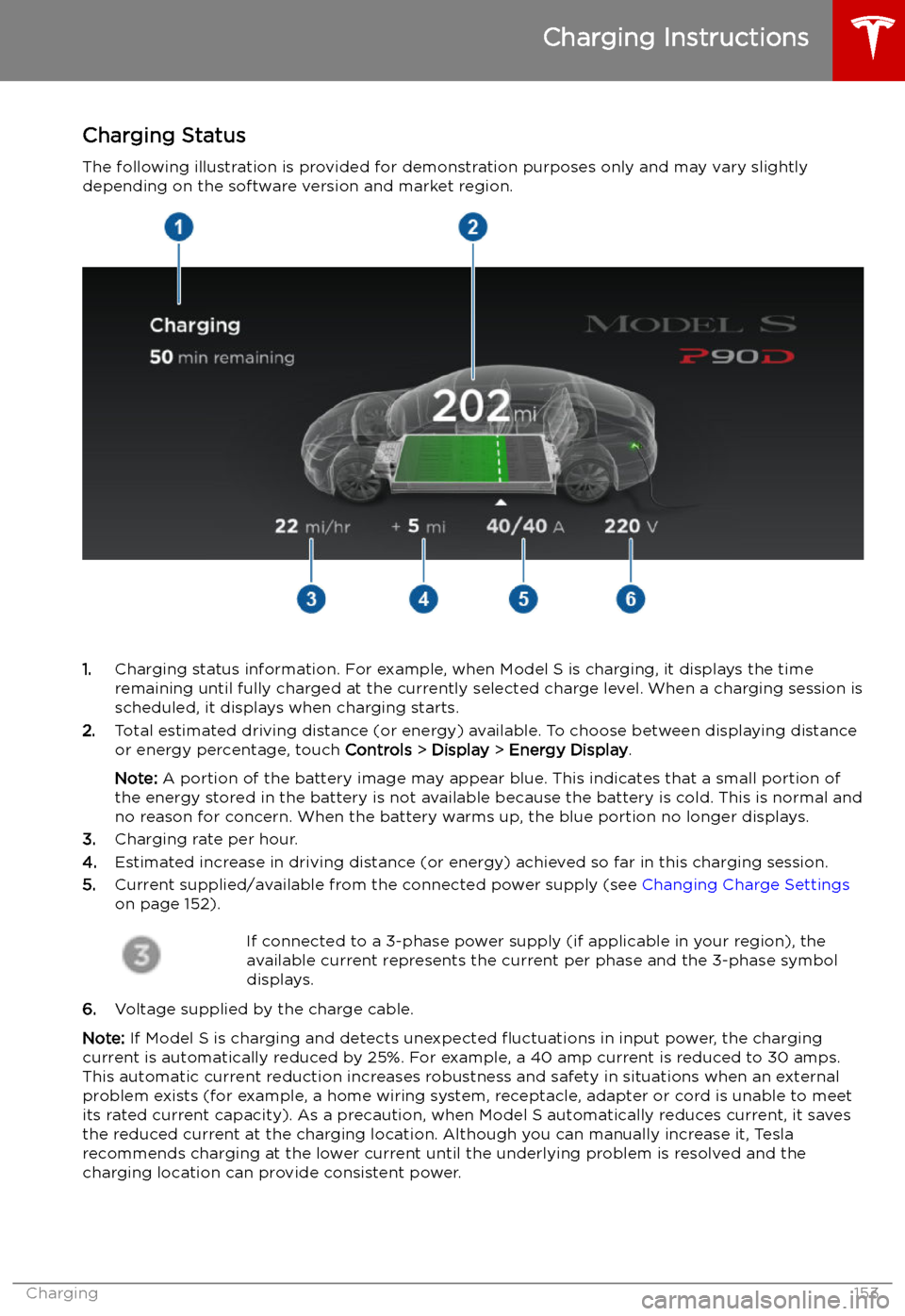
Charging Status
The following illustration is provided for demonstration purposes only and may vary slightly
depending on the software version and market region.
1. Charging status information. For example, when Model S is charging, it displays the time
remaining until fully charged at the currently selected charge level. When a charging session is
scheduled, it displays when charging starts.
2. Total estimated driving distance (or energy) available. To choose between displaying distance
or energy percentage, touch Controls > Display > Energy Display .
Note: A portion of the battery image may appear blue. This indicates that a small portion of
the energy stored in the battery is not available because the battery is cold. This is normal and
no reason for concern. When the battery warms up, the blue portion no longer displays.
3. Charging rate per hour.
4. Estimated increase in driving distance (or energy) achieved so far in this charging session.
5. Current supplied/available from the connected power supply (see Changing Charge Settings
on page 152).
If connected to a 3-phase power supply (if applicable in your region), the
available current represents the current per phase and the 3-phase symbol
displays.
6. Voltage supplied by the charge cable.
Note: If Model S is charging and detects unexpected