parking brake TESLA MODEL S 2019 Owner's Manual
[x] Cancel search | Manufacturer: TESLA, Model Year: 2019, Model line: MODEL S, Model: TESLA MODEL S 2019Pages: 207, PDF Size: 5.41 MB
Page 53 of 207

Starting and Powering
Off
Starting When you open a door, Model S powers on
the instrument panel and touchscreen and you
can operate all controls.
To drive Model S:
1. PRESS THE BRAKE PEDAL - Model S
powers on and is ready to drive.
2. SELECT A GEAR - Move the gear lever all
the way down for Drive and all the way up
for Reverse. See Shifting Gears on page
54.
Note: If the PIN to Drive feature is enabled
(see PIN to Drive on page 138), you must also
enter a valid PIN on the touchscreen before
you can drive Model S.
Note: If Passive Entry is off and you do not
press the brake pedal to start Model S within
approximately five minutes, a message
displays on the instrument panel and you must
use the key to lock then unlock Model S again before starting the vehicle.
Everything you need to know when driving
Model S displays on the instrument panel.
Key Not Inside
If Model S does not detect a key when you
press the brake, the instrument panel displays
a message telling you that a key is not inside.
If you receive this message, place the key in
the center console cup holder where Model S
can best detect it.
If Model S still does not detect the key, try holding it against the center console,
immediately below the 12V power socket (see
12V Power Socket on page 20). Or try using
another key. If another key does not work, contact Tesla.
A number of factors can affect whether
Model S can detect the key. These include a
low battery in the key, interference from other
devices using radio signals, and objects
between the key and receiver.
Always keep the key with you. After driving,
the key is needed to restart Model S after it
powers off. And when you leave Model S, you
must bring the key with you to lock Model S, either manually or automatically.
Powering Off
When you finish driving, shift into Park by
pressing the button on the end of the gear selector. The parking brake automatically
engages and all systems keep operating.
When you leave Model S with the key, it
powers off automatically, turning off the
instrument panel and touchscreen.
Model S also powers off automatically after
being in Park for 15 minutes, even if you are
sitting in the driver
Page 55 of 207

Gears
Shifting Gears When Model S is in Park, you must press the
brake to shift to another gear.
Move the lever up or down to change gears.
If you try to shift into a gear that the current
driving speed prohibits, a chime sounds and
the gear does not change.
Reverse
Push the lever all the way up and release. You
can only shift into Reverse when Model S is
stopped or moving less than 8 km/h. If moving
less than 1.6 km/h, you must press the brake.
Neutral
Push the lever up or down to the first position
and release to shift into Neutral. Neutral allows
Model S to roll freely when you are not
pressing the brake pedal.
If Model S is in Park and you use the
touchscreen to release the parking brake
( Controls > Safety & Security ), Model S shifts
into Neutral (see Parking Brake on page 68).
Drive
Push the lever all the way down and release.
You can shift into Drive when Model S is stopped or moving less than 8 km/h inReverse. If Model S is moving less than
1.6 km/h, you must press the brake to shift into Drive.
Park
Press the end of the gear selector while Model S is stopped. Whenever Model S is in Park, the parking brake is applied.
Model S automatically shifts into Park
whenever you connect a charge cable or if
two or more of the following conditions are
met simultaneously:
Page 61 of 207
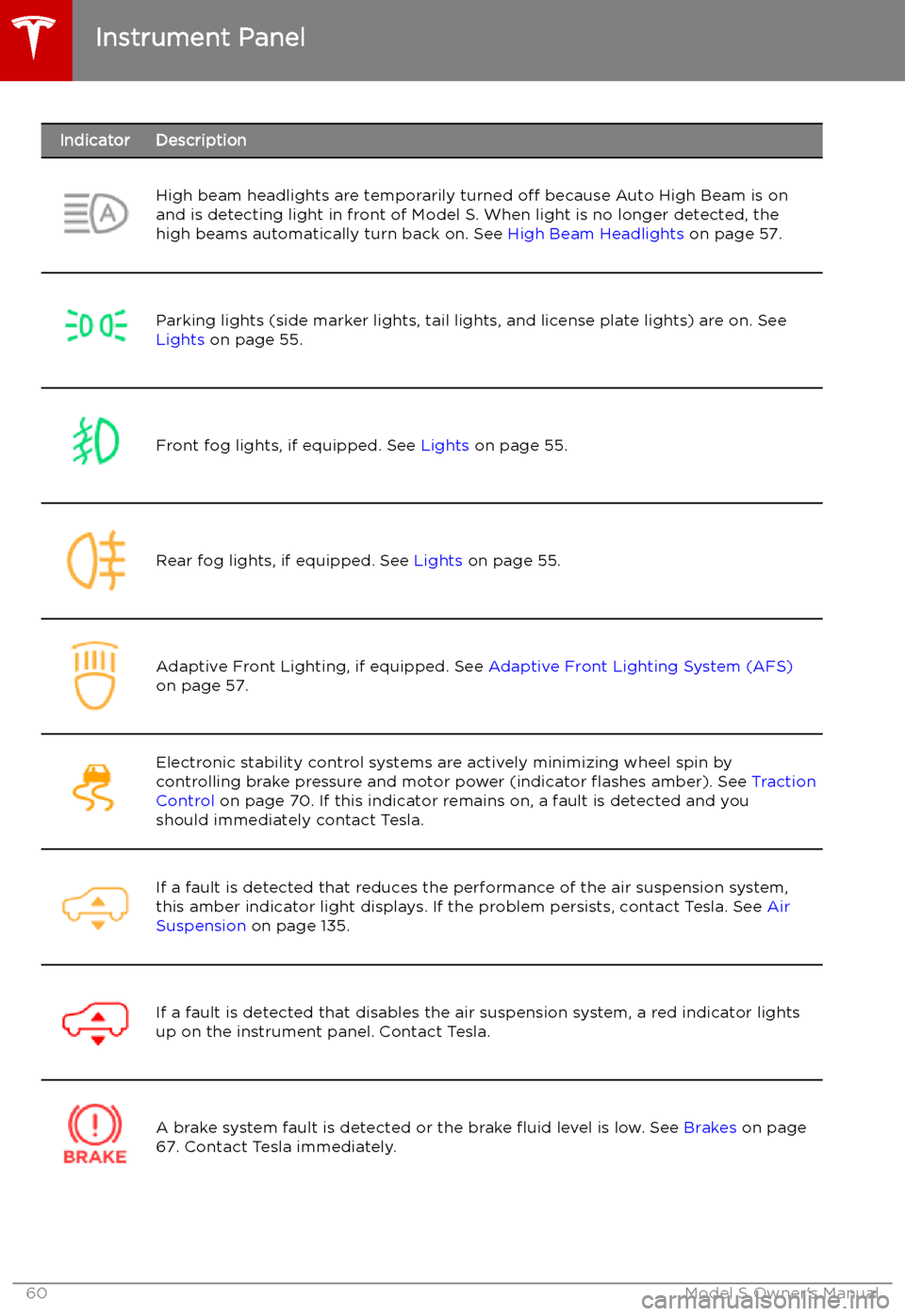
IndicatorDescriptionHigh beam headlights are temporarily turned off because Auto High Beam is on
and is detecting light in front of Model S. When light is no longer detected, the
high beams automatically turn back on. See High Beam Headlights on page 57.Parking lights (side marker lights, tail lights, and license plate lights) are on. See
Lights on page 55.Front fog lights, if equipped. See Lights on page 55.Rear fog lights, if equipped. See Lights on page 55.Adaptive Front Lighting, if equipped. See Adaptive Front Lighting System (AFS)
on page 57.Electronic stability control systems are actively minimizing wheel spin by
controlling brake pressure and motor power (indicator
Page 70 of 207

When you use the touchscreen to
manually apply the parking brake,
the red parking brake indicator lights
up on the instrument panel .If the parking brake experiences an
electrical issue, the amber parking brake indicator lights up and a fault
message displays at the top of the
instrument panel.Caution: In the unlikely event that Model S
loses electrical power, you cannot access
the touchscreen and are therefore unable to release the parking brake. Contact
Tesla.
Brakes
Driving69
Page 117 of 207

Safety &
SecurityYou can manually apply and release the PARKING BRAKE see Parking Brake
on page 68), POWER OFF the vehicle (see Powering Off on page 52), limit
the acceleration and max speed (see Speed Limit Mode on page 117), and
turn the following features on or off:
Page 179 of 207

TransmissionTypeSingle speed fixed gearOverall Final Drive RatioSmall motor: 9.325:1
Large motor: 9.734:1Reverse GearReverse direction of motor, limited to
24 km/h
Steering
TypeRack and pinion with electronic power steering, speed sensitiveNumber of turns lock to lock2.05Turning Circle (curb to curb)11.3 meters
Brakes
Type
4-wheel anti-lock braking system (ABS)
with Electronic Brake Force Distribution,
Integrated Advanced Stability Control and
Electronic Accelerator pedal actuated
regenerative braking systemCalipersFour piston fixedRotor Diameters (ventilated)Front: 13.98”/355 mm
Rear: 14.37”/365 mmFront Rotor thicknessNew: 1.26”/32 mm
Service limit: 1.18”/30 mmRear Rotor thicknessNew: 1.10”/28 mm
Service limit: 1.02”/26 mmFront Brake Pad Thickness (excluding back plate)0.393”/10 mmRear Brake Pad Thickness (excluding back plate)0.354”/9 mmParking brakeElectrically actuated parking brake
calipers
Subsystems
178Model S Owner
Page 189 of 207

Disable the Self-Leveling AirSuspension System
If Model S is equipped with the air suspension
system, it automatically self-levels, even when
power is off. To prevent damage, you must
activate Jack Mode to disable self-leveling:
1. Touch Controls > Suspension on the
touchscreen.
2. Press the brake pedal, then touch Very
High to maximize height.
3. Touch Jack.When Jack Mode is active, Model S
displays this red indicator light on
the instrument panel, along with a message telling you that active
suspension is disabled.
Note: Jack Mode cancels when driving speed
exceeds 7 kph.
Warning: Failure to activate Jack Mode on
a vehicle equipped with the air
suspension system can result in the
vehicle becoming loose during transport,
which may cause significant damage.
Activate Transport Mode
Transport Mode keeps the parking brake
disengaged while winching Model S onto a
Page 202 of 207

child protection (continued)disabling rear window switches 14child seatscleaning 164
disabling front passenger airbag 43
installing and using 30
Tesla built-in rear facing 37child-protectiondisabling liftgate and rear door handles
12
Chill acceleration 74
cleaning 163
climate controls 119
collision avoidance assist 104
connecting to Wi-Fi 142
console12V power socket 20
cup holders 22
USB ports 20
consumption chart 78
contact informationroadside assistance 184
copyrights 192
cruise control 85
cup holders 22
D DAB radio 131
dashboard overview 2
Dashcam 81
data recording 193
data sharing 193
declarations of conformity 195
delivery mileage 193
devicesBluetooth, playing audio files 132
connecting 20
playing audio files from 132
dimensions 175
Dog Mode 123
dome (map) lights 55
door handles 11
door labels 173
Door Unlock Mode 11
doors 9
doors, opening 9
drive away locking 12
Drive gear 54
driverprofiles 45
seat adjustment 24drivingseating position 24
starting 52
tips to maximize range 78E
Easter Eggs 190
easy entry, driver profile 45
electric parking brake 68
emergency braking 104
emergency
Page 204 of 207

Mobile Connectordescription 146
using 149
modifications 171
motor specifications 177
my car does what? 190
N naming 117
Navigate on Autopilot 94
navigating 125, 126
NCC certifications 195
Neutral gear 54
O
Obstacle-Aware Acceleration 104
odometer 8, 77
offset from speed limit 107
Online Routing 128
overhang dimensions 175
overtake acceleration 85
Owner Information, about 192
P Park Assist 71
Park gear 54
parking brake 68
parking, using Autopark 98
parking, using Summon 100
parts replacement 171
pedestrian protection 76
personal data, erasing 118
phonesteering wheel buttons 48
using 133
phone app 134
PIN 46
PIN to Drive 138
power management 78
power socket 20
power windows 14
powering on and off 52
public charging stations 146
R
radar 82
radio 130
Radio Frequency information 195
rangedisplayed on instrument panel 59
driving tips to maximize 78range (continued)regenerative braking 67
range assurance 78
Range mode 78
Re-route 128
rear seats, folding and raising 25
rear view camera 80
rear window switches, disabling 14
recent (Media Player) 131
Recents (navigation) 126
regenerative braking 67
relative speed limit 107
release notes 143
restarting the touchscreen 52
Reverse gear 54
RFID transponders 171
roadside assistance 184, 185
roof racks 174
rotating tires 158
Round Trip Energy (navigating) 128
S
safety informationairbags 43
child seats 35
rear facing child seats 40
seat belts 28seat beltscleaning 164
in a collision 28
overview of 27
pre-tensioners 28
wearing when pregnant 27
seat covers 26
seat heaters 119
seating capacity 173
seatsadjusting 24
heaters 119
Tesla built-in rear facing 37
security settings 138
sensors 82
Sentry Mode 138
service data recording 193
service intervals 155
Settings, erasing 118
shifting gears 54
Show Calendar Upon Entry 137
Side Clearance (Summon) 100
side collision warning 102
slip start 70
software reset 118
software updates 143
software version 8
specificationscargo volume 176
dimensions 175
Index
Index203