brakes TESLA MODEL S 2020 Owner's Manual
[x] Cancel search | Manufacturer: TESLA, Model Year: 2020, Model line: MODEL S, Model: TESLA MODEL S 2020Pages: 226, PDF Size: 6.06 MB
Page 3 of 226
Overview
Interior Overview
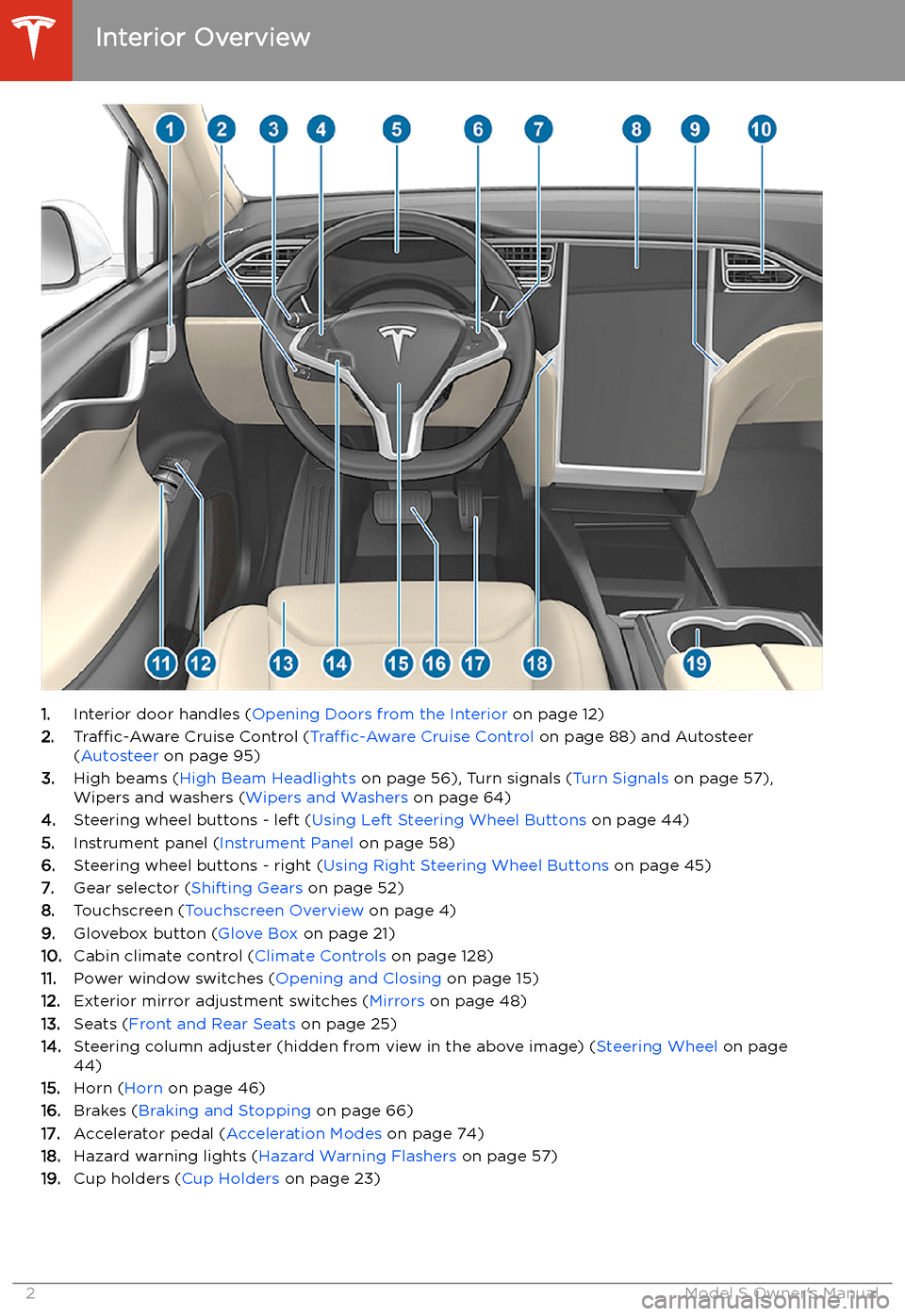
1. Interior door handles ( Opening Doors from the Interior on page 12)
2. Traffic-Aware Cruise Control ( Traffic-Aware Cruise Control on page 88) and Autosteer
( Autosteer on page 95)
3. High beams ( High Beam Headlights on page 56), Turn signals ( Turn Signals on page 57),
Wipers and washers ( Wipers and Washers on page 64)
4. Steering wheel buttons - left ( Using Left Steering Wheel Buttons on page 44)
5. Instrument panel ( Instrument Panel on page 58)
6. Steering wheel buttons - right ( Using Right Steering Wheel Buttons on page 45)
7. Gear selector ( Shifting Gears on page 52)
8. Touchscreen ( Touchscreen Overview on page 4)
9. Glovebox button ( Glove Box on page 21)
10. Cabin climate control ( Climate Controls on page 128)
11. Power window switches ( Opening and Closing on page 15)
12. Exterior mirror adjustment switches ( Mirrors on page 48)
13. Seats ( Front and Rear Seats on page 25)
14. Steering column adjuster (hidden from view in the above image) ( Steering Wheel on page
44)
15. Horn ( Horn on page 46)
16. Brakes ( Braking and Stopping on page 66)
17. Accelerator pedal ( Acceleration Modes on page 74)
18. Hazard warning lights ( Hazard Warning Flashers on page 57)
19. Cup holders ( Cup Holders on page 23)
Interior Overview
2Model S Owner
Page 61 of 226
IndicatorDescription
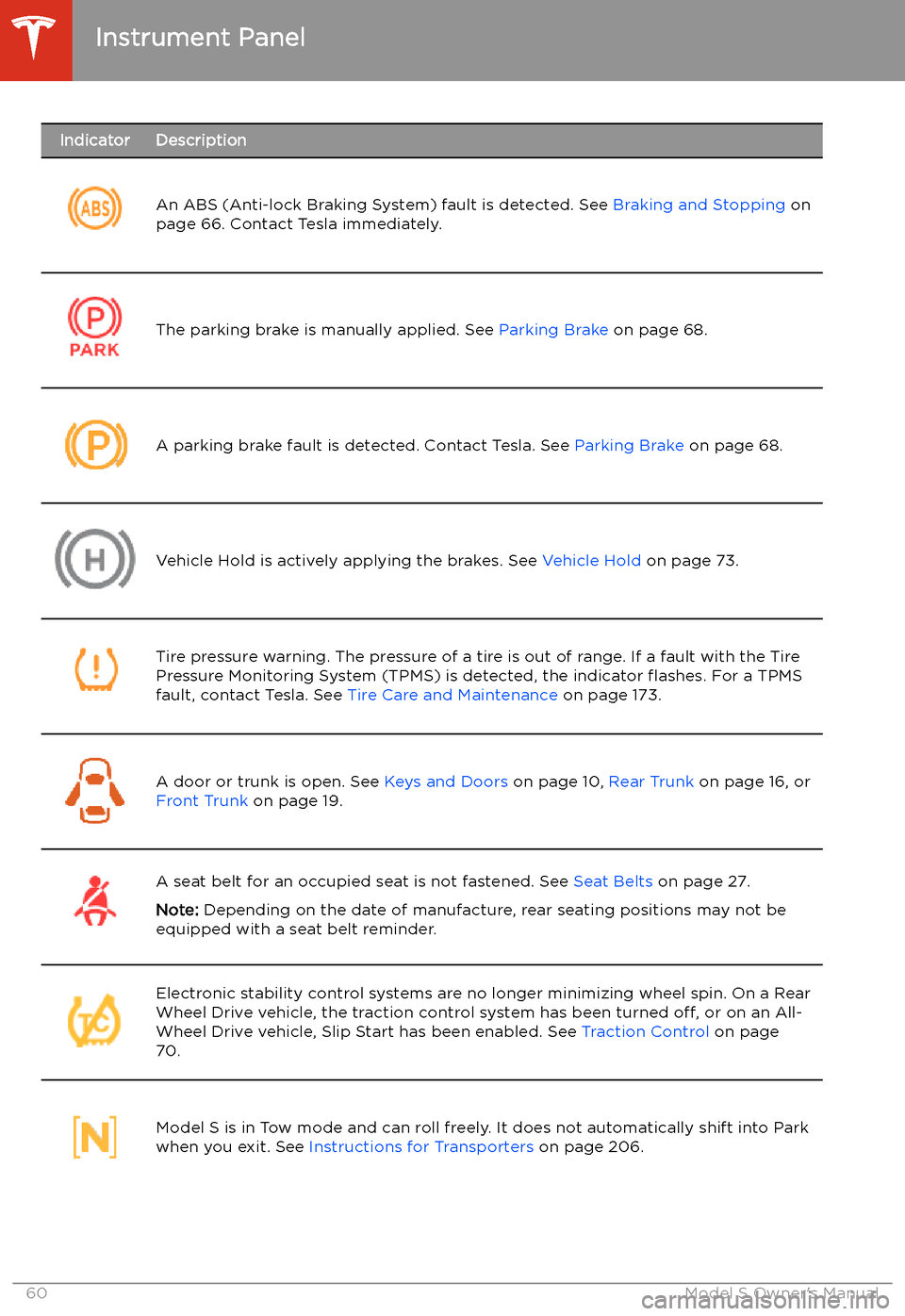
An ABS (Anti-lock Braking System) fault is detected. See Braking and Stopping on
page 66. Contact Tesla immediately.The parking brake is manually applied. See Parking Brake on page 68.A parking brake fault is detected. Contact Tesla. See Parking Brake on page 68.Vehicle Hold is actively applying the brakes. See Vehicle Hold on page 73.Tire pressure warning. The pressure of a tire is out of range. If a fault with the Tire
Pressure Monitoring System (TPMS) is detected, the indicator
Page 68 of 226
Caution: If the brakes are not functioning
properly, stop the vehicle as soon as safety permits and contact Tesla Service.
See Park on page 52 for information on
using the Park button to stop the vehicle
in case of emergency.Warning: Always maintain a safe driving
distance from the vehicle in front of you
and be cautious in hazardous driving
conditions. Do not rely on brake disc
wiping or hydraulic fade compensation to act as a substitute for adequate braking.
Regenerative Braking
Whenever Model S is moving and your foot is
off the accelerator, regenerative braking slows
down Model S and feeds any surplus energy
back to the Battery.
By anticipating your stops and reducing or
removing pressure from the accelerator pedal
to slow down, you can take advantage of regenerative braking to increase driving range.
Of course, this is no substitute for regular braking when needed for safety.
Note: If regenerative braking is aggressively
slowing Model S (such as when your foot is
completely off the accelerator pedal at
highway speeds), the brake lights turn on to
alert others that you are slowing down.
Warning: In snowy or icy conditions
Model S may experience traction loss
during regenerative braking, particularly
when in the Standard setting and/or not
using winter tires. Tesla recommends
using the Low setting (see To Set the
Regenerative Braking Level on page 67)
in snowy or icy conditions to help maintain vehicle stability.
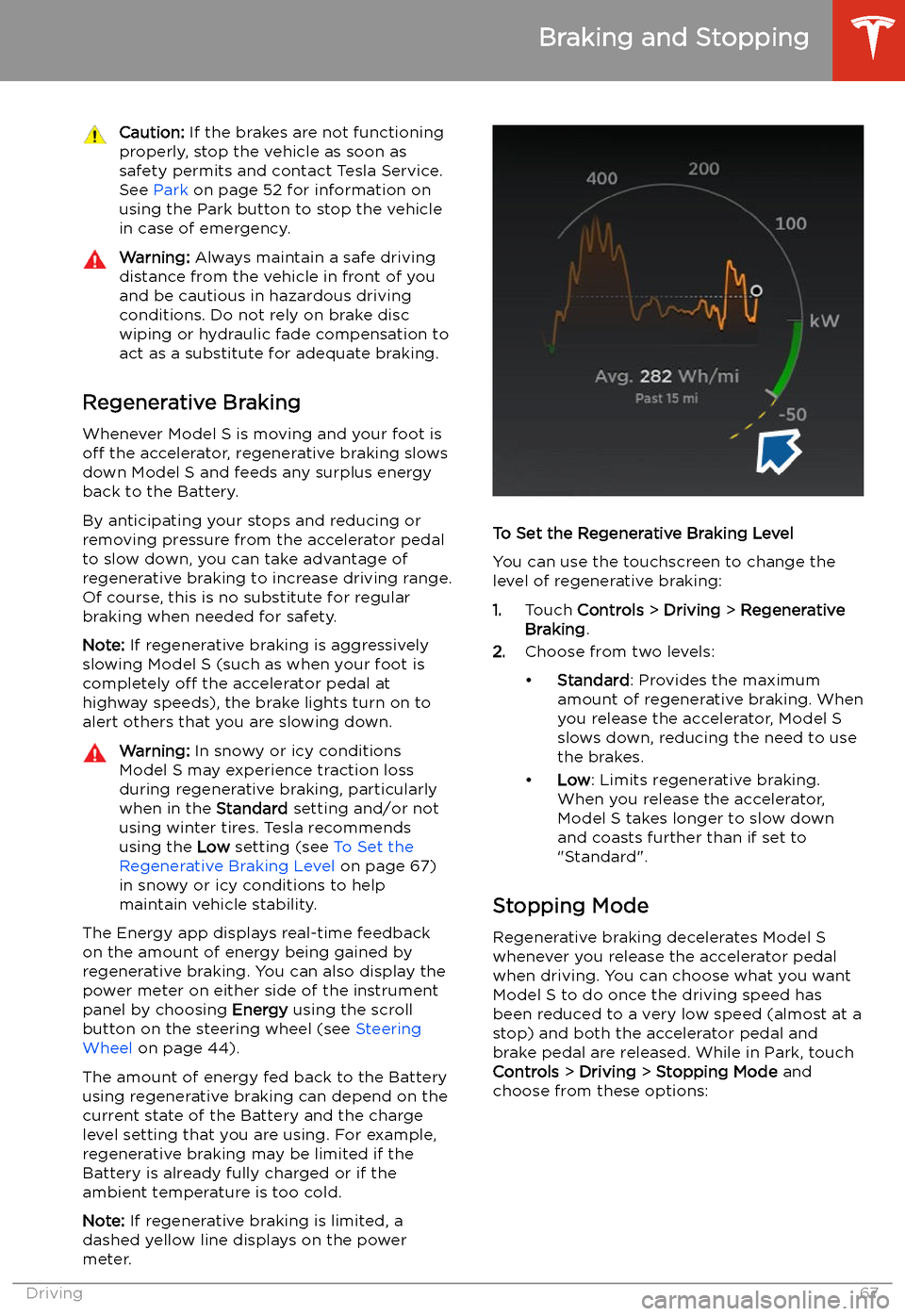
The Energy app displays real-time feedback
on the amount of energy being gained by
regenerative braking. You can also display the
power meter on either side of the instrument
panel by choosing Energy using the scroll
button on the steering wheel (see Steering
Wheel on page 44).
The amount of energy fed back to the Battery using regenerative braking can depend on the
current state of the Battery and the charge
level setting that you are using. For example,
regenerative braking may be limited if the Battery is already fully charged or if the
ambient temperature is too cold.
Note: If regenerative braking is limited, a
dashed yellow line displays on the power
meter.
To Set the Regenerative Braking Level
You can use the touchscreen to change the
level of regenerative braking:
1. Touch Controls > Driving > Regenerative
Braking .
2. Choose from two levels:
Page 70 of 226
Use the touchscreen to manually release the
parking brake (which also shifts Model S into Neutral):
1. Touch Controls > Safety & Security .
2. Press the brake pedal, then touch Parking
Brake . If Model S was previously in Park, it
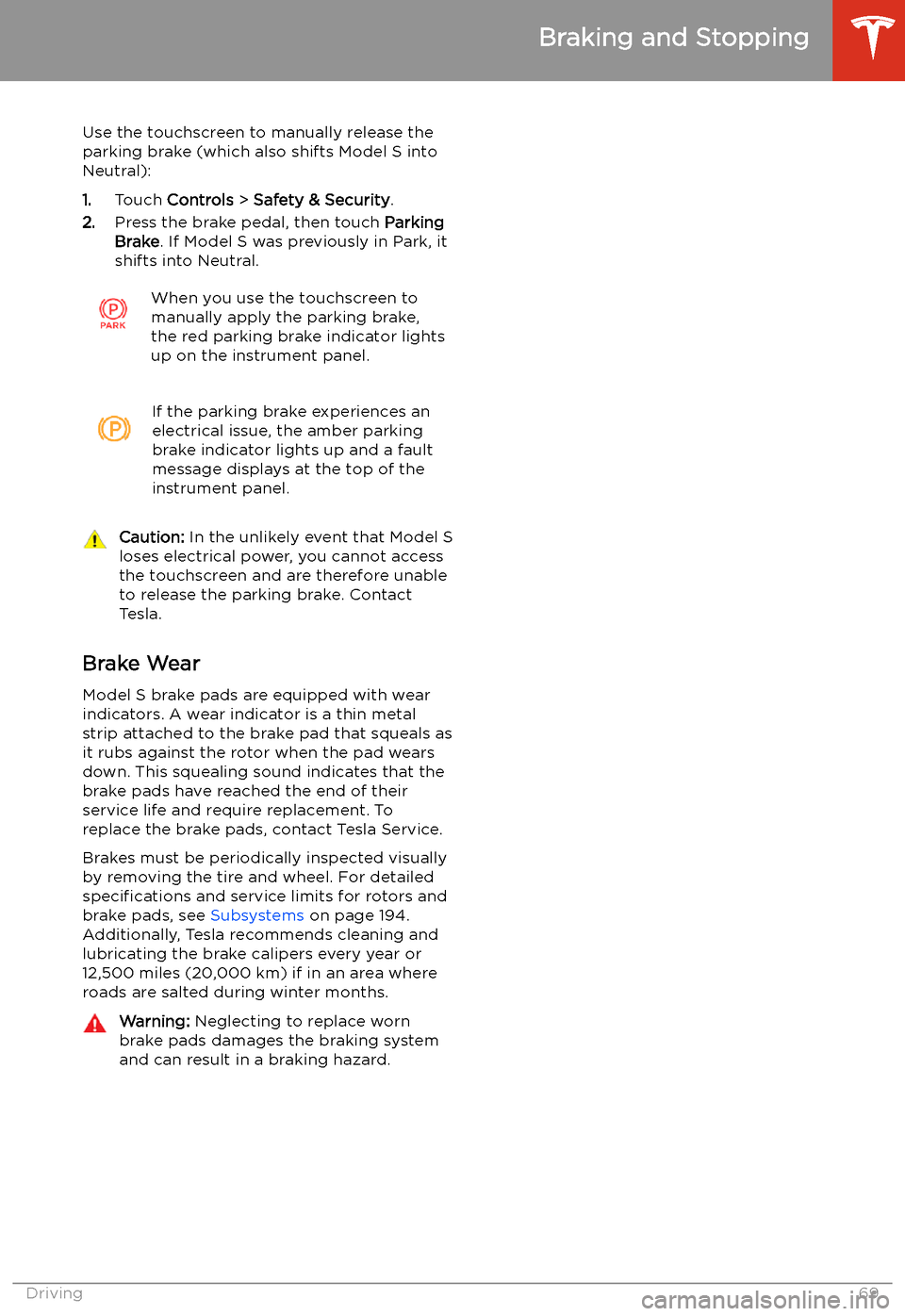
shifts into Neutral.When you use the touchscreen to
manually apply the parking brake,
the red parking brake indicator lights
up on the instrument panel.If the parking brake experiences an
electrical issue, the amber parking brake indicator lights up and a fault
message displays at the top of the
instrument panel.Caution: In the unlikely event that Model S
loses electrical power, you cannot access
the touchscreen and are therefore unable to release the parking brake. Contact
Tesla.
Brake Wear
Model S brake pads are equipped with wear
indicators. A wear indicator is a thin metal
strip attached to the brake pad that squeals as
it rubs against the rotor when the pad wears
down. This squealing sound indicates that the
brake pads have reached the end of their service life and require replacement. To
replace the brake pads, contact Tesla Service.
Brakes must be periodically inspected visually by removing the tire and wheel. For detailed
specifications and service limits for rotors and
brake pads, see Subsystems on page 194.
Additionally, Tesla recommends cleaning and
lubricating the brake calipers every year or
12,500 miles (20,000 km) if in an area where
roads are salted during winter months.
Warning: Neglecting to replace worn
brake pads damages the braking system
and can result in a braking hazard.
Braking and Stopping
Driving69
Page 74 of 226
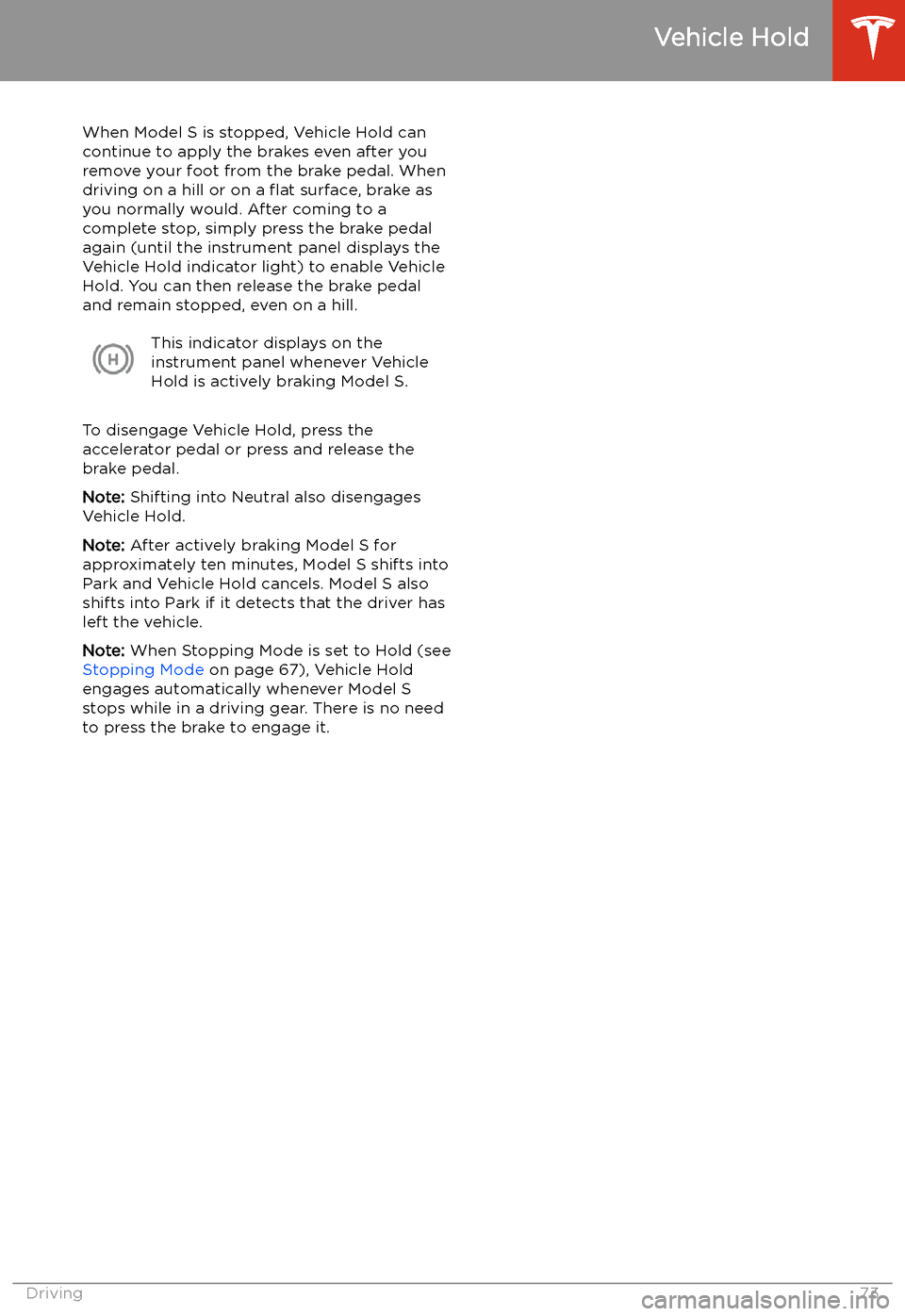
Vehicle Hold
When Model S is stopped, Vehicle Hold can
continue to apply the brakes even after you
remove your foot from the brake pedal. When
driving on a hill or on a
Page 115 of 226

Warning: Forward Collision Warning is
designed only to provide visual and
audible alerts. It does not attempt to
apply the brakes or decelerate Model S.
When seeing and/or hearing a warning, it
is the driver
Page 116 of 226

Obstacle-Aware AccelerationObstacle-Aware Acceleration is designed toreduce the impact of a collision by reducing
motor torque and in some cases applying the
brakes, if Model S detects an object in its driving path. For example, Model S, while
parked in front of a closed garage door with
the Drive gear engaged, detects that you have
pressed hard on the accelerator pedal.
Although Model S still accelerates and hits the
garage door, the reduced torque may result in
less damage.
Obstacle-Aware Acceleration is designed to
operate only when all of these conditions are
simultaneously met:
Page 196 of 226
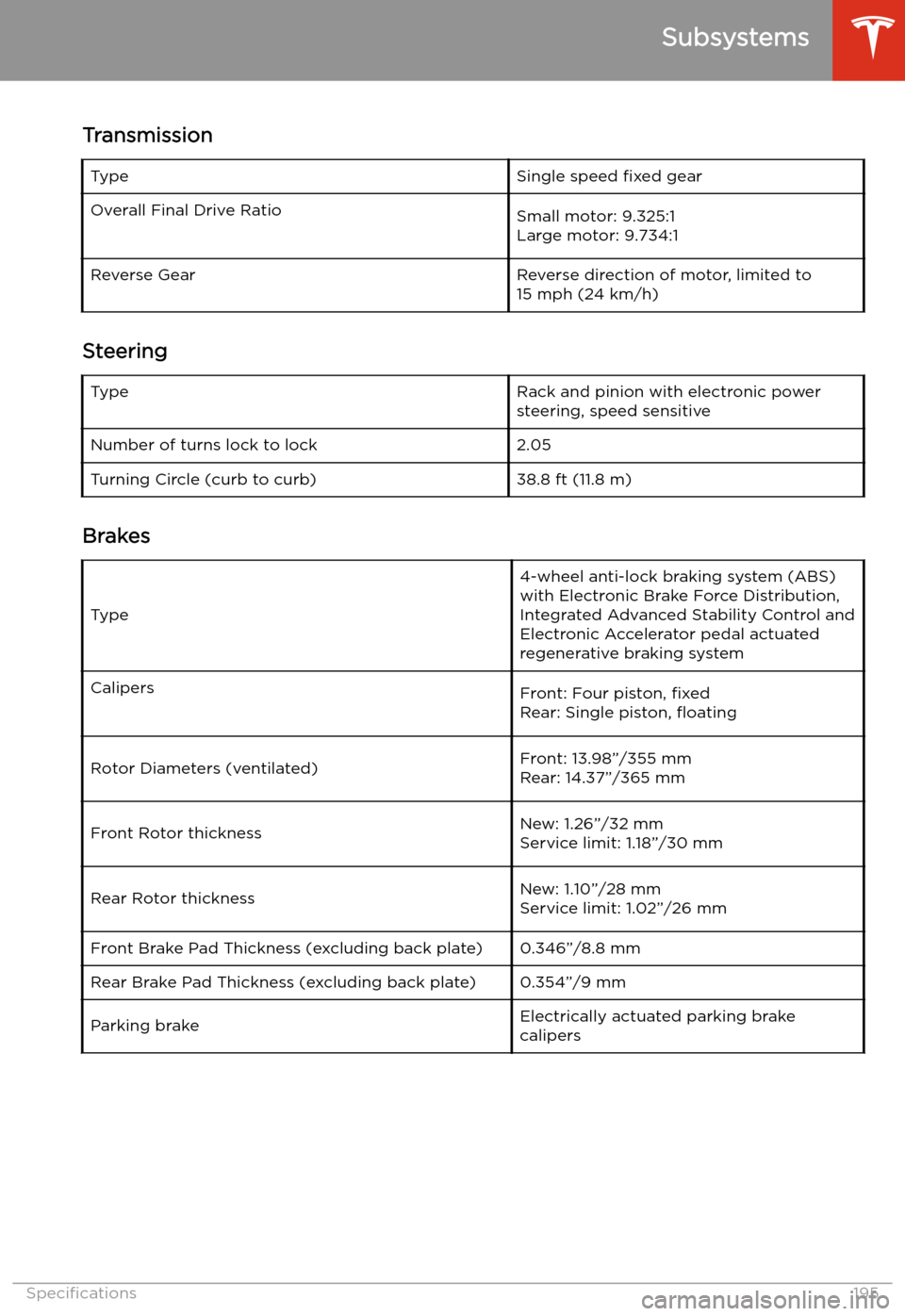
TransmissionTypeSingle speed fixed gearOverall Final Drive RatioSmall motor: 9.325:1
Large motor: 9.734:1Reverse GearReverse direction of motor, limited to
15 mph (24 km/h)
Steering
TypeRack and pinion with electronic power steering, speed sensitiveNumber of turns lock to lock2.05Turning Circle (curb to curb)38.8 ft (11.8 m)
Brakes
Type
4-wheel anti-lock braking system (ABS)
with Electronic Brake Force Distribution,
Integrated Advanced Stability Control and
Electronic Accelerator pedal actuated
regenerative braking systemCalipersFront: Four piston, fixed
Rear: Single piston,
Page 220 of 226
Index
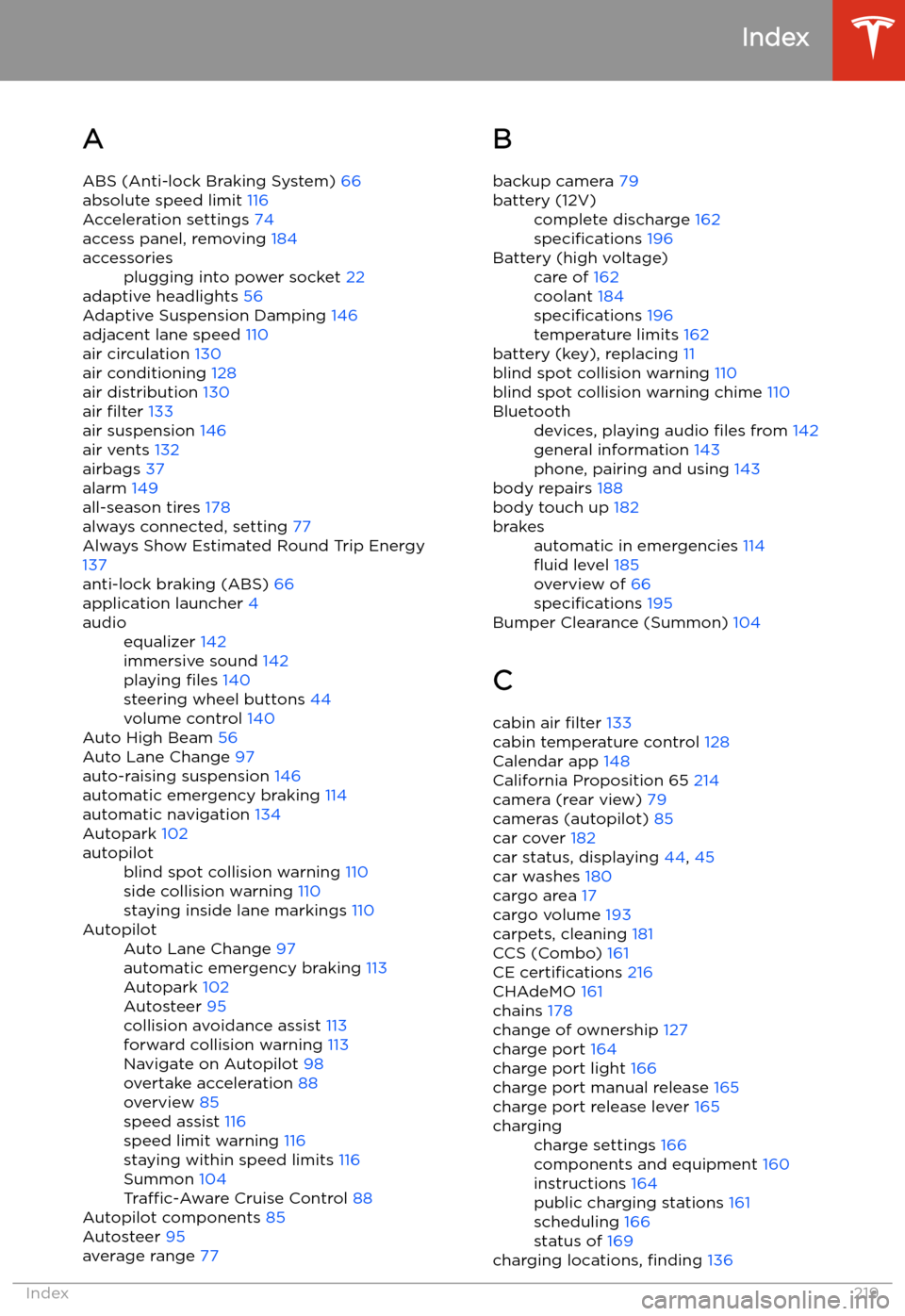
A ABS (Anti-lock Braking System) 66
absolute speed limit 116
Acceleration settings 74
access panel, removing 184
accessoriesplugging into power socket 22
adaptive headlights 56
Adaptive Suspension Damping 146
adjacent lane speed 110
air circulation 130
air conditioning 128
air distribution 130
air filter 133
air suspension 146
air vents 132
airbags 37
alarm 149
all-season tires 178
always connected, setting 77
Always Show Estimated Round Trip Energy 137
anti-lock braking (ABS) 66
application launcher 4
audioequalizer 142
immersive sound 142
playing files 140
steering wheel buttons 44
volume control 140
Auto High Beam 56
Auto Lane Change 97
auto-raising suspension 146
automatic emergency braking 114
automatic navigation 134
Autopark 102
autopilotblind spot collision warning 110
side collision warning 110
staying inside lane markings 110AutopilotAuto Lane Change 97
automatic emergency braking 113
Autopark 102
Autosteer 95
collision avoidance assist 113
forward collision warning 113
Navigate on Autopilot 98
overtake acceleration 88
overview 85
speed assist 116
speed limit warning 116
staying within speed limits 116
Summon 104
Traffic-Aware Cruise Control 88
Autopilot components 85
Autosteer 95
average range 77
B
backup camera 79battery (12V)complete discharge 162
specifications 196Battery (high voltage)care of 162
coolant 184
specifications 196
temperature limits 162
battery (key), replacing 11
blind spot collision warning 110
blind spot collision warning chime 110
Bluetoothdevices, playing audio files from 142
general information 143
phone, pairing and using 143
body repairs 188
body touch up 182
brakesautomatic in emergencies 114
Page 224 of 226
shifting gears 52
Show Calendar Upon Entry 148
Side Clearance (Summon) 104
side collision warning 110
SiriusXM 140
slip start 70
Smart Summon 107
software reset 127
software update preferences 157
software updates 157
software version 9specifications12V battery 196
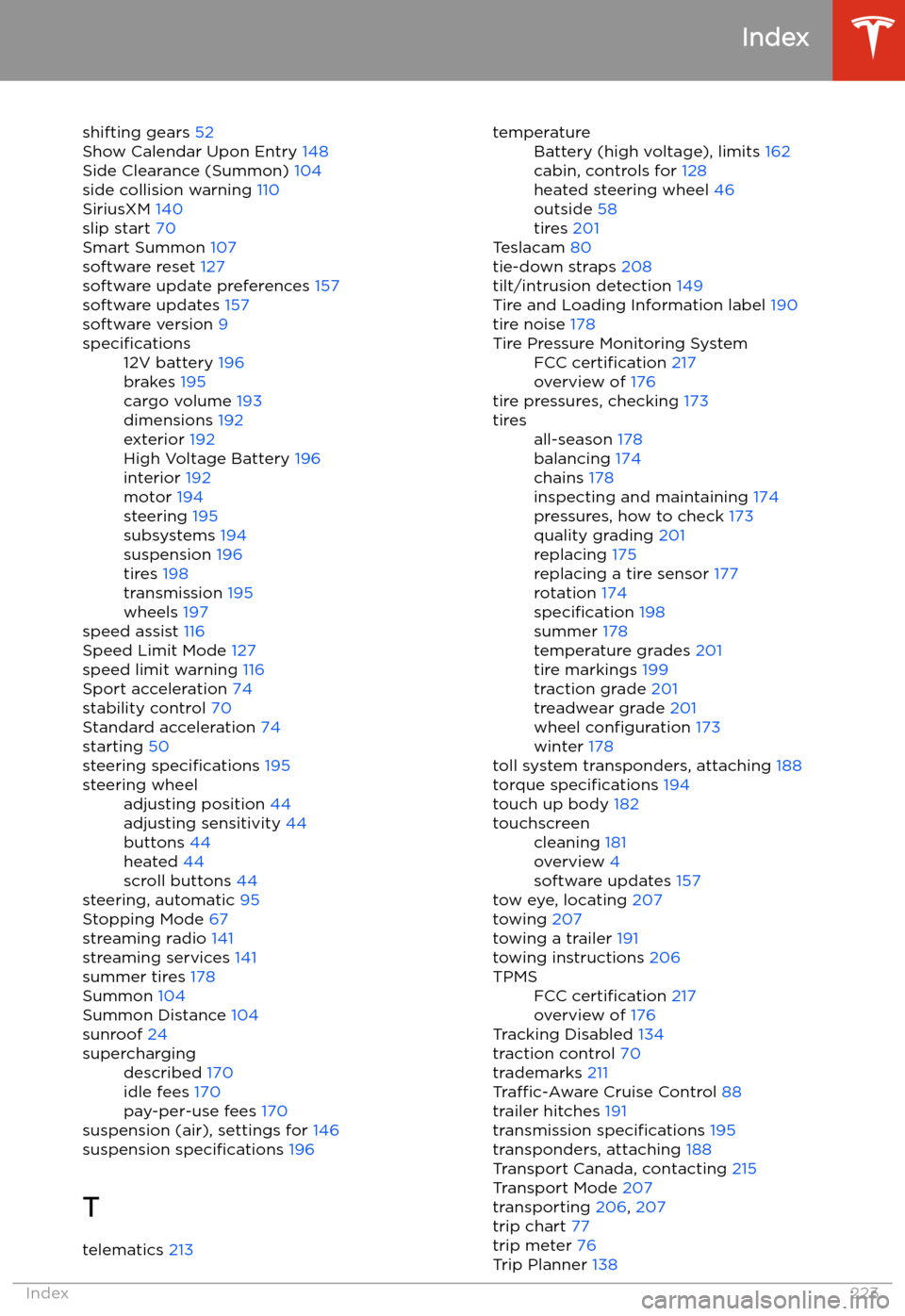
brakes 195
cargo volume 193
dimensions 192
exterior 192
High Voltage Battery 196
interior 192
motor 194
steering 195
subsystems 194
suspension 196
tires 198
transmission 195
wheels 197
speed assist 116
Speed Limit Mode 127
speed limit warning 116
Sport acceleration 74
stability control 70
Standard acceleration 74
starting 50
steering specifications 195
steering wheeladjusting position 44
adjusting sensitivity 44
buttons 44
heated 44
scroll buttons 44
steering, automatic 95
Stopping Mode 67
streaming radio 141
streaming services 141
summer tires 178
Summon 104
Summon Distance 104
sunroof 24
superchargingdescribed 170
idle fees 170
pay-per-use fees 170
suspension (air), settings for 146
suspension specifications 196
T telematics 213
temperatureBattery (high voltage), limits 162
cabin, controls for 128
heated steering wheel 46
outside 58
tires 201
Teslacam 80
tie-down straps 208
tilt/intrusion detection 149
Tire and Loading Information label 190
tire noise 178
Tire Pressure Monitoring SystemFCC certification 217
overview of 176
tire pressures, checking 173
tiresall-season 178
balancing 174
chains 178
inspecting and maintaining 174
pressures, how to check 173
quality grading 201
replacing 175
replacing a tire sensor 177
rotation 174
specification 198
summer 178
temperature grades 201
tire markings 199
traction grade 201
treadwear grade 201
wheel configuration 173
winter 178
toll system transponders, attaching 188
torque specifications 194
touch up body 182
touchscreencleaning 181
overview 4
software updates 157
tow eye, locating 207
towing 207
towing a trailer 191
towing instructions 206
TPMSFCC certification 217
overview of 176
Tracking Disabled 134
traction control 70
trademarks 211
Traffic-Aware Cruise Control 88
trailer hitches 191
transmission specifications 195
transponders, attaching 188
Transport Canada, contacting 215
Transport Mode 207
transporting 206, 207
trip chart 77
trip meter 76
Trip Planner 138
Index
Index223