change TESLA MODEL S 2021 Owner´s Manual
[x] Cancel search | Manufacturer: TESLA, Model Year: 2021, Model line: MODEL S, Model: TESLA MODEL S 2021Pages: 281, PDF Size: 7.63 MB
Page 104 of 281
NOTE: If, after you briefly press the
accelerator pedal to confirm that you want to
continue through the intersection, the traffic signal changes before you enter the
intersection (for example, the light changes
from green to yellow or from yellow to red),
Model S may determine that it is not
appropriate to proceed. Therefore, Model S stops and you must press the accelerator to proceed. At all times, it is your responsibility
to ensure the vehicle stops or accelerates
appropriately and safely.
WARNING: Traffic Light and Stop Sign Control DOES NOT turn Model S through an intersection. When in a turning lane, Model S stops at the red stop line. To proceed, briefly press the accelerator pedal
Page 106 of 281
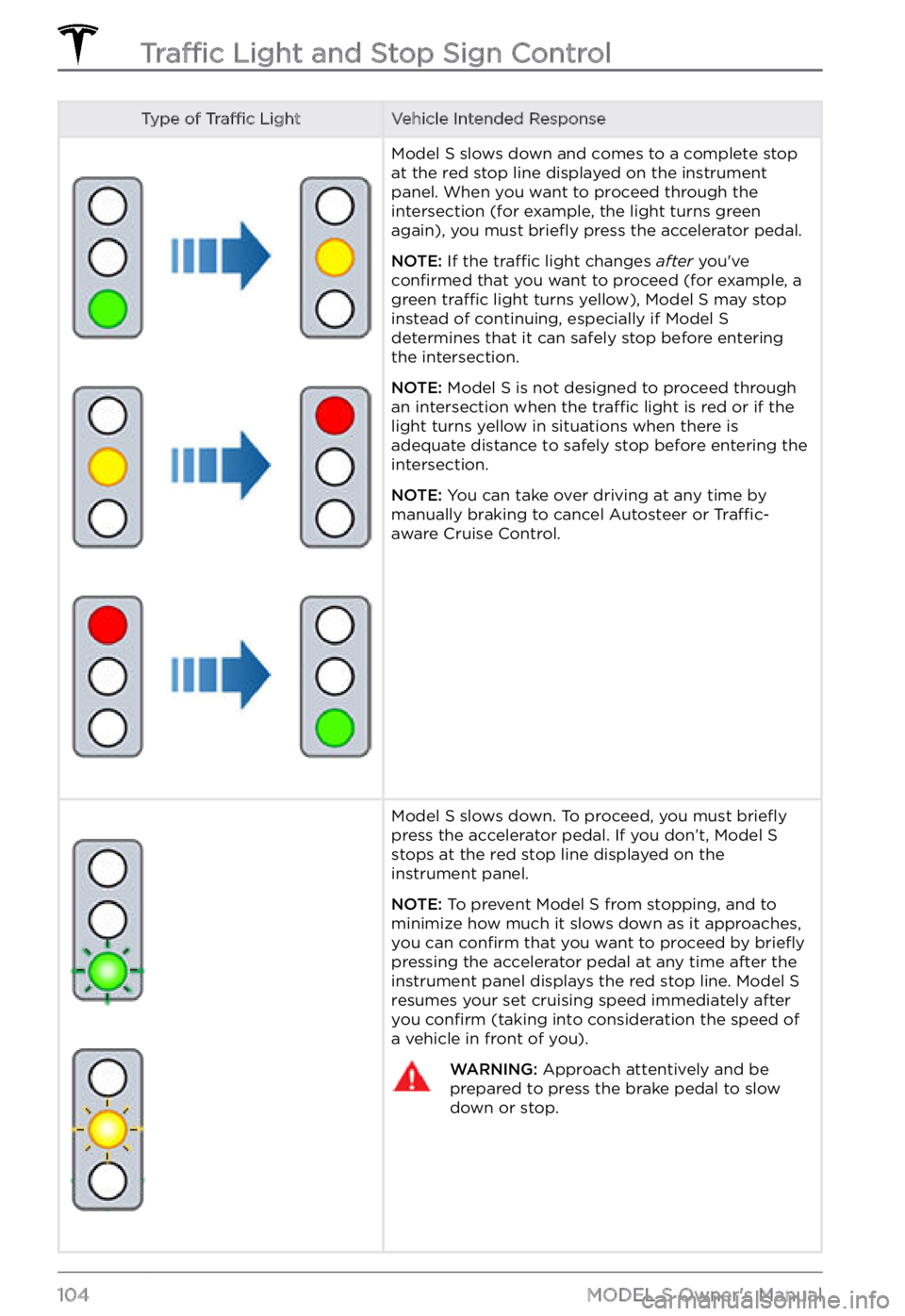
Type of Traffic LightVehicle Intended ResponseModel S slows down and comes to a complete stop
at the red stop line displayed on the instrument panel. When you want to proceed through the
intersection (for example, the light turns green
again), you must
briefly press the accelerator pedal.
NOTE: If the traffic light changes after you
Page 112 of 281

WARNING: When Autopark is active, monitor the touchscreen and instrument panel to ensure that you are aware of the instructions that Autopark is providing.
To Pause Parking
To pause Autopark, press the brake pedal
once. Model S stops and remains stopped
until you touch Resume on the touchscreen.
To Cancel Parking
Autopark cancels the parking sequence when
you manually move the steering yoke, change
gears, or touch Cancel on the touchscreen.
Autopark also cancels parking when:
Page 122 of 281
NOTE: Lane Departure Avoidance does not
warn you of lane departures, or provide steering interventions, if the associated turn signal is on, which indicates an intentional
lane change.WARNING: Lane Departure Avoidance is intended to help keep you safe, but it does not work in every situation and does not replace the need to remain attentive and in control.
WARNING: Keep your hands on the steering yoke and drive attentively at all times.
WARNING: Steering interventions are minimal and are not designed to move Model S out of its driving lane. Do not rely on steering interventions to avoid side collisions.
Emergency Lane Departure
Avoidance
Emergency Lane Departure Avoidance automatically applies steering to avoid a potential collision in situations where:
Page 147 of 281
To change or delete the address associated
with Home or Work, press and hold the
shortcut icon and in the popup window, enter
a new address and touch
Save as Home or Save as Work, or touch Clear Home or Clear Work.
NOTE: Based on your usage patterns, Model S may prompt you to save a location as Home
or Work.
NOTE: Once a Home or Work location is
saved, Model S may prompt you to navigate
to your Work location in the mornings and to
your Home location in the evenings and
provide an estimated driving time based on
current
traffic conditions.
For security reasons, if you sell Model S, it is
recommended that you delete your Home
and Work locations. You can delete these individually or you can perform a factory
reset to erase all personal data (touch
Controls > Service > Factory Reset).
Charging Locations
To display charging locations on the map,
touch the map
Page 173 of 281

If the touchscreen displays a message indicating that a software update was not
successfully completed, contact Tesla.
Charging
If Model S is charging when the software
update begins, charging stops. Charging
resumes automatically when the software
update is complete. If you are driving
Model S at the scheduled update time, the update is
canceled and must be rescheduled.
Viewing Release Notes
When a software update is complete, read the
release notes displayed on the touchscreen to
learn about changes or new features. To
display release notes about the current
version of your vehicle
Page 181 of 281
Charging Status
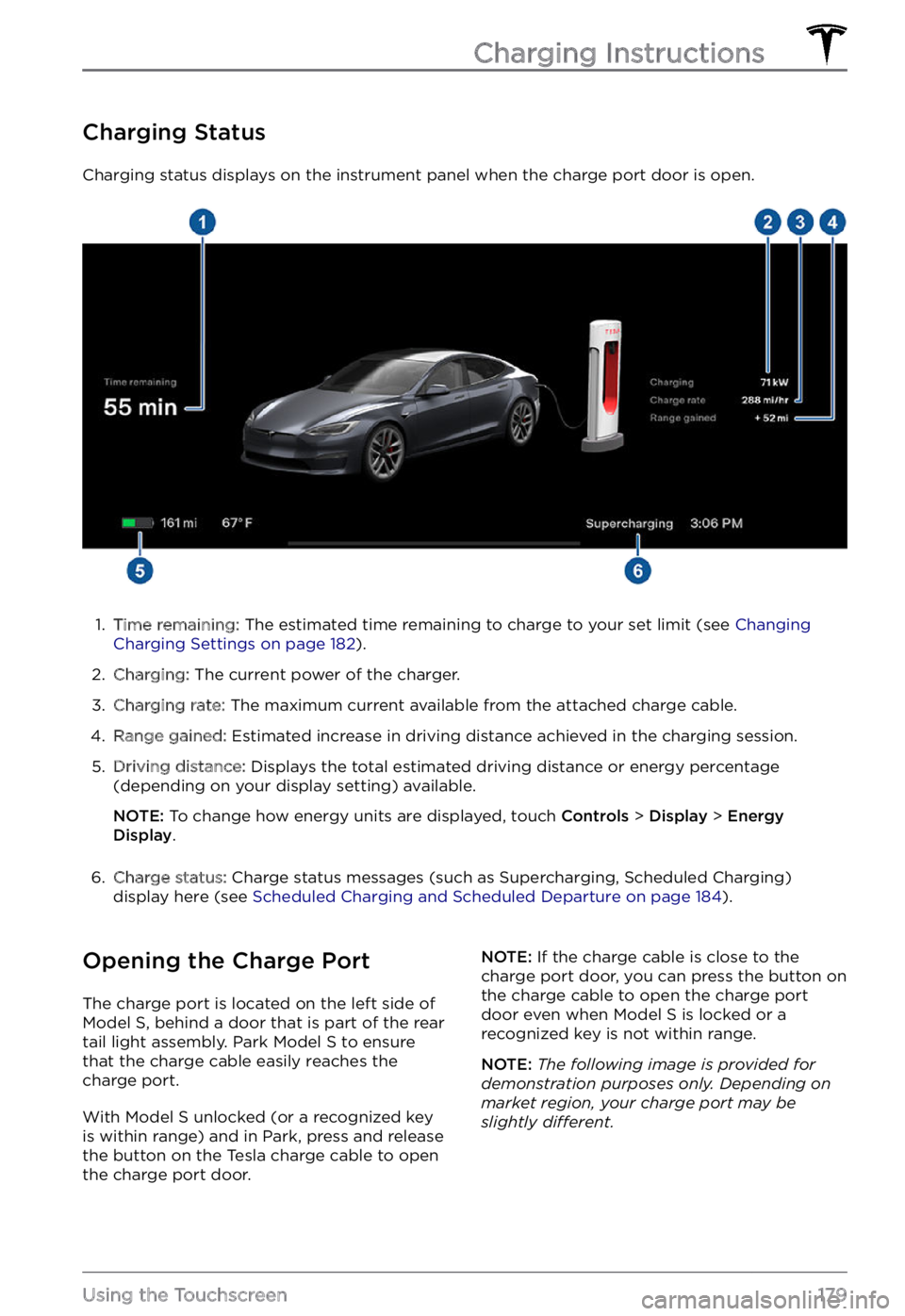
Charging status displays on the instrument panel when the charge port door is open.
1.
Time remaining: The estimated time remaining to charge to your set limit (see Changing Charging Settings on page 182).
2.
Charging: The current power of the charger.
3.
Charging rate: The maximum current available from the attached charge cable.
4.
Range gained: Estimated increase in driving distance achieved in the charging session.
5.
Driving distance: Displays the total estimated driving distance or energy percentage
(depending on your display setting) available.
NOTE: To change how energy units are displayed, touch Controls > Display > Energy Display.
6.
Charge status: Charge status messages (such as Supercharging, Scheduled Charging)
display here (see Scheduled Charging and Scheduled Departure on page 184).
Opening the Charge Port
The charge port is located on the left side of Model S, behind a door that is part of the rear
tail light assembly. Park Model S to ensure
that the charge cable easily reaches the
charge port.
With Model S unlocked (or a recognized key is within range) and in Park, press and release
the button on the Tesla charge cable to open the charge port door.
NOTE: If the charge cable is close to the
charge port door, you can press the button on
the charge cable to open the charge port
door even when Model S is locked or a recognized key is not within range.
NOTE: The following image is provided for demonstration purposes only. Depending on market region, your charge port may be slightly di
Page 185 of 281

1.
Driving distance: Displays the total
estimated driving distance available.
2.
Set limit: Adjust the charge limit by
dragging the arrow below the battery to
indicate the level of charging you want.
The setting you choose applies to
immediate and scheduled charging
sessions.
NOTE: A portion of the battery image
may appear blue. This indicates that a
small portion of the energy stored in the
battery is not available because the
battery is cold. This is normal and no
reason for concern. When the battery warms up, the blue portion no longer displays.
3.
Stop charging: Touch to stop charging.
4.
Charge current at this location: The
current automatically sets to the
maximum current available from the
attached charge cable, unless it was previously reduced to a lower level. If
needed, touch
- or + to change the
current (for example, you may want to
reduce the current if you are concerned
about overloading a domestic wiring
circuit shared by other equipment). It is
not possible to set the charging current to
a level that exceeds the maximum
available from the attached charge cable.
When you change the current,
Model S remembers the location. If you charge at
the same location, you do not need to
change it again.
NOTE: If Model S is charging and detects
unexpected
Page 274 of 281
A
ABS (Anti-lock Braking System): 66
absolute speed limit: 126
access panel, removing: 199
accessories: 24
plugging into power socket: 24
Active Road Noise Reduction: 25
adaptive headlights: 58
adjacent lane speed: 119
aero covers: 190
air conditioning: 135
air filter: 140
air vents: 138
airbags: 38
alarm: 161
all-season tires: 192
Always Show Estimated Round Trip Energy: 146
anti-lock braking (ABS): 66
apps: 6
audio: 149, 152
playing files: 149, 152
settings: 149
volume control: 149
auto fold: 50
Auto High Beam: 57
Auto Lane Change: 95
auto tilt: 50
AUTO wipers: 65
automatic emergency braking: 123
automatic navigation: 142
Autopark: 109
autopilot: 119
blind spot collision warning: 119
side collision warning: 119
Autopilot: 84, 87, 93, 95, 109, 111, 122, 126
Auto Lane Change: 95
automatic emergency braking: 122
Autopark: 109
Autosteer: 93
collision avoidance assist: 122
forward collision warning: 122
overtake acceleration: 87
overview: 84
speed assist: 126
speed limit warning: 126
staying within speed limits: 126
Summon: 111
Traffic-Aware Cruise Control: 87
Autopilot components: 84
Autosteer: 93
B
backup camera: 76
battery (12V): 177, 210
complete discharge: 177
specifications: 210
Battery (high voltage): 177, 199, 210
care of: 177
coolant: 199
specifications: 210
temperature limits: 177
battery (key), replacing: 12
blind spot collision warning: 119
Bluetooth: 150, 154
devices, playing audio files from: 150
general information: 154
phone, pairing and using: 154
body repairs: 202
body touch up: 196
Boombox: 153
brakes: 66, 123, 199, 208
automatic in emergencies: 123
fluid level: 199
overview of: 66
specifications: 208
Bumper Clearance (Summon): 111
C
cabin air filter: 140
cabin camera: 25
cabin temperature control: 135
Calendar: 154, 157
California Proposition 65: 227
camera (rear view): 76
cameras (autopilot): 84
Camp Mode: 139
car cover: 197
Index
Page 277 of 281
key: 12, 229
FCC and IC certifications: 229
replacing battery: 12
key card: 10
keys: 9, 12
adding key cards and phone keys: 12
deleting key cards and phone keys: 12
displaying a list of: 12
overview: 9
L
label: 204
Tire and Loading Information: 204
vehicle certification: 204
lane assist: 119
lane change, automatic: 95
Lane Departure Avoidance: 119
LATCH child seats, installing: 35
liftgate: 17
adjust opening height: 17
opening: 17
lifting: 201
lights: 56, 58
adaptive headlights: 58
hazard warning: 58
headlights after exit: 58
turn signals: 58
load limits: 204
location tracking: 142
locking: 14
lumbar adjustment: 26
M
maintenance: 186, 187, 188, 194, 198, 199, 200
brake fluid, checking: 199
cleaning: 194
daily checks: 186
fluid replacement intervals: 187
monthly checks: 186
panel, removing: 199
replacing wiper blades: 198
service intervals: 186
tires: 188
washer fluid, topping up: 200
washer jets, cleaning: 198
map orientation: 142
map updates: 148
mats: 197
media: 149, 152
microphones: 25
mileage upon delivery: 227
mirrors: 50
mobile app: 172
mobile app access: 172
Mobile Connector: 176, 179
description: 176
using: 179
modifications: 202
motor specifications: 208
N
Navigate on Autopilot: 98
navigating: 142
NCC certifications: 229
Neutral gear: 55
NHTSA, contacting: 229
noise reduction microphones: 25
O
Obstacle-Aware Acceleration: 122
occupancy sensor: 40
occupant classification: 41
odometer: 73
Off-Peak Charging: 184
offset from speed limit: 126
Online Routing: 147
opening hood without power: 222
overhang dimensions: 206
overtake acceleration: 87
Owner Information, about: 224
P
Park Assist: 70
Park gear: 54
parking brake: 68
parking, using Autopark: 109
parking, using Summon: 111
parts replacement: 202
Index