charging TESLA MODEL S 2021 Owner´s Manual
[x] Cancel search | Manufacturer: TESLA, Model Year: 2021, Model line: MODEL S, Model: TESLA MODEL S 2021Pages: 281, PDF Size: 7.63 MB
Page 177 of 281
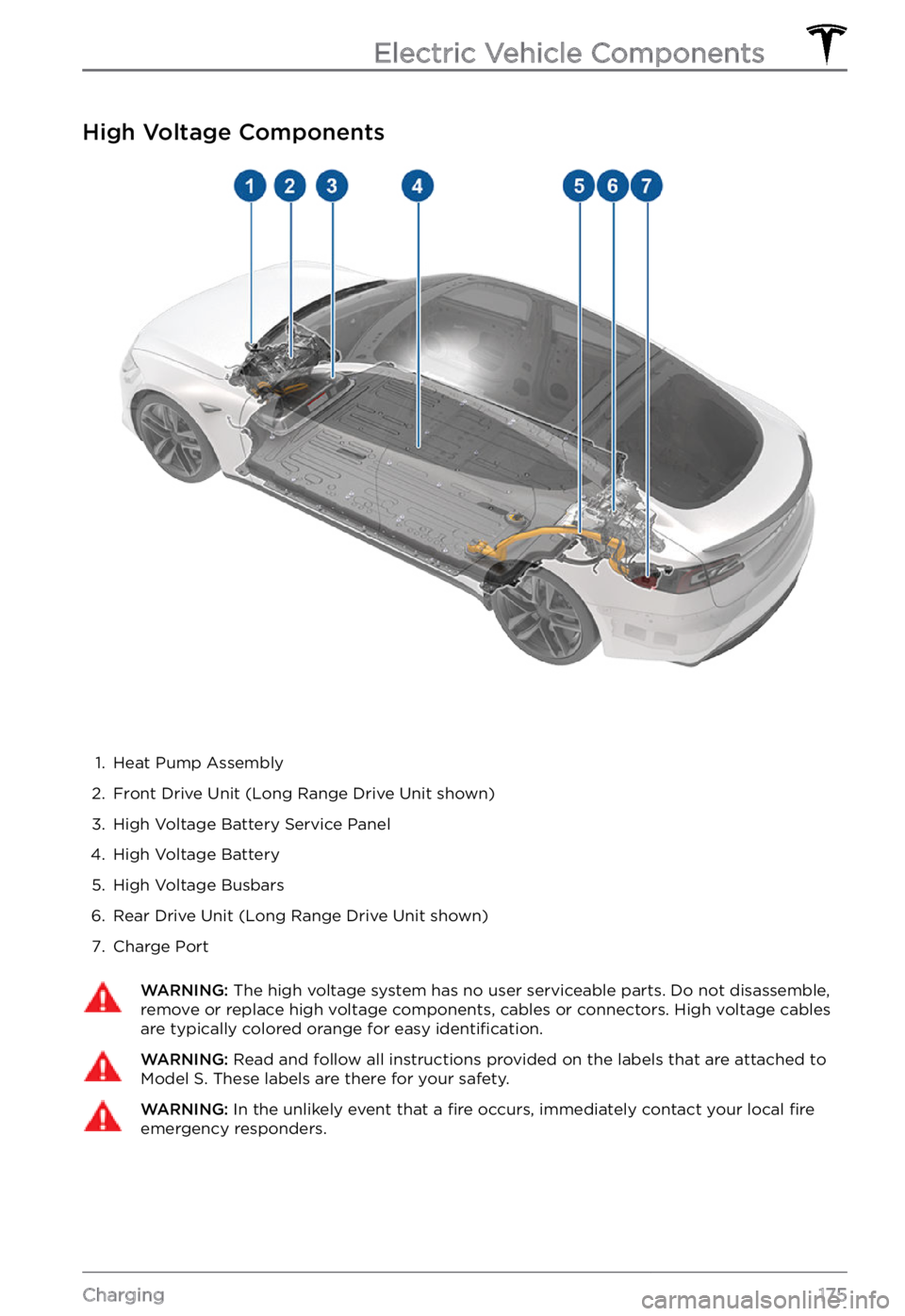
High Voltage Components
1.
Heat Pump Assembly
2.
Front Drive Unit (Long Range Drive Unit shown)
3.
High Voltage Battery Service Panel
4.
High Voltage Battery
5.
High Voltage Busbars
6.
Rear Drive Unit (Long Range Drive Unit shown)
7.
Charge Port
WARNING: The high voltage system has no user serviceable parts. Do not disassemble, remove or replace high voltage components, cables or connectors. High voltage cables are typically colored orange for easy identification.
WARNING: Read and follow all instructions provided on the labels that are attached to Model S. These labels are there for your safety.WARNING: In the unlikely event that a fire occurs, immediately contact your local fire emergency responders.
Electric Vehicle Components
175Charging
Page 178 of 281
Charging Equipment
Charging equipment designed specifically to
charge your Model S is available from Tesla. A
Tesla Wall Connector, which installs in your
parking space, is the fastest way to charge
Model S in daily use.
In most market regions, Model S is equipped
with a Mobile Connector and the adapter(s)
needed to plug into the most commonly used power outlets. When using the Mobile
Connector,
first plug the Mobile Connector
into the power outlet, attach an adapter (if
needed), and then plug in
Model S. For more
information about your Mobile Connector, see
the Mobile Connector Owner
Page 179 of 281
About the Battery
Model S has one of the most sophisticated
battery systems in the world. The most
important way to preserve the Battery is to
LEAVE YOUR VEHICLE PLUGGED IN when
you are not using it. This is particularly important if you are not planning to drive
Model S for several weeks.
NOTE: When left idle and unplugged, your
vehicle periodically uses energy from the
Battery for system tests and recharging the
12V battery when necessary.
There is no advantage to waiting until the
Battery
Page 181 of 281
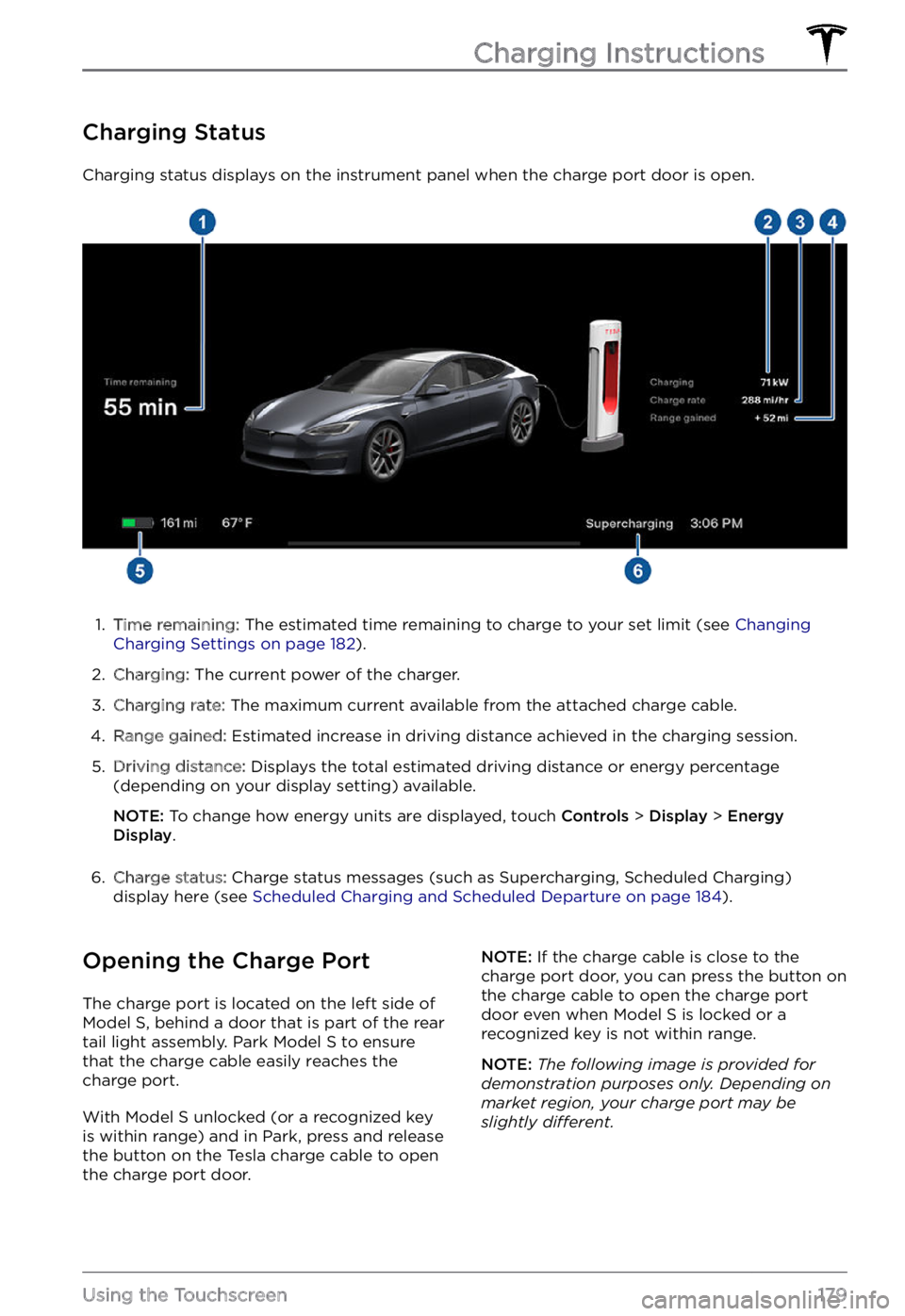
Charging Status
Charging status displays on the instrument panel when the charge port door is open.
1.
Time remaining: The estimated time remaining to charge to your set limit (see Changing Charging Settings on page 182).
2.
Charging: The current power of the charger.
3.
Charging rate: The maximum current available from the attached charge cable.
4.
Range gained: Estimated increase in driving distance achieved in the charging session.
5.
Driving distance: Displays the total estimated driving distance or energy percentage
(depending on your display setting) available.
NOTE: To change how energy units are displayed, touch Controls > Display > Energy Display.
6.
Charge status: Charge status messages (such as Supercharging, Scheduled Charging)
display here (see Scheduled Charging and Scheduled Departure on page 184).
Opening the Charge Port
The charge port is located on the left side of Model S, behind a door that is part of the rear
tail light assembly. Park Model S to ensure
that the charge cable easily reaches the
charge port.
With Model S unlocked (or a recognized key is within range) and in Park, press and release
the button on the Tesla charge cable to open the charge port door.
NOTE: If the charge cable is close to the
charge port door, you can press the button on
the charge cable to open the charge port
door even when Model S is locked or a recognized key is not within range.
NOTE: The following image is provided for demonstration purposes only. Depending on market region, your charge port may be slightly di
Page 184 of 281

2. While holding the public charging handle
in one hand and the adapter in the other
hand, press and hold the button on the
public charging handle and pull both
outwards, removing the handle and adapter at the same time.
NOTE: If the charging station handle
separates from the adapter, leaving the
adapter in
Model S, use the touchscreen
to unlock the charge port (touch the
charging icon on the overhead view of the
vehicle).
3.
Press and hold the charging handle button again to release the adapter from
the charging handle.
NOTE: The charge port automatically closes
within approximately 10 seconds of removing
the connector from the charge port.
CAUTION: Tesla strongly recommends leaving Model S plugged in when not in use. This maintains the Battery at the optimum level of charge.
Manually Releasing Charge
Cable
If the usual methods for releasing a charge
cable from the charge port (using the charge
handle release button, touchscreen, or mobile
app) do not work, carefully follow these steps:
1.
Ensure that Model S is not actively
charging by displaying the charging
screen on the touchscreen. If necessary,
touch
Stop Charging.
2.
Open the rear trunk.
3.
Pull the charge port
Page 185 of 281

1.
Driving distance: Displays the total
estimated driving distance available.
2.
Set limit: Adjust the charge limit by
dragging the arrow below the battery to
indicate the level of charging you want.
The setting you choose applies to
immediate and scheduled charging
sessions.
NOTE: A portion of the battery image
may appear blue. This indicates that a
small portion of the energy stored in the
battery is not available because the
battery is cold. This is normal and no
reason for concern. When the battery warms up, the blue portion no longer displays.
3.
Stop charging: Touch to stop charging.
4.
Charge current at this location: The
current automatically sets to the
maximum current available from the
attached charge cable, unless it was previously reduced to a lower level. If
needed, touch
- or + to change the
current (for example, you may want to
reduce the current if you are concerned
about overloading a domestic wiring
circuit shared by other equipment). It is
not possible to set the charging current to
a level that exceeds the maximum
available from the attached charge cable.
When you change the current,
Model S remembers the location. If you charge at
the same location, you do not need to
change it again.
NOTE: If Model S is charging and detects
unexpected
Page 186 of 281

Scheduled Charging and
Scheduled Departure
Toggle between Scheduled Departure and
Scheduled Charging by touching Controls > Charging > Switch to Scheduled Departure/Scheduled Charging.
Using Scheduled Charging
With Scheduled Charging selected, enable
the feature then set a daily time when you
want
Model S to start charging.
Using Scheduled Departure
When Scheduled Departure is displayed,
touch Schedule to set a daily time when you
want Model S to be ready to drive. Specify a
time, then touch Settings to enable either or
both of the following departure features:
Page 187 of 281

Log into your Tesla Account to view fees and
details about Supercharger sessions, track the remaining balance of free credits, set up a
payment method, and make payments. Once
a payment method is saved, fees are automatically paid from your account.Charging Instructions
185Charging
Page 197 of 281
CAUTION: Do not aim water hoses directly at windows, door, or hood seals or at electronic modules or exposed cabling.
CAUTION: To avoid corrosive damage that may not be covered by the warranty, rinse away any road salt from the underside of the vehicle, wheel wells, and brakes. After cleaning the vehicle, dry the brakes by going on a short drive and applying the brakes multiple times.
CAUTION: Avoid using tight-napped or rough cloths, such as washing mitts. A high-quality microfiber cleaning cloth is recommended.
CAUTION: If washing in an automatic car wash, use touchless car washes only. These car washes have no parts (brushes, etc.) that touch the surfaces of Model S. Some touchless car washes use caustic solutions that, over time, can cause discoloration of decorative exterior trim. Avoid exposure to soaps and chemicals above pH 13. If unsure, check the product label or ask the staff at the car wash. Damage caused by improper washing is not covered by the warranty.
CAUTION: If washing in an automatic car wash, make sure the vehicle is locked. In addition, avoid using controls on the touchscreen that can result in accidentally opening doors or trunks while the vehicle is being washed. Any damage caused is not covered by the warranty.
CAUTION: Ensure the wipers are off
before washing Model S to avoid the risk of damaging the wipers.
CAUTION: Do not use chemical based wheel cleaners or pre-wash products. These can damage the finish on the wheels.
WARNING: Never spray liquid at a high velocity (for example, if using a pressure washer) towards the charge port while Model S is charging. Failure to follow these instructions can result in serious injury or damage to the vehicle, charging equipment, or property.
Cleaning the Interior
Frequently inspect and clean the interior to
maintain its appearance and to prevent
premature wear. If possible, immediately wipe up spills and remove marks. For general cleaning, wipe interior surfaces using a soft cloth (such as
microfiber) dampened with a
mixture of warm water and mild non-
detergent cleaner (test all cleaners on a
concealed area before use). To avoid streaks,
dry immediately with a soft lint-free cloth.
Interior Glass
Do not scrape, or use any abrasive cleaning fluid on glass or mirrored surfaces. This can
damage the reflective surface of the mirror
and the heating elements in the rear window.
Airbags
Do not allow any substance to enter an airbag
cover. This could affect correct operation.
Dashboard and Plastic Surfaces
Do not polish the upper surfaces of the dashboard. Polished surfaces are reflective and could interfere with your driving view.
Seats
Wipe spills as soon as possible using a soft
cloth moistened with warm water and non- detergent soap. Wipe gently in a circular
motion. Then wipe dry using a soft, lint-free
cloth.
If equipped with leather seats, note that
leather is prone to dye-transfer which can
cause discoloration, particularly on light
colored leather. White and tan leather is
coated with an anti-soiling treatment. Using
detergents or commercially available leather
cleaners and conditioners is not
recommended because they can discolor or dry out the leather.
If equipped with polyurethane seats, be
careful with dyes, such as from clothing or
denim, that come into contact with the seats.
Over time, dyes can
diffuse into the seat
material and cause staining.
Vacuum cloth seats as needed to remove any
loose dirt.
Cleaning
195Maintenance
Page 199 of 281
CAUTION: Do not use cutting pastes, color restoration compounds, or polishes containing harsh abrasives. These can scour the surface and permanently damage the paint.
CAUTION: Do not use chrome polish or other abrasive cleaners.
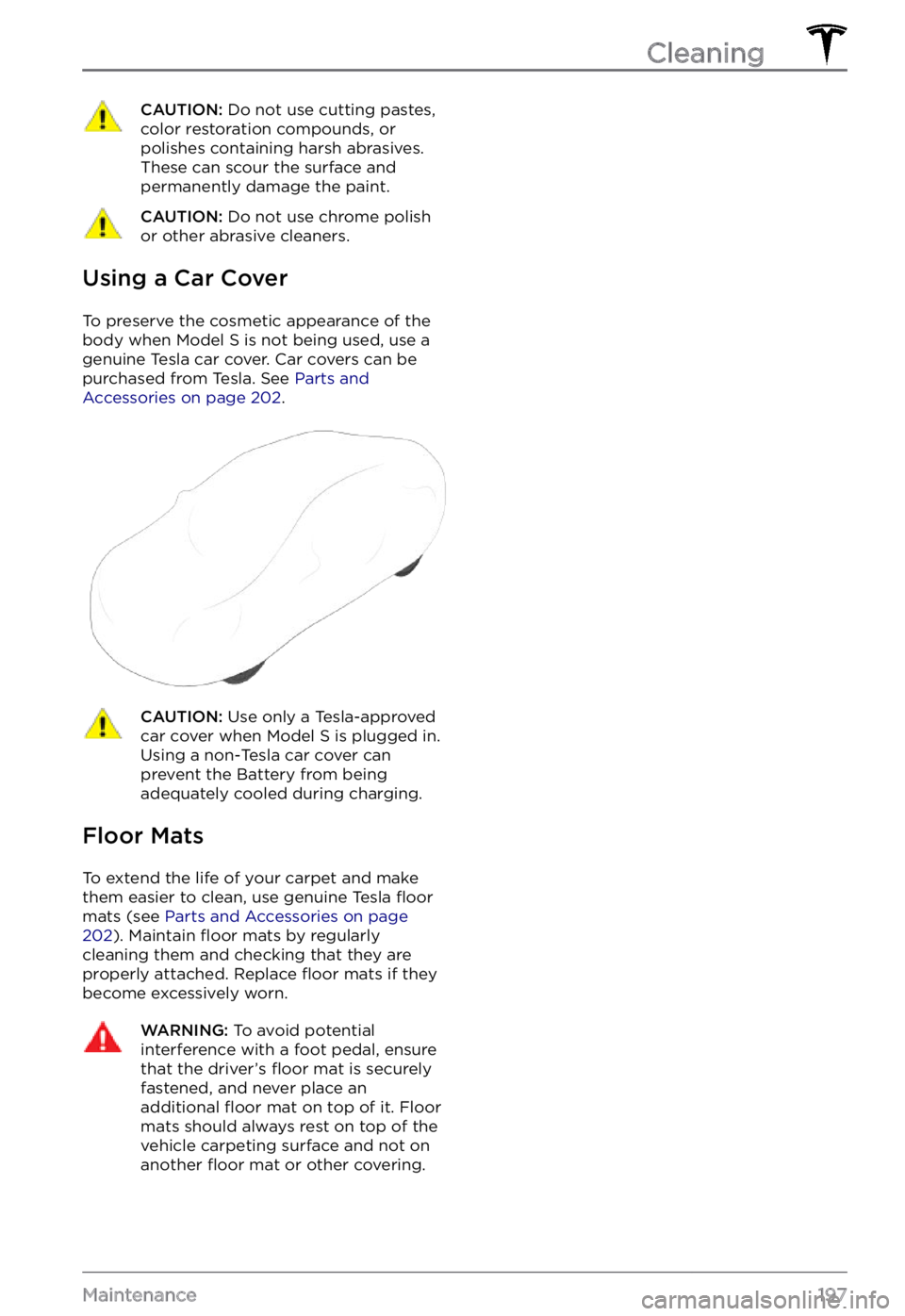
Using a Car Cover
To preserve the cosmetic appearance of the
body when Model S is not being used, use a
genuine Tesla car cover. Car covers can be
purchased from Tesla. See
Parts and Accessories on page 202.
CAUTION: Use only a Tesla-approved car cover when Model S is plugged in. Using a non-Tesla car cover can prevent the Battery from being adequately cooled during charging.
Floor Mats
To extend the life of your carpet and make
them easier to clean, use genuine Tesla floor
mats (see Parts and Accessories on page 202). Maintain floor mats by regularly
cleaning them and checking that they are
properly attached. Replace
floor mats if they
become excessively worn.
WARNING: To avoid potential interference with a foot pedal, ensure that the driver