park assist TESLA MODEL S 2022 Owner´s Manual
[x] Cancel search | Manufacturer: TESLA, Model Year: 2022, Model line: MODEL S, Model: TESLA MODEL S 2022Pages: 281, PDF Size: 7.63 MB
Page 3 of 281

Overview............................................................3
Exterior Overview......................................................3
Interior Overview.......................................................4
Touchscreen Overview.............................................6
Opening and Closing....................................9
Keys.................................................................................9
Doors.............................................................................14
Windows......................................................................16
Rear Trunk...................................................................17
Front Trunk.................................................................19
Interior Storage and Electronics........................22
Seating and Safety Restraints.................26
Front and Rear Seats.............................................26
Seat Belts....................................................................29
Child Safety Seats...................................................32
Airbags........................................................................38
Driving.............................................................44
Driver Profiles...........................................................44
Steering Yoke............................................................47
Mirrors.........................................................................50
Starting and Powering Off....................................51
Gears............................................................................53
Lights...........................................................................56
Instrument Panel.....................................................60
Wipers and Washers..............................................65
Braking and Stopping............................................66
Traction Control.......................................................69
Park Assist.................................................................70
Acceleration Modes................................................72
Trip Information........................................................73
Getting Maximum Range......................................74
Rear View Camera...................................................76
Dashcam.....................................................................77
Pedestrian Warning System................................80
Cold Weather Best Practices...............................81
Autopilot.........................................................84
About Autopilot.......................................................84
Traffic-Aware Cruise Control...............................87
Autosteer....................................................................93
Navigate on Autopilot...........................................98
Traffic Light and Stop Sign Control.................101
Autopark...................................................................109
Summon.......................................................................111
Smart Summon........................................................115
Lane Assist................................................................119
Collision Avoidance Assist..................................122
Speed Assist............................................................126
Using the Touchscreen.............................128
Controls.....................................................................128
Climate Controls.....................................................135
Maps and Navigation............................................142
Media..........................................................................149
Entertainment..........................................................152
Phone and Calendar.............................................154
Air Suspension........................................................158
Using Voice Commands......................................160
Security Settings.....................................................161
HomeLink Universal Transceiver......................166
Connecting to Wi-Fi.............................................169
Software Updates..................................................170
Mobile App...............................................................172
Charging........................................................175
Electric Vehicle Components............................175
Battery Information...............................................177
Charging Instructions...........................................179
Maintenance.................................................186
Maintenance Schedule.........................................186
Tire Care and Maintenance.................................188
Cleaning.....................................................................194
Wiper Blades and Washer Jets........................198
Fluid Reservoirs......................................................199
Jacking and Lifting................................................201
Parts and Accessories.........................................202
Specifications.............................................203
Identification Labels............................................203
Vehicle Loading.....................................................204
Dimensions and Weights...................................206
Subsystems.............................................................208
Wheels and Tires....................................................210
Roadside Assistance.................................217
Contacting Tesla Roadside Assistance..........217
Instructions for Transporters.............................218
Consumer Information............................224
About this Owner Information.........................224
Disclaimers..............................................................226
Reporting Safety Defects..................................228
Contents
Page 5 of 281
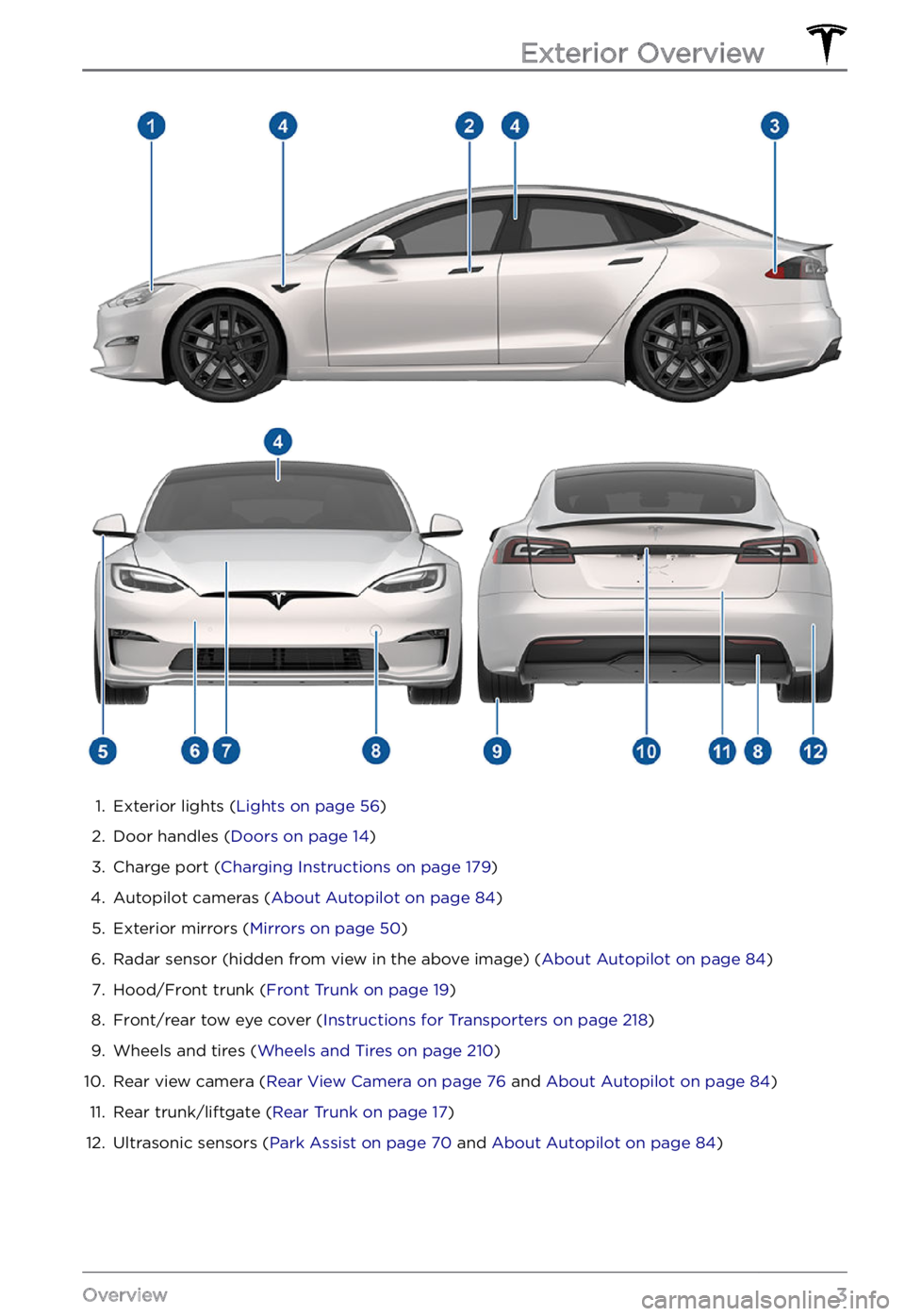
1.
Exterior lights (Lights on page 56)
2.
Door handles (Doors on page 14)
3.
Charge port (Charging Instructions on page 179)
4.
Autopilot cameras (About Autopilot on page 84)
5.
Exterior mirrors (Mirrors on page 50)
6.
Radar sensor (hidden from view in the above image) (About Autopilot on page 84)
7.
Hood/Front trunk (Front Trunk on page 19)
8.
Front/rear tow eye cover (Instructions for Transporters on page 218)
9.
Wheels and tires (Wheels and Tires on page 210)
10.
Rear view camera (Rear View Camera on page 76 and About Autopilot on page 84)
11.
Rear trunk/liftgate (Rear Trunk on page 17)
12.
Ultrasonic sensors (Park Assist on page 70 and About Autopilot on page 84)
Exterior Overview
3Overview
Page 63 of 281
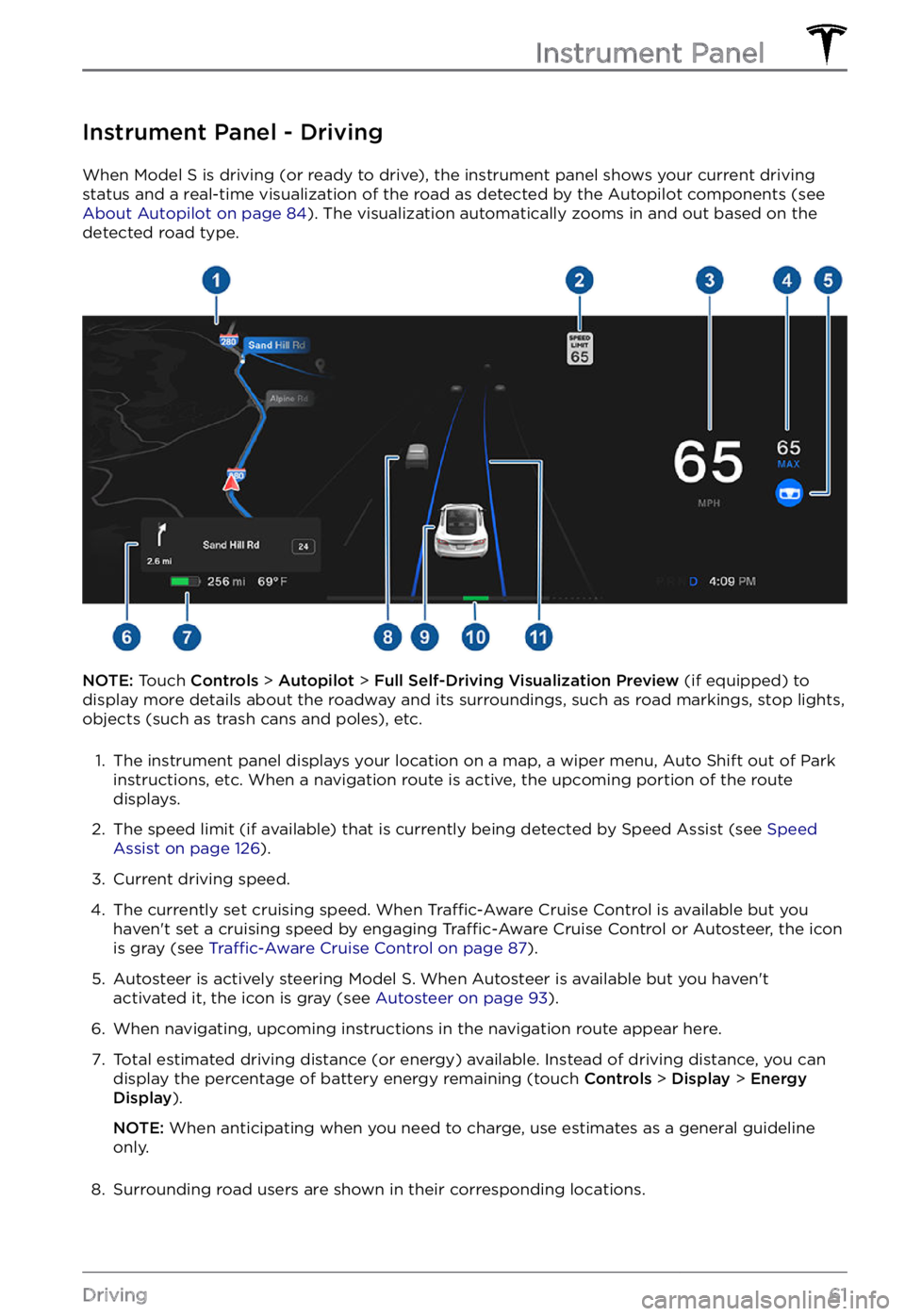
Instrument Panel - Driving
When Model S is driving (or ready to drive), the instrument panel shows your current driving
status and a real-time visualization of the road as detected by the Autopilot components (see
About Autopilot on page 84). The visualization automatically zooms in and out based on the
detected road type.
NOTE: Touch Controls > Autopilot > Full Self-Driving Visualization Preview (if equipped) to
display more details about the roadway and its surroundings, such as road markings, stop lights,
objects (such as trash cans and poles), etc.
1.
The instrument panel displays your location on a map, a wiper menu, Auto Shift out of Park instructions, etc. When a navigation route is active, the upcoming portion of the route
displays.
2.
The speed limit (if available) that is currently being detected by Speed Assist (see Speed Assist on page 126).
3.
Current driving speed.
4.
The currently set cruising speed. When Traffic-Aware Cruise Control is available but you
haven
Page 72 of 281
How Park Assist Works
Model S has several sensors designed to
detect the presence of objects. When driving slowly in Drive or Reverse (for example, when
parking), the vehicle alerts you if an object is
detected in close proximity of your
Model S.
Objects are only detected in the direction of
the gear you selected; front objects in Drive,
rear objects in Reverse.
WARNING: You may not be alerted if Model S rolls freely in the opposite direction of the selected gear (for example, Park Assist does not display an alert if Model S rolls backwards down a hill while in Drive).
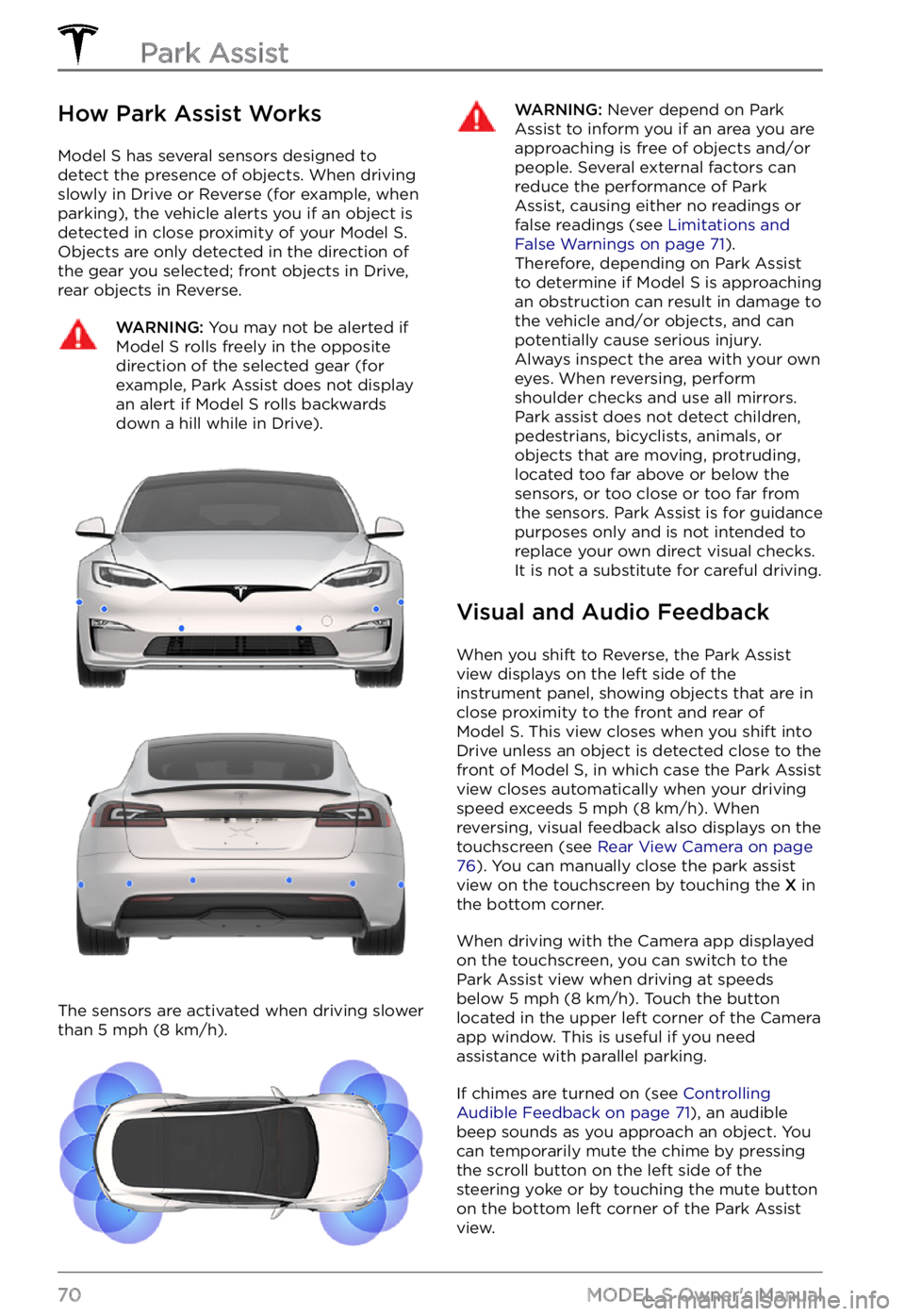
The sensors are activated when driving slower
than 5 mph (8 km/h).
WARNING: Never depend on Park Assist to inform you if an area you are approaching is free of objects and/or people. Several external factors can reduce the performance of Park Assist, causing either no readings or false readings (see Limitations and False Warnings on page 71). Therefore, depending on Park Assist to determine if Model S is approaching an obstruction can result in damage to the vehicle and/or objects, and can potentially cause serious injury. Always inspect the area with your own eyes. When reversing, perform shoulder checks and use all mirrors. Park assist does not detect children, pedestrians, bicyclists, animals, or objects that are moving, protruding, located too far above or below the sensors, or too close or too far from the sensors. Park Assist is for guidance purposes only and is not intended to replace your own direct visual checks. It is not a substitute for careful driving.
Visual and Audio Feedback
When you shift to Reverse, the Park Assist
view displays on the left side of the instrument panel, showing objects that are in
close proximity to the front and rear of
Model S. This view closes when you shift into
Drive unless an object is detected close to the
front of
Model S, in which case the Park Assist
view closes automatically when your driving
speed exceeds
5 mph (8 km/h). When
reversing, visual feedback also displays on the
touchscreen (see
Rear View Camera on page 76). You can manually close the park assist
view on the touchscreen by touching the X in
the bottom corner.
When driving with the Camera app displayed
on the touchscreen, you can switch to the
Park Assist view when driving at speeds
below
5 mph (8 km/h). Touch the button
located in the upper left corner of the Camera
app window. This is useful if you need
assistance with parallel parking.
If chimes are turned on (see Controlling Audible Feedback on page 71), an audible
beep sounds as you approach an object. You
can temporarily mute the chime by pressing
the scroll button on the left side of the
steering yoke or by touching the mute button
on the bottom left corner of the Park Assist
view.
Park Assist
70MODEL S Owner
Page 73 of 281
NOTE: If a sensor is unable to provide
feedback, the instrument panel displays an
alert message.CAUTION: Keep sensors clean from dirt, debris, snow, and ice. Avoid using a high pressure power washer on the sensors and do not clean a sensor with a sharp or abrasive object that can scratch or damage its surface.
CAUTION: Do not install accessories or stickers on or near the parking sensors.
Controlling Audible Feedback
You can use Park Assist with or without
audible feedback. To turn chimes on or off,
touch Controls > Safety > Park Assist Chimes.
To mute the chimes temporarily, touch the
mute button in the corner of the Park Assist
view. The chimes are muted until you shift
into a
different gear or drive over 5 mph (8 km/h).
Limitations and False Warnings
The parking sensors may not function
correctly in these situations:
Page 78 of 281
Camera Location
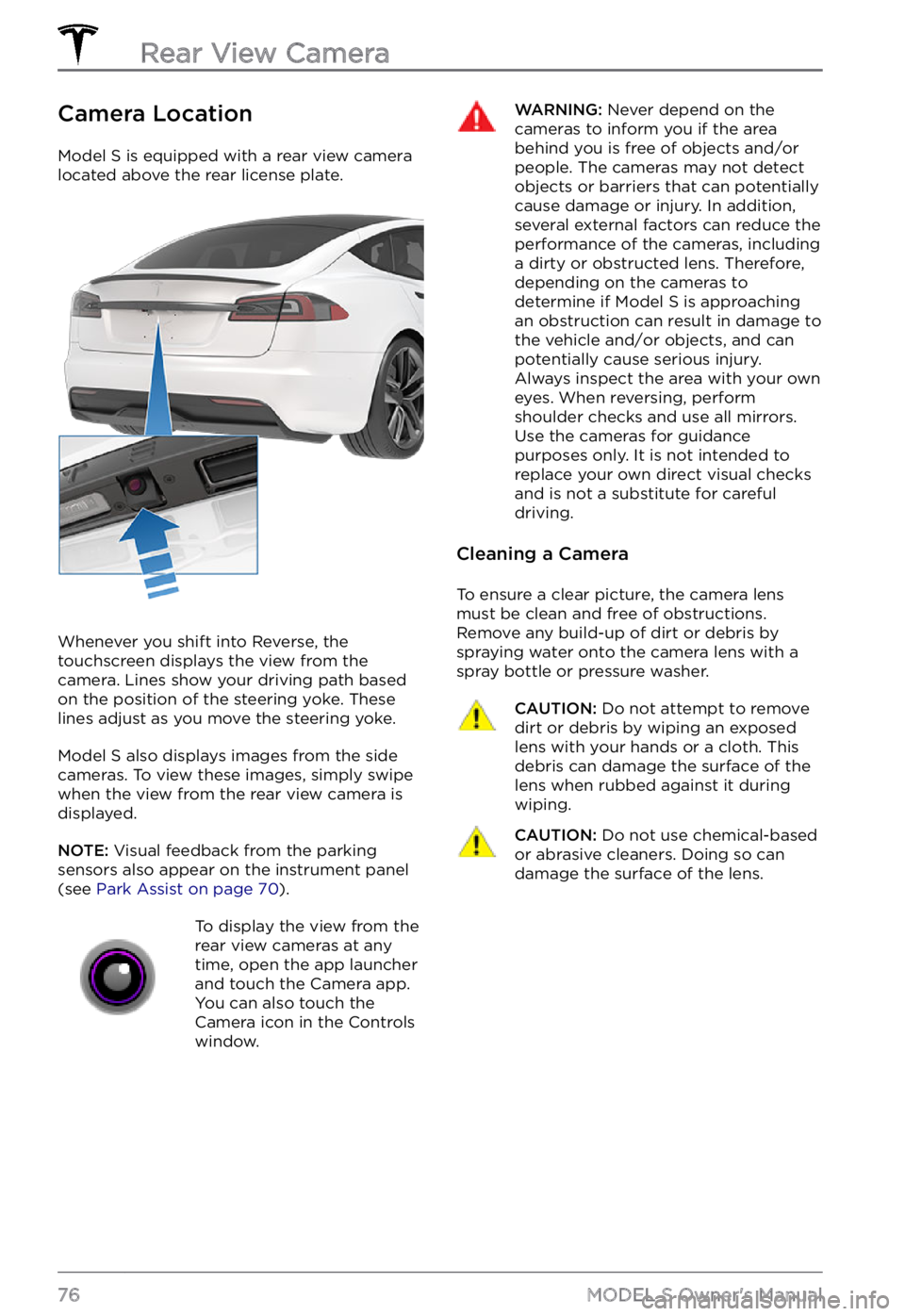
Model S is equipped with a rear view camera
located above the rear license plate.
Whenever you shift into Reverse, the
touchscreen displays the view from the
camera. Lines show your driving path based
on the position of the
steering yoke. These
lines adjust as you move the steering yoke.
Model S also displays images from the side
cameras. To view these images, simply swipe
when the view from the rear view camera is displayed.
NOTE: Visual feedback from the parking
sensors also appear on the instrument panel (see Park Assist on page 70).
To display the view from the
rear view cameras at any
time, open the app launcher
and touch the Camera app.
You can also touch the
Camera icon in the Controls
window.WARNING: Never depend on the cameras to inform you if the area behind you is free of objects and/or people. The cameras may not detect objects or barriers that can potentially cause damage or injury. In addition, several external factors can reduce the performance of the cameras, including a dirty or obstructed lens. Therefore, depending on the cameras to determine if Model S is approaching an obstruction can result in damage to the vehicle and/or objects, and can potentially cause serious injury. Always inspect the area with your own eyes. When reversing, perform shoulder checks and use all mirrors. Use the cameras for guidance purposes only. It is not intended to replace your own direct visual checks and is not a substitute for careful driving.
Cleaning a Camera
To ensure a clear picture, the camera lens
must be clean and free of obstructions.
Remove any build-up of dirt or debris by
spraying water onto the camera lens with a
spray bottle or pressure washer.
CAUTION: Do not attempt to remove dirt or debris by wiping an exposed lens with your hands or a cloth. This debris can damage the surface of the lens when rubbed against it during wiping.
CAUTION: Do not use chemical-based or abrasive cleaners. Doing so can damage the surface of the lens.Rear View Camera
76MODEL S Owner
Page 135 of 281
Allow Mobile Access: Allow your Tesla mobile
app to access your Model S (see Mobile App on page 172).
NOTE: To disable Allow Mobile Access, you
must enter your Tesla account credentials.
Security Alarm: Enable the security alarm, if
equipped (see Security Settings on page 161).
Park Assist Chimes: If on, a beep sounds
when Model S approaches an object while
parking (see Park Assist on page 70).
Joe Mode: If on, Joe Mode lowers the volume
of your vehicle
Page 220 of 281
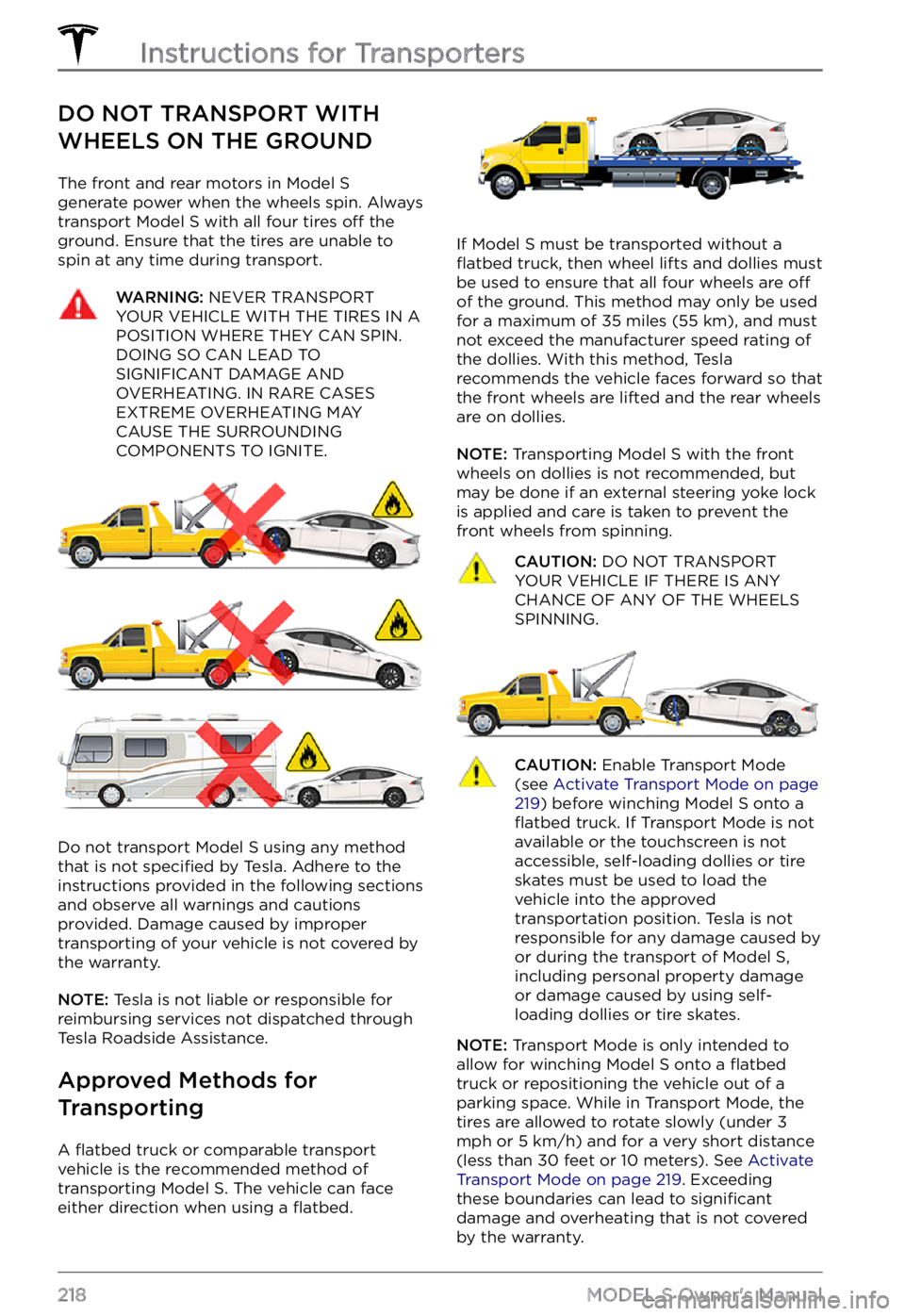
DO NOT TRANSPORT WITH
WHEELS ON THE GROUND
The front and rear motors in Model S generate power when the wheels spin. Always
transport Model S with all four tires off the
ground. Ensure that the tires are unable to
spin at any time during transport.
WARNING: NEVER TRANSPORT YOUR VEHICLE WITH THE TIRES IN A POSITION WHERE THEY CAN SPIN. DOING SO CAN LEAD TO SIGNIFICANT DAMAGE AND OVERHEATING. IN RARE CASES EXTREME OVERHEATING MAY CAUSE THE SURROUNDING COMPONENTS TO IGNITE.
Do not transport Model S using any method
that is not specified by Tesla. Adhere to the
instructions provided in the following sections
and observe all warnings and cautions provided. Damage caused by improper transporting of your vehicle is not covered by
the warranty.
NOTE: Tesla is not liable or responsible for
reimbursing services not dispatched through
Tesla Roadside Assistance.
Approved Methods for
Transporting
A flatbed truck or comparable transport
vehicle is the recommended method of
transporting
Model S. The vehicle can face
either direction when using a flatbed.
If Model S must be transported without a flatbed truck, then wheel lifts and dollies must
be used to ensure that all four wheels are off
of the ground. This method may only be used
for a maximum of 35 miles (55 km), and must
not exceed the manufacturer speed rating of
the dollies. With this method, Tesla
recommends the vehicle faces forward so that
the front wheels are lifted and the rear wheels
are on dollies.
NOTE: Transporting Model S with the front
wheels on dollies is not recommended, but
may be done if an external
steering yoke lock
is applied and care is taken to prevent the
front wheels from spinning.
CAUTION: DO NOT TRANSPORT YOUR VEHICLE IF THERE IS ANY CHANCE OF ANY OF THE WHEELS SPINNING.
CAUTION: Enable Transport Mode (see Activate Transport Mode on page 219) before winching Model S onto a flatbed truck. If Transport Mode is not available or the touchscreen is not accessible, self-loading dollies or tire skates must be used to load the vehicle into the approved transportation position. Tesla is not responsible for any damage caused by or during the transport of Model S, including personal property damage or damage caused by using self-loading dollies or tire skates.
NOTE: Transport Mode is only intended to
allow for winching Model S onto a flatbed truck or repositioning the vehicle out of a
parking space. While in Transport Mode, the
tires are allowed to rotate slowly (under
3 mph or 5 km/h) and for a very short distance
(less than 30 feet or 10 meters). See Activate Transport Mode on page 219. Exceeding
these boundaries can lead to significant
damage and overheating that is not covered
by the warranty.
Instructions for Transporters
218MODEL S Owner
Page 274 of 281

A
ABS (Anti-lock Braking System): 66
absolute speed limit: 126
access panel, removing: 199
accessories: 24
plugging into power socket: 24
Active Road Noise Reduction: 25
adaptive headlights: 58
adjacent lane speed: 119
aero covers: 190
air conditioning: 135
air filter: 140
air vents: 138
airbags: 38
alarm: 161
all-season tires: 192
Always Show Estimated Round Trip Energy: 146
anti-lock braking (ABS): 66
apps: 6
audio: 149, 152
playing files: 149, 152
settings: 149
volume control: 149
auto fold: 50
Auto High Beam: 57
Auto Lane Change: 95
auto tilt: 50
AUTO wipers: 65
automatic emergency braking: 123
automatic navigation: 142
Autopark: 109
autopilot: 119
blind spot collision warning: 119
side collision warning: 119
Autopilot: 84, 87, 93, 95, 109, 111, 122, 126
Auto Lane Change: 95
automatic emergency braking: 122
Autopark: 109
Autosteer: 93
collision avoidance assist: 122
forward collision warning: 122
overtake acceleration: 87
overview: 84
speed assist: 126
speed limit warning: 126
staying within speed limits: 126
Summon: 111
Traffic-Aware Cruise Control: 87
Autopilot components: 84
Autosteer: 93
B
backup camera: 76
battery (12V): 177, 210
complete discharge: 177
specifications: 210
Battery (high voltage): 177, 199, 210
care of: 177
coolant: 199
specifications: 210
temperature limits: 177
battery (key), replacing: 12
blind spot collision warning: 119
Bluetooth: 150, 154
devices, playing audio files from: 150
general information: 154
phone, pairing and using: 154
body repairs: 202
body touch up: 196
Boombox: 153
brakes: 66, 123, 199, 208
automatic in emergencies: 123
fluid level: 199
overview of: 66
specifications: 208
Bumper Clearance (Summon): 111
C
cabin air filter: 140
cabin camera: 25
cabin temperature control: 135
Calendar: 154, 157
California Proposition 65: 227
camera (rear view): 76
cameras (autopilot): 84
Camp Mode: 139
car cover: 197
Index
Page 275 of 281
car washes: 194
card: 10
cargo area: 18
cargo volume: 208
carpets, cleaning: 196
CCS (Combo): 176
CE certifications: 229
CHAdeMO: 176
chains: 193
charge port: 179
charge port light: 181
charging: 175, 176, 180
components and equipment: 175
instructions: 180
public charging stations: 176
charging locations, finding: 145
charging stations, displaying on map: 142
child protection: 16
disabling rear window switches: 16
child seats: 32
installing and using: 32
child-protection locks: 15
cleaning: 194
climate controls: 135
coat hangers: 24
cold weather best practices: 81
collision avoidance assist: 122
connecting to Wi-Fi: 169
console: 22, 23, 24
12V power socket: 24
opening: 22
rear: 22
USB ports: 23
contact information: 218, 229
roadside assistance: 218
Tesla: 229
copyrights: 224
cruise control: 87
D
dashboard overview: 4
Dashcam: 77
data recording: 226
data sharing: 226
declarations of conformity: 229
delivery mileage: 227
devices: 150
Bluetooth, playing audio files: 150
dimensions: 206
Dog Mode: 139
dome (map) lights: 56
door handles: 14
door labels: 204
doors: 14, 15
Child Lock: 15
interior locking and unlocking: 15
locking: 14
opening from interior: 14
Unlock on Park: 15
unlocking: 14
doors function: 15
Walk-Away Door Lock: 15
Drag Strip Mode: 72
drive away locking: 15
Drive gear: 55
driver: 26, 44
profiles: 44
seat adjustment: 26
driving: 26, 51, 74
seating position: 26
starting: 51
tips to maximize range: 74
E
easy entry, driver profile: 44
EDR (event data recorder): 226
electric parking brake: 68
emergency braking: 122
emergency flashers: 58
Emergency Lane Departure Avoidance: 119
emission label: 203
energy: 60, 67
gained from regenerative braking: 67
range information: 60
energy use predictions (navigating): 146
event data recording: 226
exterior: 3, 56, 194, 196, 197, 206
Index