steering wheel TESLA MODEL X 2017 (UK) User Guide
[x] Cancel search | Manufacturer: TESLA, Model Year: 2017, Model line: MODEL X, Model: TESLA MODEL X 2017Pages: 202, PDF Size: 4.82 MB
Page 86 of 202
Note: Autosteer is a BETA feature.
If Model X is equipped with Driver Assistance
components (see About Driver Assistance on
page 77), and you have purchased the
optional Autopilot Tech Package, you can use
Autosteer to manage steering and speed under certain circumstances. Autosteer builds
upon
Traffic-Aware Cruise Control,
intelligently keeping Model X in its driving lane
when cruising at a set speed. Using the
forward looking camera, the radar sensor, and
the ultrasonic sensors, Autosteer detects lane
markings and the presence of vehicles and
objects, assisting you in steering Model X
based on the lane markings and the vehicle
directly in front of you.
Warning: Autosteer is a hands-on feature.
You must keep your hands on the steering
wheel at all times.Warning: Autosteer is intended for use
only on highways and limited-access
roads with a fully attentive driver. When using Autosteer, hold the steering wheel
and be mindful of road conditions and
surrounding
traffic. Do not use Autosteer
on city streets, in construction zones, or
in areas where bicyclists or pedestrians
may be present. Never depend on
Autosteer to determine an appropriate driving path. Always be prepared to take
immediate action. Failure to follow these instructions could cause serious property
damage, injury or death.
Operating Autosteer
Before you can operate Autosteer, you must
enable it by touching Controls > Settings >
Driver Assistance > Autosteer > Enable.
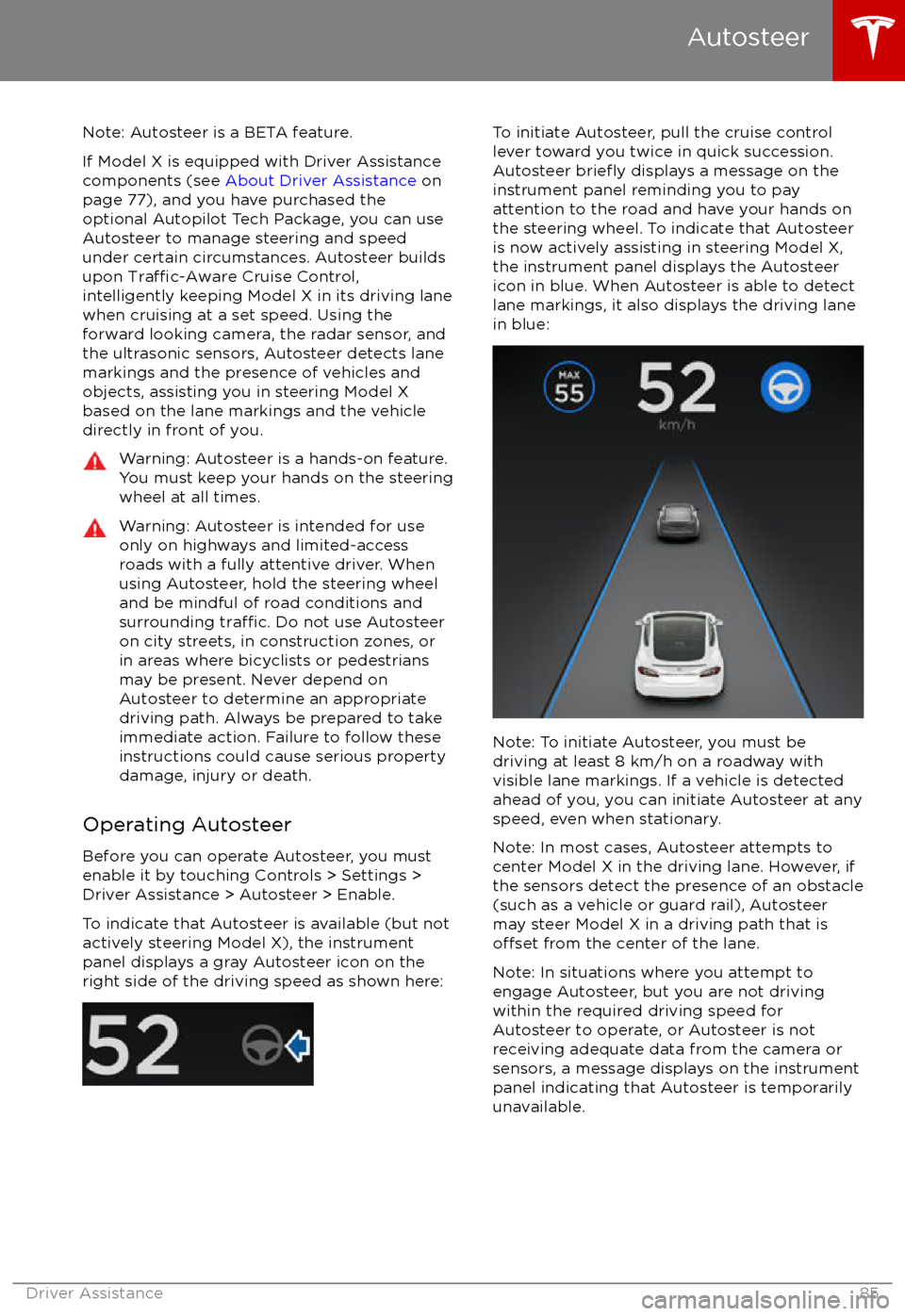
To indicate that Autosteer is available (but not actively steering Model X), the instrumentpanel displays a gray Autosteer icon on theright side of the driving speed as shown here:
To initiate Autosteer, pull the cruise control
lever toward you twice in quick succession. Autosteer
briefly displays a message on the
instrument panel reminding you to pay
attention to the road and have your hands on
the steering wheel. To indicate that Autosteer
is now actively assisting in steering Model X, the instrument panel displays the Autosteericon in blue. When Autosteer is able to detectlane markings, it also displays the driving lane
in blue:
Note: To initiate Autosteer, you must be
driving at least 8 km/h on a roadway with
visible lane markings. If a vehicle is detected ahead of you, you can initiate Autosteer at any
speed, even when stationary.
Note: In most cases, Autosteer attempts to
center Model X in the driving lane. However, if
the sensors detect the presence of an obstacle
(such as a vehicle or guard rail), Autosteer
may steer Model X in a driving path that is
offset from the center of the lane.
Note: In situations where you attempt to
engage Autosteer, but you are not driving
within the required driving speed for Autosteer to operate, or Autosteer is notreceiving adequate data from the camera or
sensors, a message displays on the instrument panel indicating that Autosteer is temporarily
unavailable.
Autosteer
Driver Assistance85
Page 87 of 202
Restricted Speed
Autosteer is intended for use on freeways and
highways where access is limited by entry and
exit ramps. When using Autosteer on residential roads, a road without a centerdivider, or a road where access is not limited,
Autosteer limits the driving speed. The
maximum driving speed is calculated based
on the detected speed limit plus 10 km/h. In situations where the speed limit cannot be
detected, speed is limited to 70 km/h. When
Autosteer is engaged in these situations, it
reduces your driving speed and your set
speed to be within these limits. You can
manually accelerate to exceed the limited speed, but when you release the accelerator
pedal, Autosteer slows Model X to the limited
speed. When you leave the road, or disengage
Autosteer by using the steering wheel, you can increase your set speed again, if desired.
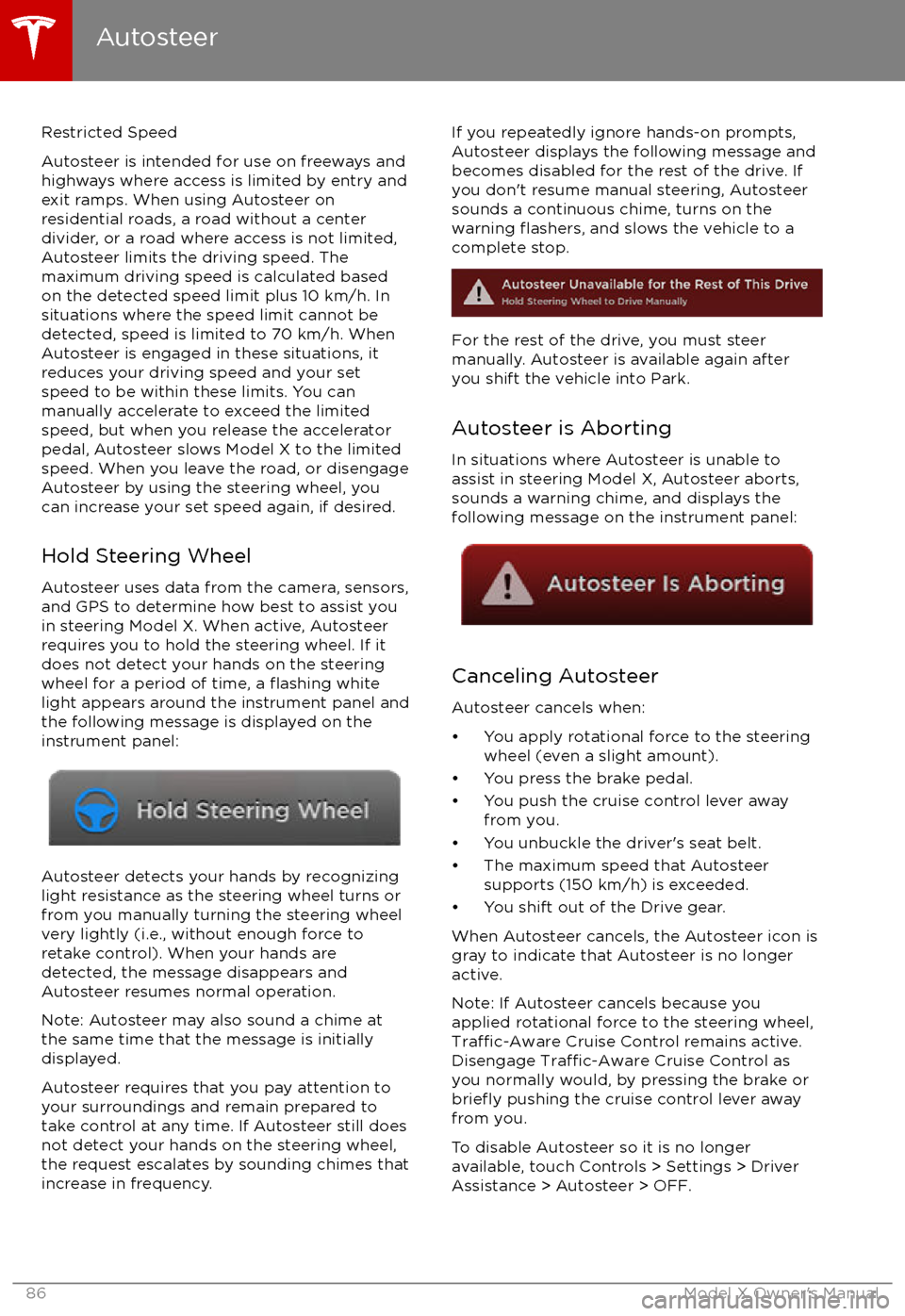
Hold Steering Wheel Autosteer uses data from the camera, sensors,and GPS to determine how best to assist you
in steering Model X. When active, Autosteer requires you to hold the steering wheel. If itdoes not detect your hands on the steering
wheel for a period of time, a
flashing white
light appears around the instrument panel and
the following message is displayed on the
instrument panel:
Autosteer detects your hands by recognizing
light resistance as the steering wheel turns or
from you manually turning the steering wheel very lightly (i.e., without enough force toretake control). When your hands are
detected, the message disappears and Autosteer resumes normal operation.
Note: Autosteer may also sound a chime at
the same time that the message is initially
displayed.
Autosteer requires that you pay attention to your surroundings and remain prepared totake control at any time. If Autosteer still doesnot detect your hands on the steering wheel,the request escalates by sounding chimes that
increase in frequency.
If you repeatedly ignore hands-on prompts,
Autosteer displays the following message and
becomes disabled for the rest of the drive. If
you don
Page 92 of 202

Note: If you press the brake when Autopark is
actively parking Model X, the parking process pauses until you press the Resume button onthe touchscreen.
Note: Autopark detects potential
perpendicular parking spaces that are at least
2.9 meters wide with a vehicle parked on each
side. Autopark detects parallel parking spaces that are at least six meters, but less than 15
meters long. Autopark does not operate on angled parking spaces.Warning: Never depend on Autopark tofind a parking space that is legal, suitable,
and safe. Autopark may not always detect
objects in the parking space. Always
perform visual checks to
confirm that a
parking space is appropriate and safe.
Warning: When Autopark is actively
steering Model X, the steering wheel
moves in accordance with Autopark
Page 107 of 202

6. Climate controls (see Climate Controls on page 115).
7. Volume control
Touch the up and down arrows to increase or decrease the volume of the speakers. You can
also adjust the volume using the scroll wheel on the left side of the steering wheel.
8. Reverse the position of the two currently displayed apps.Warning: Paying attention to road and traffic conditions must always be the driver
Page 109 of 202

1. CloseTouch the circled X in the top left corner of a window to close it (or you can touch anywhere
outside the window).
2. Doors
Touch to open or close doors.
3. Seats
Touch to move the second row seats forward or back.
4. Cold Weather
If Model X is equipped with the optional cold weather package, you can control all seatheaters as well as the heated wipers and steering wheel. Heaters that are turned on are displayed in red. To turn
off all seat heaters, touch All Off. Note that you can also control the
front driver and passenger seats using the main climate control panel located on the bottom
of the touchscreen (see Climate Controls on page 115).
5. Suspension
If Model X is equipped with Smart Air Suspension, touch to manually raise or lower Model X,or to remove a previously saved auto-raising location (see Smart Air Suspension on page
120). Model X must be powered on and you must press the brake pedal before you can
change suspension settings. Smart Air Suspension causes Model X to self-level, even when powered
off. Therefore, when towing or lifting, you must disable self-leveling (see Instructions
for Transporters on page 183 and Jacking and Lifting on page 166).
6. Driving
Page 116 of 202
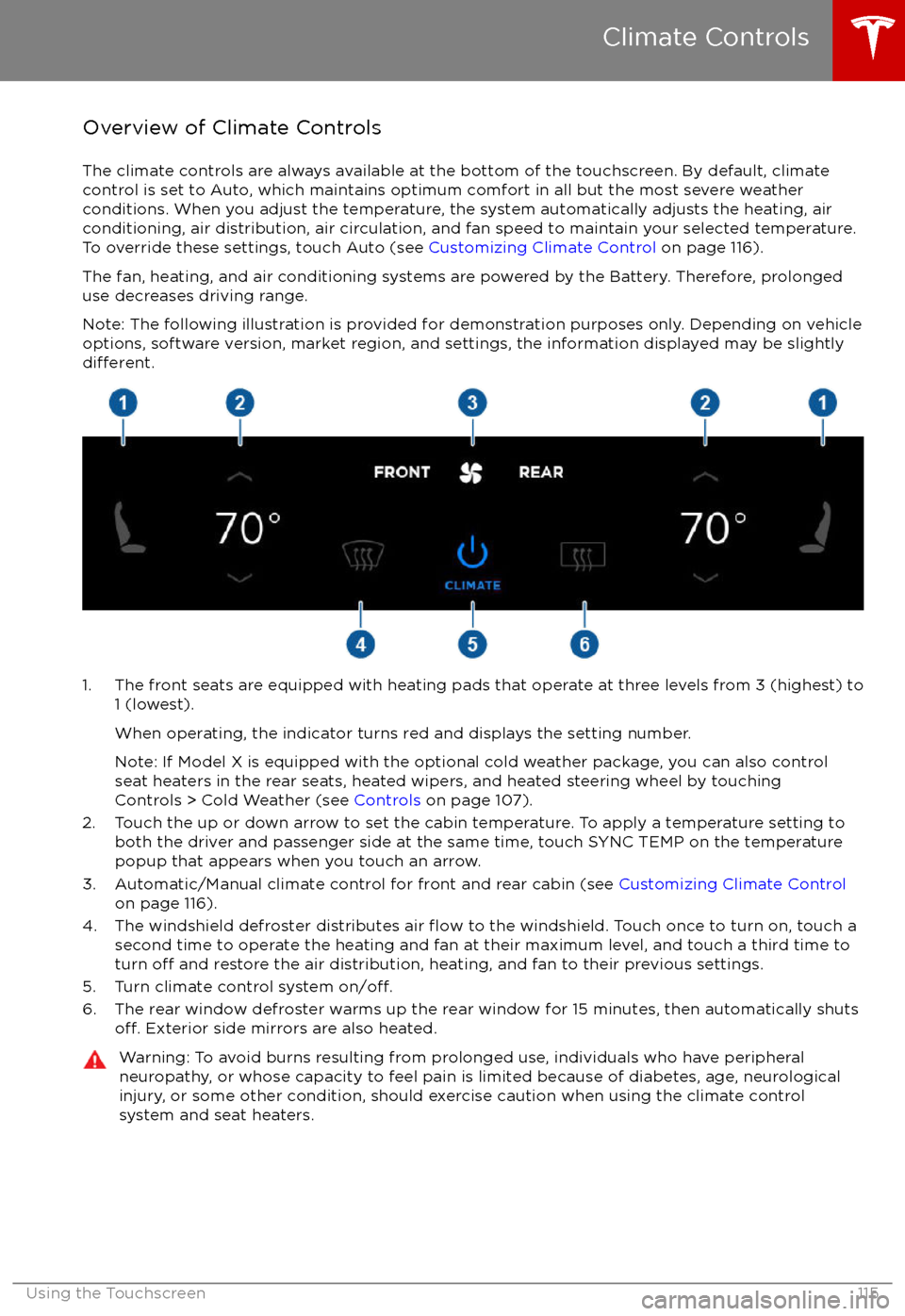
Overview of Climate Controls
The climate controls are always available at the bottom of the touchscreen. By default, climate control is set to Auto, which maintains optimum comfort in all but the most severe weather conditions. When you adjust the temperature, the system automatically adjusts the heating, air
conditioning, air distribution, air circulation, and fan speed to maintain your selected temperature. To override these settings, touch Auto (see Customizing Climate Control on page 116).
The fan, heating, and air conditioning systems are powered by the Battery. Therefore, prolonged
use decreases driving range.
Note: The following illustration is provided for demonstration purposes only. Depending on vehicle
options, software version, market region, and settings, the information displayed may be slightly
different.
1. The front seats are equipped with heating pads that operate at three levels from 3 (highest) to 1 (lowest).
When operating, the indicator turns red and displays the setting number.
Note: If Model X is equipped with the optional cold weather package, you can also control seat heaters in the rear seats, heated wipers, and heated steering wheel by touchingControls > Cold Weather (see Controls on page 107).
2. Touch the up or down arrow to set the cabin temperature. To apply a temperature setting to both the driver and passenger side at the same time, touch SYNC TEMP on the temperaturepopup that appears when you touch an arrow.
3. Automatic/Manual climate control for front and rear cabin (see Customizing Climate Control
on page 116).
4. The windshield defroster distributes air
flow to the windshield. Touch once to turn on, touch a
second time to operate the heating and fan at their maximum level, and touch a third time to
turn
off and restore the air distribution, heating, and fan to their previous settings.
5. Turn climate control system on/off.6. The rear window defroster warms up the rear window for 15 minutes, then automatically shutsoff. Exterior side mirrors are also heated.
Warning: To avoid burns resulting from prolonged use, individuals who have peripheral neuropathy, or whose capacity to feel pain is limited because of diabetes, age, neurologicalinjury, or some other condition, should exercise caution when using the climate control
system and seat heaters.
Climate Controls
Using the Touchscreen115
Page 126 of 202

To play the next song in a selected playlist or
album, touch the previous or next arrows on
the Now Playing view, or use the buttons on
the left side of the steering wheel (see Using
Left Steering Wheel Buttons on page 42). You
can also
shu
Page 153 of 202

Inspecting and Maintaining TiresRegularly inspect the tread and side walls for
any sign of distortion (bulges), cuts or wear.Warning: Do not drive Model X if a tire is
damaged, excessively worn, or inflated to
an incorrect pressure. Check tires
regularly for wear, and ensure there are
no cuts, bulges or exposure of the ply/
cord structure.
Tire Wear
Adequate tread depth is important for proper
tire performance. Tires with a tread depth less
than 3 mm are more likely to hydroplane in
wet conditions and should not be used. Tires
with a tread depth less than 4 mm do not
perform well in snow and slush and should not
be used when driving in winter conditions.
Model X is originally
fitted with tires that have
wear indicators molded into the tread pattern. When the tread has been worn down to 3 mm,
the indicators start to appear at the surface of
the tread pattern, producing the
effect of a
continuous band of rubber across the width of
the tire. For optimal performance and safety,
Tesla recommends replacing tires before the
wear indicators are visible.
Tire Rotation, Balance, and Wheel Alignment
Model X tires cannot be rotated, as tires are
asymmetrical and front tires are a
differentsize from rear tires.
Unbalanced wheels (sometimes noticeable as
vibration through the steering wheel)
affectvehicle handling and tire life. Even with regular
use, wheels can get out of balance. Therefore,
they should be balanced as required.
If tire wear is uneven (on one side of the tire
only) or becomes abnormally excessive, check
the alignment of wheels.
Note: When replacing only two tires, always
install the new tires on the rear.
Punctured Tires
A puncture eventually causes the tire to lose pressure, which is why it is important to check
tire pressures frequently. Permanently repair
or replace punctured or damaged tires as
soon as possible.
Your tubeless tires may not leak when
penetrated, provided the object remains in the tire. If, however, you feel a sudden vibration or
ride disturbance while driving, or you suspect a tire is damaged, immediately reduce yourspeed. Drive slowly, while avoiding heavy
braking or sharp steering and, when safe to do so, stop the vehicle. Arrange to have Model X
transported to a Tesla service center, or to a
nearby tire repair center.
Note: In some cases, you can temporarily
repair small tire punctures (under 6 mm) using an optional tire repair kit available from Tesla.
This allows you to slowly drive Model X to Tesla or to a nearby tire repair facility.Warning: Do not drive with a punctured
tire, even if the puncture has not causedthe tire to
deflate. A punctured tire candeflate suddenly at any time.
Flat Spots
If Model X is stationary for a long period in
high temperatures, tires can form
flat spots.
When Model X is driven, these flat spots cause
a vibration which gradually disappears as the
tires warm up and regain their original shape.
To minimize
flat spots during storage, inflatetires to the maximum pressure indicated on the tire wall. Then, before driving, release airto adjust tire pressure to the recommended
levels.
Improving Tire Mileage
To improve the mileage you get from your
tires, maintain tires at the recommended tire
pressures, observe speed limits and advisory
speeds, and avoid:
Page 195 of 202
AABS (Anti-lock Braking System) 59
Acceleration (dual-motor) 107
access panel, removing 164accessoriesinstalling 167
plugging into power socket 126
adaptive headlights 56
air circulation 116
air conditioning 115
air distribution 116
air
filter 119
air suspension 121
air vents 119
airbag, front passenger, disabling 37
airbags 35
alarm 136
all-season tires 153
always connected, setting 67
anti-lock braking (ABS) 59
audioplaying files 122
steering wheel buttons 42
volume control 122
Auto High Beam 56
Auto Lane Change 88
auto-raising suspension 120
Autopark 90
Autopilot 77
Autosteer 85
average range 67
B
backup camera 69
battery (12V)complete discharge 144specifications 175Battery (high voltage)care of 144
coolant 164
specifications 176
temperature limits 144
battery (key), replacing 5
blind spot warning 95
Bluetoothdevices, playing audio files from 125
general information 127
phone, pairing and using 127
body repairs 167
body touch up 162
brake
fluid replacement 150
brakesautomatic in emergencies 97fluid level 164
overview of 59
specifications 175
brightness of displays 111
C
Cabin Overheat Protection setting 111
cabin temperature control 115
Calendar app 134
camera (rear view) 69
car cover 162
car washes 160
carpets, cleaning 161
CE
certifications 189
CHAdeMO 143
chains 154
change of ownership 114
charge port 145
charge port light 147
chargingcharge settings 148
components and equipment 142
instructions 145
public charging stations 143
scheduling 148
status of 149
charging locations, finding 130
child protectiondisabling liftgate and rear door handles 9
disabling rear window switches 11child seatsdisabling front passenger airbag 37
installing and using 25
cleaning 160
climate controls 115
Cold Weather controls 107
collision avoidance assist 97
console12V power socket 126
cup holders 17
USB ports 126
consumption chart 67
contact informationroadside assistance 180coolantBattery, checking level of 164
Battery, replacement interval 150
copyrights 185, 186
Creep 107
cruise control 79
cup holders 17
D
DAB radio 123
dashboard overview 2
data recording 187
day mode 111
declarations of conformity 189
Index
194Model X Owner
Page 198 of 202
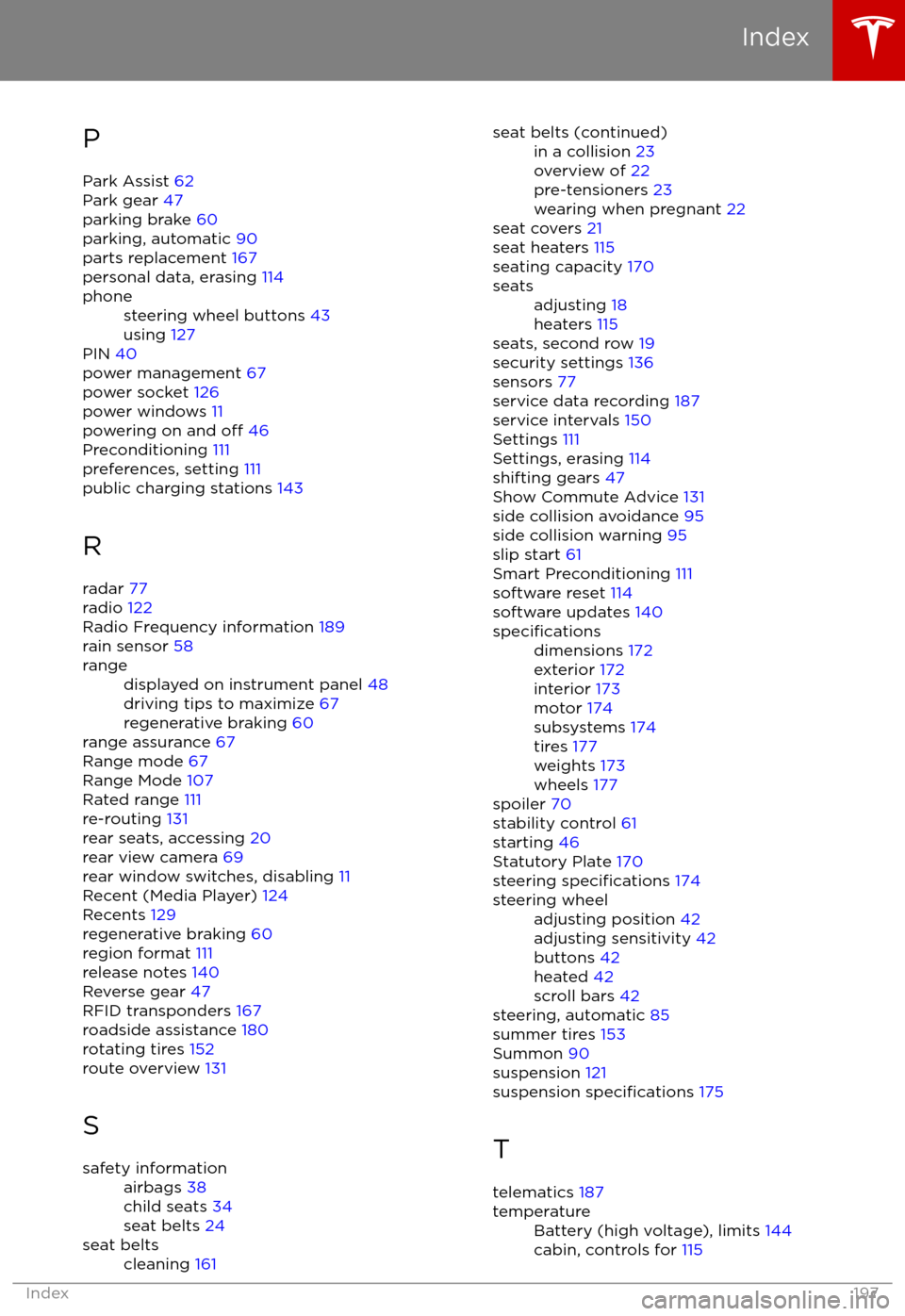
PPark Assist 62
Park gear 47
parking brake 60
parking, automatic 90
parts replacement 167
personal data, erasing 114phonesteering wheel buttons 43
using 127
PIN 40
power management 67
power socket 126
power windows 11
powering on and
off 46
Preconditioning 111
preferences, setting 111
public charging stations 143
R
radar 77
radio 122
Radio Frequency information 189
rain sensor 58
rangedisplayed on instrument panel 48
driving tips to maximize 67
regenerative braking 60
range assurance 67
Range mode 67
Range Mode 107
Rated range 111
re-routing 131
rear seats, accessing 20
rear view camera 69
rear window switches, disabling 11
Recent (Media Player) 124
Recents 129
regenerative braking 60
region format 111
release notes 140
Reverse gear 47
RFID transponders 167
roadside assistance 180
rotating tires 152
route overview 131
S
safety informationairbags 38
child seats 34
seat belts 24seat beltscleaning 161seat belts (continued)in a collision 23
overview of 22
pre-tensioners 23
wearing when pregnant 22
seat covers 21
seat heaters 115
seating capacity 170
seatsadjusting 18
heaters 115
seats, second row 19
security settings 136
sensors 77
service data recording 187
service intervals 150
Settings 111
Settings, erasing 114
shifting gears 47
Show Commute Advice 131
side collision avoidance 95
side collision warning 95
slip start 61
Smart Preconditioning 111
software reset 114
software updates 140
specificationsdimensions 172
exterior 172
interior 173
motor 174
subsystems 174
tires 177
weights 173
wheels 177
spoiler 70
stability control 61
starting 46
Statutory Plate 170
steering
specifications 174
steering wheeladjusting position 42
adjusting sensitivity 42
buttons 42
heated 42
scroll bars 42
steering, automatic 85
summer tires 153
Summon 90
suspension 121
suspension
specifications 175
T
telematics 187
temperatureBattery (high voltage), limits 144
cabin, controls for 115
Index
Index197