warning TESLA MODEL X 2017 (UK) Owner's Guide
[x] Cancel search | Manufacturer: TESLA, Model Year: 2017, Model line: MODEL X, Model: TESLA MODEL X 2017Pages: 202, PDF Size: 4.82 MB
Page 70 of 202
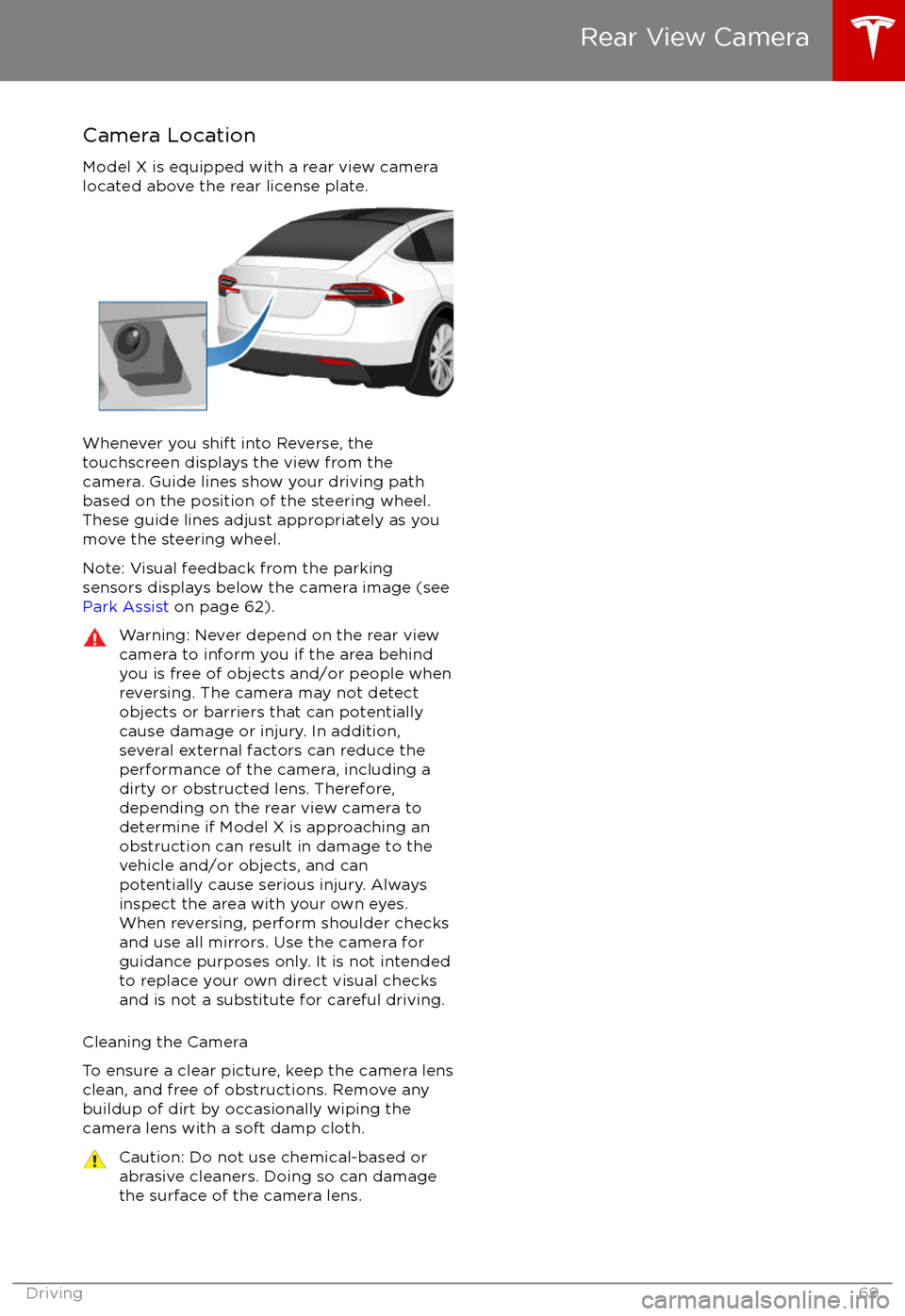
Camera Location
Model X is equipped with a rear view camera
located above the rear license plate.
Whenever you shift into Reverse, the
touchscreen displays the view from the
camera. Guide lines show your driving path
based on the position of the steering wheel. These guide lines adjust appropriately as you
move the steering wheel.
Note: Visual feedback from the parking
sensors displays below the camera image (see
Park Assist on page 62).
Warning: Never depend on the rear view
camera to inform you if the area behind
you is free of objects and/or people when
reversing. The camera may not detect
objects or barriers that can potentially
cause damage or injury. In addition, several external factors can reduce the
performance of the camera, including a
dirty or obstructed lens. Therefore,
depending on the rear view camera to
determine if Model X is approaching an
obstruction can result in damage to the vehicle and/or objects, and can
potentially cause serious injury. Always
inspect the area with your own eyes.
When reversing, perform shoulder checks and use all mirrors. Use the camera forguidance purposes only. It is not intendedto replace your own direct visual checks
and is not a substitute for careful driving.
Cleaning the Camera
To ensure a clear picture, keep the camera lens clean, and free of obstructions. Remove any
buildup of dirt by occasionally wiping the
camera lens with a soft damp cloth.
Caution: Do not use chemical-based or abrasive cleaners. Doing so can damage
the surface of the camera lens.
Rear View Camera
Driving69
Page 74 of 202

Warning: Under no circumstances shouldyou exit Trailer Mode when towing a
trailer. Doing so can cause serious injury
and/or death.Warning: Do not use the air suspension setting to appropriately match the height
of the hitch with the height of the trailer.
While Towing a Trailer
Model X is designed primarily as a passenger-
carrying vehicle. Towing a trailer puts additional load on the motor, drive train,brakes, tires and suspension and
significantlydecreases range. If you decide to tow a trailer,
proceed with caution and follow these general
guidelines:
Page 75 of 202
Warning: You must use the Model X trailerhitch when towing a trailer. Never attempt
to attach a
different type of trailer hitch.
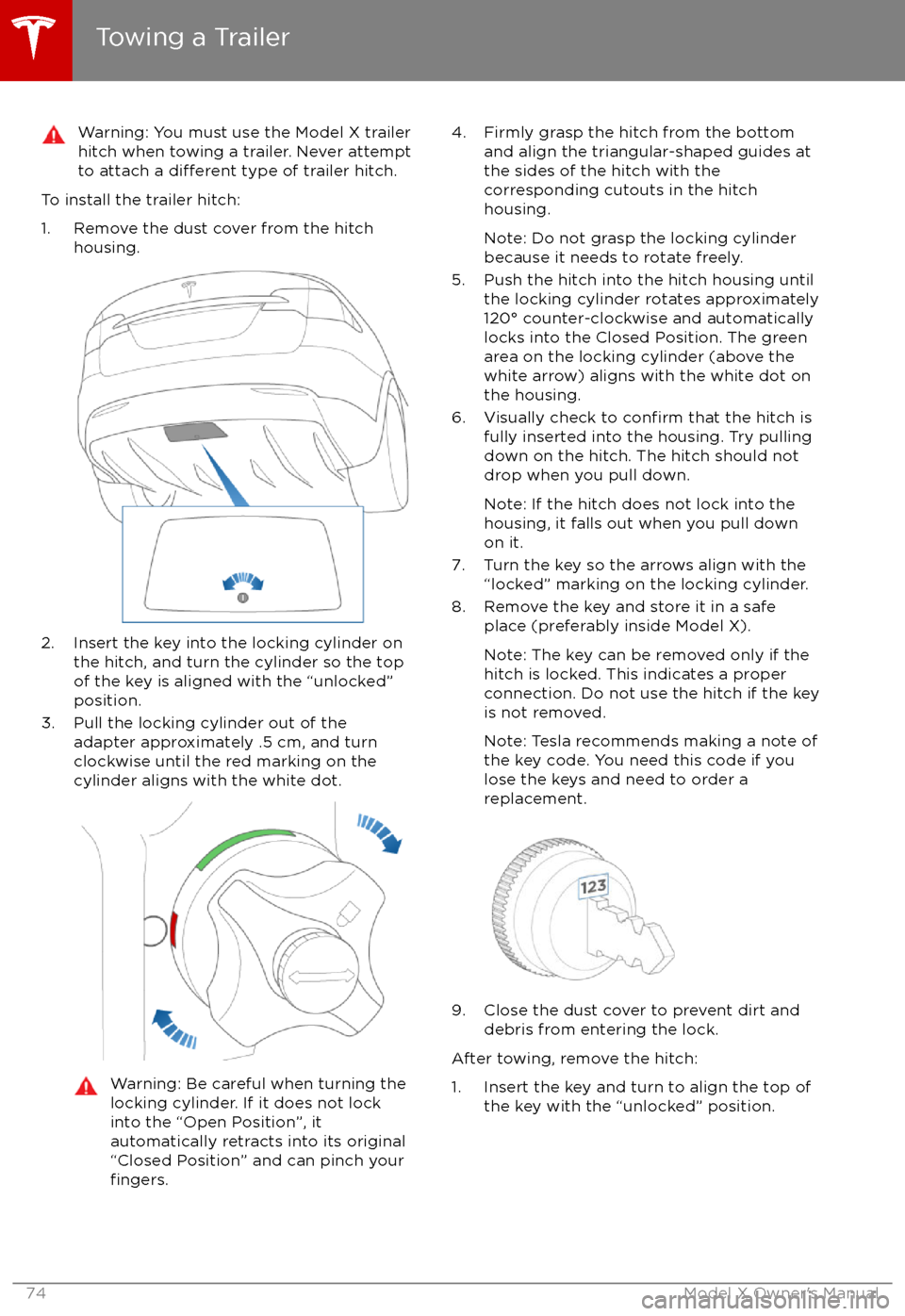
To install the trailer hitch:
1. Remove the dust cover from the hitch housing.
2. Insert the key into the locking cylinder onthe hitch, and turn the cylinder so the topof the key is aligned with the “unlocked”
position.
3. Pull the locking cylinder out of the adapter approximately .5 cm, and turn
clockwise until the red marking on the
cylinder aligns with the white dot.
Warning: Be careful when turning the
locking cylinder. If it does not lock
into the “Open Position”, it
automatically retracts into its original “Closed Position” and can pinch your
fingers.
4. Firmly grasp the hitch from the bottom and align the triangular-shaped guides at
the sides of the hitch with the
corresponding cutouts in the hitch
housing.
Note: Do not grasp the locking cylinder
because it needs to rotate freely.
5. Push the hitch into the hitch housing until the locking cylinder rotates approximately
120
Page 76 of 202

2. While firmly holding the bottom of the
hitch (to prevent it from dropping to the ground), pull the locking cylinder out
approximately .5 cm, and turn it clockwise
until the red marking on the locking
cylinder aligns with the white dot. At this
point, the locking cylinder is locked in the "open" and the hitch drops out of the
housing.Warning: Be careful when turning the
locking cylinder. If it does not lock
into the “Open Position”, it
automatically retracts into its original “closed" position and can pinch your
fingers.
3. Re-install the dust cover on the hitch housing to prevent dirt from accumulating
inside the housing.
4. Close the dust cover on the hitch
Page 80 of 202
If Model X is equipped with Driver Assistance
components (see About Driver Assistance on
page 77) and you have purchased the optional
Autopilot Tech Package, the forward looking camera and the radar sensor are designed to
determine when there is a vehicle in front of
you in the same lane. If the area in front of Model X is clear,
Traffic-Aware Cruise Control
maintains a set driving speed. When a vehicle
is detected,
Traffic-Aware Cruise Control is
designed to slow down Model X as needed to
maintain a selected time-based distance from
the vehicle in front, up to the set speed.
Traffic-Aware Cruise Control does not
eliminate the need to watch the road in front
of you and to apply the brakes when needed.
Traffic-Aware Cruise Control is primarily
intended for driving on dry, straight roads,
such as highways and freeways. It should not
be used on city streets.
Warning: Traffic-Aware Cruise Control is
designed for your driving comfort and
convenience and is not a collision warning or avoidance system. It is your
responsibility to stay alert, drive safely,
and be in control of the vehicle at all
times. Never depend on
Traffic-AwareCruise Control to adequately slow down
Model X. Always watch the road in front
of you and be prepared to take corrective
action at all times. Failure to do so can
result in serious injury or death.
Warning: Although Traffic-Aware Cruise
Control is capable of detecting
pedestrians and cyclists, never depend on
Traffic-Aware Cruise Control to
adequately slow down Model X for them.
Always watch the road in front of you and be prepared to take corrective action at
all times. Failure to do so can result in
serious injury or death.
Warning: Do not use Traffic-Aware Cruise
Control on city streets or on roads where
traffic conditions are constantly changing.
Warning: Do not use Traffic-Aware Cruise
Control on winding roads with sharp
curves, on icy or slippery road surfaces, or
when weather conditions (such as heavy
rain, snow, fog, etc) make it inappropriate
to drive at a consistent speed.
Traffic-
Aware Cruise Control does not adapt
driving speed based on road and driving
conditions.
Operating Traffic-Aware Cruise
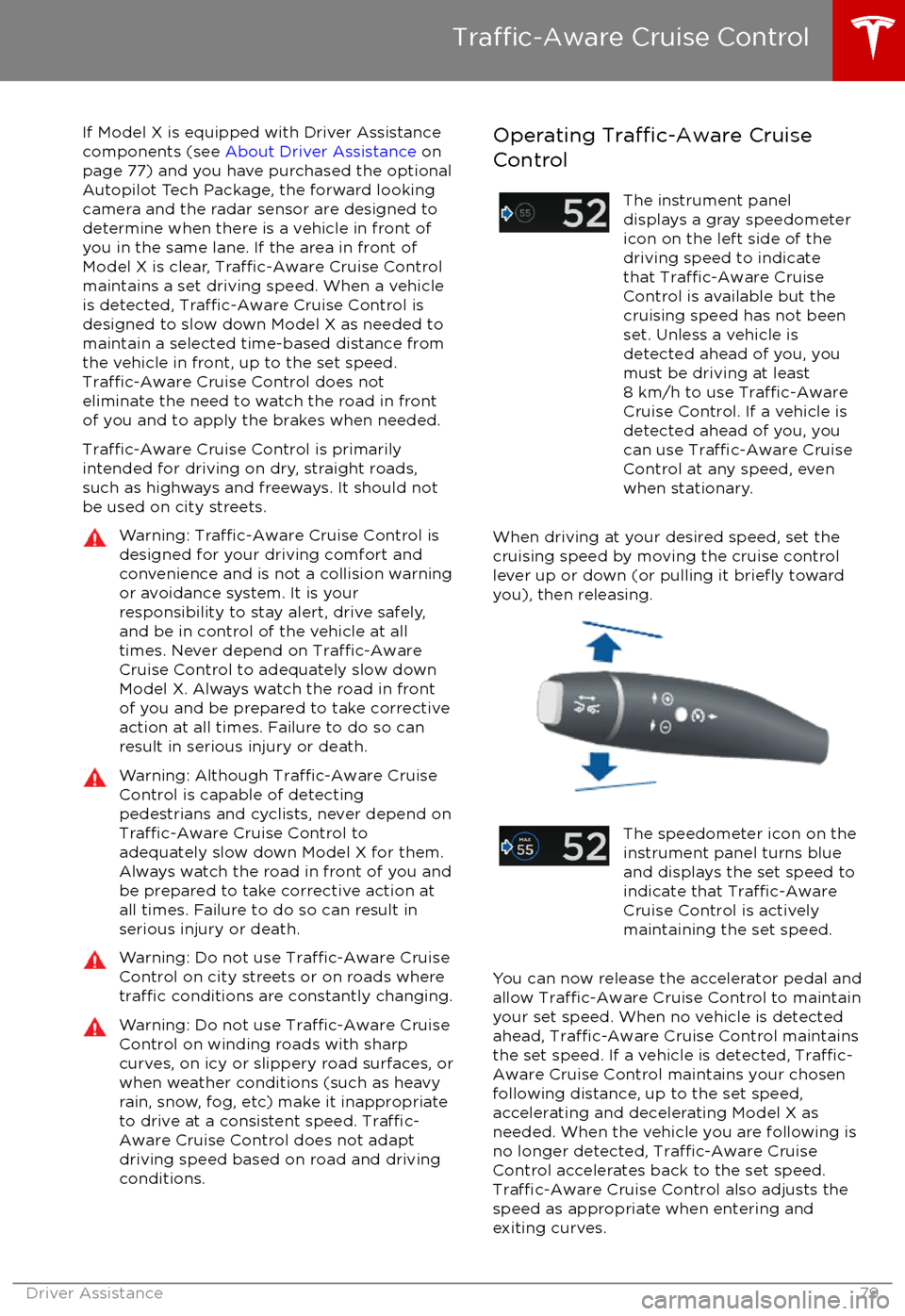
ControlThe instrument panel
displays a gray speedometer
icon on the left side of the
driving speed to indicate
that
Traffic-Aware Cruise
Control is available but the
cruising speed has not been
set. Unless a vehicle is
detected ahead of you, you
must be driving at least
8 km/h to use
Traffic-AwareCruise Control. If a vehicle is
detected ahead of you, you
can use
Traffic-Aware Cruise
Control at any speed, even
when stationary.
When driving at your desired speed, set the cruising speed by moving the cruise control
lever up or down (or pulling it
briefly toward
you), then releasing.
The speedometer icon on the
instrument panel turns blue
and displays the set speed to
indicate that
Traffic-AwareCruise Control is actively
maintaining the set speed.
You can now release the accelerator pedal and
allow Traffic-Aware Cruise Control to maintain
your set speed. When no vehicle is detected ahead,
Traffic-Aware Cruise Control maintains
the set speed. If a vehicle is detected, Traffic-
Aware Cruise Control maintains your chosen
following distance, up to the set speed,
accelerating and decelerating Model X as
needed. When the vehicle you are following is
no longer detected,
Traffic-Aware Cruise
Control accelerates back to the set speed.
Traffic-Aware Cruise Control also adjusts the
speed as appropriate when entering and
exiting curves.
Traffic-Aware Cruise Control
Driver Assistance79
Page 84 of 202

Canceling and Resuming
To manually cancel
Traffic-Aware Cruise
Control, briefly push the cruise control lever
away from you or press the brake pedal. The
speedometer icon on the instrument panel
turns gray to indicate that cruise control is not
actively controlling your speed.
To resume cruising at the previously set
speed, briefly pull the cruise control lever
toward you.
Note: Depending on date of manufacture,
some Model X vehicles have a button on the
end of the cruise control lever. Pressing this
button when cruise control is active cancels
cruise control.
Note: When
Traffic-Aware Cruise Control
cancels, Model X does not coast. Instead, regenerative braking slows down Model X in
the same way as when you move your foot
offthe accelerator when driving without cruise control (see Regenerative Braking on page
60).
Warning: Traffic-Aware Cruise Control
cancels, or may not be available, in the
following situations:
Page 86 of 202
Note: Autosteer is a BETA feature.
If Model X is equipped with Driver Assistance
components (see About Driver Assistance on
page 77), and you have purchased the
optional Autopilot Tech Package, you can use
Autosteer to manage steering and speed under certain circumstances. Autosteer builds
upon
Traffic-Aware Cruise Control,
intelligently keeping Model X in its driving lane
when cruising at a set speed. Using the
forward looking camera, the radar sensor, and
the ultrasonic sensors, Autosteer detects lane
markings and the presence of vehicles and
objects, assisting you in steering Model X
based on the lane markings and the vehicle
directly in front of you.
Warning: Autosteer is a hands-on feature.
You must keep your hands on the steering
wheel at all times.Warning: Autosteer is intended for use
only on highways and limited-access
roads with a fully attentive driver. When using Autosteer, hold the steering wheel
and be mindful of road conditions and
surrounding
traffic. Do not use Autosteer
on city streets, in construction zones, or
in areas where bicyclists or pedestrians
may be present. Never depend on
Autosteer to determine an appropriate driving path. Always be prepared to take
immediate action. Failure to follow these instructions could cause serious property
damage, injury or death.
Operating Autosteer
Before you can operate Autosteer, you must
enable it by touching Controls > Settings >
Driver Assistance > Autosteer > Enable.
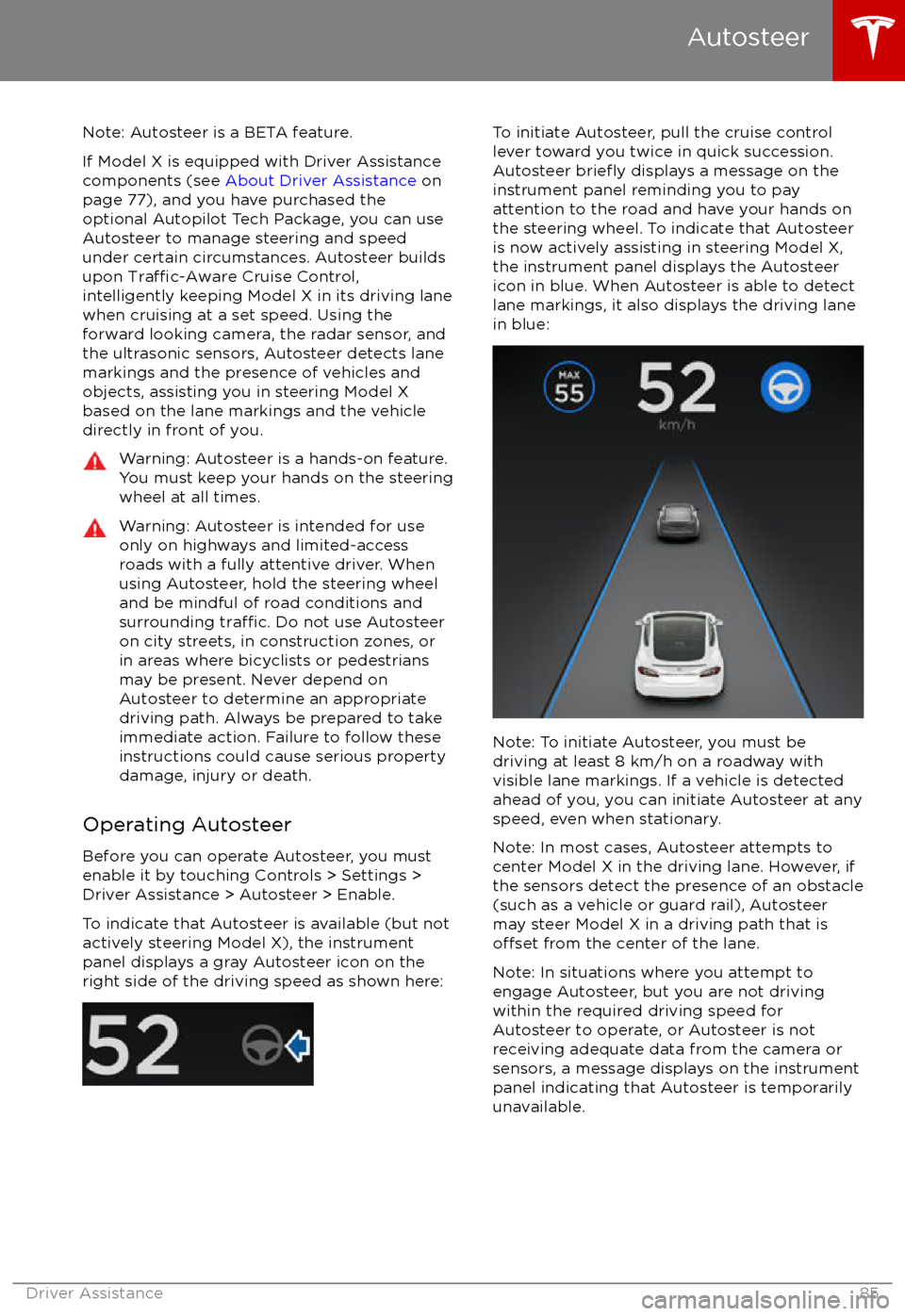
To indicate that Autosteer is available (but not actively steering Model X), the instrumentpanel displays a gray Autosteer icon on theright side of the driving speed as shown here:
To initiate Autosteer, pull the cruise control
lever toward you twice in quick succession. Autosteer
briefly displays a message on the
instrument panel reminding you to pay
attention to the road and have your hands on
the steering wheel. To indicate that Autosteer
is now actively assisting in steering Model X, the instrument panel displays the Autosteericon in blue. When Autosteer is able to detectlane markings, it also displays the driving lane
in blue:
Note: To initiate Autosteer, you must be
driving at least 8 km/h on a roadway with
visible lane markings. If a vehicle is detected ahead of you, you can initiate Autosteer at any
speed, even when stationary.
Note: In most cases, Autosteer attempts to
center Model X in the driving lane. However, if
the sensors detect the presence of an obstacle
(such as a vehicle or guard rail), Autosteer
may steer Model X in a driving path that is
offset from the center of the lane.
Note: In situations where you attempt to
engage Autosteer, but you are not driving
within the required driving speed for Autosteer to operate, or Autosteer is notreceiving adequate data from the camera or
sensors, a message displays on the instrument panel indicating that Autosteer is temporarily
unavailable.
Autosteer
Driver Assistance85
Page 89 of 202

If Model X is equipped with Driver Assistance
components (see About Driver Assistance on
page 77), and you have purchased the
optional Autopilot Tech Package, you can use
Auto Lane Change to move Model X into an adjacent lane. When both
Traffic-AwareCruise Control and Autosteer are active, Auto
Lane Change intelligently assists you in
steering Model X into an adjacent driving lane.
Using the forward looking camera, the radar
sensor, and the ultrasonic sensors, Autosteer
detects lane markings and the presence of other vehicles.
Auto Lane Change is designed for use on highways and main roads with visible lane
markings and under relatively predictable circumstances in which minimal steering and
driver intervention is needed.
Warning: It is the driver
Page 92 of 202

Note: If you press the brake when Autopark is
actively parking Model X, the parking process pauses until you press the Resume button onthe touchscreen.
Note: Autopark detects potential
perpendicular parking spaces that are at least
2.9 meters wide with a vehicle parked on each
side. Autopark detects parallel parking spaces that are at least six meters, but less than 15
meters long. Autopark does not operate on angled parking spaces.Warning: Never depend on Autopark tofind a parking space that is legal, suitable,
and safe. Autopark may not always detect
objects in the parking space. Always
perform visual checks to
confirm that a
parking space is appropriate and safe.
Warning: When Autopark is actively
steering Model X, the steering wheel
moves in accordance with Autopark
Page 99 of 202
alert and always pay attention to the area
in front of Model X so you can anticipate whether any action is required.Warning: Forward Collision Warning does
not operate when Model X is traveling less than 7 km/h.Warning: Forward Collision Warning does
not provide a warning when the driver is already applying the brake.
Automatic Emergency Braking
The forward looking camera and the radar
sensor are designed to determine the distance
from any object (vehicle, motorcycle, bicycle,
or pedestrian) traveling in front of Model X.
When a frontal collision is considered
unavoidable, Automatic Emergency Braking is designed to apply the brakes to reduce the
severity of the impact, even if you are already
applying the brakes.
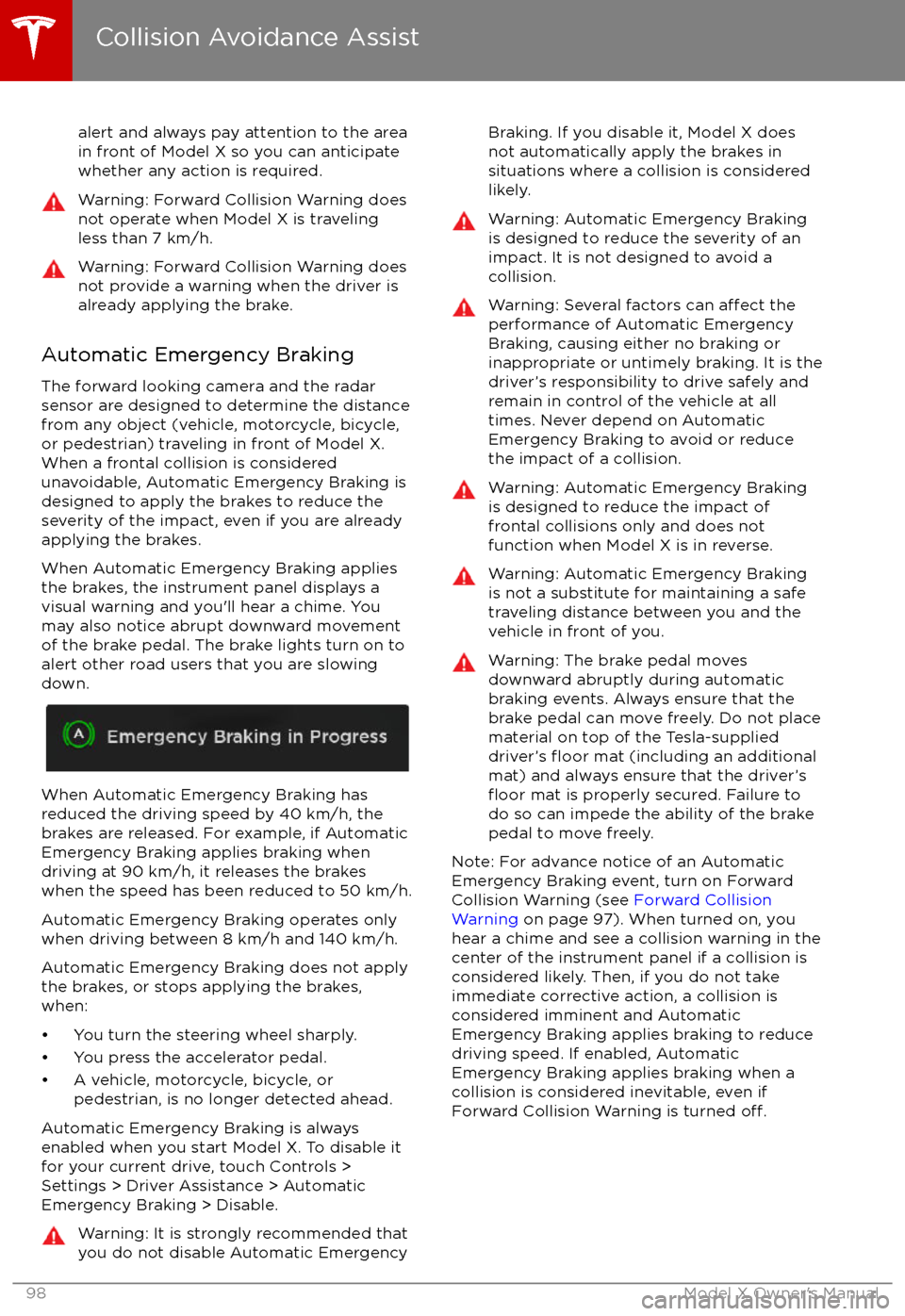
When Automatic Emergency Braking applies
the brakes, the instrument panel displays a visual warning and you