towing TESLA MODEL X 2017 Owner's Manual (UK)
[x] Cancel search | Manufacturer: TESLA, Model Year: 2017, Model line: MODEL X, Model: TESLA MODEL X 2017Pages: 202, PDF Size: 4.82 MB
Page 72 of 202

Towing Capacity
A Model X equipped with the optional towing
package is capable of towing a trailer. The
total trailer weight (trailer weight including all
cargo and additional equipment), and the trailer tongue weight, must never exceed thefollowing:TiresMaximum Towing
Capacity*Maximum Tongue
Weight**20" or 22"2270 kg90 kg
**The tongue weight is the downward force
that the weight of the trailer exerts on the
hitch. It must not be less than 4% of the trailer
load. Carrying a
significant amount of
equipment, passengers or cargo in Model X
can reduce the tongue weight it can handle, which also reduces the maximum towingcapacity. Maximum towing capacity is
calculated assuming Model X
Page 74 of 202

Warning: Under no circumstances shouldyou exit Trailer Mode when towing a
trailer. Doing so can cause serious injury
and/or death.Warning: Do not use the air suspension setting to appropriately match the height
of the hitch with the height of the trailer.
While Towing a Trailer
Model X is designed primarily as a passenger-
carrying vehicle. Towing a trailer puts additional load on the motor, drive train,brakes, tires and suspension and
significantlydecreases range. If you decide to tow a trailer,
proceed with caution and follow these general
guidelines:
Page 75 of 202
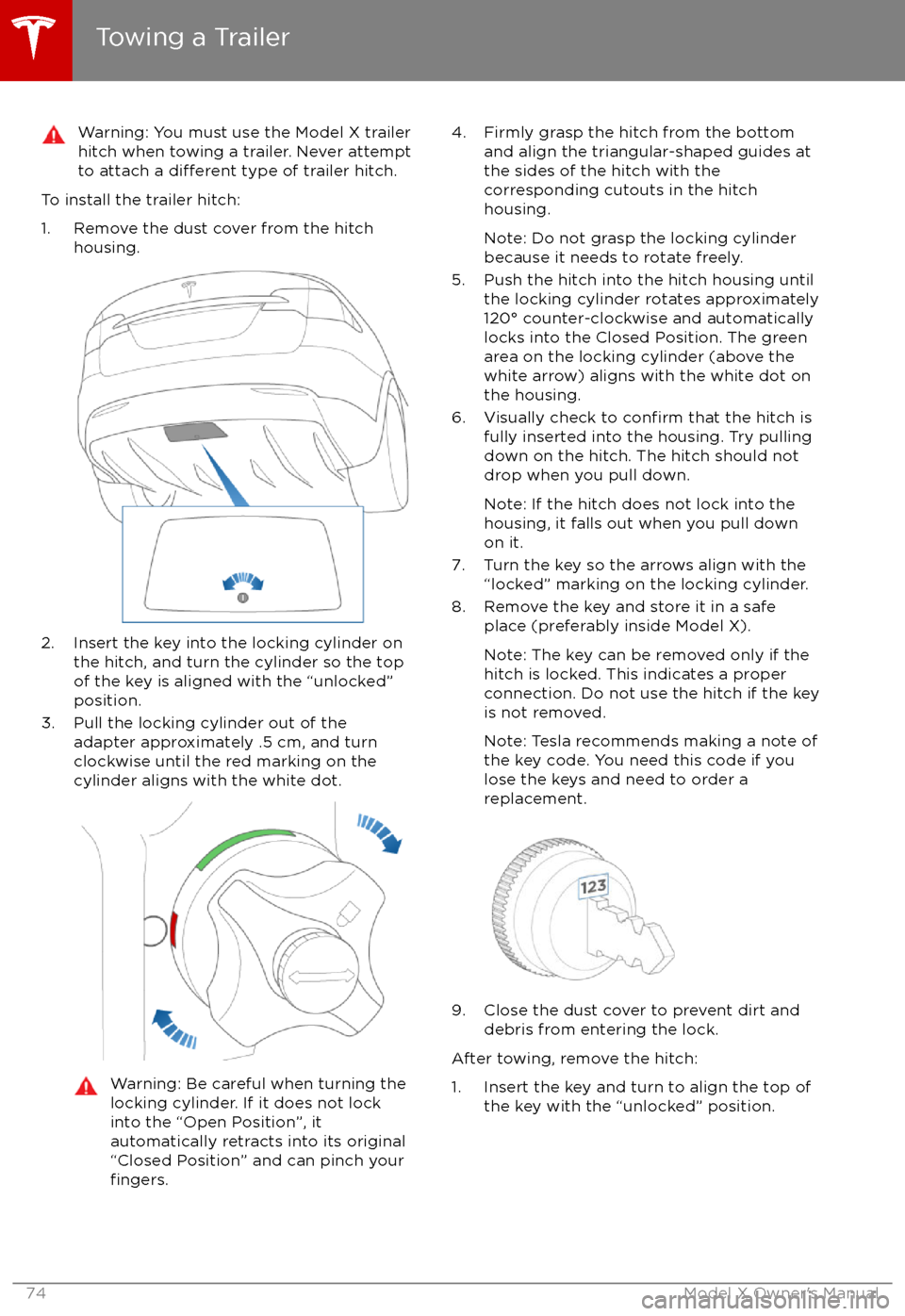
Warning: You must use the Model X trailerhitch when towing a trailer. Never attempt
to attach a
different type of trailer hitch.
To install the trailer hitch:
1. Remove the dust cover from the hitch housing.
2. Insert the key into the locking cylinder onthe hitch, and turn the cylinder so the topof the key is aligned with the “unlocked”
position.
3. Pull the locking cylinder out of the adapter approximately .5 cm, and turn
clockwise until the red marking on the
cylinder aligns with the white dot.
Warning: Be careful when turning the
locking cylinder. If it does not lock
into the “Open Position”, it
automatically retracts into its original “Closed Position” and can pinch your
fingers.
4. Firmly grasp the hitch from the bottom and align the triangular-shaped guides at
the sides of the hitch with the
corresponding cutouts in the hitch
housing.
Note: Do not grasp the locking cylinder
because it needs to rotate freely.
5. Push the hitch into the hitch housing until the locking cylinder rotates approximately
120
Page 77 of 202

Impact on RangeTowing increases Model X
Page 109 of 202
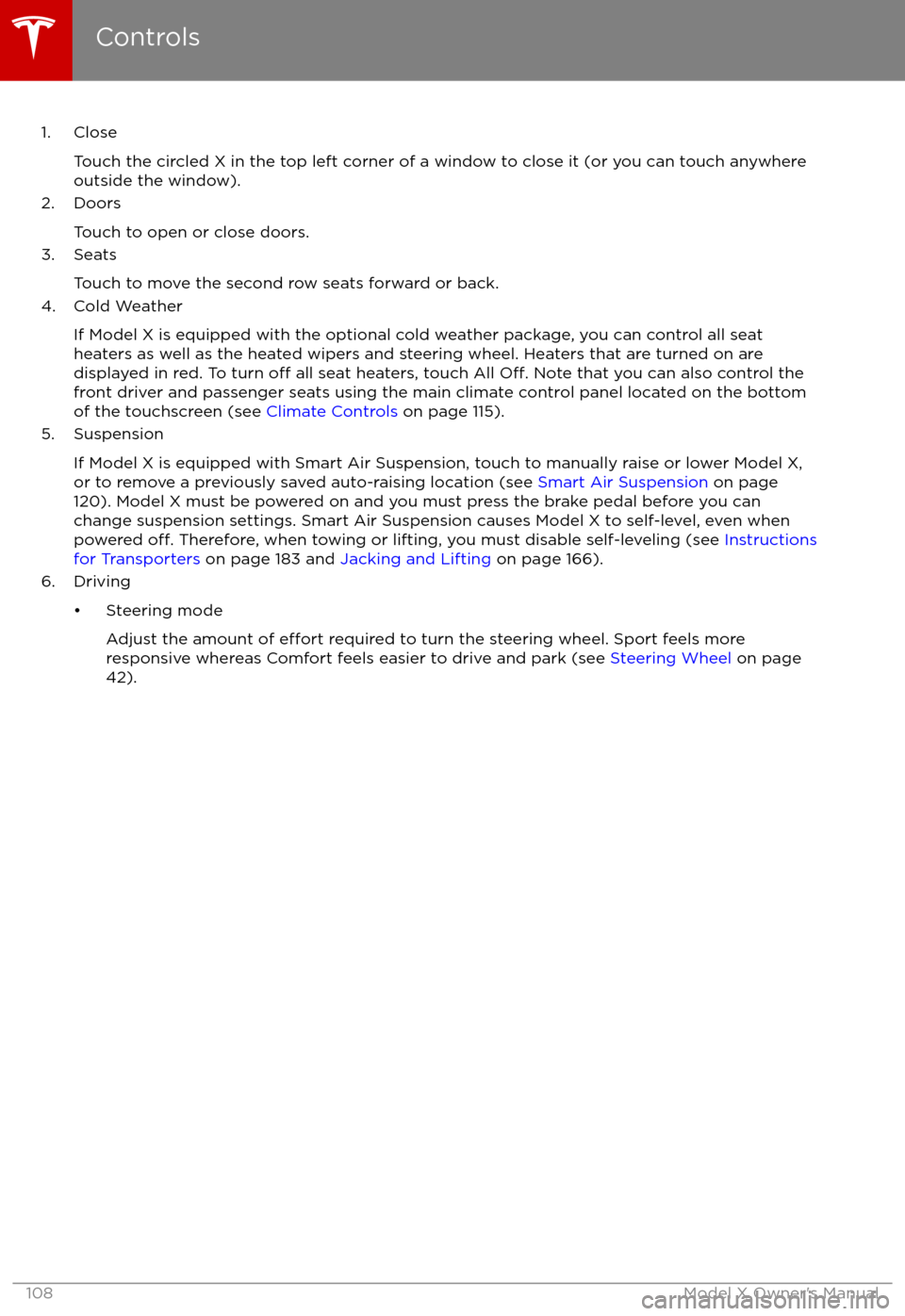
1. CloseTouch the circled X in the top left corner of a window to close it (or you can touch anywhere
outside the window).
2. Doors
Touch to open or close doors.
3. Seats
Touch to move the second row seats forward or back.
4. Cold Weather
If Model X is equipped with the optional cold weather package, you can control all seatheaters as well as the heated wipers and steering wheel. Heaters that are turned on are displayed in red. To turn
off all seat heaters, touch All Off. Note that you can also control the
front driver and passenger seats using the main climate control panel located on the bottom
of the touchscreen (see Climate Controls on page 115).
5. Suspension
If Model X is equipped with Smart Air Suspension, touch to manually raise or lower Model X,or to remove a previously saved auto-raising location (see Smart Air Suspension on page
120). Model X must be powered on and you must press the brake pedal before you can
change suspension settings. Smart Air Suspension causes Model X to self-level, even when powered
off. Therefore, when towing or lifting, you must disable self-leveling (see Instructions
for Transporters on page 183 and Jacking and Lifting on page 166).
6. Driving
Page 152 of 202

Maintaining Tire Pressures
If you are not towing a trailer, keep tires
inflated to the pressures shown on the Tire
and Loading Information label, even if it differsfrom the pressure printed on the tire itself. The
Tire and Loading Information label is located
on the center door pillar and is visible when
the driver
Page 170 of 202

Load Capacity LabelingIt is important to understand how much
weight your Model X can safely carry. This
weight is called the vehicle capacity weight
and includes the weight of all occupants, cargo and any additional equipment added toyour Model X since it was manufactured.
There are up to three labels attached to Model X that state how much weight it can safely
carry. These labels are located on the center door pillar and are visible when the front door
is open:
1. Towing label (if equipped)
2. Tire and Loading Information label
3. Statutory Plate
Note: Towing capability is available on your
Model X only if you have purchased the optional Towing Package.
Warning: Overloading Model X has an
adverse effect on braking and handling,
which can compromise your safety or damage Model X.Caution: Never store large amounts of
liquid in Model X. A significant spill can
cause electrical components to
malfunction.
Towing Label
If equipped with the optional towing package,
the Towing Label instructs you to refer to this owner
Page 174 of 202

Interior DimensionsHead RoomFrontRear
Third41.7 in
40.9 in 37.1 in1059 mm
1039 mm 942 mmLeg RoomFrontRear
Third41.2 in
38.4 in 32.7 in1046 mm 975 mm831 mmShoulder RoomFront Rear
Third60.7 in 56.8 in 40 in1542 mm
1442 mm 1016 mm
Hip Room
Front Rear
Third55.6 in 59 in
38.5 in1412 mm
1498 mm 978 mm
Weights
Curb Weight* - 90D5267 lbs2389 kgCurb Weight* - P90D5377 lbs2439 kgGVWR** - 90D6658 lbs3020 kgGVWR** - P90D6768 lbs3070 kgGross Vehicle Weight Distribution -90DFront: 2976 lbs
Rear: 3682 lbsFront: 1350 kgRear: 1670 kgGross Vehicle Weight Distribution -
P90DFront: 2976 lbs
Rear: 3792 lbsFront: 1350 kgRear: 1720 kgGross Axle Weight Rating- Front3241 lbs1470 kgGross Axle Weight Rating - Rear (at
nominal tire pressure of 42 psi)3792 lbs1720 kgTowing Capacity (if equipped)See Towing a Trailer on page 71.*Curb Weight = weight of the vehicle with correct fluid levels, no occupants and no cargo
**GVWR = Gross Vehicle Weight Rating
Dimensions and Weights
Specifications173
Page 185 of 202

Connect the Towing Eye1. Locate the towing eye in the front trunk.
2. Remove the tow hook cover by inserting a small
flat screwdriver into the slot located
along the top of the cover, then prying
gently to release the cover from the top
snap.
3. Insert the towing eye.
Fully insert the towing eye into the
opening on the right side, then turn it
counter-clockwise until securely fastened.
4. Attach the winch cable to the towing eye.
Caution: Before pulling, make sure the
towing eye is securely tightened.Pull Onto the Trailer and Secure the
Wheels
Secure wheels using the eight-point tie-downmethod with basket straps or tie-down straps:
Page 199 of 202

temperature (continued)heated steering wheel 44
outside 48
third row seats, folding and raising 20
tie-down straps 184
tilt detection 136
Tire and Loading Information label 170
tire noise 154
Tire Pressure Monitoring SystemFCC certification 189
overview of 154
tire pressures, checking 151
tire pressures, when towing 71
tire repair kitinflating with air only 158inflating with sealant 157
replacing the sealant canister 159tiresall-season 153
balancing 152
chains 154
inspecting and maintaining 152
pressures, how to check 151
replacing 153
replacing a tire sensor 154
rotation 152
specification 177
summer 153
tire markings 178
tire sealant 156
winter 153
toll system transponders, attaching 167
tolls, avoiding 131
torque
specifications 174
touch up body 162
touchscreenclean mode 161
cleaning 161
Controls 107
overview 102
Settings 111
software updates 140
Tow mode 183
towing 183
towing a trailer 71
towing eye, locating 184
towing instructions 183
Towing Label 169
Towing Mode 71
TPMSFCC certification 189
overview of 154
traction control 61
trademarks 185, 186
Traffic-Aware Cruise Control 79Traffic-Based Routing 131
trailer, towing 71
transmission
specifications 174
transponders, attaching 167
transporting 183
trip chart
67
trip meter 66
trip overview 131
trip planner 131
trunk, front 14trunk, rearchild protection lock 9
disabling interior handle 9
TuneIn radio 124
turn signals 57
Typical range 111
U ultrasonic sensors 77
Unlock on Park 4
unlockingtrunk, front 14
trunk, rear 12
unlocking and locking doors 4
unlocking when key doesn