vent TESLA MODEL X 2023 User Guide
[x] Cancel search | Manufacturer: TESLA, Model Year: 2023, Model line: MODEL X, Model: TESLA MODEL X 2023Pages: 296, PDF Size: 8.56 MB
Page 43 of 296

WARNING: Ensure that the seat belt is positioned
correctly and that the shoulder anchor is locked
into position before driving. Riding in a moving
vehicle with the seat belt positioned incorrectly or
with the shoulder anchor not locked into position
can reduce the effectiveness of the seat belt in a
collision.
To Release a Belt
Hold the belt near the buckle to prevent the belt from
retracting too quickly, then press the button on the
buckle. The belt retracts automatically. Ensure there is
no obstruction that prevents the belt from fully
retracting. The belt should not hang loose. If a seat belt
does not fully retract, contact Tesla.
Wearing Seat Belts When Pregnant
Do not put the lap or shoulder sections of the seat belt over the abdominal area. Wear the lap section of the
belt as low as possible across the hips, not the waist. Position the shoulder portion of the belt between the
breasts and to the side of the abdomen. Consult your doctor for
specific guidance.
WARNING: Never place anything between you and
the seat belt to cushion the impact in the event of
a collision.
Seat Belt Pre-tensioners
The front seat belts are equipped with pre
Page 44 of 296

2. With the belt unfastened, unreel the webbing to its limit. Check that unreeling is free from snags, and
visually check the webbing for wear. Allow the webbing to retract, checking that retraction is
smooth and complete.3.
With the webbing half unreeled, hold the tongue plate and pull forward quickly. The mechanism should lock automatically and prevent further unreeling.
If a seat belt fails any of these tests, contact Tesla immediately.
For information about cleaning seat belts, see Seat Belts
on page 198.
Seat Belt Warnings
WARNING: Seat belts should be worn by all
occupants at all times, even if driving for a very
short distance. Failure to do so increases the risk
of injury or death if a collision occurs.
WARNING: Secure small children in a suitable child
safety seat as described in the Child Safety Seat
topic. Always follow the child safety seat
manufacturer
Page 47 of 296

To securely hold child safety seats, all passenger seating positions are equipped with an automatic locking
retractor (ALR) feature that, by fully extracting the seat belt (beyond the length needed for a typical adult
occupant), locks the belt into place until the seat belt is unbuckled and the webbing is fully retracted. The ALR
mechanism operates as a ratchet, winding in slack and preventing the seat belt from extending any further until it has been completely rewound. When installing a child safety seat with integrated restraints, engage the belt
Page 49 of 296

WARNING: For vehicles with third row seats, when
a child is seated in a second row monopost seat,
the setting for the button that moves a second row
outboard seat forward for easy access into the
third row should be OFF (touch Controls > Seats >
Easy Entry). This ensures that you need to
manually hold the button to move the seat,
preventing a child seated in the second row from
being pushed against the corresponding front
seat. See #unique_143 on page .
To install a LATCH child safety seat, slide the safety seat
latches onto the anchor bars until they click into place. Carefully read and follow the instructions provided by
the child safety seat manufacturer.
Bench Seats
Monopost Seats
Once installed, test the security of the installation before seating a child. Attempt to twist the child safety seat from side to side and try to pull it away from the seat, then check to ensure the anchors remain securely in place.
NOTE: Lower LATCH anchors should not be used with
child seats or booster seats that have an integrated safety belt in situations where the combined weight of
the child plus the child safety seat is more than
65 lbs
(29.5 kg). In these situations, use the seat belt instead.
Attaching Upper Tether Straps
If an upper tether strap is provided, attach its hook to the anchor point located on the back of the second and third row (if equipped) seats.
NOTE: The location of anchor points may not be readily
visible but can be found by identifying a slice in the
seat
Page 53 of 296

Location of Airbags
Airbags are located in the approximate areas shown below. Airbag warning information is printed on the sun visors.
Model X is equipped with an airbag and lap/shoulder belt at both front seating positions. The airbag is a
supplemental restraint at those seating positions. All occupants, including the driver, should always wear their seat belts whether or not an airbag is also provided at their seating position to minimize the risk of severe injury or death
in the event of a crash.
1.
Knee airbags
2.
Front airbags
3.
Curtain airbags
4.
Seat-mounted side airbags
5.
Door-mounted airbags
How Airbags Work
Airbags inflate when sensors detect an impact that
exceeds deployment thresholds. These thresholds are designed to predict the severity of a crash in time for
the airbags to help protect the vehicle
Page 78 of 296
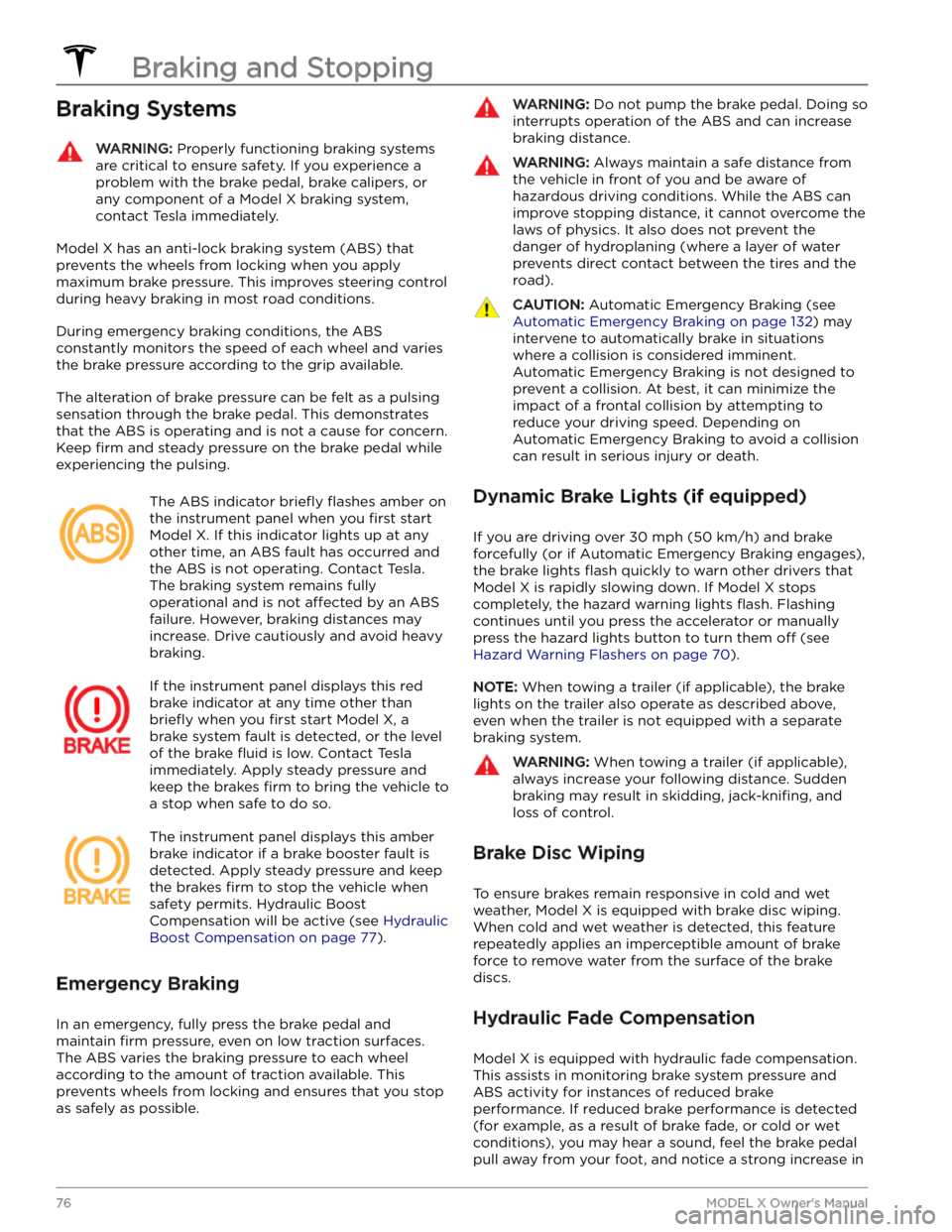
Braking SystemsWARNING: Properly functioning braking systems
are critical to ensure safety. If you experience a
problem with the brake pedal, brake calipers, or
any component of a Model X braking system,
contact Tesla immediately.
Model X has an anti-lock braking system (ABS) that
prevents the wheels from locking when you apply
maximum brake pressure. This improves steering control
during heavy braking in most road conditions.
During emergency braking conditions, the ABS
constantly monitors the speed of each wheel and varies
the brake pressure according to the grip available.
The alteration of brake pressure can be felt as a pulsing sensation through the brake pedal. This demonstrates that the ABS is operating and is not a cause for concern. Keep
firm and steady pressure on the brake pedal while
experiencing the pulsing.
The ABS indicator briefly flashes amber on
the
instrument panel when you first start
Model X. If this indicator lights up at any
other time, an ABS fault has occurred and the ABS is not operating. Contact Tesla.
The braking system remains fully
operational and is not
affected by an ABS
failure. However, braking distances may increase. Drive cautiously and avoid heavy braking.
If the instrument panel displays this red
brake indicator at any time other than
briefly when you first start Model X, a
brake system fault is detected, or the level
of the brake
fluid is low. Contact Tesla
immediately. Apply steady pressure and keep the brakes
firm to bring the vehicle to
a stop when safe to do so.
The instrument panel displays this amber
brake indicator if a brake booster fault is detected. Apply steady pressure and keep the brakes
firm to stop the vehicle when
safety permits. Hydraulic Boost Compensation will be active (see
Hydraulic
Boost Compensation on page 77).
Emergency Braking
In an emergency, fully press the brake pedal and
maintain
firm pressure, even on low traction surfaces.
The ABS varies the braking pressure to each wheel
according to the amount of traction available. This prevents wheels from locking and ensures that you stop as safely as possible.
WARNING: Do not pump the brake pedal. Doing so
interrupts operation of the ABS and can increase
braking distance.
WARNING: Always maintain a safe distance from
the vehicle in front of you and be aware of
hazardous driving conditions. While the ABS can
improve stopping distance, it cannot overcome the
laws of physics. It also does not prevent the
danger of hydroplaning (where a layer of water
prevents direct contact between the tires and the
road).
CAUTION: Automatic Emergency Braking (see
Automatic Emergency Braking on page 132) may
intervene to automatically brake in situations
where a collision is considered imminent.
Automatic Emergency Braking is not designed to
prevent a collision. At best, it can minimize the
impact of a frontal collision by attempting to
reduce your driving speed. Depending on
Automatic Emergency Braking to avoid a collision
can result in serious injury or death.
Dynamic Brake Lights (if equipped)
If you are driving over 30 mph (50 km/h) and brake
forcefully
(or if Automatic Emergency Braking engages),
the brake lights
flash quickly to warn other drivers that
Model X is rapidly slowing down. If Model X stops
completely, the hazard warning lights
flash. Flashing
continues until you press the accelerator or manually press the hazard lights button to turn them
off (see
Hazard Warning Flashers on page 70).
NOTE: When towing a trailer (if applicable), the brake
lights on the trailer also operate as described above,
even when the trailer is not equipped with a separate
braking system.
WARNING: When towing a trailer (if applicable),
always increase your following distance. Sudden
braking may result in skidding, jack-knifing, and
loss of control.
Brake Disc Wiping
To ensure brakes remain responsive in cold and wet
weather,
Model X is equipped with brake disc wiping.
When cold and wet weather is detected, this feature
repeatedly applies an imperceptible amount of brake
force to remove water from the surface of the brake
discs.
Hydraulic Fade Compensation
Model X is equipped with hydraulic fade compensation.
This assists in monitoring brake system pressure and ABS activity for instances of reduced brake
performance. If reduced brake performance is detected (for example, as a result of brake fade, or cold or wet
conditions), you may hear a sound, feel the brake pedal pull away from your foot, and notice a strong increase in
Braking and Stopping
76MODEL X Owner
Page 80 of 296

NOTE: The parking brake operates on the rear wheels
only, and is independent of the pedal-operated brake
system.CAUTION: In the unlikely event that Model X loses
electrical power, you cannot access the
touchscreen and are therefore unable to release
the parking brake without first jump starting (see
Jump Starting on page 226).
WARNING: In snowy or icy conditions the rear
wheels may not have sufficient traction to prevent
Model X from sliding down a slope, particularly if
not using winter tires. Avoid parking on hills in
snowy or icy conditions. You are always
responsible for parking safely.
WARNING: Your Model X may display an alert if
the road is too steep to safely park on, or if the
parking brakes are not properly engaged. These
alerts are for guidance purposes only and are not a
substitute for the driver
Page 81 of 296

How It Works
The traction control system constantly monitors the speed of the front and rear wheels. If
Model X
experiences a loss of traction, the system minimizes wheel spin by controlling brake pressure and motor power. By default, the traction control system is on. Under normal conditions, it should remain on to ensure
maximum safety.
This yellow indicator flashes on the
instrument panel whenever the traction
control system is actively controlling brake
pressure and motor power to minimize wheel spin. If the indicator stays on, a fault is detected with the traction control system. Contact Tesla Service.
WARNING: Traction control cannot prevent
collisions caused by driving dangerously or turning
too sharply at high speeds.
Allowing Wheel Slip
To allow the wheels to spin at a limited speed, you can
enable Slip Start.
Slip Start can be enabled only when
Model X is moving 30 mph (48 km/h) or slower. Slip
Start automatically disables when the speed exceeds
50 mph (80 km/h).
Under normal conditions, Slip Start should not be enabled. Enable it only in circumstances where you
deliberately want the wheels to spin, such as:
Page 137 of 296
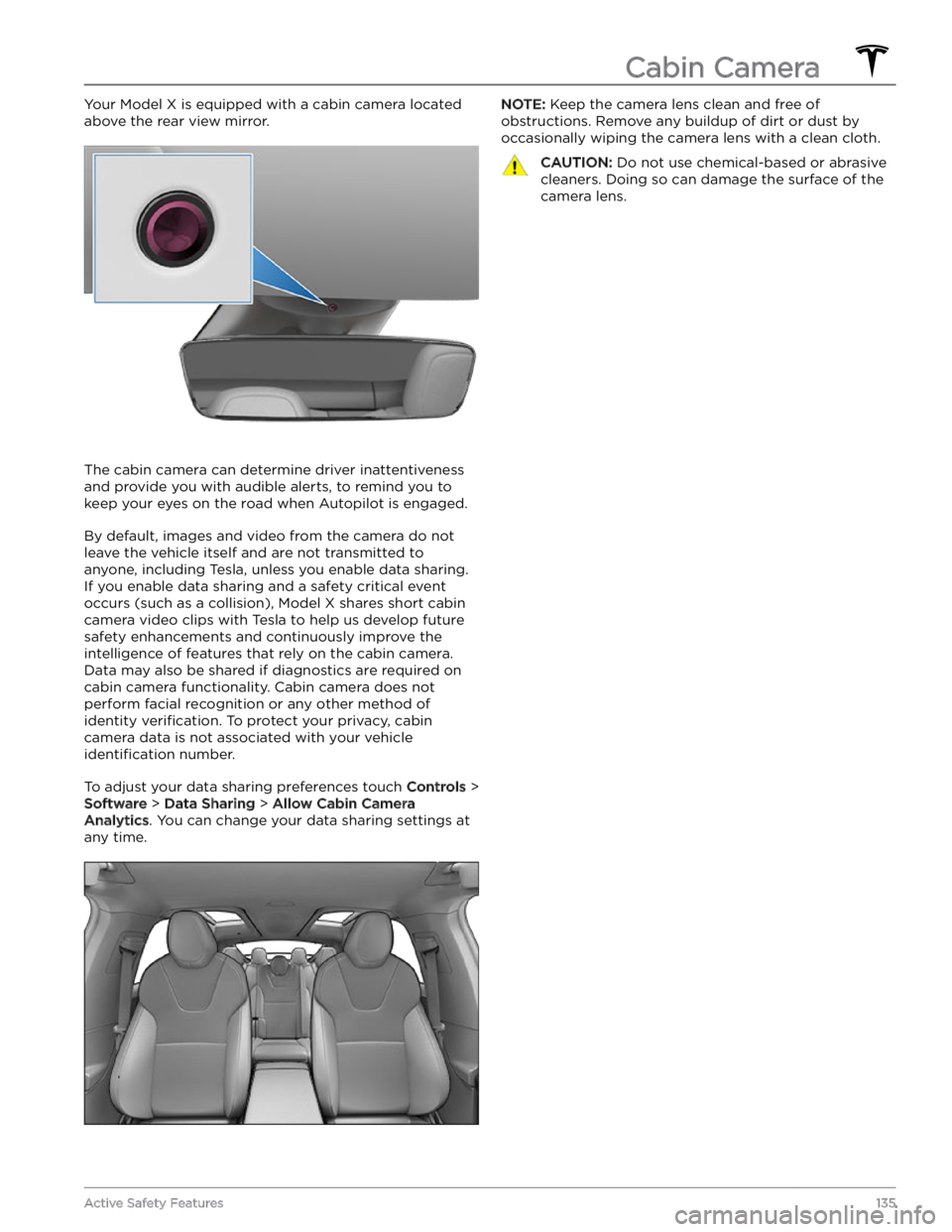
Your Model X is equipped with a cabin camera located
above the rear view mirror.
The cabin camera can determine driver inattentiveness and provide you with audible alerts, to remind you to keep your eyes on the road when Autopilot is engaged.
By default, images and video from the camera do not
leave the vehicle itself and are not transmitted to
anyone, including Tesla, unless you enable data sharing. If you enable data sharing and a safety critical event
occurs (such as a collision),
Model X shares short cabin
camera video clips with Tesla to help us develop future
safety enhancements and continuously improve the
intelligence of features that rely on the cabin camera.
Data may also be shared if diagnostics are required on cabin camera functionality. Cabin camera does not
perform facial recognition or any other method of identity
verification. To protect your privacy, cabin
camera data is not associated with your vehicle
identification number.
To adjust your data sharing preferences touch Controls >
Software > Data Sharing > Allow Cabin Camera
Analytics. You can change your data sharing settings at
any time.
NOTE: Keep the camera lens clean and free of
obstructions. Remove any buildup of dirt or dust by occasionally wiping the camera lens with a clean cloth.CAUTION: Do not use chemical-based or abrasive
cleaners. Doing so can damage the surface of the
camera lens.
Cabin Camera
135Active Safety Features
Page 138 of 296
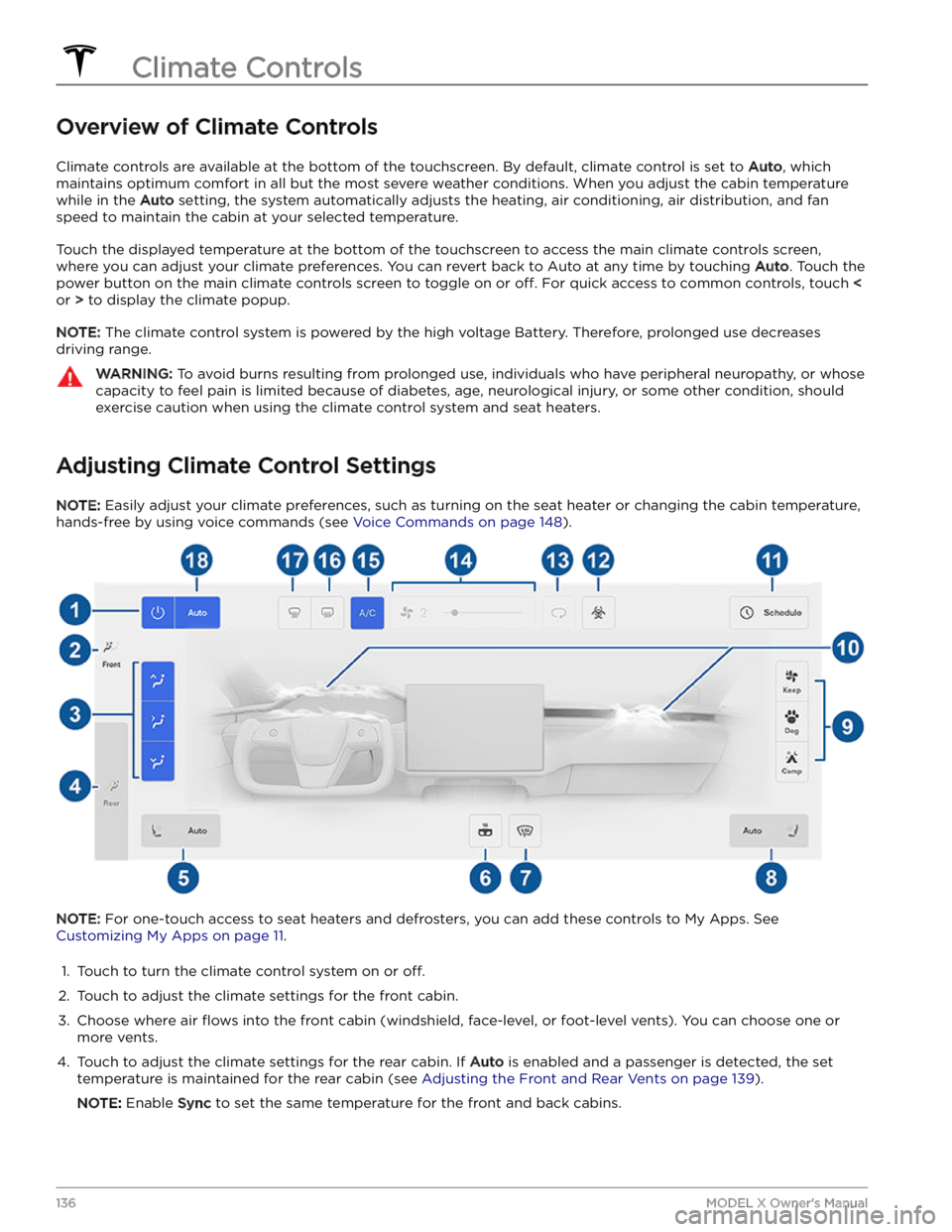
Overview of Climate Controls
Climate controls are available at the bottom of the touchscreen. By default, climate control is set to Auto, which
maintains optimum comfort in all but the most severe weather conditions. When you adjust the cabin temperature
while in the
Auto setting, the system automatically adjusts the heating, air conditioning, air distribution, and fan
speed to maintain the cabin at your selected temperature.
Touch the displayed temperature at the bottom of the touchscreen to access the main climate controls screen, where you can adjust your climate preferences. You can revert back to Auto at any time by touching
Auto. Touch the
power button on the main climate controls screen to toggle on or
off. For quick access to common controls, touch <
or > to display the climate popup.
NOTE: The climate control system is powered by the high voltage Battery. Therefore, prolonged use decreases
driving range.
WARNING: To avoid burns resulting from prolonged use, individuals who have peripheral neuropathy, or whose
capacity to feel pain is limited because of diabetes, age, neurological injury, or some other condition, should
exercise caution when using the climate control system and seat heaters.
Adjusting Climate Control Settings
NOTE: Easily adjust your climate preferences, such as turning on the seat heater or changing the cabin temperature,
hands-free by using voice commands (see
Voice Commands on page 148).
NOTE: For one-touch access to seat heaters and defrosters, you can add these controls to My Apps. See
Customizing My Apps on page 11.
1.
Touch to turn the climate control system on or off.
2.
Touch to adjust the climate settings for the front cabin.
3.
Choose where air flows into the front cabin (windshield, face-level, or foot-level vents). You can choose one or
more vents.
4.
Touch to adjust the climate settings for the rear cabin. If Auto is enabled and a passenger is detected, the set
temperature is maintained for the rear cabin (see Adjusting the Front and Rear Vents on page 139).
NOTE: Enable Sync to set the same temperature for the front and back cabins.
Climate Controls
136MODEL X Owner