service TESLA MODEL Y 2020 Owner´s Manual
[x] Cancel search | Manufacturer: TESLA, Model Year: 2020, Model line: MODEL Y, Model: TESLA MODEL Y 2020Pages: 232, PDF Size: 7.68 MB
Page 185 of 232

Motor Type
Rear motor: AC permanent magnet synchronous motor, liquid-cooled, with variable frequency drive.
Front motor: AC induction motor, liquid-cooled, with variable frequency drive.
Transmission
TypeSingle speed fixed gearGearbox Ratio9:1
Steering
TypeRack and pinion with electronic power steering, speed sensitiveNumber of turns lock to lock2.00Turning Circle (curb to curb)39.8 ft (12.1 m)
Brakes
Type4-wheel anti-lock braking system (ABS) with Electronic Brake Force Distribution, Integrated Advanced Stability Control and Electronic Accelerator pedal actuated
regenerative braking systemCalipers
Front: Four piston fixed
Rear: Integrated Electronic Parking Brake Sliding
Rotor Diameter (ventilated)
Front (non-Performance): 14.0"/355 mm
Front (Performance): 14.0"/355 mm
Rear (non-Performance): 13.2"/335 mm
Rear (Performance): 13.2”/335 mm
Front Rotor thickness
New (non-performance): 0.98"/25 mm
New (performance): 1.06" / 27 mm Service limit (non-performance): 0.91”/23 mmService limit (performance): 0.98" / 25 mm
Rear Rotor thickness
New (non-performance): 0.79"/20 mm
New (performance): 0.87" / 22 mm Service limit (non-performance): 0.71”/18 mm
Service limit (performance): 0.79" / 20 mm
Front Brake Pad Thickness (excluding back plate)
New: 0.393"/10 mm
Service limit: 0.085"/2.15 mm
Rear Brake Pad Thickness (excluding back plate)
New: 0.354"/9 mm
Service limit: 0.078"/2 mm
Subsystems
183Specifications
Page 186 of 232
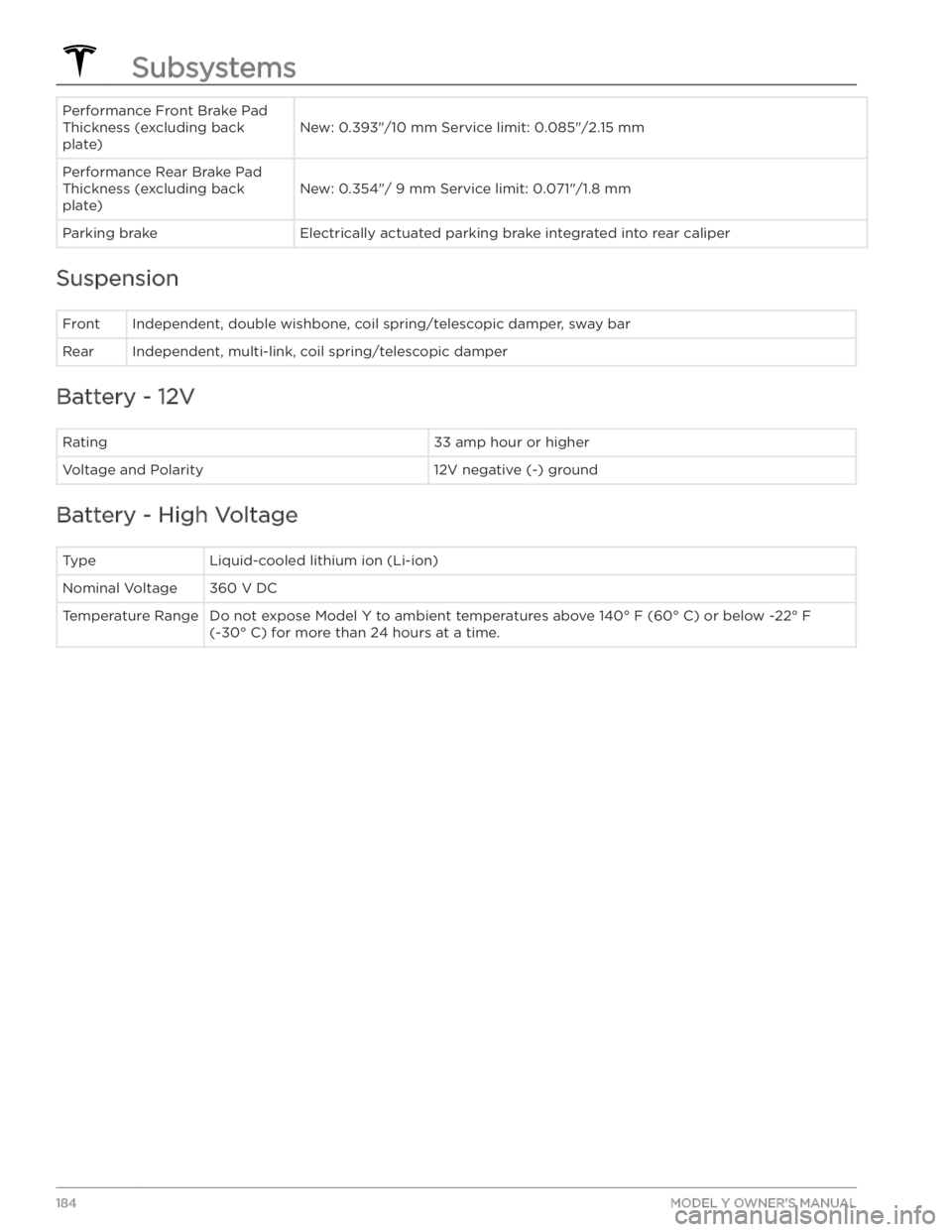
Performance Front Brake Pad
Thickness (excluding back
plate)
New: 0.393"/10 mm Service limit: 0.085"/2.15 mm
Performance Rear Brake Pad
Thickness (excluding back
plate)
New: 0.354"/ 9 mm Service limit: 0.071"/1.8 mm
Parking brakeElectrically actuated parking brake integrated into rear caliper
Suspension
FrontIndependent, double wishbone, coil spring/telescopic damper, sway barRearIndependent, multi-link, coil spring/telescopic damper
Battery - 12V
Rating33 amp hour or higherVoltage and Polarity12V negative (-) ground
Battery - High Voltage
TypeLiquid-cooled lithium ion (Li-ion)Nominal Voltage360 V DCTemperature RangeDo not expose Model Y to ambient temperatures above 140
Page 187 of 232

Wheel Specifications (Factory)
Wheel DiameterLocationWidth (in)Offset (mm)19"Front/Rear9.54520"Front/Rear9.54521"Front9.54021"Rear10.548Lug Nut Torque129 lb. ft (175 Nm)Lug Nut Socket Size21 mmNOTE: For instructions on how to jack/lift Model Y, see Jacking and Lifting on page 176.
Tire Specifications (Factory)
Tire SizeLocationSize19"Front/Rear255/45R1920"Front/Rear255/40R2021"Front255/35R2121"Rear275/35R21Tire pressures vary depending on the type of tires fitted. Refer to the tire pressures printed on the Tire and
Loading Information label. This label is located on the center door pillar and is visible when the
driver’s door is
open (see
Maintaining Tire Pressures on page 164).
Winter tires can be purchased from a Tesla service center or may be available for purchase on the Tesla web site.
Wheels and Tires
185Specifications
Page 194 of 232
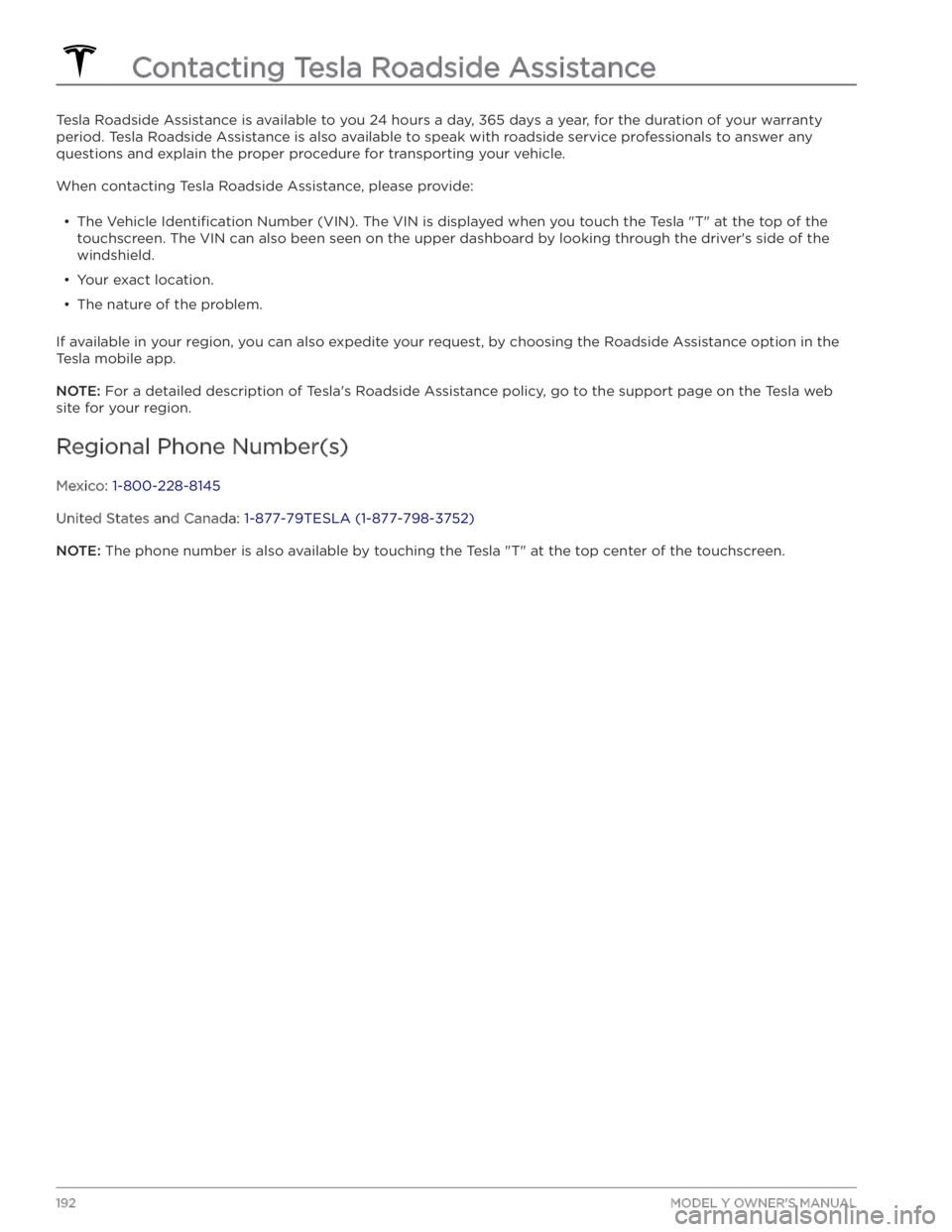
Tesla Roadside Assistance is available to you 24 hours a day, 365 days a year, for the duration of your warranty period. Tesla Roadside Assistance is also available to speak with roadside service professionals to answer any
questions and explain the proper procedure for transporting your vehicle.
When contacting Tesla Roadside Assistance, please provide:
Page 195 of 232

DO NOT TRANSPORT WITH
WHEELS ON THE GROUND
The rear motor in Model Y generates power when the
wheels spin. Always transport
Model Y with all four tires
off the ground. Ensure that the tires are unable to spin
at any time during transport.
WARNING: NEVER TRANSPORT YOUR VEHICLE
WITH THE TIRES IN A POSITION WHERE THEY
CAN SPIN. DOING SO CAN LEAD TO
SIGNIFICANT DAMAGE AND OVERHEATING. IN
RARE CASES EXTREME OVERHEATING MAY
CAUSE THE SURROUNDING COMPONENTS TO
IGNITE.
Do not transport Model Y using any method that is not
specified by Tesla. Adhere to the instructions provided
in the following sections and observe all warnings and
cautions provided. Damage caused by improper
transporting of your vehicle is not covered by the
warranty.
NOTE: Tesla is not liable or responsible for reimbursing
services not dispatched through Tesla Roadside Assistance.
Approved Methods for Transporting
NOTE: The tires are allowed to rotate slowly (under 3
mph or 5 km/h) and for a very short distance (less than
30 feet or 10 meters) only when Transport Mode is
enabled (see
Activate Transport Mode on page )
while the vehicle is being winched onto a
flatbed truck
or pulled out of a parking space for repositioning.
Exceeding these boundaries can lead to
significant
damage and overheating that is not covered by the
warranty.
A flatbed truck or comparable transport vehicle is the
recommended method of transporting
Model Y. The
vehicle can face either direction when using a
flatbed.
If Model Y must be transported without a flatbed truck,
then wheel lifts and dollies must be used to ensure that
all four wheels are
off of the ground. This method may
only be used for a maximum of
35 miles (55 km), and
must not exceed the manufacturer speed rating of the
dollies. With this method, Tesla recommends the vehicle
facing forward so that the front wheels are lifted and the rear wheels are on dollies.
CAUTION: Enable Transport Mode (see Activate
Transport Mode on page ) before winching
Model Y onto a flatbed truck (see Pull Onto
Flatbed Truck From Front on page and Pull
Onto Flatbed Truck From Rear on page ). If
Transport Mode is not available or the
touchscreen is not accessible, self-loading dollies
or tire skates must be used to load the vehicle
into the approved transportation position. Tesla is
not responsible for any damage caused by or
during the transport of Model Y, including
personal property damage or damage caused by
using self-loading dollies or tire skates.
WARNING: Model Y is equipped with high voltage
components that may be compromised as a result
of a collision (see High Voltage Components on
page 154). Before transporting Model Y, it is
important to assume these components are
energized. Always follow high voltage safety
precautions (wearing personal protection
equipment, etc.) until emergency response
professionals have evaluated the vehicle and can
accurately confirm that all high voltage systems
are no longer energized. Failure to do so may
result in serious injury.
Activate Transport Mode
Transport Mode keeps the parking brake disengaged
while winching
Model Y onto a flatbed truck. When
active, Transport Mode displays a message indicating that the vehicle will remain free-rolling. The following
are required to enable Transport Mode:
Page 209 of 232

2. Self-test of internal ground fault monitoring circuit failed3.
Thermal sensor disconnected
4.
Other hardware component issues
What to do:
An internal issue was detected by the Wall Connector.
1.
Try charging again by disconnecting the Wall Connector from the vehicle and reconnecting.
2.
If the issue persists, turn OFF the circuit breaker for
the Wall Connector, wait 10 seconds, and turn the circuit breaker ON again. Then try reconnecting the Wall Connector to the vehicle.
3.
If the issue persists, check for loose connections.
a.
Make sure there is no power to the Wall
Connector.
b.
Remove the face plate and inspect the wiring
terminals for any loose connections.
c.
Contact an electrician if necessary to make sure all
wires are properly connected and torqued according to the instructions in the Wall Connector Installation Manual.
4.
Once all connections have been checked and made
secure, restore power to the Wall Connector and try charging again by reconnecting to the vehicle.
5.
If the issue persists, the Wall Connector needs service. Schedule a service appointment through
your Mobile App.
(CC_a005)
Unable to charge - Wall Connector
GFCI tripped
Disconnect and retry or use
different equipment
What this alert means:
Ground fault. Current is leaking through an unsafe path.
Possible Line to ground or Neutral to ground fault.
What to do:
Try again by disconnecting the Wall Connector from the
vehicle and reconnecting. If the problem persists, turn
OFF the circuit breaker servicing the Wall Connector,
wait 10 seconds, turn the circuit breaker ON again, then
try reconnecting the Wall Connector to the vehicle. If the
problem persists, contact Tesla.
(CC_a006)
Unable to charge
Page 223 of 232

(UMC_a017)
Charging speed reduced
High temperature detected by Mobile Connector
High temperature detected by Mobile Connector alerts indicate the outlet used to charge is becoming too warm, so charging has been slowed to protect the
outlet.
This is not typically an issue with your vehicle or your
Mobile Connector, but rather an issue with the outlet. A
warm outlet may be caused by a plug that is not fully inserted, a loose building wiring connection to the outlet, or an outlet that is beginning to wear out.
To regain normal charge speed, make sure your adapter
is fully plugged into the outlet. If charging speed does not return to normal, contact an electrician to inspect the outlet and building wiring connections to the outlet and complete any repairs needed.
If the outlet is worn, it should be replaced with a high-
quality outlet. Consider upgrading to a Tesla Wall
Connector for greater convenience and highest charging speed.
(VCFRONT_a182)
12V battery must be replaced soon
Software updates will not complete
until serviced
The 12V battery has aged or degraded and needs to be
replaced. Until the battery is replaced, vehicle software updates will not complete.
It is recommended to replace the battery at your earliest convenience. In the meantime, continue normal use of the vehicle.
The vehicle is still OK to drive with this alert present, for
a period of time. However, if you continually delay the 12V battery replacement, the vehicle may eventually not have enough power to start or restart.
If the 12V battery is too low to turn on the vehicle or open the doors, follow the instructions in
Jump Starting
the 12V Battery on page 195.
For more information on the battery system, see Battery
Information on page 156.
(VCFRONT_a192)
Electrical system power reduced
Vehicle may shut down
unexpectedly
The electrical system cannot maintain the voltage
required to support all vehicle features.
If you drive the vehicle while this alert is present, certain
features may be disabled or function at a reduced level due to the low voltage. It is also possible the vehicle will
shut down unexpectedly.
Try turning off non-critical features, like seat heaters or
cabin fans, to help the vehicle maintain electrical power
for as long as possible.
Eliminating or reducing usage of non-critical features
may allow the vehicle to reach its destination without
shutting down, although this is not guaranteed.
Schedule service before your next planned drive. The vehicle may shut down unexpectedly or may not restart without service.
(VCSEC_a221)
Air pressure below
recommendation for tires
Check pressure and refill air as
needed
This alert does NOT indicate that there is a flat tire.
The tire pressure monitoring system (TPMS) has detected that the air pressure in one or more of your
tires is at least 20% lower than the recommended cold tire pressure. This recommended pressure should be displayed on the Tire and Loading information label.
See Maintaining Tire Pressures on page 164 for detailed
information on how to keep the tires properly
inflated.
This alert may appear in cold weather because the tire pressure decreases when cold.
Page 228 of 232

liftgate: 16
adjust opening height: 16
opening: 16
lifting: 176
lights: 53, 54, 55
hazard warning: 55
headlights after exit: 54
turn signals: 55
load limits: 179
location tracking: 130
locking: 13
lug nut covers: 166
lumbar adjustment: 25
M
maintenance: 162, 164, 170, 173, 174
brake fluid, checking: 174
cleaning: 170
daily checks: 162
fluid replacement intervals: 162
monthly checks: 162
panel, removing: 174
replacing wiper blades: 173
service intervals: 162
tires: 164
washer fluid, topping up: 174
washer jets, cleaning: 173
map orientation: 130
map updates: 134
mats: 172
media: 135
mileage upon delivery: 200
mirrors: 48
mobile app: 151
mobile app access: 151
Mobile Connector: 155, 157
description: 155
using: 157
modifications: 177
motor specifications: 183
my car does what?: 198
N
naming: 123
Navigate on Autopilot: 93
navigating: 130, 131
NCC certifications: 202
Neutral gear: 51
NHTSA, contacting: 202
O
Obstacle-Aware Acceleration: 114
occupancy sensor: 39
occupant classification: 41
odometer: 7
off-road assist: 63
offset from speed limit: 117
Online Routing: 133
opening hood without power: 195
overhang dimensions: 181
overtake acceleration: 84
Owner Information, about: 198
P
Park Assist: 64
Park gear: 51
parking brake: 62
parking, using Autopark: 103
parking, using Summon: 105
parts replacement: 177
passenger detection: 39
passenger front airbag: 39
personal data, erasing: 124
phone: 8, 11, 138
adding as a key: 11
authenticating as a key: 8
removing as a key: 11
using: 138
phone app: 139
phone key: 8
PIN: 44
PIN to Drive: 142
power cycling: 49
power socket: 23
power windows: 15
powering on and off: 49
Proposition 65: 200
public charging stations: 155
R
radar: 81
radio: 135
Radio Frequency information: 202
range: 61, 67
driving tips to maximize: 67
regenerative braking: 61
range assurance: 68
Re-route: 133
Index
Page 229 of 232

reading light: 23
rear seats, adjusting and folding: 26
rear view camera: 69
rear window switches, disabling: 15
recent (Media Player): 136
Recents (navigation): 131
recording videos: 70, 144
regenerative braking: 61
relative speed limit: 117
release notes: 150
restarting the touchscreen: 49
Reverse gear: 51
RFID transponders: 177
roadside assistance: 193
roof racks: 181
rotating tires: 165
Round Trip Energy (navigating): 132
S
safety defects, reporting: 202
safety information: 31, 36, 43
airbags: 43
child seats: 36
seat belts: 31
schedule service: 151
scheduled charging: 160
scheduled departure: 160
using: 160
seat belts: 29, 30, 171
cleaning: 171
in a collision: 30
overview of: 29
pre-tensioners: 30
wearing when pregnant: 30
seat covers: 28
seat heaters: 125, 127
seating capacity: 179
seats: 25, 125
heaters: 125
security settings: 142
sensors: 81
Sentry Mode: 142
service data recording: 199
service intervals: 162
Settings, erasing: 124
shifting gears: 51
Show Calendar Upon Entry: 140
Side Clearance (Summon): 105
side collision warning: 111
slip start: 63
Smart Summon: 108
smartphone: 8, 11
authenticating as a key: 8
removing as a key: 11
Software Reinstall: 149
software reset: 124
software update preferences: 149
software updates: 149
software version: 7
specifications: 181, 183, 185
12V battery: 185
brakes: 183
cargo volume: 183
dimensions: 181
exterior: 181
High Voltage Battery: 185
interior: 181
motor: 183
steering: 183
subsystems: 183
suspension: 185
tires: 185
transmission: 183
weights: 183
wheels: 185
speed assist: 117
Speed Limit Mode: 123
speed limit warning: 117
stability control: 63
starting: 49
steering specifications: 183
steering wheel: 46, 53
adjusting position: 46
adjusting sensitivity: 46
buttons: 46
lights, controlling: 53
scroll buttons: 46
steering, automatic: 89
streaming radio: 135
streaming services: 135
summer tires: 168
Summon: 105
Summon Distance: 105
supercharging: 160
described: 160
idle fees: 160
pay-per-use fees: 160
suspension specifications: 185
Index